Automatic Updates for Any Joomla Extension
Any Joomla extension that has an update site (meaning it implements the Joomla Updates API) can be set to automatically update when a new version is available. WordPress has had this for years, and now mySites.guru brings the same capability to Joomla - particularly useful when you’re managing multiple Joomla sites and need consistent extension versions across every one of them.
Note: this covers extension auto-updates, which you control per-extension through mySites.guru. Joomla 5.4+ also introduced automated core updates - a separate feature managed by Joomla.org infrastructure that patches the CMS itself without admin intervention. If you manage client sites, you probably want to disable core auto-updates while selectively enabling extension auto-updates here.
Background on Joomla extension auto-updates
mySites.guru has been running automatic updates for years. The system has automatically upgraded over 3 million JCE Editor, Akeeba Backup, Admin Tools, and RegularLabs extensions across connected sites.
Originally, auto-updates were limited to a handful of trusted extension developers. The quality of some Joomla extensions at the time made it risky to auto-update everything. Since then, the ecosystem has matured, and customers told us they wanted to select their own extensions for auto-update, including custom extensions they’d built themselves.
So now you can select any update site stream and mark it for automatic updates.
How do Joomla extension auto-updates work?
On the Updates tab of any Manage Site page, you’ll see every update site stream reported by your Joomla site:
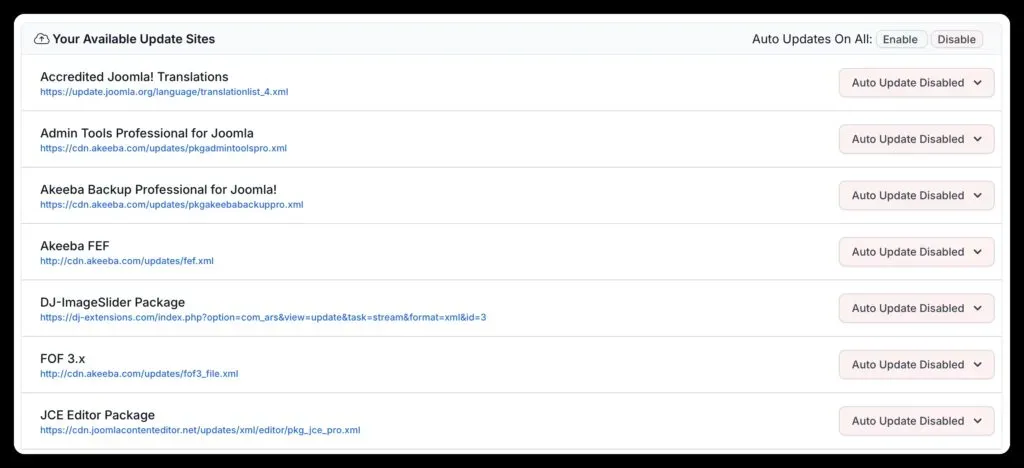
This data comes from the snapshot of your site. You can see the exact URL each extension developer provides for updates, which also lets you verify the authenticity of your update sites. Very few Joomla site owners actually check this.
Any stream marked Auto Update Enabled gets checked once a day. If an update is available for an installed extension, mySites.guru tells your Joomla site to apply it. You’ll get an email notification for both successful and failed updates.
How do you enable Joomla auto-updates across all sites at once?
The split button lets you enable an update site stream across every connected site in your account. Want Akeeba Backup to auto-update on all your sites? Two clicks. The same cross-site approach applies to managing multiple WordPress sites - plugin auto-updates work identically across your WordPress portfolio.
This also works for Joomla’s own components - Accredited Translations, Joomla WebLinks, and the Joomla Update Component can all be kept current automatically.
How do you verify Joomla update site authenticity?
One thing most Joomla site owners never do is check where their update sites actually point. Every extension registers a URL that Joomla calls when checking for updates. If that URL has been tampered with, or if a dodgy extension is phoning home to somewhere unexpected, you’d never know without looking.
The Updates tab in mySites.guru shows you the exact URL for each update stream. If something doesn’t look right (an unfamiliar domain, HTTP instead of HTTPS, a URL that doesn’t match the developer’s known infrastructure), that’s worth investigating before you enable auto-updates for it.
When should you use Joomla auto-updates vs manual updates?
Auto-updates work best for extensions where you trust the developer and where updates are typically non-breaking: security tools like Akeeba Backup and Admin Tools, content editors like JCE, and utility extensions like RegularLabs.
For extensions that are tightly integrated with your site’s functionality (page builders, complex e-commerce components, or anything that modifies database schema on update), you might prefer to apply updates manually so you can test first. Nothing stops you from mixing both approaches: auto-update the low-risk stuff and manually handle the rest.
Note that extension auto-updates through mySites.guru are separate from Joomla’s built-in automated core upgrades introduced in Joomla 5.4. The core auto-update feature only touches Joomla itself, not third-party extensions. If you want both core and extension updates managed through a controlled workflow, disable core auto-updates and use mySites.guru for both.
Can you auto-update your own custom Joomla extensions?
If you’ve built custom extensions for your clients, you can auto-update those too, as long as they implement a standard Joomla update site. This is common for agencies that maintain a branded plugin across dozens of client sites.
Push a new version to your update server, and mySites.guru rolls it out to every site that has auto-updates enabled for that stream. No need to use the mass installer for routine version bumps.
What happens when an auto-update fails?
mySites.guru sends you an email immediately. The notification tells you which site, which extension, and what went wrong. Common failure reasons:
- The site was offline or unreachable when the update was attempted
- PHP memory or execution time limits were too low for the update package
- File permission issues prevented writing to the extension directory
- The update server itself was temporarily unavailable
Failed updates don’t affect other sites or other extensions. Each is processed independently. Fix the underlying issue and either wait for the next daily check or trigger a manual update.
What if I don’t want auto-updates?
Nothing is enabled by default. You have to make a conscious decision to opt in for each extension stream. If you prefer to review and apply updates manually, that’s fine too.
Safety net: backups and uptime monitoring
You can schedule daily backups in your mySites.guru account using Akeeba Backup (free or professional version). If an auto-update causes problems, you’ve got a restore point from before the update ran.
mySites.guru notifies you immediately when an update succeeds or fails. The notification email includes a link to the developer’s release notes so you can check what changed.
You can also set up uptime monitoring that checks your site every 5 minutes around the clock. If a site goes offline after an update, you’ll know within minutes - not when a client calls.
Force-pushing a specific extension version with the mass installer
Sometimes auto-updates and the standard upgrade path aren’t what you need. Maybe an extension’s update server is down, or you want to roll back to a specific version, or you’ve got a patched zip that fixes a problem the developer hasn’t released yet.
In those cases, the mass installer lets you upload a zip file (or paste a URL to one) and push it to as many sites as you want. The installer overwrites whatever version is currently installed - so you can use it to upgrade, downgrade, or replace an extension entirely.
This is also useful for extensions that don’t have an update site at all. Some older Joomla extensions or niche commercial plugins never implemented the Joomla Updates API, so auto-updates aren’t an option. The mass installer sidesteps that completely. If you’ve got the zip, you can deploy it.
Combining auto-updates with vulnerability alerts
mySites.guru also cross-references your installed plugin versions against known vulnerability databases. If an extension you haven’t opted into auto-updates gets flagged as vulnerable, you’ll see it on your dashboard. That’s often a good prompt to either enable auto-updates for it going forward or push a manual update immediately. When critical vulnerabilities like the Novarain Framework exploit (CVE-2026-21627) drop, sites with automatic updates enabled are patched before the public exploit hits GitHub.
Auto-update the extensions you trust, and let vulnerability alerting watch everything else.
Run a free audit to connect your first Joomla site and try automatic extension updates.
Learn more about update strategies in our CMS updates guide.