Detect Locked Joomla Scheduled Tasks Before They Cause Problems
Joomla’s Task Scheduler has been running background jobs since Joomla 4.1: sending update notifications, cleaning up expired sessions, rotating logs, processing privacy consent requests. It works well, right up until a task crashes mid-execution. When that happens, the lock is never released. The task sits there marked as “running” even though the process died minutes or hours ago.
In the Joomla admin, locked tasks show up with a running person icon in System > Scheduled Tasks:

But nobody checks that screen regularly. If you manage 30 Joomla sites, you’re not logging into each one to inspect the task scheduler. Update notifications stop arriving, sessions pile up, logs grow unchecked, and you don’t find out until something breaks.
How does mySites.guru detect and unlock locked Joomla tasks?
Every time you run a snapshot on a Joomla 5 or 6 site, mySites.guru checks for locked scheduled tasks automatically. The result appears in the audit dashboard alongside the rest of your site health data:
- 0 locked tasks: green badge, everything healthy
- 1 or more locked tasks: warning badge with the count, plus Investigate and Fix buttons
Click Investigate to see exactly which tasks are stuck. mySites.guru connects to the site and pulls the full details: task name, type, how long it’s been locked, the last exit code, and an Unlock button to fix it on the spot.
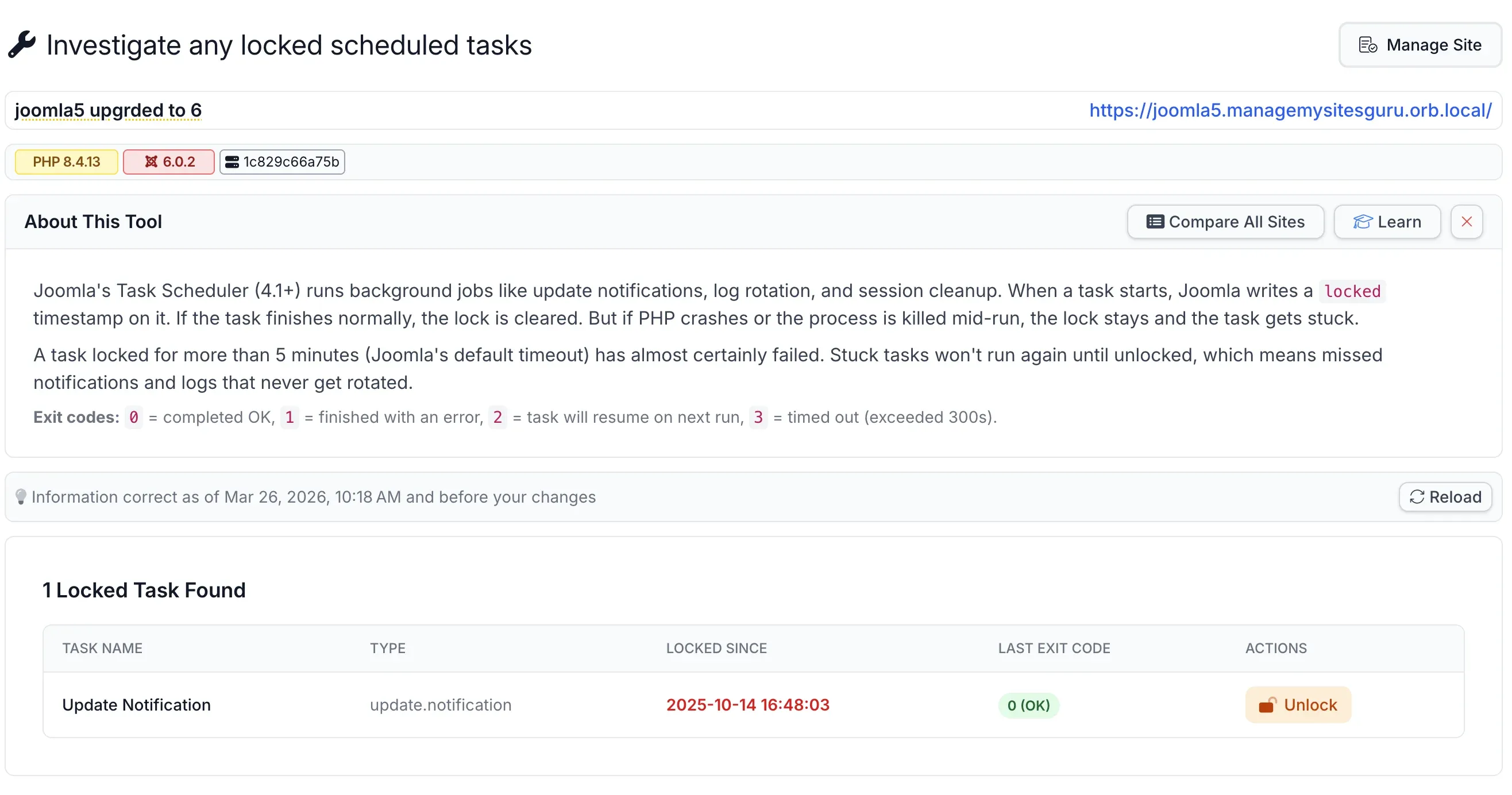
If a task has been locked for more than 15 minutes, mySites.guru flags it with an additional warning. Joomla’s default task timeout is 300 seconds. Anything beyond that is almost certainly stuck, not actively running.
The check itself is lightweight - a single COUNT(*) query against an indexed column, adding negligible overhead to the snapshot.
What about checking all your sites at once?
If you manage dozens or hundreds of Joomla sites, you don’t want to open each snapshot individually. The pivot page shows the locked task count for every connected Joomla site on a single screen. One glance tells you which sites have stuck tasks and which are clean. Click Investigate on any flagged site to drill into the details, or Fix to unlock the stuck tasks remotely.
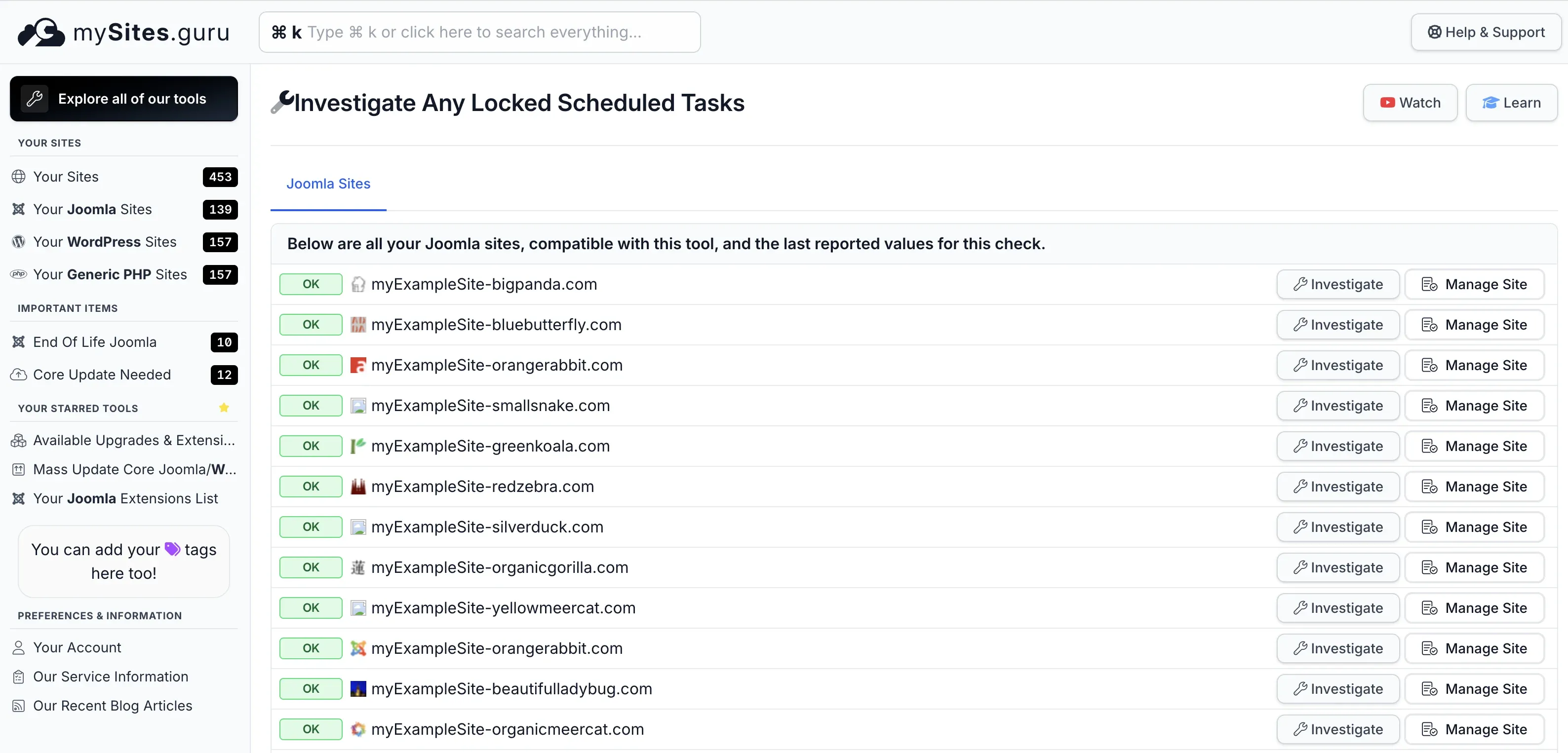
This is where the real time savings come in. Instead of logging into 200 Joomla admin panels to check System > Scheduled Tasks on each one, you get the full picture from one page. Sites with zero locked tasks show green. Sites with stuck tasks show a warning count. Sort, scan, fix, move on.
What can locked Joomla tasks break?
Stuck scheduled tasks don’t crash your site, but the downstream effects accumulate:
- Update Notification: you stop getting emails about available Joomla and extension updates. The update check still works from mySites.guru, but local admin notifications go silent.
- Session GC: expired sessions aren’t cleaned up. The
#__sessiontable grows, slowing database queries. - Privacy Consent: GDPR consent expiry processing stops. Users who should be re-prompted aren’t.
- Log Rotation: action logs grow without bounds. On high-traffic sites, this eats disk space fast.
- Custom tasks from third-party extensions stop running with no error message.
That last one deserves extra attention. Third-party extensions can register their own scheduled tasks via com_scheduler plugins. Akeeba Backup is the most common example - it provides a task plugin for automated backup schedules. If you’ve set up Akeeba to run nightly backups via the scheduler and the task locks, your backups stop silently. You won’t know until you need a restore and find the most recent backup is three weeks old.
Any extension that ships a com_scheduler task plugin is at risk. The Investigate view in mySites.guru shows the task type identifier, so you can tell immediately whether a locked task belongs to Joomla core or a third-party extension.
None of these cause immediate, visible errors. That’s the problem. They’re the kind of issues you discover weeks later when someone asks “why haven’t we had an update notification in a month?” or when a backup is needed and the latest one is stale.
Why do Joomla scheduled tasks get stuck?
Joomla scheduled tasks get stuck when the PHP process running them dies without releasing the database lock. The four most common causes:
- PHP hits
max_execution_timeormemory_limit, the process dies, and the database lock persists because there’s no cleanup handler. - Long-running tasks lose their database connection, especially on shared hosting with aggressive connection timeouts.
- The web server or PHP-FPM restarts while a task is running. The lock stays.
- A third-party plugin providing a scheduled task throws a fatal error. The task framework can’t catch it, so the lock remains.
These aren’t edge cases. On a busy shared host, PHP timeouts and connection drops happen regularly. If you manage multiple Joomla sites across different hosts, you’ll eventually run into locked tasks on at least a few of them.
Note: Joomla 5.4.2 improved cascade behaviour
Before Joomla 5.4.2, a single stuck task would block all other scheduled tasks from running. The scheduler checked for any locked task and refused to start new ones, even if the lock had long exceeded its timeout. Joomla 5.4.2 fixed this by respecting the configured timeout, so a timed-out task no longer prevents other tasks from executing. The stuck task itself still needs manual unlocking, but at least it no longer takes the entire scheduler down with it.
How do I unlock a stuck Joomla scheduled task?
The fastest way is directly from mySites.guru. When the snapshot flags locked tasks, click Fix to unlock them remotely. mySites.guru connects to the site and clears the lock on the stuck tasks without you ever logging into the Joomla admin. This is the whole point of the feature - detect and resolve locked tasks across all your sites from one dashboard, instead of logging into each one individually.
If you prefer to fix it manually, you can also unlock tasks from the Joomla admin:
- Go to System > Scheduled Tasks
- Find the task showing the running person icon
- Click the task to open it
- The task detail screen will show the lock state, and you can manually unlock it
Or if you have database access:
UPDATE #__scheduler_tasks SET locked = NULL WHERE id = <task_id>;Replace #__ with your actual table prefix (usually jml_ or similar) and <task_id> with the task ID shown in the mySites.guru investigate results.
Which Joomla versions support scheduled task detection?
The Task Scheduler was introduced in Joomla 4.1, but this feature targets Joomla 5 and Joomla 6 sites. Those are the actively supported major versions, and the ones where mySites.guru invests in new audit tooling.
Joomla 4 sites will not show locked task data. Joomla 3 has no task scheduler at all.
Where did this feature come from?
This feature was requested by Marc Dechèvre (WoluWeb), a long-time Joomla contributor and mySites.guru user. Marc noticed that locked tasks were a recurring pain point for agencies managing Joomla sites at scale. The information was always there in the database, but nobody had an easy way to check it across multiple sites without logging into each one individually.
If you have feature ideas for mySites.guru, get in touch via the contact form or reply to any newsletter email. User feedback drives the roadmap.
Further reading
- Joomla Scheduled Tasks Documentation - official help page covering task types, options, and the scheduler interface
- Get to Know the Joomla Task Scheduler - Joomla Community Magazine introduction to the feature from its launch
- Execution History of Scheduled Tasks (Joomla 5.x) - how to review task execution logs, added in Joomla 5.3
- Issue #47217: Fix scheduled tasks stopping when one gets stuck - the Joomla issue tracker entry for the 5.4.2 cascade fix
- Akeeba Backup Scheduled Tasks Integration - how Akeeba uses the Joomla scheduler for automated backups
How do I try it?
The locked scheduled tasks check ships with all mySites.guru subscriptions at no extra cost. Connect your Joomla 5 or 6 sites and the next snapshot picks up any locked tasks automatically.
Not a subscriber? The free audit runs a broad set of Joomla health checks on any site. Worth a look.