How to Enforce Minor Upgrades Only in WordPress
We’ve been writing a lot about WordPress and Joomla automatic updates lately. Previous posts covered stopping all WordPress auto-updates with one click, locking down plugin installs, and what happened when the WordPress 6.9.2 security release crashed sites. On the Joomla side, we looked at disabling Joomla’s new automated core upgrades and preventing accidental version jumps via update channels. This post covers the middle ground for WordPress: keep security patches coming, block major version jumps.
Why Aren’t All WordPress Updates Equal?
WordPress has two types of core update, and the difference matters if you manage production sites.
Minor updates (6.9 to 6.9.1, 6.9.1 to 6.9.2) are security patches and bug fixes. Small, targeted, designed not to break anything. WordPress has auto-applied these since version 3.7, and they rarely cause trouble. The 6.9.2 through 6.9.4 security releases are a recent example — patches that sites needed within hours.
Major updates (6.8 to 6.9, 6.9 to 7.0) introduce new features, change admin interfaces, update database schemas, deprecate functions, and sometimes alter how plugins interact with core. These are the updates that break things.
You want minor updates to happen automatically — security patches shouldn’t wait. But you want to control when major updates happen, because you want to test first. WordPress has a constant for this: WP_AUTO_UPDATE_CORE.
How Does mySites.guru Handle This?
mySites.guru’s WordPress Configuration audit reads WP_AUTO_UPDATE_CORE from every connected site during each snapshot. The connector checks whether the constant is defined and whether its value is exactly 'minor'. If not, the audit flags it.
Click fix, and the connector writes define('WP_AUTO_UPDATE_CORE', 'minor') to wp-config.php on the remote site. No SSH, no file editing, no logging into each WordPress admin.
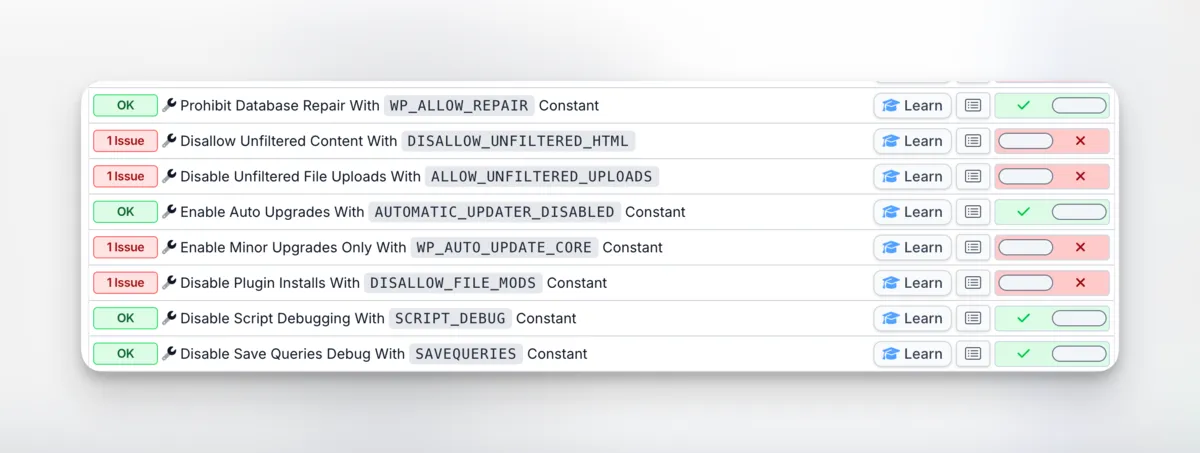
There’s a separate check for AUTOMATIC_UPDATER_DISABLED too, because these two constants interact:
AUTOMATIC_UPDATER_DISABLED = true+WP_AUTO_UPDATE_CORE = 'minor'— No auto-updates at all (the disabled flag overrides everything)AUTOMATIC_UPDATER_DISABLED = false+WP_AUTO_UPDATE_CORE = 'minor'— Only minor core updates auto-apply (the recommended setup)
If you’ve already disabled the full auto-updater and want to re-enable just security patches, you need to set AUTOMATIC_UPDATER_DISABLED back to false while keeping WP_AUTO_UPDATE_CORE at 'minor'. The mySites.guru dashboard shows both constants side by side so you can configure each site to the exact update behaviour you want. See the full list of configuration checks on the features page.
What Does WP_AUTO_UPDATE_CORE Do?
This constant in wp-config.php accepts three values:
| Value | Behaviour |
|---|---|
true | All core updates happen automatically (minor and major) |
false | No core updates happen automatically |
'minor' | Only minor/security updates happen automatically |
The default behaviour when the constant isn’t defined is that WordPress auto-applies minor updates. This has been the case since WordPress 3.7 introduced the automatic background update system.
There’s another wrinkle: WordPress automatically disables all background updates if it detects version control. The auto-updater checks for .git, .svn, .hg, and .bzr directories, walking up from ABSPATH to the filesystem root. If it finds one, it won’t auto-update anything - core, plugins, themes, or translations. The logic is in WP_Automatic_Updater::is_vcs_checkout(), and you can override it with the automatic_updates_is_vcs_checkout filter if you want auto-updates on a version-controlled site. But if you’re deploying via Git and wondering why WP_AUTO_UPDATE_CORE seems to do nothing, this is probably why.
The other common problem: many hosting providers, one-click installers, and site migration tools set WP_AUTO_UPDATE_CORE to true or leave it undefined, which can result in major updates being applied without warning.
Note that WP_AUTO_UPDATE_CORE only controls WordPress core updates. Plugin and theme auto-updates are managed separately through the WordPress admin or with the auto_update_plugin and auto_update_theme filters. If you want to stop all automatic updates entirely, you need the AUTOMATIC_UPDATER_DISABLED constant instead — but for most sites, minor-only core updates make more sense.
Why Are Major WordPress Auto-Updates Risky?
When major updates happen unattended, things break. A plugin that worked on 6.8 might call a function that’s deprecated or removed in 6.9. The plugin author might have an update ready, but if WordPress core updates first, the site is down before anyone notices. Watching for plugin vulnerabilities matters here too - a vulnerable plugin on a freshly updated core is a bad combination. The WordPress vulnerability scanner gives you a cross-site view of every known CVE affecting your installed plugins.
Themes are another weak point. Major updates sometimes change template hierarchy, block editor behaviour, or CSS loading order. Custom themes get hit hardest because they’re rarely tested against pre-release WordPress builds. We saw this play out in real time when WordPress 6.9.2 crashed sites running certain theme frameworks — a security auto-update broke front-end rendering, and it took three releases in two days to sort it out.
Database schema changes are the scariest part. Major updates occasionally modify tables, and if the update process gets interrupted — server timeout, resource limits, a flaky connection — you can end up with a half-migrated database that neither the old nor the new code can work with.
And automatic updates skip staging entirely. You go from “everything works” to “production is updated and you hope it works.”
How Do You Set Up WordPress Minor-Only Updates Manually?
To restrict auto-updates to minor versions only, add this to wp-config.php:
define('WP_AUTO_UPDATE_CORE', 'minor');Place it before the /* That's all, stop editing! */ comment. If the constant already exists with a different value, change it.
For a single site, this is a two-minute job. For a portfolio of WordPress sites, the process looks more like:
- SSH into each server (or use file manager on each hosting account)
- Check the current value of
WP_AUTO_UPDATE_CORE - Set it to
'minor'if it’s not already - Verify the change took effect
- Repeat for every site
And then keep checking. WordPress upgrades, hosting migrations, and platform auto-configuration tools can reset the value without telling you. You should also consider locking down plugin installs so that nobody introduces untested code while you’re carefully managing core updates.
The recommended WordPress update setup for production sites
The best approach is to disable automatic updates entirely and manage all updates through a proper deployment strategy: take backups first, test on staging, then roll out in batches using the bulk update WordPress tool so a bad update doesn’t hit every site at once. That’s how agencies and hosting providers who manage large numbers of WordPress sites handle it.
But if you can’t commit to that workflow — maybe you don’t have staging environments for every site, or you don’t check for updates often enough — then minor-only auto-updates are a reasonable fallback:
- Set
WP_AUTO_UPDATE_COREto'minor'so security patches still come through - Leave
AUTOMATIC_UPDATER_DISABLEDatfalseso the update mechanism actually works - Turn off individual plugin and theme auto-updates — handle those through your own workflow
- Use mySites.guru to see available major updates across all sites and apply them when you’re ready
It’s a compromise. You’re trading some control for the assurance that critical security patches won’t sit waiting while you get around to them.
Can You See This Setting Across All Your Sites at Once?
mySites.guru also lets you view WP_AUTO_UPDATE_CORE across every connected WordPress site on a single screen. You can see which sites have it set correctly, which ones don’t, and toggle each one individually without leaving the page.
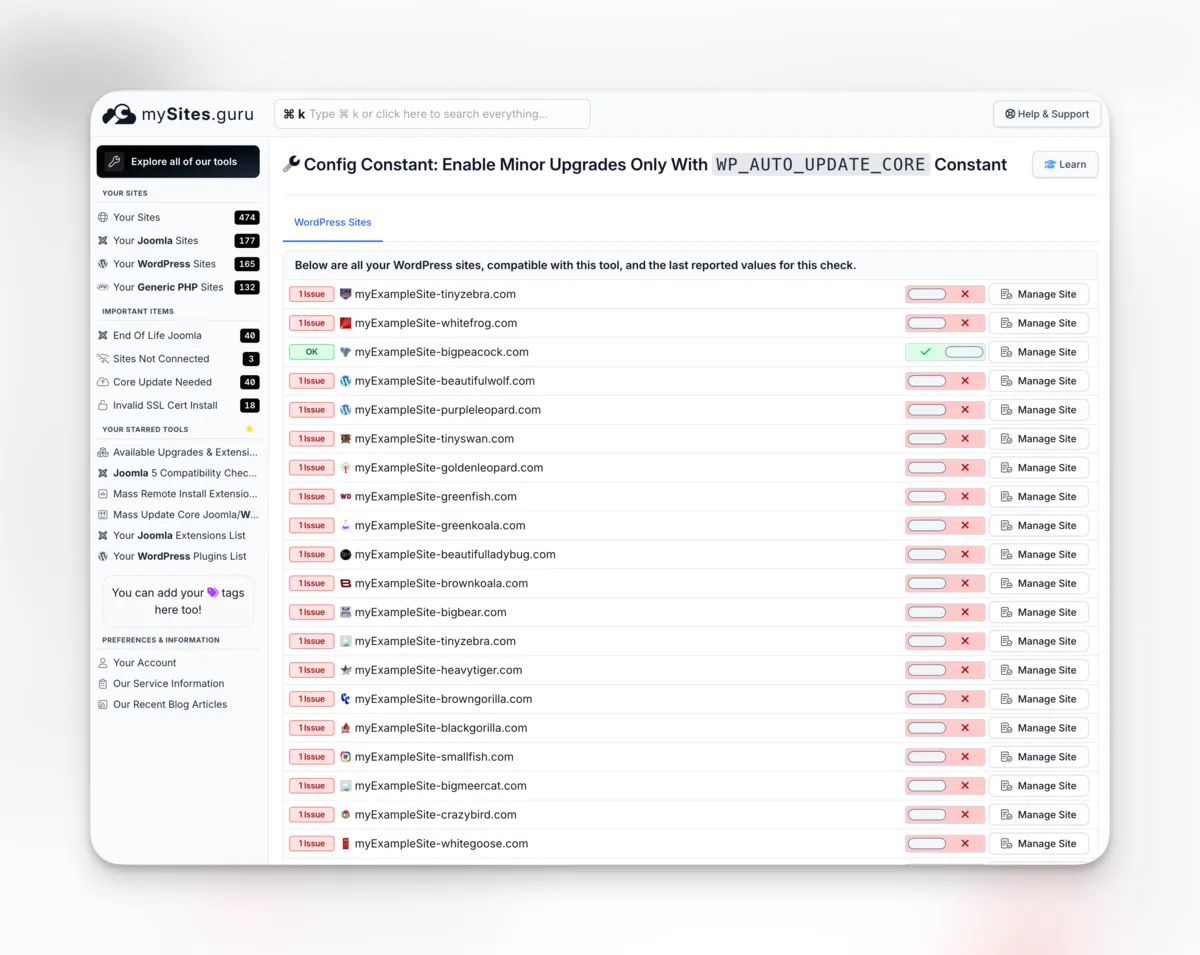
If you manage 20 sites, you fix 20 sites from one screen. If you manage 200, same screen. No spreadsheets, no SSH sessions, no logging into each WordPress admin to check a value buried in wp-config.php.
Ongoing monitoring with mySites.guru
Once minor-only updates are configured, mySites.guru keeps checking. The audit dashboard shows which sites have the correct setting, which have pending major updates, which have the auto-updater disabled entirely, and any sites where the configuration has drifted from what you set.
This is how we handle other wp-config.php constants too — debug settings, DISALLOW_FILE_MODS, the WordPress admin bar logo, and leftover default content like the Sample Page. Monitor on every snapshot, flag anything that changed, offer a one-click fix.
Without that kind of visibility across your whole portfolio, you’re just hoping. Hoping every site still has the right setting, that no hosting migration reset it, and that nobody changed it during a support ticket three months ago.
Further reading
- Configuring Automatic Background Updates — WordPress Developer Resources documentation on all update types and how to configure them
- wp-config.php Constants Reference — official reference for WP_AUTO_UPDATE_CORE, AUTOMATIC_UPDATER_DISABLED, and every other wp-config.php constant
- WP_Automatic_Updater Class Reference — the class that handles all automatic background updates, including VCS checkout detection and the should_update logic
- is_vcs_checkout() Method Reference — how WordPress detects Git, SVN, Mercurial, and Bazaar to disable auto-updates
- allow_major_auto_core_updates Filter — filter hook for programmatic control over major version auto-updates
- allow_minor_auto_core_updates Filter — filter hook for programmatic control over minor version auto-updates
- automatic_updates_is_vcs_checkout Filter — filter to override WordPress’s version control detection
- wp_version_check() Function Reference — the function WordPress uses to check for available core updates
- The Definitive Guide to Disabling Auto Updates in WordPress 3.7 — the original Make WordPress Core post from when the auto-update system launched
Version pinning is one of several strategies in our updates at scale guide.