The WordPress Plugin You Trusted Was Sold to an Attacker

On April 5, 2026, a backdoor hidden inside 26 WordPress plugins woke up. It had been sitting dormant for eight months, planted by a buyer who acquired the entire Essential Plugin portfolio in early 2025. Their very first code commit was the backdoor. When it activated, it injected SEO spam into wp-config.php across every site running any of the affected plugins.
There is no CVE, and no patch that fixes this. These plugins are permanently closed on WordPress.org and will never be updated again. If any of them are on your sites, remove them and check for damage.
Austin Ginder at Anchor Hosting found this while doing forensic work on a client site and wrote up the full technical breakdown. This post covers what you need to know, what mySites.guru found across our platform, and how to check your own sites.
This is the second supply chain attack on WordPress in a single week, after the Smart Slider 3 Pro 3.5.1.35 compromise we covered on April 8. Different attackers, different methods, same outcome.
How Did the Essential Plugin WordPress Backdoor Work?
A buyer going by “Kris” picked up the Essential Plugin portfolio (formerly WP Online Support) on Flippa for a six-figure sum. That gave them 26 plugins with a combined install base in the hundreds of thousands. On May 12, 2025, a new essentialplugin account showed up on WordPress.org with SVN commit access to all 26.
On August 8, 2025, the buyer’s first code commit landed in version 2.6.7. The changelog said “Check compatibility with WordPress version 6.8.2.” In reality, it added 191 lines of backdoor code hidden inside the plugin’s existing analytics module.
The short version: the plugin phones home to the attacker’s server, the server sends back malicious code, and the plugin executes it. The attacker then drops a fake core file called wp-comments-posts.php into the webroot and injects SEO spam into wp-config.php. The spam only shows up for Googlebot, so site owners never see it when browsing their own site. To make it harder to shut down, the attacker resolves their command-and-control domain through an Ethereum smart contract instead of normal DNS, so taking down one domain does not help.
For a full technical breakdown of the deserialization chain, REST endpoint abuse, and C2 evasion, read Austin Ginder’s original writeup.
From August 8, 2025 until April 5, 2026, the attacker’s server just returned normal responses. Eight months of nothing. Then it flipped and started serving malicious payloads.
What Did WordPress.org Do?
WordPress.org responded on April 7, 2026:
- Issued a dashboard security notice to affected site owners
- Permanently closed all 26 Essential Plugin plugins (they cannot be reinstalled from the directory)
- Force-pushed version 2.6.9.1 on April 8, which added
return;statements to disable the phone-home function
The problem: the forced update does not clean wp-config.php. If your site was compromised before April 8, the SEO spam injection is still sitting in your configuration file. The update stops the phone-home, but it does not undo what already happened.
Remove these plugins entirely. They are dead. WordPress.org will never reopen them, and v2.6.9.1 is a bandaid on a corpse. Find alternatives for anything you were using them for.
The forced update does not clean existing infections.
WordPress.org's v2.6.9.1 disables the backdoor module but leaves injected code in wp-config.php untouched. If any of these plugins were active on your site before April 8, 2026, you must manually inspect wp-config.php for injected PHP code near the require_once ABSPATH . 'wp-settings.php' line. Infected files grow by approximately 6KB.
How WordPress.org Could Have Prevented This
WordPress.org does have a plugin ownership transfer process. For plugins under 10,000 users, the current owner can transfer via self-service. For larger plugins, the current owner emails plugins@wordpress.org and the team verifies the request is legitimate.
The gap is what happens after the transfer. WordPress.org checks that the current owner authorised it, but does not vet the new owner, does not review their first code commit, and does not notify existing users that the plugin changed hands. The buyer in this case created a fresh WordPress.org account, received SVN access to 26 plugins, and committed a backdoor on day one. The transfer process worked exactly as designed. It just was not designed for this.
Apple requires a full re-review when an iOS app changes ownership. Google Play has a developer verification process. WordPress.org verifies the seller wants to sell, but not whether the buyer should be trusted with the code.
A change-of-control notification to existing users and a mandatory code review on the new owner’s first commit would have caught this.
How to Check Your WordPress Sites for the Essential Plugin Backdoor with mySites.guru
If you manage more than a handful of WordPress sites, checking each one by hand is a waste of a day. mySites.guru’s extension inventory tracks every installed plugin across all connected sites. We found dozens of affected sites across the platform and have already contacted every customer running one of these plugins.
Use the search links below to check your own portfolio. Each link opens the mySites.guru extension search page filtered for that specific plugin, showing you every site where it is installed and which version is running:
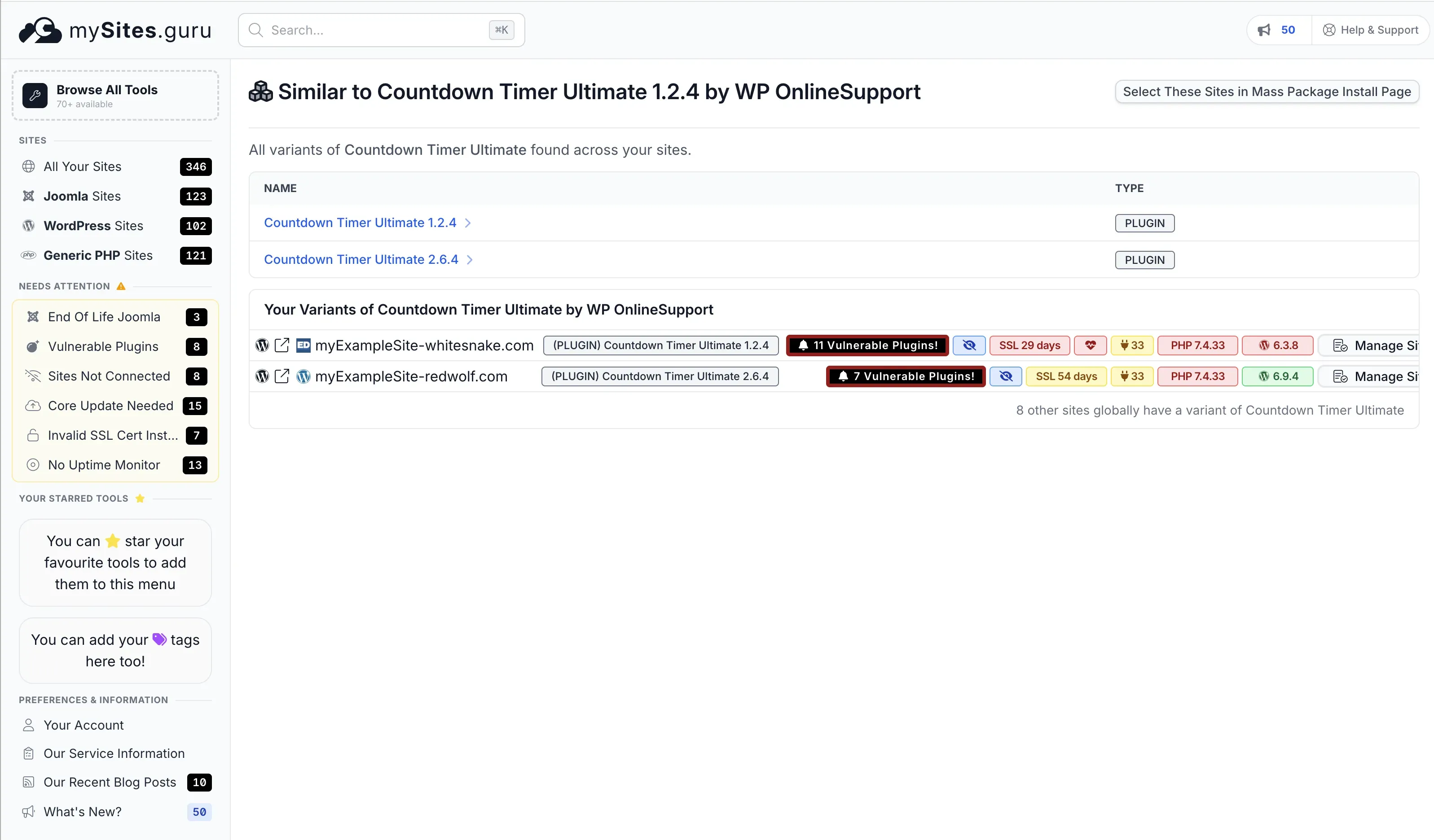
mySites.guru subscribers: search your sites for affected plugins
Already have a mySites.guru account? Click any plugin name below to jump straight to your extension search, filtered for that plugin across all your connected sites. If you find any, remove the plugin and inspect wp-config.php for injected code.
- Countdown Timer Ultimate
- Popup Anything on Click
- WP Testimonial with Widget
- WP Team Showcase and Slider
- SP News and Widget
- WP Blog and Widgets
- Timeline and History Slider
- Post Grid and Filter Ultimate
- Footer Mega Grid Columns
- WP Responsive Recent Post Slider
- WP Slick Slider and Image Carousel
- Hero Banner Ultimate
- Accordion and Accordion Slider
- Post Category Image with Grid and Slider
- Product Categories Designs for WooCommerce
- Meta Slider and Carousel with Lightbox
- WooCommerce Product Slider and Carousel
The following plugins from the affected list have never appeared on any mySites.guru-monitored site: Album and Image Gallery plus Lightbox, Audio Player with Playlist Ultimate, Featured Post Creative, Portfolio and Projects, Preloader for Website, SP FAQ, Ticker Ultimate, WP Featured Content and Slider, WP Trending Post Slider and Widget.
Combined with the mass plugin updater, you can identify and act on every affected site in your portfolio in minutes rather than spending a day logging into sites one by one.
If you do not have a mySites.guru account, start a free trial and connect your sites. The plugin index builds automatically on the first snapshot.
What to look for manually
If you are checking a single site by hand, look for these three things:
- Check wp-config.php: Open the file and look for unexpected PHP code near the
require_once ABSPATH . 'wp-settings.php'line. Infected files grow by approximately 6KB. - Search for wp-comments-posts.php: This file should not exist in a clean WordPress installation. Check the webroot.
- Search your plugins directory: Look for any of the 26 affected plugin slugs listed below. If any are present, remove them regardless of version.
The Full List of Affected WordPress Plugins
All 26 plugins from the Essential Plugin (WP Online Support) portfolio that WordPress.org permanently closed on April 7, 2026:
- Countdown Timer Ultimate (
countdown-timer-ultimate) - Popup Anything on Click (
popup-anything-on-click) - WP Testimonial with Widget (
wp-testimonial-with-widget) - WP Team Showcase and Slider (
wp-team-showcase-and-slider) - WP FAQ (
sp-faq) - SP News and Widget (
sp-news-and-widget) - WP Blog and Widgets (
wp-blog-and-widgets) - Album and Image Gallery plus Lightbox (
album-and-image-gallery-plus-lightbox) - Timeline and History Slider (
timeline-and-history-slider) - Featured Post Creative (
featured-post-creative) - Post Grid and Filter Ultimate (
post-grid-and-filter-ultimate) - Footer Mega Grid Columns (
footer-mega-grid-columns) - WP Responsive Recent Post Slider (
wp-responsive-recent-post-slider) - WP Slick Slider and Image Carousel (
wp-slick-slider-and-image-carousel) - WP Featured Content and Slider (
wp-featured-content-and-slider) - Hero Banner Ultimate (
hero-banner-ultimate) - Preloader for Website (
preloader-for-website) - Accordion and Accordion Slider (
accordion-and-accordion-slider) - Portfolio and Projects (
portfolio-and-projects) - Ticker Ultimate (
ticker-ultimate) - WP Trending Post Slider and Widget (
wp-trending-post-slider-and-widget) - WooCommerce Product Slider and Carousel (
woo-product-slider-and-carousel-with-category) - Audio Player with Playlist Ultimate (
audio-player-with-playlist-ultimate) - Meta Slider and Carousel with Lightbox (
meta-slider-and-carousel-with-lightbox) - Post Category Image with Grid and Slider (
post-category-image-with-grid-and-slider) - Product Categories Designs for WooCommerce (
product-categories-designs-for-woocommerce)
Indicators of Compromise
If any of the 26 plugins above were active on your site before April 8, 2026, check for these indicators:
| Indicator | What to look for |
|---|---|
| wp-config.php injection | Unexpected PHP code near require_once ABSPATH . 'wp-settings.php'. File size increases by ~6KB. |
| wp-comments-posts.php | This file should not exist in a clean WordPress installation. Check the webroot. |
| SEO spam (Googlebot only) | View your site as Googlebot using site:yourdomain.com in Google. Look for spam pages, redirected search results, or pharmaceutical/gambling content. |
| Unauthenticated REST endpoint | The backdoor registers a REST API route with permission_callback: __return_true. Check for unexpected REST routes. |
| analytics.essentialplugin.com | Search server access logs for outbound connections to this domain. |
If you find any of these indicators, the site was actively compromised. Do not just remove the plugin. Clean wp-config.php, remove wp-comments-posts.php, scan all files for additional payloads, and rotate all admin credentials.
Why This Is Not a Normal WordPress Vulnerability
With a normal vulnerability, you patch it and move on. This is not that. The attacker did not find a bug. They bought the plugin, got official commit access, and WordPress.org distributed their malware for eight months.
The Smart Slider 3 Pro compromise hit the same week via a different route (update server breach rather than acquisition). Two supply chain attacks in one week, both exploiting trust in the official update channel.
If you manage client sites, real-time file change monitoring catches bad changes regardless of how they arrive. It does not matter whether the source is a compromised update, a bought plugin, or a direct exploit. The file change is what you catch.
Credit
Austin Ginder at Anchor Hosting found this through forensic work on a client site. His full writeup walks through the entire investigation, including how he binary-searched 939 backup snapshots to narrow the injection window to under 7 hours. Worth reading in full.
Further Reading
- Someone Bought 30 WordPress Plugins and Planted a Backdoor in All of Them - Austin Ginder / Anchor Hosting - the original discovery report with full forensic methodology
- Transferring Your Plugin to a New Owner - WordPress.org Developer Handbook - WordPress.org’s current (minimal) plugin transfer process
- Smart Slider 3 Pro 3.5.1.35 Supply Chain Compromise - mySites.guru - the other supply chain attack that hit the same week