4 Major WordPress Plugins Patched Security Flaws in March 2026
Four of WordPress’s most-installed plugins all shipped security patches in March 2026: Elementor (10 million active installs), Yoast SEO (10 million), WPForms (6 million), and Really Simple Security (3 million). Combined, that is over 29 million WordPress installations running code that needed fixing.
The patches shipped as minor version bumps. No emergency banners, no vendor blog posts sounding the alarm. If you check your plugins regularly, you might have noticed the update dot. If you rely on auto-updates, you might be fine. If you do neither, your sites are still vulnerable.
Two of these four vulnerabilities require no authentication to exploit. An attacker does not need an account on your site. They just need to know your site exists.
How Does mySites.guru Help With WordPress Plugin Vulnerabilities?
If you manage WordPress sites for clients, you already know these patches exist. The information is public. The hard part is checking every site actually got them. Four plugins across 50 client sites is 200 individual version checks. Manually, that is an afternoon. With a dashboard, it takes seconds.
mySites.guru’s vulnerability alerting cross-references every installed plugin on your connected sites against the Wordfence Vulnerability API twice daily. When a CVE drops for a plugin you have installed, you get flagged automatically, without RSS feeds to monitor or security blogs to bookmark.
For patches like these, you can see at a glance which sites are still running vulnerable versions, then push updates in bulk across your entire portfolio. Or run a free audit on any site to see its current plugin versions and known vulnerabilities in under a minute.
The WordPress Extensions page lists every plugin installed across all your connected sites. Filter by name, sort by version, and click “Which sites?” to find exactly where a specific plugin is running.
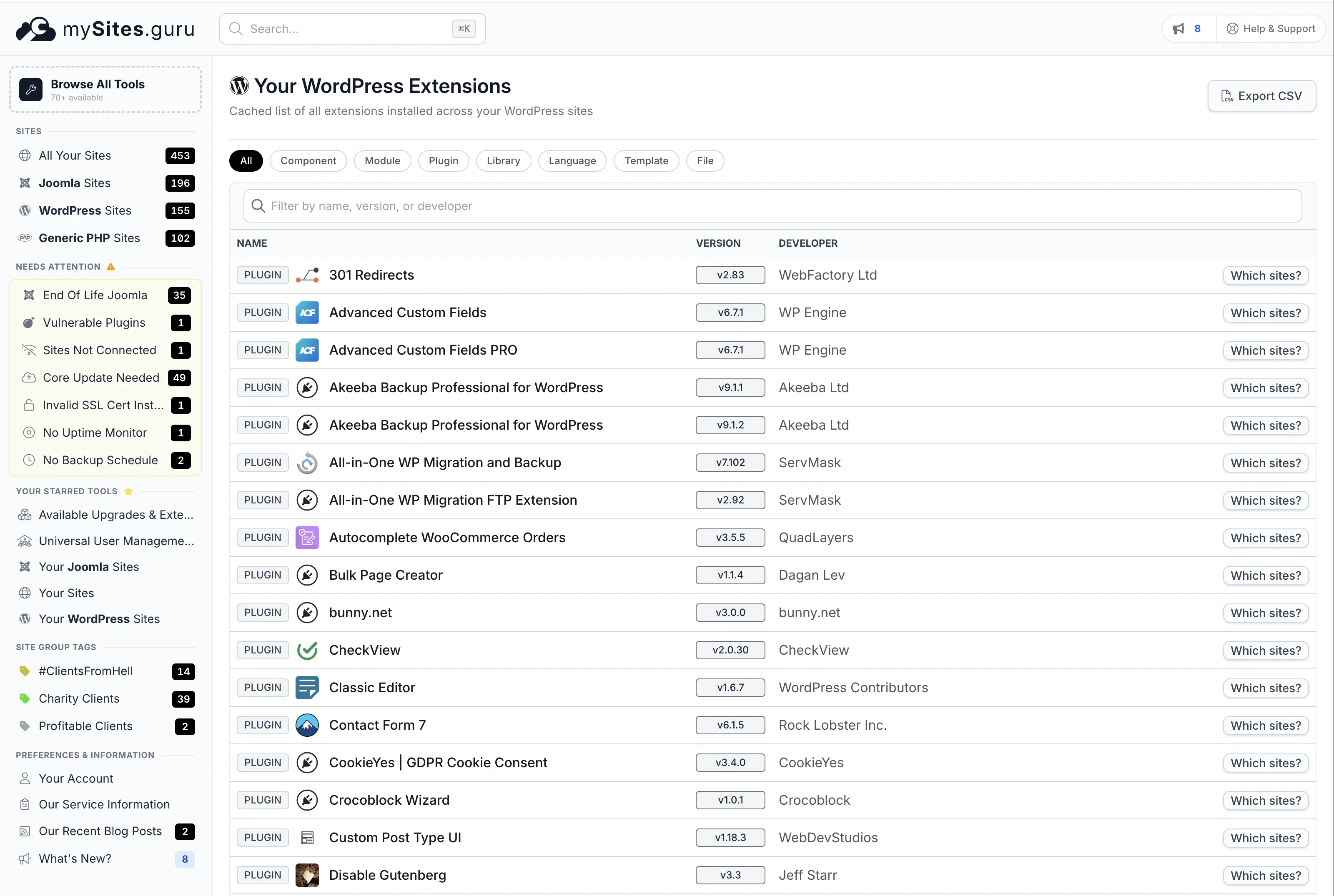
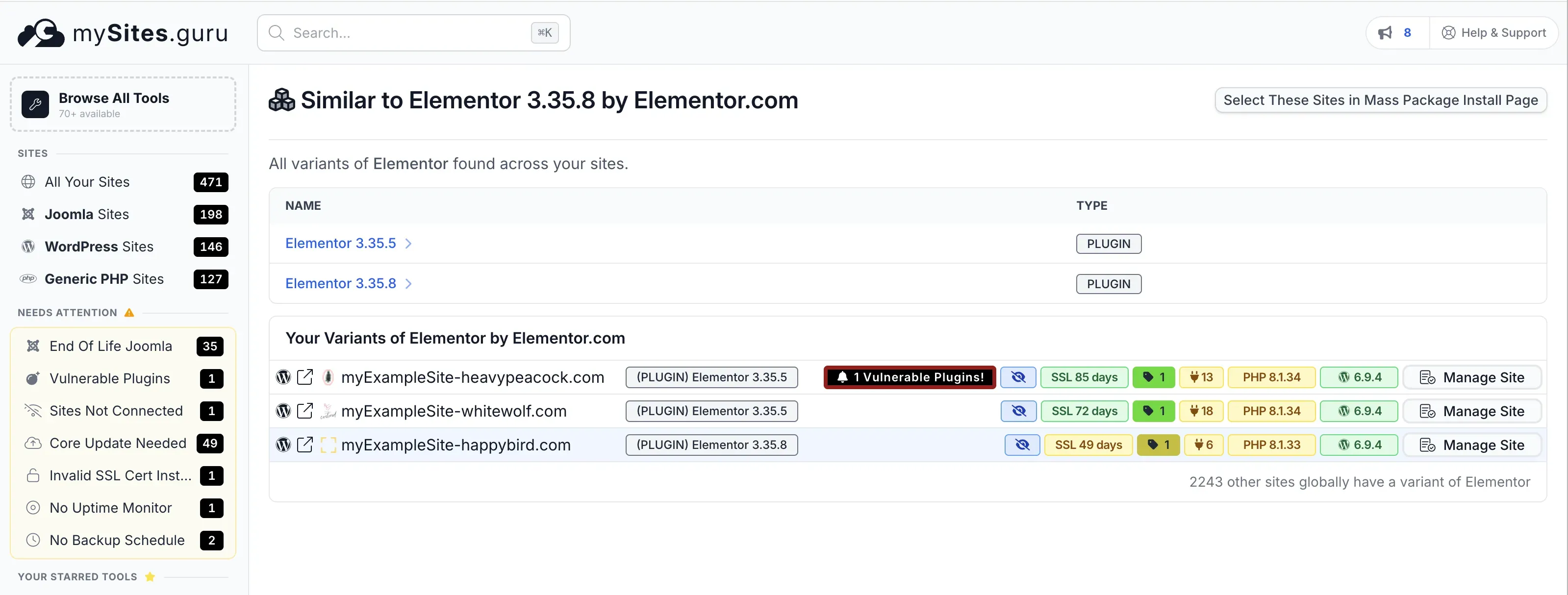
Click through to any plugin and you see every version variant across your portfolio. In this example, Elementor 3.35.5 (vulnerable) and 3.35.8 (patched) are both present, with a “1 Vulnerable Plugins!” warning on the sites still running the old version.
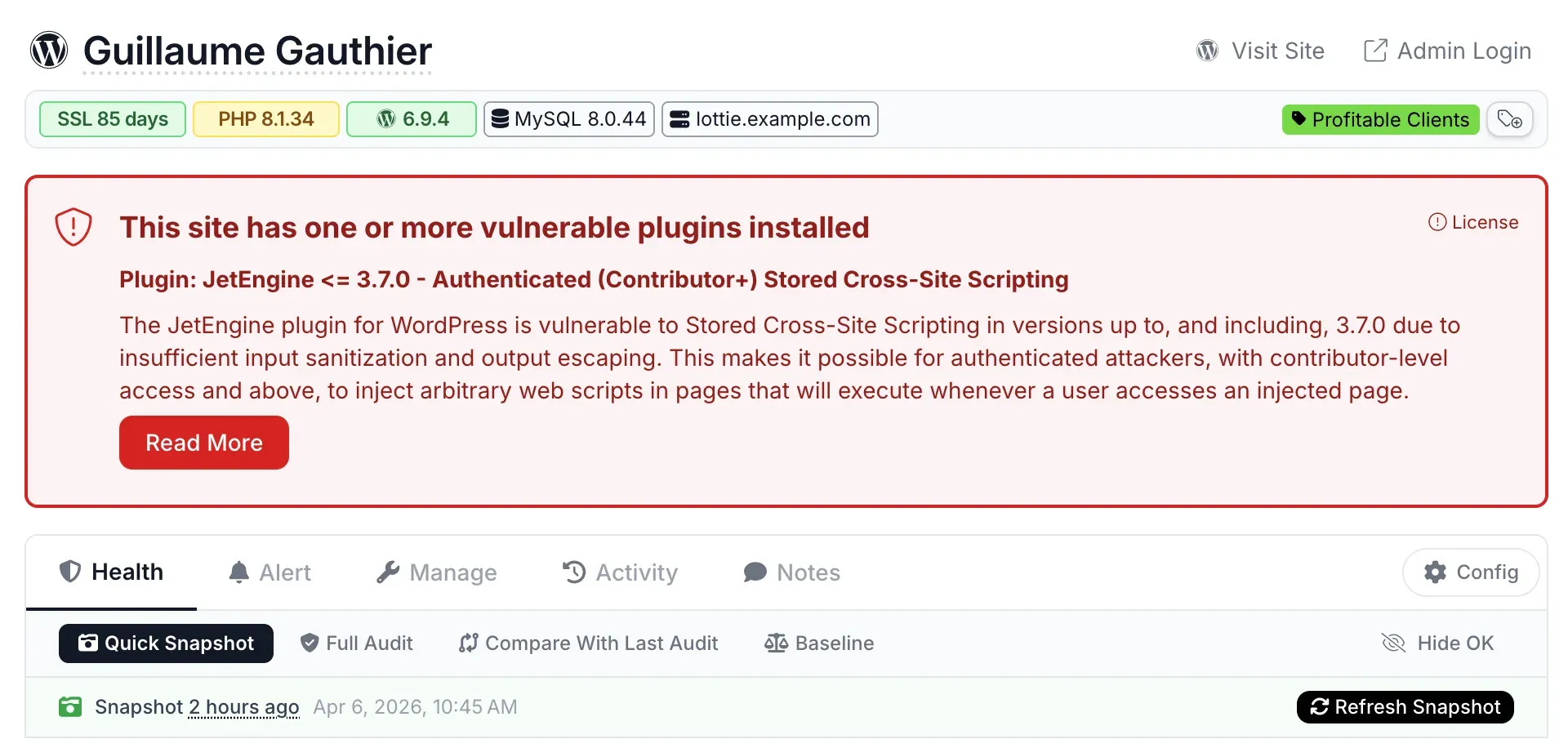
When a site has a known vulnerable plugin, the manage site page shows a red warning banner at the top with the CVE details and a link to learn more.
The WordPress vulnerability scanner page explains the full detection pipeline.
What Got Patched?
Elementor - Sensitive Data Exposure (CVE-2026-1206)
| Detail | Value |
|---|---|
| CVE | CVE-2026-1206 |
| CVSS | 4.3 Medium |
| Type | Incorrect Authorization / Information Disclosure |
| Affected versions | All versions up to 3.35.7 |
| Patched version | 3.35.8 (March 23, 2026) |
| Auth required | Yes - Contributor or above |
| Researcher | Angus Girvan (via Wordfence) |
The is_allowed_to_read_template() function in Elementor had a logic error. It treated non-published templates as readable without checking whether the requesting user actually had edit capabilities. A contributor could call the get_template_data action via the elementor_ajax endpoint with any template_id and pull back private or draft template content.
This is a confidentiality issue, not a code execution flaw. No one is taking over your site through this alone. But draft templates often contain unreleased page layouts, pricing structures, or client content that should not be accessible to low-privilege users.
mySites.guru subscribers: check your Elementor versions now
Open Elementor Extension Search
Lists every Elementor version across your connected sites, grouped by version number. Spot 3.35.7 or earlier at a glance. Not a subscriber? Sign up free to get this visibility.
Yoast SEO - Stored Cross-Site Scripting (CVE-2026-3427)
| Detail | Value |
|---|---|
| CVE | CVE-2026-3427 |
| CVSS | 6.4 Medium |
| Type | Stored XSS |
| Affected versions | All versions up to 27.1.1 |
| Patched version | 27.2 (March 17, 2026) |
| Auth required | Yes - Contributor or above |
| Researcher | Osvaldo Noe Gonzalez Del Rio (via Wordfence) |
Yoast SEO failed to sanitize the jsonText block attribute in the HowTo block. A contributor could inject arbitrary JavaScript into page content. The script executes in the browser of anyone who views the page, including administrators.
What can an attacker do with it? Steal admin session cookies, redirect users, deface content, or inject SEO spam. XSS in a plugin installed on 10 million sites is a wide attack surface, even with the contributor-level authentication requirement. Sites with open registration, guest author accounts, or compromised low-privilege credentials are the obvious targets.
Yoast’s 27.2 changelog mentions “adds sanitization to duration text for the HowTo block” without naming the CVE directly. This is normal - most vendors downplay security fixes in their changelogs.
mySites.guru subscribers: check your Yoast SEO versions now
Open Yoast SEO Extension Search
Shows which of your sites run Yoast SEO 27.1.1 or earlier. Not a subscriber? Sign up free and connect your sites.
WPForms - Sensitive Data Exposure (CVE-2026-25339)
| Detail | Value |
|---|---|
| CVE | CVE-2026-25339 |
| CVSS | Medium (score not yet assigned by NVD) |
| Type | Sensitive Data Exposure |
| Affected versions | All versions up to 1.9.9.1 |
| Patched version | 1.9.9.2 |
| Auth required | No - unauthenticated |
| Researcher | Not publicly attributed |
This one requires no login at all. An unauthenticated attacker can trigger sensitive data exposure from WPForms. The exact technical mechanism has not been fully documented publicly, but the vulnerability is confirmed across multiple security databases including the Sucuri March 2026 roundup and Patchstack.
WPForms is the most popular form plugin for WordPress. It collects contact form submissions, payment details, registration data, and application forms. A data exposure flaw in a form plugin deserves urgent attention because the data it handles is sensitive by definition.
The current version on wordpress.org is 1.10.0.2, so 1.9.9.2 is now several releases behind. If you are still on 1.9.9.x, update immediately.
mySites.guru subscribers: check your WPForms versions now
Both Lite and Pro editions are affected - check which version each of your sites is running. Not a subscriber? Sign up free and connect your sites.
Really Simple Security - Broken Access Control (CVE-2026-32461)
| Detail | Value |
|---|---|
| CVE | CVE-2026-32461 |
| CVSS | 5.3 Medium |
| Type | Missing Authorization (CWE-862) |
| Affected versions | All versions through 9.5.7 |
| Patched version | 9.5.8 (February 26, 2026) |
| Auth required | No - unauthenticated |
| Researcher | Or Benit (via Patchstack Bug Bounty) |
Really Simple Security (formerly Really Simple SSL) had missing authorization checks on certain plugin functions. An unauthenticated attacker can call these functions to modify plugin settings without logging in.
The CVSS vector confirms integrity impact only - no data theft, no denial of service. The likely practical attack is manipulating SSL/security settings: disabling HTTPS enforcement, altering security rules, or weakening the site’s security posture to enable follow-up attacks like session hijacking over unencrypted connections.
Note the patch date: February 26, over five weeks ago. The CVE was published March 13. If your sites have not updated to at least 9.5.8 in over a month, your update process needs attention.
Why Did These All Land in the Same Month?
March 2026 was unusually busy for WordPress plugin security. Beyond these four, we also covered Smart Slider 3’s arbitrary file read (CVE-2026-3098) and the broader pattern of AJAX endpoint authorization failures across both WordPress and Joomla ecosystems.
This is not a coordinated attack. It is the natural result of increased security research activity. The Wordfence Bug Bounty and Patchstack Bug Bounty programs have been scaling up, paying researchers to audit popular plugins. More researchers auditing more plugins means more vulnerabilities found and disclosed. The patches come in waves because the responsible disclosure timelines converge.
The takeaway is better process, not panic. If checking four plugins across your portfolio takes manual effort, you will fall behind when the next wave hits.
How to Check If Your Sites Are Patched
Manual Check (Single Site)
- Log into wp-admin
- Go to Plugins > Installed Plugins
- Find each plugin and compare the version number:
| Plugin | Minimum safe version |
|---|---|
| Elementor | 3.35.8 |
| Yoast SEO | 27.2 |
| WPForms | 1.9.9.2 |
| Really Simple Security | 9.5.8 |
- If any version is lower, click Update Now
Bulk Check With mySites.guru (Unlimited Sites)
mySites.guru’s WordPress Extensions page lists every plugin across all your connected sites with version numbers. Checking all four plugins takes under a minute:
- Open Your WordPress Extensions in mySites.guru
- Type “Elementor” in the filter bar
- Click Which sites? to see every site running it, grouped by version
- Any site on 3.35.7 or earlier is vulnerable - update it
- Repeat for Yoast SEO, WPForms, and Really Simple Security
Sites running vulnerable versions are flagged automatically with a red “Vulnerable Plugins!” badge. You do not need to remember version numbers or cross-reference CVE databases - the dashboard does it for you.
Once you’ve identified the sites that need updating, push the updates in bulk from the same dashboard. No SSH access required, no logging into individual admin panels.
Try a free audit to see where any single site stands, or sign up to connect your full portfolio and get this visibility across all your sites.
WP-CLI Check (Command Line)
If you have SSH access and WP-CLI installed:
wp plugin list --fields=name,version,update_version --format=tableThis shows the installed version alongside the available update version. Run it on each site, or script it across multiple servers.
What to Do After Updating
Patching is step one. For the two unauthenticated vulnerabilities (WPForms and Really Simple Security), consider whether exploitation may have occurred before you applied the patch:
- WPForms: Review form submission logs for unusual entries. Check whether any form data was accessed by unauthorized parties. If you collect payment or personal data through WPForms, assess whether a data breach notification is required under your jurisdiction’s privacy laws.
- Really Simple Security: Check your SSL/security settings are still correctly configured. Verify HTTPS enforcement is active. Review the plugin’s settings page for unexpected changes.
- Both: Run a security audit and check for signs of compromise. Look for unfamiliar admin accounts, modified files, or unexpected cron jobs.
For the two authenticated vulnerabilities (Elementor and Yoast SEO), review your user list. If any contributor or author accounts were created without your knowledge, that is worth investigating regardless of these specific CVEs.
Are Auto-Updates Enough?
WordPress supports per-plugin auto-updates, and many hosts enable them by default. In theory, your sites should have received these patches automatically. In practice:
- Some agencies disable auto-updates for stability reasons
- Some hosts delay or batch auto-updates
- Plugin auto-updates can fail silently if the site has filesystem permission issues
- Minor-only auto-update policies may not catch plugin updates at all
Auto-updates are a good safety net, not a replacement for monitoring. The only way to be certain a patch landed is to verify the installed version. Trust, but verify.
Rated 4.6/5 by WP Mayor
"An excellent solution for agencies and developers who manage multiple WordPress and Joomla sites. The vulnerability scanning and alerting alone make it worth the subscription."
Further Reading
- Vulnerability & Patch Roundup - March 2026 - Sucuri’s comprehensive monthly roundup covering all four CVEs
- Wordfence Threat Intelligence - WordPress Plugin Vulnerabilities - searchable database of disclosed WordPress plugin CVEs
- Patchstack Vulnerability Database - independent WordPress security intelligence with CVSS scoring
- WordPress Plugin Auto-Updates Documentation - official WordPress developer docs on auto-update behaviour
- CISA Known Exploited Vulnerabilities Catalog - US government catalog of actively exploited vulnerabilities (none of these four are listed as of April 2026)