How to Disable Automated Joomla Core Upgrades in Joomla 5.4+ and 6.0
Joomla 5.4 and 6.0 introduced automated core updates. Your Joomla site can now register itself with Joomla.org’s update infrastructure and apply core patches without anyone touching the admin panel. New installations have this enabled by default.
If you manage client sites, you probably want to turn this off. Here’s how.
How Do You Disable Automated Joomla Core Updates?
Method 1: Using mySites.guru across all your sites
If you manage more than a handful of Joomla sites, logging into each one to toggle a setting is exactly the kind of repetitive work that eats your day. mySites.guru handles this from one screen.
During each site snapshot, mySites.guru checks the autoupdate parameter in the com_joomlaupdate configuration on every connected Joomla 5.4+ and 6.0+ site. If the parameter is missing or set to 1, the site is flagged as having an issue. The dashboard shows you all your Joomla sites with their current status at a glance:
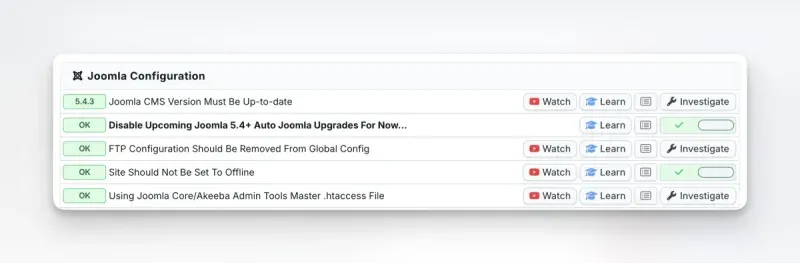
Each site gets a simple toggle:
- Green tick = auto-updates are disabled (recommended)
- Red cross = auto-updates are not disabled - this is flagged as an issue
Clicking the toggle sets the autoupdate parameter to 0 on the remote site, preventing Joomla from automatically upgrading until you change the setting back. For an agency managing dozens or hundreds of Joomla sites, this turns a multi-hour task into a few minutes of clicking through a filtered list.
The same check also appears in the Joomla Configuration section of each individual site’s audit:
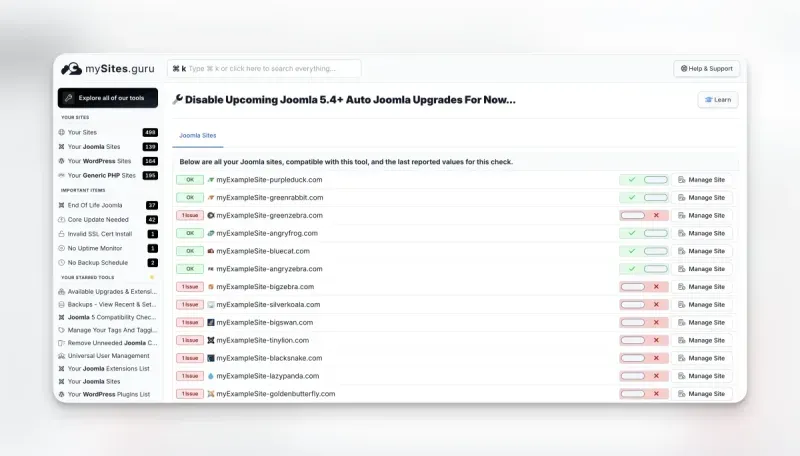
One-way toggle by design
mySites.guru can disable auto-updates remotely, but it cannot enable them. If you decide you want automated updates on a specific site, you need to enable that directly in the Joomla administrator panel on version 5.4+. This is a deliberate safety measure - auto-updates should only be turned on with full awareness of what the feature does.
Combined with mySites.guru’s update channel detection, you can see both which versions your sites are being offered and whether they’ll install those versions automatically.
Method 2: Through the Joomla admin panel
- Log into the Joomla administrator panel
- Navigate to System → Joomla! Updates
- Click Options in the toolbar
- Select the Automated Updates tab
- Toggle the setting from Yes to No
- Click Save & Close
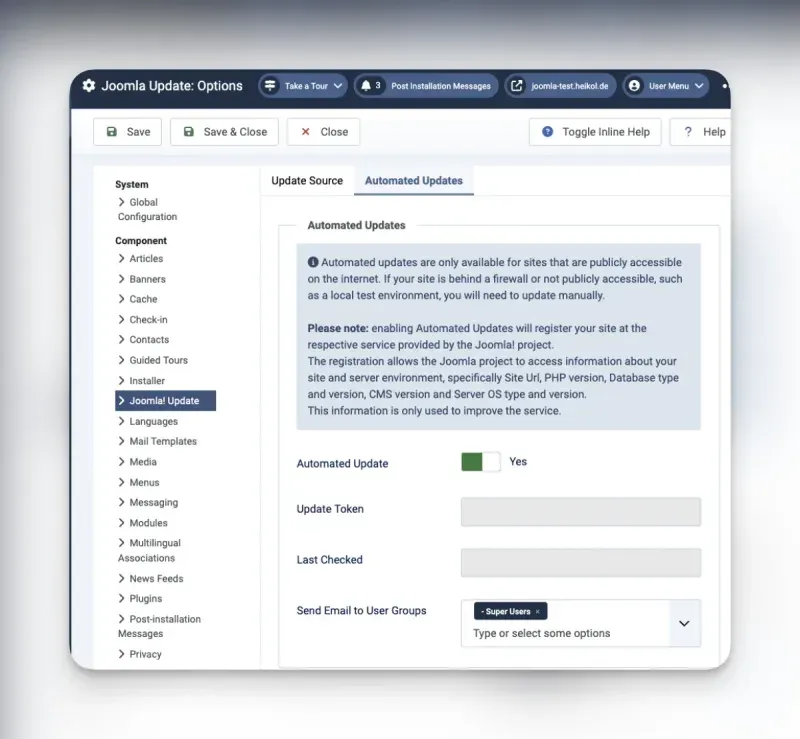
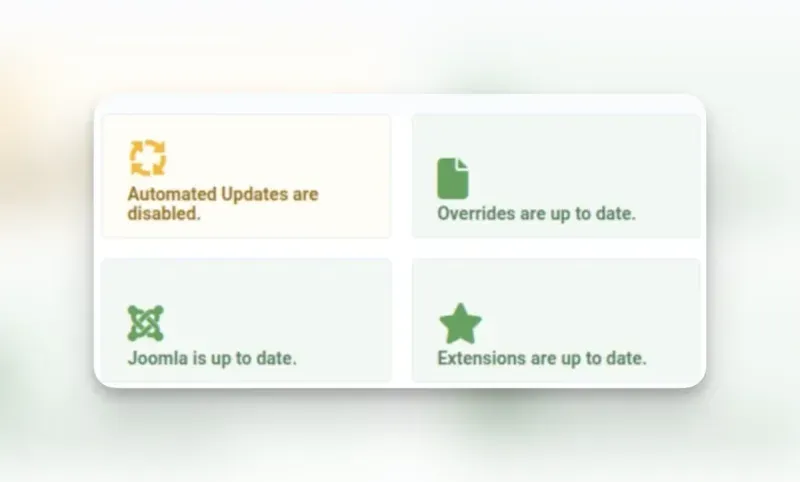
You can also reach this from the Home Dashboard - look for the “Automated Updates are disabled” quick icon. If it shows an orange icon instead of green, automated updates are still enabled - click through to the settings to disable them.
Method 3: During installation (for new sites)
Since the opt-out mechanism was added, the Joomla installation wizard includes a Disable Automated Updates button on the final screen after installation completes. Clicking it prevents the site from registering with the update server entirely.
Don't miss the opt-out during installation
The opt-out button appears only on the final installation screen. Once you delete the installation directory, there's no going back to that screen. If you miss it, disable automated updates through the admin panel (Method 2) instead.
Managing Joomla updates after disabling auto-updates
Disabling automated updates doesn’t mean ignoring updates. It means you decide when they happen. A solid update workflow for agencies looks like this:
1. Monitor available updates from one dashboard
Use mySites.guru’s update management to see which Joomla sites have pending core updates. You get this information from your regular site snapshots without logging into each site.
2. Test on a staging site first
Before applying a Joomla core update to a client’s production site, test it on a staging copy. Check that all extensions work, forms submit correctly, and custom code still functions. This is the step that automated updates skip entirely.
3. Back up before updating
Make sure each site has a current backup before you apply the update. mySites.guru’s backup scheduling can automate this so you’re not manually triggering backups across dozens of sites.
4. Apply updates in batches
With mySites.guru, you can upgrade multiple Joomla sites from one dashboard. Apply the update to a small group first, verify everything is stable, then roll out to the rest. This gives you the speed of bulk updates with the safety of incremental rollout.
5. Document the change
If you provide client reports, the update should appear in the report for that maintenance period. Automated updates that happen without your involvement don’t show up in your documentation - another reason to keep updates in your own hands.
What Do Joomla Automated Core Updates Actually Do?
Joomla 5.1 (April 2024) introduced The Update Framework (TUF) to cryptographically secure the update process, but TUF alone didn’t make updates automatic. It wasn’t until Joomla 5.4 and 6.0 (both released October 2025) that fully automatic core updates arrived, built on top of that TUF foundation. The process has four steps:
- Your Joomla site registers itself with a centralized server on Joomla.org infrastructure and receives a unique authentication token.
- The remote server uses that token to signal your site that an update is available.
- Your site (not the remote server) downloads the update package and installs it. The process is pull-based: the remote server cannot push code to your site directly.
- After a successful update, all super users on the site receive an email notification.
Only Joomla core files are updated. Third-party extensions, templates, and plugins are left untouched - if you want control over extension updates, that’s a separate mechanism covered in our guide to automatic updates for any Joomla extension. The core-only scope is actually a large part of the problem for agencies.
What data does registration collect?
When your site registers with the autoupdate.joomla.org service, it sends technical information about your environment: php_version, db_type, db_version, cms_version, and server_os. An authentication token is generated and stored on both the Joomla update server and your site. This token is how the remote server authenticates requests to your site’s API.
The registration also creates new REST API endpoints on your site through com_joomlaupdate’s webservices integration. These endpoints allow the update server to communicate with your Joomla installation, checking status and triggering the update process.
How updates get applied without admin login
The update mechanism bypasses the traditional /administrator/ login flow entirely. Instead of going through the admin panel, the remote server communicates with your site through Joomla’s /api endpoints, proxied through /index.php. This means even if you’ve locked down your admin panel with IP restrictions, password-protected directories, or .htaccess rules, the automated update system can still reach your site through the front-end API path.
That’s by design: the update needs to work without human interaction, so it can’t rely on an authenticated admin session. But it does mean there’s an additional attack surface to consider, even if TUF protections make exploitation difficult.
Requirements for automated updates to work
Automated updates won’t activate unless all of these are true:
- The site must be publicly accessible on the internet (localhost and intranet sites are excluded)
- The update channel must be set to Default (not “Joomla Next” or “Testing” - see our guide on Joomla update channels for why this matters)
- Minimum stability must be set to Stable
- The site must be running Joomla 5.4 or higher (or 6.0+)
- Working mail configuration (for post-update notification emails)
The default behavior depends on how the site was installed
This is the part that catches people off guard:
- New installations of Joomla 5.4+ or 6.0+: automated updates are enabled by default
- Sites upgraded from Joomla 5.3 or earlier to 5.4+: automated updates are disabled by default
If you’ve been running Joomla 5 since before 5.4 and upgraded through the normal update process, you’re fine - the feature is off unless you turned it on. But any fresh Joomla installation (new client site, dev environment spun up with the latest version, a hosting provider’s one-click installer) has automated updates running from day one.
What is The Update Framework (TUF)?
TUF is an open-source security specification that protects software update systems from supply-chain attacks. It started in the Python community and is now a graduated Cloud Native Computing Foundation (CNCF) project under the Linux Foundation. Docker, Google, Amazon, Microsoft, VMware, and Cloudflare all use it.
The problem it solves: what happens when the server distributing your updates gets compromised? Without TUF, an attacker who controls the update server can serve a malicious package and every client that checks for updates will install it. TUF prevents this with a few mechanisms:
- Cryptographic signing with role separation. Updates aren’t signed by a single key. TUF splits signing responsibilities across multiple roles - root, targets, snapshot, and timestamp - each with their own keys. Compromising one key doesn’t give an attacker the ability to forge a complete, valid update.
- Threshold signatures. Critical actions require M-of-N signatures (e.g., 3 out of 5 keyholders must sign). Even if an attacker steals one or two keys, they still can’t produce a valid release.
- Expiration enforcement. TUF metadata has built-in expiration dates. A client won’t accept stale metadata, which limits the window for replay attacks where an attacker serves an old, vulnerable version as if it were current.
- Consistent snapshots. The framework ensures clients get a consistent view of the repository at a point in time, preventing mix-and-match attacks where an attacker combines files from different releases.
How Joomla uses TUF
Before Joomla 5.1, the updater retrieved update information from an XML file hosted on the Joomla.org CDN. Whatever that XML file said was trusted - there was no cryptographic verification that the update information actually came from the Joomla project. If someone compromised the CDN or the update server, they could point every Joomla site to a malicious download.
Joomla 5.1 replaced this with a TUF-based update system. The implementation includes a server-side setup for the update repository with a CLI tool for managing signing keys and publishing releases, and a PHP client library that reads and verifies TUF metadata before accepting any update. Even if an attacker compromises the update server infrastructure, they cannot forge the cryptographic signatures that prove an update was published by the official Joomla project.
The automated update feature introduced in Joomla 5.4 builds on top of this TUF foundation. The pull-based mechanism (where your site downloads and verifies the update itself rather than receiving pushed code) combined with TUF’s signature verification means the worst-case scenario for a server compromise is that an attacker could trigger a legitimate pending update to install sooner than expected - not inject arbitrary code.
The entire infrastructure is open source. The PHP client library is based on php-tuf, a shared implementation also used by Drupal and TYPO3 - though Joomla maintains its own fork with several changes. The fork fixes how signature verifiers are recreated during root key rotation (aligning with the TUF spec more strictly than upstream), relaxes spec_version validation to accept a wider range of version formats, fixes canonical JSON key sorting for nested arrays, adds PHP 8.4 nullable type compatibility, and widens the Guzzle Promises constraint to support both v1 and v2. A full diff of the fork’s changes is available. The fork does lag behind upstream on some improvements like static caching, delegated role optimizations, and the latest TUF spec version. The signed metadata itself - covering all four TUF roles (root, targets, snapshot, and timestamp) - lives in the joomla/updates repository, which has accumulated over 1,500 commits of cryptographic signatures and update artifacts. The server that orchestrates the pull-based update cycle is the Automated-Updates-Server, a Laravel 11 application hosted by the Joomla project. It runs on PHP 8.3+ with Laravel Horizon managing the job queue: health-checking registered sites every 15 minutes, queuing update jobs when patches are available, and removing inactive sites after 7 days of failed checks. Joomla is the first PHP-based CMS to ship TUF verification in its update pipeline.
For site administrators, TUF operates transparently. You don’t need to configure anything or manage keys. It runs in the background every time your site checks for or applies a Joomla core update, whether manual or automated.
Why Should Agencies Disable Automated Joomla Core Updates?
The feature was built for a specific audience: the long tail of Joomla sites with no active maintenance. After a security patch release, there’s roughly a 10-12 hour window before attackers reverse-engineer the fix and start scanning for unpatched sites. For sites with no one watching the dashboard, automated updates close that window.
But if you’re reading this blog, you probably manage sites professionally. Automated updates don’t fit that workflow. These concerns aren’t new, either. Back in 2014, Brian Teeman - co-founder of Joomla - wrote that automatic updates for Joomla are a bad idea, arguing that the risks of breaking sites without notice outweigh the convenience. His point: “You definitely do not want to find out at 2 a.m. on a Saturday night that an update has gone wrong when a furious client calls you.” Over a decade later, with the feature now shipping in core, those same arguments still hold.
Joomla isn’t alone in this tension, either. Drupal is building its own automatic updates initiative and is upfront about the limitations. Their own documentation states: “Automatic updates are generally not intended for use by large enterprise organizations that already have their own build workflows and pipelines. Instead, the intent is to support small-to-medium site owners who have a ‘set-it-and-forget-it’ attitude towards their Drupal installations.” (source). That’s exactly the distinction that matters here: automatic updates are for unmanaged sites, not for sites you’re actively responsible for.
Extension compatibility breaks
The core updates but your extensions don’t. An automated patch can land on a site running extensions that haven’t been tested against the new core version. Contact forms stop submitting. E-commerce checkout flows fail. On client sites running niche or legacy extensions, the risk gets worse.
We’ve seen this pattern play out for years with WordPress automatic updates and it’s no different here.
No staging-first workflow
The automated system updates the live site directly. There’s no mechanism to route the update through a staging environment first, verify that everything works, and then apply to production. For agencies that bill for maintenance and guarantee uptime, skipping the test step is unacceptable.
Unpredictable timing
Updates can trigger at any time. During peak traffic. Right before a client presentation. While you’re in the middle of debugging something else on the same site. You have no say in the timing.
Backup dependency
Every guide on automated updates (including Joomla’s own documentation) stresses that having a current, restorable backup before each update is “absolutely vital.” That’s true, but on a portfolio of 50+ sites, ensuring every site has a valid backup at the exact moment an automated update fires is an operational challenge. If you’re using mySites.guru’s backup scheduling, you have a safety net - but the timing still isn’t guaranteed to align.
Undermines your maintenance service
If you sell maintenance contracts where tested, documented updates are part of the service, automated updates create confusion. A client’s site updates itself overnight, something breaks, and the first question is “who did this?” Explaining that Joomla did it on its own doesn’t exactly inspire confidence in the controlled process you promised them.
Continuous data transmission
Once registered, the service performs health checks every 24 hours, transmitting technical information about your site to Joomla’s servers - including PHP version, database type and version, CMS version, and server OS. This happens regardless of whether a new update is available. If your clients are in regulated industries or have strict data governance policies, this ongoing communication with an external service may need to be disclosed or approved.
Cloudflare and WAF interference
Community reports confirm that Cloudflare’s Bot Fight Mode blocks the automated update mechanism, returning 403 errors. Sites behind aggressive WAF rules may need additional configuration to allow the update server’s requests through. If you manage sites on varied hosting environments, this adds another variable to troubleshoot when updates fail silently.
The feature is still maturing
The autoupdate.joomla.org service stability under high load has not been fully demonstrated in production at scale. The feature was developed by a small team of contributors, and additional security concerns have been reported to the Joomla Security Strike Team and are still being addressed. Failure notifications rely on your site being operational after the upgrade - if an update causes a site error, no notification will be sent. If client site availability is what you sell, relying on a system that’s still proving itself in production adds risk you probably don’t need.
How Do You Audit Your Existing Joomla Sites?
If you’ve been building new Joomla sites since October 2025 (when 5.4.0 and 6.0.0 shipped), some of them may have automated updates running without you realizing it. To audit your portfolio:
- Run a snapshot on all your connected Joomla sites in mySites.guru
- Check the automated update status - the dashboard will show you which sites have the feature enabled
- Disable it on any site where you want manual control, directly from the dashboard
- Verify the update channel - while you’re at it, confirm all sites are on the “Default” channel, not “Joomla Next” (which could trigger a major version jump)
If you’re not using mySites.guru yet, you can start with a free audit to see the state of your sites.
What to look for in the audit results
When you run the audit, the “Disable Upcoming Joomla 5.4+ Auto Joomla Upgrades” check appears in the Joomla Configuration section of each site’s report. Sites where auto-updates are already disabled show a green OK badge. Sites where the autoupdate parameter is set to 1 (or missing entirely, which Joomla 5.4+ interprets as opting in) show a red 1 Issue badge.
Pay particular attention to:
- Sites built after October 2025 - new installations default to auto-updates enabled
- Sites on shared hosting with one-click Joomla installers - the hosting provider’s installer may not disable auto-updates
- Sites handed off from other developers - you may not know what settings the previous maintainer used
- Dev/staging sites that were later pointed to production domains - if the original install had auto-updates enabled, the production site inherited that setting
Check your hosting control panel too
Disabling Joomla’s built-in auto-updates isn’t the whole picture. Many web hosting control panels have their own auto-upgrade features that operate independently of Joomla’s settings. Softaculous, Installatron, and similar one-click installers bundled with cPanel, Plesk, and DirectAdmin can all be configured to auto-update Joomla and WordPress installations on a schedule. Some managed hosting providers enable this by default.
This means you can disable auto-updates inside Joomla and still wake up to find your site was upgraded overnight by Softaculous. The hosting panel updates the files directly on disk - it doesn’t go through Joomla’s update mechanism at all, so TUF verification doesn’t apply and Joomla’s own auto-update setting is irrelevant.
If you manage sites across multiple hosts, log into each hosting control panel and check:
- Softaculous - go to the installation’s edit page and look for “Auto Upgrade” and “Auto Upgrade Plugins” settings. Set both to “Do not Auto Upgrade.”
- Installatron - check the “Automatic Update” option in the application’s settings
- Managed WordPress/Joomla hosts - some providers (like WP Engine for WordPress, or Starter for Joomla) manage updates as part of the service. Review their update policies and opt out if your workflow requires it.
This is easy to overlook, especially on client sites where someone else set up the hosting. Add it to your audit checklist.
What if auto-updates already ran on your sites?
If you’re finding out about this after an update already landed on one of your sites, here’s how to assess and recover:
Check what version was installed. Log into the Joomla admin panel and check the current CMS version under System → System Information. Compare it to what you expected. If the site was on 5.4.2 and is now on 5.4.3, that’s a minor patch - check the Joomla release notes for what changed.
Test the site thoroughly. Walk through the critical user paths: contact forms, login, search, any custom functionality, e-commerce checkout if applicable. Check the front-end and back-end for PHP errors. Look at the site’s error log for new entries timestamped around the update time.
Verify extensions are compatible. Open the Extensions → Manage → Manage panel and look for any extensions flagged with compatibility warnings. Check that your Joomla extensions are all functioning correctly. Pay particular attention to template overrides, which can break silently when core HTML output changes.
Check for failed update artifacts. If an automated update failed partway through, you may find the site in an inconsistent state. Look for Joomla’s administrator/cache/com_joomlaupdate directory and check if there are leftover update packages. A failed update that left partial files behind will need manual cleanup - either by re-running the update or restoring from backup.
Disable auto-updates immediately. Follow the methods above to prevent it from happening again. Then take a fresh backup of your sites so you have a clean restore point going forward.
When Do Automated Joomla Updates Make Sense?
The feature isn’t universally bad. There are legitimate use cases:
- Personal or hobby sites with no third-party extensions and no maintenance contract
- Brochure sites running vanilla Joomla with no custom code and minimal extension usage
- Sites where no one is watching - if the alternative is running an unpatched Joomla site for months, automated updates are the lesser risk
If a site fits that profile, leaving automated updates enabled is reasonable. The core Joomla team built this feature to solve a real problem: the massive number of Joomla sites running outdated, vulnerable versions because no one is maintaining them.
But if you’re the person maintaining the site, testing updates, managing extensions, and guaranteeing uptime, then you should be the one deciding when updates happen.
How Does WordPress Handle Automatic Updates?
WordPress has had automatic background updates since version 3.7, and the same debates played out in that ecosystem years ago. If you manage WordPress sites alongside Joomla, you’ll recognize the pattern: the feature helps unmanaged sites stay patched, but agencies need more control. The recent WordPress 6.9.2 incident - where a security auto-update crashed sites running certain theme frameworks - is a textbook example of why testing before deployment matters, regardless of the CMS.
WordPress went a different direction on the security side, too. In 2016, Scott Arciszewski of Paragon Initiative Enterprises publicly disclosed that WordPress’s auto-update mechanism had no cryptographic signature verification - updates were checked with an MD5 hash provided by the same server serving the file, making api.wordpress.org a single point of failure for roughly a quarter of all websites on the internet. His words: “If you manage to hack their infrastructure, you can push a false update to millions of WordPress blogs and get reliable remote code execution everywhere.” He built sodium_compat (a PHP polyfill for Ed25519 signing) and submitted patches to ticket #39309, but Matt Mullenweg told core developer Dion Hulse to stop working on it because it wasn’t among WordPress’s 2017 priorities - the Editor, Customizer, and REST API were. Mullenweg called it “a good idea” but “not a priority,” ranking it below weak passwords and users not updating their plugins. It took until WordPress 5.2 in May 2019 - three years after the disclosure - for Ed25519 signature verification to ship. And even then, WordPress rolled its own signing system rather than adopting TUF. Joomla, whatever your opinion of its auto-update implementation, at least built on an established, peer-reviewed security framework from day one.
mySites.guru gives you the same control for both platforms. You can stop WordPress automatic updates with a single toggle, or take the middle path and enforce minor-only core updates so security patches keep flowing while major version jumps are blocked. And now you can do the same for Joomla’s automated core updates. Same dashboard, same workflow, both CMS platforms covered.
Security issues reported
On 11 March 2026, while researching this article, two security issues with Joomla's automated update mechanism were identified and reported to the Joomla Security Strike Team by Phil Taylor.
Further Reading
- WordPress (all versions): SPOF, RCE, and Negligence - Scott Arciszewski’s 2016 disclosure on oss-sec about WordPress’s lack of cryptographic signature verification in auto-updates.
- WordPress Trac #39309: Secure WordPress against infrastructure attacks - The ticket where Paragon Initiative’s patches for Ed25519 update signing were submitted, stalled, and eventually implemented in WordPress 5.2.
- Matt Mullenweg responds: digital signatures are important but not a priority - WP Tavern’s coverage of the dispute between Arciszewski and Mullenweg over update signing priorities.
- Drupal Automatic Updates initiative - Drupal’s own auto-update project, with an honest acknowledgment that it’s not intended for enterprise organizations with existing build pipelines.
- Automatic updates for Joomla! are a bad idea - Brian Teeman (Joomla co-founder) on why automatic updates are risky for professionally managed sites, written in 2014 but still relevant.
- Automatic core updates in Joomla - David Jardin’s official write-up in the Joomla Community Magazine on the architecture, TUF integration, and rationale.
- Automatic Core Joomla Updates - Practical guide from Joomlers.uk with enable/disable steps and an agency perspective.
- Automatic Joomla updates (Joomla 5.4+) - Joomill’s breakdown of configuration options and risk mitigation.
- Automated testing is essential for Joomla CMS updates - Digital Peak on why automated updates need automated testing infrastructure to be safe at scale.
- The Update Framework (TUF) - The official TUF project site: full specification, security model, and adopter list.
- Tamper-proof core updates for Joomla - TUF making it into 5.1 - How TUF was integrated into Joomla’s update system and what it protects against.
- php-tuf/php-tuf - The PHP implementation of TUF used by Joomla, Drupal, and TYPO3 for cryptographic update verification.
- joomla/updates - Joomla’s signed TUF bootstrap repository with the cryptographic metadata that every Joomla 5.1+ site validates against.
- Joomla Automated-Updates-Server - The open-source Laravel app that orchestrates Joomla’s pull-based automated update cycle.
- Automatic updates for any Joomla extension - How to enable or disable automatic updates for individual Joomla extensions across all your connected sites.
Auto-update controls are covered in our guide to managing CMS updates.