mySites.guru

Integrate mySites.guru to Alfred Workflow on Mac

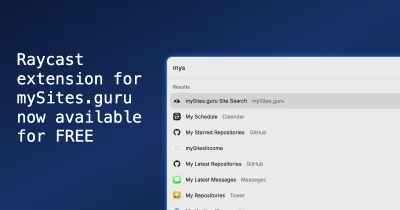
You can now install our Alfred Workflow, and get quick easy access to all your sites within mySites.guru!

Wait! What is Alfred? Why should I use it?

Alfred is an award-winning app for macOS which boosts your efficiency with hotkeys, keywords, text expansion and more. Search your Mac and the web, and be more productive with custom actions to control your Mac.

Seriously, if you are using a Mac Computer you should be using Alfred.

I have mine mapped to CMD+SPACE and just by hitting that keyboard combination I get instant access to so many features

Check out the Mac app – for FREE – at https://www.alfredapp.com

What is a Alfred Workflow?

A workflow can be thought of as a plugin or extension. It adds additional functionality to Alfred.

You need the Alfred PowerPack to use workflows which is £34 (or £59 lifetime) but its still totally worth it, for the productivity you will gain. Its also very addictive to create your own workflows and power up your productivity to new levels – how do you think I work so fast? haha.

How to integrate mySites.guru with Alfred

Simple.

  1. Once you have Alfred and the Powerpack enabled, just download our Workflow
  2. press your Alfred shortcut (Mine is CMD+SPACE) and then type “my” (without the quotes) then a space
  3. Instantly you will see a list of menu items you can choose
  4. Select an item and hit enter and your browser will load that page!

Full Integration with YOUR account.

Furthermore, you can enable public pages in your mySites.guru account, to obtain a token.

A token is just a string like smk4md33zf223efmg6y3bgbbo7mmeu63 (demo token, not real!)

You do that on the Public Site Screenshots page https://manage.mysites.guru/en/sites/screenshots

This token can then be configured in the workflow (Edit the workflow in Alfred, and paste the token in the place of the placeholder ENTER_TOKEN_HERE in the script), and will give you access to MORE features, such as listing all your sites in the Alfred search, and allowing you to jump direct to the Manage Site page for a site, making getting to the right place as simple as the following keystrokes (for a site called mySites.guru)

CMD+SPACE 
my 
SPACE 
mys 
ENTER

that’s all I type to get to the Manage Site page for mySites.guru site in my mySites.guru account ha! The “mys” filters the site list.

Last updated on February 12th, 2026

Out of your depth? Need Help?

Phil Taylor

The Original Joomla Expert – Since 2004 – Mambo Days!

Found issues with your Joomla site? Get same-day expert help fixing errors, security issues, and performance problems. Flat-rate pricing, no hourly billing surprises.

  • ● Fix hacked or compromised sites
  • ● Resolve PHP errors & White Screen of Death
  • ● System upgrades & PHP 8 compatibility
  • ● Performance optimization & hosting issues
  • ● £120 flat rate per incident
Get Expert Help TODAY! →

If we can’t add value, you don’t pay • Same-day turnaround

20+ Years – Fixing Websites, Joomla, Mambo, WordPress, Symfony.

Need Help Addressing Health Check Issues?

Phil Taylor has been fixing Joomla sites since 2004. If it were simple, you would have done it yourself by now. Get professional help from someone who’s seen it all.

  • 20+ years of Joomla & PHP expertise
  • Same-day turnaround on most issues
  • No charge if we can’t add value or fix the problem