Joomla TinyMCE Editor Broken in Firefox 148 - How to Fix It

On February 26, 2026, Firefox 148 landed and immediately broke the TinyMCE editor in Joomla. Every version of Joomla that ships TinyMCE was affected: 4.4.x, 5.4.x, and 6.0.x. The editor flickers endlessly, reloading its iframe in an infinite loop. Content editing becomes impossible.
If you manage multiple Joomla sites and your content editors started reporting problems the same week, this is almost certainly the cause. Hotfix packages are available from downloads.joomla.org, and the fix will ship in the next point releases (Joomla 5.4.4 and 6.0.4).
What went wrong with Joomla’s TinyMCE?
Firefox 148 removed a deprecated API called MouseEvent.mozInputSource. This was a Mozilla-specific property that let JavaScript distinguish between mouse clicks from different input devices (physical mouse, touch screen, pen). Mozilla marked it as deprecated years ago and finally removed it in Firefox 148.
TinyMCE’s initialization code relied on this property. During editor setup, TinyMCE checks whether the iframe containing the editor has finished loading. The code path that performed this check interacted with mozInputSource in a way that, once the property was removed, caused the iframe to never reach a completed state. TinyMCE would detect the iframe as incomplete, tear it down, and reinitialize, over and over.
The result: the editor loads its stylesheets repeatedly, the content area flickers, and you cannot type or interact with anything.
Which browsers and platforms are affected?
The bug is specific to Firefox:
- Firefox 148 on macOS (both Apple Silicon and Intel), Windows 11, and Ubuntu 24.04
- Firefox Developer Edition 149.0b1 (also affected, confirming this is a permanent API removal)
- Chrome, Safari, Edge: Unaffected. These browsers never implemented
mozInputSource.
This means the issue only hits users and content editors who use Firefox. If your agency standardizes on Chrome, you might not have noticed. But if even one of your clients or their editors uses Firefox, their editing workflow broke overnight with no warning.
Which Joomla versions are affected?
Every version of Joomla that includes TinyMCE as the default editor:
- Joomla 4.4.x (confirmed on 4.4.14)
- Joomla 5.4.x (confirmed on 5.4.3)
- Joomla 6.0.x (confirmed on 6.0.3)
The bug is in TinyMCE’s JavaScript, not in Joomla’s PHP code. Any Joomla installation using the bundled TinyMCE editor is affected regardless of template, extensions, or server configuration.
What is the upstream TinyMCE issue?
The root cause sits in TinyMCE itself, tracked as GitHub issue #10947 on the TinyMCE repository. The fix required TinyMCE to switch from the removed MouseEvent.mozInputSource to the standard PointerEvent.pointerType API, which provides the same input-device detection using a cross-browser standard.
Joomla’s fix, tracked as PR #46889, patches the TinyMCE initialization script bundled with Joomla. The fix modifies a single file: build/media_source/plg_editors_tinymce/js/tinymce.es6.js.
How did Joomla respond?
The Joomla project handled this well. The issue was flagged on February 26, the same day Firefox 148 shipped. The fix was already merged into the development branches before the report was even filed, because the Joomla team had caught it during Firefox Developer Edition testing.
The Joomla Magazine published a detailed post-mortem titled “How we decided not to panic”, walking through the team’s decision process for handling the incident. Rather than rushing out emergency point releases, they chose to ship hotfix packages that site owners could install through Extension Manager while preparing proper releases on the normal timeline.
Credit where it’s due - the Joomla team got the response right on this one.
How do you fix the Joomla TinyMCE issue?
Push the hotfix to every site at once with mySites.guru
If you manage multiple Joomla sites, the Mass Package Installer is the fastest way to fix this. It deploys the hotfix to every connected site in one operation, no need to download anything or log into individual admin panels.
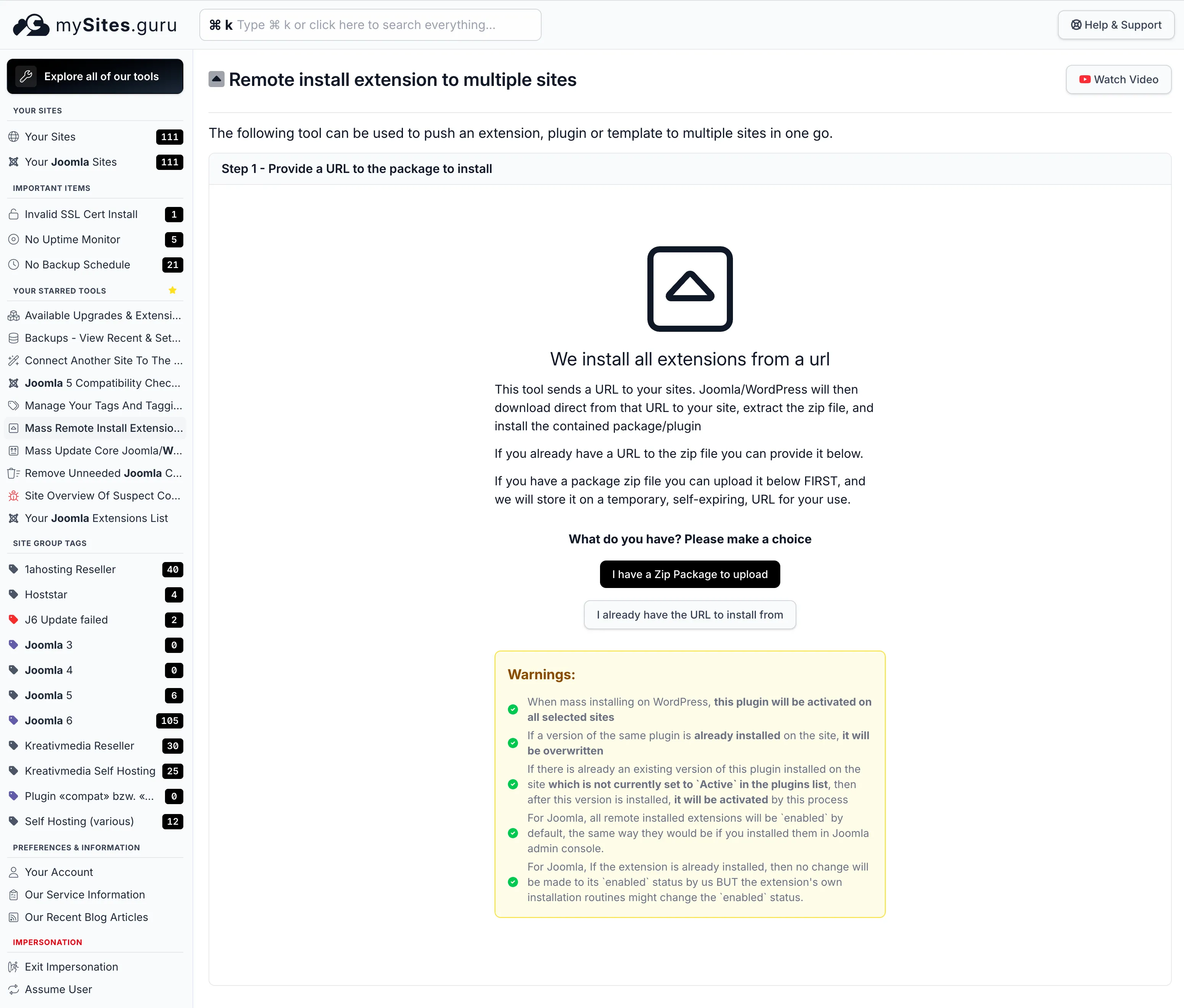
- Open the Mass Package Installer in your mySites.guru dashboard
- Click “I already have the URL to install from”
- Paste the hotfix URL:
https://downloads.joomla.org/cms/joomla6/6-0-3/Joomla_5_4_3_and_6_0_3_TinyMCE_Firefox_148_Hotfix1-zip?format=zip
Click to copy
- Select the sites you want to patch (or select all Joomla 5.x / 6.x sites)
- Hit install
Each site downloads the hotfix directly from Joomla’s servers, extracts it, and installs it. You never touch the zip file yourself. The hotfix only patches the TinyMCE JavaScript file - it does not change Joomla core files, database schema, or any other functionality.
mySites.guru also tracks Joomla core versions and extension versions across every connected site, so you can filter by Joomla version in the dashboard to see exactly which sites are running 4.4.x, 5.4.x, or 6.0.x before pushing the fix.
The Mass Package Installer works with any Joomla extension package, not just hotfixes. Security patches, plugin updates, template fixes - anything you can install through Joomla’s Extension Manager, you can push to unlimited sites from one screen.
Fixing a single site manually
If you only manage one site, or don’t have a mySites.guru account yet:
- Go to downloads.joomla.org and download the TinyMCE Firefox 148 Hotfix package
- Install it through System > Install > Extensions in your Joomla admin
- Clear your browser cache and reload the article editor
You can also use the “Install from URL” tab in Extension Manager and paste this URL directly:
https://downloads.joomla.org/cms/joomla6/6-0-3/Joomla_5_4_3_and_6_0_3_TinyMCE_Firefox_148_Hotfix1-zip?format=zip
Click to copy
Other options
Wait for the next point release. The fix is merged into both the Joomla 5.x and 6.x branches and will ship with Joomla 5.4.4 and 6.0.4. If your content editors can use Chrome temporarily, waiting is a valid approach.
Switch editors temporarily. Changing the default editor to CodeMirror or JCE avoids the problem entirely. Go to System > Global Configuration > Default Editor. This is a workaround, not a fix, and should be reversed once the hotfix is applied.
What does this incident teach us?
Browser vendors remove deprecated APIs on their own schedule. They do not coordinate with every CMS and JavaScript library that might depend on those APIs. Mozilla deprecated mozInputSource years ago, but the actual removal still caught TinyMCE (and by extension, every CMS that bundles it) off guard.
This is not unique to Joomla. The Astroid Framework vulnerability showed the same pattern: a third-party component breaks, and agencies need to identify affected sites and deploy a fix across their entire portfolio fast. The only defense is staying current with updates and having a process to roll out fixes quickly.
For agencies managing client sites, incidents like this are exactly why building a morning check routine matters. A quick scan of your dashboard catches problems before your clients call you about them.
Further Reading
- Joomla 6.0.3 / 5.4.3 hotfix downloads - Official hotfix packages from the Joomla project
- “How we decided not to panic” - Joomla Magazine - The Joomla team’s post-mortem on their decision process
- GitHub Issue #47238 - The original bug report with community confirmation across platforms
- TinyMCE Issue #10947 - The upstream TinyMCE bug report about the mozInputSource removal
- Joomla PR #46889 - The merged fix that patches TinyMCE initialization
Edge cases like this are covered in our CMS updates guide.