Novarain Framework Vulnerability: Check Your Joomla Sites for nrframework
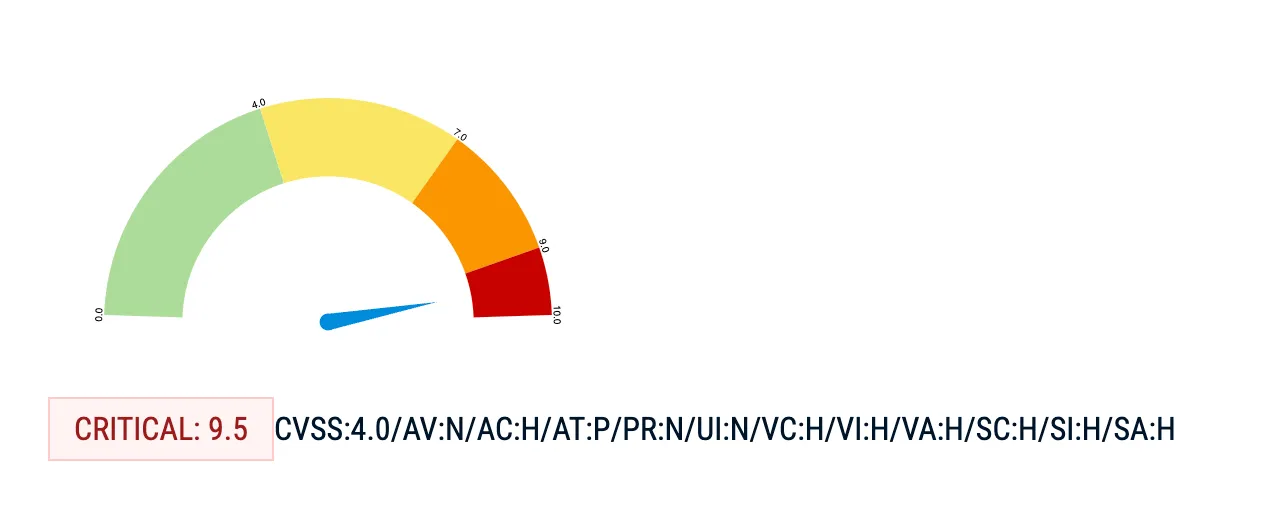
The Tassos/Novarain Framework (plg_system_nrframework) for Joomla has a critical vulnerability (CVE-2026-21627, CVSS 9.5) that allows unauthenticated attackers to include arbitrary PHP files, delete files, and perform SQL injection. A public exploit tool is already on GitHub.
Most Joomla administrators don’t know this plugin is on their sites. It’s a hidden dependency, installed automatically when you add any Tassos.gr extension like Convert Forms, EngageBox, or Google Structured Data. If you manage Joomla sites and you’re not sure whether this affects you, run a free audit to find out.
Why are we writing about this now?
This CVE was reserved in January 2026 and publicly disclosed on 16 February. Tassos.gr patched it within days. That was six weeks ago. We're writing about it because 3,861 sites in our dataset - 46.5% of those running the Novarain Framework - are still on vulnerable versions as of 30 March 2026. The vendor did their job. The patch exists. But a patch nobody installs protects nobody, and a public exploit on GitHub means the window for automated attacks is wide open. If you manage Joomla sites with Tassos extensions and you haven't checked, this post is for you.
TL;DR
- CVE-2026-21627 - CVSS 9.5 critical unauthenticated vulnerability in plg_system_nrframework versions 4.10.14 through 6.0.37
- Attackers can include arbitrary PHP files, read files, delete files, and perform SQL injection through Joomla’s
com_ajaxendpoint - no login required - Update to nrframework 6.0.38+ immediately via Tassos.gr downloads
- Affects every Joomla site running Convert Forms, EngageBox, Google Structured Data, Advanced Custom Fields, or Smile Pack
- A public exploit with multiple attack modes is available on GitHub
- Already compromised? Updating alone won’t undo the damage. Check for signs of compromise below
This vulnerability was disclosed on 16 February 2026 and patched the same week. That was six weeks ago. As of 30 March 2026, 46.5% of affected sites in our dataset are still running vulnerable versions. A weaponised exploit tool with multiple attack modes is on GitHub. If you haven't patched, your sites have been exposed for over a month.
To their credit, Tassos.gr responded quickly. They published a security advisory on 18 February 2026, two days after the SSD disclosure, and confirmed patched versions for every affected extension on both Joomla 3 and Joomla 4/5/6. They also noted they had “no evidence that this vulnerability has been exploited in the wild” at the time of their advisory. The vendor did their part. The problem is that six weeks later, nearly half the sites running their framework haven’t applied the update.
What is the Novarain Framework?
The Novarain Framework (also called the Tassos Framework) is a shared library plugin for Joomla, distributed as plg_system_nrframework. It provides common functionality - AJAX handling, custom fields, form processing, geo-IP lookups - used by every extension in the Tassos.gr product suite.
Every extension in the suite bundles it:
| Extension | What it does | JED ranking |
|---|---|---|
| Convert Forms | Form builder (contact, payment, registration) | #2 on JED |
| EngageBox | Popup and sticky bar builder | #6 on JED |
| Google Structured Data | Schema markup for SEO | #20 on JED |
| Advanced Custom Fields | Custom field types for Joomla | - |
| Smile Pack | UI enhancement toolkit | - |
| MailChimp Auto-Subscribe | Mailing list automation | - |
These are popular, well-regarded extensions. Over 2.1 million downloads across the suite. The framework itself is installed silently as a dependency. You won’t see “Novarain Framework” in any marketing material or installation wizard. It just appears in your plugin list as plg_system_nrframework.
And that’s the problem. An admin installs Convert Forms to build a contact page. They don’t realise they’ve also installed a system plugin with its own AJAX endpoint, file handling methods, and database query layer. When that framework has a critical vulnerability, they don’t know to look for it.
How widespread is this?
We checked our own data. Across the tens of thousands of Joomla sites connected to mySites.guru:
| Metric | Count | Percentage |
|---|---|---|
| Sites with nrframework installed | 8,297 | |
| Sites on vulnerable versions (< 6.0.38) | 3,861 | 46.5% of nrframework sites |
| Sites on patched versions (6.0.38+) | 4,240 | 51.1% of nrframework sites |
Nearly half of the sites running the Novarain Framework are still on vulnerable versions. That’s 3,861 sites exposed to unauthenticated remote code execution, with a public exploit available.
The most common vulnerable version we see is 6.0.37 (328 sites), sitting just one version behind the fix. Sites on older branches like 5.0.x (404 sites on 5.0.88) and 4.x (375 sites on 4.6.23) are also exposed and may need a larger version jump to reach the patched release.
The version distribution tells a story about how Joomla extension updates actually work in practice. The largest single group (2,855 sites) is already on 6.0.68 - well past the fix. The second-largest group (1,018 sites) is on 6.0.62, also safe. These are sites with active Tassos.gr subscriptions and either automatic updates or attentive admins.
The vulnerable sites are a mix: some are on the 6.0.x branch but haven’t updated since before the patch (the 328 sites on 6.0.37), some are on older major branches where the admin may not realise a security update is available (the 5.0.x and 4.x clusters), and some are on very old versions (58 sites still running 3.1.7) where the Tassos subscription likely expired years ago and updates simply aren’t available.
That last group is the hardest to reach. They’re running abandoned extension versions on potentially abandoned Joomla installations, and no amount of vendor patching will fix them. The only way to find and address those sites is to have a central inventory that flags outdated and vulnerable extensions automatically.
How to find sites with nrframework installed with mySites.guru
Finding affected sites, checking versions, scanning logs, auditing for compromise - that takes about 10 minutes per site when done manually. If you manage 50 Joomla sites, that’s most of a working day. mySites.guru collapses that into minutes.
Find every affected site in seconds
mySites.guru tracks every installed extension on every connected site, including silent dependencies like nrframework. It’s one of the core features of managing multiple Joomla sites from a single dashboard. Search for nrframework across your portfolio and you’ll see which sites have it, which version they’re running, and when it was last updated. That’s how we pulled the statistics for this post: 8,297 sites with nrframework, version breakdown by site, all from a single query.
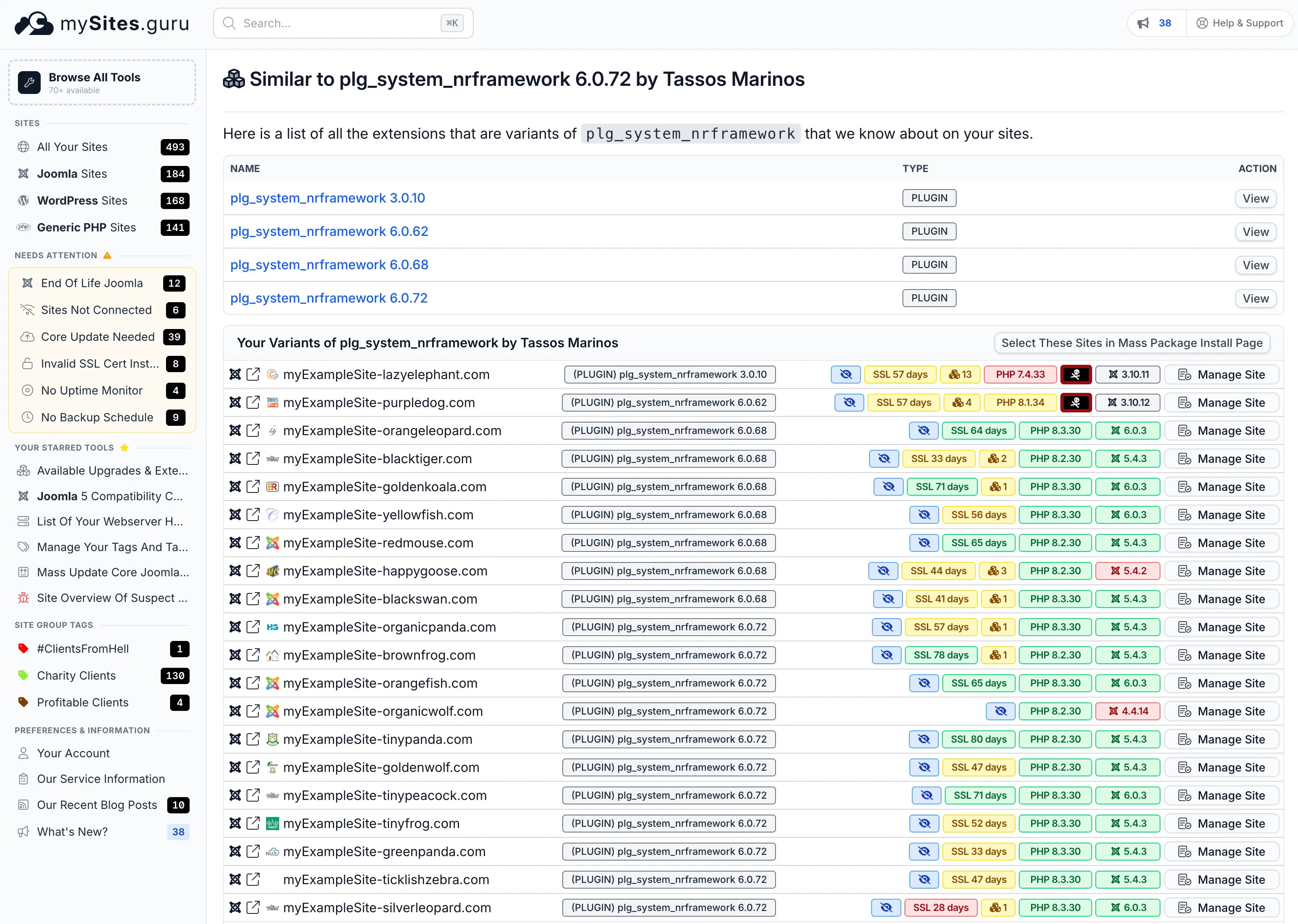
You don’t need to log into each Joomla admin panel and search the extensions list manually. The inventory is always current. One URL gives you the complete list of every site running nrframework, broken down by version number, with the site’s PHP version, Joomla version, and SSL status alongside it:
If you’re already a mySites.guru subscriber, you can open this page right now:
View all your nrframework installations
Open nrframework Extension Search
Lists every version of plg_system_nrframework installed across all your connected sites, grouped by version number. You'll see which sites are still on vulnerable versions at a glance.
Every version of nrframework installed across connected sites is listed at the top. Below that, every individual site running the plugin, with its exact version. Vulnerable and patched versions are visible at a glance.
That turns a vulnerability announcement from a stressful afternoon of logging into admin panels into a five-minute triage. One page, the full picture of which clients are exposed, and patching can start immediately.
If you don’t have a mySites.guru account yet, sign up for a free trial and connect your sites. The extension index builds automatically on the first audit.
Get alerted the day a CVE drops
When a CVE like this one is disclosed, mySites.guru cross-references it against the extension versions on your connected sites and flags every affected installation. You get an alert telling you exactly which sites need patching, rather than finding out weeks later (or from this blog post).
Spot uploaded PHP shells before the damage spreads
If an attacker exploits CVE-2026-21627 to upload a PHP shell to /images/ or /tmp/, mySites.guru’s real-time file change alerting picks it up. You’ll see which file was created, when, and on which site. That’s the difference between finding a backdoor in minutes and discovering it months later when Google flags your site for serving malware.
Push the patch to every site at once
Once you’ve confirmed the patched version works on a test site, use the mass updater to push the Tassos extension update to every affected site in your portfolio simultaneously. One action, all sites patched, window of exposure closed.
Scan for backdoors if you were exposed
If any of your sites were running a vulnerable version during the six-week window since disclosure, run a security audit to scan for signs of exploitation. The audit checks for suspicious files, backdoors, and known hack signatures across the entire file system - the kind of artefacts an attacker leaves behind after chaining the file inclusion and SQL injection primitives in this vulnerability.
What does CVE-2026-21627 actually allow?
The vulnerability gives attackers three distinct capabilities, all without authentication:
1. Arbitrary PHP file inclusion
The ajaxTaskInclude() method in nrframework.php is whitelisted for frontend access via the $non_admin_tasks array. It accepts a path parameter with Joomla’s RAW input filter, which means zero sanitisation. The concatenated path goes straight to @include_once.
An attacker sends a request like:
GET /?option=com_ajax&format=raw&plugin=nrframework&task=include&path=../../../some/file&class=TargetClassThis lets them include any PHP file on the server and instantiate any class that implements an onAjax method. Internal helper classes that were never meant to be publicly accessible become remotely reachable gadgets.
The key detail here is the $non_admin_tasks array. Joomla’s com_ajax system is designed to let plugins handle AJAX requests from the frontend. The nrframework plugin explicitly lists include as a task that doesn’t require admin authentication. That’s a design decision in the plugin code, not a Joomla core weakness. The plugin chose to allow unauthenticated users to trigger file inclusion.
What makes this worse is the class parameter. After including a file, the plugin instantiates whatever class name the attacker specifies and calls its onAjax method. Joomla’s codebase contains dozens of classes with onAjax methods, each one a potential gadget for the attacker to chain into further exploitation.
2. Arbitrary file read and file deletion
Two built-in classes provide file operations:
- nrchainedfields - handles CSV loading for cascading select fields. By manipulating the file path, an attacker can read any file the web server user can access. Configuration files, database credentials,
.htpasswdfiles - all readable. - nrinlinefileupload - provides an
onRemove()method that deletes files at attacker-supplied paths without additional validation.
GET /?option=com_ajax&format=raw&plugin=nrframework&task=include&class=NRInlineFileUpload&action=remove&remove_file=/path/to/target3. SQL injection
The ajaxify.php and componentitems.php classes pass attacker-controlled term parameters directly into database queries. This allows arbitrary table and column reads, including super-admin session tokens stored in Joomla’s session table.
These classes are designed for dynamic field population, the kind of thing that powers a “search as you type” dropdown in a form. The term parameter is supposed to be a search string entered by a user filling out a Convert Forms field. Instead, an attacker can supply SQL fragments that get concatenated into the query without prepared statements or parameter binding.
With read access to the database, the attacker can pull the #__session table to find active super-admin sessions, extract user password hashes from #__users, or read any other data the database user has access to. (For more on why Joomla database security matters, see our dedicated guide.) On shared hosting where the database user often has broader permissions than it should, the blast radius can extend beyond the Joomla database itself.
The full attack chain
In practice, an attacker chains these together:
- Read the Joomla
configuration.phpvia the file-read primitive to get database credentials - Use SQL injection to extract super-admin session tokens from the session table
- Hijack an admin session and log into
/administrator - Upload a PHP shell through the template editor or extension installer
- Delete log files and access evidence to cover tracks
That’s complete site takeover. Shell access, full database control, and the ability to modify any file on the site.
The public exploit on GitHub includes multiple attack modes: file upload, file deletion, SQL injection, and automated session hijacking. This is not a theoretical vulnerability. The tooling to exploit it is freely available and trivial to run.
Which versions are vulnerable?
The vulnerability spans the entire Tassos extension suite. If you have any of these versions, you’re exposed:
| Extension | Vulnerable versions | Patched (Joomla 4/5/6) | Patched (Joomla 3) |
|---|---|---|---|
| Novarain/Tassos Framework (plg_system_nrframework) | 4.10.14 - 6.0.37 | 6.0.62+ | 6.0.62+ |
| Convert Forms | 3.2.12 - 5.1.0 | 5.1.1+ | 4.4.11+ |
| EngageBox | 6.0.0 - 7.1.0 | 7.1.1+ | 6.3.9+ |
| Google Structured Data | 5.1.7 - 6.1.0 | 6.1.1+ | 5.6.9+ |
| Advanced Custom Fields | 2.2.0 - 3.1.0 | 3.1.1+ | 2.8.10+ |
| Smile Pack | 1.0.0 - 2.1.0 | 2.1.1+ | 1.2.4+ |
| MailChimp Auto-Subscribe | (all unpatched) | 5.1.1+ | 5.0.4+ |
These version numbers come from Tassos.gr’s official security advisory, published 18 February 2026. The nrframework plugin contains the vulnerable code, but the parent extensions control which version of nrframework gets installed. Updating any one Tassos extension to a patched version will also update the shared framework across all their products.
How do you check if your site is affected?
Step 1: Find out if nrframework is installed
Log into your Joomla admin panel and go to System > Manage > Extensions. Search for nrframework.
If it appears, note the version number. Anything between 4.10.14 and 6.0.37 is vulnerable.
Alternatively, check via the filesystem. The plugin lives at:
plugins/system/nrframework/nrframework.phpIf that file exists, the plugin is installed. Open it and look for the version string in the XML header, or check the corresponding nrframework.xml file in the same directory.
Step 2: Check for the parent extensions
Search your extensions list for:
Convert Forms(com_convertforms)EngageBox(com_rstbox)Google Structured Data(com_gsd)Advanced Custom Fields(field plugins prefixed withacf)Smile Pack
Any of these means nrframework is present. Even if you’ve disabled the parent extension, the framework plugin may still be enabled and reachable.
Step 3: Check your server logs
Look for requests targeting the vulnerability. The attack pattern is distinctive:
grep "option=com_ajax.*plugin=nrframework.*task=include" /var/log/apache2/access.logOr for nginx:
grep "option=com_ajax.*plugin=nrframework.*task=include" /var/log/nginx/access.logAny matches indicate scanning or exploitation attempts against your site.
How do you check if your site has been exploited?
If your site was running a vulnerable version of nrframework while it was publicly accessible, you should check for signs of compromise. Attackers using CVE-2026-21627 would leave traces in several places.
Use the mySites.guru security audit tools
A mySites.guru security audit runs over 50 file-level checks against the entire webspace. Several of these directly detect the artefacts an attacker would leave behind after exploiting CVE-2026-21627.
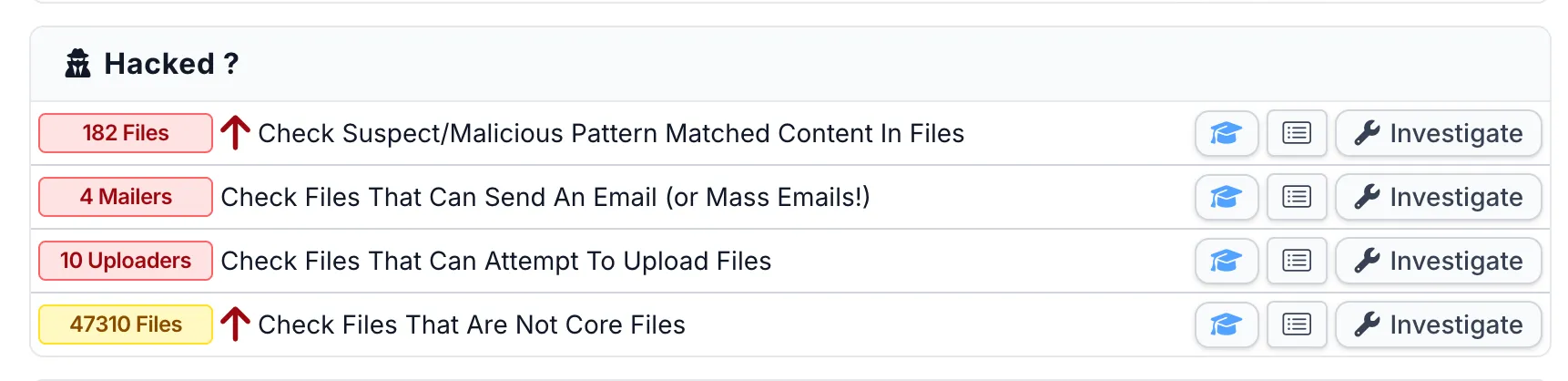
The Hacked? section of the audit flags suspect content, mailer scripts, file uploaders, and non-core files. If an attacker uploaded a PHP shell through the file inclusion primitive, the suspect content scanner will match it against 12 years of known backdoor signatures:
The Files Information section goes deeper: recently modified files, hidden dot-files, PHP files in directories where they shouldn’t be, files with 777 permissions, SQL dumps left in the webspace, and files modified between audits. If an attacker deleted logs or modified template files to inject code, these checks catch it:
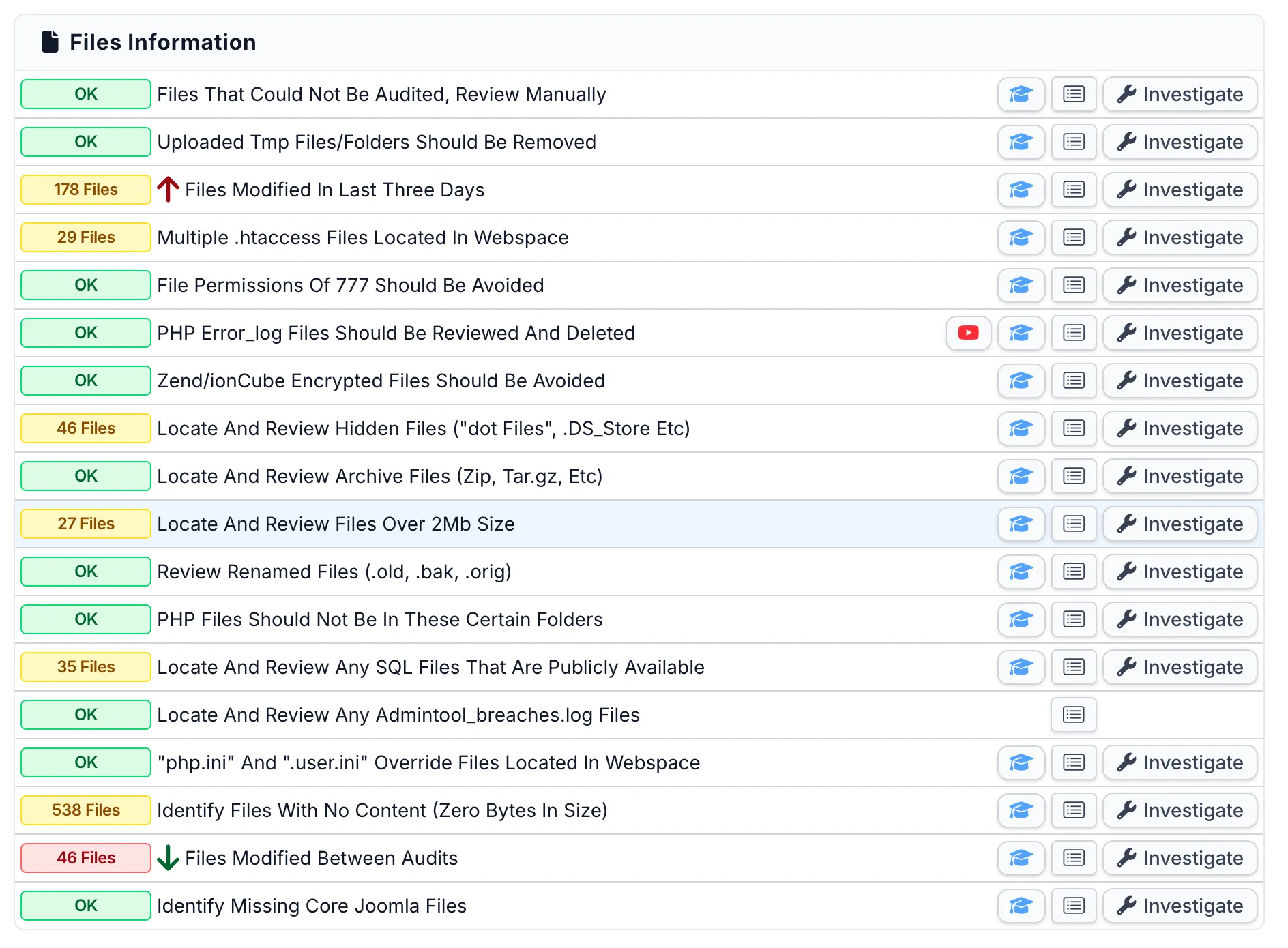
Each check is clickable - you can drill into the individual files, see their contents, and compare against known-good hashes. This is what we built mySites.guru to do: turn a manual forensic process into something you can run across every site in your portfolio in minutes.
Manual checks (if you don’t have mySites.guru)
If you’re checking manually, here’s what to look for:
Unauthorised admin accounts: Go to Users > Manage and look for admin accounts you don’t recognise. Pay special attention to accounts created after 16 February 2026 (the public disclosure date). Attackers who extract session tokens via SQL injection may create persistent admin accounts as a fallback.
Unexpected PHP files: Search writable directories for recently created PHP files:
find /path/to/joomla -name "*.php" -newer /path/to/joomla/configuration.php -type fFocus on /tmp/, /images/, /media/, /cache/, and /administrator/cache/. These are common drop locations for uploaded shells.
Modified template files: Attackers with admin access often inject code into index.php in your active template directory. Compare hashes against a clean copy:
find /path/to/joomla/templates -name "index.php" -exec md5sum {} \;Any mismatch against a known-good installation warrants investigation.
Database tampering: If you suspect SQL injection was used, check:
#__sessionfor sessions belonging to user IDs you don’t recognise#__usersfor accounts with Super User group membership that you didn’t create#__content(articles) for injected<script>tags, hidden iframes, or base64-encoded strings#__extensionsfor plugins or components you didn’t install, particularly anything with high ordering values (9999 is a common attacker pattern we’ve seen with the Astroid exploit too)
If you find evidence of compromise, updating nrframework alone won’t help. You need a full cleanup: remove backdoors, revoke compromised sessions, change database credentials, and scan the entire file system. If your Joomla site has been hacked, our recovery guide walks through the process.
How do you fix it?
Option 1: Update through the Joomla admin panel
If your Tassos.gr subscription is active, updates are available through Joomla’s built-in updater:
- Go to System > Update > Extensions
- Find the Tassos extensions in the update list
- Update them all - the nrframework plugin will update automatically with the parent extension
Option 2: Download and install manually
Download the latest versions from Tassos.gr downloads and install them through System > Install > Extensions. The installer will overwrite the vulnerable files.
Option 3: Disable immediately if you can’t update yet
If you can’t update right now (expired subscription, compatibility concerns, testing required), disable the plugin as an interim measure:
- Go to System > Manage > Plugins
- Search for
nrframework - Disable plg_system_nrframework
Disabling the plugin will break any functionality that depends on it. Convert Forms won't work. EngageBox popups won't appear. But a broken contact form is better than a compromised server. Disable, update properly during a maintenance window, then re-enable.
WAF rules as a stopgap
If you have a Web Application Firewall (ModSecurity, Cloudflare WAF, or similar), you can block the attack vector at the server level:
# Block nrframework AJAX task=include requestsSecRule ARGS:plugin "nrframework" "id:100001,phase:1,deny,chain" SecRule ARGS:task "include"This blocks the primary attack vector while leaving other com_ajax functionality intact. It’s a temporary measure, not a replacement for patching.
For nginx, the equivalent rule:
# Block nrframework AJAX task=include requestsif ($args ~* "plugin=nrframework.*task=include") { return 403;}If you use Cloudflare, you can create a WAF custom rule that blocks requests where the URI query string contains both plugin=nrframework and task=include. This provides protection at the edge before the request ever reaches your server.
What about WordPress sites?
This vulnerability is Joomla-specific. The Tassos/Novarain Framework is a Joomla plugin and has no WordPress equivalent. If you manage a mixed portfolio of Joomla and WordPress sites, only the Joomla sites need checking for this particular issue.
That said, WordPress has its own share of critical plugin vulnerabilities this month. CVE-2026-1357 in WPvivid Backup (CVSS 9.8) affects 900,000+ sites with a similar unauthenticated RCE pattern. The common thread is the same: plugins that handle file operations with insufficient access controls.
If you manage both Joomla and WordPress sites, a single dashboard that covers both saves you from checking two separate ecosystems manually. When a critical CVE drops, the last thing you want is to be logging into 50 different admin panels across two different CMS platforms, checking extension versions one site at a time. That’s how vulnerabilities stay unpatched for six weeks while a public exploit circulates on GitHub.
The pattern: AJAX endpoints without proper authorization
This is the third CMS plugin vulnerability we’ve written about in March 2026 where the root cause is the same: an AJAX endpoint that accepts requests it shouldn’t. And as of today, even Joomla core is patching the same class of issue.
- Novarain Framework (CVE-2026-21627) - Joomla’s
com_ajaxendpoint routes requests toplg_system_nrframework, which whitelists theincludetask for unauthenticated users. No permission check at all. - Astroid Framework (CVE-2026-21628) - Joomla’s AJAX handler validates the CSRF token but never checks if the user is logged in as an admin. Token from the public login page is enough.
- Smart Slider 3 (CVE-2026-3098) - WordPress
wp_ajaxactions validate a nonce but don’t check user capabilities. A subscriber account is enough to trigger the export function and read any file on the server. - Joomla core
com_ajax(5.4.4 / 6.0.4) - Released March 31, 2026. Joomla itself needed ACL hardening oncom_ajax. The framework that routes AJAX requests for every plugin in the ecosystem had the same authorization gap as the plugins built on top of it.
The root cause is the same across all four: the AJAX handler authenticates the request (or doesn’t even bother) but never authorises the action. A nonce proves someone is logged in. A CSRF token proves the request came from your site. Neither one proves the user has permission to do what they’re asking.
Both Joomla and WordPress make it easy to register AJAX handlers. They don’t make it easy to get the authorization right. Joomla’s com_ajax routes requests to any system plugin with a matching task name, and it’s up to the plugin to check permissions. WordPress’s wp_ajax_{action} fires for any logged-in user by default - you have to explicitly add current_user_can() checks. In both cases, the framework provides the plumbing but not the guardrails. Joomla 5.4.4 and 6.0.4 shipping ACL hardening for com_ajax itself tells you how deep the problem goes - the routing layer that plugins depend on had the same gap.
If you develop Joomla extensions or WordPress plugins, treat every AJAX handler as a public endpoint until you’ve explicitly proven otherwise. Check capabilities, not just tokens. Four AJAX authorization failures in one month, across two CMS platforms and their core frameworks, should settle any debate about whether this is a priority.
It’s the same hidden dependency problem we covered earlier. CVE-2026-21627 and CVE-2026-21628 both target framework plugins that admins don’t know are installed. When those frameworks have vulnerable AJAX endpoints, nobody checks for updates because nobody knows the plugin is there.
Timeline
| Date | Event |
|---|---|
| January 2026 | CVE-2026-21627 reserved |
| 16 February 2026 | SSD Secure Disclosure publishes full vulnerability details |
| 18 February 2026 | Tassos.gr publishes security advisory and confirms patched versions |
| 20 February 2026 | CVE formally published and NVD entry created |
| 26 February 2026 | Public exploit tool with multiple attack modes published on GitHub |
| 30 March 2026 | 3,861 of 8,297 affected mySites.guru sites (46.5%) remain unpatched |
Credit: the vulnerability was discovered by researcher p1r0x working with SSD Secure Disclosure.
Further Reading
- Tassos.gr official security advisory - the vendor’s own response with patched version numbers for each extension on Joomla 3 and Joomla 4/5/6
- SSD Secure Disclosure - Joomla! Novarain/Tassos Framework Vulnerabilities - the original disclosure with full technical details and attack chain walkthrough
- CVE-2026-21627 exploit on GitHub - the public proof-of-concept tool with verify, upload, delete, and RCE modes
- CVE-2026-21627 official record - the authoritative CVE entry from MITRE/CVE.org
- CVE-2026-21627 on THREATINT - CVSS scoring, CWE classification (CWE-284), and affected version ranges
- Joomla Security Centre - Joomla’s official security advisory feed for core and extension vulnerabilities
Check your sites now. If you manage Joomla sites and you’re not sure whether nrframework is installed, run a free security audit on any site - no credit card, no commitment. You’ll see every extension installed, its version, and whether it’s flagged. For sites already compromised, our Joomla hacked recovery guide covers the full cleanup process.