WordPress 6.9.2, 6.9.3, and 6.9.4: 10 Security Fixes, a Crash, and Incomplete Patches
-
TL;DR: Update to WordPress 6.9.4 now.
WordPress shipped three security releases in two days. 6.9.2 patched 10 vulnerabilities but broke sites. 6.9.3 fixed the crash. 6.9.4 (March 11) completes three patches that weren't fully applied - PclZip path traversal, Notes authorization bypass, and XXE in getID3. If you're on anything older than 6.9.4, update now.
WordPress 6.9.2 dropped on March 10, 2026 as a security-only release patching 10 vulnerabilities. Within hours, site owners started reporting blank websites after updating.
The WordPress project pulled the release, reverting the version API and download page back to 6.9.1. By 22:40 UTC the same day, 6.9.3 was released with the theme compatibility fix included. Then on March 11, WordPress 6.9.4 shipped after the security team discovered that three of the original patches were incomplete.
If you haven’t updated yet, update to 6.9.4 now. All 10 security patches are fully applied, and the regression that crashed sites is fixed.
What are the 10 WordPress security fixes?
These are the vulnerabilities patched in 6.9.2 and carried forward into 6.9.3. From the release announcement:
- Blind SSRF - reported by sibwtf and several other researchers
- PoP-chain weakness in the HTML API and Block Registry - reported by Phat RiO
- Regex DoS in numeric character references - reported by Dennis Snell of the WordPress Security Team
- Stored XSS in nav menus - reported by Phill Savage
- AJAX
query-attachmentsauthorization bypass - reported by Vitaly Simonovich - Stored XSS via
data-wp-binddirective - reported by kaminuma - XSS overriding client-side templates in admin - reported by Asaf Mozes
- PclZip path traversal - reported independently by Francesco Carlucci and kaminuma
- Authorization bypass on the Notes feature - reported by kaminuma
- XXE in the external getID3 library - reported by Youssef Achtatal; a fix to getID3 itself has also been coordinated
These fixes are being backported to all branches still receiving security updates (currently back to 4.7). WordPress 7.0 Beta 4, also released on March 10, includes all 10 security patches plus 49 additional updates (14 in the Editor, 35 in Core). WordPress 7.0 is still targeting an April 9, 2026 release.
Staying on 6.9.1 or earlier means your site is exposed to all 10 of these. Update to 6.9.4.
What went wrong with WordPress 6.9.2?
John Blackbourn, a WordPress core developer, responded in the support forums:
There appears to be an incompatibility with themes that use a certain theme framework under the hood.
A new security check in wp-includes/template-loader.php added a realpath() call that expects $template to be a strict PHP string. Some theme frameworks pass a “stringable object” through the template_include filter instead, an object with a __toString() method. That’s worked for years because PHP’s include handles stringable objects just fine. realpath() does not. It gets an object, returns false, and the template never loads. Blank page.
The bug only affected the front end. wp-admin continued to work, so affected site owners could still log in and manage their sites.
What did WordPress 6.9.3 fix?
John Blackbourn committed the fix to WordPress trunk, touching wp-includes/template-loader.php and wp-includes/class-wp-block-patterns-registry.php. The fix adds a check for stringable objects before calling realpath():
$is_stringy = is_string( $template ) || ( is_object( $template ) && method_exists( $template, '__toString' ) );$template = $is_stringy ? realpath( (string) $template ) : null;Stringable objects get cast to a string with (string) before hitting realpath(). Anything that’s neither a string nor stringable gets set to null and the security checks reject it as before. The same fix is applied to block pattern file paths in class-wp-block-patterns-registry.php.
Props to Dennis Snell and Weston Ruter on the fix, committed by John Blackbourn. This fix shipped in 6.9.3.
Timeline
The timeline on March 10, 2026:
- 6.9.2 released - 10 security patches ship
- Sites start crashing - blank front pages reported within hours on certain theme frameworks
- WordPress pulls the release - version API and download page revert to 6.9.1
- John Blackbourn confirms the bug in the support forums and identifies the theme framework incompatibility
- Jos Klever posts a workaround - replace
wp-includes/template-loader.phpwith the 6.9.1 version - John Blackbourn commits the fix to trunk - stringable object support added to template loader and block patterns registry
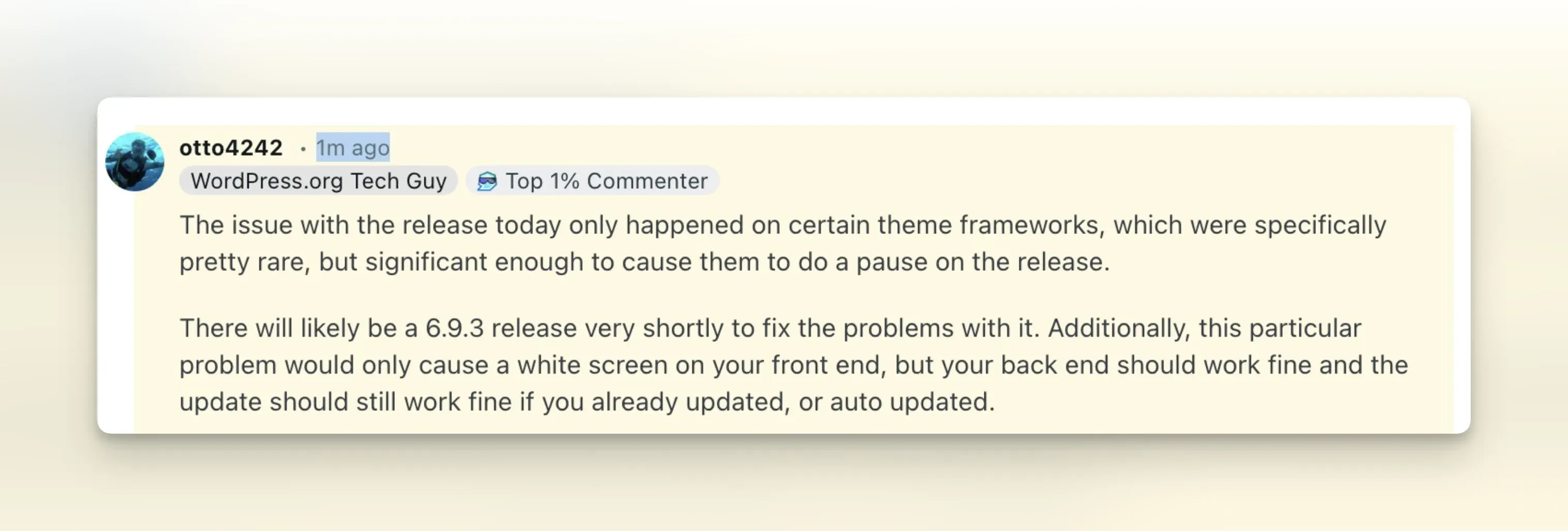
- 21:44 UTC - Otto (WordPress.org Tech Guy) confirms on Reddit that 6.9.3 is coming shortly and that the affected frameworks are “pretty rare”
- ~22:40 UTC - 6.9.3 goes live - version API, download page, and releases archive all show 6.9.3
March 11, 2026:
- WordPress Security Team discovers incomplete patches - Thomas Kräftner’s responsible disclosure confirms that three of the 10 security fixes from 6.9.2 weren’t fully applied
- 6.9.4 released - completes the PclZip path traversal fix, Notes authorization bypass fix, and XXE fix in getID3
What did WordPress say officially about 6.9.3?
The WordPress 6.9.3 release page describes this as a “fast follow” to 6.9.2. The page notes that passing stringable objects through the template_include filter is not an officially supported method in WordPress - the filter is documented as only accepting strings. But enough themes relied on it that the team restored compatibility anyway.
Only two files changed between 6.9.2 and 6.9.3: wp-includes/template-loader.php and wp-includes/class-wp-block-patterns-registry.php. All 10 security fixes from 6.9.2 remain intact.
What did WordPress 6.9.4 fix?
One day after the 6.9.2/6.9.3 saga, WordPress 6.9.4 shipped. From the release announcement:
The WordPress Security Team has discovered that not all of the security fixes were fully applied, therefore 6.9.4 has been released containing the necessary additional fixes.
Because this is a security release, it is recommended that you update your sites immediately.
So what happened? Three of the 10 security patches that shipped in 6.9.2 were incomplete. The vulnerabilities were partially addressed but not fully closed. Thomas Kräftner discovered this through responsible disclosure, and the WordPress security team confirmed it. Neither 6.9.2 nor 6.9.3 had complete fixes for these three issues - only 6.9.4 does.
The three fixes that were incomplete in 6.9.2 and 6.9.3:
PclZip path traversal - the original patch in 6.9.2 didn’t fully close the path traversal vector. 6.9.4 updates
/wp-admin/includes/file.phpwith the complete fix. Originally reported by Francesco Carlucci and kaminuma.Authorization bypass on the Notes feature - the REST API endpoint for comments (
/wp-includes/rest-api/endpoints/class-wp-rest-comments-controller.php) needed an additional authorization check. Originally reported by kaminuma.XXE in the getID3 library - the XML external entity vulnerability in
/wp-includes/ID3/getid3.lib.phpwasn’t fully mitigated. A new version of the external getID3 library has also been released by James Heinrich. Originally reported by Youssef Achtatal.
Three files changed between 6.9.3 and 6.9.4:
/wp-admin/includes/file.php/wp-includes/rest-api/endpoints/class-wp-rest-comments-controller.php/wp-includes/ID3/getid3.lib.php
If you updated to 6.9.3, you still need 6.9.4
6.9.3 fixed the theme crash from 6.9.2, but it carries the same incomplete security patches. The path traversal, authorization bypass, and XXE fixes are only fully applied in 6.9.4. Update now.
What did the WordPress security team learn from the retrospective?
Two weeks later, the WordPress Security Team published an official retrospective on the whole saga.
The biggest takeaway: there was no step in the minor release checklist to verify that all commits were successfully merged into the release branch. Three of the 10 security commits made it into trunk but never landed in the 6.9 branch, which is how 6.9.2 shipped with incomplete patches. The team calls it a checklist oversight that had simply never been caught before.
Backporting was painful too. Applying the fixes to 22 older branches (back to 4.7) took the better part of a week, partly due to contributor time constraints and partly because a bug in the WordPress.org SVN pre-commit hook blocked pushes to the 5.2 branch and earlier. The 6.0 branch (6.0.12) remains unreleased at time of writing due to an unresolved build issue.
Some things did go well. Shipping 6.9.2 before starting backports got the fix out to the majority of sites faster. Releasing 7.0 Beta 4 alongside 6.9.3 meant beta testers weren’t left on a known-insecure version, something that’s only happened three times in WordPress’s 20-year history.
Going forward, the team plans to add merge verification to the release checklist, improve automation around backports, require built-asset testing before tagging, and add unit test coverage for stringable objects in the template_include filter. Matt Mullenweg has also asked the team to explore AI-assisted tooling for reviewing changes going into releases to assess breakage risk.
If you manage WordPress sites professionally, the full retrospective is worth reading. A 20-year-old release process still had gaps nobody noticed until three patches slipped through.
What should you do now?
Update to WordPress 6.9.4. It includes all 10 security patches (fully applied), the theme regression fix from 6.9.3, and the three corrected patches. There’s no reason to stay on an older version.
- On 6.9.1 or earlier? Update to 6.9.4. You’re missing 10 security fixes.
- On 6.9.2 with a broken front end? Update to 6.9.4 from wp-admin (which still works) or replace
wp-includes/template-loader.phpvia SFTP, then update to 6.9.4. - On 6.9.2 or 6.9.3 and everything works? Still update to 6.9.4. Three security patches are incomplete in those versions.
- Have auto-updates enabled? Your site should pick up 6.9.4 automatically. Check to make sure it did. If you want more control over when updates happen, you can disable automatic WordPress updates entirely or allow only minor security patches while blocking major version jumps.
After updating, run a suspect content scan to check whether any of these vulnerabilities were exploited before the patch landed on your site.
What if you manage large numbers of WordPress sites?
Replacing one file or clicking “Update” on one site is straightforward. But if you’re an agency or freelancer responsible for 50, 100, or 200+ client sites, today was probably stressful. Which sites auto-updated to 6.9.2? Which are still on 6.9.1 and exposed to 10 unpatched vulnerabilities? Which ones have already picked up 6.9.4? You need answers to all of those questions, and you need them fast.
That’s what mySites.guru is built for. From a single dashboard you can:
- See every site’s WordPress version at a glance - instantly know which sites are on 6.9.1, 6.9.2, 6.9.3, or 6.9.4 without logging into each one
- Get vulnerability alerts - we monitor WordPress core, plugins, and themes for known security issues and notify you when your sites are affected
- Push updates to all your sites at once - roll out 6.9.4 across your entire portfolio in minutes instead of hours
- Schedule updates for maintenance windows instead of relying on auto-updates that break things at 2am on a Saturday
- Run a free security audit on any site to check for outdated software, misconfigurations, and known vulnerabilities
Days like today are exactly why we built mySites.guru. Start for free - no credit card required.
References
- WordPress 6.9.2 retrospective - the Security Team’s post-mortem covering what went well, what didn’t, and action items
- WordPress 6.9.4 release announcement - official post confirming three incomplete patches, by John Blackbourn
- WordPress 6.9.4 release page - documentation listing the three files changed and the security fixes completed
- WordPress 6.9.3 and 7.0 Beta 4 announcement - official news post covering both releases, by John Blackbourn
- WordPress 6.9.3 release page - official “fast follow” release notes confirming the two-file fix
- WordPress 6.9.2 release announcement - official post from the WordPress team
- Support thread: “No pages displaying after WP updates to 6.9.2” - where John Blackbourn confirmed the bug and Jos Klever posted the workaround
- WordPress version check API - now shows 6.9.4 as latest stable
- Fix commit in trunk - John Blackbourn’s commit adding stringable object support to the template loader and block patterns registry
- WordPress trunk commits - full commit history
- Otto’s Reddit comment - WordPress.org Tech Guy confirming 6.9.3 was coming shortly
- Reddit: r/Wordpress discussion - community discussion and reports from affected site owners
Read our complete security guide for handling incidents like this at scale.