mySites.guru

Anonymize Data Before Taking Screenshots
Anonymize Data Before Taking Screenshots

We love that people share screenshots of our Joomla and WordPress management tools, but doing so can reveal live site names, customer names, and URLs. You probably don’t want those immortalized in images, and neither do we.

So we built a way to anonymize all that data right in the browser.

How does it work?

Append ?anon=1 to any URL in your mySites.guru account and all site names, URLs, tags, usernames, and avatars are instantly replaced with randomized data.

Try it: https://manage.mysites.guru/en/sites/?anon=1
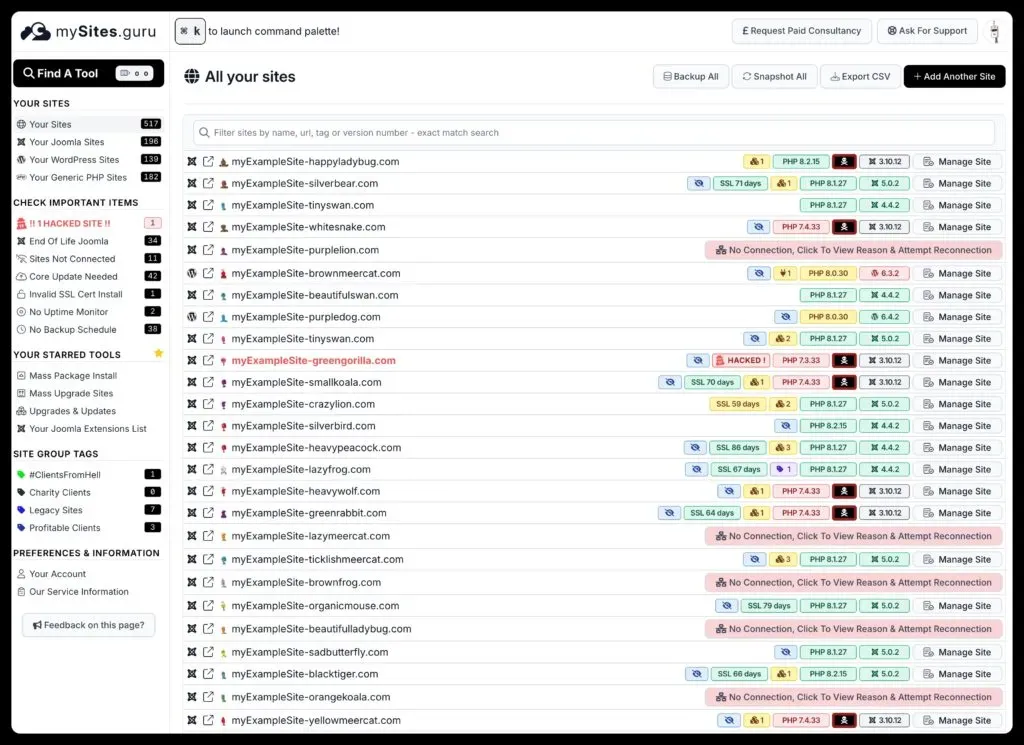
mySites.guru dashboard with anonymized site names, URLs, tags, and user data via ?anon=1

In the screenshot above, “Ethan Martinez” is a fake name generated on the fly. Every name, URL, and avatar on the page is randomized.

This works on every page in mySites.guru. If you’re writing a blog post, giving a presentation, or sharing your setup on social media, just add ?anon=1 and take your screenshot.

Credits

The anonymized data comes from a couple of open-source projects:

If you spot one of those little robot faces, now you know why they’re there.


Practical tips like this are part of our multi-site management guide.

Frequently Asked Questions

How do I hide my clients' site names and URLs when sharing a mySites.guru screenshot?
Append ?anon=1 to any mySites.guru URL and all site names, URLs, and user data are instantly replaced with randomised values.
What data does the ?anon=1 parameter replace?
It replaces site names, URLs, tags, usernames, avatars, and other personal data with randomly generated values using open-source libraries.
Does anonymization work on every page in mySites.guru?
Yes. You can append ?anon=1 to any URL inside your mySites.guru account and all personal data on that page will be anonymized.
Can I use anonymized screenshots in blog posts or marketing materials?
Yes. That is exactly what the feature is for. It lets you share screenshots publicly without revealing client site names, URLs, or personal details.
Where do the fake names and avatars come from?

Usernames, names, and avatars come from the randomuser.me API. Robot avatars come from robohash.org. Both are open-source projects.

What our users say

Chris Wilcox
Chris WilcoxLightbulb Web Design
★★★★★

With over 260 Joomla websites linked at the time of writing this review, MySites.guru has been an essential part of my web design agency client support tools for many years. Knowing all websites are monitored and easily updated in one central location is something I almost can't consider in terms of the time it would take to manage all of this manually. In the rare occasion I've had to ask for support, Phil replies almost faster than I reply to my own clients, and that is almost unheard of! For the fixed monthly cost, it really is a no-brainer to have as a standard tool if you support your client websites on a long-term basis.

Read more reviews
Mike Pritchard
Mike PritchardPritchard Websites
★★★★★

My Sites is such a great tool! It's a life-saver for us, with over 200 sites to manage it would be a nightmare with out it. We have tried a similar tool before but so happy we switched to mysites.guru. And Phil rocks with personal and speedy service!

Read more reviews

Read all 177 reviews →

Ready to Take Control?

Start with a free site audit. No credit card required.

Get Your Free Site Audit