Manage all your Joomla Sites Extensions with mySites.guru
Two years ago we were tracking over four million relationships between Joomla sites, extensions and the update sites that are used for updates from the developers, and, we got it wrong. Our architecture was wrong, and the performance sucked. So we made the decision to remove it then.
This has now been completely rewritten (Using PHP 7.4 and Symfony 4.4) for the mySites.guru service and has been re-released to great praise from our long term subscribers, some of which have been subscribers since 2012!
(Edit: This is an old article now, we now run on the very latest Symfony framework and the very latest PHP version (8.3.3 at the time of this edit!)
Want to Update One Extension on Multiple Sites instantly?
Watch Tim walk you though it
So what can I do with mySites.guru to manage my extensions?
These are the main headline features:
You can view a complete list of extensions installed on your portfolio of sites.
You can search for a specific extension regardless of version number, and see the sites that have that extension installed
You can search for a specific version of a specific extension, and see all the sites that have that specific version installed
You can see how many other sites in our database, have those extensions installed too, as a Top 50 Extensions list, drawn from live data in our database of paying customers with almost 60,000 sites.
You can filter the Mass Package Installer page, by all sites with a certain extension installed (Allowing you to push an update to just those sites)
For any site, you can see each and every extension, plugin, template or module (or even library) installed, its version number, links to its developer and their support sites.
As previously announced, you can now set ANY EXTENSIONS update stream to automatically provide updates as soon as they are available - fully automated updates of any Joomla extension
You can use the Mass Package Installer to push any Joomla extension, module, plugin, or template to all your sites in one go, or a selection of sites.
As you can see above, each of these features enables you to make wide-ranging and sweeping changes to ALL your sites in one go, or a sub set of those selected sites making the task of keeping your Joomla extensions up to date a breeze. If you’re running a Joomla agency, this pairs naturally with the broader workflow for managing multiple Joomla sites.
So what are the Top Ten Extensions used by mySites.guru customers?
Well you could login and click the link, but here is a snapshot in time image below to give you a rough estimate on 1st December 2019. The list is a pretty obvious list of the major players in Joomla extensions, nothing exciting or different to our expectations really.
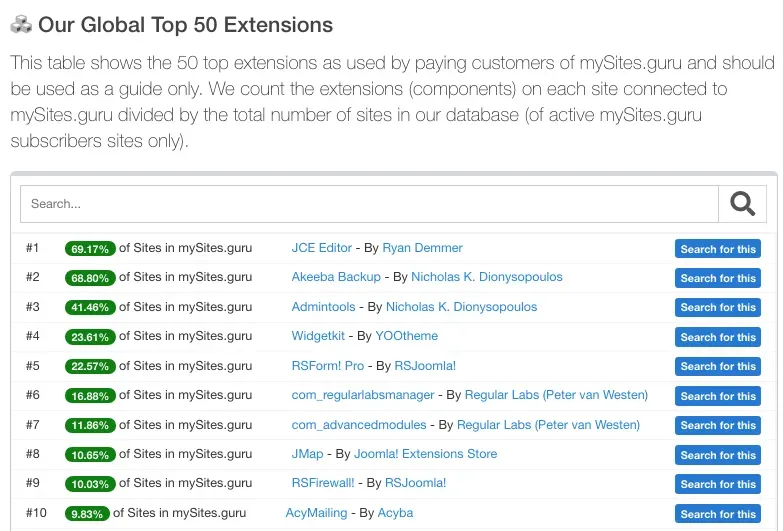 To view the full list of 50, login and navigate to the realtime list.
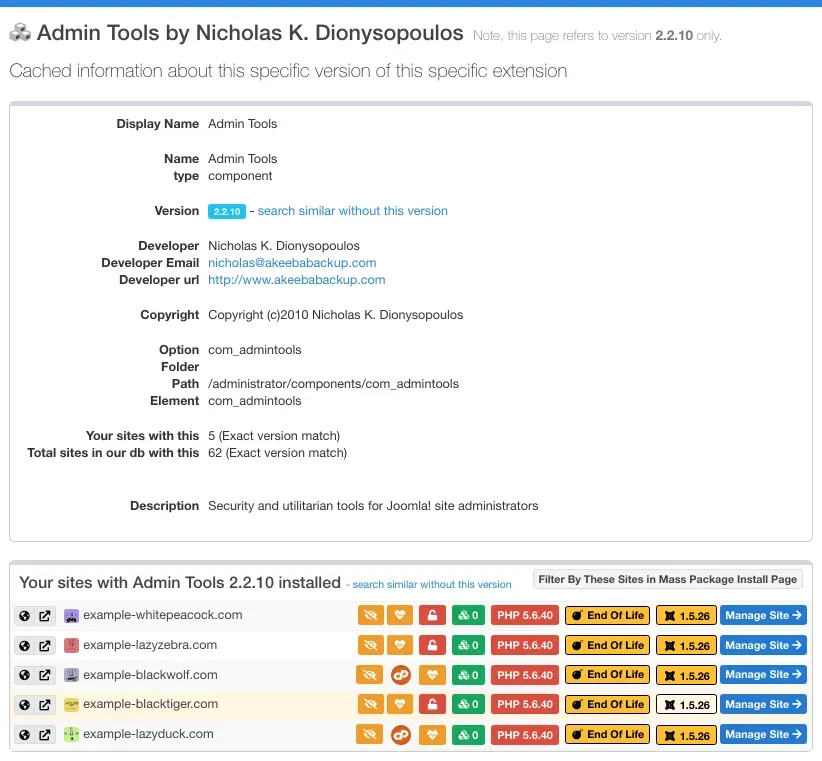 Example overview page of an old extension on old (hackable) sites.
/blog/how-to-get-mysites-guru-for-free-for-a-whole-month/
Extension management at scale is a core topic in our Joomla Agency Handbook.