How to Enable POW Captcha in Joomla 6.1
POW CAPTCHA = proof-of-work CAPTCHA. The visitor's browser solves a small maths puzzle in the background instead of clicking traffic lights. Cheap for one form submission, expensive for a bot doing thousands. No images, no third party.
Joomla 6.1 shipped a built-in proof-of-work captcha plugin called plg_captcha_powcaptcha. It is based on the Altcha open-source library, it does not call out to Google or any other third party, and it does not need an API key. For the first time in fifteen years, putting a Joomla site live with spam protection does not start with a registration form for someone else’s service.
This post covers how to turn it on. There are two routes: the mySites.guru route if you manage more than one Joomla site, and the manual route if you only have one. Both get you to the same place.
How to Enable POW Captcha Across Every Joomla 6.1 Site at Once With mySites.guru
If you manage multiple Joomla sites, enabling a new core feature is rarely the bottleneck. The work is walking through thirty admin backends, clicking through the same plugin toggle and Global Configuration save thirty times, and then checking that nothing broke on each site’s contact form.
mySites.guru now ships a tool called Enable POW Captcha On Joomla 6.1 Sites that collapses that whole sequence into one button per site, or one bulk run across the whole portfolio. The tool:
- Detects which of your connected sites are running Joomla 6.1 or later. Older sites are skipped, because the plugin does not exist on them.
- Audits each 6.1 site to see whether
plg_captcha_powcaptchais installed, whether it is enabled, and whether Global Configuration has it set as the Default Captcha. - Flags every site where any of those three conditions is not met, with a clear red, amber, or green status per row.
- Fixes any flagged site with a single click. The connector enables the plugin and writes the
captchakey in the#__extensionsconfig forcom_configtopowcaptcha. No admin login, no browser tab juggling.
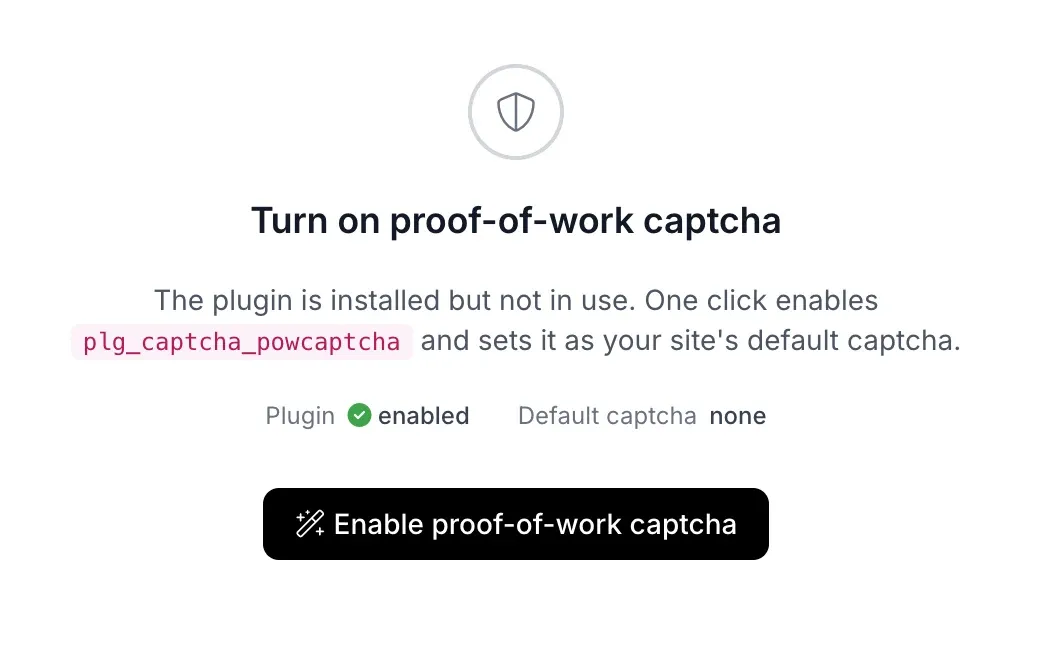
One click on Enable proof-of-work captcha and the same tool comes back green:
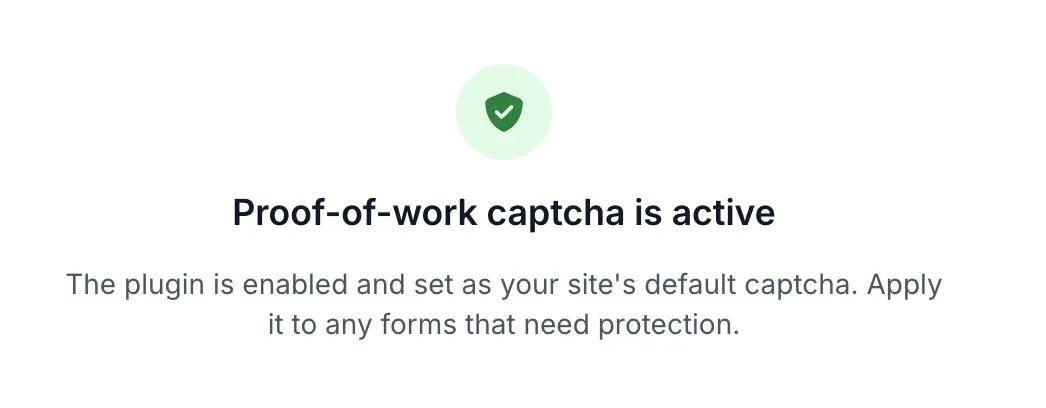
From the all-sites tool view, you see the captcha status for every connected Joomla 6.1 site in one table and toggle on the ones that still need it. For a thirty-site agency portfolio, this is the difference between a project and an afternoon.
The audit also reports which sites are still using Google reCAPTCHA, which is useful in its own right. Even if you do not migrate everything today, having a live inventory of “these six sites still depend on a Google account for captcha” means nothing breaks when that account expires or Google deprecates a version.
How to Enable POW Captcha Manually in Joomla 6.1
If you only have one Joomla site, or you want to understand exactly what the tool does before pushing it out across your portfolio, it is a two-step job.
Step 1: Enable the plugin
Go to Extensions, then Plugins. Search for powcaptcha (or just captcha). You will see a plugin called CAPTCHA - Proof of Work. Open it.
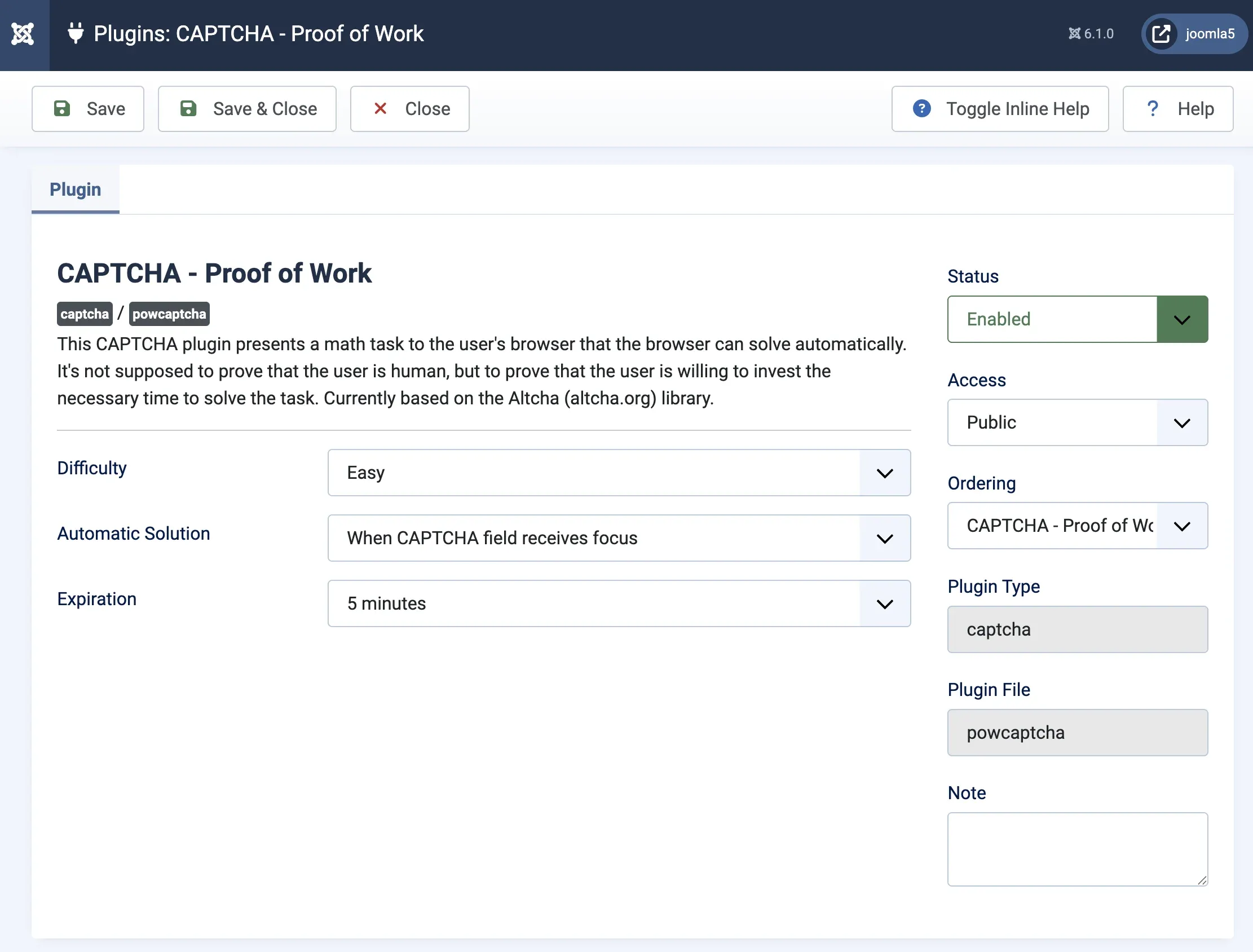
Three plugin settings matter:
- Difficulty. Easy, Medium, or Hard. Easy is fine for a normal contact form. Hard adds more compute cost per submission, useful on endpoints that attract heavy spam like user registration or comment forms. Default is Easy and there is no reason to change it until you see real abuse.
- Automatic Solution. Controls when the browser starts solving the puzzle. When CAPTCHA field receives focus is the default and works well. On page load starts solving earlier, fractionally better for slow devices but means the puzzle runs even if the visitor never submits. On submit delays solving until the visitor clicks submit and adds a visible pause. Stick with the default.
- Expiration. How long the solved puzzle stays valid. Five minutes is the default, which matches how long a real visitor takes to fill out a contact form. If you have a long multi-page form, bump it higher.
Set Status to Enabled and hit Save & Close.
Step 2: Make it the site-wide default
Go to System, then Global Configuration, then the Site tab. Find the Default Captcha field. It will currently be set to - None Selected - or whichever captcha plugin you were using before.

Change it to CAPTCHA - Proof of Work and save.
That is it. Any form in Joomla that uses the captcha API now gets POW captcha by default. That covers Joomla’s own contact forms, user registration, password reset forms, and most well-behaved third-party extensions.
Step 3: Verify it actually works
Open the site’s contact form in a private browser window. Submit it with a test message. The submission should go through with no visible captcha challenge. If the form has a hard-coded reCAPTCHA widget from a template override or a third-party extension, you will see it and that is the hint to fix it separately.
If you want to see the plugin in action, open the browser devtools, watch the Network tab, and submit the form. You should see an extra form field named altcha or similar going up with the submission. That is the solved puzzle.
Step 4: Turn off Google reCAPTCHA if you were using it
Now that POW captcha is the default, the reCAPTCHA plugin is doing nothing. Go back to Extensions, then Plugins, find CAPTCHA - ReCAPTCHA, disable it, and remove the site key and secret key from the plugin configuration. Removing the keys now means they are not sitting in the database as a liability if the site is compromised later.
What Is a Proof-of-Work Captcha, Actually?
Traditional captchas ask a human to prove they are human. Pick the traffic lights. Read the distorted text. Click the checkbox that Google’s fingerprinting thinks a real browser clicked. They all share a flaw: if the bot is good enough at the specific task, it wins. Bots have gotten very good.
Proof-of-work flips the question. Instead of testing humans against bots, it asks both of them to do a small bit of computational work before the form submission counts. The browser is given a random number and a target, and it has to find another number whose combined hash matches the target. This is the same Hashcash-style puzzle that underpins Bitcoin, just tuned to take a fraction of a second in a browser rather than ten minutes on a mining rig.
A legitimate visitor submitting one contact form does not notice the extra few hundred milliseconds. A spammer trying to submit the same form ten thousand times an hour absolutely notices the extra thousand CPU-seconds. Spam is an economics problem, and POW captchas break the economics.
Why “proof of work” beats “prove you are human”
The “are you human” framing assumes there is a test a human passes and a bot fails. In 2024, researchers at ETH Zurich showed that bots now solve reCAPTCHA v2 challenges 100% of the time, matching human success rates. The test has stopped testing anything. Proof of work does not care whether the submitter is human; it just charges both of them for the privilege of submitting.
Where Does Altcha Fit In?
The Joomla plugin is called plg_captcha_powcaptcha on purpose. The naming is library-agnostic so the Joomla project can swap the underlying implementation later if a better one comes along. For now, the engine is Altcha, an MIT-licensed proof-of-work library maintained by BAU Software s.r.o. in Brno, Czechia.
Altcha has been around since 2023 and is now on version 3. It supports several hash algorithms (SHA-256 with a key derivation function is the default, with optional Argon2id and scrypt), is small enough to ship in core without bloating Joomla, and documents itself as WCAG 2.2 Level AA and European Accessibility Act 2025 compliant. Akeeba Ltd already shipped a third-party plg_captcha_altcha plugin for Joomla users who wanted this earlier, and Nicholas Dionysopoulos continues to maintain it. From Joomla 6.1 onwards, the functionality is in core.
The decision to bundle Altcha rather than roll a Joomla-specific library was the right call. Captchas have subtle implementation failures that only show up at scale, and piggybacking on a library used outside the Joomla world means bugs get found and fixed by a larger pool of eyes.
What Happens Under the Hood When a Form Is Submitted?
Worth a minute if you ever need to debug why a submission is being rejected.
- When the form renders, the server embeds a challenge into the form HTML: a random salt, a random number, and a target hash value. These get stored in the database so the server can verify them later.
- The visitor’s browser runs a small JavaScript function that tries increasing numbers until it finds one where
hash(salt + number) <= target. This is the “work”. At Easy difficulty, a modern browser finds a solution in 100 to 500 milliseconds. At Hard, 2 to 3 seconds. - When the form is submitted, the found number is sent along with the other form data.
- The server retrieves the original challenge, verifies the submitted number is a valid solution, checks the submission is not past the expiration window, and then deletes the challenge row so the solution cannot be replayed.
The database table is created by the SQL migration in administrator/components/com_admin/sql/updates/mysql/6.1.0-2025-11-29.sql. It is small. The provider class in plugins/captcha/powcaptcha/src/Provider/POWCaptchaProvider.php handles verification.
One practical consequence: the captcha is stateful. A site with millions of form views per hour will see millions of rows being written and deleted in that table. For the contact form on a brochure site this is nothing. For a high-traffic registration endpoint it is a worth-watching load.
What Does This Mean for GDPR?
This has already resulted in fines. In France, the CNIL has ruled that Google reCAPTCHA accesses terminal data beyond what is strictly necessary for security. Under Article 82 of the French Data Protection Act, that means sites need prior consent before reCAPTCHA loads. CITYSCOOT was fined EUR 125,000 and NS CARDS FRANCE EUR 105,000, in both cases partly for improper reCAPTCHA deployment.
In practice, that decision has not stopped anyone from using reCAPTCHA, because the consent banner shows up before the captcha loads and everyone clicks Accept without reading. But it has created a compliance debt no one quite wants to deal with. German data protection authorities have taken similar positions over the years, and since Joomla has a strong German contributor base, I would guess that is part of why the project prioritised a self-hosted alternative.
POW captcha does not send anything to any third party. There is no external request, no fingerprinting, no cookie set by the captcha. Whatever cookie policy your site has for other reasons still applies, but the captcha is not adding anything to disclose. For EU-facing sites where the cookie banner is already a UX tax, that is one less line on the list.
What About Accessibility?
Traditional captchas have been a disaster for disabled users since the day they were invented. The W3C published the note Inaccessibility of CAPTCHA back in 2005 documenting how visual, audio, and cognitive challenges all exclude some group of legitimate users. Twenty-one years later, image grids are still the default experience on most reCAPTCHA-protected forms.
POW captcha is invisible. There is no test the visitor fails. A screen reader user, a keyboard-only user, someone with motor control issues, someone on a weird mobile browser: all of them fill the form and submit, the puzzle solves in the background, and it works. The Altcha project documents itself as WCAG 2.2 Level AA and European Accessibility Act 2025 compliant, and I believe them, because there is nothing for the visitor to interact with in the first place.
What Does Not Work Yet: Rate Limiting
The pull request description calls this out honestly. Altcha recommends ramping up puzzle difficulty when the same source keeps submitting. A first submission gets Easy difficulty. The tenth submission in ten minutes from the same IP gets Hard. The hundredth gets punishingly hard. This makes spam runs progressively more expensive and eventually uneconomic.
Joomla 6.1 does not do this yet. The reason is that Joomla core does not have a generic rate-limiting framework, and building one is its own medium-sized project. The captcha plugin still blocks casual bots just fine at a fixed difficulty; where the missing framework shows up is the dedicated spammer who does not care about cost per submission and will grind through.
The framework is on the official roadmap, but not for 6.x. Harald Leithner is leading a Rate Limiting Framework feature proposal targeted at Joomla 7.x, currently in Planning. The design will be modelled on Symfony’s Rate Limiter and cover login, password reset, MFA, search, contact forms, and captcha difficulty escalation. There is no open PR or issue in the joomla-cms repo against it yet; the feature entry is the only public artifact. Do not expect automatic difficulty ramping in any 6.x release.
Practical advice: if you have a specific endpoint that is getting hammered, crank the plugin’s Difficulty to Hard globally. That slows every legitimate visitor by one or two seconds. Annoying but acceptable. The alternative is layering in separate rate limiting at the web server or WAF level.
Common Gotchas When Switching to POW Captcha
Things to check after you have enabled the plugin and set it as the default.
Hard-coded reCAPTCHA in a template
Some Joomla templates include a reCAPTCHA widget directly in the contact form override. Changing the Default Captcha in Global Configuration does not affect these. You need to edit the template override, or switch to a template that uses the Joomla captcha API.
Third-party form builders
Most of the major Joomla form builders (ChronoForms, Convert Forms, RSForm!Pro, Fabrik) integrate with the Joomla captcha API and pick up the Default Captcha automatically. Some older extensions have their own captcha settings inside the form editor that need to be changed form by form.
Caching plugins
If you use a page cache on the front end, the captcha challenge is baked into the cached HTML and the same challenge is served to every visitor. That is both a functional bug (challenges can be replayed) and a security problem. Most Joomla caching setups already exclude contact-form pages from caching; double-check yours.
Privacy policy
Your privacy policy might currently say “we use Google reCAPTCHA to prevent spam”. Delete that sentence. If you are using the POW captcha, the privacy policy does not need to mention any third-party service for form protection.
Should You Switch Everything to POW Captcha Today?
Short answer: yes, but do not rip out reCAPTCHA without a plan.
Long answer: set POW captcha as the Joomla default on every site. Check each site’s forms still work. On sites where reCAPTCHA is only wired up through the Joomla captcha API, you can then disable the Google reCAPTCHA plugin and delete the API keys. On sites where reCAPTCHA is hard-coded into a third-party extension or a custom template, update those integrations individually.
The big risk is not technical, it is completeness. Half-switched sites are worse than fully-on-one-or-the-other sites, because now you have two captcha plugins enabled and the site is doing two sets of work for every form submission. Make a list, work through it, check each site, mark it done. That is exactly the kind of thing the mySites.guru Enable POW Captcha tool is for.
Further Reading
- Joomla! 6.1 release announcement - official post from the Joomla project.
- PR #46514: Add proof-of-work captcha - the pull request that added the feature, with full context from David Jardin and sponsor GLS Parcel Services.
- Joomla 7.x Rate Limiting Framework proposal - Harald Leithner’s feature proposal to add a Symfony-style rate limiter to Joomla core, which will eventually unlock automatic difficulty ramping for the POW captcha.
- Altcha documentation - the underlying library, including the algorithm, configuration options, and compliance notes.
- Breaking reCAPTCHAv2 (ETH Zurich, 2024) - the paper showing bots now solve reCAPTCHA v2 at 100% success rates.
- Dazed & Confused: A Large-Scale Real-World User Study of reCAPTCHA (USENIX Security 2023) - 13-month real-world study showing reCAPTCHA costs users more time than it catches bots.
- W3C Note: Inaccessibility of CAPTCHA - the official accessibility critique of traditional captchas.
- CNIL decision on reCAPTCHA - context on why EU sites have been uneasy about Google reCAPTCHA for years.
- Joomla 6.1: What’s new - the full 6.1 feature roundup if you want the bigger picture.
- How to disable “send copy to submitter” in Joomla - one of the older workarounds Joomla sites used to fight contact form spam. POW captcha is now the better default.
- Joomla 6 technical requirements - PHP and database minimums you need before you can run 6.1 at all, and therefore before the POW captcha plugin is even available.
- How to verify Joomla email configuration works - pair captcha protection on the browser side with an end-to-end email test so you know contact form submissions actually reach you.
Frequently Asked Questions
How do I enable the proof-of-work captcha in Joomla 6.1?
Can I enable POW captcha across multiple Joomla sites at once?
What is the Joomla 6.1 proof-of-work captcha?
Does the Joomla 6.1 POW captcha send any data to Google or a third party?
Does POW captcha replace Google reCAPTCHA on existing Joomla forms?
Is the Joomla 6.1 POW captcha GDPR compliant?
Is the Joomla POW captcha accessible?
 Written and edited by a human, with AI assistance. Our approach to AI