Let's Encrypt Is Down. Renewals Are Next
Operational - incident closed 2026-05-13 20:32 UTC
Let's Encrypt has closed the incident. The cross-certified subordinate CAs were missing Extended Key Usage (EKU) fields that are now required. Let's Encrypt has revoked and reissued the cross-signs of X2/YR by X1, and YE by X2. End-entity certificates have not been revoked because they remain compliant.
If you hold a certificate issued by the tlsserver or shortlived ACME profiles, Let's Encrypt recommends renewing it. The ACME Renewal Information (ARI) API is signalling affected certificates to renew now, so any ACME client that consults ARI will pick the new chain up automatically. Certificates issued from Let's Encrypt's roots YE and YR may not chain successfully to the previous roots X1 and X2 without an updated cross-signed intermediate.
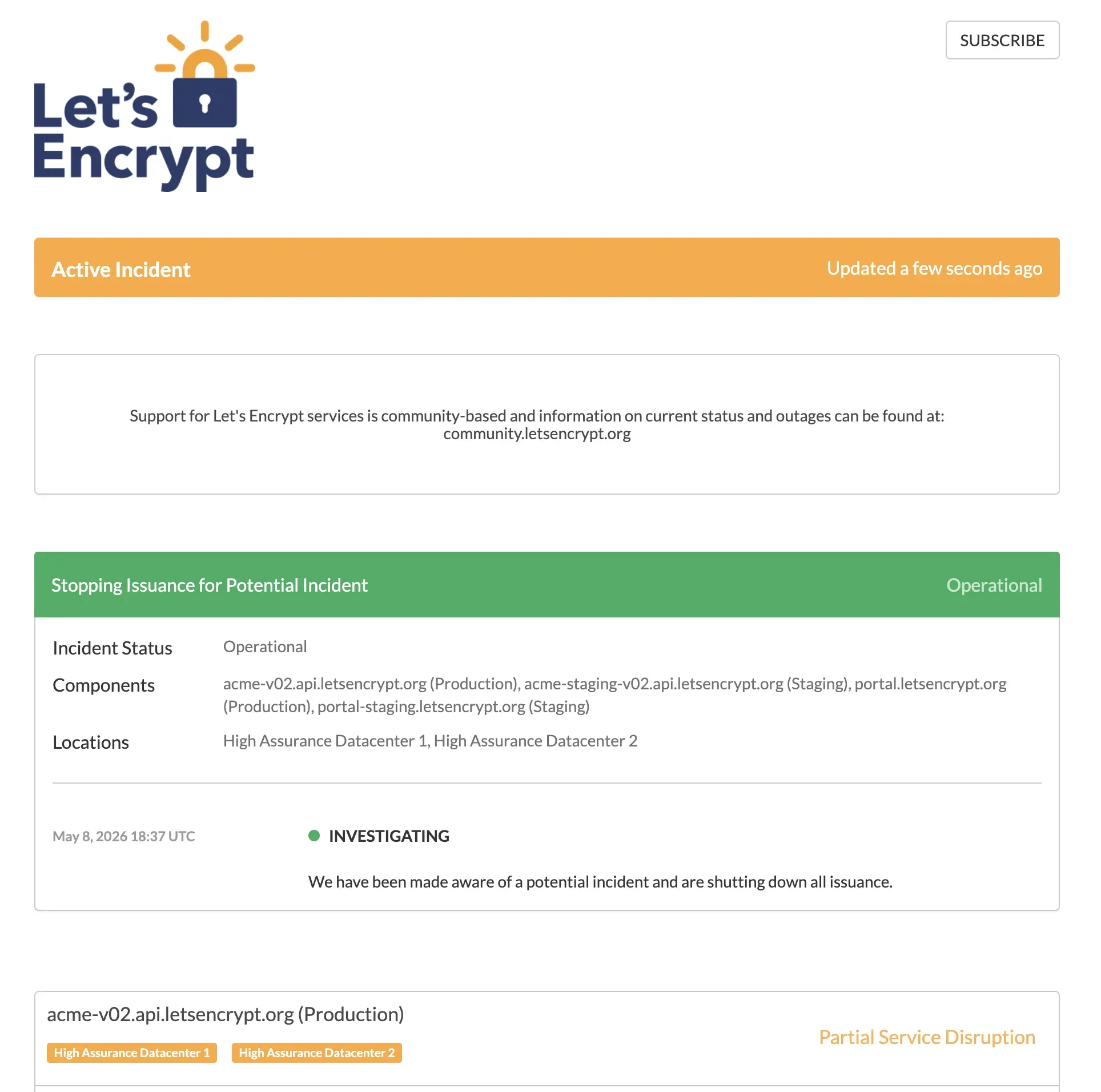
Let’s Encrypt’s status page opened the incident at 18:37 UTC on 2026-05-08 with a single sentence: “We have been made aware of a potential incident and are shutting down all issuance.” The production ACME directory endpoint at acme-v02.api.letsencrypt.org returned HTTP 503 for roughly two and a half hours before service was restored shortly after 21:00 UTC. The status page now describes the cause as an issue with the cross-signed certificate from Let’s Encrypt’s Generation X root to its new Generation Y root, and confirms issuance has been switched back to the Generation X root for the tlsserver and shortlived ACME certificate profiles.
We saw it across mySites.guru subscriber sites during the outage window. Renewal jobs that ran between roughly 18:37 and 21:00 UTC came back with urn:ietf:params:acme:error:serverInternal and 503 Service Unavailable from acme-v02.api.letsencrypt.org/directory. None of those failures would reach the site owner until their alert threshold tripped, or worse, until the cert actually expired and a browser started blocking visitors. That gap between “renewal failed” and “site is down” is the whole reason we built expiry monitoring, and incidents like today are the reason it earns its keep.
This broke far more than just self-hosted ACME clients. At 20:46 UTC, DigitalOcean opened an incident confirming the Let’s Encrypt outage was breaking new certificate issuance for Spaces, Spaces CDN, Load Balancers and App Platform Custom Domains, and causing stuck or delayed creates/forks/restores on Managed Databases (Mongo, PostgreSQL, MySQL). DigitalOcean’s note that “operations related to Managed Databases and App Platform Custom Domains will automatically retry and should complete successfully once the upstream outage is resolved” was fair, and confirms that a Let’s Encrypt halt is not just a self-hosted-VPS problem: it cascades through every managed-platform layer that depends on Let’s Encrypt for TLS termination.
The rest of this is what we know about the cause, what’s still unclear, and what to do if you ran a renewal during the outage window.
What Does the Let’s Encrypt Incident Mean for My Sites?
Existing certificates keep working until their stated expiry.
The outage breaks new issuance and renewal, not currently-valid certificates.
The TLS handshake between a visitor’s browser and your web server doesn’t phone home to Let’s Encrypt on every request. CRLs are static-published documents. OCSP (the live revocation lookup that used to depend on CA infrastructure being available) reached end of life in August 2025. So a Let’s Encrypt outage today does not in itself break sites that already hold a valid cert.
What it does break is new issuance and renewal. Every certbot, acme.sh, Caddy, Traefik, cPanel autossl and managed-host renewal job currently in flight is hitting that 503. ACME clients on default schedules typically retry with some backoff, and most are configured to renew at 60 days into a 90-day lifetime. A multi-hour outage rarely causes immediate expiry. A multi-day outage starts catching the long tail of certs that were already within their 30-day renewal window when it started.
The certs most exposed are the ones using Let’s Encrypt’s six-day “shortlived” profile, generally available since 2026-01-15. Shortlived certs renew every 2.5 days or so, so even a 12-hour outage eats a meaningful chunk of the renewal margin.
How the Let’s Encrypt Outage Unfolded
A cross-sign problem with their new Generation Y root.
Issuance has been rolled back to the older Generation X root for the tlsserver and shortlived ACME profiles.
The status page note reads: “Due to an issue with the cross-signed certificate from our Generation X root to our new Generation Y root, all issuance has been switched back to our Generation X root certificate. This affects our ‘tlsserver’ and ‘shortlived’ ACME certificate profiles.”
In plain English: Let’s Encrypt has two root certificates in play. Generation X is the older one that every browser, OS and TLS library has trusted for years. Generation Y is the newer one they’ve been rolling in. To bridge old clients during the rollover, end-entity certs were being issued from an intermediate that chained up via a cross-signed link from Generation X to Generation Y, so anything trusting either root could validate the chain. The cross-sign is what broke. Issuing only via Generation X again keeps trust working for everyone, at the cost of pausing the Generation Y rollout (the shorter-chain handshake and ECDSA-root benefits Generation Y was meant to deliver).
For most operators that means nothing changes. Certificates issued today after roughly 21:00 UTC chain via Generation X, the way they have for years. Browsers and TLS clients won’t notice. The only people who need to look twice are anyone who pinned the new Generation Y root in their own infrastructure (rare, but possible for some IoT or embedded use cases): verify your setup still validates.
Postmortem: Missing Extended Key Usage on the Cross-Signs
On 2026-05-13 at 20:32 UTC Let’s Encrypt closed the incident with a clear root cause. The cross-certified subordinate CAs that bridged Generation X and Generation Y were missing Extended Key Usage (EKU) fields that are now required. The CA/Browser Forum Baseline Requirements tightened EKU rules so that a subordinate CA used to issue TLS server certificates must have an explicit id-kp-serverAuth EKU; a subordinate without one is no longer a valid issuing chain for serverAuth use. The original cross-signs had been issued without that field, which is why the new chain stopped validating once the requirement took effect.
The fix had two phases. The first, on 2026-05-08, was the operational rollback that’s already in this post: switch the tlsserver and shortlived ACME profiles back to issuing from the Generation X root so the rest of the world keeps validating. The second, on 2026-05-13, was the proper repair: revoke and reissue the cross-signs of X2/YR by X1, and YE by X2, with the EKU fields included. End-entity certificates were not revoked because they’re still compliant on their own. The repair is on the intermediates, not the leaves.
If you hold a certificate that was issued by the tlsserver or shortlived ACME profiles in the window when the bad cross-signs were in use, Let’s Encrypt recommends renewing it so the chain pulls the corrected intermediate. The ACME Renewal Information (ARI) API is signalling affected certificates to renew immediately, so any ACME client that honours ARI (recent certbot, recent acme.sh, Caddy 2.7+) will pick the renewal up on its next scheduled run with no operator action required. Anyone who pinned the new Generation Y root in their own infrastructure should verify their cross-signed intermediate has been refreshed.
This is the right shape of postmortem from a CA. Fast operational mitigation, clear root cause, damage limited to intermediates, not leaves, and a renewal signal pushed through ARI so the long tail of clients fixes itself.
Incident Timeline
All times UTC. We’re updating this list as new signals come in.
| Time (UTC) | What happened |
|---|---|
| 2026-05-08 17:17 - 17:27 | Scheduled Database API maintenance on acme-v02.api.letsencrypt.org (Production), High Assurance Datacenter 1 and 2. The status page note said ACME clients might see timeouts of up to 10 minutes during the window. Marked Done at 18:46 UTC. Same component, same datacenters as the issuance halt that followed about an hour later. Let's Encrypt has not linked the two, and we're not either - but it's the timing detail people will ask about. |
| 2026-05-08 18:37 | Let's Encrypt opens incident "Stopping Issuance for Potential Incident". Single-sentence message: "We have been made aware of a potential incident and are shutting down all issuance." Components flagged: acme-v02.api.letsencrypt.org (Production), acme-staging-v02 (Staging), portal.letsencrypt.org, portal-staging. |
| 2026-05-08 18:47 | Status page last updated. Production confirmed at "Partial Service Disruption", datacenters High Assurance 1 and 2. No further public communication after this point. |
| ~19:00 | First failed renewal jobs on mySites.guru subscriber sites. ACME clients return urn:ietf:params:acme:error:serverInternal against /directory. Staging endpoint still healthy, returning HTTP 200, confirming the halt is targeted at production. |
| ~19:30 | Production /directory still HTTP 503. No thread on community.letsencrypt.org incidents board. No top-of-page Hacker News discussion. Twitter chatter starting but unconfirmed. |
| 2026-05-08 20:46 | DigitalOcean opens an incident on its status page: "Let's Encrypt Outage Affecting Certificate Issuance and Managed Databases Operations", status Identified. Affected components flagged Global: App Platform, Managed Databases, Load Balancers, Spaces, Spaces CDN. Symptoms: inability to create new Let's Encrypt certificates for Spaces / Load Balancers / App Platform Custom Domains, and stuck or delayed creates/forks/restores on Mongo, PostgreSQL and MySQL managed databases. DO's note: operations will automatically retry and complete once Let's Encrypt is back. Confirms the outage is now visible at the managed-platform layer, not just on self-hosted ACME clients. |
| ~21:05 | Issuance restored. acme-v02.api.letsencrypt.org/directory returns HTTP 200 again. Status page note: "Due to an issue with the cross-signed certificate from our Generation X root to our new Generation Y root, all issuance has been switched back to our Generation X root certificate. This affects our 'tlsserver' and 'shortlived' ACME certificate profiles." Total outage window: roughly 2h 28m. |
| 2026-05-13 20:32 | Incident closed. Status moved back to Operational. Let's Encrypt's note identifies the root cause as missing Extended Key Usage (EKU) fields on the cross-certified subordinate CAs, which are now required. Let's Encrypt has revoked and reissued the cross-signs of X2/YR by X1, and YE by X2. End-entity certs are not being revoked because they remain compliant. ARI is signalling affected certs (those issued by the tlsserver and shortlived profiles) to renew now. Total incident window from initial halt to closure: ~5 days, but issuance itself was only paused for ~2h 28m on 2026-05-08. |
| Now | All ACME profiles operational. Any client that honours ACME Renewal Information (ARI) will renew affected certificates automatically. Watching letsencrypt.status.io and community.letsencrypt.org/c/incidents for any further detail or Generation Y reintroduction notice. |
Warning
If you have already-issued certs that need re-issuance for any reason today (key compromise, domain change, SAN addition), assume that operation is blocked until further notice and plan around it.
How Do I Find Every Site With an At-Risk SSL Certificate?
The hard part of an incident like this isn’t the technical fix on any one site. It’s knowing which sites in your portfolio are at risk. If you manage twenty Joomla and WordPress sites for clients, you have two questions to answer in the next ten minutes:
- Which of my sites’ Let’s Encrypt certs are inside their renewal window today?
- Which of my sites’ renewal crons ran in the last hour and failed?
mySites.guru has tracked SSL certificates on every site snapshot since 2012. On every snapshot we download the active certificate the same way a browser would, then record the issuer, expiry date and full chain validity. The dashboard sorts every connected site by certificate expiration date. During an incident like today’s, that sorted list is your priority queue.
The default alert window is two days before expiry. For most sites running a healthy renewal cron that’s plenty (the cron renews at day 30, the alert is a safety net). Today is the day that safety net actually matters.
If you’re not a subscriber yet, you can connect your sites and run the same SSL audit in a free audit. The SSL state of every connected site is one of the things the audit covers.
mySites.guru Subscriber Action Steps
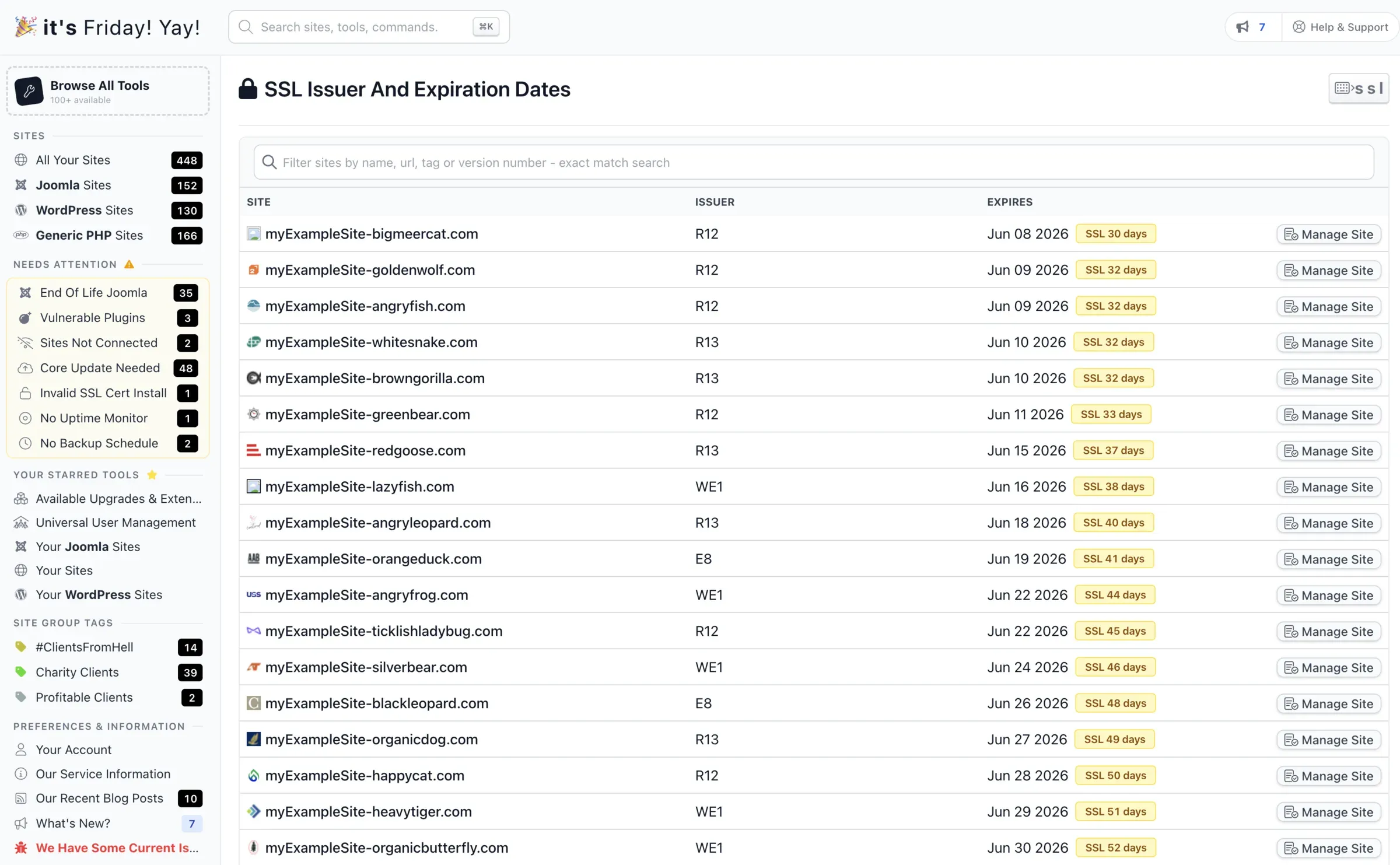
Open manage.mysites.guru/en/sites/by/ssl/expiration. The page lists every connected site sorted by SSL expiration date, with the issuer (Let’s Encrypt, ZeroSSL, Sectigo, cPanel auto-SSL, whatever) for each. That’s the single view you want during this incident.
Reading the issuer column
The codes in the Issuer column are the certificate authority's intermediate CA short names. The ones starting with R (R10, R11, R12, R13, R14) and E (E5, E6, E7, E8, E9) are all Let's Encrypt: R-series are RSA intermediates, E-series are ECDSA. WE1 and WR1-WR4 are Google Trust Services. Anything starting with R or E in this dashboard means the site is renewing through Let's Encrypt and is exposed to today's incident.
Three things to do with it:
- Anything in the next 14 days needs eyes on it today. Sort by expiration, look at the top of the list, decide whether each site can wait or needs a manual intervention (paid stopgap cert or a switch to ZeroSSL).
- Filter by issuer. If a site is showing a non Let’s Encrypt issuer, it’s not affected by this incident at all. Move on.
- For at-risk sites, check the renewal cron logs on the host. Most failures right now will be
urn:ietf:params:acme:error:serverInternalfromacme-v02.api.letsencrypt.org/directory. That’s the LE outage, not anything wrong with your config.
If your alert window is set at the default two days, push it out for the duration of the incident. We’d rather over-alert and have you ignore a few than under-alert and miss the one site that mattered. The alert window is configurable per site.
Export the list to CSV from the same screen if you want to share it with a co-worker or work the priority queue offline.
How Do I Renew an SSL Certificate When Let’s Encrypt Is Down?
If you have a cert that needs to renew before Let’s Encrypt is back, there are three options that actually work.
The first is to switch your ACME client to ZeroSSL. ZeroSSL speaks ACME, issues free 90-day DV certificates, supports wildcards on the free tier, and is the most widely-used drop-in for Let’s Encrypt during incidents like today’s. It requires External Account Binding (EAB), which is a one-time pairing step: log into ZeroSSL Developer, click “Generate” under EAB Credentials for ACME, and copy the two strings it gives you (a KID and an HMAC key). The KID is short. The HMAC key is a longer base64 string. You only generate them once per account and reuse them for every certbot run.
For certbot, the switch looks roughly like the example below. This is illustrative, not copy-and-paste. Replace the placeholders with your real EAB credentials, your webroot path, and your domain names before running it.
# EXAMPLE - swap placeholders for real values before running
certbot certonly \
  --server https://acme.zerossl.com/v2/DV90 \
  --eab-kid PASTE_YOUR_EAB_KID_FROM_ZEROSSL_DASHBOARD \
  --eab-hmac-key PASTE_YOUR_EAB_HMAC_FROM_ZEROSSL_DASHBOARD \
  --webroot -w /var/www/html \
  -d example.com -d www.example.com
--eab-kid and --eab-hmac-key come from the ZeroSSL EAB credentials screen. -w is the webroot path that serves files for example.com (whatever directory /.well-known/acme-challenge/ is reachable from on your host). -d lists every name you want on the cert.
Two caveats. If you have CAA DNS records pinning issuance to letsencrypt.org, ZeroSSL’s challenge will fail until you add or replace the CAA record. And every CA has its own rate limits, so don’t try to migrate hundreds of sites in one batch. A handful of high-priority renewals is the right scope during a short outage.
The second option is a paid cert as a stopgap. DigiCert, Sectigo, GlobalSign, Namecheap and Google Trust Services all issue paid 1-year DV certs for somewhere between $5 and $50 with same-day turnaround. Not elegant, but if a flagship site is hours from expiry and you need certainty today, this is the option that delivers it. Replace it with Let’s Encrypt once issuance resumes.
The third option is to wait. For most sites that’s the right answer. Let’s Encrypt outages have historically resolved in hours, not days. Default 90-day certs renewing at day 30 have a 30-day cushion. Unless you’re on shortlived certs or you’re already inside the 14-day red zone, waiting is fine.
Note
If your renewal cron is going to retry every hour for the next week regardless of whether it succeeds, you do not need to do anything special during the outage. The retry will eventually succeed. The risk is the silent-fail case where the cron logs an error and no one reads the log.
Let’s Encrypt Alternatives for Free SSL Certs
If you want a free Let’s Encrypt alternative for the affected sites today, the realistic answer is ZeroSSL. It’s free, it speaks ACME, it issues 90-day DV certificates with wildcard support on the free tier, and it’s the most widely-used drop-in when Let’s Encrypt is unavailable.
A few details worth knowing before you switch.
ZeroSSL requires External Account Binding (EAB) on its ACME endpoint. EAB is a one-time pairing step: log into ZeroSSL Developer, generate EAB credentials for ACME, and pass the resulting KID and HMAC key to certbot, acme.sh, Caddy or whichever ACME client you use. We have a worked certbot example in the previous section.
CAA records will block ZeroSSL until you fix them. Run dig CAA your-domain.com first. If you see issue "letsencrypt.org", that record is telling every CA except Let’s Encrypt to reject issuance. Either remove it or add issue "sectigo.com" (ZeroSSL’s underlying root is Sectigo) before you run the renewal. CAA changes propagate at DNS speed, which is usually minutes, but plan that step first.
Free-tier rate limits exist and aren’t fully published. ZeroSSL has documented 429 issues on multi-SAN HTTP-01 issuance under cert-manager, which is fine for the handful of urgent renewals you’re doing during an outage but not something to rely on as a primary portfolio-wide CA. Move the few sites that need to renew today, leave the rest on Let’s Encrypt’s renewal cron to retry once issuance resumes.
One historical aside, in case older guides bring it up: Buypass Go SSL used to be the other go-to free ACME alternative. It discontinued issuance on 2025-10-15 and shut down its ACME endpoint on 2026-04-15. Any tutorial pointing at api.buypass.com/acme/directory is now stale. ZeroSSL is the live recommendation.
Short Certificate Lifetimes Amplify Outages
Let’s Encrypt’s original 90-day rationale from 2015 was straightforward: shorter lifetimes limit the damage of a key compromise and force operators to automate renewal. Both arguments are correct. The trade-off no one spent much time on in 2015 is that your operational margin during any CA disruption is exactly the unused portion of the certificate lifetime at the moment it starts.
In December 2025 Let’s Encrypt announced its intention to drop the default lifetime from 90 days to 45 days by 2028. In January 2026 the six-day shortlived profile reached general availability. Both moves are defensible on security grounds (shorter lifetimes do reduce compromise windows). The cost they impose is sensitivity to outages like today’s. A 90-day cert renewing at day 30 has a 30-day buffer. A 45-day cert renewing at day 15 has 15 days. A 6-day shortlived cert renewing every 2.5 days has hours.
Short-lived certs aren’t bad. They’re just unforgiving. As the industry moves towards them, the cost of any single CA going down for half a day grows. Roughly 63% of all TLS-enabled sites depend on Let’s Encrypt, so the short-lifetime trend and the CA monoculture problem stack on each other. Today’s incident is a relatively cheap rehearsal. Once 6-day certs are normal and a CA goes dark for a working day, it’ll be a different conversation.
Let’s Encrypt’s Track Record on Past Incidents
A short operator memory of recent Let’s Encrypt history:
- 2020-02-29: the CAA rechecking bug. A Boulder bug let CAA records be bypassed in some renewal flows. 3,048,289 certificates were flagged. Let’s Encrypt eventually decided not to revoke ~1 million of them past the deadline because doing so would have broken too much of the web. Operational scramble lasted about five days. Bugzilla #1619179.
- 2025-07-21: complete API outage. Multi-hour total ACME API failure, postmortem dated 2025-09-02. No mass revocation, but widespread renewal failures.
- 2025-08-06: OCSP responders shut down for good. Not an outage, but it changed the failure mode for every Let’s Encrypt incident going forward. There’s no live revocation service for browsers to fail to reach. CRLs are now the only revocation transport, and CRLs are static.
- 2026-01-15: six-day shortlived certs GA. Increased the population of certs that are exposed to short outages.
- 2026-05-08: this incident. Cross-signs of X2/YR by X1, and YE by X2, were issued without the now-required Extended Key Usage (EKU) fields. Issuance halted at 18:37 UTC, restored shortly after 21:00 UTC by rolling the tlsserver and shortlived profiles back to the Generation X root. About 2h 28m of pause. Postmortem published and incident formally closed on 2026-05-13 at 20:32 UTC after the cross-signs were revoked and reissued with EKUs included.
This incident sits closer to the 2025-07-21 pattern than the 2020 one: an intended halt, a fast diagnosis, a clean rollback to a known-good configuration, no mass revocation of end-entity certs. This postmortem showed unusually narrow damage - the problem was an attribute missing from intermediates, the fix was on the intermediates, and ACME Renewal Information did the heavy lifting of telling clients which leaves to re-pull. Whether Generation Y comes back next week, next month or next quarter depends on Let’s Encrypt’s confidence in the corrected cross-signs.
What Should I Do Now That Issuance Is Back?
If a renewal cron failed during the 2026-05-08 outage window, it should have retried successfully since 21:00 UTC. Most ACME clients retry on a regular cadence (certbot’s systemd timer runs twice a day, acme.sh runs daily, Caddy retries on its own backoff), so the typical case is “the next scheduled run will succeed and you don’t have to do anything”. If you want to force it, run certbot renew (or your client’s equivalent) once and confirm the cert is reissued.
If your sites were issued by the tlsserver or shortlived ACME profiles between the initial halt and the cross-sign reissue on 2026-05-13, Let’s Encrypt recommends renewing them so the chain pulls the corrected intermediate. The ACME Renewal Information (ARI) API is signalling those certs to renew now, so if your ACME client honours ARI you don’t need to do anything: the next scheduled run will see the renewal hint and act on it. If you’re on an older client that ignores ARI, run a manual renewal once and confirm the new chain is in place. To check, inspect the issued chain with openssl s_client -connect example.com:443 -showcerts and look for the freshly-dated intermediate.
If you manually switched a site to ZeroSSL during the outage as a stopgap, you don’t need to switch it back today. ZeroSSL’s 90-day DV cert is fine to live with until its own renewal date, at which point your normal automation will pick whatever ACME server you’ve left configured.
If you ran a Generation Y-aware integration (rare, but possible if you’d been testing the new root in your own pipeline), verify that any cert issued during the incident validates against your trust store. Pinned trust to the new YR or YE roots is exactly the kind of setup that’s affected by the cross-sign repair: refresh the cross-signed intermediate in any pinning configuration so it has the new EKU.
The 2026-05-08 outage was cheap. About 2h 28m of paused issuance, resolved by an internal rollback to a known-good root, no mass revocation of end-entity certs, with a clean postmortem five days later that fixed the bad intermediates without touching anyone’s leaves. The next one might not be. With shorter cert lifetimes coming and most of the web pointing at one CA, the operational margin keeps shrinking, and any operator running renewals on autopilot without expiry alerts is one bad incident away from finding out the hard way which sites mattered.
Further Reading
- Let’s Encrypt status page, live incident updates
- Let’s Encrypt incidents category, official postmortems
- Why 90-day lifetimes? (Let’s Encrypt, 2015)
- From 90 to 45: cutting default cert lifetime (Let’s Encrypt, 2025)
- Six-day and IP-address certificate GA (Let’s Encrypt, 2026)
- ZeroSSL ACME documentation
- Bugzilla #1619179: 2020 CAA rechecking bug
The postmortem is now in: missing Extended Key Usage fields on the cross-signs, fixed by revoke-and-reissue on 2026-05-13 with ARI handling the long tail of client renewals. If you want a single view of SSL expiry across every Joomla and WordPress site you manage, the free audit is the fastest way to get one in front of you.
Frequently Asked Questions
What is the Let's Encrypt incident on 2026-05-08?
What caused the Let's Encrypt outage on 2026-05-08?
Will my existing SSL certificate stop working during a Let's Encrypt outage?
How long does Let's Encrypt take to recover from outages?
What can I do if a Let's Encrypt renewal fails right now?
What share of the web depends on Let's Encrypt?
Are 6-day Let's Encrypt certificates affected differently?
Does mySites.guru alert on SSL certificate failures during incidents like this?
 Written and edited by a human, with AI assistance. Our approach to AI