How to Turn On Module Versioning in Joomla 6.1
Joomla 6.1 shipped yesterday with one feature that will feel overdue to anyone who has ever lost a module edit: version history for modules. Articles have had this since Joomla 3.2 in 2013. Menu items, categories, tags, contacts, newsfeeds, and user notes picked it up along the way. Modules were the glaring hole in the list. Joomla 6.1.0 finally closes it.
If you manage Joomla sites for clients, you have almost certainly been bitten by this. A typo in a custom HTML module, a bad class name on a menu module, a well-meaning client who “just tweaked the footer” and took their own site offline. Without versioning, the only way back is your last backup, or opening the module side by side with a staging copy and reconstructing the old content by hand.
In 6.1, once you turn the feature on, every module save is captured. Open the Versions panel while editing and you get the same diff-and-restore UI you already use for articles. One click and the module is back.
How mySites.guru Enables Joomla Module Versioning on Every Site at Once
Joomla 6.1 ships with module versioning turned off. On a single site that is a two-click fix. On thirty client sites it is thirty logins, thirty Options dialogs, thirty Save clicks, and thirty reasons to put it off until next week.
mySites.guru now ships a new audit tool called Enable Joomla Module Versioning For Safe Rollback Of Module Edits that runs on every Joomla 6.1 snapshot. It reads the com_modules component params, checks whether save_history is set to 1, and flags any site where it is not. The fix is a single click: the connector writes save_history = 1 and sets a sensible history_limit of 10 if one is not already configured, directly to the #__extensions table. No admin login. No browser tab juggling.

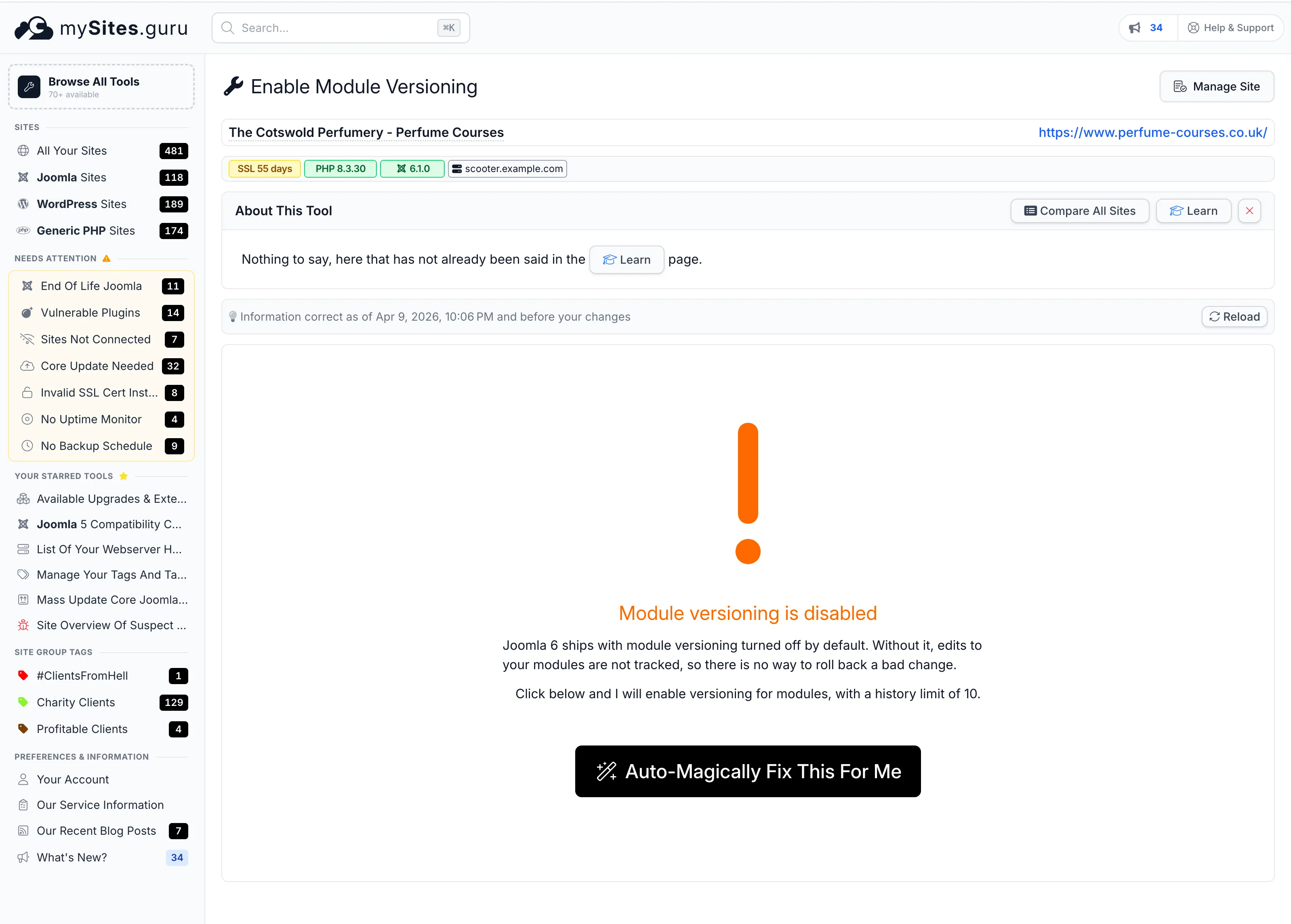
One click on Auto-Magically Fix This For Me and the same check comes back green:
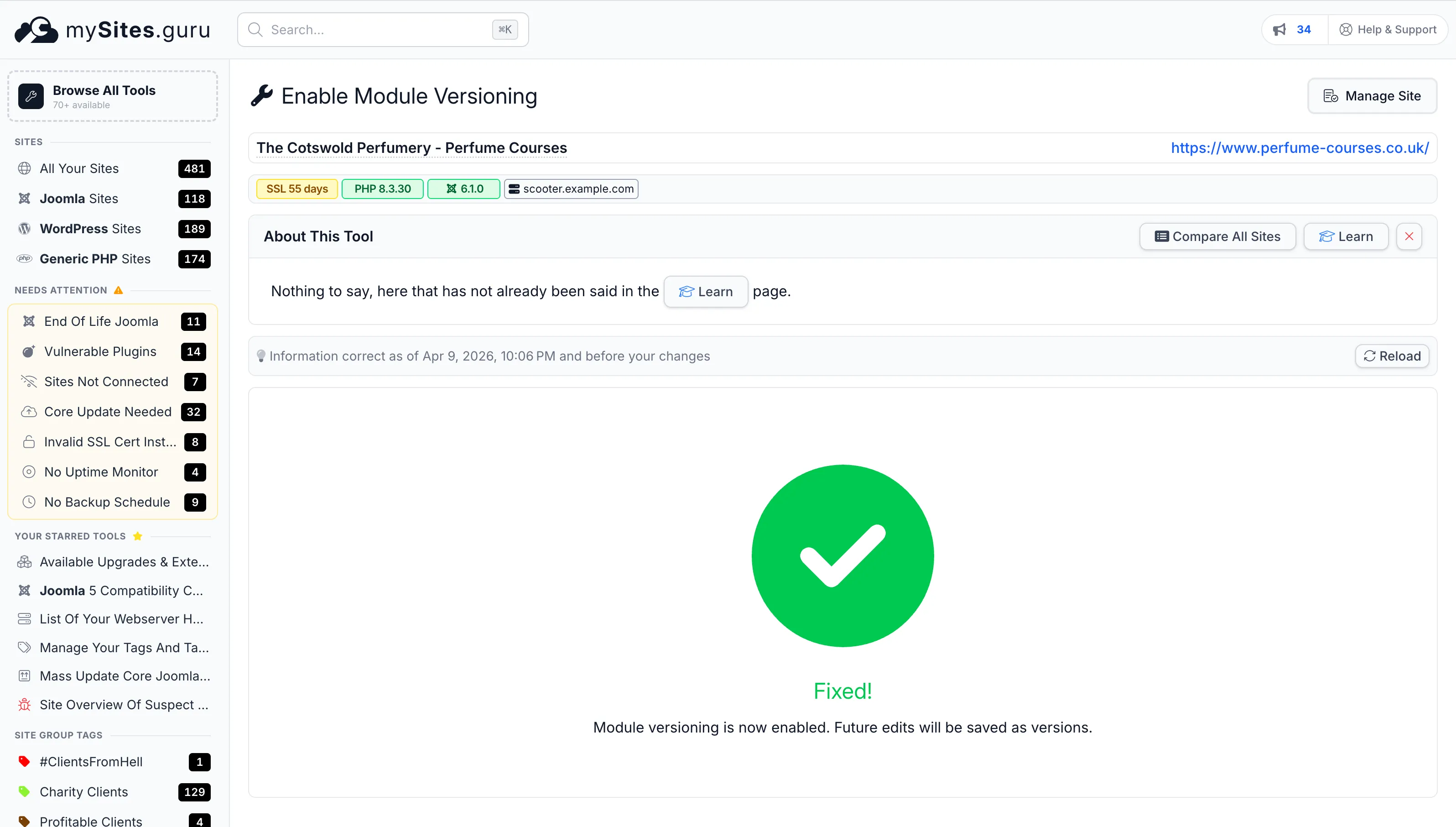
From the all-sites tool view you can see the module versioning status for every connected Joomla 6.1 site in one table and toggle on the ones that are still off. If you manage multiple Joomla sites, this is thirty minutes of busywork collapsed into one button.
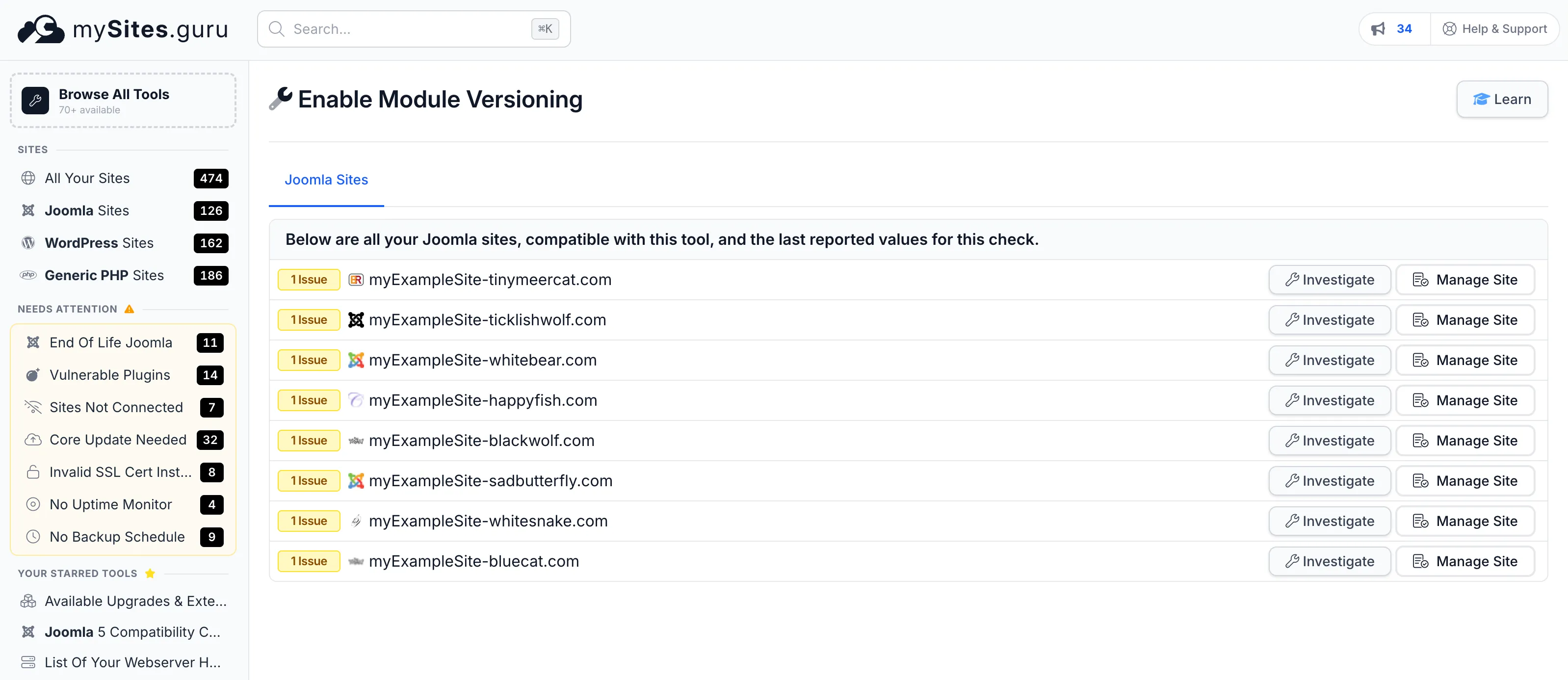
The audit tool only runs on Joomla 6.1 and later, since the feature itself does not exist on older versions. Older sites are simply skipped in the check.
How Do You Enable Joomla Module Versioning Manually in Joomla 6.1?
If you only have one Joomla site, or you want to understand what the setting does before pushing it out across your portfolio, it is a quick fix:
- Log into the Joomla 6.1 admin.
- Go to Components, then Modules.
- Click the Options button in the top right of the toolbar.
- On the Component tab, set Save History to Yes.
- Leave Maximum Versions at the default of
10, or bump it higher if you edit modules frequently and want a longer rollback window. - Click Save and Close.
That is it. From this point on, every module save is tracked.
One thing that trips people up: the setting is on the component level, not in System → Global Configuration. Joomla has a Global Configuration panel that covers site-wide settings like the site name and session lifetime. Component-specific settings like this one live on each component’s own Options screen, reached through the Components menu. Some older tutorials for content history refer to Global Configuration, but for modules in 6.1 the field is specifically in the com_modules component config.
You can also reach the same setting through Extensions → Modules → Options. It is the same underlying config row in the database, so changing it in either location applies everywhere.
What Does Joomla 6.1 Module Versioning Actually Do Under the Hood?
The implementation is smaller than you might expect. Robert Deutz’s pull request #46772 adds just 78 lines of production code. It works by:
- Adding modules as content type id 14 in the
#__content_typestable. This is the table thecom_contenthistorysystem uses to know what kinds of items can be versioned. Pre-6.1 there were 13 types (articles, categories, contacts, tags, and so on). 6.1 addscom_modules.moduleas id 14. - Flipping the save_history switch in
com_modulescomponent params. When save_history is 1, the existing contenthistory hook captures every module save. - Adding a history_limit field in the same component params, defaulting to 10. This tells contenthistory how many versions to keep per module before pruning old ones.
- Adding a version_note text field to the module edit form. When you save a module, you can optionally leave a short note describing the change. The note appears in the Versions list, so future-you (or whoever has to roll back) can see “fixed client logo width” instead of a timestamp.
Everything else already existed. The diff UI, the restore button, the Keep Forever flag, the #__ucm_history storage table - all of it was built for articles years ago and has been reused for every item type added since. Wiring modules into the same system is a few lines of XML and a content type row. The fact that it took twelve years to get here is more a story about how much is already on the Joomla project’s plate than about the difficulty of the feature.
The Audit Trail Is the Quieter Benefit
The rollback safety net is the obvious win, but the audit trail is the quieter benefit. Every version row records who made the change, when, and optionally why. On a shared admin account that is not great, but on a properly configured site with per-user Joomla logins, it becomes a simple answer to “who broke the homepage module last Tuesday.”
What Did Joomla Module Versioning Look Like Before Joomla 6.1?
If you have been on Joomla for a while, you know the workarounds. Most of them were ugly.
Third-Party Extensions
The Module Version extension by RickR2H has lived on the JED for years. It does roughly what 6.1 now does natively. Respectable piece of work, and if you are still on 5.x or earlier it is still the best option. From 6.1 forward you can drop it.
Snapshot Plugins
A pile of third-party backup and audit tools save module configurations on a schedule. That is backup, not version history. It works if you notice the problem within the backup window, not if a client discovers the bad edit three weeks later.
Manual Copy-Paste in Custom HTML Modules
The field hack: before every edit, copy the existing HTML into a text file with today’s date. Works on one module. Does not work on thirty.
Staging Sites
A proper staging workflow solves this, but every small client edit through a staging cycle is its own kind of overhead. For a “just swap the phone number in the header module” change, most agencies skip staging and take the risk.
Native 6.1 versioning kills every one of these workarounds for the specific case of module edits.
Are There Things That Joomla Module Versioning in 6.1 Does Not Cover?
Three caveats worth knowing before you sell this feature to a client.
Frontend Editing Is Not Tracked
The 6.1.0 implementation is admin-only. If a user edits a module through the frontend editing UI, that save does not hit the contenthistory hook and does not create a version row. This is a known follow-up, raised by Brian Teeman in the PR review. Expect frontend support in a future 6.x release. For now, treat frontend module edits as unversioned, and steer important changes through the admin panel where possible.
Existing Modules Have No History Until You Enable the Feature
Versioning starts recording at the moment you flip save_history on. It is not retroactive. If you turn it on today and a module was broken last week, last week’s good state is not in the history. This is why getting it enabled across your portfolio early is worth doing: every day you leave it off is a day of potential rollbacks you will never have.
The Versions Button Only Appears When com_contenthistory Is Enabled
On a default Joomla 6.1 install it is enabled. If you have been through a migration or disabled it for some reason, the Versions UI will not appear in the module edit toolbar even with save_history on. Re-enable com_contenthistory under Extensions → Plugins.
How Does mySites.guru Enable Module Versioning in Joomla 6.1?
For the curious, here is what happens when you click Fix This For Me on the Enable Module Versioning check.
The mySites.guru connector sits on each managed site as a lightweight PHP bridge. When the dashboard sends a fix request for module versioning, the connector:
- Reads the current
paramsJSON from the#__extensionsrow wherename = 'com_modules'andtype = 'component'. - Parses the JSON, or falls back to an empty object if the params are missing or malformed.
- Sets
save_historyto'1'. - Sets
history_limitto'10'if it is not already a positive integer (respecting a value you set manually). - Writes the updated params back to the
#__extensionstable in a single UPDATE query. - Reads back the saved value and returns it to the dashboard so the next snapshot reflects the change.
No filesystem writes. No Joomla admin session. No reliance on the web UI. It is the same mechanism we use for every other Joomla audit and fix tool, and it scales linearly: enabling versioning on 100 sites takes roughly as long as enabling it on 1.
Frequently Asked Questions
Does Enabling Module Versioning Slow Down the Admin?
No. The contenthistory hook is a lightweight insert into a single table on module save. There is no performance impact on admin page loads or frontend rendering. The only time you notice it is when you open the Versions panel, and even then it is a simple query against #__ucm_history filtered by item id.
Can I Set a Different history_limit Per Module?
Not in 6.1. The history_limit is set at the component level and applies to every module saved through com_modules. A higher per-module limit may come later, but for now set the component-level limit to the highest value you want for any module, and rely on the Keep Forever flag on individual versions to preserve the specific states you never want pruned.
What Happens to Versions When I Delete a Module?
The contenthistory rows for the deleted module stay in #__ucm_history by default. If you restore the module from the trash, the history is still there. If you permanently delete the module, the history rows become orphaned but do not cause harm. Joomla has no built-in cleanup for orphaned history rows, so a very long-lived site may accumulate some. It is a non-issue on any reasonably young site.
Does Module Versioning Apply to Menu Modules?
Yes. Menu modules are just modules from com_modules’ perspective. Once save_history is on, menu module edits are tracked like any other. This is separate from the existing menu item versioning, which tracks the menu items themselves.
Further Reading
- PR #46772: Versions for Modules - Robert Deutz’s pull request with the full implementation, reviewer discussion, and testing instructions.
- Mastering Joomla Content Versioning - Brian Teeman’s October 2025 Joomla Community Magazine piece on content versioning. Covers articles specifically, but the Versions UI is identical for modules in 6.1.
- Joomla 6.0 to 6.1 migration guide - official developer notes for the 6.1 release.
- How to enable POW captcha in Joomla 6.1 - the other 6.1 feature worth turning on across your portfolio: a built-in proof-of-work captcha that replaces Google reCAPTCHA.
- Using Content History in your Component - docs on how the com_contenthistory system works under the hood, useful if you develop custom components.
Running a Joomla agency and thinking about 6.1 upgrades? The Joomla Agency Handbook covers update strategy, version management, and multi-site workflows. If you just want to know whether your sites are ready, the mySites.guru Joomla 6 compatibility tool checks PHP, database, and update channel across every connected site in one view.
Frequently Asked Questions
What is module versioning in Joomla 6.1?
Why is module versioning turned off by default in Joomla 6.1?
Where is the setting to enable module versions in Joomla 6.1?
Does module versioning work with third-party modules?
Does module versioning cover frontend editing?
How much database overhead does module versioning add?
How does mySites.guru enable module versioning in Joomla 6.1?
Can I roll back a module edit in Joomla 6.1 after enabling versioning?
 Written and edited by a human, with AI assistance. Our approach to AI