OVH Flagged Our Plugin as Malware. It Is Not, and Here Is the Proof.
If you have had an email from OVH this week telling you there is malware on your hosting, and the file it named ends in bfnetwork/bfRestore.php, take a breath. That file is ours, it is legitimate, and your site has not been hacked. OVH’s scanner made a mistake, and then made a far bigger one in how it reacted to that mistake.
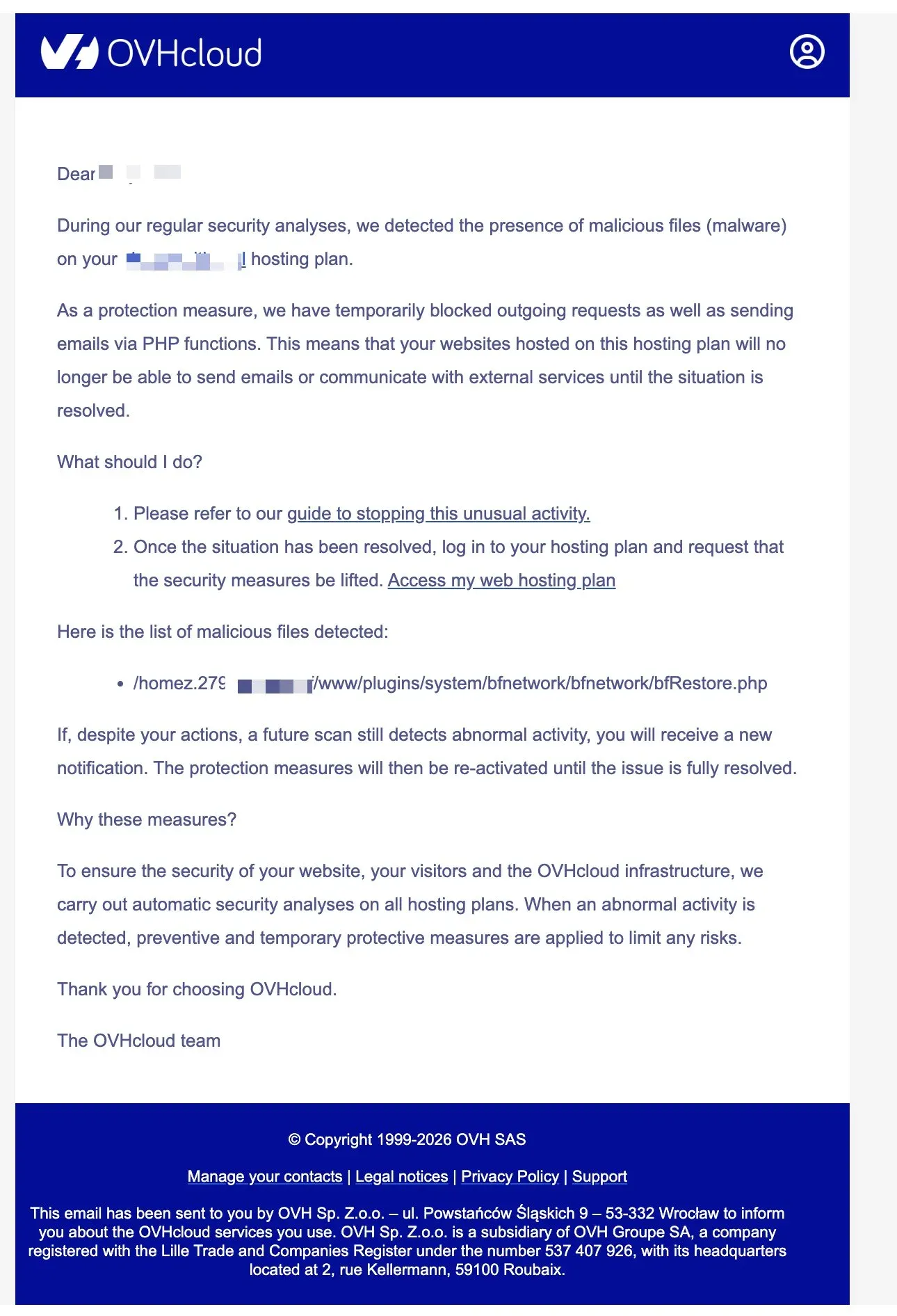
The email looks alarming on purpose. It says malware was detected, that outgoing requests and PHP email have been blocked “as a protection measure,” and it lists a single file:
OVH's email
/homez.xxx/yourname/www/plugins/system/bfnetwork/bfnetwork/bfRestore.php
That file is part of the connector plugin that mySites.guru installs to manage your Joomla site. It is not malware. Below is exactly what it does, why an automated scanner trips on it, and how to get your sites working again.
What bfRestore.php actually is
The bfnetwork plugin is how mySites.guru talks to your Joomla site to run audits, take backups, apply updates, and restore from a backup when something goes wrong. It has been published openly under the GPL, the same licence as Joomla itself, for well over a decade. You can read every line of it.
bfRestore.php is one of the smallest files in that plugin. Its entire job is to act as a bridge. When you ask mySites.guru to restore a site, this file receives a password-protected request and then hands the work over to Joomla’s own restore code. Here is the part that matters, lifted straight from the file:
if ($_REQUEST['password'] !== null && $_REQUEST['task'] !== null) {
    echo '###';
    if (file_exists(dirname(__FILE__, 5) . '/administrator/components/com_joomlaupdate/extract.php')) {
        require dirname(__FILE__, 5) . '/administrator/components/com_joomlaupdate/extract.php';
        die;
    }
}
Read what that does. It checks for a password. If the password is missing, the file does nothing and returns a 404. If the password is present, it loads com_joomlaupdate/extract.php and lets that do the actual extraction.
com_joomlaupdate/extract.php is Joomla’s, not ours. It is the official extraction engine that ships inside every copy of Joomla, in the core Joomla Update component, copyright Open Source Matters. It is the exact code Joomla runs when you click “Update” in the administrator. So the file OVH calls malware is a password-protected doorway to Joomla’s own updater.
The short version
If bfRestore.php is malware, then so is the update button in every Joomla site on the planet, because they run the same extraction code. OVH’s own customers running stock Joomla are using that engine every time they update.
Why an automated scanner gets this wrong
Signature and heuristic scanners do not understand code. They pattern-match. They look for words and shapes that appear in known-bad files: references to extracting archives, writing files, changing permissions, decoding data, calling out to the network. The problem is that legitimate backup and restore tools do exactly those things, because that is literally what a backup tool is for.
This is not a controversial point. Akeeba, who build the most widely used backup tool in the Joomla world, document the same problem on their own site. Their restore code uses standard PHP functions like base64_decode and unpack to handle binary backup data, and scanners flag it, because malware authors use the same functions. The only way to scan source code for malice without false positives is to have an experienced human read every line, and no automated host scanner does that.
So when OVH’s scanner saw a file that takes a request, checks a password, and then runs an extraction engine, it pattern-matched on “extraction” and decided it had found something dangerous. It had not. It found a backup tool doing what backup tools do.
We see the other side of this every day. Our suspect content scanner flags files too, on purpose, using over 2,000 hand-written patterns, because casting a wide net is how you avoid missing the one file that matters. The difference is what happens next. A flag in mySites.guru is an invitation to look closer. We tell you which lines matched, let you send the file to AI malware analysis for a second opinion, and let you compare it against the original. A flag is the start of an investigation. For OVH, the flag was the end of one.
The real problem is what OVH did next
Finding a false positive is forgivable. Every scanner produces them. What is not forgivable is the response.
OVH did not quarantine the single file it objected to. It did not move bfRestore.php aside and leave everything else running. Instead, according to OVH’s own documentation, when its scanner flags a file as malware it can disable three things across the whole hosting plan at once:
- Website access
- Email sending via PHP
- Outgoing requests (what OVH calls TCP OUT)
So one wrong guess about one file took out outgoing connections and PHP email for every website on that plan. Not the file. Not the site the file was on. Everything.
If you run more than one site on an OVH hosting plan, picture what that means. A scanner misreads a backup helper on one site, and suddenly none of your sites can send an email or reach the internet. The customer did nothing wrong. The file did nothing wrong. What breaks is the entire plan.
This is not security, it is collateral damage
A competent host quarantines the specific file it objects to and tells you exactly which one, so you can review it and restore it if it is a false positive. Cutting all outbound traffic and email for every site on the plan, over one heuristic guess, is a blunt instrument that does more harm than the imaginary threat it is responding to.
We tried to fix this at source, and OVH would not engage
The obvious thing to do, once we knew OVH’s scanner was misreading our file, was to talk to OVH directly. We are the software provider. We can show them the source, explain what the file does, and ask them to stop flagging it for every customer at once. That is how you fix a false positive properly: at the source, so no one else gets hit.
We tried. OVH would not discuss it with us, because we are not an OVH customer. From their side, a vendor whose legitimate file their scanner is breaking has no standing to raise it. There is no channel for “your detection is wrong, here is the proof, please correct it.” You have to be the bill-payer on the affected plan to get anyone to listen, and even then, see below.
So the affected customers tried, publicly, on X. The replies were the same first-line script every time: sorry for the difficulty, please send your customer ID and account details by private message, please open a support ticket so a technician can look. Polite, scripted, and going nowhere. No one at OVH would look at the file itself, acknowledge that the detection was wrong, or take ownership of correcting it centrally. Each customer was funnelled back into the same self-certify loop, told in effect to prove their own innocence one account at a time.
That is the part that turns a forgivable false positive into a real failure. A scanner getting something wrong is a bug. Having no way for the wronged party to report it, no human willing to take ownership, and a support process that resets to line one no matter how many people raise the same issue, is a choice. The result is that every affected customer has to take manual action on their own plan, repeatedly, while the underlying detection stays broken and waits to fire again.
What breaks when outgoing connections and PHP mail are blocked
The OVH email frames the block as protection. In practice it breaks the things your sites rely on every day. With outgoing requests and PHP email disabled, here is what stops working:
- Contact and enquiry forms. They submit, the visitor sees a thank-you, and the email never arrives. You lose leads and never know it.
- Password reset emails. Users get locked out of their own accounts because the reset email cannot be sent.
- Order and e-commerce emails. Order confirmations, invoices, and shipping notices vanish. Customers think you have taken their money and disappeared.
- Update checks. Joomla’s “Check for Updates” and WordPress’s update API both need outbound HTTPS. Block that, and your sites stop seeing security patches. The irony of a “security measure” that stops you receiving security updates writes itself. If your Joomla updates start failing too, our guide on the “offered update has expired” error helps you tell a network block apart from a real TUF problem.
- Payment gateway callbacks. Stripe webhooks, PayPal IPNs, and similar server-to-server messages cannot get through, so payments and subscriptions break.
- Everything that calls an API. reCAPTCHA verification, maps, CRM and newsletter sync, and remote management tools like ours all need to reach the outside world.
Many sites send their mail through PHP, which is exactly the path OVH blocks. If your forms or password resets have gone quiet, our guide on verifying your Joomla email configuration walks you through confirming whether mail is the problem.
We are not the only ones, and that is the point
If this were a one-off misfire on a single obscure file, you could shrug it off. It is not.
In the same week, on the same OVH hosting clusters, the same scanner flagged a completely different legitimate file: Akeeba Backup’s kickstart.txt. The pattern was identical. OVH detected the file, decided it was malware, and blocked outgoing connections and PHP email across the affected Joomla sites. Joomla developers reported it on the Joomla.fr forum on the 17th and 18th of June 2026, days before our customers were hit.
Two of the most widely used, openly published, GPL-licensed tools in the Joomla ecosystem, both flagged as malware by the same host’s scanner, within days of each other. That is not a coincidence and it is not a problem with the tools: it is a scanner that cannot tell legitimate backup code from a threat, attached to an automatic response that breaks customer sites first and asks questions never.
It is not only OVH, either. SiteGround’s Anti-Bot AI does its own version of this, serving our monitoring worker a captcha challenge instead of your site. Different host, different mechanism, same outcome: a legitimate, published, fixed IP treated as a threat, with the job of fixing it left to you. SiteGround did it again in October 2026, and its support agents could not agree on why.
What to do if OVH has blocked your plan
You do not need to delete anything. Deleting bfRestore.php only stops mySites.guru from managing, backing up, and restoring that site. The file is safe. Here is the fix:
- Read the file path in OVH’s email. If it ends in
bfnetwork/bfRestore.php, it is the legitimate connector. Leave it where it is. - Log in to your OVH control panel and open the affected Web Hosting plan. You will see an alert headed “Abnormal Activity on Your Hosting” with a button to lift the security measures.
- Tick the confirmation box and lift the security measures. OVH re-scans, and your outgoing connections and PHP email come back.
- Verify it worked. Send a test through a contact form, run Joomla’s “Check for Updates,” and confirm a password reset email arrives.
If OVH re-blocks the plan, open a ticket and ask them to whitelist the specific file rather than block the whole plan. You are not asking for a favour: you are asking them to fix a false positive in their scanner instead of breaking your sites over it.
How we help you tell a false positive from a real hack
The hardest part of a moment like this is the doubt. When a host emails you the word “malware,” you want to be certain before you trust a file. That is exactly the certainty mySites.guru is built to give you.
When our audit flags a file, we do not leave you guessing. We show you the lines that matched, so you can read them yourself. We let you send the file to AI analysis for a safe, suspicious, or malicious verdict with the problem lines pointed out. And for files like core Joomla code, we can compare what is on your server against the known-good original, byte for byte, so you can see for certain whether anything has actually changed. If you ever do find a real compromise, our WordPress hacked guide and Joomla hacked guide walk you through the cleanup, and our malware scanner checks every file in your webspace, including ones a signature database does not know about.
That is the difference between a flag and a verdict. A scanner that pattern-matches and then cuts off your whole hosting plan has given you a verdict it has no business issuing. A tool that flags, explains, and lets you confirm has given you a flag you can actually act on.
Your bfRestore.php is fine. OVH’s reaction to it was not.
Further reading
- OVH: How to react to abnormal activity detected on your web hosting - OVH’s own documentation of the block-and-self-certify process.
- Akeeba: Security scanners reporting Akeeba Backup as malware - why legitimate backup and restore code triggers scanners.
- Joomla.fr forum: OVH flagging Akeeba kickstart.txt - the same scanner hitting a different legitimate file in the same week.
- Malwarebytes Labs: Explained, false positives - how heuristic and signature scanners flag harmless files.
- Joomla documentation: Joomla Update Problems - why blocking outbound HTTPS stops update checks.
Frequently Asked Questions
Is bfRestore.php malware?
Why did OVH flag bfRestore.php as malware?
What did OVH block, and why did my whole site break?
Should I delete bfRestore.php?
Is this only a mySites.guru problem?
 Written and edited by a human, with AI assistance. Our approach to AI