Joomla Update Not Possible Because the Offered Update Has Expired
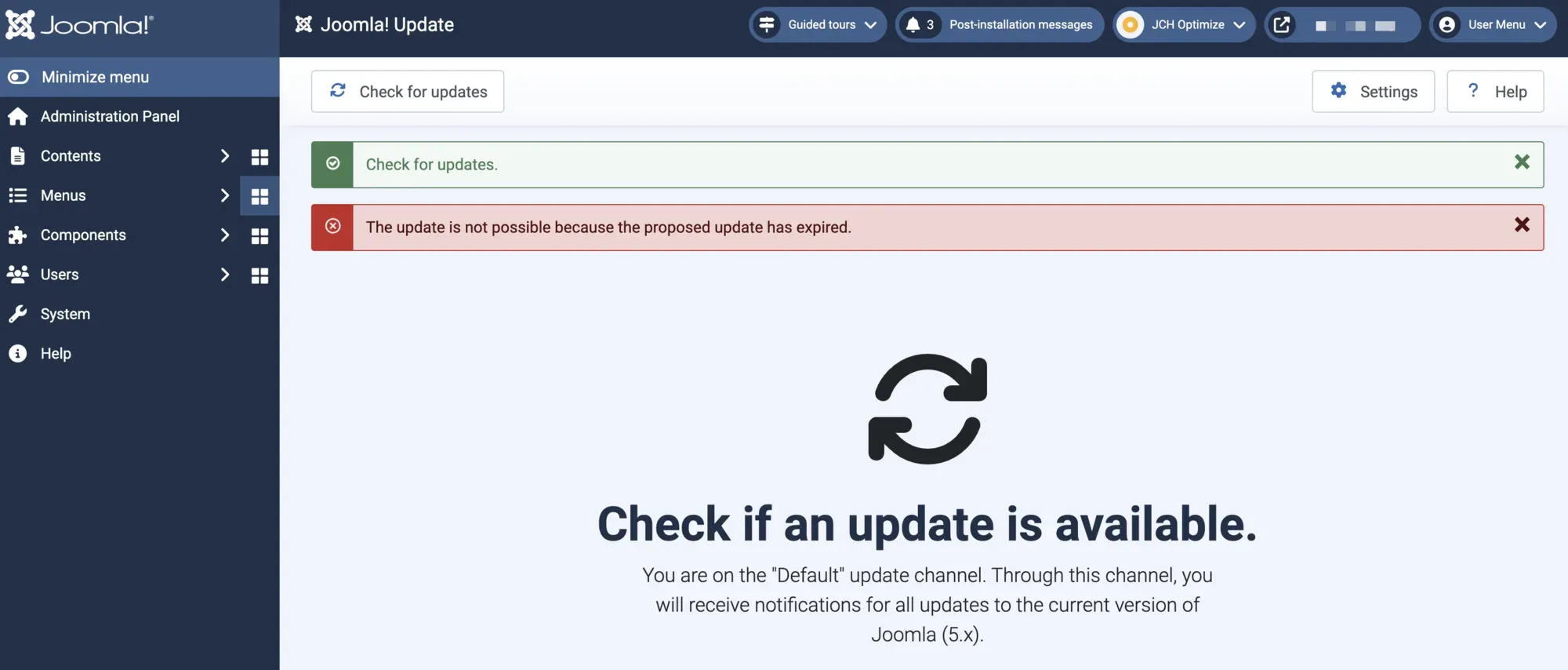
You click Check for Updates in Joomla, expecting the new version you know is out, and instead get a red banner:
Update not possible because the offered update has expired.
Depending on your language pack you might see it worded slightly differently, for example “The update is not possible because the proposed update has expired.” It is the same error either way.
The wording makes it sound like your site did something wrong. It did not. This is a security feature working exactly as designed, and the cause is almost always on Joomla’s side, not yours. Most of the forum threads you will find answer it with “try a manual update” or “clear your cache” without ever explaining what actually happened, which means a lot of people end up resetting and reinstalling things that were never broken.
Here is the real mechanism, how to tell whether the problem is Joomla’s update server or your own install, and the right fix for each, so you stop the second it is safe to.
TL;DR
This is the Joomla core project’s problem, not yours, and there is nothing on your site for you to fix. Their update server stopped receiving the freshly signed files it needs, the existing ones expired, and your Joomla correctly would not trust expired data. You cannot fix it from your end. You wait for the Joomla core project to get their ducks in a row and redeploy the files, which they have had to do more than once before. Re-check in an hour, and if you cannot wait, use Upload and Update with the package from joomla.org.
How mySites.guru Caught This Across Thousands of Joomla Sites
When we manage thousands of Joomla sites at mySites.guru, an error that fires on Joomla’s central update server is not a one-site curiosity. It hits every site at once, and we want to know about it before clients do.
We built a monitor that watches Joomla’s TUF update endpoints every hour and emails us the moment the signing metadata is expired or about to expire. It checks the same three signed files Joomla clients read (timestamp, snapshot, targets) across three vantage points: what the CDN serves, what the origin server serves once you bust the cache, and what the source repository holds. When those three disagree, something in Joomla’s publishing pipeline has stalled and every site checking for an update in that window will see the expired-update error.
That is exactly what happened on 13 June 2026, and the monitor is why this post exists. The numbers below are the live state our check recorded that afternoon, not a reconstruction.
| Source | Version | Expires | State |
|---|---|---|---|
| joomla/updates git repo (HEAD) | v1106 | 2026-06-16 | fresh |
| update.joomla.org/cms origin (cache-bust MISS) | v1100 | 2026-06-13 01:20 UTC | expired ~18h ago |
| update.joomla.org/cms via Cloudflare (HIT) | v1100 | 2026-06-13 01:20 UTC | expired, last modified Jun 11 |
If you run more than a handful of Joomla sites, this is the difference between learning about an update outage from a dashboard and learning about it from a client. The rest of this post is the full explanation, which works whether or not you use a management platform.
What Does the Joomla “Offered Update Has Expired” Error Actually Mean?
The error is a TUF freeze-attack warning. Internally it is the language string JLIB_INSTALLER_TUF_FREEZE_ATTACK, and it fires when the signed update metadata Joomla downloads has an expiry date that is now in the past.
Since Joomla 5.1, core updates are secured with TUF, The Update Framework. Instead of trusting a plain XML file, Joomla downloads a set of cryptographically signed metadata files and verifies them before it will install anything. Every one of those files has an expiry date on purpose. A freeze attack is when someone replays old but still-valid-looking update data to keep your site frozen on an outdated, vulnerable version. TUF defends against it by rejecting any metadata whose expiry has passed.
So when Joomla says the offered update has expired, it is not describing your site. It is telling you the metadata it just fetched from the update server was past its expiry date, and it correctly would not trust it. That rejection is the feature, not the bug.
Why Is My Joomla Site Showing This If Nothing Is Wrong?
Because the expired metadata almost always comes from Joomla’s own update server, not your site. There are two distinct causes, and they need different responses.
Cause One, the Common One: Joomla’s Update Server Served an Expired File
Joomla re-signs the shortest-lived metadata file, timestamp.json, every day, because it is set to expire after just three days. That fresh file then has to be deployed to the public update server and the CDN cache cleared. If that daily deploy stalls, the server keeps serving the previous file until it expires, and from that moment every site that checks for updates gets the freeze-attack error. Nothing is wrong with any of those sites. They are all correctly rejecting an expired file.
Cause Two, the Rarer One: Your Own Cached Metadata Is Stale
A site that has been dormant for months, or one restored from an old backup, can hold a long-expired copy of the metadata locally. When it finally checks for updates and compares its cached file against the current time, the file is expired and the same error fires. This one really is local to your site, and it is the only case where resetting your update component is the correct fix.
Telling them apart is simple, and the next section is the test.
How Do I Tell Whether It Is Joomla’s Server or My Site?
Run two quick checks before you change anything.
- Wait an hour and re-check. Go to System then Update and click Check for Updates again about an hour later. If it succeeds, the cause was a transient expired file on Joomla’s server that has since refreshed. You are done, and you correctly avoided touching a site that was never broken.
- Try Upload and Update. Download the version you want from joomla.org and use Extensions then Manage then Upload and Update. This path installs a package you supply by hand and bypasses the TUF live update channel completely, so the expired-metadata check never runs. If Upload and Update works while the normal check fails, that is near-proof the package is fine and only the live update channel is affected, which means the problem is the server, not your install.
If the error clears on its own within a day, or appears on multiple sites at once, it is the server-side cause and there is nothing to fix on your end. If it persists for days on a single long-dormant or restored site while other sites update fine, it is the local-cache cause, and only then should you reset.
Note
A host-side or CDN cache in front of your outbound update requests can also hold an expired file locally. If you run your own caching proxy, ask your host not to cache responses from update.joomla.org for longer than about an hour.
A Real Example: The 13 June 2026 Outage, Traced End to End
This is the part the forum threads never get to. On 13 June 2026 we watched the whole chain in real time, so here is exactly what broke.
Joomla’s timestamp.json has a three-day life. Version 1100 was signed on 10 June with an expiry stamped at 2026-06-13 01:20 UTC, and it was the last version the update server received (its copy was last modified 11 June). The job that re-signs the file and pushes it to the server is supposed to replace it every day, well before that expiry. It stopped.
The publish pipeline has two parts. A signing half re-signs the timestamp and commits it to the joomla/updates repository. A deploy half, run by the project’s Drone CI, copies the signed files to the public update server over SFTP and purges the Cloudflare cache, then posts a “Repository deployed” status back on the commit. Looking at the commit history, that “Repository deployed” status appears on every commit up to and including 10 June, then vanishes. From 11 June onward, every “Update timestamp” commit sits with no deploy status at all. Drone simply stopped deploying after 10 June.
That is why version 1100 was the last file the update server received before the deploys stopped. It expired on 13 June at 01:20 UTC, three days after it was signed, and nothing newer reached the server to replace it.
The signing half, meanwhile, kept running. The repository normally gets one “Update timestamp” commit a day. On 13 June it got four: the scheduled 01:21 run (version 1103), then three more off-schedule at 13:12, 14:27 and 18:27, up to version 1106. That cadence is a maintainer manually re-running the pipeline through the afternoon, trying to get a deploy to fire. Each run re-signed and committed a fresh timestamp to the repository, and not one of them changed anything on the live server, because the deploy half was the part that was down. We confirmed the server was still serving the expired version 1100 by re-requesting with a cache-buster and getting 1100 back, last modified 11 June, hours after the repository had raced ahead to 1106.
Snapshot and targets, the other two metadata files, were fine the whole time (they expire in December and August). It was purely the expired timestamp gate, served by a deploy pipeline that had stopped three days earlier, blocking every refresh.
The 13 June outage in one line
A global, transient outage of Joomla’s update check, where the metadata was expired and every site correctly rejected it, fixed only when Joomla’s infrastructure team got the deploy working again.
Why Joomla 6 Sites Got Hit Hardest
Joomla runs two parallel update channels, and which one your site uses depends on its version.
Older sites use the plain XML channel at update.joomla.org/core/list.xml. It is an unsigned set of XML files that has existed for years, and it was completely healthy throughout this outage, correctly offering the current versions to the sites that read it. Sites on Joomla 4 and earlier never saw the error, because their update path was never the broken one.
Sites on Joomla 5.1 and later use the signed TUF channel instead, and that is the one with the expired timestamp gate. Here is the detail that explains why the reporter on Joomla 6.0.4 was stuck while plenty of other sites updated fine: the legacy XML channel stops at the Joomla 5 line. It offers 5.4.6 as the newest core and lists no Joomla 6 release at all. Every Joomla 6 release, 6.0.1 through 6.1.1, is published only through the signed TUF channel.
That leaves a Joomla 6 site with no fallback. When the TUF timestamp expired, there was no second, unsigned channel to drop back to, so the update check was fully blocked. The signed data itself was never the problem. The targets file that lists every available version, including the 6.1.1 the reporter wanted, was valid and current the whole time. The only thing standing between that site and its update was the single expired timestamp file the deploy pipeline had stopped refreshing.
This Has Happened Before, Repeatedly
The reason we treat this as a server-side event first and a site problem second is that the public record is clear: the same error has surfaced over and over for two years, and every time it has been fixed on Joomla’s side with no site touching anything.
| Date | Report | Outcome |
|---|---|---|
| Jul 2024 | Issue #43772 (Joomla 5.1.2): a corrupt, zero-length metadata file served to many sites. | Closed the same day. Fixed at the server, no Joomla release. |
| Jan 2025 | Issue #44798 (Joomla 5.2.3): “Remote timestamp metadata expired” while updating. | Fixed server-side within hours. No client action. |
| Jul 2025 | Issue #45789 (Joomla 5.3): “happens to many clients” and even when no update was due. | Closed in minutes. “Already solved” at the server end. |
| Jun 2026 | Issue #47950 (Joomla 6.0.4): the outage traced above, expired timestamp v1100. | Resolved by redeploying the timestamp file. |
The maintainers have been candid about the cause from the start. Back on the July 2024 report, Joomla release-team member Harald Leithner laid out the exact mechanism that has caused every recurrence since:
Harald Leithner, Joomla release team, July 2024
“Joomla uses cloudflare as CDN for our update server, it caches the tuf json files (for j5.1+) and the xml files (for < 5.1). […] Everyday the timestamp.json is regenerated with an uptodate time, we upload the file from the drone CI to our webserver, this tooks a couple of ms. In case cloudflare (or one of the cloudflare mirrors) downloads the file at exact the time the file is created it’s possible that it gets a 0-length file. We use rclone for upload which should prevent this error but I hadn’t the time to debug it in deep. Clearing our cloudflare cache resolves this issue […]”
When it recurred in July 2025, Joomla co-founder Brian Teeman gave the same verdict in a sentence: “I am assuming that it was at the TUF server end and it has been fixed there. So no Joomla release required, the problem should have already disappeared”.
A reporter on the same issue put the client-side takeaway simply: it is on Joomla’s infrastructure side that Cloudflare does the caching, not on yours. Simply wait.
That is the whole reason this post leads with “it is not your site.” A documented, recurring race condition on Joomla’s own update CDN is the prior probability you should start from every time you see this error.
Should I Reset My Joomla Update Component?
Only if you have ruled out the server-side cause first. Resetting is the right fix for stale local metadata and the wrong fix for a transient server glitch, where it does nothing except cost you time.
When you have confirmed it is local (the error persists for days on one dormant or restored site while others update normally), you have three options:
- Reset Joomla! Update via Akeeba Admin Tools. If you run Admin Tools, its Reset Joomla! Update feature clears the cached update state cleanly. This is the least error-prone option.
- Clear the update sites cache. In Extensions then Update Sites, rebuild and re-check so the next fetch pulls fresh signed metadata. On a site running AcyMailing, reinstall AcyMailing afterwards, because Rebuild deletes its update site.
- Upload and Update. Download the package and install it by hand, which sidesteps the TUF channel entirely and gets the site current immediately.
For a site you are bringing back from a long sleep, Upload and Update is often the fastest path to current, after which the normal channel works again because the now-current install fetches fresh metadata on its next check.
Watching This Across a Portfolio Without Refreshing Tabs
A single site owner can afford to wait an hour and re-check. An agency running dozens or hundreds of Joomla sites cannot afford to discover an update outage one support ticket at a time.
mySites.guru already runs a daily check against every connected site’s update streams and emails you the result of auto-updates for both successes and failures, so an account-wide pattern of update failures surfaces as a cluster of alerts rather than a slow trickle of confused clients. Pair that with uptime monitoring and a scheduled backup before any update runs, and an event like the 13 June outage becomes something you read about in an alert and choose to ignore, because you already know it is Joomla’s server and not your sites.
“The offered update has expired” is a failure that looks local but is usually global. The agencies that handle it calmly are the ones with a portfolio-wide view that shows them, in one glance, that every site is failing the same check at the same time. That is the signature of a server-side cause, and the signal to wait rather than touch anything.
When the Error Is Worth Actually Worrying About
There is one case where this error is a real local problem you should act on: a single production site, kept current, that suddenly cannot update while every other site you run can. That rules out the server-side cause. At that point you are looking at stale local metadata, a host-side cache holding an expired file, or a clock on the server set wrong enough that even fresh metadata looks expired. Check the server time first (an NTP drift into the future makes every valid file look expired), then the cache, then reset the update component.
Everything else, the overwhelming majority of the time, is Joomla’s update server having a bad few hours. Your site rejecting the expired file is the system protecting you, and the correct response is patience, not surgery.
Further Reading
- File Checksum Failed in Joomla - the error you get when the metadata checks out but the downloaded package does not match its signed hash, often on release day or after a full disk.
- Joomla update error 999: a dead extension redirecting to LinkedIn - a different Joomla update failure with a completely different cause, an abandoned third-party update site rather than a Joomla.org metadata outage.
- The Update Framework (TUF) - the specification behind Joomla’s signed core updates, including how metadata expiry defends against freeze attacks.
- Joomla Documentation: Joomla Update - the official core update screen, including Upload and Update.
- Joomla Community Magazine: Tamper-Proof core updates for Joomla - the announcement of TUF shipping in Joomla 5.1.
- Akeeba: Reset Joomla! Update - how to clear cached update state when the local-metadata cause is confirmed.
Know before your clients do
mySites.guru watches the updates, backups, uptime, and security of every Joomla and WordPress site you run, from one dashboard, so an account-wide event like an update-server outage reaches you as an alert instead of a support ticket.
Frequently Asked Questions
What does "Update not possible because the offered update has expired" mean in Joomla?
Is my Joomla site broken when I see this error?
Why does "Upload and Update" work when the normal update fails?
How do I fix the Joomla offered update has expired error?
Which Joomla versions are affected by the TUF expired-update error?
Does this affect every Joomla site or just mine?
 Written and edited by a human, with AI assistance. Our approach to AI