Block AI training if you want. Never block AI answers.
Somebody reads an article about AI scrapers, opens their robots.txt, pastes in a list of bot names, and saves. It feels like a small act of housekeeping. On some of the sites we measured, it was the moment their site stopped being citable in ChatGPT, Claude, Perplexity or Apple’s answers, and no one noticed, because a site that has been deleted from an AI assistant looks exactly like a site that was never in one.
So we went and read the live robots.txt of roughly 50,000 Joomla and WordPress sites. Among the Joomla sites that had written any AI policy at all, 10.8% had blocked an answer engine. The people getting this wrong are the ones who thought hardest about it.
So mySites.guru now checks this on every site, twice a day, and the checks are built around one distinction that almost no guide on the internet makes.
The distinction that decides whether AI costs you anything
Every major AI company runs more than one crawler, and they do different jobs.
One collects content to train or ground a model. Turning it away is a legitimate editorial decision about your own content, and it costs you nothing that anybody can measure. Google says so about its own opt-out in as many words: Google-Extended “does not impact a site’s inclusion in Google Search nor is it used as a ranking signal in Google Search.” Apple says webpages that disallow Applebot-Extended can still appear in search results. DuckDuckGo makes the same promise. If you want to opt out of training, opt out of training. It is free.
The other decides whether an assistant can cite you when somebody asks it a question your site answers. Blocking that one removes you from a place a growing number of people now ask their questions, and the traffic does not return when you change your mind six months later, because nothing has recrawled you.
The two look identical in a robots.txt. Both are a User-agent: line and a Disallow: /. Nothing in the file tells you which is which, and the advice circulating online does not separate them, so people who meant the first do the second.
The single most common mistake is one word long
Applebot-Extended is Apple’s training opt-out, and Apple’s own documentation states that it does not crawl webpages at all. Applebot is Apple’s search crawler, and it feeds Siri and Spotlight. In the 1,000 files we parsed crawler by crawler, every site that had shut out an answer engine had also blocked plain Applebot. None had meant to. They lost Apple search and stopped no training whatsoever.
What each crawler is actually for
Here is the taxonomy the mySites.guru checks reason in, taken from each vendor’s own documentation rather than from a community blocklist.
- Training crawlers
- GPTBot, ClaudeBot, CCBot, Bytespider, meta-externalagent and others collect content to train models. Google-Extended and Applebot-Extended belong here too, though neither is really a crawler: both are opt-out tokens applied to data a different bot already fetched. Blocking any of these costs you nothing in search or answer visibility.
- Answer engines
- OAI-SearchBot, Claude-SearchBot, PerplexityBot and DuckAssistBot decide whether an assistant can find and cite you. Blocking one deletes you from that assistant. This is the set no one means to block, and 10.8% of Joomla sites with a written AI policy had blocked one.
- Search crawlers
- Googlebot, Bingbot, Applebot, Yandexbot and the rest. Blocking one removes you from that search engine. On the sites we sampled these were almost always collateral damage from a blocklist aimed at something else.
- User-initiated fetchers
- ChatGPT-User, Claude-User, Perplexity-User fetch one page because a human asked about it. Blocking these does not affect training or indexing. It breaks the case where your own visitor pastes your URL into an assistant and asks a question about it.
The pairs are worth memorising, because getting one wrong is how the damage happens. GPTBot pairs with OAI-SearchBot. ClaudeBot pairs with Claude-SearchBot. Google-Extended pairs with Googlebot. Applebot-Extended pairs with Applebot. In each pair the first is the training opt-out and the second is your visibility.
One site in our sample had blocked GPTBot, ClaudeBot, anthropic-ai and Applebot-Extended alongside OAI-SearchBot, Claude-SearchBot and Applebot. It opted out of training and deleted itself from every answer engine in the same edit.
Does robots.txt keep a page out of Google?
It does not, and Google is unusually blunt about this. Its official introduction to robots.txt opens with a boxed warning:
Google Search Central, in a box marked Warning
“Don’t use a robots.txt file as a means to hide your web pages (including PDFs and other text-based formats supported by Google) from Google Search results. If other pages point to your page with descriptive text, Google could still index the URL without visiting the page. If you want to block your page from search results, use another method such as password protection or noindex.”
The same page says it in the opening paragraph too: robots.txt “is used mainly to avoid overloading your site with requests; it is not a mechanism for keeping a web page out of Google.”
The mechanism is simple once stated. robots.txt controls crawling. It has never controlled indexing. If another site links to a URL you have disallowed, Google can index that URL from the link alone, and it will appear in results as a bare link with no description, because Googlebot was told not to fetch the page and so has nothing to describe it with.
This catches people out constantly, because it is the opposite of what the action looks like it does. Blocking a page in robots.txt prevents Google from ever seeing a noindex tag on that page. Google’s own guidance on noindex spells it out: for the rule to work, the page “must not be blocked by a robots.txt file”, because a crawler that cannot fetch the page never reads the tag. If you want something gone, let the crawler in so it can be told to leave.
Google’s own specification page puts the same point in one line: Google “can’t index the content of pages which are disallowed for crawling, but it may still index the URL and show it in search results without a snippet.”
Search Console reports this state as “Indexed, though blocked by robots.txt”, and in a Reddit thread covered by Search Engine Journal in June 2026 one WooCommerce site owner found 51,000 pages sitting in it. A block is not retroactive either. Pages already in an index stay there until they are recrawled, and a crawler that is not allowed to fetch a page cannot see that it has changed.
Do crawlers have to obey robots.txt?
No. This is a request, not a control, and the standard says so itself. RFC 9309, published in September 2022, describes rules that crawlers “are requested to honor when accessing URIs”, and then states directly that “these rules are not a form of access authorization.” Its security considerations go further: the protocol “is not a substitute for valid content security measures”, and listing a path in robots.txt publishes that path to anybody who reads the file.
Compliance is a choice each operator makes, and some of them have written the carve-out into their own documentation. OpenAI’s crawler docs say robots.txt rules may not apply to ChatGPT-User, on the grounds that a person asked for that specific page. Perplexity says the same of Perplexity-User. Anthropic is the exception and states that all three of its bots respect the file. TollBit’s State of the Bots data for the first half of 2026, reported by Search Engine Journal in August, found that around 15% of identified AI page-fetchers reached URLs the site had marked as disallowed, with ChatGPT-User, Bytespider and Youbot each doing so on nearly half of the European sites that had explicitly listed them.
Every crawler that matters for your visibility does read it and does honour it, which is why a mistake in it is expensive. It does mean the file can only ask; it cannot enforce anything. If content must not be reachable, it needs authentication or a server-side rule, not a line in a text file that everybody can read.
What 50,000 live robots.txt files actually look like
Since these checks shipped, mySites.guru has sampled the robots.txt of roughly 50,000 connected Joomla and WordPress sites, the way a crawler does: over the public internet, from the host root. About 45,000 of them returned something that parsed. Everything in this section is measured, not modelled.
Roughly 50,000 connected Joomla and WordPress sites, live robots.txt fetched from September 2026 onwards. Figures are a point-in-time measurement and will drift as sites are fixed.
The reassuring finding is the one that does not fit in a card. Almost no one has touched this at all: in a separate pass where we parsed 1,000 files crawler by crawler, 96.7% of Joomla sites and 83.2% of WordPress sites named no AI crawler anywhere in the file. Nothing in this post is an argument that you must go and add AI directives. Doing nothing is a perfectly good policy and it is the one most sites already have.
The 7.2% and 9.6% are the surprise. The commonest finding in the group is not a bad rule, it is no readable file at all: a 404, a 403, a timeout, or a themed HTML error page served with a 200 status. That last shape matters more than it sounds, because a naive checker reads a 200 response as a valid file and reports “no rules, everything allowed” when no one can see the file.
About 1.5% of Joomla sites and 0.4% of WordPress sites are serving User-agent: * with Disallow: /. These are live business sites, asking every search engine and assistant on earth to stay away from everything. The overwhelmingly common cause is a launch that never finished: somebody blocks the site while it is being built, which is correct, and then the site goes live and nothing visibly changes. Pages load, links work, forms submit. The only symptom is the site never appears anywhere.
None of this was a research project. We did not commission a study or crawl the open web: we ran a query against data the product already holds, because every connected site is read on its own schedule anyway and the readings sit in a column. Most writing about AI crawlers has to argue from first principles about what site owners probably do. We can go and look at what tens of thousands of them actually did, get an answer the same afternoon, and re-run it next month to see whether any of it moved.
WordPress owners are getting this right more often than Joomla owners
This was the finding we did not expect, and it came through both datasets.
WordPress owners set an AI policy far more often. Across everything measured, 6.9% of WordPress sites turn away at least one training crawler against 4.4% of Joomla sites, and in the 1,000 files we parsed name by name the gap was wider still: 16.3% of WordPress files named and blocked an AI crawler, against 3.3% of Joomla files. More WordPress owners have made a decision here.
They also do far less damage with it. Of the sites that had written any AI policy at all, 10.8% of Joomla sites had blocked an answer engine against 2.3% of WordPress sites. In the 1,000-file sample the same gap shows up in the raw counts: seven of the 23 Joomla files with a policy (30%) had also shut out a search or answer crawler, against four of the 33 WordPress files (12%). Every one of the five sites that had blocked an answer engine was a Joomla site, and every one of those five had also blocked plain Applebot while blocking eleven or twelve training crawlers in the same paste. The WordPress mistakes were milder in kind: DuckDuckBot and Baiduspider, which costs a search engine each, and no answer engines at all.
The explanation is where the policy comes from, rather than which community is more careful. On WordPress it usually arrives generated, from Cloudflare’s managed file or an SEO plugin, and both of those got the training-versus-answers split right because somebody who understood the taxonomy wrote them once. Content-Signal lines appeared on 13.9% of the WordPress files we parsed and 1.6% of the Joomla ones, which is that same edge-generated policy showing up in the data. On Joomla the policy is far more often hand-pasted from a community blocklist into a file the owner edits directly, and a pasted list is exactly the artefact that cannot tell a trainer from its answer twin.
Generated policies respect the distinction. Copied ones do not, and that has nothing to do with which CMS you run.
The nine checks mySites.guru now runs on every snapshot
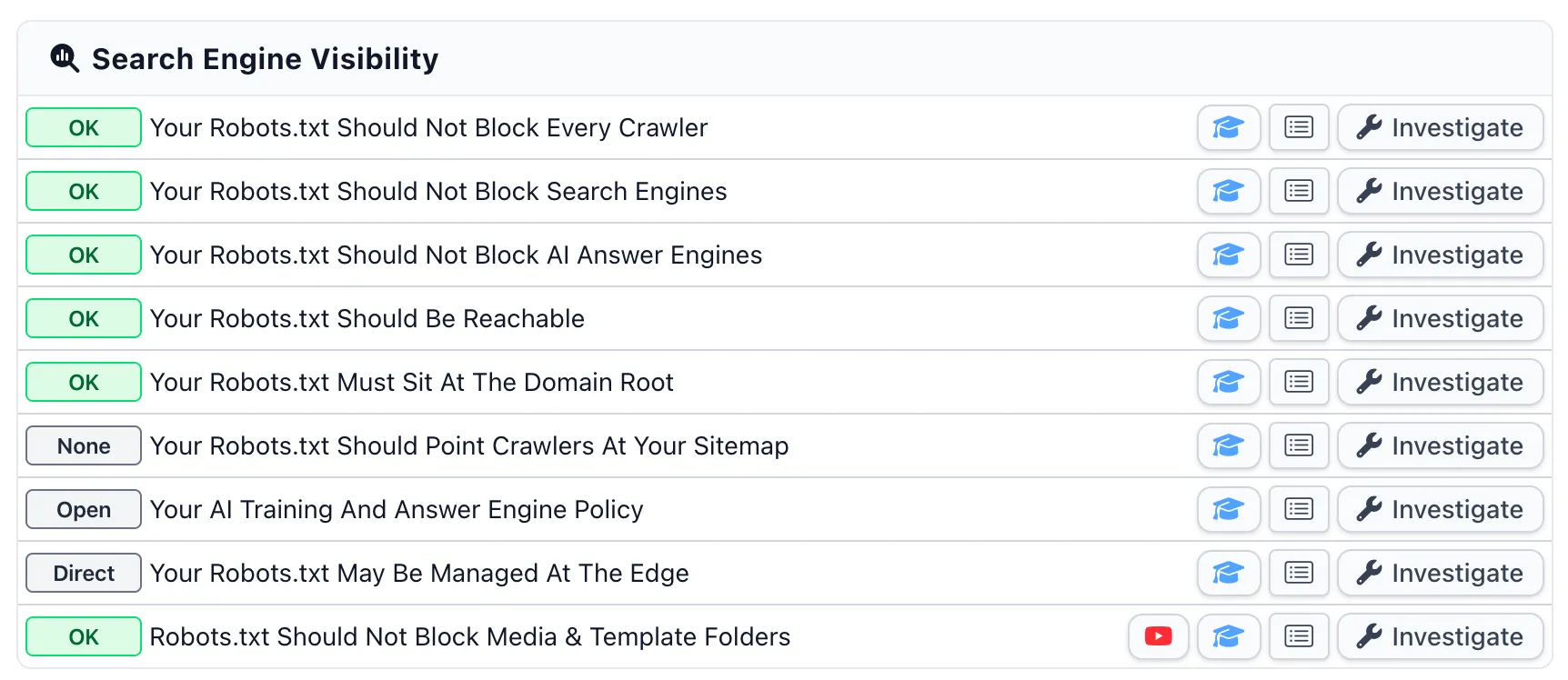
There is a new group on every site’s Snapshot tab called Search Engine Visibility. Joomla gets nine checks and WordPress gets eight, and mySites.guru fetches your live robots.txt from your domain root at most twice a day behind a snapshot.
- Should Not Block Every Crawler
- Fires on User-agent: * plus Disallow: /, the single most damaging line a robots.txt can contain. Has a one-click fix, and it is downgraded to a neutral Staging badge on hosts that look like dev or staging addresses, where blocking everything is the correct setting.
- Should Not Block Search Engines
- Fires when Googlebot, Bingbot, Applebot or another search crawler is named and shut out. One-click fix restores access to that crawler and touches nothing else.
- Should Not Block AI Answer Engines
- The check the whole group was built to make. Fires on OAI-SearchBot, Claude-SearchBot, PerplexityBot or DuckAssistBot. It also names the vendor own-goals, where both sides of a pair are blocked, and the Applebot mix-up specifically.
- Should Be Reachable
- Confirms that a request for /robots.txt returns a robots.txt. Has no fix button: the whole finding is that we cannot read a file, and writing a fresh one would guess at rules your site may already have.
- Must Sit At The Domain Root
- 0.9% of Joomla sites and 0.6% of WordPress sites are installed below the document root, so the robots.txt inside the site folder is read by nothing. No fix button, because the file has to go above the site root and every write mySites.guru makes is confined to it by design.
- Should Point Crawlers At Your Sitemap
- Two tiers. If you have a sitemap and never declare it, that is a warning with a one-click fix. If you have no sitemap at all, that is a neutral badge and no advice, because 'add a Sitemap line' is useless to somebody with nothing to point at.
- Your AI Training And Answer Engine Policy
- Informational and never a fault. It shows which AI crawlers your file turns away and separates the ones that cost you nothing from the ones that remove you from assistants. Two badges, Open and Opt-out, and both are correct answers.
- May Be Managed At The Edge
- Compares a hash of the file on your server against a hash of the file crawlers are served. When they disagree, something in front of your site is generating its own, and editing your copy changes nothing.
- Should Not Block Media & Template Folders
- Joomla only, and the one check that predates this group. Blocking /media/ or /templates/ stops Google fetching the CSS, JavaScript and images it needs to render your pages.
All nine ship with a BETA badge in the interface. The crawler taxonomy behind them changes on the vendors’ schedule rather than ours, so if you find a token classified wrongly, tell us and we will fix it.
What the badges mean
A green OK is a measured pass. A grey No Data means mySites.guru has not fetched that site’s robots.txt yet, and it is not a pass. Every one of the underlying columns is nullable, and reading an unfetched site as healthy would have put a green tick on tens of thousands of sites on the day this shipped, having measured none of them.
Why a pasted AI blocklist can block Googlebot too
This is the mechanism that turns a careless paste into a disaster, and it is a quirk of the format rather than anybody’s bug.
Under RFC 9309, consecutive User-agent: lines accumulate into one group, and the first rule line closes the header. So this blocks both bots:
User-agent: GPTBot
User-agent: CCBot
Disallow: /
The related trap is the specificity rule. A crawler obeys the most specific group that names it, and ignores every other group in the file, including the wildcard. John Mueller explained this on Reddit in July 2026 to a site owner whose disallowed search pages were being indexed anyway: “With robots.txt, the more specific rules win, so if you have a user-agent: Googlebot section, it will only use that section. If you want to apply all the rules in the user-agent: * section, you need to copy them.”
Put those two together and you can see how a file goes wrong. Append a block of crawler names to a file whose last line happens to be a dangling User-agent: Googlebot header, and your names join that group. The Disallow: / you write next then applies to Googlebot as well. Nothing about the text you pasted is wrong. The meaning came from the file you pasted it into.
This is why the mySites.guru training opt-out re-parses its own proposed output before sending it, and will not write at all if any search or answer crawler would end up blocked by the result. Three unit tests pin that behaviour. It is the only place in the whole feature where a bug would take a site out of search results rather than putting one back in.
Why naming crawlers cannot be made to work
Blocking crawlers by name is Whac-A-Mole, and that is why we built the tools the way we did.
Your robots.txt can only ever name the bots you have heard of. It cannot name the far greater number you have not, and it cannot name the ones that do not exist yet, so every new AI company is another line somebody has to remember to add. And it will never name the crawlers that ignore the file altogether, because a list of names only works on the ones polite enough to read it. You end up playing Whac-A-Mole with bot names and their access to your site, which is an unsustainable position to be in. It is the same argument that sinks .htaccess blocklists: a list can only ever hold the bad things you already know about.
The practical failure mode is the one our sample shows. A blocklist gets populated with famous names, and the famous names are the search and answer crawlers, so the list fails at its own goal and succeeds only at removing the site from results.
The worst file in the 1,000 we parsed had a single group owning 147 product tokens, ending in one Disallow: /. Applebot, OAI-SearchBot and PerplexityBot were all in it, alongside GPTBot, GoogleOther, DuckAssistBot and Claude-SearchBot. It was copied wholesale from a community blocklist. The same file had its Sitemap: line commented out, and the URL in the comment was misspelled anyway.
On comprehensive AI blocklists
A longer list is not a more complete one. It is a longer list that is still missing everything no one has heard of, while reading to you as though it were a wall. Anyone selling a comprehensive AI blocklist is selling a file that was out of date the day it was written. Opt out if you want to reserve the right, but do not mistake it for a lock.
What we recommend, and why it names no crawlers
The per-site robots.txt page in mySites.guru offers a recommended file, built from your actual site: your own install path, your own real sitemap URL, your own domain in the header comment. Nothing in it says example.com, because a customer who pastes an example domain into their live file has been actively misled.
For a Joomla site at the domain root it looks like this.
# robots.txt for https://example.org
# Everything below is allowed unless it is named here.

User-agent: *
Disallow: /administrator/
Disallow: /api/
Disallow: /bin/
Disallow: /cache/
Disallow: /cli/
Disallow: /components/
Disallow: /includes/
Disallow: /installation/
Disallow: /language/
Disallow: /layouts/
Disallow: /libraries/
Disallow: /logs/
Disallow: /modules/
Disallow: /plugins/
Disallow: /tmp/

Sitemap: https://example.org/sitemap.xml
For WordPress it is shorter, and includes the Allow line that keeps admin-ajax.php reachable for the front end.
User-agent: *
Disallow: /wp-admin/
Allow: /wp-admin/admin-ajax.php

Sitemap: https://example.org/wp-sitemap.xml
Notice what is missing. There is not one crawler named in either file. No AI blocks, no allowlist, no vendor tokens. It does not disallow /media/ or /templates/ on Joomla either, because blocking those is a finding in its own right and reproducing it in our own recommendation would be recommending the bug.
If you do want to opt out of training, there is a button for it, and it writes exactly five names: GPTBot, ClaudeBot, Google-Extended, Applebot-Extended and CCBot. Those are the five whose opt-out tokens the vendors themselves document. We will not put a token in your file on the strength of a blog post.
That button is the only write in the entire group that adds a block. The other four fixes all restore access. The asymmetry runs deeper than that: the all-sites page has one bulk action and it only ever restores. There is no bulk block button and there never will be, because a single mis-click on one would delete a company’s entire web presence from every search engine on earth, take weeks to notice and months to recover.
We run the same policy here. The live robots.txt for this site names no crawler at all, allows everything, declares its sitemap, and expresses a preference with a single Content-Signal line:
User-agent: *
Content-Signal: search=yes, ai-input=yes, ai-train=no
Disallow: /wp-admin/
...
Allow: /
Sitemap: https://mysites.guru/sitemap-index.xml
Search, yes. Feeding an assistant that cites us, yes. Training, no thank you. No one blocked, and that policy is generated in our own build rather than bolted on by a CDN. mySites.guru reports Content-Signal lines when it finds them and never writes one for you.
Is your robots.txt the file crawlers actually read?
For a meaningful minority of sites, the answer is no, and it is the finding that wastes the most time when no one knows about it.
3.9% of the Joomla sites we have measured, and 8.0% of the WordPress sites, are served a robots.txt that does not match the file on their own server. Several returned an identical 1,836-byte file containing none of their CMS’s own disallow lines, which is what Cloudflare’s managed robots.txt looked like in early September when the origin’s file was never merged into it. Give Cloudflare its due for that version: it named eight training crawlers and left the search and answer crawlers alone, which is the distinction most hand-written blocklists miss.
The eight names have since gone. A zone with the managed setting still on and AI bots still set to block now serves 1,248 bytes that are entirely comment: no User-agent group, no Content-Signal directive, no Disallow line, just the preamble explaining what content signals would mean if the file contained any. The preference moved into Cloudflare’s own Search, Training and Agent controls, where a crawler is stopped at the edge rather than asked in a file. Cloudflare’s documentation still prints the eight-crawler version, and the worked example it links to has already dropped it. Clause (c) of the preamble that remains says that where the operator gives no signal for a use, they neither grant nor restrict permission for it. So the file now reserves rights over nothing.
Cloudflare is not the only culprit either. A host can do it too: SiteGround’s anti-bot challenge serves a noindex page to anything it takes for a bot, Googlebot included. mySites.guru detects the general case by hashing both copies and comparing them, rather than by sniffing a Server: header. Being behind a CDN is not the finding. The disagreement is, and it holds for any edge that rewrites this file rather than only for the one vendor we happen to recognise.
The consequence reaches you, which is the reason the check exists. On an edge-managed site, editing robots.txt on your server changes nothing any crawler will ever see. The obvious next move, which is to open the file manager, edit the file, save it and then wonder why nothing happened, wastes an afternoon and teaches you that the tools do not work. So there is no fix button on that check, and the panel says why: we cannot change what a CDN serves, and a button that appeared to would be lying. It links you to the Cloudflare setting instead.
This is also getting more common. Since 15 September 2026, domains newly onboarding to Cloudflare have Training and Agent crawlers blocked by default on pages that display ads, while Search crawlers stay allowed. That default gets the distinction right, more than most hand-written blocklists manage.
Existing zones are moving to the same three controls. Cloudflare emailed account holders on 16 September to say the migration runs over the following week, and a zone that had Block AI Bots switched on becomes Search: allow, Training: disallow, Agent: block on pages with ads. Cloudflare describes the new Search setting as letting Applebot, Googlebot and Bingbot index a site while telling them not to train on it, so for a zone that was blocking, this is a loosening. Those crawlers feed answer engines, and pages that were invisible to them become eligible to appear there. If you run sites for clients who chose to block, that decision is being relaxed on a schedule they did not pick, and the switch that expressed it leaves the dashboard once the migration finishes.
Which of your sites are hidden right now?
If you have a hundred sites, you should not have to open a hundred pages to find the two that are invisible. There is an all-sites Search Engine Visibility page listing every connected Joomla and WordPress site with a verdict against each one, drawn from the stored readings rather than from a live call, so it renders hundreds of rows at once.
Sites that are hidden from search get a red badge and a Restore button. The restore is careful about what it touches. It comments out the Disallow: / inside the wildcard group rather than deleting it, so you can see exactly what changed and put it back, and it leaves a Disallow: / under a named crawler completely alone, because that is an opt-out no one should undo on your behalf.
Where a crawler shares a group with others, the group gets split rather than cleared. The 180-token file above is why: deleting that one Disallow: / line would have restored Apple and OpenAI’s answer crawlers and simultaneously reversed the owner’s training opt-out for every trainer in the same group, which is an edit to their AI policy that no one asked for.
There is also a daily digest, on by default, that emails you when a site newly starts blocking search engines or answer engines. It is a set difference rather than a count, so a site that has been blocking Googlebot for years never triggers it, and no site is emailed twice for the same block. Blocking an AI training crawler is reported in the interface and never emailed, because it is a legitimate choice and not our business to nag you about.
The one directive that adds reach
Sitemap: is the only line in robots.txt that gives a crawler something. Everything else in the file takes something away.
81.6% of the Joomla sites we have measured declare no sitemap, which sounds like an enormous open goal until you check the second number: only 15.4% of those sites have a sitemap to declare. Telling the other 84.6% to “add a Sitemap line” would be advice they cannot follow, and a check that gives you advice you cannot follow is a check you learn to ignore, and then you ignore it on the day it is right.
So the mySites.guru check has two tiers. Sitemap found but not declared is a warning with a one-click fix that appends the real URL, which is a one-line win. No sitemap found at all is a neutral badge and no nagging, because on Joomla that is an extension decision rather than a robots.txt edit.
WordPress is a different population entirely. 87.5% of WordPress sites already declare a sitemap, against 18.4% of Joomla sites, and most of those lines were injected by Yoast, Rank Math or All in One SEO rather than typed by anybody. Where a WordPress site does omit the line, 56.9% of them have a sitemap sitting there undeclared, so the one-click fix applies far more often than on Joomla. Which leads to the trap that makes this check not act on WordPress more often than you would expect: writing a physical robots.txt into a WordPress webroot is not an addition, it is a takeover. The web server then answers the request itself, WordPress never runs, and every line the SEO plugin was injecting stops being served, including the Sitemap: line you were trying to protect.
What eventually replaces a list of bot names
There is a problem underneath everything above, and it explains why robots.txt can never be more than a request.
A user-agent string is a self-declaration. Anything on the internet can send Googlebot in a header, and plenty does. So the file asks a crawler to identify itself honestly and then to obey rules written for that identity, and both parts of that depend entirely on the crawler’s goodwill. Verifying a bot properly today means reverse DNS lookups and published IP ranges, which works, is fiddly, and ties a bot’s identity to where it happens to be hosted.
Google is now testing a replacement for that, and there is nothing to do about it yet. Web Bot Auth is an IETF draft protocol, developed by a working group formed for it, that has agents cryptographically sign their requests using HTTP Message Signatures. Google’s own summary of the benefit is the useful sentence: it lets a site “move beyond easily spoofed headers to a verified identity and decouple agent identity from IP addresses.”
In practice, a participating agent sends a Signature-Agent header naming a key directory, the site fetches that agent’s public keys once and caches them, and every signed request can then be checked against them. Google is currently signing a subset of requests from its Google-Agent user agent, which authenticates as agent.bot.goog. Most major bot detection services, CDNs and web application firewalls already support the protocol, and Cloudflare publishes a reference implementation.
Google is careful about the status, and so are we. Not every Google user agent uses it, not every request from a participating agent is signed, and Google still recommends verifying by IP address, reverse DNS and user-agent string alongside it. mySites.guru does not check any of this today, and none of the nine checks in the Search Engine Visibility group knows what a signature is.
The direction of travel is what matters. “Which bot is this?” is on its way to being a question with a verifiable answer rather than a trusting one, and that is the thing that would finally make access decisions enforceable in a way a text file has never been. It does not change what you should do with your robots.txt this week. It does suggest that the long-term answer to unwanted crawlers is identity and enforcement at your edge, and that curating a list of names in a public text file was always the wrong layer for it.
Do not paste anything from the internet, including this
Every code block in this post is an illustration. So is every code block in every other article about robots.txt, including the ones that told the sites we measured to block Applebot.
Be careful because this particular file punishes a small mistake out of all proportion to the effort of making it. One line in the wrong group, one crawler name confused with its near-twin, one wildcard section a crawler never reads because you gave it a section of its own, and the site is still up, still fast, still taking orders, and slowly disappearing from the places people look for it. There is no error message. Nothing goes red. You find out from a traffic graph months later.
WordPress owners have the cleanest illustration of how cheap the mistake can be. Settings, Reading, one checkbox marked “Discourage search engines from indexing this site”, ticked during a build and never unticked. It is exactly the right setting while a site is being built and exactly the wrong one the day it launches, and clicking it takes less than a second.
That checkbox is not a robots.txt setting, and this post's checks cannot see it
On current WordPress the Reading checkbox does not write Disallow: / into your robots.txt at all. It emits a site-wide noindex on your pages instead, which is a far more effective way of leaving Google, because noindex is the instruction that actually removes a page from an index. Every check in this post reads robots.txt, so a site can pass all nine and still be invisible. mySites.guru covers that setting with a separate check, Let Search Engines Index The Site, and if you run WordPress it deserves more of your attention than anything to do with AI crawlers.
So before you paste a block of crawler names into a live site, know what each name is for, which group it will join, and what you lose if you are wrong about either. If you cannot say what OAI-SearchBot does without looking it up, that is the signal to leave the file alone. Doing nothing has no failure mode. This file rewards restraint far more reliably than it rewards effort.
What to do this week
You do not need a tool for most of this. Here is the whole job.
- Open
https://yourdomain.com/robots.txtin a browser. If you get a 404, a 403 or a themed error page, that is your first finding and it is the commonest one. - Look for
Disallow: /underUser-agent: *. On a live site, that line is almost never intentional. - Look for any crawler named in the file. If
Applebot,Googlebot,Bingbot,OAI-SearchBot,Claude-SearchBot,PerplexityBotorDuckAssistBotappears above aDisallow: /, you are paying for it in visibility. - If you have a
User-agent: Googlebotsection, check that it repeats every rule you meant Googlebot to obey. It will not inherit anything fromUser-agent: *. - Check the file is at the root of the domain, not inside a subfolder, and remember that
www.and the apex are two different hosts needing two different files. - Add a
Sitemap:line if you have a sitemap and it is missing. Confirm the URL actually returns XML first. - Compare what you see in a browser against the file on your server. If they differ, your CDN is generating it and your server copy is decoration.
If you would rather this ran by itself across every site you manage, that is what we built. The checks run on every snapshot, the all-sites page tells you which sites are hidden, and there is a crawler tester on each site’s robots.txt page that answers “would this crawler be allowed to fetch this URL”, tested against the editor buffer so you can check an edit before you save it to a live site. Google retired its own tester in 2023 and never replaced it.
Doing nothing remains a perfectly good policy. Doing something careless is the expensive one, and it is expensive in a way that produces no error message, no broken page and no complaint from anybody. Just a slow, silent absence from the places people are increasingly asking their questions.
If you want the fuller argument about why the robots changed, Philip Walton’s piece in the August 2026 Joomla Community Magazine is what sent us off to measure our own. Our older post on checking a Joomla robots.txt for SEO problems covers the /media/ and /templates/ story in more depth.
Further Reading
- Introduction to robots.txt - Google's own page, and the source of the sentence that robots.txt is not a mechanism for keeping a page out of Google.
- Block Search indexing with noindex - explains why a page blocked in robots.txt can never have its noindex tag read.
- RFC 9309, Robots Exclusion Protocol - the 2022 standard, including the line that these rules are not a form of access authorization.
- How Google interprets the robots.txt specification - the grouping and specificity rules, including that a disallowed URL may still be indexed without a snippet.
- Google's common crawlers - confirms Google-Extended is a control token rather than a crawler, and does not affect Search.
- Authenticate requests with Web Bot Auth - Google's experimental work on cryptographically signed crawler identity, and where this problem is heading next.
- OpenAI's bots - the GPTBot, OAI-SearchBot and ChatGPT-User split, in OpenAI's words.
- Anthropic's crawlers - ClaudeBot, Claude-SearchBot and Claude-User, and Anthropic's statement that all three respect robots.txt.
- About Applebot - Apple's own page, including the line that Applebot-Extended does not crawl webpages.
- Perplexity's bots - PerplexityBot and Perplexity-User, and Perplexity's own statement that the second generally ignores robots.txt.
- Cloudflare's 2026 bot report - the Search, Agent and Training split, and the defaults that changed on 15 September 2026.
- The robots have changed, and your robots.txt hasn't - Philip Walton in the Joomla Community Magazine, August 2026, which prompted us to go and measure this.
Frequently Asked Questions
Does robots.txt stop my pages appearing in Google?
Do AI crawlers have to obey robots.txt?
What is the difference between GPTBot and OAI-SearchBot?
Is blocking Applebot the same as opting out of Apple's AI training?
Does blocking Google-Extended hurt my Google rankings?
Why does my robots.txt on disk not match what crawlers receive?
Where does mySites.guru check all of this?
Where do these figures come from?
Should I use llms.txt instead?
 Written and edited by a human, with AI assistance. Our approach to AI