Hacked Yesterday, Exploited Today: Why One Cleanup Is Never the End
Three unauthenticated remote-code-execution zero-days hit Joomla in June 2026, one after another: JCE, SP Page Builder and iCagenda. The patches are out, the scanners have moved on, and a few weeks later it all feels like it has settled down. That calm is the dangerous part. The first wave of attackers has done its job: it got in, dropped its files, and went quiet. Those files are still there, waiting.
This is the part most “my site got hacked” advice gets wrong. A modern compromise is not a single event you clean up and forget. The first wave is reconnaissance and groundwork. It plants dormant uploaders, hidden admin accounts and malicious scheduled tasks that do nothing visible at first. Then the second wave arrives, days or weeks later, and uses that groundwork to plant more backdoors, inject JavaScript into your template files, redirect your homepage to spam, and turn the site to profit. Being hacked yesterday does not mean you are safe today. It usually means the opposite.
That gap between the breach and the damage is exactly where reactive cleanup fails and monitoring earns its place. You cannot clean what you cannot see, and the second wave does not announce itself on the page a browser scanner checks. It changes files on disk, between scans, when no one is looking. Catching it means watching for those changes continuously, not running one scan after the horse has bolted.
How mySites.guru catches the second wave between two clean-looking scans
A dormant dropper planted in the first wave will not change the homepage your visitors see, so a browser-level scanner that loads your front page finds nothing. What it changes is files on disk. mySites.guru’s audit is built around that fact, and the most on-thesis tool in it is called Files Modified Between Audits: it compares every file in this audit against the previous one and flags anything that changed in between. A backdoor that lay quiet through your last clean scan and woke up this week shows up here as a diff, in red, with the note “we highly recommend that you review these files.”
Two more checks in the same audit hunt the rest of the second-wave kit. Check Files That Can Attempt To Upload Files looks specifically for the dropper and uploader class of file, the small scripts an attacker leaves behind so they can return and upload more later. Changes To Core Joomla Files Should Be Avoided (and its WordPress equivalent) hashes every core file against the official release, so injected JavaScript or a modified index.php is caught even when the file looks like it belongs.
Note
An audit is a point-in-time snapshot. For the gap between audits, mySites.guru also offers a near-real-time File Watch List: add files like configuration.php, wp-config.php or your template's index.php, and the on-site plugin recomputes their checksum on every page load and emails you the instant the content changes.
The reason this matters is that the audit reads every file on the server, line by line, including the dot-prefixed and oddly-named ones a scanner never opens. During the JCE wave, attackers dropped webshells with .xml.php double extensions into tmp, images and media folders. A scan of your rendered homepage will never find a .xml.php file sitting in /images. A file-level audit that hashes everything will. That is the whole difference between checking what your visitors see and checking what is actually on your server.
Here is what that looks like on a real site, caught in an audit. These are confirmed backdoors, flagged “Hacked File” against a known-bad hash, sitting and waiting:
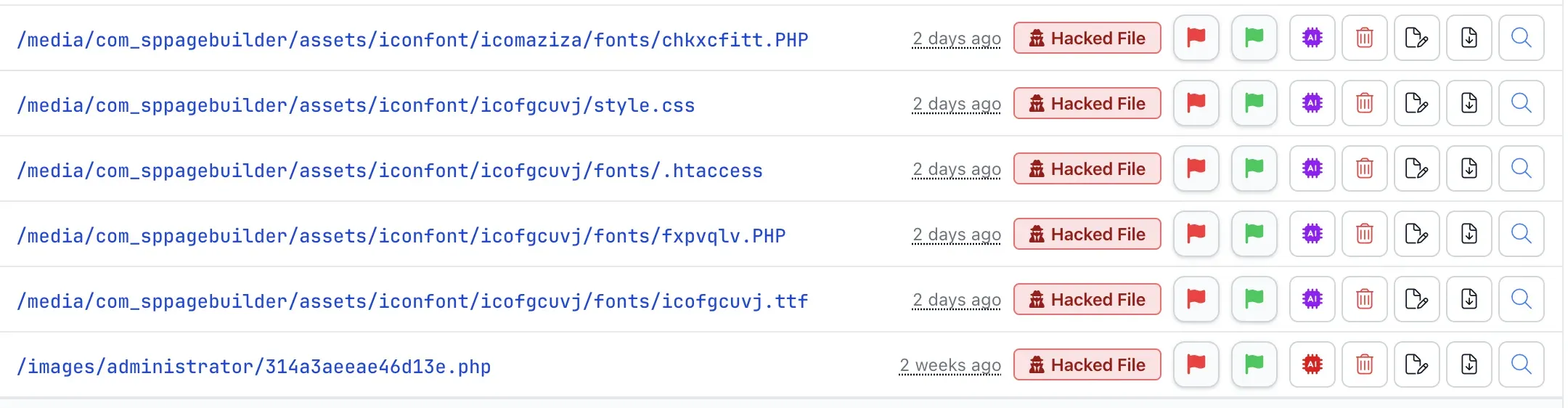
Look at the dates. One shell, 314a3aeeae46d13e.php in /images/administrator, was planted two weeks ago. The rest, scattered through /media/com_sppagebuilder/assets/iconfont/ as .PHP files and a .htaccess hidden in a fonts folder, appeared two days ago. Two separate visits, two waves, both dormant. None of them changed a single thing a visitor would see, which is exactly why an external scanner that only reads your rendered pages walks straight past them. mySites.guru found all six because it audits under the hood: every file, every line.
What does a dormant dropper actually do?
A dropper is a small uploader script that does nothing visible when it is first planted. It waits. When the attacker comes back, it pulls down whatever they want next: a fuller webshell, an SEO spam directory, a credit-card skimmer, a crypto drainer. Uploaders are not a rare exotic. In Sucuri’s analysis of website reinfection, the single most common backdoor type found was an uploader, “a PHP script that allows attackers to upload any file that they want.” Attackers favour them because they enable the later waves.
This is why the timeline of a compromise looks the way it does. The first wave is fast and quiet. It exploits the vulnerability, plants the dropper, maybe creates a hidden admin account, and leaves. There is often no defacement, no obvious redirect, nothing a casual look at the site would catch. Owners who do notice clean up the one file they found and assume it is over. It is not over. The dropper is still there, and so is whatever else the attacker seeded for persistence.
The WordPress supply-chain backdoor in the Essential Plugin portfolio is the cleanest illustration of the timeline. A buyer acquired the plugins, planted a backdoor in August 2025, and let it sit dormant for eight months before activating it in April 2026 to inject SEO spam and open a remote-code-execution endpoint. Eight months between the plant and the payload. A scan run in, say, December would have shown a perfectly healthy site.
Why does a cleaned site get hacked again within minutes?
A site that keeps getting reinfected almost always comes down to one of five things:
-
The clean was not complete. The visible malware is the part you are meant to find and remove. Underneath it sits the persistence layer: compromised FTP credentials, dormant droppers and a row of webshells you never spotted. Miss one and the attacker is still inside. This is exactly what a full file-level audit is for: use the mySites.guru tools to find every backdoor, not just the one you tripped over.
-
The original way in was never closed. Even a perfect clean is pointless if the hole that let them in is still open. If the site was breached through an outdated JCE Editor and you never upgrade it, the attacker simply re-exploits the same unauthenticated vulnerability and walks straight back through the front door, fresh shells in hand. Fixing the symptom without fixing the root entry point is not a fix at all.
-
A scheduled task is rebuilding the malware for them. Attackers plant cron jobs whose only purpose is to rewrite the payload the moment it disappears, so the site re-infects itself with no second visit required. The catch is that the cron is often not in your own account, so check every crontab on the server, not just yours. On WordPress it may not be in any crontab at all: WP-Cron events live in the database, where nothing on the server can see them. Joomla 4.1 and later has the same problem in its own scheduled tasks table.
-
The super admin accounts were never checked. A clean that only touches files ignores the database, where attackers add their own super-user account or promote an existing one. With a valid login they do not need the original vulnerability or a webshell at all: they log straight in and re-plant everything. List every super admin on every site you manage, confirm you recognise each one, and delete the rest. On WordPress, read that list from the database rather than the Users screen, because an account can be filtered out of the screen while sitting in the table.
-
Something never stopped running. If the malware is back within seconds rather than minutes, nothing is being triggered at all. Deleting a file does not stop a program already started from it, so a PHP process can sit in memory rewriting the file as fast as you remove it, with no file left on disk for a scan to find.
Points one and two are about being thorough and patching properly, and point four about auditing who can log in. Point three is the one that catches even careful people out, so it is worth seeing in the wild.
We saw exactly this on a live Joomla server this week. A mySites.guru audit surfaced a cron job, running every five minutes, that checks whether a hidden webshell (.sys-mta-miud.php) is still sitting in the public web root and, if it has gone, copies a stashed backup of it (.sys_xicyll.php, tucked away in a .cache directory) straight back into place. The leading dots hide the files from a casual directory listing, the innocuous # SYSCHK comment makes the line look like a routine system check, and 2>/dev/null swallows any error. Delete the shell and it is back inside five minutes.
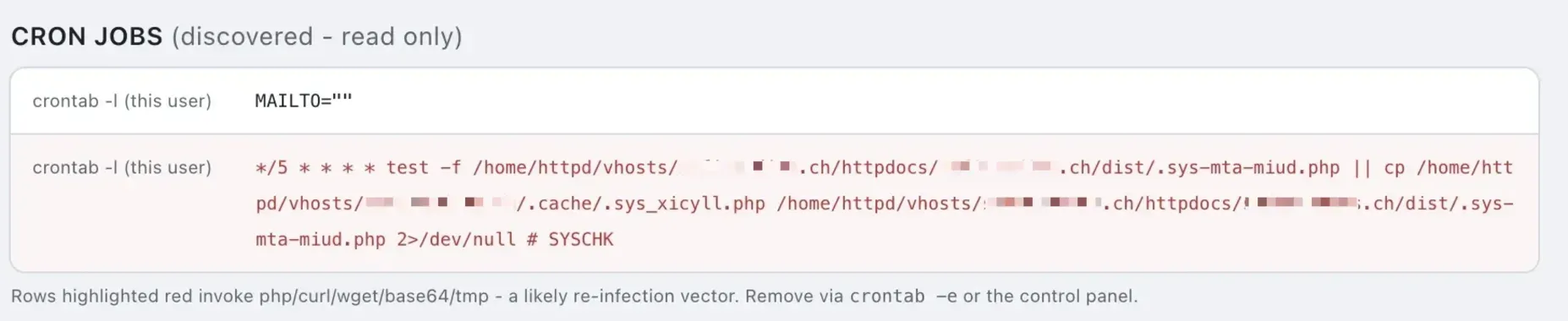
This is why restoring files alone never finishes the job:
Warning
Even if you restore all your files and database from a clean backup and close all known vulnerabilities, the malicious scheduled tasks will still be there and will reinfect your site in a few minutes. Restoring files is not the same as closing every backdoor.
This is the norm, not a rare worst case. In Sucuri’s 2023 hacked-website data, 49.21% of compromised sites contained at least one backdoor, and among sites with database-level malware, 55.2% had a malicious admin user left behind for re-entry. Layered persistence is how these campaigns are designed. Removing one backdoor when the site has three, plus a rogue admin and a cron job, just resets the clock.
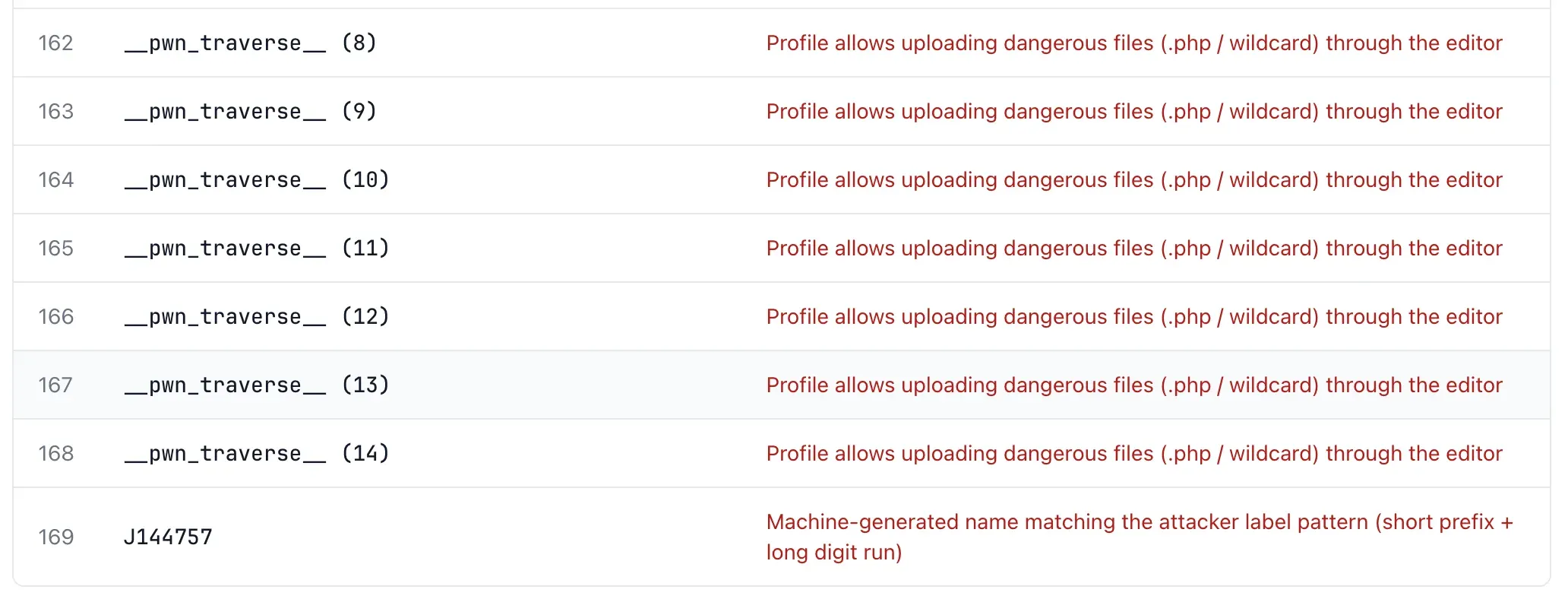
The JCE wave is a textbook example of designing for repeat entry. Attackers did not leave a single way back in, they left a row of them. This audit found fourteen rogue editor profiles, all named __pwn_traverse__, each one configured to allow uploading dangerous .php and wildcard files through the editor, plus a machine-generated profile (J144757) matching the attacker’s naming pattern. Every one of those profiles is a standing door. Delete the webshell and they walk back through the next profile, upload another, and carry on. That is how a site gets hacked again, and again, and again, long after the first cleanup looked like it worked.
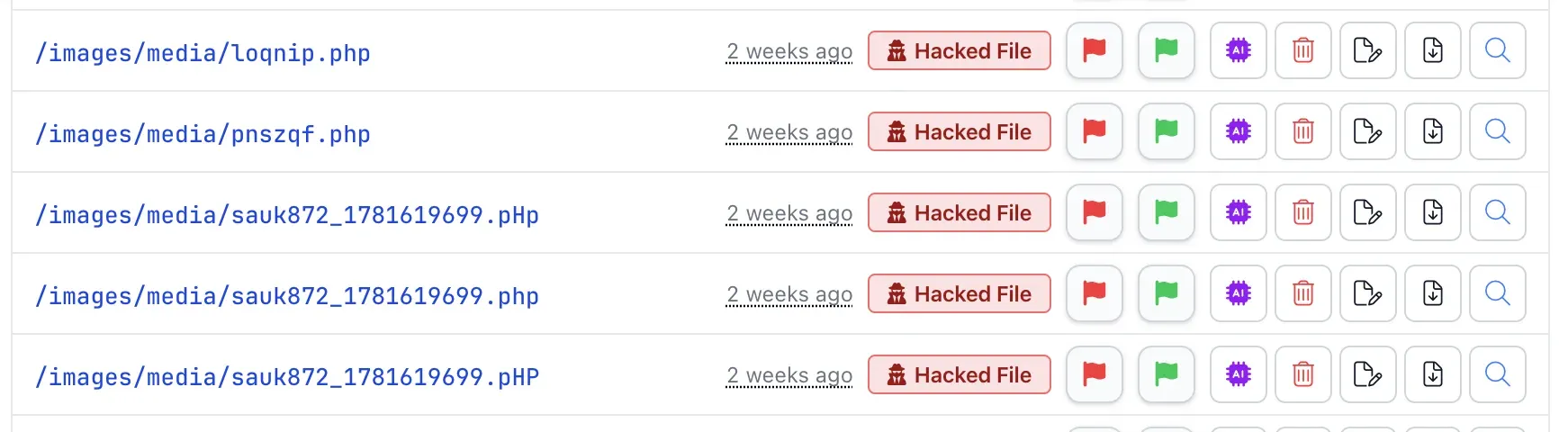
The same redundancy shows up in the shell files themselves. On this site the attacker dropped the identical payload into /images/media five times over, changing only the case of the extension: sauk872_1781619699.php, .pHp and .pHP, alongside loqnip.php and pnszqf.php, all planted in the same visit two weeks ago. The casing trick is intended. A hand-written cleanup that searches for *.php in lowercase, or a server rule that blocks one casing, leaves the .pHp and .pHP copies live and executable. A hash-based audit does not care about the extension at all, so it flagged every copy as a confirmed hacked file.
The second wave on the page: injected JavaScript, redirects and spam
Once the dropper has done its work, the second-wave payload is built for money. The dominant forms are malicious JavaScript and conditional redirects. Injected JavaScript in a template or theme file runs in every visitor’s browser, and it is not always the theme: we found a fake Cloudflare captcha that tells visitors to paste a command into the Windows Run box injected into a WordPress core file. A conditional redirect bounces traffic from Google to spam or phishing while leaving the site looking normal when you visit it directly. Sucuri’s 2024 scan data found malware and malicious redirects on 74.7% of infected sites and SEO spam on 38.4%, alongside crypto drainers and credit-card skimmers for direct financial theft.
The mass .htaccess injection we built a one-click cleaner for is this exact mechanism at scale. On a hacked Joomla or WordPress site we have seen close to 9,000 malicious .htaccess files, one in nearly every folder, each with a redirect or PHP-injection rule. They are spread that wide for coverage and persistence: a hidden backdoor rewrites them within minutes of deletion, so cleaning the root file alone achieves nothing. That is the second wave in physical form, thousands of files planted to still be there after your cleanup, with a dropper standing by to replace any you remove.
The newer trend is worse for anyone relying on file scans alone. Campaigns like Sign1 increasingly store their payload in the database (in WordPress options rows) rather than in files, which is why a once-and-done file scan misses them and continuous, multi-layer monitoring does not. The Hacked by AntonKill defacement wave hitting unpatched Helix3 Joomla sites en masse since 5 July does the same thing: the defacement lives in the template settings in the database, so every clean file scan comes back green while the skull is still on the homepage.
Why monitoring beats a one-time scan
Every reinfection report comes back to the same point. Cleanup is necessary but it is not enough, because the attacker planned for your cleanup. What actually protects a site is continuous visibility: knowing what changed, and when, so a dropper that wakes up three weeks after the breach is caught the moment it touches a file.
Sucuri’s own recommendation for self-reinstalling malware is “a file integrity monitoring service that resides mostly outside of the environment itself,” comparing file hashes against known-good copies so you can see tampering even when the malware is built to hide. That is the principle mySites.guru runs on across every site you manage: an audit that diffs files between scans, an uploader hunter for the dropper class specifically, core-file hash verification, renamed-file detection for the .bak and .old stash trick, and a near-real-time File Watch List for the files you most want to guard. The hash list behind it has more than 14,000 confirmed known-bad files and over 2,000 hand-written content patterns, updated daily, and a hack found on one connected site is checked for on every other site’s next audit.
When we find an actively exploited Joomla zero-day, we do not just forward a CVE. With the iCagenda flaw we reproduced it ourselves, confirmed it was being exploited in the wild before any patch existed, filed responsible disclosure with the vendor, alerted every affected account, then code-reviewed JoomliC’s 4.0.8 fix the same day it shipped and told users it was safe to reinstate. That is the level of attention the second wave demands, and it is why monitoring is not a slogan here, it is how the tooling is built.
If you suspect a site is compromised, start with whether your site is hacked and the full hacked-site cleanup process, then use the hack and backdoor detection to find what the first wave left behind. Start a free audit and see what is already sitting on your server, waiting.
Further Reading
- An Overview of Website Reinfection Vectors - Sucuri on why uploaders are the most common backdoor and how attackers guarantee they can return.
- Attackers Abuse Cron Jobs to Reinfect Websites - the mechanism behind sites that reinfect within minutes of cleanup.
- Web Shells - Sucuri on how webshells evade detection without continuous monitoring.
- RCE in the Joomla Content Editor Extension - YesWeHack’s technical write-up of the JCE chain (CVE-2026-48907).
- CISA Known Exploited Vulnerabilities Catalog - the federal advisory that confirmed the JCE flaw was being actively exploited.
Frequently Asked Questions
Why does my site keep getting hacked after I clean it?
What is a dormant dropper file?
How do I detect a second-wave attack on Joomla or WordPress?
Will restoring a clean backup fix a hacked site?
What were the recent Joomla zero-days that triggered this wave?
How does mySites.guru catch the second wave?
 Written and edited by a human, with AI assistance. Our approach to AI