What Are the .myjoomla.configuration.php.md5 Files?
If you have found a file called .myjoomla.configuration.php.md5 sitting in your Joomla webspace, right next to configuration.php, and wondered whether you have been hacked, here is the short version: no, you have not, and the file is safe. It was created by mySites.guru, not by an attacker.
It is a file-integrity lock file. It holds a single 32-character MD5 fingerprint of your configuration.php, and the mySites.guru connector on your site uses it to notice the moment that file is changed. There is nothing else inside it, and it does nothing to your site on its own.
Note
A file name starting with a dot is hidden by most FTP clients, cPanel file managers, and the plain ls command. That is why these files seem to appear out of nowhere. The dot does not make a file dangerous, and it does not make it safe either. It just hides it from casual browsing.
What Is the .myjoomla.configuration.php.md5 File?
The .myjoomla.configuration.php.md5 file is a tamper-detection sidecar. When you monitor configuration.php with mySites.guru, the connector calculates the MD5 hash of that file and writes it, as one line of 32 hexadecimal characters, into a companion file in the same folder. For configuration.php in your site root, that companion is .myjoomla.configuration.php.md5.
The content is boring. Open one and you will see a single line like this and nothing more:
d41d8cd98f00b204e9800998ecf8427eYou get one lock file per watched file, named .myjoomla.<filename>.md5, and it always sits in the same directory as the file it tracks. So if you monitor /includes/defines.php, the lock file lives at /includes/.myjoomla.defines.php.md5. Out of the box mySites.guru watches the files hackers tend to target on a Joomla site: configuration.php, index.php, includes/defines.php, includes/framework.php, a core layout helper, and .htaccess.
That means .myjoomla.configuration.php.md5 is usually not the only one you will find. A default setup also leaves .myjoomla.index.php.md5 next to your index.php, and a sidecar for each of the other watched files. You can change the watch list in your dashboard, and if you add or remove files, the set of .myjoomla.*.md5 files on disk changes to match whatever you chose.
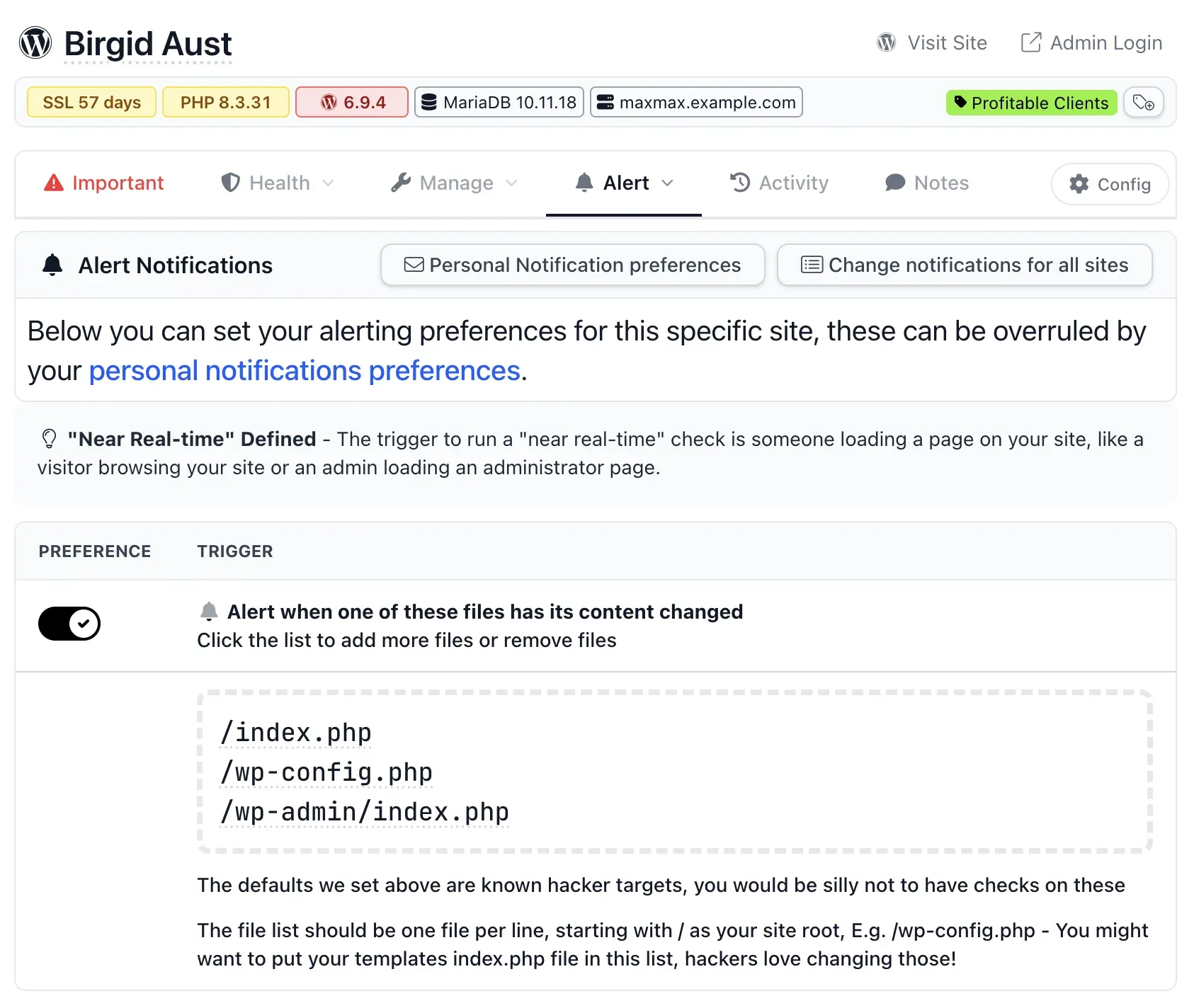
The Alert tab in mySites.guru, where you pick which files are monitored. This is a WordPress site, so the list shows wp-config.php; on Joomla the same screen watches configuration.php and writes the .myjoomla.*.md5 sidecars instead.
The .myjoomla Prefix Is a Legacy Name
The .myjoomla part looks out of place on a modern install, and there is a simple reason for it. The connector has written that prefix for years, since long before the service was rebranded to mySites.guru. Renaming it now would orphan the existing lock files on every connected site at once and briefly re-trigger a modified-file alert on all of them, so the prefix stays exactly as it is.
On WordPress the same connector does the same job with a different prefix. There you will find .mywpguru.wp-config.php.md5 rather than a .myjoomla. file, again for historical reasons. The names differ, the mechanism is identical, and both are the same mySites.guru file-monitoring feature under the hood.
How mySites.guru Uses the File to Detect Tampering
Every time a page on your site is rendered, front-end or administrator, the connector recalculates the MD5 hash of each watched file and compares it to the value stored in the matching .md5 lock file. Two things can happen:
- The hashes match. The file has not changed. Nothing happens, and the check costs microseconds.
- The hashes differ. The file has changed since the last check. The connector logs the event, sends an alert to mySites.guru (which emails you and any team members who have alerts enabled for that site), then rewrites the lock file with the new hash so you are not alerted again for the same change.
Because the check is driven by page loads, it is near real-time rather than continuous. If an admin edits configuration.php through the Joomla back-end, the same request that saves the change is the request that catches it. The only lag is when a file is altered over FTP or SSH on a site no one is visiting, in which case the comparison runs on the next page load. The full feature, including how to choose which files to watch and how to whitelist your own IP so your own edits do not raise a flag, is covered in our writeup on real-time alerts for file changes and logins.
Isn’t MD5 Broken? Why That Doesn’t Matter Here
You may know that MD5 is cryptographically broken, and you would be right, but it does not weaken this particular use of it. MD5’s failure is collision resistance: an attacker can craft two brand-new files that happen to share the same hash. Noticing that your existing configuration.php has changed is a different problem, and MD5 is still perfectly good at it.
To beat this monitor, an attacker would need a second-preimage attack: take your specific configuration.php and produce a different, malicious file with the identical MD5 hash. That is a far harder problem than a collision, and it remains computationally infeasible. Every headline MD5 break, the 2004 collisions, the 2008 chosen-prefix work, the Flame malware in 2012, involved the attacker controlling both files. Here mySites.guru controls the baseline. It hashes your real file and holds the fingerprint out of an attacker’s reach, so any ordinary edit, accidental corruption, or run-of-the-mill malware injection shifts the hash and trips the alert.
There is a second reason MD5 earns its place here, and it is the one that actually drove the choice: speed. MD5 is one of the fastest hashes in common use, and this check runs on every single page load, so the cost of hashing has to stay close to zero. That shaped two intended decisions, keep the hashing algorithm cheap and keep the real-time watch list short. Swapping to SHA-256 would make each lock file larger and every page load do more work, for no real gain against this threat model. For change detection on a file you already control, on every request, MD5 is the right tool, not a compromise.
Why configuration.php Is the File Worth Watching
configuration.php is the single most attractive file on a Joomla site. It holds your database username and password, the site $secret key, FTP credentials if you use them, SMTP mailer credentials, and your log and tmp paths. An attacker who can edit it can repoint your database connection, disable error reporting to hide their tracks, or move your tmp path to a directory they control and drop code there.
Getting an alert the instant that file changes means you find out before the attacker has time to do anything else with the access. WordPress has the same weak point in wp-config.php, which is why the connector monitors it there and writes .mywpguru.wp-config.php.md5 alongside it. If a monitored config file does change unexpectedly, our guides on a hacked Joomla site and finding hacked files and backdoors walk through what to check next without destroying the evidence.
Worth knowing if you ever need to open configuration.php or wp-config.php yourself: our web file manager doesn’t fence either file off specially, so you can edit or delete them like any other file, and a deleted config file goes to a recoverable trash first rather than taking your site down for good.
Is It Safe to Delete These .md5 Files?
Yes. Deleting a .myjoomla.configuration.php.md5 file will not break your site. On the next page load the connector sees that the lock is gone, recalculates the hash, and writes it back as a fresh baseline. No alert fires for the missing lock file, because a missing baseline is treated as first-time monitoring rather than a change.
Warning
There is one catch. If the watched file had already been tampered with, deleting its lock file makes the connector adopt the tampered version as the new known-good baseline, and you lose the chance to be alerted about that specific change. So do not delete these files as a routine cleanup step. To stop monitoring a file properly, remove it from the watch list in your mySites.guru dashboard instead of deleting the lock on disk.
What File-Integrity Checks Won’t Catch
Hash-based monitoring on a watch list is fast and has effectively zero false positives, but it is one layer, not the whole defence. It is worth knowing its limits.
It only covers the files you are watching. A backdoor dropped into a random uploads folder three directories deep is not on the watch list, so a .md5 lock will never see it. That is what a full security audit, the hidden-files check, and the suspect-content scanner are for, and why those run across your entire webspace rather than a short list. It also cannot see payloads that live in the database rather than on disk. We watched exactly that play out with the Helix3 defacement wave, where the injected code lived in the database, not the files, so a clean file hash told you nothing. Treat the .md5 lock files as instant change detection on your highest-value files, and pair them with full-site scanning for everything else.
Further Reading
- File integrity monitoring (Wikipedia) - the general technique of baselining a file’s hash and alerting on change, and where it fits in standards like PCI-DSS and NIST.
- MD5 (Wikipedia) - the collision history behind the “MD5 is broken” claim, and why it applies to forging files rather than detecting changes to one you control.
- Checking the integrity of your configuration.php file (RSJoomla) - a vendor writeup on why
configuration.phpis the most targeted file on a Joomla site. - Securing wp-config.php (WordPress developer handbook) - what lives in the WordPress equivalent and how to lock it down.
Want this running on every Joomla and WordPress site you look after, without logging into each server to check? Run a free audit on one site and see the file monitoring in action.
Frequently Asked Questions
What is the .myjoomla.configuration.php.md5 file?
Is .myjoomla.configuration.php.md5 malware?
Why does the file say myjoomla when I use mySites.guru?
What is the WordPress equivalent file?
Is it safe to delete the .myjoomla.configuration.php.md5 files?
Does MD5 being broken make this insecure?
 Written and edited by a human, with AI assistance. Our approach to AI