A Login for Your Accountant, Not Your Sites

This is a blog post about a mySites.guru feature. Accountants can now log in to mySites.guru themselves to grab your past invoices.
If you run a web agency on mySites.guru, your accountant does not need to see your client sites. They need your invoices. And yet most SaaS tools force you to pick between two bad options: hand over full access and trust the bookkeeper not to poke around, or export a PDF of every invoice at month end and email the lot.
We shipped a third option. It is called the Accountant Portal and it is live today on every paid plan.
What Does the Accountant Portal Do?
The Accountant Portal is a new role type for team members. When you add a user and pick Accountant only, that user can log in, see your invoices, open any invoice in detail, and email a copy to themselves. That is the complete list. Every other page in the app returns 403 Access Denied.
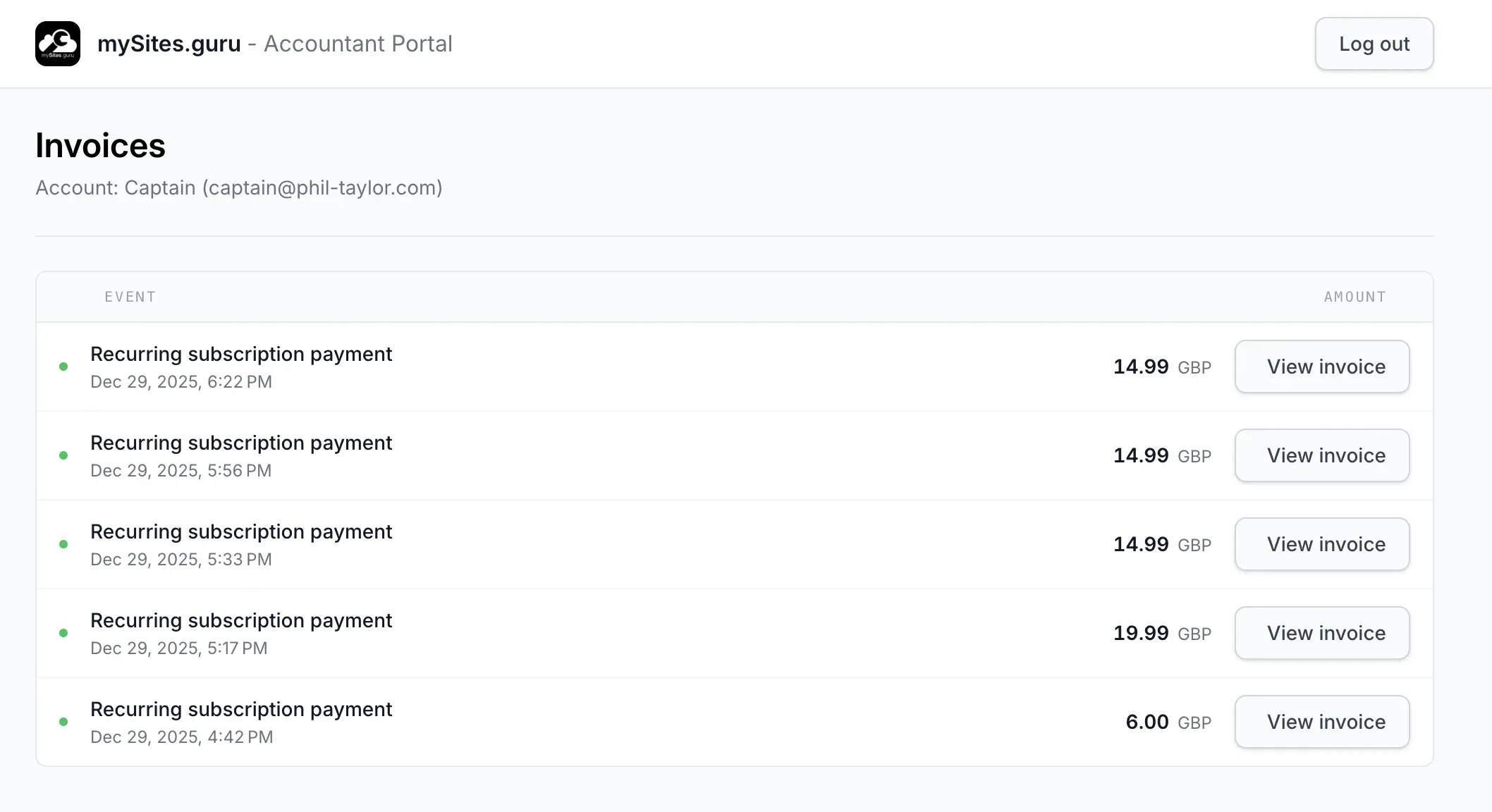
That screenshot is the entire world an accountant can see. No sidebar, no tools menu, no team management, no settings. Just invoices.
Why Build a Separate Role Instead of Adding Permissions?
mySites.guru has had team members with per-site and per-feature permissions for years. We could have added an “invoices only” toggle to the existing team form. We chose not to.
A permission-based approach leaks. Every time we add a new feature (a new tool, a new audit, a new dashboard widget) we have to remember to exclude the accountant role. One missed #[IsGranted] check and the bookkeeper is suddenly looking at your hacked-sites list. That is not a security model, that is a promise we have to keep renewing on every PR, and we will eventually forget one.
The Accountant Portal inverts the default. Instead of maintaining a growing allowlist of what an accountant cannot see, we maintain a short allowlist of what they can see:
/invoices/invoices/{id}(single invoice view)/invoices/{id}/email(email invoice to self)/login,/logout, password reset
A global request listener runs before every controller. If the logged-in user has ROLE_ACCOUNTANT and the route is not on that allowlist, they get a 403. No controller has to opt in. No future feature can accidentally expose data. The “captive portal” stays captive, full stop.
How Do You Invite an Accountant?
Open your Your Team page and click Add Team Member. Enter their name and email, then pick the Accountant only option.
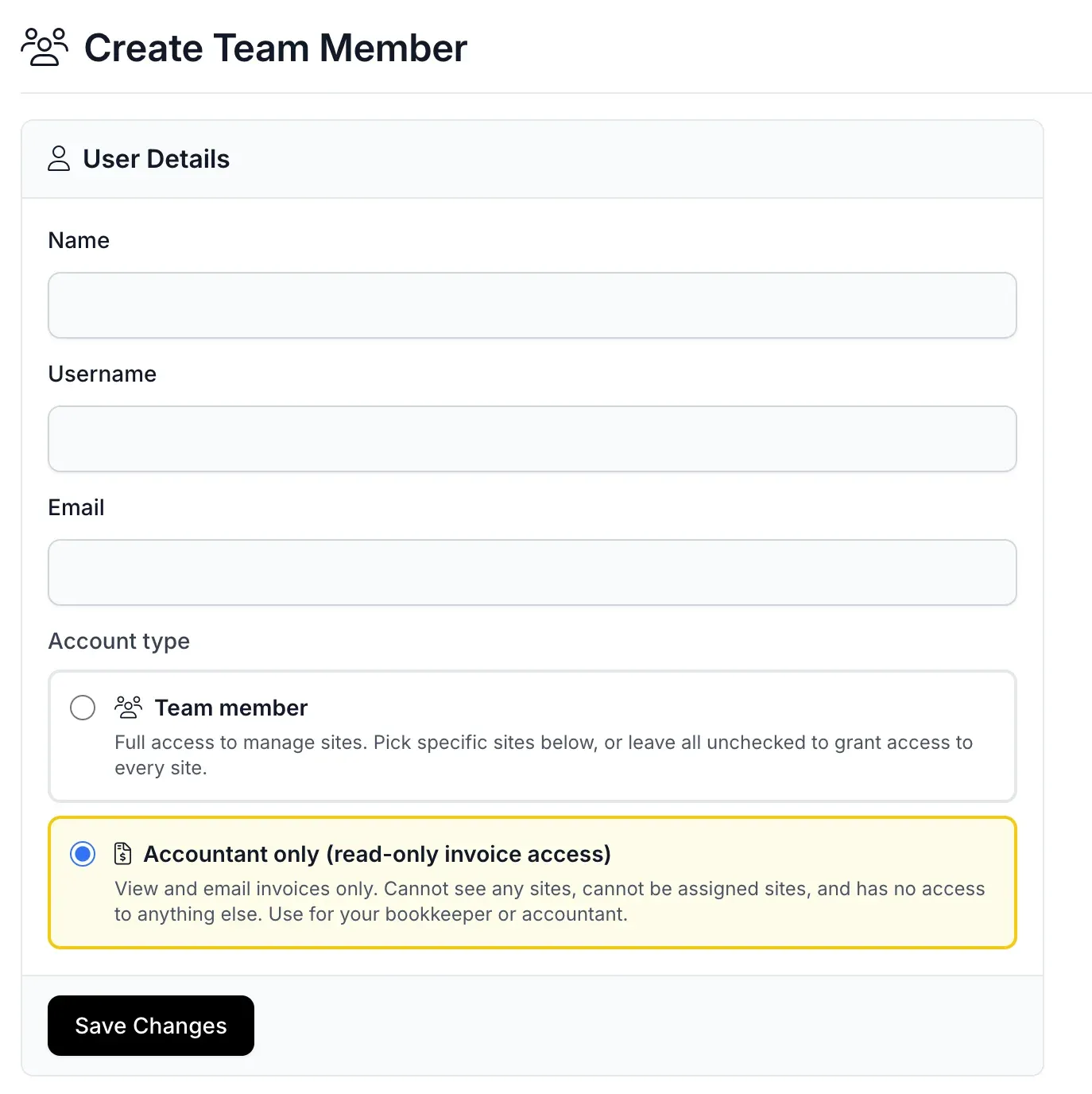
The help text tells you what you are agreeing to: View and email invoices only. Cannot see any sites, cannot be assigned sites, and has no access to anything else.
Ticking Accountant only hides the site picker entirely. There is no way to accidentally bundle a “just this one site” exception. Accountants are mutually exclusive with regular team members: one or the other, never both. The account saves, an invite email goes out with a password-reset link, and your accountant is up and running in under a minute.
What About Notifications and Activity Emails?
mySites.guru sends plenty of operational email: failed backups, security alerts, plugin update warnings, uptime pings. Your accountant does not want any of that, and you do not want them seeing it.
The getTeamMembers() call that feeds those notifications now excludes accountants by default. Billing emails (receipts, payment failures) still reach them, since that is the whole reason they have a login. Everything else skips them. You do not need to touch any notification preferences for this to work.
Can the Accountant Be Impersonated or Tricked Into Full Access?
No. The details that come up in security reviews:
ROLE_ACCOUNTANTis written to the samerolescolumn as every other role. OnehasRole()check, enforced centrally, not scattered across controllers.- The authenticator checks for
ROLE_ACCOUNTANTon every successful login and force-redirects to/invoices, overriding any stored target path. Even a bookmarked deep link ends up on the captive page. - A company owner can still impersonate an accountant for debugging, but the reverse is impossible. An accountant has no impersonation UI, no team member list, and no access to the user-switching mechanic.
- The lockdown listener runs on every request, not just HTML routes. AJAX and JSON endpoints 403 too.
- Passkeys and 2FA work on accountant accounts the same as any other. I would recommend turning a passkey on regardless.
Why Does This Matter?
Bookkeepers are busy people handling invoices for a pile of clients at once. The last thing you want is yours clicking around in an unfamiliar control panel and accidentally triggering a backup restore or firing off an email to a client who has no idea who they are. “I’ll just have a quick look round” is how incidents start. With the Accountant Portal there is no “round” to look at, so the temptation never shows up.
It is also honest. When you give your accountant a login, they should know exactly what they can and cannot see. A role labelled Accountant only (read-only invoice access) with a yellow warning box on the invite form leaves nothing to interpret. No one is “pretty sure” they cannot see client data. They demonstrably cannot.
Why Do We Not Auto-Email Financial Data?
Plenty of SaaS tools will happily pump your invoice data to whoever you point them at, on whatever schedule you pick. We will not.
Invoices are financial records. In the UK they fall under the UK GDPR and the Data Protection Act 2018, and the ICO’s own guidance is that plain SMTP email is not a secure channel for personal financial information. GDPR Article 32 (security of processing) says the same thing in EU terms. If your invoice touches anything health-related in the US, you are suddenly in HIPAA territory. Australia has the Privacy Act 1988. And the accounting regulators (ICAEW and AAT) expect members to keep client financial data inside access-controlled systems, not bouncing around inboxes.
Email is plaintext. It travels over servers you do not control, sits in spam filters you do not administer, and hangs around in archives long after the recipient has left the firm. Auto-emailing an invoice to an accountant every month means a year of invoices sitting across four or five mail hops, indefinitely. If their mailbox is compromised next year, so is your billing history.
The Accountant Portal inverts that flow. The accountant logs in with a password or a passkey, over TLS, to a page only they can see, and pulls the data when they need it. If they want a copy in their inbox, they can email a single invoice to themselves with one click. Same convenience, far less attack surface, and no one is wondering two years from now whether a closed Yahoo account still has a client’s billing address sat in it.
Why No PDFs?
The Accountant Portal does not render invoice PDFs. Invoices display as HTML, and if the accountant needs a saved file, their browser’s Print to PDF handles it. That is a intended choice, and we are in reasonably good company on it.
The Government Digital Service blog laid out why GOV.UK publishes content as HTML rather than PDF: PDFs are harder to search, awkward with screen readers, awkward to re-flow on mobile, and ignore the browser settings (text size, contrast, preferred font) that a lot of readers actually rely on. The government’s Accessibility team went further in 2023 and started stripping legacy PDFs off GOV.UK. The ONS has now stopped generating PDFs of its HTML content from 2026 onwards.
Not everyone got the memo. The States Assembly in Jersey has just moved the other way, making the PDF the authoritative version of each proposition and treating the HTML on the page as a convenience copy. Every publication now has an info box saying the PDF is the official document. Two governments, same decade, opposite conclusions. I would not bet on Jersey ageing well on that one.
Those reasons apply to invoices too:
- An HTML invoice respects the accountant’s screen reader, their zoom level, and their high-contrast setting. A PDF locks you into 10 point text at whatever font happened to be embedded, whether that works for them or not.
- If we change a VAT number, a trading address, or a line-item format, we edit one template and every historical invoice picks it up. Regenerating a decade of PDFs every time HMRC tweaks a required field is not a good use of anyone’s weekend.
- A rendered PDF of a simple invoice is routinely five to twenty times the size of the equivalent HTML. Across thousands of customers that becomes a lot of bandwidth and storage for a worse experience.
- Browsers already print HTML to PDF properly. The output is an accessible, tagged PDF that matches the reader’s display preferences. Two clicks in Chrome and your accountant has a filing copy that actually works with their tooling.
The part a lot of developers forget: every major operating system already has a first-class PDF renderer built in. macOS has had Print to PDF in the system print dialog since 2001. Windows 10 shipped Microsoft Print to PDF as a default printer back in 2015. Every mainstream Linux desktop exposes the same option via CUPS. Chrome, Safari, Firefox, and Edge all route into those system printers. So the PDF your accountant saves is one produced by Apple, Microsoft, or the CUPS team, using the same font rasterisation and colour management their operating system uses for everything else on screen.
Rendering a PDF server-side in PHP cannot get near that. The PHP options (mPDF, TCPDF, dompdf, wkhtmltopdf wrappers) are all fighting a frozen CSS subset, an embedded font list that never quite matches the source page, and assorted quirks around page breaks, ligatures, RTL text, emoji, and custom web fonts. I have lost enough Saturdays to TCPDF trying to line an invoice up with its HTML version to know the answer: ship the HTML, let the OS render the PDF.
One more reason, and it is one the PDF-by-default crowd rarely thinks about: printing is not eco-friendly. A PDF exists to look like a sheet of paper, and the natural next step with a PDF is to print it. A 2019 study by The Shift Project put the global digital industry at roughly 4% of greenhouse gas emissions, and paper is still the single biggest source of office waste in the UK according to Defra’s waste prevention programme. Every unneeded invoice PDF is an invitation to hit print, and every printed invoice is ink, toner, paper, electricity, and a delivery lorry somewhere up the supply chain.
An HTML invoice defaults to never being printed. If you want a filing copy you still can, but the default behaviour is “read it on the screen and close the tab” rather than “print it and put it in a folder that no one opens.” Small thing per invoice. Not a small thing across thousands of accountants filing thousands of clients.
HTML first, print on demand. The invoice you see is the invoice you get, and the format of any saved copy is yours to pick.
Give It a Try
Open your Your Team page, click Add Team Member, and tick Accountant only. Your accountant has a login in two minutes. If you do not yet have a mySites.guru account, pricing starts at £5/month for one site or £19.99/month for unlimited sites, and every plan includes unlimited team members and accountants.
Team access patterns like this one are covered in our agency multi-site management guide.
Frequently Asked Questions
What does the Accountant Portal in mySites.guru do?
How is an accountant different from a team member in mySites.guru?
Can my accountant see my client sites or my clients' data in mySites.guru?
Is there an extra charge for adding an accountant in mySites.guru?
How does my accountant log in?
Can the accountant email invoices to themselves?
Can I revoke accountant access?
 Written and edited by a human, with AI assistance. Our approach to AI