Balbooa Forms Fixes an Unauthenticated File Upload RCE
Balbooa Forms is a popular drag-and-drop form builder for Joomla, installed as the com_baforms component and used for contact, registration, and survey forms on thousands of sites. Up to and including version 2.4.0, its frontend attachment upload had a serious flaw: it accepted a file from any anonymous visitor, with no login, no CSRF token, and no check on the file type. An attacker could upload a .php file into a public folder and then run it, which is unauthenticated remote code execution, the worst outcome a web flaw can have. This was a zero-day: it was already being exploited in the wild when we found it, before any patch existed, and those attacks are still going on now against sites that have not updated.
Balbooa fixed it in version 2.4.1, released on 9 July 2026. Do not stop at 2.4.1. Three more security releases have followed it, the most recent on 18 August 2026, and the minimum safe version is now 2.4.3.2. See the update note directly below. This post explains what the original flaw was, how it surfaced, what the fix does, and how to check whether any of your sites were touched, without publishing anything an attacker could copy.
Update, 29 September 2026: 2.4.3.4 is now the minimum
Balbooa released Forms 2.4.3.4 on 29 September with five more security fixes, mostly in file attachments, including a path traversal into auto-reply emails and unauthenticated deletion of other visitors’ uploads. The advice further down this post to update to 2.4.3.2 is now out of date: 2.4.3.2 and 2.4.3.3 are both affected, so update every install to 2.4.3.4. What changed and who is affected is in Balbooa Forms 2.4.3.4 Fixes Five Security Issues.
Update, 19 August: the "hardening" release was two pre-auth flaws, one scored 10.0
The Joomla project published CVE-2026-67364 (pre-auth PHP code injection, 10.0) and CVE-2026-67363 (pre-auth payment amount tampering, 7.7) on 19 August, covering the 18 August 2.4.3.2 release that Balbooa had presented as routine hardening. Both list 1.0.0 to 2.4.3.1 as affected, so 2.4.3 and 2.4.3.1 are vulnerable too and 2.4.3.2 is the only safe version. Details are further down this post. Earlier: on 28 July 2026 Balbooa released 2.4.3, fixing CVE-2026-65880, a second unauthenticated remote code execution flaw scored CVSS 10.0. It is triggered through the Signature field type and is a completely different bug from the upload flaw described in this post. The CVE record lists every version up to and including 2.4.2.1 as affected, so 2.4.1 and 2.4.2 are both vulnerable. Anyone who applied the emergency 2.4.1 update on 9 July and stopped there stayed remotely exploitable for another 19 days. Two further security releases have shipped since, 2.4.3.1 on 31 July and 2.4.3.2 on 18 August, so the current minimum is 2.4.3.2. Update every Balbooa Forms install without waiting for a maintenance window, then check each site for stray PHP files and unexpected admin accounts, because a site could already have been hit by either flaw.
TL;DR
TL;DR: The frontend upload in Balbooa Forms (com_baforms) up to and including 2.4.0 (fixed in 2.4.1) accepted a file from anyone with no authentication, no CSRF token, and no allow-list on the file extension. Because it trusted the caller’s filename, a .php upload ended up in a public directory and could be executed, which is unauthenticated remote code execution (CWE-434). This is a zero-day that was, and still is, being actively exploited in the wild: it came to light through a Hetzner abuse report that a mySites.guru customer brought to us as a raw access log, evidence of a live attack, and there was no patch at that point. We diagnosed it, disclosed it privately to Balbooa, and they responded the same day and shipped the fix in 2.4.1 within a day, crediting Phil Taylor as the reporter. It is tracked as CVE-2026-56291. No proof of concept has been made public. Since then a second, unrelated unauthenticated RCE (CVE-2026-65880, CVSS 10.0, via the Signature field) has been found and fixed in 2.4.3, and it affected 2.4.1 and 2.4.2 as well, followed by two more security releases, 2.4.3.1 and 2.4.3.2, so update every Balbooa Forms install to 2.4.3.2 immediately, then check exposed sites for stray files and unexpected admin accounts. If you manage more than a handful of Joomla sites, mySites.guru lists every Balbooa Forms install in your account in seconds and pushes the update.
How This One Was Found
Most vulnerability posts start with a CVE and work backwards. This one started with a log line.
A customer received an abuse report from Hetzner, the hosting company, about suspicious activity on one of their Joomla sites. Rather than guess at it or panic, they did the right thing: they brought us the raw web server access log and asked us to look. Credit to Hetzner for catching the activity and flagging it, and to the customer for bringing evidence instead of a hunch.
That log showed a POST request to the Balbooa Forms upload handler that had no business succeeding the way it did. We traced the request back through the extension’s code, confirmed that the frontend upload accepted files with no authentication and no restriction on type, and reproduced the whole chain end to end on a local Joomla install within the hour. From there it was a private email to Balbooa, who replied the same day and released the fix in version 2.4.1 the next day, on 9 July 2026, crediting Phil Taylor as the reporter. The flaw is now tracked as CVE-2026-56291.
This is what responsible disclosure looks like
Found through a real abuse report, confirmed in the code, reported privately, and fixed by the vendor within a day, all before any technical detail was published. No exploit has been released. The reason to write about it is to get sites updated, not to show anyone how it worked.
What Was Actually Wrong in Balbooa Forms?
The flaw was an unauthenticated file upload with no file-type allow-list. The Balbooa Forms upload endpoint runs for any visitor, logged in or not, and before the fix it did three things wrong at once: it required no login, it checked no CSRF token, and it worked out the file extension from the name the visitor supplied and used it as-is. Joomla’s built-in filename cleaner strips dangerous characters, but it does not block a .php extension, so a file named shell.php stayed shell.php.
Put those together and an anonymous request could write an attacker-controlled .php file into the extension’s upload folder, which by default sits under images/baforms/uploads/ inside the web root. Because that folder is served directly and has nothing stopping PHP from running in it, requesting the uploaded file in a browser executed it. Upload becomes code execution, and no account on the site is needed at any point.
The important detail for site owners is the “no login” part. Plenty of upload bugs need an editor or admin account first, which limits the damage to people you already trust. This one did not. Anyone on the internet who could reach the form could reach the upload handler.
Root Cause, In the Code
For the developers among you, here is the mechanism without the exploit. The request enters through a single front-end task, index.php?option=com_baforms&task=form.uploadAttachmentFile. In 2.4.0 the controller that handles it ran no authentication check and no Session::checkToken() call, so the task was reachable by any anonymous visitor and accepted a raw file straight from the request.
The controller passed that file to the model’s write routine (FormModel::uploadAttachmentFile, around line 122 in the front-end FormModel.php). The flaw was in that routine. It worked the file extension out from the attacker-supplied filename, sanitised only the name portion with Joomla’s File::makeSafe(), and then re-attached the original extension verbatim before writing the file. In effect:
- the extension is taken from the caller’s filename, so
shell.phpyieldsphp; File::makeSafe()cleans the name but does not reject a.phpextension;- the cleaned name and the untouched extension are joined back together (
$fileName = $name . '.' . $ext); - the file is written under
images/baforms/uploads/form-<id>/, a directory inside the web root that serves and executes PHP.
There was no allow-list checking the extension against the file types the form is actually meant to accept. That single missing check is the whole vulnerability. With no login, no token, and no allow-list standing in the way, an anonymous upload of a .php file became code running on the server. We are not publishing the request body that ties these together, but the shape of the bug is the same one this class of extension keeps producing.
Why an Upload Flaw Is as Bad as It Gets
An unauthenticated upload that puts executable code on the server is the top of the severity scale. Once an attacker can run PHP of their choosing on your server, they are no longer limited to your site. They can read your configuration.php and the database credentials in it, create a hidden Joomla Super User, plant a backdoor that a plugin update will not remove, pivot to other sites in the same hosting account, or add the server to a spam or malware network. The uploaded file is rarely the goal in itself; it is the foothold.
This is the same lesson as the AJAX endpoints blind spot we keep coming back to. An endpoint that Joomla will run for anonymous visitors is exposed to the entire internet, so every input it touches has to be treated as hostile. A single allow-list check, “is this file one of the types this form is allowed to accept”, would have stopped this.
What the 2.4.1 Fix Does
Balbooa’s fix is a good one, and it closes the flaw at more than one layer, which is exactly what you want. Version 2.4.1 makes four changes to the frontend upload:
- It now validates the file extension on the server against each Upload File field’s own configuration, so a
.phpupload to a field that only accepts images is rejected. - It adds a MIME Types option to the Upload File field, so a form can also require the file’s real content type to match, not just its name.
- It generates the stored filename on the server instead of trusting the one the visitor sent. Even a file that gets through as an allowed type is saved under a name the attacker cannot predict, which defeats the classic double-extension trick.
- It adds a CSRF token check to the upload request, so the handler no longer runs for a request that did not come from a real form on the site.
We verified all four against the released package. On 2.4.0, an anonymous request with no token uploaded a .php file and ran it. On 2.4.1 the same request is rejected, and even a request with a valid token cannot deliver executable code, because the extension allow-list and the forced filename both stand in the way. The fix holds.
There is one thing worth flagging for anyone who reads vendor changelogs to decide what to update. Balbooa’s 2.4.1 changelog lists these four items under a plain “Fixed” heading, with no mention that they close an actively exploited remote code execution flaw. That is not unusual, and it is not a criticism, but it is a trap. If you triage updates by whether the changelog says “security”, this one reads like routine housekeeping, and you would leave it sitting in the queue while the door stays open. It is the same pattern as the Helix3 “Security Update” changelog: the words in the changelog are a poor guide to how urgent an update really is.
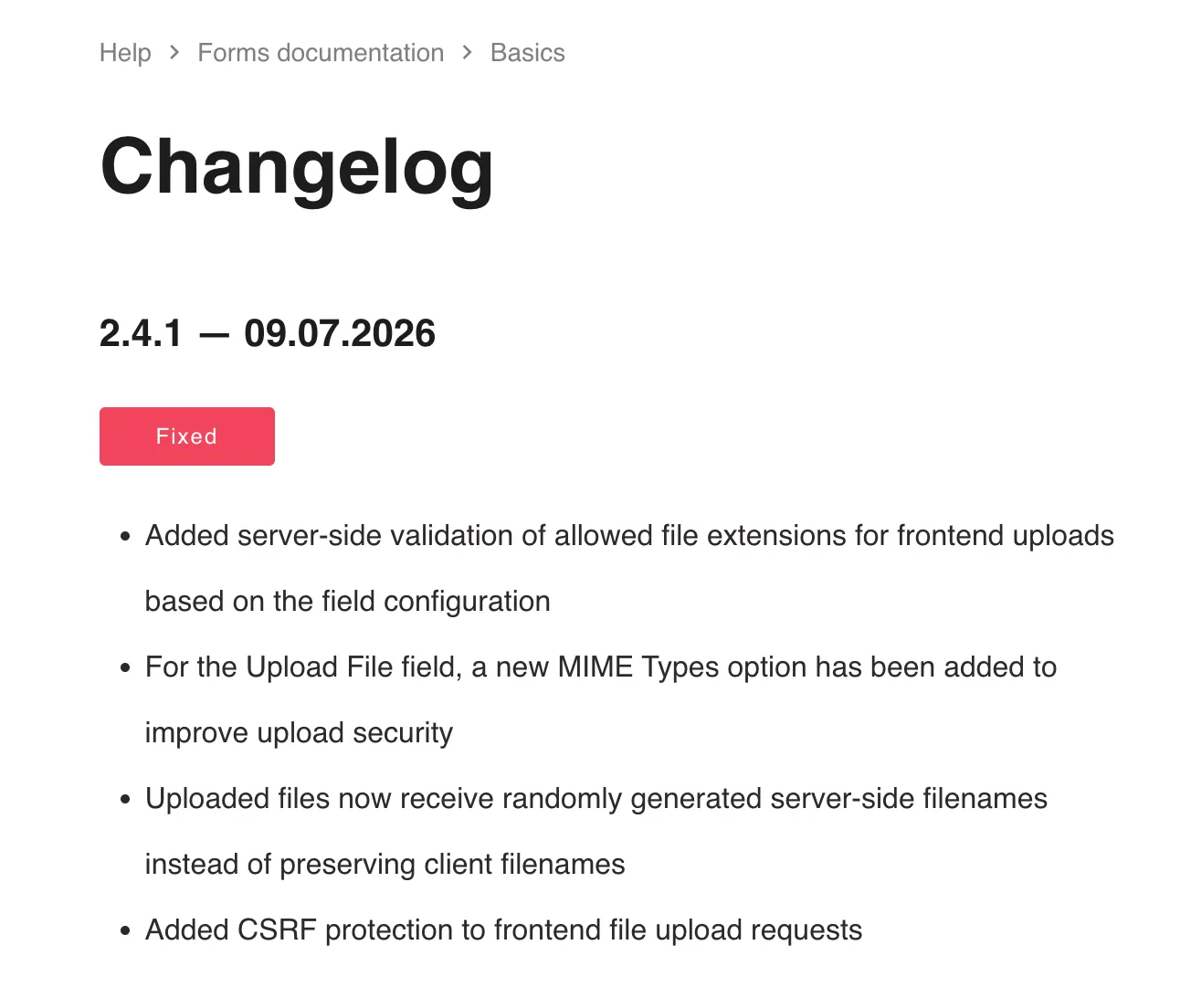
Balbooa did update the changelog, but at the time of writing there is no post on the Balbooa Forms blog about this security issue at all. So the only public signal that 2.4.1 matters is four terse lines under a “Fixed” heading, with nothing anywhere that tells a site owner this closes an actively exploited remote code execution flaw. If you are waiting for a vendor announcement before you update, there is not one to wait for.
Four Security Releases in Six Weeks
The release described above was the first of four. No single vendor page lists them together, so here is the run:
| Date | Release | What it addressed | CVE |
|---|---|---|---|
| 9 July 2026 | Forms 2.4.1 | The unauthenticated file upload described in this post | CVE-2026-56291 |
| 28 July 2026 | Forms 2.4.3 | Unauthenticated remote code execution via the Signature field | CVE-2026-65880 |
| 31 July 2026 | Forms 2.4.3.1 | “Security hardening”, stated as administrator area only | None assigned |
| 18 August 2026 | Forms 2.4.3.2 and Gallery 2.5.1.1 | Released as “security hardening”. Confirmed on 19 August as pre-auth PHP code injection (10.0) and pre-auth payment amount tampering (7.7) | CVE-2026-67364, CVE-2026-67363 |
The 18 August release covers five areas in the Balbooa Forms Joomla extension: authorization and access control in the Media Manager, path validation for internal file operations, payment validation so transaction amounts are verified during payment processing, parameter handling in post-submission PHP scripts, and validation of signature images. Balbooa Gallery 2.5.1.1 was released the same day with the first two of those.
Both releases are credited by Balbooa to Akinlabi Omoogun and Sergiy Tryzhychynskyi, and neither name appears anywhere in our own disclosure record. No CVE had been assigned to either when this section was written. Two were published the next day, and they are covered below.
What “Security Hardening” Leaves You Unable to Work Out
Balbooa published no affected version range, no severity, no CVSS score, and state the release is not related to any publicly disclosed vulnerability. That is the vendor’s call to make. The practical problem is that it leaves the person responsible for the site with no way to answer the only question that matters, which is whether their particular install was exposed and for how long.
Three details in the release notes are worth reading closely, and none of them need a proof of concept to spot.
The 31 July release said its improvements “are limited to the Forms administrator area and require administrator access”. The 18 August release leaves out that sentence and describes itself as covering “administrative and user-facing functionality”. Payment processing and post-submission scripts both run when an anonymous visitor submits a form, not when an administrator logs in.
Payment validation that ensures “transaction amounts are consistently verified” is the description of a fix for amounts not being verified. On a form that takes money, the question that raises is who decides the price.
Signature image validation is the third time in six weeks that the Signature field has been touched, and the second time for a security reason. The first was CVE-2026-65880, scored 10.0.
We had not audited the difference between 2.4.3.1 and 2.4.3.2, so at that point we were not calling any of it exploitable. This reading comes from the vendor’s own release notes, read closely, not from any finding of ours.
The CVEs Confirmed It the Next Day
On 19 August the Joomla project published two CVE records for the 18 August release. Two of the three details above are in them.
CVE-2026-67364 is pre-auth PHP code injection, scored 10.0. The optional custom-PHP post-submission handler runs through eval(), and the [URL parameter = X] shortcode is substituted into it with the raw, unescaped value of a query parameter, so an anonymous visitor can run their own PHP on the server. The CSRF token that guards the endpoint is given out anonymously by a separate task, so it stops no one. It does need the form to have a custom-PHP handler configured, which is a documented builder feature, and no reCAPTCHA on the submit button.
CVE-2026-67363 is pre-auth payment amount tampering, scored 7.7. The stripeCharges and payAuthorize endpoints take the charge total from a request parameter and pass it to the payment gateway without recomputing it from the form’s configured prices, with no authentication and no CSRF check. Anyone can buy a priced item for a penny, and forge line items, quantities and shipping while they are at it.
Both records give the affected range as 1.0.0 to 2.4.3.1. So “administrative and user-facing” meant unauthenticated, “payment validation” meant anyone could name their own price, and “parameter handling in post-submission PHP scripts” meant remote code execution. The vendor’s line about the release not relating to any publicly disclosed vulnerability was accurate when written, in the narrow sense that nothing was public yet.
Both are credited to Akinlabi Omoogun. Neither is our finding. The point of the reading above is that you did not need the CVE records to know this release was worth treating as urgent: the release notes said enough on their own.
The Same Fixes Appeared in Gridbox First
The Media Manager and File System Protection rows in the 18 August release are word for word identical to the equivalent rows in Gridbox 2.20.2.3, published on 10 August. Balbooa’s Media Manager is shared across the product range, so this reads as one piece of code being fixed in three products across eight days rather than three separate faults. If you run more than one Balbooa Joomla extension, treat a security release in any of them as a prompt to check the others.
That matters here because Gridbox is the extension where a mySites.guru audit found twenty-three vulnerabilities, on top of the earlier authentication bypass.
What This Looks Like Across the Sites We Manage
Which sites are behind turns out to be more revealing than how many.
Across the Balbooa Forms installs we can see, around seven in ten are now on 2.4.3.2, almost all of them having moved within a day of the 18 August alert. Under one in ten is still on 2.4.3 or 2.4.3.1. That last group is the diligent one: they read the 31 July notice, updated inside a few days, and are exactly who the two new CVEs cover, because both records stop at 2.4.3.1.
More seriously, roughly one install in four is still on 2.4.2.1 or below, which means still exposed to CVE-2026-65880, the 10.0 unauthenticated remote code execution fixed on 28 July. Those sites never actioned the last alert. Hardening is the least of their worries while a 10.0 remains open on them.
For Balbooa Gallery, the wrinkle is the extension element. Balbooa renamed it from com_bagallery to com_gallery somewhere before the 2.5 line, and the two populations have not merged: every com_gallery install we can see is on 2.4.1 or above, and every com_bagallery install tops out at 2.4.0. If your Gallery install still reports com_bagallery, confirm you are actually being offered the 2.5.1.1 update rather than assuming it, because an element rename is exactly the kind of thing that stops a Joomla update ever being offered, with no error to tell you so.
Flagging all of this across a portfolio is part of the mySites.guru subscription: every connected Joomla site running Balbooa Forms below 2.4.3.2 or Balbooa Gallery below 2.5.1.1 is now flagged automatically, with the sites still exposed to the July remote code execution flagged separately and more severely.
Balbooa Forms Has Had Security Issues Before
This is not the first time Balbooa Forms has needed a security fix, which is worth knowing when you decide how urgently to act. The component has two prior SQL injection issues on record, CVE-2021-47930 and CVE-2025-49485, both reached through the form submission id parameter. Different flaw, same lesson: the parts of a form builder that face anonymous visitors are the parts that need the hardest scrutiny.
This is the nature of the tool, not a knock on Balbooa specifically: a form builder exists to accept input from people you do not know, and that job is hard to do safely. The credit here is that when the upload flaw was reported, Balbooa acted on the same day rather than sitting on it.
Form Builders Are a Recurring Attack Surface
If you manage Joomla or WordPress sites, treat every form-builder extension as a piece of your attack surface that deserves regular attention. The exact flaw fixed here, an unauthenticated file upload of a dangerous type, is CWE-434, and it shows up across the form-builder category rather than in one vendor’s code.
The clearest recent parallel is Convert Forms, another well-regarded Joomla form builder, which patched an unauthenticated file upload of the same class in late 2024 (CVE-2024-40744, rated 9.8 critical). Look wider and the pattern holds: Ninja Forms on WordPress had its own file-upload CVE through the same AJAX-handler weakness, and Contact Form 7 fixed an unauthenticated upload of its own in 6.2.4. When a category of extension keeps producing the same kind of bug, the sensible response is to monitor the whole category.
How mySites.guru Caught This Without a Signature
We did not need a Balbooa-specific rule to catch this activity. mySites.guru watches for the behaviour, an anonymous visitor uploading an executable file, rather than a fingerprint of one particular extension’s bug.
That generic detection is what flagged the suspicious upload in the first place, and it is the same logic that catches iCagenda, Page Builder CK, and JCE upload attempts. An attacker dropping a .php file through a public form looks the same regardless of which extension left the door open, so we can catch new bugs of this shape before anyone has written a rule naming them. Signature-based tools only see an attack once someone has described it. Behaviour-based detection sees it the first time it happens.
If a hostile file does get through, the suspect content tool and the backdoor and hacked-file detection find it across every connected site, matching it against known malware hashes and thousands of code patterns. Anything flagged can be sent for AI-powered malware analysis that explains in plain English what the file does.
How Do I Find Every Balbooa Forms Site I Manage?
The first question after any extension security release is the awkward one: which of my sites actually run this? Up to about ten sites, you can log in to each Joomla admin and check the installed extensions list. Past that, you need a single view.
mySites.guru keeps a live inventory of every extension, template, and framework on every Joomla and WordPress site in your account. You search for Balbooa Forms once and get back every connected site running it, the version each one is on, and whether an update is available. No logging into forty admin panels one at a time.
View every Balbooa Forms install across your sites
Search for Balbooa Forms across every connected Joomla site and filter for anything on 2.4.0 or earlier to find the installs that still need updating. Not a subscriber? Sign up free and connect your sites.
Across the Joomla sites we monitor, the same thing is true of Balbooa Forms as of most extensions after a quiet security release: a lot of installs are running older versions and no one has updated yet. That gap between “a fix exists” and “my sites have it” is the whole reason this post exists.
Bulk Updating Balbooa Forms Across Every Site
Once you know which sites need it, the mass updater handles the rollout. Tick the sites on an old version, push the update to all of them from one screen. The same routine covers any Joomla extension, plugin, or core update, so the workflow you set up once works for the next security release too. You can also switch on automatic updates for any Joomla extension so future Balbooa Forms releases install without you lifting a finger.
For agencies managing dozens of Joomla sites
The patch is the easy bit. Knowing which client sites run Balbooa Forms, and getting the update onto all of them, is the work. See how mySites.guru manages multiple Joomla sites from one screen.
If a particular site cannot be updated right away, unpublishing any public Balbooa Forms form that accepts file attachments takes the vulnerable upload handler out of reach while you schedule a maintenance window.
How Do I Check a Balbooa Forms Site for Tampering?
Updating closes the door. It does not tell you whether anyone walked through it first. Because the flaw allowed an anonymous visitor to drop a file and run it, a site that was on 2.4.0 or earlier could already have been touched, and you should check before you assume it is clean.
Three checks, in order of value:
- Look in the upload folder. By default Balbooa Forms stores attachments under
images/baforms/uploads/, in a subfolder per form. Anything there that is not an image or a document, and above all anything ending in.php, is a red flag. On a single site you can runfind images/baforms/uploads -name '*.php' -type fover SSH. - Check for rogue administrator accounts. Code execution is a fast route to a hidden Super User. In your Joomla Users list, sort by registration date and treat any administrator account you do not recognise as suspect.
- Hunt for modified and unfamiliar files. A foothold is a perfect moment to plant persistence elsewhere. Look for recently changed PHP files and for executable files sitting where uploads should not contain code.
mySites.guru runs all three of these across every connected site at once. The suspect content tool and hacked-file detection surface the stray PHP files, the extension and user inventory sorts every account across every site by registration date, and real-time alerting tells you the moment a new file appears or an unfamiliar admin logs in, rather than at the next manual check.
If any of that turns something up, the Joomla hacked recovery guide and the how to fix a hacked site walkthrough cover the cleanup, and fix.mysites.guru is the done-for-you option if you would rather hand it over.
Stay Ahead of the Next One
This is one extension on one day. There will be another, because Joomla runs on thousands of third-party extensions and the ones that accept input from anonymous visitors keep producing bugs like this. The update itself is the easy part. The hard part is knowing a fix exists, knowing which of your sites are affected, and getting to them before an attacker does, and doing that for every extension across every site you look after.
That is the job mySites.guru does for you. It keeps a live inventory of every extension on every Joomla and WordPress site in your account, flags the ones with a known vulnerability, and lets you push the update to all of them from one screen. When something like this Balbooa Forms flaw appears, you see exactly which sites are exposed in seconds instead of logging into forty admin panels to find out. And because the monitoring watches for the behaviour rather than a signature, it catches new upload attacks of this shape before anyone has written a rule naming them.
Get free email alerts when a Joomla vulnerability breaks
We email a plain-English alert the moment a serious flaw like this one is disclosed, with the affected versions and what to do. No charge, unsubscribe any time.
Want the alerts and the tooling to act on them? Start with a free audit on one site and see your full extension inventory, or sign up for mySites.guru to get vulnerability alerts and one-click updates across every site you manage.
CVE Record and Disclosure Timeline
Critical The maximum possible score
There is no worse rating a vulnerability can get. It is unauthenticated, remotely exploitable in a single request, needs no user interaction, and ends in full remote code execution, so every metric that makes a flaw dangerous is at its worst here.
This flaw is now tracked as CVE-2026-56291, assigned by the Joomla CNA, the body that assigns identifiers for Joomla and its extensions, and crediting Phil Taylor of mySites.guru as the reporter. It is CWE-434, unrestricted upload of a file with a dangerous type, reached by an anonymous visitor over the network in a single request, with no privileges and no user interaction, and it ends in full remote code execution. On CVSS 4.0 that profile scores 10.0, the maximum, the same score and the same vector as the near-identical Page Builder CK flaw (CVE-2026-56290), the CVE assigned one number earlier for the same class of bug.
| Field | Detail |
|---|---|
| CVE | CVE-2026-56291 |
| Component | Balbooa Forms (com_baforms) |
| Vendor | Balbooa |
| Type | Unauthenticated arbitrary file upload to remote code execution |
| CVSS 4.0 | 10.0 (critical), AV:N/AC:L/AT:N/PR:N/UI:N/VC:H/VI:H/VA:H/SC:H/SI:H/SA:H |
| CWE | CWE-434 (Unrestricted Upload of File with Dangerous Type) |
| Finder | Phil Taylor, mySites.guru |
| Affected versions | Up to and including 2.4.0 |
| Fixed in | 2.4.1, released 9 July 2026. Minimum safe version is now 2.4.3.2 (18 August 2026), after 2.4.3 fixed a second, unrelated unauthenticated RCE, CVE-2026-65880, that affected 2.4.1 and 2.4.2, 2.4.3.1 added administrator-area hardening, and 2.4.3.2 fixed CVE-2026-67364 (pre-auth PHP code injection, 10.0) and CVE-2026-67363 (pre-auth payment amount tampering, 7.7) |
The disclosure ran on a single-day cycle from evidence to fix, and the full timeline is at the foot of this post.
Timeline
A customer's abuse report shows the flaw already being exploited
A mySites.guru customer receives a Hetzner abuse report for a live Joomla site and brings us the raw access log. We trace the POST to the Balbooa Forms upload handler, confirm the missing authentication and file-type checks in the code, and reproduce the full chain locally. We disclose it to Balbooa the same day and the vendor replies the same day.
Balbooa ships Forms 2.4.1 and CVE-2026-56291 is assigned
The fix closes the flaw at four layers: a server-side extension allow-list, a MIME type option, forced server-side filenames and a CSRF token check. Balbooa credits Phil Taylor as the reporter. No proof of concept is published.
2.4.3 closes a second unauthenticated RCE that 2.4.1 did not
CVE-2026-65880, through the Signature field, affects 2.4.1 and 2.4.2, so patching against the flaw in this post was no longer enough. It is not our finding; Balbooa credit other reporters.
2.4.3.1 ships as security hardening
Described by the vendor as administrator-area only. No CVE was assigned to it.
2.4.3.2 is published as routine hardening and is not
Confirmed on 19 August as CVE-2026-67364, a pre-authentication PHP code injection scoring 10.0, and CVE-2026-67363, pre-authentication payment tampering at 7.7. Both affect 1.0.0 to 2.4.3.1, so 2.4.3 and 2.4.3.1 are vulnerable too. The minimum safe version is 2.4.3.2, not 2.4.1.
Further Reading
- Read the full roundup of a dozen Joomla disclosures we made in a single month, of which this Balbooa Forms flaw was one.
- CWE-434: Unrestricted Upload of File with Dangerous Type - the official definition of this weakness class from MITRE.
- OWASP File Upload Cheat Sheet - the developer's checklist for accepting uploads safely: allow-lists, signature checks, renaming, and storing outside the web root.
- OWASP: Unrestricted File Upload - a concise overview of the risk and the defences.
- PortSwigger Web Security Academy: File upload vulnerabilities - a neutral, in-depth reference on how these flaws work and how to prevent them.
- Securing Joomla extensions - Joomla's own guidance for developers, including safe file handling with
JFilterInputandJFile::makeSafe(). - Cotton Cloud patched the login, then the data - a Joomla file store where the first fix closed the anonymous route and left every registered user able to reach other people's files.
Frequently Asked Questions
What was the security flaw in Balbooa Forms?
Which version of Balbooa Forms is affected, and which one fixes it?
Is this a zero-day?
How do I find every Balbooa Forms install across the sites I manage?
My site runs Balbooa Forms. How do I know if it was already hit?
Do form-builder extensions get attacked often?
Does mySites.guru need a signature for each new exploit like this?
 Written and edited by a human, with AI assistance. Our approach to AI