How to Enable Joomla Extension Auto-Updates Safely
Joomla 5.4 and 6.1 ship native auto-update for the CMS core, but not for extensions.
If you want Akeeba Backup, Admin Tools, JCE, RegularLabs, or your own custom extensions to update on their own across one or many sites, you still need an external platform like mySites.guru driving the Joomla update API on a schedule.
The trick is that an auto-update toggle on its own is the easy part. The hard part is the backup taken before the update, the uptime monitoring that catches a regression in minutes, the email alert that names the site and the version, and the vulnerability data that tells you whether the update was urgent in the first place. mySites.guru wires those four together so the toggle is the last decision you make, not the first.
This is a practical how-to. If you want the longer walkthrough of how the per-extension toggle and split button work in isolation, that is covered in the auto-update any Joomla extension post. Here we focus on the steps an agency follows on day one to turn it on safely.
Prerequisites Before You Enable Auto-Updates
Three things, in order:
- A connected Joomla site (or sites) in your mySites.guru account, on Joomla 4, 5, or 6.
- A scheduled daily backup using Akeeba Backup, so you always have a restore point from before the auto-update ran. Optional of course but insane to run auto-updates without a backup policy.
- A list of extension update streams you trust enough to apply without a human in the loop.
Native Joomla still does not have an “auto-update extensions” toggle. Joomla 5.4 introduced auto-update for the CMS core itself, which most agencies actually want disabled on client sites. The extension-side story is handled outside core.
How do you enable Joomla extension auto-update on a single site?
On the Manage Site page for any connected Joomla site, open the Updates tab. mySites.guru reads every update site stream the Joomla site reports through its standard updates API. You will see one row per stream, with the developer URL, the currently-installed version, and the available version.
Click the Auto Update toggle on the row for the stream you want to automate. That stream is now checked once every 24 hours. If a new version is available for the installed extension, mySites.guru calls the Joomla updates API on your site and applies it. You receive an email with the site name, the extension, the from-version, the to-version, and the result.
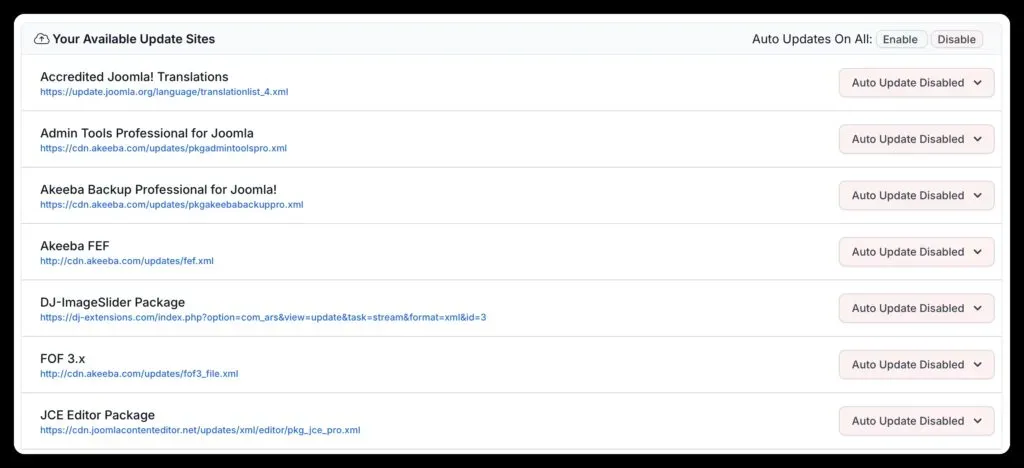
Nothing is enabled by default. Every toggle is an explicit opt-in by you, per extension, per site.
Turn Auto-Update on Across Every Site With One Click
Each Auto Update toggle has a split button. Click the dropdown next to any extension’s status pill and you get four explicit choices, the same four for every extension and for both Joomla and WordPress:
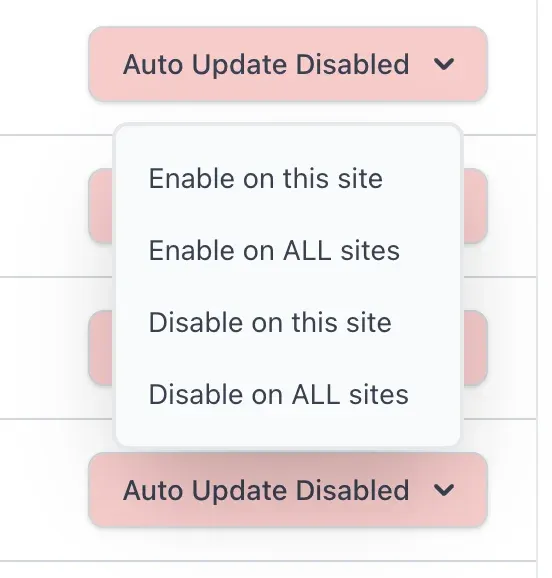
- Enable on this site - turn auto-update on for this one extension on the site you are currently viewing.
- Enable on ALL sites - turn auto-update on for this extension on every connected site that has it installed. Two clicks and Akeeba Backup is auto-updating across the portfolio.
- Disable on this site - turn it off here, leave the rest of the portfolio alone.
- Disable on ALL sites - kill the auto-update for this extension everywhere it is enabled, in one action. The escape hatch when an extension stream stops being trustworthy.
That last one is the part agencies underestimate. The day a developer ships a regression in their auto-update channel, you do not want to log into 50 backends to disable the toggle one by one. One dropdown, one click, every site.
This is the part that breaks down without tooling. Logging into 50 client backends to flip a per-site setting is not a workflow agencies sustain. Doing it once from a single dashboard is.
The same toggle is available for the Joomla Update Component itself. If you do want core auto-updates on, you can enable that here too, but most agencies leave that off and run core updates through a controlled mass-upgrade pass instead.
WordPress Plugin Auto-Updates From the Same Dashboard
The same toggle works for WordPress plugins. WordPress has shipped first-party plugin auto-updates since 5.5, but it is per-site, in the wp-admin UI, and it gives you no portfolio view. From mySites.guru’s Manage Site page, the Update tab on a WordPress site lists every installed plugin with the same Auto Update toggle and the same split-button “this site / all sites” choice that the Joomla side uses.
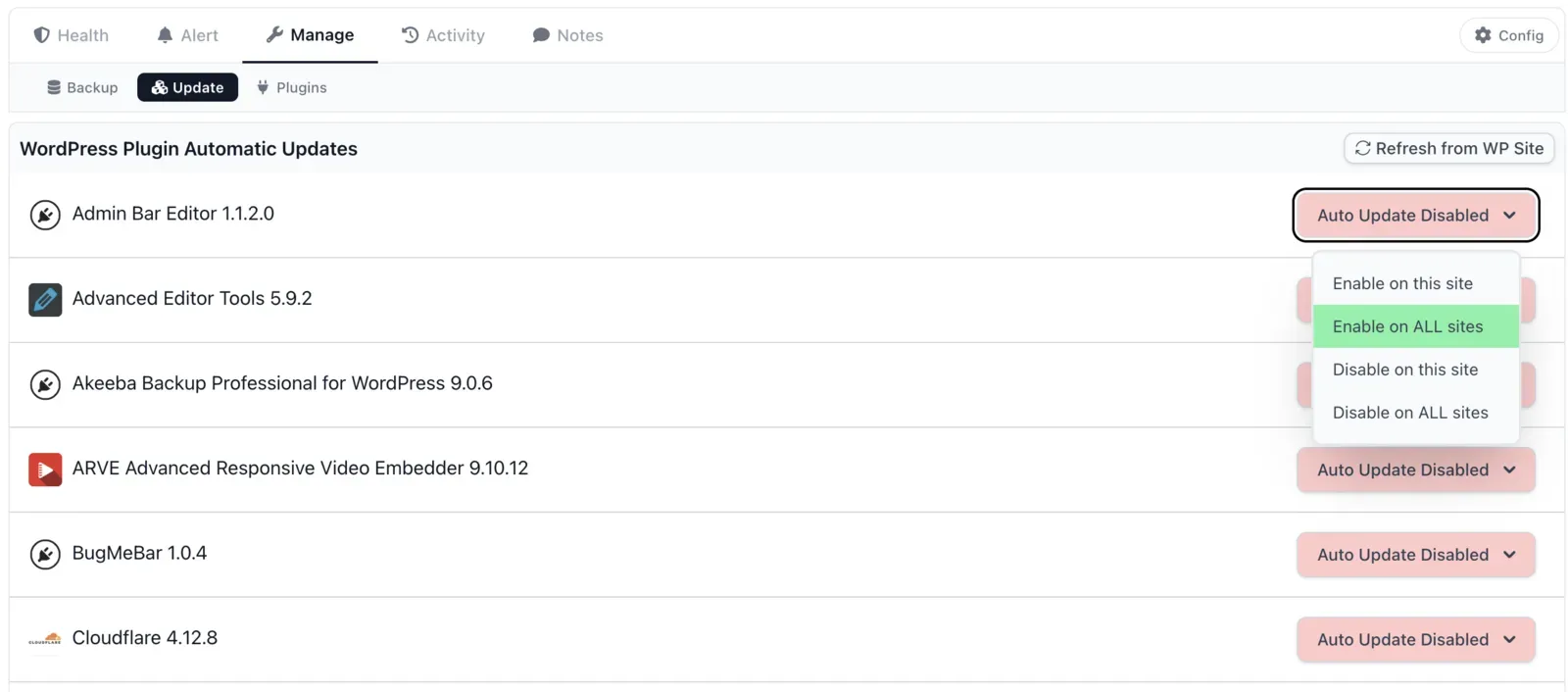
There is one difference in what happens after you flip the toggle. On Joomla, mySites.guru runs the daily check and applies the update itself. On WordPress, the toggle switches on WordPress’s own per-plugin auto-update setting (the same one as the “Enable auto-updates” link on the wp-admin Plugins screen), and WordPress’s background updater, run by WP-Cron, applies the update on its own schedule.
That matters if your sites set DISALLOW_FILE_MODS to true in wp-config.php, which the mySites.guru security audit recommends. WordPress switches its background updater off when that constant is set, so the toggle is saved but nothing applies the update. Manual updates pushed from the mySites.guru Updates tab still work with the constant set, so on locked-down sites that is the way to keep plugins current.
So the setup works the same way whether you run a Joomla portfolio, a WordPress portfolio, or a mix:
- One UI for both CMS platforms. The same toggle and the same “all sites” split button.
- Per-plugin opt-in. Auto Update Disabled is the default on every plugin. You decide which streams you trust per CMS.
- Cross-CMS portfolio view. The Updates dashboard shows every site, every plugin/extension stream, and the auto-update state across both CMS platforms in one filter.
If your portfolio is mixed (most agencies’ is) this is where mySites.guru saves the most time. WordPress plugin auto-update is a wp-admin per-site checkbox; doing it portfolio-wide on 80 mixed sites without a unified UI is the workflow the platform is built to replace.
Which Joomla extensions are safe to auto-update?
Auto-update earns its place on extensions where the developer has a long track record of non-breaking releases. The four families that are auto-updated portfolio-wide most often:
- Akeeba Backup and Admin Tools. Backup integrity matters and Akeeba’s release cadence is stable.
- JCE Editor. The dominant Joomla content editor, and one that shipped two security releases in a week, including an unauthenticated file upload fix. Auto-update sites had both before most agencies had read the advisory.
- RegularLabs. Modules Anywhere, Articles Anywhere, the rest of the family.
- Custom extensions you maintain yourself. You set the cadence and you wrote the code.
Auto-update is a worse fit for:
- Page builders that touch every template render
- E-commerce components like VirtueMart and HikaShop where a checkout regression is a revenue regression
- Anything that runs database schema changes on update without a migration step you can roll back
For those, queue a manual update through the bulk upgrade workflow on a Tuesday morning when you can watch the dashboard.
WordPress folks have had plugin auto-updates for years, and we see - repeatedly - issues with page builders and ecommerce plugins auto-updating, not being noticed, and breaking sites.
How do you roll back a Joomla extension auto-update that broke a site?
The email alert names the site, the extension, and the version it was upgraded to. From there:
- Restore the daily Akeeba Backup taken before the update ran.
- Disable the Auto Update toggle on that specific stream so the next 24-hour check does not re-apply it.
- Open the Joomla site, manually install the previous version of the extension if the developer keeps old releases, or stay on the restored version until the developer ships a fixed point release.
- If uptime monitoring caught the regression first, the alert email and the uptime alert will both reference the same minute, which makes correlating them with the auto-update record straightforward.
The point of the daily backup is exactly this: the rollback is “restore yesterday and turn the toggle off,” not “spend a day reverse-engineering what changed”.
Note
If an extension does not implement a Joomla update site, auto-update is not an option for it. The mass installer covers that case by letting you push a zip across many sites in one action.
Extension Auto-Update vs Joomla 5.4 Core Auto-Update
Different scopes, different mechanisms.
| Feature | Scope | Triggered by | Configured in |
|---|---|---|---|
| Joomla 5.4+ core auto-update | The Joomla CMS itself | Joomla.org infrastructure release pushes new version | Joomla System → Update settings |
| mySites.guru extension auto-update | One or many third-party extensions across one or many sites | mySites.guru's daily check against each update site URL | Updates tab on each connected site |
Most agencies still disable Joomla core auto-updates on client sites - for good reason - because a silent core upgrade can interact unpredictably with extensions, templates, and overrides that have not yet been tested against the new version. Then they enable extension auto-updates selectively for the streams above. That gives you predictable extension currency without losing control over when the core moves.
How do I see which sites have Joomla auto-update enabled and for which extensions?
The Manage Site page has the per-site view. For a portfolio view, the Updates dashboard shows every site, every installed extension stream, and the auto-update state. You can filter by extension to answer the agency-typical question of “which sites have Akeeba Backup auto-update on, and which do not”.
Combine that with the vulnerability scanner and the security audit and you have the three signals that matter on day one of an extension CVE: which sites have it installed, which sites are auto-updating it, and which sites are still vulnerable. The same three signals work for core CVEs - the Joomla 5.4.6 and 6.1.1 security release on 26 May 2026 is a recent example where the dashboard answered “which sites are still on the vulnerable version” in seconds.
Why Rolling Your Own Auto-Updater Always Falls Apart
Every agency that runs more than a handful of Joomla sites eventually asks: can we just write a bash script and a cron job, hit each site’s update API, and skip paying for a platform? The technical answer is yes, you can. You will, for about six months.
What gets you in the end is not the script. It’s everything underneath it.
- Per-site, not per-portfolio. A bash or PHP cron sitting on each Joomla site’s own server is per-site by definition. Want to know which of 80 client sites successfully patched JCE Editor last night? You are SSH’ing into 80 servers and grepping logs, or you are building the dashboard yourself. That is the platform you decided not to pay for, now built worse.
- Joomla minor releases keep breaking it. The update API is stable, until a 5.x point release tightens authentication, or 6.0 deprecates a field, or a TUF rollout changes the hash algorithm (Joomla extension manifests have already moved from MD5 to SHA-256/384/512 over the years). Every Joomla release is a chance for your homegrown script to start failing on a subset of sites. You find out from the client.
- Key and credential rotation. Each site needs a credential the script can present to call the admin API, or a long-lived token sitting in a script directory the world can read. When the developer who wrote the script leaves, that credential moves with them or stays orphaned on every site.
- No monitoring wiring. A cron that exits 0 on a failed update because it didn’t actually parse the response is the worst kind of monitoring: silent confidence. Without a separate alerting layer (uptime monitor, error log parser, email-to-on-call), you find broken updates the way clients always do, which is after the homepage breaks.
- Maintenance is a tax you pay forever. Joomla update XML adds a new field. PHP 8.4 changes a deprecation. cURL 8 tightens TLS defaults. Each one is a half-day for someone on your team to patch the script across every site, or a ticket that sits in the backlog while sites drift out of compatibility.
mySites.guru is the platform answer to all of the above. The check runs once a day per stream from a central queue, not per site. The agency dashboard is the per-portfolio view, already built. The connector is updated for every Joomla minor release as part of the platform’s daily work, not yours. Failed updates email the account owner, not /dev/null. And the £19.99 a month for unlimited sites is, in agency time terms, less than the half-day a quarter you would otherwise be spending fixing your own script.
Roll-your-own is a fine prototype. It is a bad five-year plan.
Further Reading
- Joomla Documentation: Extensions Update Sites (Help5.x) - official Joomla docs on the update-site protocol that auto-updates depend on.
- Joomla Documentation: Joomla Update (Help5.x) - the core update screen, separate from extension auto-updates.
- Joomla Community Magazine: Automatic core updates in Joomla - official background on the Joomla 5.4 core auto-update feature.
- Akeeba Backup - the backup integration mySites.guru drives for the daily snapshot before any update.

Unlock Joomla extension auto-updates free for a month
New to mySites.guru? Take it for a full month at no charge. Connect a few client sites, turn on extension auto-update for the streams you trust, schedule the daily backup, wire up uptime monitoring, and see what running a Joomla portfolio looks like when the platform handles the routine work.
Your first audit needs no card. Then subscribe with code FIRSTMONTHFREE for a free month, with every feature on every site, and pay the same £19.99 a month after it that the platform has charged since 2012.
Already running a single site and just want a quick check first? Run a free audit - no signup, no credit card, results in two minutes.
Frequently Asked Questions
How do I enable auto-update for Joomla extensions?
Can Joomla auto-update extensions natively without a third-party tool?
Is it safe to auto-update Joomla extensions on a client site?
Which Joomla extensions are safe to auto-update?
How often does mySites.guru check for new Joomla extension versions?
What happens if a Joomla auto-update fails?
Can mySites.guru auto-update WordPress plugins too?
 Written and edited by a human, with AI assistance. Our approach to AI