JCE Free/Pro 2.9.99.4 Patches Two Authenticated Vulnerabilities in Joomla's Most Popular Editor

The whole story in one place
Our JCE Profiles Hack page is the page of truth for the attack these flaws lead up to, with the indicators of compromise and the tool that finds and fixes it across every site you manage.
JCE (Joomla Content Editor) ships on more Joomla sites than any other editor extension. It is consistently one of the top two installs in our live extension ranking, neck and neck with Akeeba Backup. If you manage a stack of Joomla sites for clients, the odds that every single one of them has JCE installed are very high.
On 28 May 2026, the JCE developer announced JCE Pro 2.9.99.4 and the matching JCE Free 2.9.99.4. It is a security maintenance release patching two related authenticated vulnerabilities in the editor’s Editor Profile and filesystem search code. The fix shipped within 24 hours of the external security report arriving, which is fast.
This post covers what was patched, what an attacker could and could not do with the original bugs, how to push the update across every Joomla site you manage with mySites.guru, and why “authenticated only” is not the green light some site owners assume it is.
Update: JCE has shipped several times since. The current version is 2.9.99.11
This page covers 2.9.99.4. Since then, the developer shipped 2.9.99.5 (3 June) to fix a more serious unauthenticated editor profile upload that could be used to upload arbitrary files (CVE-2026-48907), then 2.9.99.6 (8 June), a security hardening release following a full four-day audit of the editor, 2.9.99.7 (18 June, an upload-regression fix and group whitelist), 2.9.99.8 (2 July, a maintenance release that also hardens the File Browser), 2.9.99.10 (29 July, an authenticated file rename fix plus a broad hardening pass, CVE-2026-65891), and 2.9.99.11 (15 September, the last 2.9 feature release before JCE 3.0). That unauthenticated flaw is now being actively exploited with public exploit code. Do not stop at 2.9.99.4: update straight to the current 2.9.99.11. Read the JCE 2.9.99.6 advisory or the 2.9.99.5 advisory. For sites that cannot reach the current release (it needs PHP 7.4 and Joomla 3.10+), the developer offers a free patch package for JCE 2.7.x, 2.8.x and 2.9.x.
TL;DR
- JCE Pro 2.9.99.4 and JCE Free 2.9.99.4 released 28 May 2026
- Patches two authenticated vulnerabilities affecting all previous 2.9.x versions
- Bug 1: an authenticated user could access an Editor Profile they were not assigned to and invoke filesystem actions inside that profile’s restrictions
- Bug 2: a directory parameter in JCE’s filesystem search could be manipulated to list folder contents outside the configured root (directory traversal)
- Exploitation required a logged-in Joomla session. Anonymous visitors cannot trigger either bug
- No CVE numbers assigned at time of writing
- Runs natively on Joomla 3, 4, 5, and 6 without the Backwards Compatibility plugin
- Update via the Joomla Update Manager or the JCE downloads area
- If you manage multiple sites, mySites.guru’s mass updater lets you push the update to every affected site in one batch
Why “authenticated only” still matters
Any Joomla site with public registration, a customer portal, a contributor workflow, a membership area, or any non-Super-User account that can log in to the backend or frontend is in scope for this advisory. That is the majority of business Joomla sites. Authenticated-only does not mean admin-only.
What was actually patched in JCE 2.9.99.4?
The JCE security advisory describes two issues. Both are quoted from the developer’s release announcement:
From the developer's release announcement
Editor Profile access: an authenticated user could potentially access an Editor Profile that they are not assigned to and invoke filesystem actions available to that profile, but within the restrictions of that profile.
Filesystem search directory traversal: a directory parameter could be manipulated to list folder contents beyond configured boundaries.
To unpack what those actually mean, you need a quick refresher on how JCE is wired up.
A quick tour of JCE Editor Profiles
JCE’s distinctive feature is its Editor Profiles system. Instead of giving every logged-in user the same editor, JCE lets administrators define different profiles for different user groups. A registered user might get a minimal toolbar with no file uploads. A content editor might get image and file managers scoped to a specific media directory. A super user might get the full editor with arbitrary file operations.
Each profile defines:
- Which toolbar buttons are visible
- Which file types can be uploaded
- Which directories the editor can browse and upload into
- Which advanced features (templates, code view, character map, etc.) are exposed
The whole point is privilege separation inside the editor. A subscriber should not be able to invoke the same filesystem actions as a super user, even if they somehow access the editor. The profile assignment is the boundary that enforces that.
Bug 1: Editor Profile assignment bypass
The first vulnerability allowed an authenticated user to invoke filesystem actions through an Editor Profile they were not assigned to. Before the patch, the assignment check in the relevant code path was either missing or could be bypassed by manipulating the request.
The practical impact is constrained by the profile’s own permissions. The attacker is still bounded by what the unassigned profile is allowed to do, not promoted to super user. But if a site’s super-user-only profile permits, for example, image uploads to the entire images/ tree, a subscriber-level user could potentially route their request through that profile and upload there too, ignoring whatever restriction the subscriber’s intended profile imposed.
This matters most on sites where:
- A high-privilege profile exists with broad filesystem access
- That profile is supposed to be locked to administrators or super users
- Lower-privilege user groups exist with frontend or backend login
Bug 2: Directory traversal in filesystem search
The second issue was a classic directory traversal. JCE has a filesystem search feature that lets the editor (within a profile’s allowed directories) search for files matching a query. The directory parameter to that search was not adequately sanitised. A manipulated parameter could traverse outside the configured root and list folder contents elsewhere on the server.
Directory traversal vulnerabilities are usually summarised by an example payload like ../../../etc/passwd. In this case, the bug listed folder contents rather than reading file contents directly, which is a lower severity outcome than arbitrary file read. But folder listings still leak information an attacker can use:
- Filenames of database backups left in unusual locations
- Names of
.env,.git/, orwp-config.php.bakstyle files - The structure of other CMS installations on the same account
- Plugin and extension folders for fingerprinting other vulnerabilities
Both bugs interact. The Editor Profile bypass widened which profile an attacker could route through, and the directory traversal widened where that profile could look. The patched 2.9.99.4 closes both.
What the JCE vulnerabilities actually let an attacker do
The advisory is explicit: exploitation required an active, authenticated Joomla session; unauthenticated access was not possible. So an anonymous attacker scanning the internet for vulnerable Joomla sites cannot trigger either bug without an account. That puts this in a different category from Joomla CVE-2025-7771, Smart Slider 3 arbitrary file read, or Novarain Framework’s unauthenticated file inclusion.
With an account, though, the picture is less reassuring. A logged-in user could route filesystem actions through an Editor Profile they were never assigned to, bounded by whatever that profile permits but escaping the restrictions of their intended profile. If a super-user profile allowed image uploads to the whole images/ tree, a registered subscriber could potentially upload there too. Combine that with the directory traversal in filesystem search, and the same user could list folder contents outside the configured root, pulling filenames of backups, .env files, wp-config.php.bak, or the layout of adjacent CMS installs to fingerprint other targets.
Neither bug grants direct arbitrary file read or RCE on its own, but both expand what a low-privilege account can see and where it can write inside a profile’s permitted operations. That is enough to matter on any site where the gap between “registered user” and “admin” is supposed to be a real boundary.
That fact deflates the urgency somewhat, but it does not zero it out. The set of Joomla sites with at least one registered user beyond Super User is enormous:
- E-commerce sites running VirtueMart, HikaShop or J2Store with customer accounts
- Membership sites with paid registrations
- Community forums (Kunena, EasyDiscuss)
- Multi-author publications with editor and author groups
- Anywhere user registration is enabled in Global Configuration, even if rarely used
- B2B portals where logged-in users are the entire audience
If any of the above describes one of your client sites, authenticated-only is your problem too.
How to update JCE on a single Joomla site
For a single site, the update is unremarkable. Joomla’s built-in Extension Update tooling will pick up 2.9.99.4 automatically as soon as the JCE update server publishes it (which is now).
Steps:
- Log in to the Joomla administrator
- Go to System → Update → Extensions
- Click Check for Updates
- Select the JCE row in the list
- Click Update
If the update does not appear, check that JCE’s update site is enabled at System → Update → Update Sites and that the Joomla! Extensions Update component itself has been run recently.
For JCE Pro specifically, you need a valid subscription key entered in Components → JCE Editor → Options → Subscription Key for the Pro update channel to be reachable. JCE Free users get their updates straight from the Joomla extension feed and do not need a key.
After the update completes, hard-refresh the editor in a logged-in browser session to flush cached JCE assets. The version reported under Components → JCE Editor should read 2.9.99.4 once you reload.
How to find every Joomla site with a vulnerable JCE using mySites.guru
That is the easy case. The hard case is “I look after 40 client Joomla sites. Which of them are running an old JCE?”
That is what mySites.guru is built for. Twice a day, a snapshot runs against every connected Joomla site and indexes every installed extension, including its exact version number. From that index you can answer the JCE 2.9.99.4 question in seconds rather than logging into 40 administrator panels in sequence.
Open the extension search inside your dashboard and look up the Editor - JCE entry. You will see every version of JCE installed across your portfolio, grouped by version number, with every site that runs each version listed below it. Sites still on 2.9.99.3 or earlier are the ones that need attention. Sites already on 2.9.99.4 (or which auto-updated overnight) are green.
You can also filter by JCE Free vs JCE Pro if you maintain a mixed estate. Both editions ship the same security fix in 2.9.99.4 from the same JCE update server, but Pro needs a subscription key so it helps to know which sites belong in which group.
mySites.guru subscribers: jump straight to the JCE inventory
Lists every JCE install across your connected Joomla sites, grouped by version. Anything on 2.9.99.3 or earlier needs the 2.9.99.4 patch. Not a subscriber? Sign up free and connect your sites.
Push 2.9.99.4 across every affected site in one batch
Once you know which sites are on a vulnerable JCE, you do not patch them one by one. The mySites.guru mass extension updater lets you pick every site running JCE on an outdated version and trigger the update across all of them in one batch.
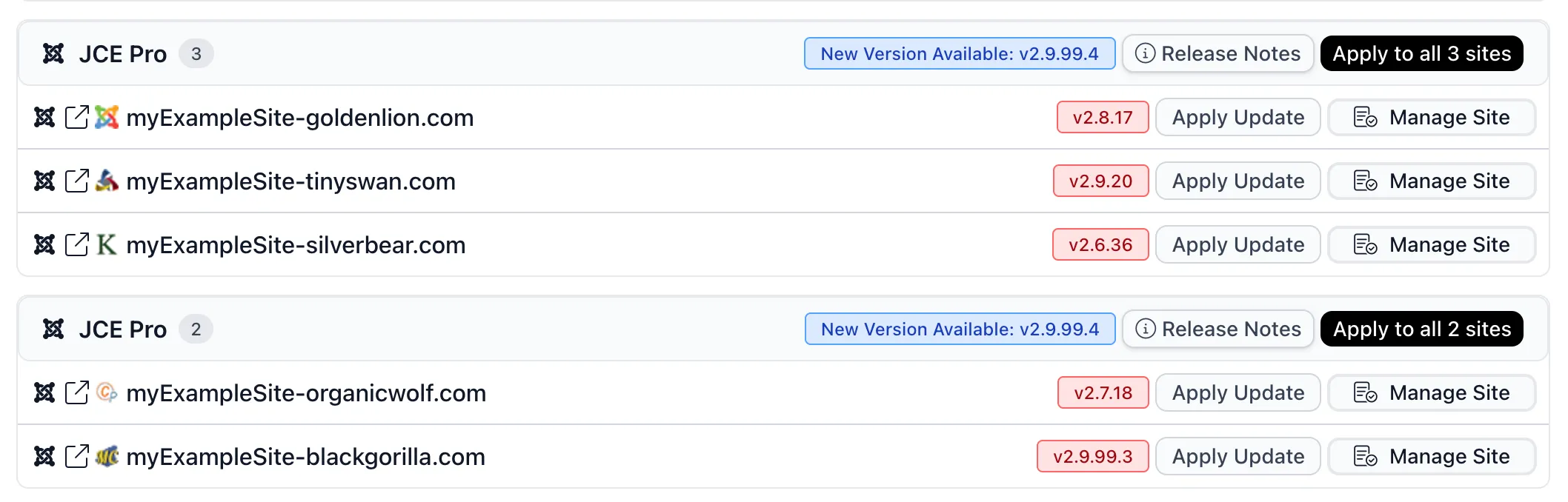
The screen groups every JCE install across your account by the new version it can update to, with a single “Apply to all” button per group plus per-site Apply Update controls when you want to be selective. Sites stuck on much older versions (v2.6, v2.7, v2.8) get patched in the same sweep as ones already on the 2.9.99.x line.
Behind the scenes the platform calls each site’s connector to invoke the Joomla update routine, pulls the 2.9.99.4 package from JCE’s update server, installs it, and reports back. You see a progress bar, a final pass/fail per site, and a log entry against the site for the change. If a site is offline, behind a firewall, or has an outdated connector, it surfaces as a clear failure rather than a silent miss.
For agencies running scheduled automation, JCE updates can be enrolled in the same overnight extension auto-update flow as everything else. The Automatic Updates for Any Joomla Extension feature already supports JCE Free and JCE Pro through Joomla’s native extension update API.
If you would rather hold off auto-updates on production and run the batch update manually after smoke-testing on a staging instance, the same screen lets you tick exactly which sites you want to patch right now and leave the rest.
Thousands of opted-in sites have already been patched automatically
The mySites.guru automatic extension updater has already pushed 2.9.99.4 to thousands of opted-in Joomla sites overnight without anyone having to log in. If your sites are enrolled, the patch has been applied, the version has been verified, and an audit entry is sitting in the activity log. If they are not, this is the advisory to change that. Turn on automatic extension updates in your account and the next time a popular extension like JCE ships a security release, you wake up to “done” rather than “to do”. Enable auto-updates from your mySites.guru dashboard or run a free audit if you do not have an account yet.

How quickly should you patch JCE 2.9.99.4?
It depends on your sites.
Patch within 24 hours
Do this if any of the following are true:
- The site allows public user registration
- The site has any customer-facing account flow (e-commerce, members, downloads)
- You run a community component (Kunena, EasyDiscuss, JomSocial)
- You have any history of credential stuffing or compromised low-privilege accounts on the site
- The site stores anything sensitive in folders adjacent to JCE’s configured roots
Patch within the week
This applies to low-traffic brochure sites with no public registration, no customer accounts, and a single Super User. Even here, 2.9.99.4 is a free, no-config drop-in upgrade. Wait until the next scheduled maintenance window and that’s fine.
Authenticated-only bugs tend to get deprioritised in agency triage queues until someone publishes a working exploit chain, and then everyone scrambles. JCE 2.9.99.4 is a clean security patch with no functional changes, so the risk of applying it is essentially zero. The risk of not applying it is whatever the next external researcher discovers, multiplied across every site that still has the bug.
Edge cases and gotchas
A handful of things to watch for when rolling out 2.9.99.4 across an estate.
Lapsed JCE Pro subscriptions
Both JCE Free and JCE Pro pull updates from the same JCE update server run by the developer, not from the Joomla Extensions Directory. The catch for Pro is the subscription key. If a Pro install’s subscription has lapsed, the 2.9.99.4 update will not appear in the site’s Joomla extension update list and the site will sit on the old version.
The fix is to renew the subscription (the developer will prompt for it) or to log a temporary key into the site, pull the security release, then sort the renewal properly afterwards.
A practical workflow is to scan your mySites.guru extension report for any JCE Pro install still on a pre-2.9.99.4 version 48 hours after release. Those are almost certainly the sites with lapsed subscriptions.
Custom Editor Profiles with broad filesystem access
If you originally set up an Editor Profile on a high-trust user group with broad filesystem access (the whole images/ tree, or worse, /), audit it after the update. Even though 2.9.99.4 plugs the assignment bypass, the underlying principle of least privilege still applies. A profile with broad filesystem access remains a high-value target for whatever the next JCE issue turns out to be. Lock profiles down to the narrowest path that still lets the user group do their job.
You can review every profile under Components → JCE Editor → Editor Profiles on each site.
Sites still on JCE 2.x branches older than 2.9
If you still have a JCE 2.7.x or 2.8.x install on a long-tail Joomla 3 site, that install is far more exposed than the current advisory implies. The 2.9.99.4 fix is for the 2.9.x branch only. Those older 2.7.x and 2.8.x lines have not received this patch, and almost certainly have a backlog of unpatched issues going back years, including the unauthenticated profile upload later patched in 2.9.99.5 (CVE-2026-48907).
The right answer is to update the underlying Joomla site to 4 or 5 and bring JCE up to the current 2.9.99.11 at the same time. mySites.guru’s migration tooling can help triage which sites need the most work. For sites that cannot reach the current release (it needs PHP 7.4 and Joomla 3.10 or later), the JCE developer has published a free patch package that closes the unauthenticated upload vulnerability in JCE 2.7.x, 2.8.x and 2.9.x. It is a stopgap that fixes the vulnerability only and does not clean a compromised site, so back up and test on a copy first and still plan to migrate.
JCE 2.6.x is a special case. The developer confirms it is not affected by that unauthenticated upload in a default configuration, because the import path is blocked and no guest-accessible profile exists by default. It is still unsupported and may have other unpatched issues, so plan to migrate it regardless.
If you cannot upgrade Joomla on a particular site (some clients will not, even when the risk is explained), at minimum disable JCE on that site and fall back to TinyMCE or CodeMirror until the site can be modernised.
Checking for signs of prior exploitation
Because both bugs require authentication, the audit trail for any past exploitation lives inside Joomla’s own user activity logs and the web server access logs, not in some external IDS feed. There is no fingerprint to scan for the way you would for an unauthenticated remote code execution.
A reasonable retrospective audit on a high-risk site looks like this:
- Pull the last 90 days of access logs and grep for requests to JCE’s filesystem endpoints. The relevant URLs contain
task=plugin.displayorplugin=imgmanager/filemanager/browserin the query string, routed throughindex.phpon Joomla 4/5/6 or the JCE controller on Joomla 3. - Filter to requests made by authenticated users (anything with a Joomla session cookie). Anonymous requests cannot have triggered either bug.
- Cross-reference any unusual paths in the directory parameter against your configured profile roots. Anything pointing well outside the configured root is a candidate for follow-up.
- Look for newly created subscriber-level or registered-user accounts that you do not recognise, especially around the time of any suspicious requests. The attacker model here assumes a valid account, and the cheapest way to get one is to register a new one if your site permits.
If you find anything that looks like intended probing, treat the site as you would after any other authenticated breach: rotate session keys, invalidate active sessions via Joomla’s user management, audit your images/, media/, and any custom-defined upload roots for files you did not put there, and run mySites.guru’s suspect content scanner against the site.
For most sites the audit will come up empty, and that’s fine. The point is to be intended about closing the chapter rather than assuming nothing happened because nothing was reported.
JCE and the Joomla Backwards Compatibility plugin
The 2.9.99 branch is fully native to Joomla 5 and 6 and does not require the Backwards Compatibility plugin. If JCE is the only reason the BC plugin is enabled on a particular site, you can disable BC once 2.9.99.4 is in place, provided your other extensions are also BC-free.
For an estate audit of which sites still need BC and which can shed it, see our Joomla compat plugin is a crutch write-up.
Does this affect WordPress?
No. JCE is a Joomla-only editor extension. There is no WordPress build of JCE Pro or JCE Free, no shared codebase, and no equivalent advisory for WordPress.
WordPress sites use TinyMCE through the WordPress core editor instead, which has its own separate vulnerability history. If you are looking after a mixed Joomla and WordPress estate, the WordPress half of your portfolio is unaffected by this particular advisory. The Joomla half needs the update.
The pattern in this advisory (privilege check bypass on a request that already requires a login) is a recurring shape across both platforms. We dug into the same anti-pattern in AJAX Endpoints: The Biggest CMS Security Blind Spot, where authenticated-but-not-authorised endpoints crop up everywhere from Smart Slider 3 to Joomla core’s own com_ajax router.
Timeline
JCE Pro and Free 2.9.99.4 ship within 24 hours of an external report
Two related authenticated flaws in the Editor Profile and filesystem search code: reaching a profile you are not assigned to, and a directory parameter that could list folders outside the configured root. Both need a logged-in session, which is what keeps this one at patch-this-week.
2.9.99.5 fixes a separate and far more serious flaw
An unauthenticated editor profile upload that the developer says could be used to upload arbitrary files to the server, tracked as CVE-2026-48907. Not a reopening of the flaws above, a different bug with no login requirement at all.
2.9.99.6 follows a four-day audit of the whole editor
Narrowed entry points and hardened input validation, framed as defence in depth rather than a fix for one named flaw.
Working exploit code for CVE-2026-48907 is published on GitHub
Any site still below 2.9.99.5 is now racing a published exploit.
CISA adds CVE-2026-48907 to its Known Exploited Vulnerabilities catalog
Which is the US government confirming real-world attacks, not a theoretical risk.
2.9.99.10 fixes a file rename flaw
CVE-2026-65891, an authenticated privileged-user file rename that could hide a file, is minor next to CVE-2026-48907. The version to be on is still the newest one.
2.9.99.11 closes the 2.9 series
The last release to add features to 2.9. JCE 3.0 is due within days, and 2.9 moves to maintenance, still receiving security fixes.
Further Reading
- JCE Pro 2.9.99.4 release announcement - the developer's original advisory and changelog
- JCE security update and a free patch for older sites - the developer confirms active exploitation of the later unauthenticated flaw and offers a free patch for sites that cannot update
- JCE Pro 2.9.99.6 Security Update - the hardening release, with update notes through to the current 2.9.99.11
- JCE downloads area - direct package downloads for JCE Pro subscribers
- JCE on the Joomla Extensions Directory - the JCE Free listing
- Top 50 Joomla Extensions - live ranking from the mySites.guru database, where JCE consistently ranks in the top two
- How to update Joomla, Joomla extensions, WordPress and WordPress plugins from mySites.guru - the mass updater workflow used for rollouts like this
- Automatic updates for any Joomla extension - enrol JCE in scheduled overnight updates so the next advisory patches itself
- AJAX Endpoints: The Biggest CMS Security Blind Spot - the recurring authenticated-but-not-authorised pattern across Joomla and WordPress
For broader agency guidance on managing Joomla security and updates across a portfolio, see our Joomla agency handbook.
Frequently Asked Questions
What is the JCE Free/Pro 2.9.99.4 security update?
Are the JCE 2.9.99.4 vulnerabilities exploitable without a login?
Which JCE versions are affected by the 2.9.99.4 advisory?
Do I need the Joomla Backwards Compatibility plugin for JCE 2.9.99.4?
How does mySites.guru help with the JCE 2.9.99.4 update?
Does this advisory affect WordPress?
Is JCE 2.9.99 the final release before JCE 3.0?
 Written and edited by a human, with AI assistance. Our approach to AI