Joomla 5.4.6 and 6.1.1 Patch TEN Security Issues
Joomla released 5.4.6 and 6.1.1 on 26 May 2026, closing ten CVEs in a single release. Two are MFA Authentication Bypass issues, one is a High-severity privilege escalation through the com_users batch task, and a pair of XSS bugs in the joomla/filter Framework package have been sitting there since Joomla 3.0.0.
One Joomla site: click Update and move on. Thirty sites: you have a patch night ahead of you, and the order you patch in matters.
Patching Joomla 5.4.6 and 6.1.1 Across a Client Portfolio
The first thing to do on a release like this is take inventory. Which of your sites are on 5.4.5 right now? Which are still on 4.4.x and need to clear 5.4 before they can reach 6.1.1? Which are on 6.1.0 and ready for a single-step bump?
mySites.guru’s “Joomla outdated” check answers all three. Every connected Joomla site gets a row showing current version, target version, and a colour code for how far behind it is. After this release, every 5.4.5 and 6.1.0 site is flagged red. You can manage multiple Joomla sites from one dashboard and patch them in a single bulk operation rather than logging in to each admin.
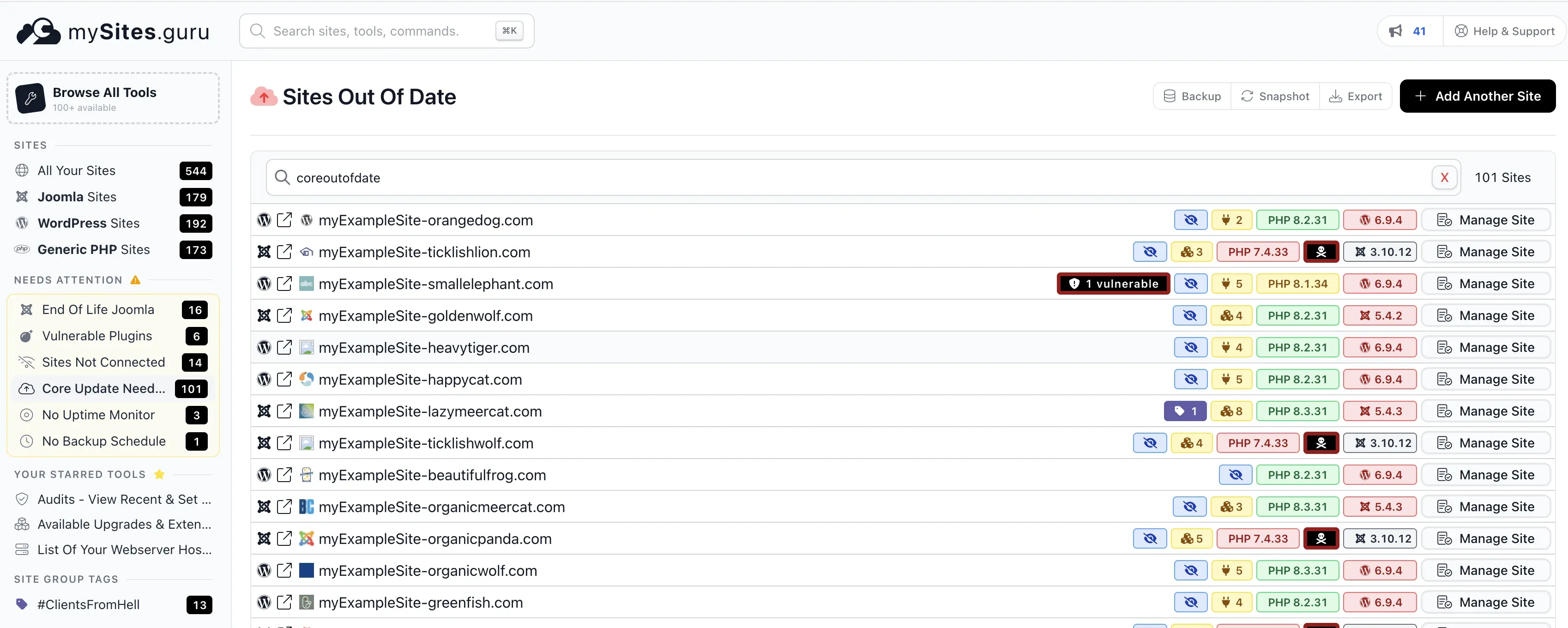
The Joomla 3.10.12 and 5.4.2 rows above are flagged red. WordPress 6.9.4 rows are flagged red too, since 7.0 is out. One row has a “1 vulnerable” badge. You see all of it without logging in to a single admin.
Two parts matter most when you have a lot of sites:
- Bulk Joomla core upgrade runs the update on every selected site in parallel. Backups are taken first if you’ve enabled that in your site settings. The same tool handles WordPress, so mixed estates get patched in one pass instead of two patch nights.
- Post-upgrade verification confirms the new version actually took effect. Sites occasionally hang at “downloading” or fail at the database fix step, and a quick hash or status check catches those before a client does.
This is the kind of release the mass-upgrade workflow was built for. Ten CVEs in one go, no cherry-picking, every site on 5.4.5 or 6.1.0 needs the patch tonight. The guide on how to upgrade hundreds of Joomla and WordPress sites from one dashboard walks through the click path, and how to update Joomla, Joomla extensions, WordPress, and WordPress plugins from mySites.guru covers the wider day-to-day workflow once core patching is done.
If you want to see what this looks like before signing up, the free audit runs the same outdated-version check on your sites without asking for a credit card.
Important
You cannot upgrade directly from Joomla 4.x to 6.1.1. The 6.1.1 release notes are explicit: update to 5.4 first, then move to 6.x. The 5.4.6 release itself needs 4.4 as the starting point. Plan two-step paths for any 4.x sites you still operate.
What the Hell Is a “CVE”?
CVE stands for Common Vulnerabilities and Exposures. It is a public catalogue of known security holes in software, maintained by MITRE and mirrored by the US National Vulnerability Database (NVD). Every entry gets a unique ID in the form CVE-YYYY-NNNNN, where the year is when the ID was assigned (not necessarily when the bug was found or fixed).
A few things worth knowing if you have not bumped into them before:
- A CVE ID is an identifier, not a severity. “CVE-2026-48898” tells you which bug, not how bad. Severity is a separate rating (Low, Moderate, High, Critical) usually scored against the CVSS framework.
- The same CVE can mean different things on different versions of the software. A flaw might be exploitable on one Joomla minor version and not another, which is why the “Affected” column matters.
- The CVE is only the reference; the patch is whatever new version closes the bug (in this case, 5.4.6 and 6.1.1).
- NVD entries lag. When Joomla or another vendor publishes an advisory, the CVE ID is reserved but the NVD page often shows “RESERVED” or “AWAITING ANALYSIS” for several days while NVD analysts write up severity and impact. The vendor advisory is the authoritative source until NVD catches up.
When you manage Joomla sites, you need to know which CVEs hit your version and how urgent each one is. The table below has both.
The Ten Security Issues in Joomla 5.4.6 and 6.1.1
Joomla’s Security Centre published all ten advisories on 26 May 2026. The full list, ordered by severity:
| CVE | Severity | Affected | Fix | What it is |
|---|---|---|---|---|
| CVE-2026-48898 | High | 4.0.0-5.4.5, 6.0.0-6.1.0 | 5.4.6, 6.1.1 | Privilege escalation through the com_users batch task. Improper access check lets a low-privilege backend user elevate beyond their assigned group. |
| CVE-2026-48896 | Moderate | 4.0.0-5.4.5, 6.0.0-6.1.0 | 5.4.6, 6.1.1 | MFA Authentication Bypass. Insufficient state checks in the MFA flow. |
| CVE-2026-48897 | Moderate | 4.0.0-5.4.5, 6.0.0-6.1.0 | 5.4.6, 6.1.1 | MFA Authentication Bypass. Incorrectly reset session states. |
| CVE-2026-48899 | Moderate | 4.0.0-5.4.5, 6.0.0-6.1.0 | 5.4.6, 6.1.1 | Incorrect Access Control in sample data plugins. Unauthorised users can trigger sample data install actions. |
| CVE-2026-48903 | Moderate | 3.0.0-5.4.5, 6.0.0-6.1.0 | 5.4.6, 6.1.1 | XSS in the joomla/filter Framework’s checkAttribute method. Present since 3.0.0. |
| CVE-2026-48904 | Moderate | 4.0.0-5.4.5, 6.0.0-6.1.0 | 5.4.6, 6.1.1 | Privilege escalation through com_users webservice endpoints. Improper access check on the group editing API. |
| CVE-2026-48905 | Moderate | 3.0.0-5.4.5, 6.0.0-6.1.0 | 5.4.6, 6.1.1 | XSS in the joomla/filter Framework’s cleanAttributes code. Present since 3.0.0. |
| CVE-2026-48900 | Low | 4.1.0-5.4.5, 6.0.0-6.1.0 | 5.4.6, 6.1.1 | ACL bypass in com_scheduler. Low-priv users can edit task types of existing scheduler tasks. |
| CVE-2026-48901 | Low | 4.0.0-5.4.5, 6.0.0-6.1.0 | 5.4.6, 6.1.1 | Incorrect cache key construction for InputFilter objects. |
| CVE-2026-48902 | Low | 3.9.0-5.4.5, 6.0.0-6.1.0 | 5.4.6, 6.1.1 | Transport encryption downgrade. Password and username reset links generated as HTTP when “Force SSL” is off. Reaches back to 3.9.0. |
NVD entries may show “RESERVED” status for the first few days after disclosure. The authoritative writeups live in the Joomla Security Centre and were live the day the patches came out.
Eight of the ten affect every install from 4.0.0 onwards. CVE-2026-48900 is scoped to 4.1.0 and later (com_scheduler was added in 4.1). CVE-2026-48902, 48903 and 48905 reach further back, into the Joomla 3 lineage.
More Security Issues Already Queued for the Next Release
Two open pull requests filed on 2026-05-27 line up three more CVEs for the next 5.4 and 6.1 point releases. PRs #47847 (5.4) and #47848 (6.1) bump bundled symfony/yaml from 6.4.25 (5.4 branch) and 6.4.34 (6.1 branch) to 6.4.41 to close three Symfony-side advisories:
- CVE-2026-45304 - YAML Parser exponential memory allocation via recursive collection-alias expansion. The classic “Billion Laughs” attack pattern, transplanted from XML into YAML.
- CVE-2026-45305 - ReDoS via catastrophic backtracking in
Parser::cleanup()regex. - CVE-2026-45133 - Stack exhaustion via unbounded recursion in nested blocks, sequences, and mappings.
All three are denial-of-service rather than remote code execution. No one’s site gets hacked Wednesday morning because of them. But they affect every version of symfony/yaml from 2.0.0 through 8.0.11, meaning the buggy code went into the library in 2011 and nothing flagged it until 20 May 2026.
AI Is Accelerating the Security Disclosure Rate
Three Symfony YAML parser CVEs disclosed on the same day, in code that has been sitting in production since 2011, fit a wider change: vulnerability discovery has shifted gear over the last twelve months.
For most of open source history, finding a security bug needed a human with niche expertise sitting down to read code. A “Billion Laughs” variant in symfony/yaml stayed there for fifteen years because few humans had the time or motivation to look, not because the code is impossibly complex. The library worked. It parsed YAML. Almost no one was going to craft a recursive collection-alias payload at it and watch the memory graph climb.
LLMs have changed the economics. An LLM can read the entire symfony/yaml codebase in seconds, suggest classes of input that might trigger pathological behaviour, and write the fuzzing harness to confirm. A researcher who would have spent a week manually auditing one parser can now sweep a hundred packages in an afternoon.
You can see the same pattern in the Joomla 5.4.6 / 6.1.1 release itself: the credits list on the Joomla Security Centre names “Doyensec (with Claude/Anthropic Research)” against CVE-2026-48896. Expect more attributions like that on future releases.
For an agency, the practical consequences:
- Disclosure rate is climbing and will keep climbing. Expect more CVEs per Joomla point release, not fewer, and the same across PHP frameworks, WordPress plugins, and NPM packages.
- More disclosures means more theoretical issues. The three symfony/yaml ones above only matter if attacker-controlled YAML reaches a parser on your site, which on most Joomla installs it doesn’t. The CVE still gets a number, still appears in
composer audit, and still needs an answer when a client asks. - Patch cadence becomes operational. Releases that close ten core CVEs and reference three more queued for the next minor don’t fit a rolling once-a-quarter schedule. Thirty sites done by hand was already annoying; fifty during a high-disclosure year isn’t sustainable without tooling.
You won’t read every CVE on every release, so you need something that tells you which of your sites are exposed to which fix and lets you patch them in bulk before the next batch arrives. That is what the free audit shows you.
Which Security Issue Should You Patch First in Joomla?
For most agencies the answer is “all of them, at once, because they all need 5.4.6 or 6.1.1 anyway.” There is no cherry-picking individual patches out of this release. But if you have a backlog of upgrades and have to phase the rollout, the priority order is:
1. CVE-2026-48898 (com_users batch task privilege escalation)
This is the only High-severity item. The com_users batch task lets administrators apply changes to many users at once: changing groups, resetting passwords, deleting accounts. An improper access check means a backend user with limited rights can use the batch operation to elevate beyond their assigned permissions.
Patch first on any site where you do not personally control every backend account. That includes multi-author publications, sites with freelance editors, anywhere a junior staff member has Manager or Publisher access, and any client site where the user list has grown over years without audit.
2. CVE-2026-48896 and 48897 (MFA Authentication Bypass)
Two distinct issues, both Moderate. CVE-2026-48896 is “insufficient state checks” in the MFA flow. CVE-2026-48897 is “incorrectly reset session states.” Both have been present since Joomla 4.0.0.
These only matter if you rely on Joomla’s MFA. If you have super-user accounts protected by 2FA on the assumption that a stolen password alone is not enough, that assumption was wrong from 4.0.0 through 5.4.5 and 6.0.0 through 6.1.0. Patch every site running MFA before you patch the ones without it. If you are going the other way and turning MFA enforcement on across a portfolio, do the patching first.
3. CVE-2026-48904 (com_users webservice priv-esc)
A privilege escalation parallel to CVE-2026-48898 but reached via the webservice API rather than the HTML admin. Only matters if you have webservices enabled, which most production sites do, because Joomla turns them on by default. If nothing on the site uses the API, disable the Joomla API and this whole class of flaw stops applying.
4. The XSS pair (CVE-2026-48903 and 48905)
Both live in the joomla/filter Framework package: checkAttribute and cleanAttributes. Both are described as inadequate content filtering allowing XSS payloads to come through attribute sanitisation. The advisories do not publish concrete bypass payloads, so the practical risk depends on what extensions you have installed that pass user-supplied HTML through the framework filter. Patch in normal rollout order.
5. The Low and remaining Moderate items
CVE-2026-48899 (sample data plugin access control), CVE-2026-48900 (com_scheduler task type editing), CVE-2026-48901 (InputFilter cache key), CVE-2026-48902 (HTTP password reset links). Worth closing, but unlikely to drive a same-night incident.
How Do You Verify a Joomla Bulk Update Actually Worked?
The most common patch-night failure I see is a patch that never applies: a site reports the new version in the dashboard, but the files on disk are still on the old build. Sometimes the database fix step fails and the site loads while logging errors in the background.
Useful checks after a bulk Joomla update:
- Version string check. Hit every site’s frontend (or your admin’s version display) and confirm it reports 5.4.6 or 6.1.1. mySites.guru’s site overview does this on one screen.
- Database fix. Joomla’s Extensions → Manage → Database tool flags any schema mismatches. Worth running after a Moderate or High patch night. Across 30+ sites doing it by hand is impractical, which is why automating it as part of the update flow matters.
- MFA round-trip. Log in to one admin account per site with MFA enabled. The 48896/48897 fixes changed session-state handling, so a quick check catches anything misbehaving.
mySites.guru lists the real version running on your site, not the version Joomla’s dashboard thinks is installed. It reads the actual code on disk and shows it alongside every connected site in your console, so a site that hung at “downloading 6.1.1” shows up as still on 6.1.0 even when its admin claims otherwise.
Companion pieces to keep near the workflow: what a planted row in Joomla’s scheduler looks like, which is the mechanism CVE-2026-48900 above gives a low privileged account; detecting locked Joomla scheduled tasks, which sometimes appear in the days after a Joomla version bump if a cli/joomla.php task left a row stuck in task_lock, and automatic updates for any Joomla extension, which closes the gap between core patches like this one and the long tail of extension CVEs that never make a Joomla.org headline.
How Do You Spot Joomla Sites Still on Old Versions Without Logging Into Each Admin?
If your sites aren’t connected to a central manager, the manual options are limited:
- Reading
administrator/manifests/files/joomla.xmlon every site over SSH or FTP. Workable for five sites; rough for thirty. - Requesting
/administrator/manifests/files/joomla.xmlon each site and parsing the<version>element. Often blocked on hardened sites. - Checking the frontend HTML for a generator tag, if it hasn’t been stripped, which on most hardened sites it has been.
The connector-based approach mySites.guru uses reports the running version straight from the site itself: faster, accurate, and unaffected by whatever fingerprinting hardening is in place. Above five sites it’s the only practical option. The multi-site management dashboard lists every connected site by version on one screen, and the extension auto-update guidance keeps the long tail of plugins current without manual sweeps.
The dashboard puts every old version on the same screen. Joomla 3.10.12, 5.4.2, 5.4.5, 6.1.0, and the WordPress sites left on 6.9.4 after 7.0 came out all show up in one filterable list. Sort by version, see how many sites you have on each, filter by “Joomla 5.4.5” to get the exact list needing 5.4.6 tonight. Each row has a one-click admin login if you need to step into a site, so there’s no typing thirty passwords. The screenshot above this section shows the mixed-CMS view with red badges on every site behind a stable release.
A single-screen view is the difference between “I think we’re up to date” and “here’s the report.” Client-facing security questionnaires get easier the moment you can produce that.
Other Library Bumps in the 6.1.1 Build
Beyond the security work, the 6.1.1 build bundles:
- phpseclib 3.0.52, picking up fixes from two consecutive bumps in the release cycle (3.0.51 in PR 47620, then 3.0.52 in PR 47738).
- joomla/oauth2 4.0.2 via PR 47722, fixing OAuth2Client authentication.
- Three NPM dev-dependency updates via PR 47622.
These library bumps don’t change behaviour for end users, but they do close transitive vulnerabilities that would otherwise turn up on any composer security audit of the Joomla codebase.
What Happened in the Next Release
Worth keeping in mind if you are planning the update after this one. The releases that followed, 5.4.7 and 6.1.2, included a core regression that makes Joomla ignore every Option set on an individual article, including alternative layouts and author display. If you updated past 6.1.1 and your article layouts stopped taking effect, that is a known core bug with an official hotfix rather than anything wrong with your template. The next security release after that, 5.4.9 and 6.1.4 on 29 September 2026, fixed 16 more core issues, including a fourth MFA bypass of the year and the Template Manager bug from 5.4.8 and 6.1.3: the full list is in the 5.4.9 and 6.1.4 write-up.
Timeline
Three symfony/yaml advisories are flagged
They affect every version of the package from 2.0.0 through 8.0.11, so the buggy code shipped in 2011 and nothing flagged it for fifteen years. All three are denial of service rather than remote code execution.
Joomla 5.4.6 and 6.1.1 close ten CVEs in a single release
Two MFA authentication bypasses, a High-severity privilege escalation through the com_users batch task, and a pair of cross-site scripting bugs in the joomla/filter Framework package that had been present since Joomla 3.0.0.
The Security Centre publishes all ten advisories the same day
Which is the point the fixes become diffable, so the window between the release and your update is the window that matters.
Two pull requests line up three more CVEs for the next point releases
They bump bundled symfony/yaml from 6.4.25 on the 5.4 branch and 6.4.34 on the 6.1 branch to 6.4.41, closing the three Symfony-side advisories.
Further Reading
- Joomla 6.1.1 and 5.4.6 Security and Bugfix Release announcement - the official joomla.org write-up.
- Joomla Security Centre - full list of advisories with affected versions and credits.
- GitHub release notes for 5.4.6 and 6.1.1 - changelog, diff links, and the upgrade-path notes.
- 5.4.5 to 5.4.6 diff - every changed file in the security release.
- 6.1.0 to 6.1.1 diff - same for the 6.x branch.
If you want to see how many of your Joomla sites are still on 5.4.5 or 6.1.0, start with a free audit - no credit card needed.
Frequently Asked Questions
When were Joomla 5.4.6 and 6.1.1 released?
How many CVEs are fixed in Joomla 5.4.6 and 6.1.1?
Which CVE in this release is the most urgent?
Can I upgrade directly to Joomla 6.1.1 from a 4.x install?
Does the MFA bypass affect Joomla sites that don't have MFA enabled?
Will mySites.guru flag my Joomla 5.4.5 sites as needing this patch?
Does this release ship any other library updates?
 Written and edited by a human, with AI assistance. Our approach to AI