Joomla Extension Updates Can Now Be Flagged as Security Releases
Until 29 September 2026, a Joomla extension developer had no way to tell a site’s administrator that an update fixed a security problem. The update manager listed a security release exactly like a release that changed a button colour, and the only signal was whatever the changelog said, if anyone opened it. Joomla 5.4.9 and 6.1.4, released on 29 September 2026, changed that. Your update XML can now include a <security> element, and Joomla turns it into a “Security release level” badge in the update manager and a warning on the administrator’s Home Dashboard.
The change was written for Joomla 6.2 by Allon Moritz (@laoneo) of Digital Peak in pull request 48127, then backported in pull request 48233, so you do not have to wait for 6.2 on 13 October. Every site on a current Joomla 5 or 6 release reads it today. Allon introduced it in the Joomla Community Magazine in August. This post goes further into the parts we had to test to answer: how Joomla picks a level when a site skips releases, what it does with values it does not expect, what older Joomla versions do with the tag, and what your users will see.
Written for Joomla extension developers
This post is for the people who build Joomla extensions and publish their update XML. If you run Joomla sites rather than build extensions, there is nothing for you to change: skip to what Joomla administrators will see for the badge and the dashboard notice, and read the warning at the end of that section.
<update>
    <element>com_example</element>
    <version>2.4.1</version>
    <security>3</security>
    <!-- the rest of your update entry, unchanged -->
</update>
Adding the security tag to a Joomla update XML
The <security> element goes inside the <update> entry for the release that fixes the problem, next to the elements you already send. It is optional, takes an integer from 0 to 4, and is documented on the update server page of the Joomla Manual. A complete entry for a security release looks like this:
<?xml version="1.0" encoding="utf-8"?>
<updates>
    <update>
        <name>Example Gallery</name>
        <description>Example Gallery 2.4.1</description>
        <element>com_examplegallery</element>
        <type>component</type>
        <client>administrator</client>
        <version>2.4.1</version>
        <infourl title="Example Gallery 2.4.1">https://example.com/releases/2-4-1</infourl>
        <changelogurl>https://example.com/updates/changelog.xml</changelogurl>
        <downloads>
            <downloadurl type="full" format="zip">https://example.com/downloads/com_examplegallery-2.4.1.zip</downloadurl>
        </downloads>
        <sha512>2f1c9a…</sha512>
        <tags>
            <tag>stable</tag>
        </tags>
        <targetplatform name="joomla" version="(5\.[0-9]|6\.[0-9])" />
        <php_minimum>8.1</php_minimum>
        <security>3</security>
    </update>
</updates>
Joomla’s updater only stores the update elements it has been told about. Pull request 48127 adds SECURITY to that list ($updatecols in libraries/src/Updater/UpdateAdapter.php), adds a nullable security column to the #__updates table (TINYINT on MySQL and MariaDB, smallint on PostgreSQL), and reads the column back in the update manager template and the Home Dashboard quick icon. There is no new API to call and nothing to change in your extension’s install manifest.
The five Joomla security levels and which one to send
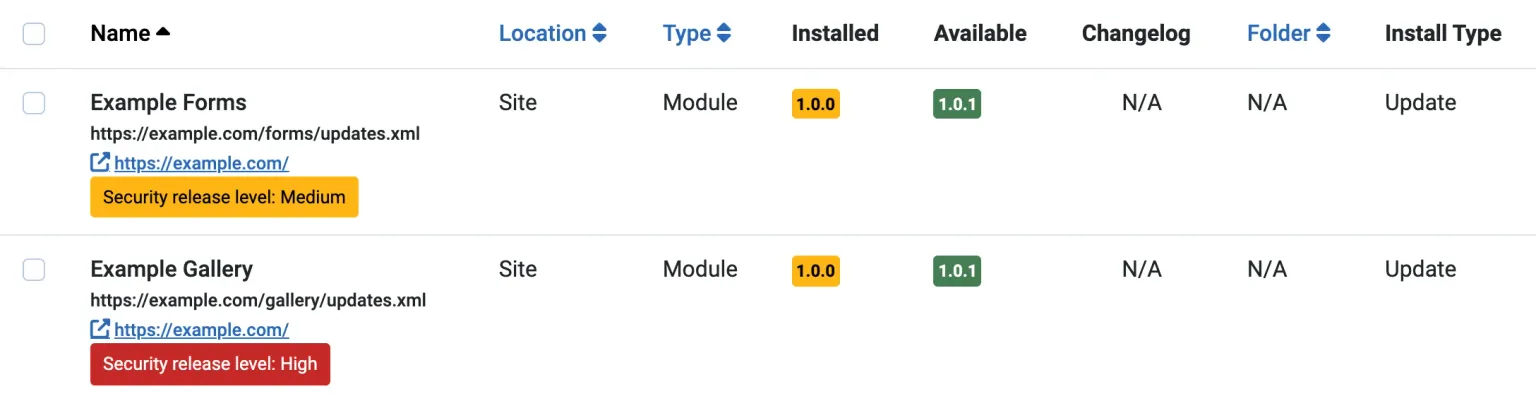
Joomla defines five values and a label for each in administrator/language/en-GB/com_installer.ini. The update manager shows a badge for any level above 0, amber (Bootstrap’s btn-warning) for 1 and 2 and red (btn-danger) for 3 and 4, and the Home Dashboard adds a line for each update with a level above 0.
| Value | Joomla’s label | Badge | Dashboard line | CVSS base score |
|---|---|---|---|---|
0 | Security release level: None | none | no | 0.0 |
1 | Security release level: Low | amber | yes | 0.1 to 3.9 |
2 | Security release level: Medium | amber | yes | 4.0 to 6.9 |
3 | Security release level: High | red | yes | 7.0 to 8.9 |
4 | Security release level: Critical | red | yes | 9.0 to 10.0 |
The core code does not tell you how to choose the number, but the last column does. It is the mapping Allon gives in his magazine article, and it matches the qualitative bands that CVSS 3.1 and CVSS 4.0 both use, so if a CVE has been assigned for your fix, take the base score from the record and the level follows. If not, score the worst issue in the release yourself. When a release fixes several issues, send the level of the worst one, because the badge is a single number.
A level 2 fix for a Medium stored XSS gets the same amber badge as a level 1, and only levels 3 and 4 turn red. Do not inflate a Medium to High to get the red badge. Admins learn very quickly to ignore a vendor whose every release is High.
Two different security elements in Joomla XML
Do not get confused. A Joomla extension can now publish two elements called security, in two different files, and they do different jobs. A security release should set both.
The new one goes in your update XML, inside the <update> entry for the release. It holds a single integer, and it is the one Joomla reads to draw the badge:
<!-- updates.xml, the file your <updateservers> manifest entry points at -->
<update>
    <element>com_examplegallery</element>
    <version>2.4.1</version>
    <security>3</security>
</update>
The older one goes in your changelog XML, the separate file your <changelogurl> points at. It holds a list of <item> lines describing the fixes, and Joomla shows them when an admin opens the changelog for the update, next to the fix, addition, change, remove, language and note sections:
<!-- changelog.xml, the file your <changelogurl> points at -->
<changelogs>
    <changelog>
        <element>com_examplegallery</element>
        <type>component</type>
        <version>2.4.1</version>
        <security>
            <item>Fixed SQL injection in the gallery search filter</item>
        </security>
    </changelog>
</changelogs>
The number tells the admin how urgent the update is, and the items tell them what it fixes. The Joomla Manual documents the two on different pages: the new element on the update server page, the older one on the changelog page. The manual change that added the new element only edited the update server page, so if you start from the changelog page you will find a security element there and never learn the other one exists.
How Joomla picks the level when a site skips releases
Joomla shows the highest level of every release newer than the version the site has installed, not the level of the newest release. This came in with pull request 48190, after a reviewer pointed out that a Critical fix in 1.0.1 would vanish from view the moment 1.0.2 shipped without a flag. While parsing your feed, the updater keeps every entry that has a <security> element and passes the site’s platform, PHP, database and stability checks. It then runs this, from libraries/src/Updater/Updater.php:
private function findHighestSeverity(string $installedVersion, UpdateTable $update, array $securityUpdates): ?int
{
    $securityLevel = (int) $update->security;

    /** @var \Joomla\CMS\Table\Update $securityUpdate */
    foreach ($securityUpdates as $securityUpdate) {
        if (version_compare($securityUpdate->version, $installedVersion, '>') && $securityLevel < (int) $securityUpdate->security) {
            $securityLevel = (int) $securityUpdate->security;
        }
    }

    return $securityLevel;
}
$update is the newest compatible release, the one the site will be offered. The result goes into #__updates.security, and that stored number is what the update manager and the dashboard read. Pull request 48190’s own test feed shows the effect. It lists five releases: 0.9.0 flagged Critical, 1.0.0 unflagged, 1.0.1 High, 1.0.2 Medium and 1.0.3 unflagged. The table below starts from that feed; change any release’s level and the badges follow.
| Release | <security> | Badge if this version is installed |
|---|---|---|
| 0.9.0 | Security release level: High | |
| 1.0.0 | Security release level: High | |
| 1.0.1 | Security release level: Medium | |
| 1.0.2 | No badge | |
| 1.0.3 | Up to date |
We installed each of those versions of a test module on a Joomla 6.1.4 site, pointed it at this feed and ran the update check. Joomla stored exactly the levels in the table. A site on 0.9.0 sees High rather than Critical, because the Critical entry is the version it already has, and a site on 0.8.0 would see Critical. One detail matters if you read the database: the level is written onto the row for the newest release, 1.0.3 here, even though 1.0.3 itself is unflagged. #__updates.security holds the computed answer for that site, not the level your feed gave that release.
So flag the release that contains the fix, once, and leave later releases alone. You do not need to repeat <security>3</security> on 2.4.2 and 2.4.3 so that sites still on 2.4.0 see it, because Joomla finds 2.4.1 in the feed and takes its level. That only works if you keep the flagged entry in the feed. If your update XML lists only the latest version, as many do, a site on 2.4.0 will see 2.4.3 with no badge at all. Keep old entries in the file for at least as long as you expect sites to lag behind.
What Joomla does with values outside 0 to 4
Joomla does not validate the value. It appends whatever text the element holds, casts it to an integer when it works out the level, and draws the badge whenever the result is not empty. We sent each of these values to a Joomla 6.1.4 site, for an update from 1.0.0 to 1.0.1, and recorded what it stored and showed:
| What you send | Stored in #__updates.security | Update manager badge | Dashboard line |
|---|---|---|---|
0 | 0 | none | no |
1 to 4 | 1 to 4 | Low, Medium (amber), High, Critical (red) | yes |
5 | 5 | red, reading COM_INSTALLER_SECURITY_SEVERITY_5 | yes |
-1 | -1 | amber, reading COM_INSTALLER_SECURITY_SEVERITY_-1 | no |
High | 0 | none | no |
<security></security> | 0 | none | no |
<security> 3 </security> | 3 | High (red) | yes |
| no element | 0 | none | no |
4 on an entry whose targetplatform excludes the site | 0 | none | no |
None of these produced a PHP warning or a log entry, so a mistake here goes unreported on both sides. Any number outside 0 to 4 shows the untranslated language key to the admin, which looks broken, and the admin will blame your extension for it. A word such as High becomes 0 with no warning, so the release goes out unflagged and the admin never knows. And a flag only counts on an entry the site can actually install: if your feed has separate <update> entries per Joomla major version, put the <security> element on each branch’s entry that contains the fix, or the sites on the other branch see nothing.
Send an integer from 0 to 4 and nothing else.
Older Joomla versions ignore the tag
You can add the element to a feed that still serves Joomla 3 and Joomla 4 sites. Older versions only store the update elements they know, and Joomla 3.10.12’s list in libraries/src/Updater/UpdateAdapter.php is:
protected $updatecols = array('NAME', 'ELEMENT', 'TYPE', 'FOLDER', 'CLIENT', 'VERSION', 'DESCRIPTION', 'INFOURL', 'EXTRA_QUERY');Anything else in an <update> entry is read and dropped. We tested it with the same feed, including <security>3</security>, on Joomla 4.4.14 and 3.10.12: both offered the update from 1.0.0 to 1.0.1 as normal, logged nothing, and showed no badge, because neither has the security column in #__updates. Joomla 5.4.8 and 6.1.3, the releases before the backport, have no SECURITY in that list either. One feed with the element works for every branch you support, and sites start showing the badge as they update to Joomla 5.4.9, 6.1.4 or 6.2.
Flagging a release you have already published
If you shipped a security release without the flag, add <security> to that release’s existing <update> entry and republish the file. You do not need a new version. Sites pick the level up the next time they fetch your feed, and when that happens depends on what triggers the check. On a Joomla 6.1.4 site with 1.0.1 already listed unflagged, we added <security>3</security> to the 1.0.1 entry and tried each route:
| How the site checks | Picked up the new level? |
|---|---|
| Check for Updates button in System, Update, Extensions | yes, straight away |
php cli/joomla.php update:extensions:check | yes, straight away |
| Home Dashboard quick icon, feed fetched minutes earlier | no |
| Home Dashboard quick icon, after the cache timeout | yes |
The dashboard check respects the Installer’s update cache, which is six hours by default (Cache Timeout in the Installer options), so an admin who never clicks Check for Updates sees the badge within six hours of your change, on their next visit to the dashboard. The other two routes ignore the cache. Retro-flagging is worth doing for a security release that is still recent, since most sites behind on your extension are still behind on it.
Checking the tag in your Joomla release pipeline
If you publish releases with Akeeba Release System, version 7.5.0 already writes the element when you set a severity on a release. If you build the XML yourself, a typo in the security element costs you the badge without any error, so check the feed before it goes live. This runs anywhere xmllint is installed (it ships with libxml2 on macOS and most Linux images) and fails the build if any <security> element holds anything other than an integer from 0 to 4:
xmllint --noout updates.xml || exit 1
if xmllint --xpath '//update/security[not(contains("|0|1|2|3|4|", concat("|", normalize-space(.), "|")))]' updates.xml 2>/dev/null; then
  echo "updates.xml: <security> must be an integer from 0 to 4" >&2
  exit 1
fi
The exit codes run the opposite way to what you might expect. xmllint --xpath exits 0 when the expression matches something, and here a match means a bad value, so the if branch is the failure. When every value is valid the expression matches nothing, xmllint prints “XPath set is empty” to stderr and exits non-zero, and the script continues. The first line is there because a file that does not parse would also exit non-zero from the second command and slip through as a pass. normalize-space() lets <security> 3 </security> through, which matches what Joomla accepts; drop it if you want your feed stricter than Joomla is.
How many Joomla extension vendors send the tag so far
Almost none, but that’s because it’s new. On 5 October 2026 we fetched every enabled extension update feed in the mySites.guru database, 11,092 distinct URLs with their query strings stripped, and 7,504 of them answered with update XML. Five of those feeds include a <security> element.
| Developer | Extension | Feed | Level sent |
|---|---|---|---|
| Weeblr | 4SEF | u1.weeblr.com/.../pkg_forsef_full.xml | 0 |
| Weeblr | 4Podcast | u1.weeblr.com/.../plg_system_forpodcast_full.xml | 0 |
| Weeblr | 4Analytics | u1.weeblr.com/.../pkg_foranalytics_full.xml | 0 |
| Moonsoft | List Manager | moonsoft.es/comp_update/listmanager.xml | 0 |
| Moonsoft | Calc Builder | moonsoft.es/comp_update/calcbuilder.xml | 0 |
All five send <security>0</security>, which is the right answer for a release with no security fix and shows nothing in the update manager. Weeblr sends it on every entry in its feeds, which is the tidiest way to do it. The five feeds come from two vendors out of the 633 hosts that served a working feed, or 0.3%, so no public update feed in our data yet marks a release Low or higher.
So for now, an extension update without a badge tells an administrator nothing. That will change as vendors pick it up, and the cost of adopting it is one element per security release. If you are a Joomla extension developer reading this, yours could be the first feed in a product category to send it.
What Joomla administrators will see
Administrators do not need to do anything to get this. On Joomla 5.4.9, 6.1.4 or 6.2, an extension update whose developer sent a level gets a badge under its name in System, Update, Extensions, red for High and Critical, amber for Medium and Low:
The Home Dashboard’s extension updates quick icon, the one that already says “Updates are available!”, adds a line naming each extension with a security update:
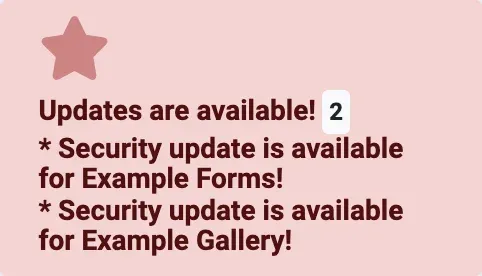
The dashboard line does not say how severe the update is, only that it is a security update, so open the update list to see the level. Install the red ones first.
No badge does not mean no security fix
The security level is something the extension developer chooses to send, and in October 2026 fewer than one feed in a thousand sends it. An update with no badge can still be a security release. Read the changelog, and do not wait for a badge before applying updates from a vendor with a history of quiet security fixes.
Where mySites.guru fits
mySites.guru does not wait for vendors to flag their own releases. Part of the subscription is a check of every installed Joomla extension version, on every connected site, against our Joomla extension vulnerability rules, which we write from vendor advisories, CVE records and our own research. A site running an affected version is flagged whether or not the vendor’s update XML says anything, and the vulnerabilities page lists every rule we hold. The security tag will make vendor-flagged releases easier to spot in Joomla itself, and it is a welcome change, but it can only ever describe the releases a vendor chose to label.
The same connection lists every available extension update across all your Joomla sites on one screen, and can apply them for you with automatic updates for any Joomla extension with a backup first. If you manage more than a handful of Joomla sites, that is the quickest way to make sure a security release you hear about today is installed everywhere by tonight. See what it costs, or manage multiple Joomla sites from one dashboard.
Timeline
Pull request 48127 opened
Allon Moritz of Digital Peak proposes a security flag for extension updates, aimed at Joomla 6.2.
Merged into the 6.2 branch
The security column, the update manager badge and the Home Dashboard notice arrive in 6.2-dev.
Highest severity follow-up merged
Pull request 48190 makes Joomla show the highest level of every release newer than the installed version, not just the latest one.
Backported to Joomla 5.4
Pull request 48233 brings both changes to the 5.4 branch, and from there to 6.1.
Documented in the Joomla Manual
The tag is added to the update server page of the developer manual, not to the changelog page.
Joomla 5.4.9 and 6.1.4 released
The first stable releases that read the tag. Joomla 6.2.0 RC1 ships the same day.
Joomla 6.2.0 due
The release the feature was written for.
Further Reading
- Joomla Manual: Update Servers - the reference for every update XML element, including security
- Joomla Manual: Change Log - the changelog XML format and its own security element
- Extension developers, it's time to mark your security updates - Allon Moritz's announcement in the Joomla Community Magazine, with the severity mapping
- joomla-cms pull request 48127 - the original change and its review discussion
- joomla-cms pull request 48190 - the highest-severity follow-up, with the test feed used in this post
- FIRST: CVSS v4.0 Specification - the qualitative severity bands the level mapping in this post follows
Frequently Asked Questions
Which Joomla versions show the security flag on extension updates?
What values can the Joomla security tag take?
Is the update XML security tag the same as the security section in a Joomla changelog?
Do I need to repeat the security flag on later Joomla extension releases?
Will the security tag break updates on Joomla 3 or Joomla 4 sites?
Does a Joomla extension update without a security badge mean it has no security fix?
 Written and edited by a human, with AI assistance. Our approach to AI