Impostor Files: How to find every file in a core folder that core never shipped

Introducing a new mySites.guru audit feature: Impostor Files Check
Impostor Files is a new check in the mySites.guru audit, listed as Check Core Folders For Impostor Files.
It reports every file sitting in a folder the CMS itself owns that the CMS never shipped. Only the folders core is responsible for, rather than every non-core file on your site.
A backdoor that avoids detection is one that looks like it belongs. No one plants hacked.php in the web root any more. They plant session.php among the libraries, or a second index.php in a folder that already holds forty of them, nineteen levels down in a directory no one has opened since the site was built.
Grep is no help, because the file looks like everything around it, and a signature scan only helps once someone has seen that dropper before.
There is one thing the attacker cannot fake. Every release of Joomla and WordPress ships a known, fixed set of files. Joomla 5.4.7 puts exactly one file directly in /administrator/, and that file is index.php. Anything else sitting there arrived some other way.
The old check returns 13,653 files on a median site
We already had a check for this, sort of. Check Files That Are Not Core Files reports every file anywhere on your site that is not part of the CMS distribution, using the same hashing pass the rest of the audit runs on. It works exactly as designed, and almost no one can use it.
On 2026-08-27 we took the most recent completed audit of every site with a snapshot in the last thirty days and looked at what that check returns.
| Result | Sites |
|---|---|
| More than 1,000 non-core files | 99.8% |
| More than 10,000 non-core files | 68.3% |
| More than 50,000 non-core files | 5.9% |
The median site returns 13,653 files. The mean is higher still at 21,095, because the tail runs a long way: the ninety-ninth percentile is 135,192 and one site returns over 1.5 million.
Nothing is broken. Every extension, plugin, theme and template you install adds files, and none of them are core files, so the count grows with ordinary use. The problem is that the answer looks identical on a clean site and on a hacked one. A list of thirteen thousand filenames is a haystack, and a webshell in /wp-includes/ sits somewhere in the middle of it looking like everything else.
Here are both checks on the same site, one row above the other:
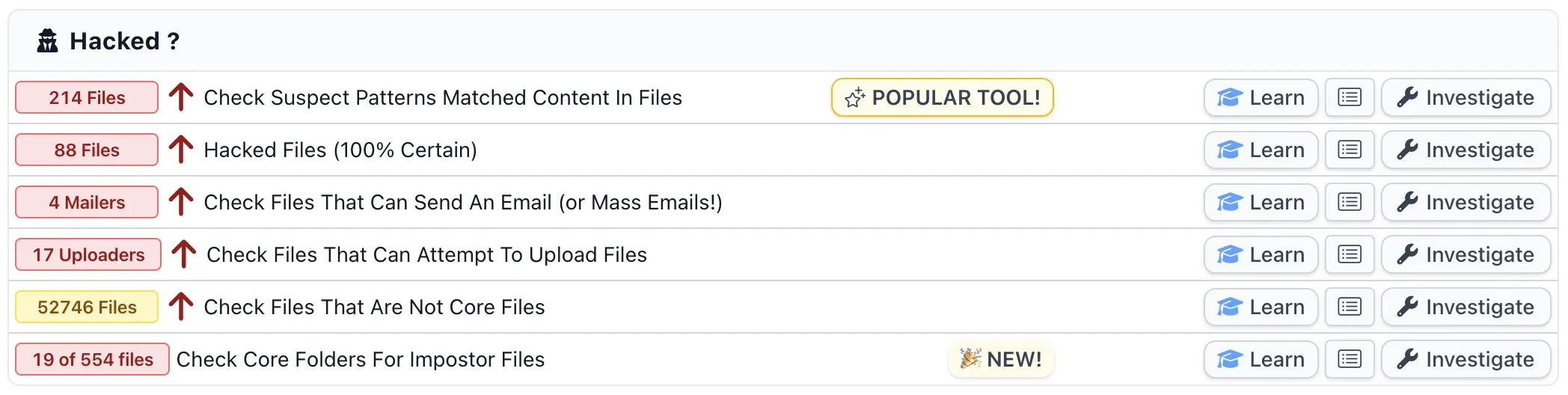
The site in that screenshot is a purposely hacked test install of Phil’s, so treat the numbers as a demonstration rather than a typical result. The old check gives you 52,746 rows to read. The new one gives you 554, and tells you that 19 of them are executables.
Joomla ships one file in /administrator/, and it is index.php
Core is a tightly specified layout, and the numbers show how tight.
Joomla 5.4.7 ships 10,095 files across 2,877 folders. Of those folders, 1,589 hold exactly one file, and 2,259 of them hold three or fewer. WordPress 6.8.2 ships 3,230 files across 325 folders. Every other release is just as fixed: Joomla 4.4.13 is 9,576 files, Joomla 3.9.23 is 6,410, Joomla 6.1.3 is 9,916 across 2,900 folders.
The one-file rule is not a quirk of a single release, either. Joomla 6.1.3, the current version, also ships exactly one file directly in /administrator/, and it is still index.php.
More than half of Joomla’s core folders contain a single file. If a folder is meant to hold one file and it holds two, the second one is worth thirty seconds of your attention, and there is no version of “normal use” that put it there.
So Impostor Files asks a much narrower question than the old check. A file qualifies when its folder appears in the official release and the file does not. /administrator/ is a core folder, so a second file in it is reported. /administrator/components/com_yourextension/ is not a core folder, so nothing in it is reported and your extensions stay out of the way.
Spot the impostor in /libraries/src/Session/
/administrator/ is the easy example, because one file is small enough to hold in your head. The check works identically nineteen levels down, in the folders where you have no idea what is supposed to be there.
So here is a game. Below is /libraries/src/Session/ on a Joomla 5 site. Eight entries. Joomla ships seven of them.
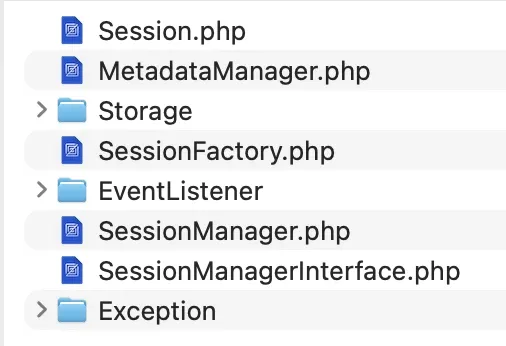
Take thirty seconds. Every name is plausible, the file sizes are unremarkable, and every PHP file in that folder shares one modification time, so sorting by date tells you nothing at all.
Show me the answer
It is SessionManagerInterface.php.
Joomla 5.4.7 ships Session.php, MetadataManager.php, SessionFactory.php and SessionManager.php into that folder, plus the Storage, EventListener and Exception subfolders. It ships no interface beside SessionManager.php, and it never has. SessionManagerInterface.php appears in no Joomla manifest, not in 5.4.7 and not in the current 6.1.3.
Which is a horrible thing to have to know. A PHP codebase full of SomethingInterface.php files makes one more look like housekeeping, and this one is 1.7 KB, exactly the size of the real SessionManager.php sitting directly above it, with the same modification time as every other file in the folder. There is nothing to notice.
Nothing except the release manifest, which says Joomla put seven things there and something else put the eighth. That is the entire check.
For the record, that one is planted. It is a file on a test site we control, written to be as convincing as we could make it, because a screenshot of a real customer’s backdoor is not ours to publish.
How does mySites.guru know what Joomla or WordPress actually shipped?
We hold the file list for the exact version your site is running, generated from the official release package. Every path, with its hash:
administrator/index.php                          8f1c...
administrator/cache/index.html                   8ca096fda23d564fe62bc65ef5f498e0
administrator/components/com_actionlogs/config.xml   0ea0080554fbea75f60151a5d67f27b4
libraries/loader.php                             b96deb0e0d737e2a6a14082f6274e387
That list is what the audit already compares your files against to spot modified core files. Impostor Files reuses it from the other direction: instead of asking which core files changed, it asks which files are in core’s folders without being in core’s list.
This is manifest-driven, never a hardcoded list of folder names. Between Joomla 5.4.7 and 6.0.1, 61 core folders disappear and 50 new ones appear. A static list written against Joomla 5 would flag legitimate Joomla 6 files and miss real ones. Your site’s own version manifest is always right for your site.
It also costs nothing extra to run. The audit has already walked your webspace, hashed every file and imported the release list. The check is a database question over work that has already happened, so it does not add a second scan or another few minutes to your audit.
Note
Files at the very top of your site are included, not skipped. Joomla 5.4.7 ships six files in the web root, so a seventh one there is reported the same as one buried nineteen levels down.
The executables list is the thing to read, not the executables count
You get two counts back, and they are not two versions of the same answer.
The Executables Count Is the Sharper of the Two
It counts program files only: .php, .phtml, .php3 through .php8, .phar, .inc, .pht and .phps. The match is case-insensitive, because .pHp5 and .PHTML are exactly the sort of thing a dropper uses to slip past a case-sensitive filter.
It does not read zero on a healthy site. This post said it was when it first went up, and that was wrong. Once the check had run everywhere, the lowest count on any connected site was one, on both platforms. A Joomla site most commonly shows six to nine and averages just under nine. A WordPress site averages between four and five. The reason is that Joomla and WordPress both write files into folders they own, not that everybody is hacked.
The count therefore tells you how much reading you have to do. Only the list tells you whether you have a problem.
The Total Is Noisy on Purpose
It averages 332 files on a Joomla site and 23 on a WordPress one, with a worst case in the thousands. Almost all of it is ordinary:
| What it is | Why it is in a core folder |
|---|---|
Your own uploads under /images/ | Joomla ships /images/banners/, so /images/ is core’s |
Extension language files under /administrator/language/ | Core owns the folder, your extensions write into it |
Leftover index.html guards from older Joomla versions | Shipped by a version you have since upgraded past |
Extension and vendor assets under /media/ | Same as /images/, core ships into it |
.DS_Store | Uploaded by somebody’s Mac |
/images/ and /media/ are core folders, which is why their contents appear at all. Joomla ships /images/banners/ with sample banners in it, so every photo you have uploaded since sits in a folder core owns.
The three you will almost certainly see, and why each one is fine
In the week the check went live, a customer switched on Executables only, expected an empty list because that is what we had told them to expect, and got three files. All three were legitimate, and between them they explain most of what any Joomla site shows here.
/administrator/cache/autoload_psr4.php
Written by Joomla itself. It is a caching autoloader, created on page load if it is missing and rebuilt whenever you install or update an extension. Joomla 5.4 ships exactly one file into /administrator/cache/, and that file is index.html, so the folder belongs to core and this file does not.
/administrator/components/com_joomlaupdate/restore_finalisation.php
Left behind by an upgrade. Joomla shipped it in 3.x and in every 4.x release up to and including 4.4, then dropped it in 5.0 in favour of finalisation.php. Joomla’s updater does not delete it, so it sits on disk being no part of the version you are actually running. You can see the files that should be in that folder in the Joomla repository. Of the three, this is the one to actually open. A filename that core used to ship, in a folder core owns, is an attractive thing for someone to overwrite, and no one would look twice at it.
/configuration.php
Has never been a core file in any version. The release package contains configuration.php-dist, and the Joomla installer writes your configuration.php from it during setup. Every Joomla site therefore has a file in its web root that core never shipped, and the check reports it every time, correctly.
None of the three is a finding. They are the check doing the job described at the top of this post: comparing your disk against what the official release contains, and being honest when the two differ. A file Joomla writes at runtime, a file an older Joomla shipped, and a file the installer created are all, in fact, not core files.
The filters deal with two of them. Hide cache and logs covers /administrator/cache/, and Hide config file covers configuration.php by exact path. Nothing hides restore_finalisation.php, so it is still there even under the Quiet view preset, which is the correct behaviour for a file that used to be core and no longer is.
Nothing is hidden at source, because a dropper can sit in /images/ too
The obvious way to make the total useful is to exclude /images/ at source. We do not, because that hides real findings along with the noise. Attackers put PHP files in image folders constantly. It is one of the oldest tricks there is, and a check that will not look there without telling you is worse than one that shows you too much.
So the filtering happens in the view, and you control it. Toggles are provided for images, language files, media, manifests, index.html guards, dot files, SQL update scripts, cache and logs, and the site configuration file. There is an Executables only toggle, a Quiet view preset that switches on everything ordinary in one click while still showing executables, and a Show everything button to put it back.
Every filter defaults to off. The first view you get shows you everything, and hiding is your decision rather than ours. The filters are applied on your site in the query itself rather than on the page afterwards, so the count at the top always describes the same set of rows you are looking at.
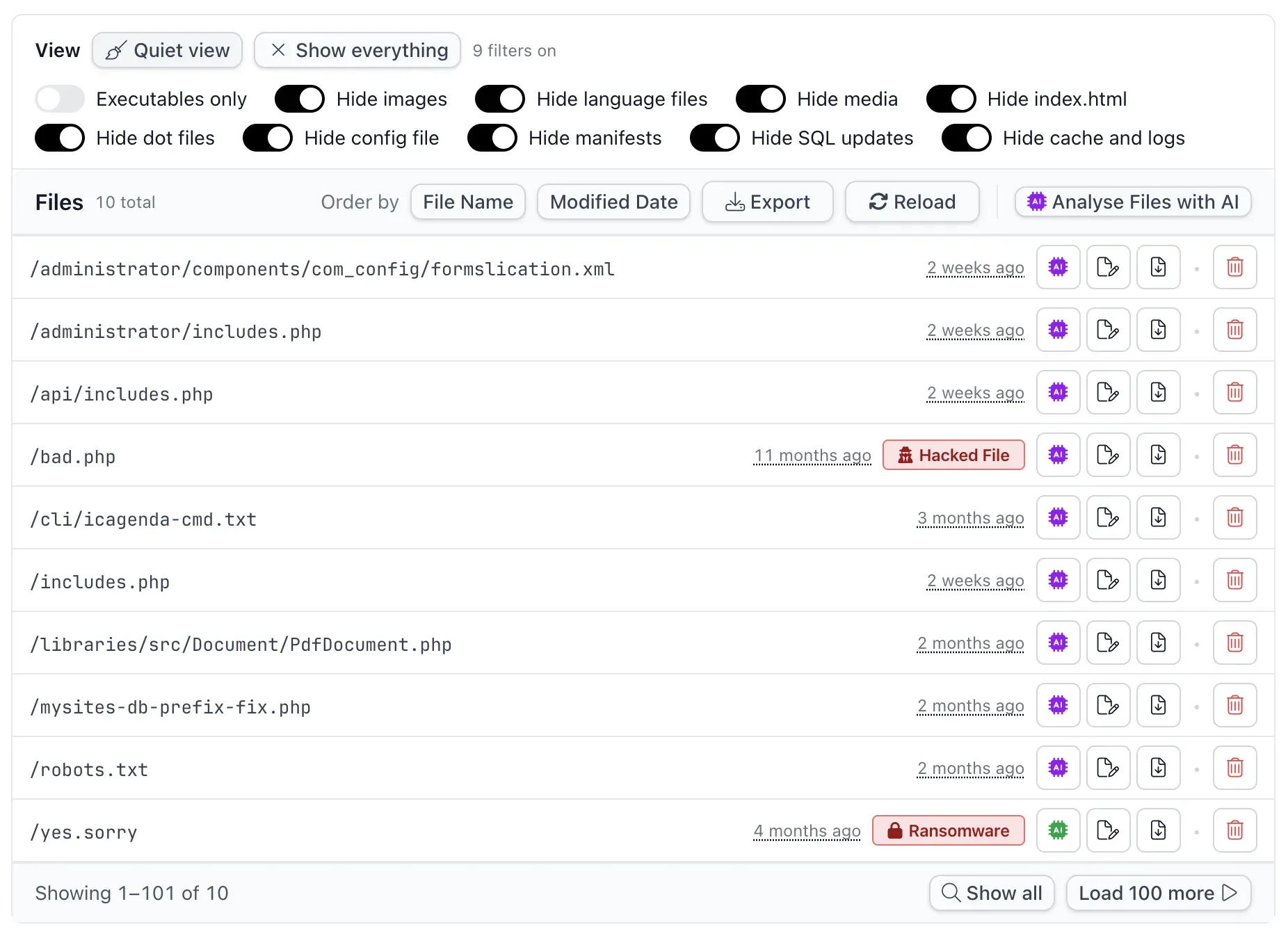
That is the same hacked test site with Quiet view switched on. Nine toggles take it from 554 rows down to ten, and now look at what is left.
Joomla has an /administrator/includes/ folder, an /api/includes/ folder and an /includes/ folder. It ships no includes.php file next to any of them. All three are in that list. Someone picked a filename that reads as the folder beside it, three times, and on a directory listing it slides straight past you.
/libraries/src/Document/PdfDocument.php is the same move done more carefully. That folder holds 33 core classes and most of them are named SomethingDocument.php. A thirty-fourth one looks like it belongs, right up until you check it against the release and find Joomla never shipped it.
Not everything left is sinister. /robots.txt is there because Joomla ships robots.txt.dist and expects you to rename it, so your own copy is a file core never shipped and the check reports it. That is the trade for not hiding things at source.
Each row exports to CSV if you would rather work through the list somewhere else. Files already matched by the other checks keep their badges here too, so a file the audit has independently called out as hacked is labelled as such in this list rather than looking like one more unexplained row.
Why does the list include my own .htaccess?
Because you put it there, and we would rather show it to you than guess.
Without the executables restriction, /administrator/ flags on every site we measured. On all thirteen it was .DS_Store, uploaded by somebody’s Mac. On three of them it was .htaccess and .htpasswd, which is Admin Tools password-protecting the administrator folder. That is a hardening measure we actively recommend, and it produces two files core never shipped, in a folder core owns.
Which is why Impostor Files does not set the hacked flag and does not send you an email. It reports. It never accuses. A check that shouts about your own hardening is a check you will switch off, and then it protects nothing.
WordPress gets a stronger rule than Joomla
Its core folders are stricter about who writes into them.
Core WordPress 6.8.2 ships 93 files directly in /wp-admin/ and 572 across that whole tree, plus 244 directly in /wp-includes/ and 2,210 beneath it. WordPress 7.1 is bigger at 593 and 2,729, and just as exactly specified. Plugins do not write into either tree. Themes do not write into either tree. Core owns both, so we check them recursively: any file under /wp-admin/ or /wp-includes/ that core did not ship is reported, however deep it sits and whatever folder it is in.
That catches a shell in a directory the attacker created themselves. A backdoor written into /wp-includes/ is a well worn move and one of the first things to check if you think a WordPress site is hacked, because it is the last place an owner thinks to look and it is still there after a theme or plugin is replaced. On Joomla a folder like that is out of scope, for the reason set out below. On WordPress there is nowhere under those two trees to sit that we are not already looking.
Two things get conflated here. The AccessPress backdoor wrote its webshell into wp-includes/vars.php, a file WordPress ships, which makes it a modified core file rather than an impostor one. The audit’s core file integrity check is what catches that, by hash, and reverts it to the original in one click. Impostor Files answers the other half of the question: which files are sitting in core’s folders without being core’s.
WP-CLI already does part of this, on one site, over SSH
Credit where it is due. wp core verify-checksums diffs your on-disk files against the WordPress.org checksums manifest and reports File should not exist for anything extra in wp-admin/, wp-includes/ or the web root. If you have shell access to a WordPress site, that command answers a good chunk of this question today and has done for years.
wp core verify-checksums
Warning: File should not exist: wp-includes/class-wp-cache-init.php
We built this anyway.
It covers Joomla, which has no equivalent. WordPress.org publishes a checksums API; the Joomla project publishes no per-file manifest at all, which is why we generate ours from the release packages ourselves. On Joomla there is no command to point you at.
It runs remotely, across every site at once, with no SSH access, no WP-CLI installed and nothing to run by hand. That is the difference between a command you could run on a site you are already worried about and an answer that arrives for all of your sites on every audit, including the ones you were not worried about.
And it produces something you can work through. A shell command gives you a wall of text. The check gives you the file list with sizes and modification times, filters to cut the ordinary out of it, and a CSV export.
What this check cannot see on Joomla
We would rather tell you the limits of a check than let you assume it covers more than it does.
On Joomla, this check cannot go recursive. /administrator/components/ is where your extensions legitimately live, so flagging everything under /administrator/ would flag every component you have ever installed and the check would be as useless as the one it replaces.
Which means: on Joomla, a file at /administrator/private/shell.php is not reported by this check, because /administrator/private/ is not a folder core ships into, so it is not a folder we consider ours to police. A file dropped straight into /administrator/ is caught. A file dropped into a folder the attacker made is not.
One tool with one job will never show you everything
That file is invisible to this check only, and that is why the audit runs more than two dozen separate file and folder checks rather than one clever one.
Impostor Files asks a single narrow question: is this file in a folder core owns, when core never shipped it? Ask a narrow question and you get a short answer. But a narrow question also has a wrong side, and /administrator/private/shell.php is on it.
So other checks ask other questions about the same file:
- Check Files That Are Not Core Files lists it, because it lists everything that is not core, anywhere. That is the noisy 13,653-row check from the top of this post, and this is the trade it exists for: it sees the file that Impostor Files cannot, and it buries the answer among thousands of rows. Neither check replaces the other, and running both is the only reason you get the file and a list short enough to read.
- Check Suspect Patterns Matched Content In Files reads what is inside it, against roughly 1,500 patterns. It does not care where the file sits.
- Hacked Files (100% Certain) matches its hash against confirmed hacked files, so a known shell is named as one wherever someone put it. Which of those two to believe, and in what order, is its own subject.
- Check Files That Can Attempt To Upload Files and Check Files That Can Send An Email (or Mass Emails!) find it by what it is able to do, which is how you catch a dropper and a spam relay that are not in any pattern list yet.
- Files Modified Between Audits catches it the moment it appears, under any name, in any folder, which is how you spot a site being re-hacked days after you cleaned it.
- PHP Files Should Not Be In These Certain Folders finds PHP under
/images/, where PHP has no business being. - Locate And Review Double Extension Files finds
name.php.xxx, and Review Renamed Files finds the.old,.bakand.origcopies people leave behind. - Locate And Review Hidden Files and Paths With Hidden Folders In Them find dot-prefixed files and folders: the
.toolsand.bakdirectories a listing does not show you by default. - Identify Missing Core Joomla Files covers the opposite failure, where something core shipped is no longer there.
None of those is the whole answer either. /administrator/private/shell.php is found by several of them and missed by this one, and a differently shaped backdoor flips which is which. That is how the audit is built: many narrow checks, each with a job it does exactly, rather than one tool claiming to see everything and seeing less.
No manifest means no answer, not a clean bill of health
If we could not download the file list for your CMS version, Impostor Files shows no result at all, rather than a zero or a green tick.
A zero says we looked and found nothing, which would be a lie in the one situation where you most need us to be straight with you. The core file list is emptied and re-imported at the start of every audit, so a failed download leaves the check with nothing to compare against rather than an answer from a fortnight ago. The status shows as no data, and the reason is on the page.
The same applies to sites running a connector that predates the check. No data is not a passing grade, and we do not display it as one.
Where do I find Impostor Files?
It is in the Hacked ? section of each site’s audit, listed as Check Core Folders For Impostor Files on Joomla and Check Core WordPress Folders For Impostor Files on WordPress. Press Cmd+K and type part of the name to jump straight there.
To answer it across everything at once rather than site by site, the all-sites view for the check is at manage.mysites.guru/en/tools/allsites/joomla/hacked/foreigncorefolderfiles, which lists every connected Joomla site with its executables count beside it. Change joomla to wordpress in that address for the WordPress equivalent. Sort by the executables column and the sites worth your morning are at the top.
The check is Joomla and WordPress only. A generic site has no CMS, so there is no official release to compare against and nothing that can honestly be called a core folder. So the check does not appear on those sites at all, rather than sitting there reporting nothing forever.
Why this one took a while
This has been on my own wish list for years and I am pleased I finally had the month to build it. Earlier in this post I called the old check a haystack. This is another magnifying glass for finding the needle in it, and it is the one I have wanted for a very long time.
Check one site right now
The check runs on the next audit, with no setting to enable and nothing to configure.
Not a subscriber? Run a free audit and see what is sitting in your core folders.
Open the executables list and read it. Most of what is on it will be Joomla’s own work, an older version’s leftovers, or a file the installer wrote, and you should expect a handful rather than none. The day something appears on that list that you cannot account for is the day you want to have been looking. When that happens, work through the triage order for a hacked Joomla site or a hacked WordPress site rather than deleting things at random. Connect your sites to mySites.guru and it runs on the next audit.
Further Reading
- Find Hacks and Backdoors in WordPress & Joomla - how the audit hashes and classifies every file on your site.
- Clean a Hacked Site with Suspect Content and Hacked Files - the triage order once something does show up.
- The hidden files lurking on your site that you don't know about - the dot-folder blind spot this check does not cover on purpose.
- Suspect Content vs Hacked Files - which of the audit's file checks answers which question.
- MITRE ATT&CK T1505.003: Web Shell - the technique, and why persistence outlives the vulnerability that allowed it.
- wp core verify-checksums - the WP-CLI command that answers part of this question on a single WordPress site.
- Joomla release downloads and WordPress releases - the official packages the file lists are generated from.
Frequently Asked Questions
What is an impostor file?
How is this different from the Files That Are Not Core Files check?
Which number should I react to?
Why does it list configuration.php and autoload_psr4.php?
Does it flag my site as hacked or email me?
Does it catch a backdoor in a folder the attacker created?
What happens if you cannot get the file list for my CMS version?
Does this work on non-CMS sites?
 Written and edited by a human, with AI assistance. Our approach to AI