Unauthenticated SQL Injection in AcyMailing found by mySites.guru
AcyMailing is one of the most widely installed newsletter and email-marketing extensions for Joomla. During routine security research on the extensions our customers rely on, mySites.guru discovered an unauthenticated SQL injection vulnerability in AcyMailing, and reported it privately to the developers before disclosing anything publicly. The fix is now available in AcyMailing 10.11.1.
If you run AcyMailing on any Joomla site, update to 10.11.1 now. If you manage more than a handful of sites, read on for how to find every affected one at once. This is the second AcyMailing security issue we have covered this year, after the CVE-2026-3614 privilege-escalation flaw in April.
Update, 26 September 2026: 10.11.1 is no longer enough
AcyMailing 10.11.1 fixes the SQL injection described here, but it is not a safe version any more. AcyMailing 11.1.0, released on 24 September 2026, fixes two further flaws that affect every version up to 11.0.5, and on 26 September the Joomla CNA published them as CVE-2026-94132, a file write into the web root through mailbox actions rated 9.5 Critical, and CVE-2026-94131, an arbitrary file deletion rated 8.3 High. Where this post says update to 10.11.1, update to 11.1.0 instead. Our AcyMailing 11.1.0 write-up has the details. If Joomla does not offer you 11.1.0, check that the AcyMailing update site still exists.
TL;DR
- mySites.guru found an unauthenticated SQL injection in AcyMailing and reported it responsibly to the vendor
- Every version from 6.0.0 up to and including 10.11.0 is affected; fixed in 10.11.1 (released 9 July 2026)
- A public front-end endpoint placed request parameters straight into a database query, so an anonymous visitor could read data from any table - user accounts, password hashes, article content
- Update to AcyMailing 10.11.1 immediately
- Tracked as CVE-2026-56292, assigned by the Joomla CNA and crediting mySites.guru as the finder, published on 9 July 2026 at CVSS 4.0 9.2 (Critical)
- mySites.guru already flags every connected Joomla site still running a vulnerable version, so you do not have to check each site by hand
mySites.guru discovered this security issue and reported it privately to the AcyMailing team in early July 2026. We withheld public details until a fix was available and site owners had a reasonable window to update. This is how we handle every vulnerability we find: fix first, publish second.
What is the vulnerability?
AcyMailing exposes a front-end endpoint that anonymous visitors can reach without logging in. That endpoint accepted request parameters and placed them into the column list of a database SELECT query without sanitising or quoting them, the textbook shape of a SQL injection. Joomla’s standard text filter, which the extension applied to those parameters, strips HTML but does nothing to neutralise SQL syntax. It is the same public-endpoint-meets-unchecked-input pattern behind a long run of recent Joomla extension vulnerabilities.
So an attacker could supply a crafted parameter that turned the query into one reading from any table in the Joomla database, and get the result back in the response. No account needed, no CSRF token, nothing stolen first.
In practice that means an unauthenticated attacker could read:
- Joomla user accounts, including usernames and password hashes
- Article and content records
- Extension configuration and other stored data
We are not publishing the exact request or a working proof-of-concept. The point of this post is to get people updated, not to hand attackers a recipe.
How serious is it?
Serious enough that we treated it as a priority disclosure. The two things that decide real-world impact are:
- Whether the site has a web application firewall that filters SQL. Because the payload is literally SQL, a WAF often recognises and blocks it before it reaches AcyMailing. We tested this, and the results are worth their own section below. Sites running bare, with no such protection, are the exposed ones.
- The site’s own configuration. Some setups hand the data straight back; others limit what an anonymous request can see. Either way, the safe assumption is that any site on an affected version is at risk until it’s updated.
A WAF is mitigation, not a fix. The only reliable remedy is to update AcyMailing.
Does a WAF protect you? We tested it
A web application firewall does not make your site secure. It is a layer, not a cure, and a vulnerable extension is still a vulnerable extension whether or not something in front of it happens to catch the attack today. But because this particular flaw is a SQL injection, and the payload is recognisably SQL, a decent WAF should spot it and reject the request.
So we tested that claim rather than take it on faith. Against our proof-of-concept, with the extension left vulnerable, we put two of the most common Joomla firewalls in front of it:
- Admin Tools Professional (Akeeba), in its default settings, blocked the attack.
- RSFirewall! (RSJoomla), in its default settings, blocked the attack.
Both stopped the injection cold with no manual tuning. That is exactly what a WAF is for, and it is a strong argument for running one: a site with either of these installed and enabled was protected from this specific issue even before the patch existed.
This is the case for defence in depth. Layers matter: a WAF caught this one before it reached the vulnerable code, giving you breathing room to update. It does not mean you can skip updating. Treat the firewall as the seatbelt and the patch as not crashing the car - you want both.
Do not read this as “you are fine, your WAF has it covered”. A WAF is only as good as its rules, it can be misconfigured or bypassed, and the next vulnerability in the next extension might not look like SQL at all. The firewall bought our tested sites time. Updating AcyMailing to 10.11.1 is what actually closes the door.
Which versions are affected?
Every AcyMailing release from 6.0.0 up to and including 10.11.0 contains the affected code path. The fix shipped in AcyMailing 10.11.1 on 9 July 2026. The issue is tracked as CVE-2026-56292, assigned by the Joomla CNA.
If you run any version of AcyMailing earlier than 10.11.1, assume your site is affected and update now. Do not wait to confirm exploitation - by the time you can confirm it, the data is already gone.
WordPress is affected too, not just Joomla
This is the part people will miss. AcyMailing for WordPress is affected by exactly the same vulnerability. AcyMailing is not a Joomla-only extension. It ships as a plugin for WordPress as well, built from the same codebase, and both editions have the same public front-end endpoint and the same unsanitised query. The fix, version 10.11.1, is the fix for both.
You do not have to take our word for the cross-platform scope, because the vendor’s own changelog says so. Look again at the screenshot below: the entry is flagged with both the Joomla and the WordPress logos. Acyba shipped one patch, on one day, for both CMS platforms, because it is one bug in one shared engine.
If you run the AcyMailing plugin on WordPress, everything in this post applies to you. The affected range is the same (6.0.0 up to and including 10.11.0), the fix is the same (10.11.1), and an anonymous visitor could read your WordPress database, including your wp_users table and the password hashes in it. Update the AcyMailing plugin now.
The version numbering is shared across both editions, which makes this easy to reason about. Whether the plugin sits in a Joomla site’s Components menu or a WordPress site’s Plugins list, the number to get to is 10.11.1. Anything from 6.0.0 to 10.11.0 is vulnerable on either platform.
How to update AcyMailing on WordPress
- Back up first. As on Joomla, take a database and files backup before you touch the plugin. mySites.guru can snapshot every connected WordPress site with one click.
- Update the plugin. In the WordPress admin, go to Plugins, then Updates, and update AcyMailing to 10.11.1. If it is not offered yet, download the latest build from your AcyMailing account and upload it under Plugins, then Add New, then Upload Plugin. If you manage many WordPress sites, do it in bulk from the mySites.guru dashboard rather than logging into each
wp-admin. - Confirm the version shows 10.11.1 or later, and clear any page or object cache.
A note on how WordPress sites get flagged
For Joomla, we maintain our own extension vulnerability database and we have already added AcyMailing to it, so every connected Joomla site below 10.11.1 is flagged automatically within the hour. For WordPress, we have added AcyMailing to our WordPress plugin vulnerability tracking as well, so your connected WordPress sites below 10.11.1 are flagged too. Either way, the extension search below works for WordPress installs right now, so you can find every affected site today.
The changelog barely mentions it
Here is the entire public description of this fix, as it appears on the official AcyMailing changelog for 10.11.1:
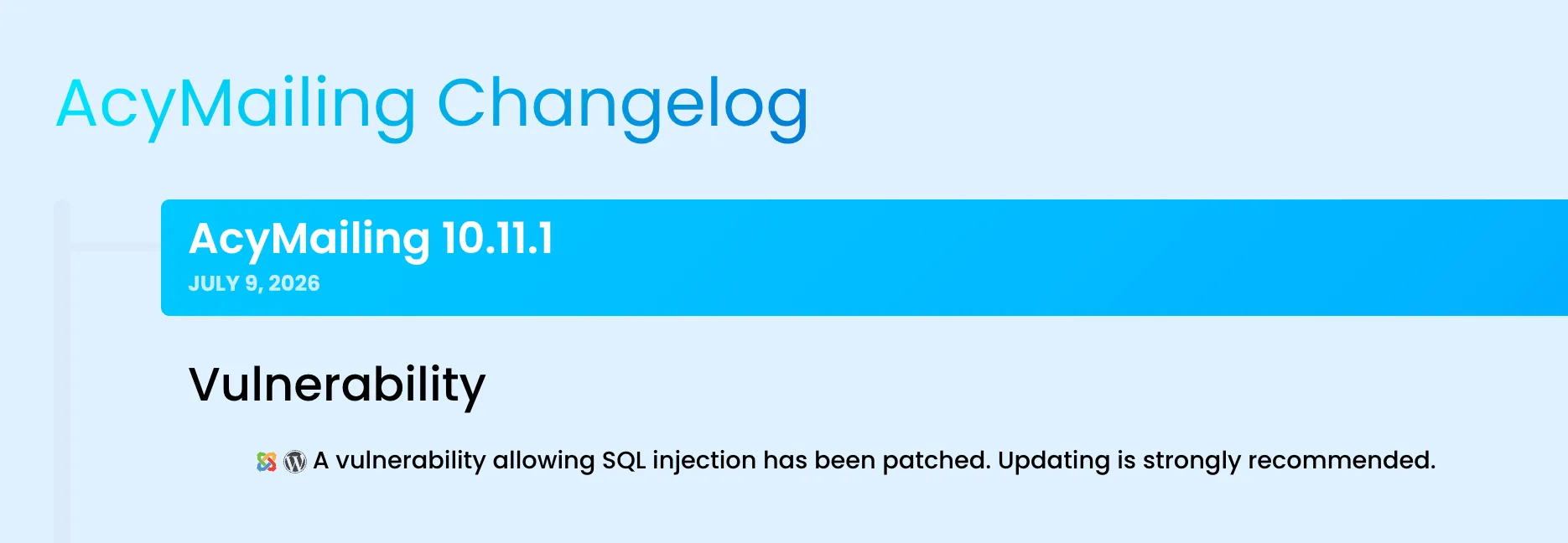
One line. It does not say the injection is unauthenticated, that an anonymous visitor with no account could reach it, or that it exposes user records and password hashes. If you triage updates by reading changelogs, this reads like a footnote, not the emergency it is.
To show what “a vulnerability allowing SQL injection” actually means in practice, here is the output of our proof-of-concept against a local test install, with the extension left vulnerable. In a single anonymous request, with no login, it pulled back the Super Admin’s username and full bcrypt password hash, a row from the content table, and the database name and version:

That is a local test site with throwaway data, not a customer’s, and we are not releasing the request that produced it. But it is the concrete version of the changelog’s one euphemistic line: an anonymous visitor reading the credentials table out of the database.
This is the same trap we keep flagging. The Balbooa Forms remote code execution fix appeared under a plain “Fixed” heading, and JoomShaper shipped a critical Helix3 patch under a changelog that just read “Security Update”. The words a vendor puts in a changelog are a poor guide to how urgently you need to update. The version number is what matters: anything below 10.11.1 needs updating now. It happened again with AcyMailing 11.1.0, whose two security fixes were filed under Bug fixes.
How do you update AcyMailing safely?
- Take a backup first. Before any extension update on a production Joomla site, back up the database and files. If you use mySites.guru, trigger a snapshot or a full backup so you have a clean starting point to compare from.
- Update through Joomla’s Extensions manager, or in bulk from mySites.guru. On a single site, open the Joomla administrator, go to System, then Update, then Extensions, and let Joomla pull AcyMailing 10.11.1. If it does not appear, use Find Updates, or download the latest package from the AcyMailing account area and install it over the top. If you manage more than one site, do not do this one panel at a time: use the mySites.guru mass update feature to upgrade AcyMailing across every affected site from a single dashboard. We built the update runner to push Joomla extension and WordPress plugin updates to thousands of sites at once, and you can even enable auto-updates for any Joomla extension so a fix like this applies without you lifting a finger.
- Confirm the version. After updating, open Components, then AcyMailing, and check the version shown is 10.11.1 or later. In mySites.guru, the extension search confirms in one view that no connected site is still below 10.11.1.
- Clear caches. Clear Joomla’s cache and any CDN or page cache so stale front-end assets do not linger.
Updating closes the door. It does not undo any data an attacker may already have read, so if you handle sensitive subscriber data and were on a vulnerable version for a long time, treat credentials and any exposed data as potentially known.
How mySites.guru handles this across many sites
Updating one site is easy. The hard part, if you manage dozens or hundreds of Joomla sites, is knowing which ones run AcyMailing and which of those are still on a vulnerable version. Checking each admin panel by hand does not scale.
mySites.guru already tracks the installed extensions and versions on every connected site. When a security issue like this appears, we add the affected version range to our vulnerability database, and every connected site running a vulnerable version of AcyMailing is flagged automatically. You see, in one place, exactly which sites need updating, and you can push the update from the dashboard rather than logging into each one.
If you are already a mySites.guru subscriber, the AcyMailing extension search page lists every installed version across all your connected Joomla sites, grouped by version number. Filter for anything below 10.11.1 to see which sites still need the update.
View all your AcyMailing installations
Open AcyMailing Extension Search
Lists every installed version across all your connected Joomla sites. Filter for anything below 10.11.1 to find the installations that need updating.
This is what we built the platform for. You should not have to learn about a Joomla security issue from the news and then go audit a portfolio of client sites by hand. The dashboard tells you what is exposed and lets you fix it from one place.
Learn more about automatic updates for any Joomla extension and how the suspect content tool helps after an incident.
Why newsletter extensions are a quiet attack surface
This is a pattern, not a one-off, and it is why the class of bug matters more than this single instance. Newsletter and form extensions make attractive targets for the same reason they are useful: they expose front-end endpoints that anonymous visitors are meant to reach. Subscribe forms, unsubscribe links, click tracking, archive pages - none of that can require a login.
Every one of those public endpoints is attack surface. When the code behind them trusts request input, or hands it to a database query without escaping, an anonymous visitor becomes an anonymous attacker. We have seen the same class of issue across form builders like Balbooa Forms, page builders like PageBuilder CK, template frameworks like Novarain, and editors like JCE: a public task that reaches a dangerous operation with too little checking in between.
The lesson for site owners is not “avoid newsletter extensions”. They are fine, and the reputable ones are well maintained. The lesson is that keeping them updated is security-critical, not just feature maintenance. A newsletter extension two versions behind is not a cosmetic problem.
What to do right now
- Update every Joomla and WordPress site running AcyMailing to 10.11.1 or later, one at a time or in bulk from one dashboard. The current release is 11.1.0, which includes two later security fixes, so update straight to that
- If you manage multiple sites, let mySites.guru show you which ones are still exposed rather than checking by hand
- Take a backup before updating, and clear caches afterwards
- If you were on a vulnerable version for a long time and handle sensitive data, treat any exposed data as potentially read, and if you suspect a breach, find any hacked files and backdoors and follow our guide to fixing a hacked Joomla or WordPress site
Disclosure timeline and CVE
This flaw is tracked as CVE-2026-56292, assigned by the Joomla CNA, the body that assigns identifiers for Joomla and its extensions, and crediting Phil Taylor of mySites.guru as the reporter.
The Joomla CNA published the record on 9 July 2026 at CVSS 4.0 9.2, Critical, on the vector AV:N/AC:L/AT:P/PR:N/UI:N/VC:H/VI:L/VA:L/SC:H/SI:H/SA:H, classified CWE-89. Our own pre-assignment read was 8.7 High, scored as a pure read against the component alone (VC:H with everything else at none). The CNA scored the subsequent-system impact of reading credentials out of the database as SC:H/SI:H/SA:H, which is what has it into Critical. We have adopted the official figure here. For reference, the vector we originally used was AV:N/AC:L/AT:N/PR:N/UI:N/VC:H/VI:N/VA:N/SC:N/SI:N/SA:N: reachable over the network, low complexity, no privileges and no user interaction, with high impact to the confidentiality of the site’s data. It is not a 10.0 like the recent Balbooa Forms and Page Builder CK file-upload flaws: this is a read-only injection, so it scores maximum on confidentiality but nothing on integrity or availability. An attacker can read your entire database, but this specific flaw does not let them write to it or take the site down. This is High, not Critical, and it is still an emergency when what leaks is every user record and password hash.
Critical Published by the Joomla CNA, 9 July 2026
Unauthenticated, exploitable over the internet in a single request with no user interaction, ending in full read access to the site database. It falls short of 10.0 only because it is a read, not a write: high confidentiality impact, but no integrity or availability impact.
| Field | Detail |
|---|---|
| CVE | CVE-2026-56292 |
| Component | AcyMailing for Joomla (com_acym) and AcyMailing for WordPress (acymailing plugin) |
| Vendor | Acyba (acymailing.com) |
| Type | Unauthenticated SQL injection (CWE-89) |
| CVSS 4.0 | 9.2 (Critical), AV:N/AC:L/AT:P/PR:N/UI:N/VC:H/VI:L/VA:L/SC:H/SI:H/SA:H, CWE-89, as published by the Joomla CNA. Our pre-assignment read was 8.7 High |
| Impact | Anonymous read access to any database table, including user accounts and password hashes |
| Finder | Phil Taylor, mySites.guru |
| Affected versions | 6.0.0 up to and including 10.11.0, on both Joomla and WordPress |
| Fixed in | 10.11.1, released 9 July 2026 |
The disclosure ran on a fast cycle from discovery to fix, and the full timeline is at the foot of this post.
Timeline
Early July: we find the injection and report it privately
Routine security research on the extensions our customers rely on turns up an unauthenticated SQL injection in AcyMailing. We confirm it against the code, prove it on a local install by reading a Super Admin password hash back out of the database, and disclose it to Acyba with all public detail withheld.
Acyba ships AcyMailing 10.11.1 for both Joomla and WordPress
The fix closes the flaw on both platforms. The changelog entry says only that a SQL injection has been patched, with no mention that it needed no login or that password hashes were reachable through it.
CVE-2026-56292 is published at CVSS 4.0 9.2, Critical
The Joomla CNA assigns and publishes the record the same day, crediting Phil Taylor of mySites.guru as the finder. Our own pre-assignment read was 8.7 High; the CNA also scored the impact of reading credentials out of the database into other systems, which is what takes it into Critical.
We flag every affected site and publish this write-up
The affected range goes into our Joomla and WordPress vulnerability databases, so every connected site below 10.11.1 is flagged automatically. No proof of concept is released.
Further Reading
- Our month-long run of Joomla security disclosures - the wider picture this AcyMailing SQL injection was part of
- CVE-2026-56292 - our record page for this CVE, with the details assigned by the Joomla CNA
- AcyMailing 11.1.0 security release - two more AcyMailing security fixes, filed under Bug fixes and later published as CVE-2026-94132 and CVE-2026-94131
- AcyMailing official site and downloads
- AcyMailing official changelog (the 10.11.1 entry shown above)
- Joomla! Security Centre and the Joomla CNA
- OWASP: SQL Injection
- Joomla documentation: updating extensions
- How mySites.guru mass-updates extensions across every site
Frequently Asked Questions
What is the AcyMailing SQL injection vulnerability?
Do I need to log in to Joomla for an attacker to exploit this?
Which AcyMailing versions are affected?
How do I know if my site is affected?
Is AcyMailing for WordPress affected, or only Joomla?
Was this exploited in the wild before the fix?
 Written and edited by a human, with AI assistance. Our approach to AI