How to Disable the Joomla API (and What Breaks When You Do)
Every Joomla site since 4.0 ships with a second application sitting beside the website and the administrator: the Joomla API, which Joomla’s own screens call Web Services. It lives at /api/, it is switched on by default, and on a fresh Joomla 6.1 install it is eighteen enabled plugins exposing articles, users, configuration, extensions, media and more to anyone who can authenticate. Most Joomla sites have no use for it at all, and still take on the security risk of an interface their owners never asked for.
This guide covers switching the Joomla API off completely, step by step with screenshots from a Joomla 6.1.3 site, and then the harder part: what stops working when you do. The biggest casualty is Joomla’s own Automated Core Updates, which since 5.4 depend on the API to work at all. After that come the nuclear option of deleting the api folder, and the .htaccess, nginx and Cloudflare rules that block /api/ before PHP ever sees the request.
Disabling the API stops Joomla automated core updates
Automated Core Updates are a free service the Joomla project runs for sites on Joomla 5.4 and later: Joomla’s update server calls back to your site on /api/index.php/v1/joomlaupdate/ and installs new core releases without anyone logging in. Disabling the Web Services - Joomlaupdate plugin, blocking /api/ or deleting the api folder all stop that service. Two things are not affected and should not be confused with it: updating Joomla yourself from System, then Joomla under Update in the administrator, and core updates you run from mySites.guru. Neither uses the Joomla API. If you rely on the Joomla project’s service, keep that one plugin and path open, as described below.
What the Joomla API is, and when it arrived
The Joomla API is a separate entry point, api/index.php, that answers requests with JSON:API documents instead of HTML pages. It has no routes of its own. Each route comes from a plugin in the webservices group, so Web Services - Content registers the article endpoints, Web Services - Users registers the user endpoints, and so on. Requests authenticate through a second plugin group, api-authentication, and a user can only log in through it if their group holds the Web Services Login permission (core.login.api).
It was built for Joomla 4. George Wilson’s pull request #23424 merged the first version into the 4.0 branch on 7 March 2019, building on Google Summer of Code webservices work. Token authentication followed in pull request #27021 in March 2020, and Joomla 4.0.0 shipped on 17 August 2021 with sixteen webservices plugins, all enabled.
The plugin count has grown since. Joomla 4.1 added Web Services - Media, and Joomla 5.4 added Web Services - Joomlaupdate for automated updates, which is how a Joomla 6.1 site ends up with eighteen. Plugins added by a core update are installed enabled, and that includes sites where the owner had already switched every other webservices plugin off. The 5.4 update SQL inserted the Joomlaupdate plugin with enabled = 1 regardless, so a site that was fully locked down on 5.3 came out of the 5.4 update with its API partly back on.
Default states on a fresh Joomla 6.1 install, taken from Joomla’s installation SQL:
- 18 x Web Services plugins
- Enabled. Banners, Config, Contact, Content, Installer, Joomlaupdate, Languages, Media, Menus, Messages, Modules, Newsfeeds, Plugins, Privacy, Redirect, Tags, Templates and Users. They are locked core extensions, so they can be disabled but not uninstalled.
- API Authentication - Web Services Joomla Token
- Enabled. Lets a request log in with an X-Joomla-Token header.
- API Authentication - Web Services Basic Auth
- Disabled. Would let a request log in with a username and password.
- User - Joomla API Token
- Enabled. Adds the Joomla API Token tab to user profiles, where tokens are created. Super Users only by default.
- Web Services Login permission
- Granted to Super Users only in the root permissions.
There is no master switch. The Web Services section of Global Configuration holds only CORS settings, and nothing in ApiApplication checks a global on/off flag. Switching the API off means switching off its plugins.
The Joomla API’s security record so far
For its first eighteen months the Joomla API was quiet. Then came CVE-2023-23752, fixed in Joomla 4.2.8 on 16 February 2023. The API router merged the request’s query string into the route’s own settings, so adding ?public=true to a request told Joomla the route needed no login. /api/index.php/v1/config/application?public=true returned the site’s configuration, including the database username and password in plain text, and the users endpoint returned every username and email address. Every Joomla 4 site from 4.0.0 to 4.2.7 was affected.
It was exploited in the wild within weeks. VulnCheck showed how the leaked credentials turned into code execution, Rapid7 shipped a Metasploit module in April 2023, and CISA added the CVE to its Known Exploited Vulnerabilities catalogue on 8 January 2024. Anyone who had switched off the Web Services plugins was safe, because a disabled plugin has no route to attack.
After that the API was quiet again until 2026, when the Joomla Security Strike Team published thirteen more advisories for core webservice endpoints between March and September:
Counted from the Joomla Security Centre. Joomla 4 reached end of life on 14 October 2025.
| CVE | What was wrong | Fixed in |
|---|---|---|
| CVE-2026-21630 | SQL injection in the articles endpoint’s ordering | 5.4.4 / 6.0.4 |
| CVE-2026-23899 | Improper access check in webservice endpoints | 5.4.4 / 6.0.4 |
| CVE-2026-35223 | Improper access check in the com_config endpoints | 5.4.6 / 6.1.1 |
| CVE-2026-40384 | Path traversal in the com_media endpoint | 5.4.6 / 6.1.1 |
| CVE-2026-48904 | Privilege escalation through the com_users endpoints | 5.4.6 / 6.1.1 |
| CVE-2026-48947 | Media files overwritten without edit permission | 5.4.7 / 6.1.2 |
| CVE-2026-48957 | Incorrect access control in the com_privacy endpoints | 5.4.7 / 6.1.2 |
| CVE-2026-48958 | Custom fields created without permission | 5.4.7 / 6.1.2 |
| CVE-2026-71574 | The API allowed changes the administrator screens block | 5.4.8 / 6.1.3 |
| CVE-2026-72531 | Fields reachable for components the user cannot access | 5.4.8 / 6.1.3 |
| CVE-2026-72532 | Categories reachable for components the user cannot access | 5.4.8 / 6.1.3 |
| CVE-2026-90913 | Access level changes through the API by users below Super User | 5.4.9 / 6.1.4 |
| CVE-2026-92226 | API edit tasks ignoring item permissions | 5.4.9 / 6.1.4 |
Most of these are permission checks that were missing or weaker than the matching check in the administrator, which is the pattern to expect from a second front door written years after the first. The API reimplements access control for every component it exposes, and each reimplementation is a fresh chance to get it wrong. The two newest are covered in the Joomla 5.4.9 and 6.1.4 security release, and we cover a few of the older ones individually in the Joomla 5.4.6 and 6.1.1 security release and in our look at AJAX and API endpoints as a CMS blind spot.
For a site owner, a site with its webservices plugins disabled was not reachable through any of these fourteen, because a disabled plugin registers no route and the request stops with a 404 before any component code runs. A Joomla 4 site will not receive fixes for the thirteen 2026 flaws, so for the Joomla 4 sites still out there, switching the API off is the only mitigation available short of upgrading off an end-of-life version.
Does your Joomla site actually use the API?
Almost certainly not. The Joomla API is used by software outside the site, never by the site itself: the administrator, the frontend, the media manager and the Joomla Update screen do not make a single call to /api/. Unless something external was set up on purpose to talk to the site with an API token, the API sits unused, as it does on most brochure sites, club sites and small shops.
The extension ecosystem has been slow to build on it. Five years after Joomla 4.0, the one major vendor we know of that depends on the core API is Akeeba:
- Akeeba Backup’s JSON API v3 authenticates with a Joomla API token. Akeeba deprecated the older v2 API and its Secret Word authentication on 26 August 2026 and plans to remove both in Akeeba Backup 11 in October 2027, so remote backup tools that talk to Akeeba Backup will move onto the Joomla API over the next year.
- Akeeba Panopticon, the self-hosted site monitor, connects through the Joomla API with a Super User’s token and needs the Web Services - Installer plugin, the token plugins and its own connector plugin enabled.
Beyond Akeeba, a search of public code turns up a handful of extensions shipping their own webservices plugin, among them JoomGallery 4, Phoca Cart, J2Commerce and BwPostman, plus custom work: a mobile app, a headless frontend, or an agency’s integration with a CRM. If you did not build or buy one of those, you do not need the API.
mySites.guru is not on the list. The mySites.guru connector does not use the Joomla API, so everything in this guide can be applied to a connected site without affecting audits, snapshots, backups or updates.
What stops working when you disable the Joomla API?
The site keeps working. Pages render, users log in, editors edit and the administrator behaves as before, because none of it goes near /api/. Four things do stop:
- Automated Core Updates on Joomla 5.4 and later. When they are on, your site registers with
autoupdate.joomla.org, and Joomla’s update server then calls back into six routes under/api/index.php/v1/joomlaupdate/to check health, prepare, run and finish an update. Those routes are registered by the Web Services - Joomlaupdate plugin and authenticated by anX-JUpdate-Tokenheader rather than a user login. New 5.4 and 6.x installs have Automated Update switched on; sites upgraded from earlier versions have it off. - Akeeba Backup’s JSON API v3 and Akeeba Panopticon, which both need the API, and Panopticon needs specific plugins enabled. Backups you run through mySites.guru are not on this list: mySites.guru works with every version of Akeeba’s JSON API, so switching the Joomla API off does not break mySites.guru’s backups through Akeeba Backup. Other services that use Akeeba’s JSON API lose that option when Akeeba Backup 11 removes the older API, as explained below.
- Any extension that ships its own webservices plugin, if you rely on its remote features.
- Anything custom that holds an API token for the site.
The manual update in the administrator (System, then Joomla under Update) is not affected by any of this. It runs in the administrator and does not touch the API.
Keeping automated updates while switching everything else off
The Joomlaupdate routes are declared public and check their own update token, so they do not need the token authentication plugin or any user’s Web Services Login permission. You can disable the other seventeen core webservices plugins and both API authentication plugins, leave Web Services - Joomlaupdate enabled, and automated updates keep working. Every other endpoint answers 404. The firewall rules later in this guide include the matching exception.
If you decide automated updates are not wanted anyway, our guide to disabling Joomla automated upgrades explains the reasons agencies usually give, and how mySites.guru switches the setting off across every connected site.
What changes when Akeeba Backup drops its old JSON API?
Today you can switch the Joomla API off completely and still let outside services drive Akeeba Backup, because Akeeba’s older JSON API v2 and its Secret Word authentication work without Joomla’s API layer. That window is closing. Akeeba deprecated both on 26 August 2026 and plans to remove them in Akeeba Backup 11, scheduled for October 2027. From that release on, the only way for a third party to talk to Akeeba Backup is JSON API v3, and v3 runs through the Joomla API with a Joomla API token.
For a site that uses Akeeba Backup with an outside service that relies on Akeeba’s JSON API, such as a remote backup tool or Akeeba Panopticon, switching the Joomla API off completely will stop being an option once that site is on Akeeba Backup 11. The narrower lockdown in this guide still applies: keep Web Services - Akeeba Backup, the token authentication plugin and the account that holds the token, disable every other webservices plugin, and restrict /api/ at the edge to the addresses of the service that needs it.
mySites.guru works with every version of Akeeba’s JSON API, so nothing changes for mySites.guru backups today. We have also built a new connection layer that lets mySites.guru reach Akeeba Backup without going through Joomla’s API at all, so mySites.guru customers can keep the Joomla API switched off after Akeeba Backup 11 as well.
How to disable the Joomla API step by step
These steps are the same on Joomla 4, 5 and 6. The screenshots are from a Joomla 6.1.3 test site that also has Akeeba Backup installed, which is why a nineteenth webservices plugin appears in the list.
1. Disable every Web Services plugin
Log in to the administrator and go to System, then Plugins under Manage. Click Filter Options and set the type filter (the second dropdown) to webservices. Set the list limit to 50 or All so nothing is hidden on a second page, tick the select-all box in the table header, and click Disable in the toolbar.
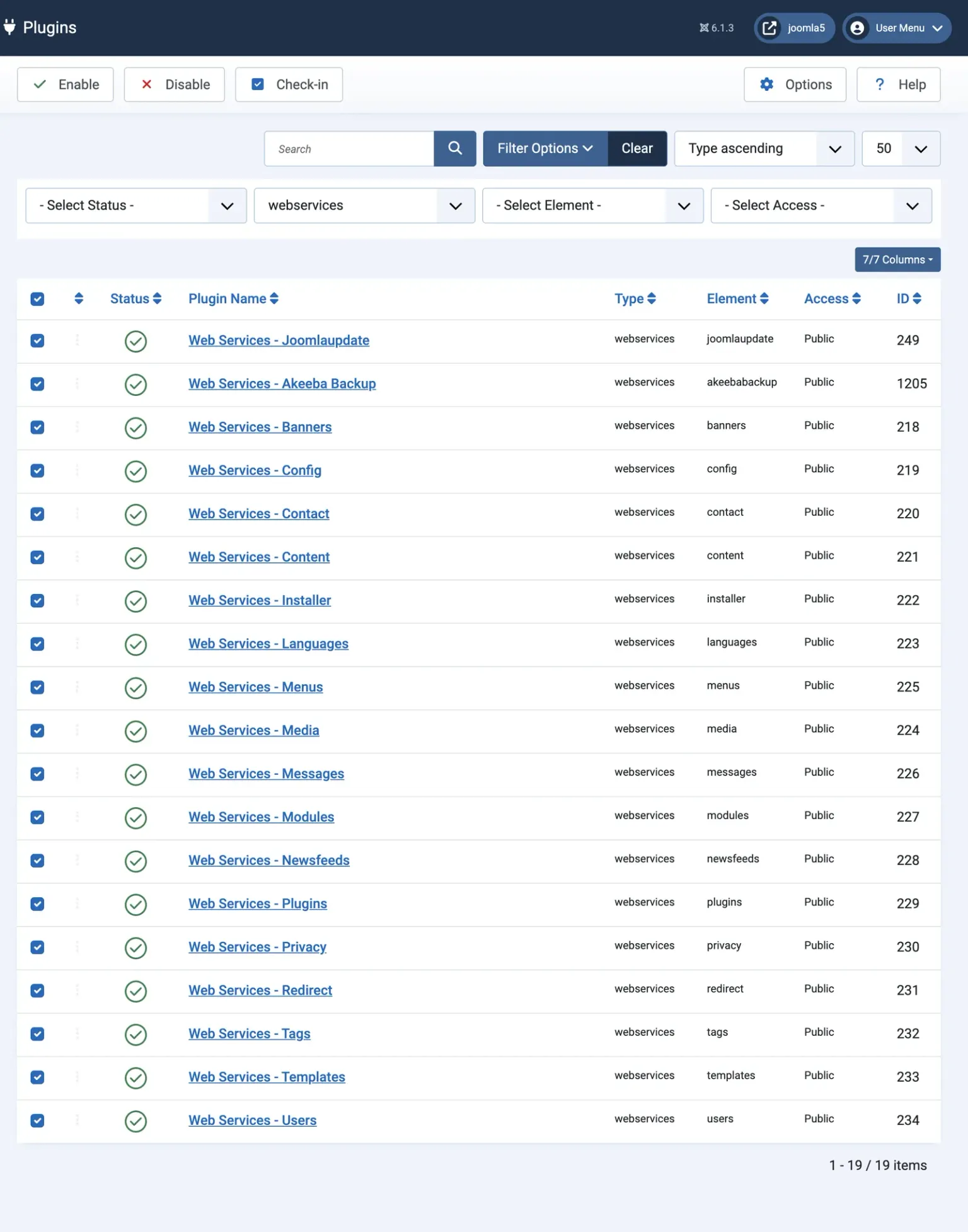
Read the confirmation message before moving on. It should say the same number of plugins as the list shows. Joomla skips any plugin that another user has checked out, so on our test site the first attempt reported “18 plugins disabled” out of 19 and left the Akeeba Backup plugin running, with only a small padlock beside its name to explain why. Check it in (System, then Global Check-in) and disable it again.
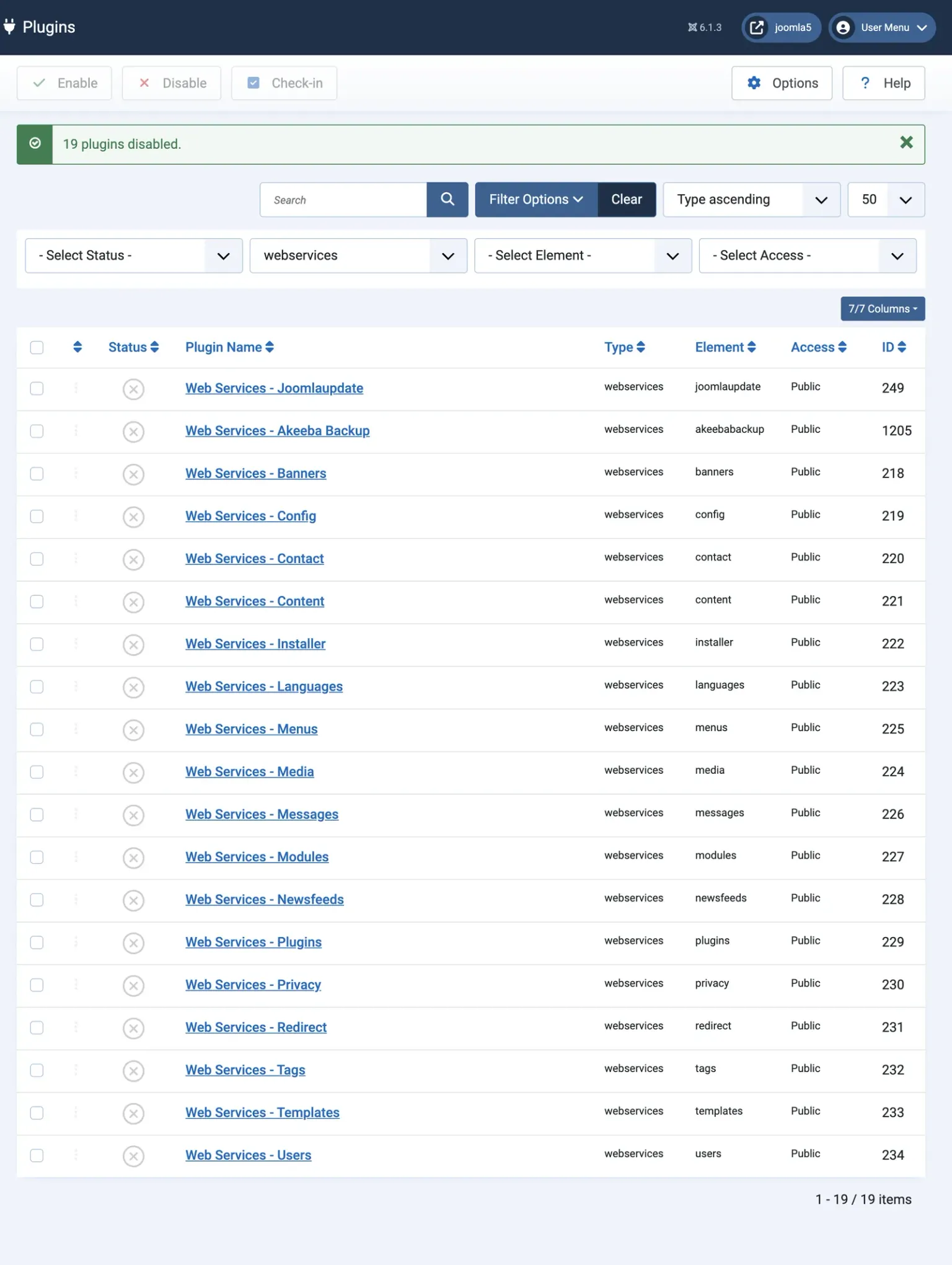
This is the step that matters most. With the webservices plugins disabled, the API registers no routes, and every request to /api/ stops at the router with 404 Resource not found before any component code runs. It covers third-party webservices plugins too, including ones that register public routes and handle their own authentication (Akeeba’s does, so it can accept its Secret Word).
If you want to keep automated updates, re-enable Web Services - Joomlaupdate alone after this step.
2. Disable the API authentication plugins
Clear the type filter and search the plugin list for API Token. Disable both results: API Authentication - Web Services Joomla Token, which accepts tokens on API requests, and User - Joomla API Token, which adds the token tab to user profiles. Then filter by the api-authentication type and confirm API Authentication - Web Services Basic Auth is disabled, as it is by default.
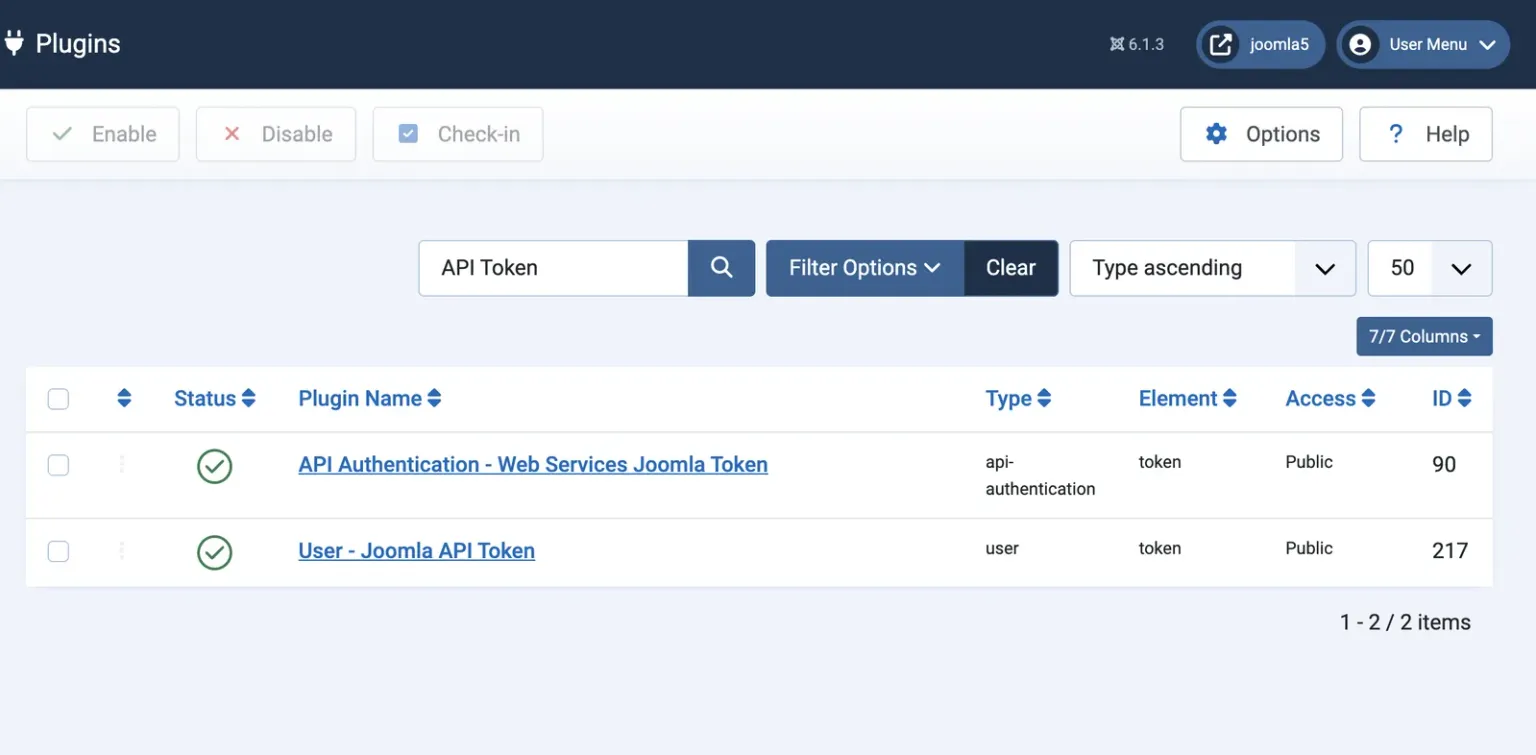
With step 1 done this is belt and braces, but it means any API token that has ever been issued on the site stops working immediately. That matters if a plugin is re-enabled later by a person, an extension installer or a core update.
3. Turn off Automated Update
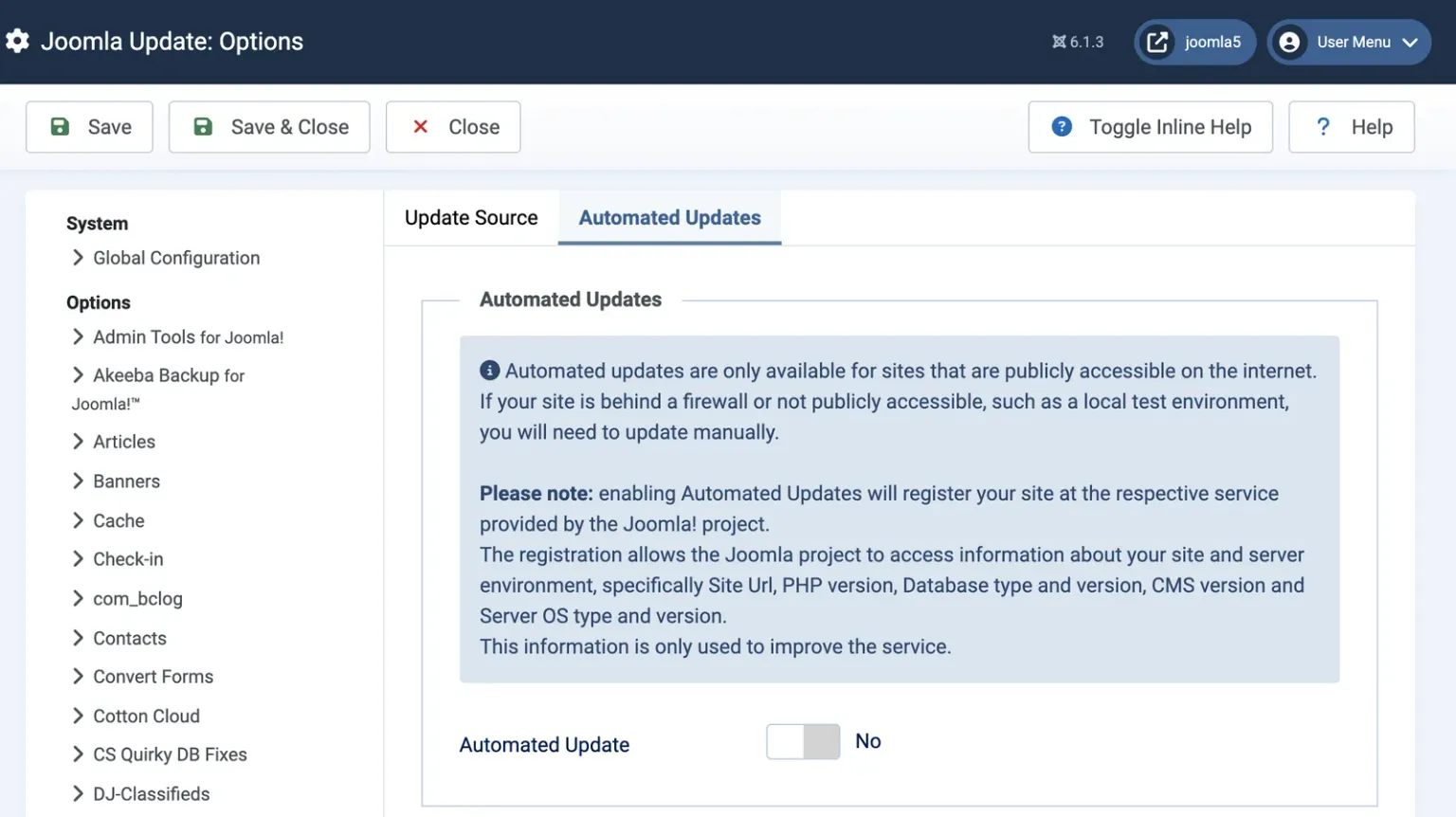
Go to System, then Joomla under Update, click Options, open the Automated Updates tab and set Automated Update to No. On a site where it was on, this is the right setting once the API is off: the feature cannot reach the site any more, so core updates are now your job, and the setting should say so. Skip this step if you kept the Joomlaupdate plugin enabled.
4. Check the Web Services Login permission
Go to System, then Global Configuration, and open the Permissions tab. Work through each group and make sure Web Services Login is not Allowed for anything other than Super Users. Joomla only grants it to Super Users by default, but tutorials for setting up integration accounts tell people to grant it to other groups, and it tends to stay granted after the integration is gone.
5. Test it from outside
Request an endpoint from a machine that is not logged in to the site:
curl -s -H 'Accept: application/vnd.api+json' https://example.com/api/index.php/v1/content/articlesA site with the API switched off answers with a 404:
{"errors":[{"title":"Resource not found","code":404}]}A site with the API still on answers 401 with {"errors":[{"title":"Forbidden"}]}, meaning the route exists and wants a login. A 401 is not a pass.
6. Re-check after every Joomla update
Core updates can add webservices plugins, and new ones are installed enabled. Joomla 4.1 did it with Media, and Joomla 5.4 did it with Joomlaupdate, reopening part of the API on sites that had closed it, with no notice. Filter the plugin list by webservices after each update and disable anything new, or put one of the edge rules below in front of the site so a returning plugin cannot be reached anyway.
Deleting the Joomla api folder: the nuclear option
The blunt alternative is to delete the api folder from the site root. With it gone there is no api/index.php to run, and requests to /api/ fail with a not-found response from the web server. It feels decisive, and for a site that must be closed right now and has no one available to work through the plugin list, it is a reasonable emergency measure. It has four problems as a long-term fix:
- Every Joomla update puts it back. The
apifolder is part of the full update package, and Joomla’s build forcesapi/index.phpinto every package as well, so the next core update restores the whole application with no message saying so. - Automated Core Updates stop, exactly as with the plugins, because the callback routes live in the deleted folder.
- The System, Discover screen throws an error, because the installer’s discover scan lists
api/componentsand fails when the folder is missing. - Installing a language pack or any component with an API section writes files back into
api/, partially restoring the folder with the plugins still enabled.
Nothing in Joomla checks for the folder or warns when it is missing, which cuts both ways: deleting it breaks nothing loudly, and its return goes equally unnoticed. If you use this option, disable the plugins as well, so the folder is harmless when it comes back.
Blocking /api/ with .htaccess or nginx
A server rule stops API requests before Joomla or PHP starts, and core updates leave it in place because Joomla does not overwrite your live .htaccess. It is the right companion to disabling the plugins: the plugins close the API inside Joomla, and the rule means a plugin re-enabled by an update is still unreachable.
On Apache, put the rule in the ## Begin - Custom redirects section of Joomla’s .htaccess, which sits above the core SEF section that rewrites /api/ requests to api/index.php:
## Begin - Custom redirects
#
# Block the Joomla API (Web Services)
RewriteRule ^api/ - [F]
#
## End - Custom redirects
[F] answers 403 Forbidden and stops rewriting. The pattern must match api/ rather than a specific route, because the API is reachable both through the rewrite (/api/v1/...) and directly through /api/index.php/v1/.... If Joomla is installed in a subfolder, the same rule goes in that subfolder’s .htaccess and matches relative to it.
To keep automated updates working, exempt the Joomlaupdate routes:
RewriteCond %{REQUEST_URI} !/v1/joomlaupdate/
RewriteRule ^api/ - [F]
To allow an integration from a known address, add an IP condition:
RewriteCond %{REMOTE_ADDR} !^203\.0\.113\.10$
RewriteRule ^api/ - [F]
Behind Cloudflare or another proxy, REMOTE_ADDR is the proxy’s address unless the server restores the visitor’s IP with mod_remoteip, so an IP allowlist in .htaccess needs that set up first. On a server without mod_rewrite, RedirectMatch 403 ^/api/ does the same job through mod_alias.
On nginx, a prefix location with ^~ wins over the usual ~ \.php$ block, so PHP never runs for these requests:
location ^~ /api/ {
    # allow 203.0.113.10;
    deny all;
}
A rule in .htaccess is one layer, and we have argued at length that .htaccess will not stop a Joomla hack on its own. Here it is closing a door you have already locked, which is the job it is good at.
A Cloudflare WAF rule for the Joomla API
If the site sits behind Cloudflare, a custom WAF rule blocks /api/ at the edge, before the request reaches your server at all. Create a new custom rule in the zone’s WAF settings, switch the rule builder to the expression editor, and use:
(starts_with(http.request.uri.path, "/api/"))Set the action to Block and deploy it. To keep automated updates, exempt the Joomlaupdate routes:
(starts_with(http.request.uri.path, "/api/") and not http.request.uri.path contains "/v1/joomlaupdate/")To let one integration through, add its addresses to the expression, separated by spaces rather than commas:
(starts_with(http.request.uri.path, "/api/") and not ip.src in {203.0.113.10 198.51.100.0/24})The free plan allows five custom rules per zone, so one of them spent on /api/ is well spent. starts_with is case-sensitive, which is fine here because Joomla’s API paths are lower case. For a site in a subfolder, change /api/ to /subfolder/api/.
An edge rule only covers traffic that goes through Cloudflare. Anyone who finds the origin server’s real IP address can go around it, which is one more reason the plugins should be off as well.
Which Joomla API lockdown should you use?
Use more than one. Our order of preference, for a site that does not need the API:
- Disable the plugins
- Always. It is the only method that works inside Joomla, needs no server access and removes every route. Re-check it after each core update.
- Cloudflare rule
- If the site is on Cloudflare. It stops requests before they cost you anything and cannot be undone by a Joomla update.
- .htaccess or nginx rule
- If the site is not on Cloudflare, or as well as it. Joomla updates leave it alone, and it blocks anything the plugin list misses.
- Delete the api folder
- Only as an emergency stopgap, paired with disabled plugins. It lasts until the next core update.
For a site that uses the API for one integration, keep only the plugins that integration needs, restrict /api/ to its IP addresses at the edge, give its token to a dedicated account rather than a person’s, and revoke the token when the integration is retired. For a site that wants automated core updates and nothing else, keep Web Services - Joomlaupdate, disable the rest, and exempt /v1/joomlaupdate/ in your rules.
Where mySites.guru fits
Everything above is a manual job, repeated on every Joomla site you look after, and repeated again after every core update that re-enables a plugin with no warning. mySites.guru turns steps 1 to 4 into one tool: Joomla API (Web Services) Enabled is a read-only check that runs on each connected Joomla 4, 5 or 6 site’s snapshot, and Disable The Joomla 4+ API (Web Services) Layer is the toggle next to it that acts on what the check finds.
- The check counts enabled plugins across both the
webservicesandapi-authenticationfolders (leaving out Joomlaupdate, which is reported on its own), and reads CVE the moment a site is both API-enabled and still on Joomla 4.0.0 to 4.2.7, the versions exposed to CVE-2023-23752. It reads Basic when the weaker Basic Authentication plugin is on, since that accepts a username and password with no MFA step in front of it. - Its Investigate page lists each webservices and api-authentication plugin with a core-or-third-party flag, and the users who currently hold an enabled API token, by id, username and name. It never reads or transmits the token itself, so this is the list you check before assuming no one still has access. If a hack is the reason you are looking, revoking every one of those tokens in a single click is a separate, purpose-built tool, because a password reset does not touch them.
- The toggle disables all of those plugins in one click, core and third-party alike, while leaving Web Services - Joomlaupdate running on purpose so automated core updates keep working, then re-counts and reports an error if anything is still on. Flipping it back restores Joomla’s own defaults, the core webservices plugins and Token authentication, not Basic auth or a third-party plugin that happened to be on before. A per-plugin switch on the same page handles the one case the bulk toggle does not, keeping only Joomlaupdate enabled and everything else off.
- Run it one site at a time, or from Tools across every Joomla site in the account, so a portfolio-wide lockdown is one click instead of an afternoon in each site’s Plugins manager.
Pair it with the rest of what a mySites.guru subscription does around this:
- With automated updates off, patching is back in your hands. mySites.guru shows which sites are behind the current Joomla release and lets you upgrade many Joomla sites from one screen, with a backup taken first. When a release like Joomla 5.4.6 and 6.1.1 fixes a webservice flaw, that view is the list of sites still exposed.
- Every snapshot checks whether Joomla’s Automated Update is on, and one toggle switches it off remotely across the sites you choose.
- Installed extensions are matched against our Joomla vulnerability database, including the third-party extensions that ship their own webservices plugins.
- Privilege escalation flaws such as CVE-2026-48904 end with an extra administrator. mySites.guru flags admin accounts that should not be there, and forced MFA for Super Users protects the logins that do belong.
- Sites still on Joomla 4 are flagged as end of life, and those are the ones where switching the API off matters most.
The connector does not use the Joomla API, so none of this depends on /api/ being open. See the plans, or run a free audit on one site to see what it finds.
Timeline
Web Services merged into the Joomla 4.0 branch
George Wilson's pull request #23424 adds api/index.php, the JSON:API output and routes registered by plugins.
Token authentication added
Pull request #27021 brings the Joomla API Token that most integrations now use.
Joomla 4.0.0 ships with the API switched on
The release includes sixteen webservices plugins, all enabled by default.
Joomla 4.2.8 fixes CVE-2023-23752
Adding ?public=true to an API request skipped authentication and exposed the site configuration, including the database password. JSST advisory.
CVE-2023-23752 exploited in the wild
VulnCheck reports exploitation seen by SANS ISC and GreyNoise, and a Metasploit module follows in April.
CISA adds CVE-2023-23752 to its Known Exploited Vulnerabilities catalogue
Joomla 5.4 adds Automated Core Updates, built on the API
A new Web Services - Joomlaupdate plugin, from pull request #45143, is installed enabled, including on sites that had switched every other webservices plugin off. How it works.
Two webservice fixes in Joomla 5.4.4 and 6.0.4
An SQL injection in the articles endpoint and an improper access check across webservice endpoints.
Eleven webservice fixes in five months
By Joomla 5.4.8 and 6.1.3 the count for 2026 alone reaches eleven, none of them released for Joomla 4. Every advisory is linked in the table above and listed in the Joomla Security Centre.
Two more webservice fixes in Joomla 5.4.9 and 6.1.4
CVE-2026-90913 and CVE-2026-92226 bring the count for 2026 to thirteen, both rated Moderate and both listing Joomla 4 as affected.
- Not yet public
- Not yet public
Further Reading
- Web Services, Joomla Programmers Documentation - the official reference for the API, its routes and token authentication.
- Automatic Core Updates in Joomla, Joomla Community Magazine - David Jardin on how automated updates use the webservices system.
- The Joomla 4.2.8 security fix and why it's not the end of the world - Nicholas Dionysopoulos on CVE-2023-23752 and disabling Web Services as a stopgap.
- Joomla for RCE: CVE-2023-23752 to Code Execution, VulnCheck - how the 2023 information leak was turned into full compromise.
- Cloudflare WAF custom rules - rule syntax and how many rules each plan allows.
Frequently Asked Questions
Is there a setting in Global Configuration to turn off the Joomla API?
Will disabling the Joomla API break my site?
Does disabling the API stop Joomla automated updates?
Can I just delete the Joomla api folder?
Does mySites.guru need the Joomla API enabled?
I am still on Joomla 4. Does this matter more for me?
 Written and edited by a human, with AI assistance. Our approach to AI