Finding Rogue Admin Accounts Across Every Joomla Site You Manage
The vulnerability gets patched. The webshell gets deleted. A week later the site is hacked again, and everyone stands around wondering how, because the hole is definitely closed.
The answer is usually sitting in the user table, which is why rogue Super Admin accounts are one of the checks we run on every connected site. During the original compromise the attacker created an account for themselves, and that account is still there despite everything you did afterwards. They do not need the exploit any more, or the backdoor, or the file you deleted. They have a login. MITRE ATT&CK catalogues this as T1136, Create Account, and it is the highest-value thing an attacker does on the way in.
Finding those accounts is easy on one site and close to impossible on eighty. mySites.guru now runs the check for you on every connected Joomla site.
How Do I Find Rogue Admin Accounts Across Every Joomla Site?
The Rogue Super Admin Accounts check runs on every connected Joomla site as part of the regular snapshot, with no configuration and nothing to install. It reads the site’s user tables, resolves which groups actually hold Super User permissions on that specific site rather than assuming the stock group, and matches every account against a set of attacker identity rules.
A site that fails this check is marked as hacked in your dashboard automatically. You do not have to go looking.
See which of your Joomla sites have planted accounts
The Compare All Sites view lists every connected Joomla site with a pass or fail for this check, so you find all of them at once instead of one nasty surprise at a time.
Open the Rogue Super Admin check
Not a subscriber? Run a free audit on one site and the check runs on the first snapshot.
Click into any flagged site and you get the accounts themselves: ID, username, name, email, when it was registered, and a plain-English reason each one was flagged. There is a delete button that removes all of them from the site in one action.
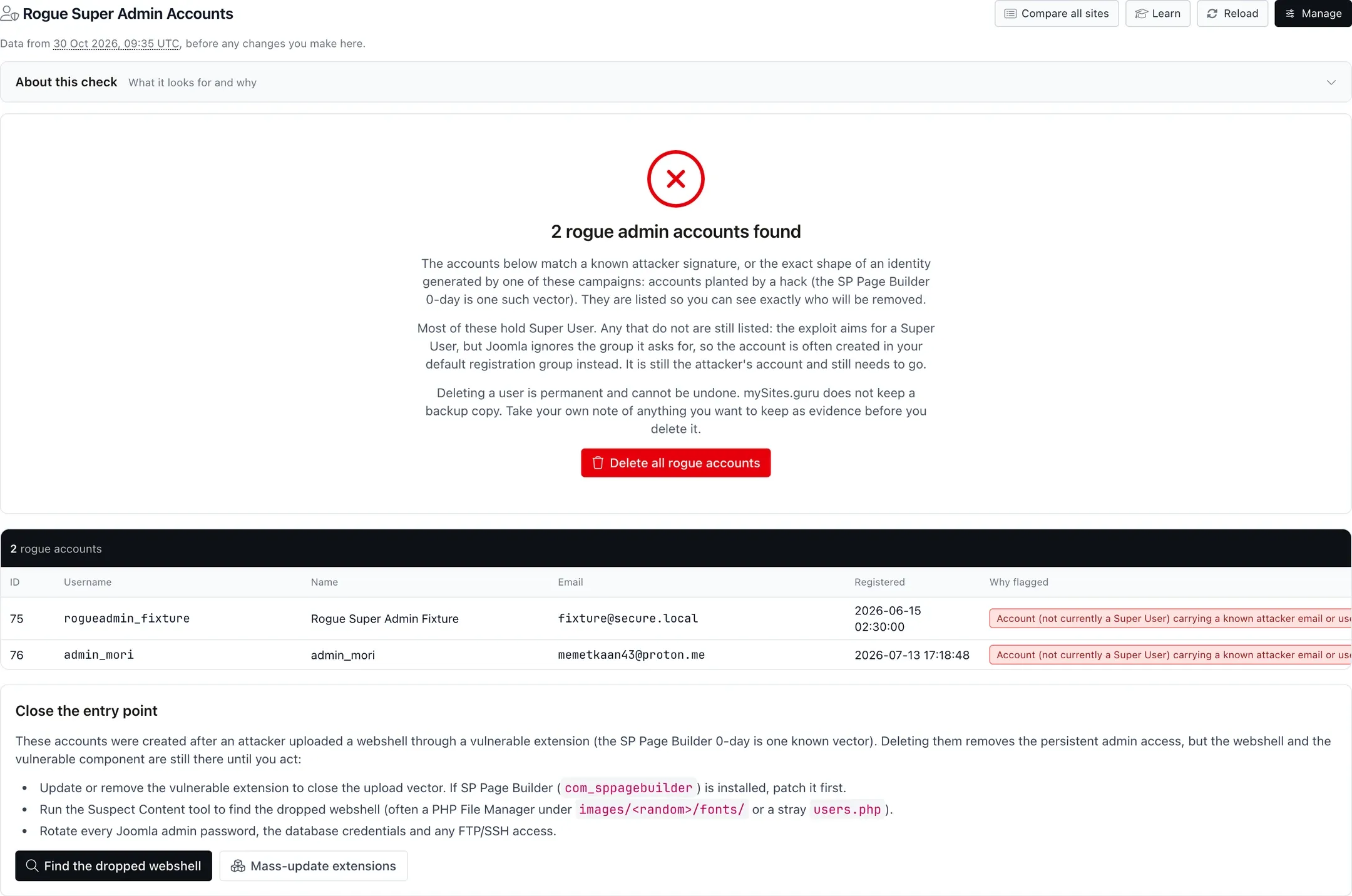
Two accounts, planted a month apart, on a site otherwise running a current Joomla. The first holds Super User. The second is the more instructive of the pair: it is flagged as not currently a Super User, because it matched a known attacker signature while sitting in an ordinary user group. No amount of filtering the Super Users list would ever have surfaced it.
Deletion is permanent and we keep no backup of the removed rows, so if you want anything for evidence, record it before you click. Every account is re-checked against the detection rules on the site itself immediately before it is deleted, so a page you left open yesterday cannot remove a user who is fine today.
What the Check Is Currently Holding
None of what follows is visible from a single site.
As of today, across the Joomla sites we manage, this check is flagging 827 planted accounts sitting on 20 different sites, spread like this:
| Accounts on the site | Number of sites | Total accounts |
|---|---|---|
| Over 20 | 10 | 814 |
| 2 to 5 | 1 | 4 |
| Exactly 1 | 9 | 9 |
Ten sites account for 814 of the 827 between them. That is what a mass registration looks like, and it is the version you would notice on your own, because the user count jumps and the notification emails pile up. OWASP catalogues the bulk version as OAT-019, Account Creation.
Nine of the twenty affected sites have exactly one planted account, sitting in a user list alongside real users, created on an ordinary day. No one notices that. It is not noisy enough to trigger anything, and it is the one that gets the site re-hacked in a month, because it is still a working login long after the cleanup is declared finished.
The loud compromises find themselves. The quiet ones are the reason this check has to run on every site, all the time, rather than on the site you already suspect.
Why Checking Your Joomla Super Users Misses Them
Every article about hacked sites tells you to open your user manager, filter to administrators, and delete anything you do not recognise. It is sensible advice, and on its own it would miss most of what we find.
When an attacker plants an account, it takes two steps: create the user row, then map that user into a group with Super User permissions. The second step fails a lot. The exploit runs out of privileges, the group mapping is written wrong, the site’s permission setup is not what the payload assumed, or the code simply crashes between the two. The account still exists. It just is not an administrator.
So it sits in whatever group new registrations get by default, indistinguishable from a real signup, and completely absent from the Super Users list you were told to check. Dormant is not the same as harmless. It is a valid credential the attacker holds, on a site they have already proved they can reach, and privilege escalation is a much easier second visit than the original break-in was.
Our check matches identity shape in any user group, not just Super Users, for this exact reason. That is why the second row in the screenshot above is labelled “not currently a Super User” rather than being excluded.
How the Check Decides an Account Is Rogue
We are not going to print the matching rules verbatim, because the people running these campaigns read security blogs too and renaming their accounts is a five-minute job. By class, there are three:
Known attacker identities
Specific email addresses and usernames we have pulled out of real compromised sites during incident work. When a campaign reuses the same mailbox across hundreds of victims, and they usually do, a literal match is the most reliable signal available. This class matches in any user group, and it is what caught both accounts in the screenshot above.
Generated identity shapes
Automated tooling generates its names, and every generator leaves a fingerprint. A fixed prefix followed by a run of hex characters, or a username duplicated into the local part of a throwaway domain, is a shape no human picks and no legitimate registration produces. Matching the shape rather than the string means the campaign has to change its generator, not just its mailbox.
Accounts with no valid registration date
A Joomla account created through Joomla always gets a registration timestamp. An account written straight into the database by an exploit frequently does not. This one is reported as a warning rather than a confirmed hit, it is not counted in the rogue total, and there is no bulk delete for it, because a database migration or a CLI import can produce the same result innocently. You get told, you look, you decide.
Note: ordinary spam signups are excluded on purpose
A hit here marks the whole site as hacked, which is a serious claim, so the check ignores the everyday bot registrations that turn up on any site with an open signup form. Those are covered separately by the unactivated users check. A rogue admin result means we believe someone got in, not that your registration form is busy.
Where These Accounts Come From
Rogue accounts are the second half of a compromise, so every one of them started as something else. The recurring pattern across the incidents we have worked this year is a file upload or privilege escalation in a third-party Joomla extension, followed within minutes by an account being created.
The SP Page Builder zero-day is the clearest example we have documented, because we traced it through real access logs: the upload request, the fetch of the planted shell, and a new Super User appearing in the site, in sequence. That incident is what this check was originally built for. The Gridbox authentication bypass and the 23 further Gridbox vulnerabilities we found afterwards include a registration flaw that puts a visitor into whatever group they ask for, which produces exactly the mass-registration pattern in the table above.
Joomla core has produced them too. CVE-2026-48904, patched in Joomla 5.4.6 and 6.1.1, let an unauthenticated attacker manipulate group membership through the com_users webservice endpoints and grant themselves Super User. CVE-2026-90907, fixed in Joomla 5.4.9 and 6.1.4, is a milder case: an anonymous visitor could create Guest-group accounts through the profile save task even with registration switched off. Those accounts are not admins, but they are accounts no one approved, so they belong in the same review (details in the 5.4.9 and 6.1.4 write-up).
The vector changes every few weeks. The thing the attacker does next does not, which is why detecting the account is more durable than chasing each individual flaw.
How Do I Check a Joomla Site by Hand?
If you want to check a single site yourself, or you want to verify what we are reporting, three queries in phpMyAdmin will do it. Replace #__ with your site’s real table prefix.
Every account holding Super User permissions, newest first:
SELECT u.id, u.username, u.name, u.email, u.registerDate, u.lastvisitDate
FROM `#__users` AS u
JOIN `#__user_usergroup_map` AS m ON m.user_id = u.id
WHERE m.group_id = 8
ORDER BY u.registerDate DESC;
Group 8 is Super Users in a stock Joomla install. If your site has custom groups with administrative permissions, that query will miss them, which is one of the things the automated check handles for you by reading the site’s actual permission rules instead of assuming.
Accounts with no valid registration date, which should be none:
SELECT id, username, email, registerDate
FROM `#__users`
WHERE registerDate = '0000-00-00 00:00:00' OR registerDate IS NULL;
And the one people never think to run, registrations grouped by day:
SELECT DATE(registerDate) AS day, COUNT(*) AS accounts
FROM `#__users`
GROUP BY DATE(registerDate)
ORDER BY day DESC
LIMIT 30;
A mass compromise is a spike. If a site that normally gets two signups a week shows ninety on a single Monday, you have your date, and now you know exactly which window of your access logs to read. That query takes two seconds and has found more compromises for me than any amount of scrolling through a user list.
One timing trap worth knowing: Joomla writes the registration timestamp in the site’s own timezone from configuration.php, while your access logs are almost certainly UTC. Convert before you go looking, or you will search the wrong hour, find nothing, and conclude the logs are clean.
What Should I Do If I Find One?
Treat it as proof of compromise, not as a tidying job. The account is evidence that someone had enough access to write to your database, and they did not stop there.
- Record it first. Username, email, registration date, last visit. Deletion is permanent and there is no undo, so capture what you need before you remove anything.
- Delete the account, from the mySites.guru user manager for that site or from the Joomla user manager. Removing the row closes that door.
- Find the entry point. Use the registration date to narrow your access logs, then look at what was being requested around that timestamp. Our guide to finding hacked files and backdoors covers what to sweep for.
- Patch what let them in. Usually an out-of-date third-party extension. Your mySites.guru extension inventory will tell you which ones on that site are on a version with a known flaw.
- Rotate everything. Joomla admin passwords, database credentials, FTP and SSH keys, and the Joomla secret. Force-logout every session, and revoke every Joomla API token too, since a password reset does not touch those.
- Clean the whole site, not the one folder you found something in. Someone who got in through one component usually leaves a second way back. Our hacked site recovery guide walks through the full process, and if you would rather hand it over, fix.mysites.guru is a single fixed fee of £120 per incident, usually same day.
After the patch
A patched site with a planted account on it is still fully compromised.
The attacker does not need the vulnerability any more. They have a login, and it works exactly like yours does.
Why This Runs on Every Site Instead of the One You Suspect
We built this as an account-wide check rather than a per-site tool because no one audits a site they think is fine.
You check the site the client phoned about. You do not check the other seventy-nine, because there is no reason to and no time for it. The compromise that matters is the one on a site no one has mentioned, holding one extra account, waiting for whoever planted it to come back. Nine of the twenty sites in our numbers above are in exactly that state, and not one of them was found because somebody went looking.
That is the whole argument for running the check everywhere, automatically, and marking the site as hacked when it fires. It costs you nothing to have it run on a site that turns out to be clean.
Get free email alerts when a Joomla extension flaw breaks
We email a plain-English alert the moment a serious flaw is disclosed, with the affected versions and what to do. No charge, unsubscribe any time.
Want the check running across your own sites? Connect them to mySites.guru and it runs on the first snapshot (see snapshot vs audit for what a snapshot reads and what only an audit can), alongside the extension inventory, the file integrity scan and the rest of the audit.
Further Reading
- MITRE ATT&CK T1136: Create Account: the formal classification for account creation as a persistence technique.
- Sucuri: Hidden WordPress Backdoors Creating Admin Accounts: the WordPress equivalent, including malware that filters its own account out of the user list.
- OWASP OAT-019: Account Creation: the automated threat handbook entry covering bulk sign-up abuse.
- Joomla Security Centre: CVE-2026-48904: the core privilege escalation through
com_userswebservices, fixed in 5.4.6 and 6.1.1. - Reinfected? Check every crontab, not just yours: the other persistence mechanism that is still there after a file cleanup.
Frequently Asked Questions
What is a rogue admin account?
How do I find rogue admin accounts across all my Joomla sites?
Why does checking the Super Users list miss rogue accounts?
Can I delete rogue admin accounts from mySites.guru?
Does the rogue admin check work on WordPress?
Will deleting the rogue account fix my hacked site?
 Written and edited by a human, with AI assistance. Our approach to AI