The Malware You Thought You Deleted - Is Still Running!

You fix the hacked website. You delete the webshell. You refresh the page. It is already back.
So you delete it again, watch the file disappear, and refresh once more. Back again. At this point most people start doubting the delete, then the FTP client, then the malware scanner that told them the file was there in the first place. We have watched capable developers go round that loop for an entire afternoon.
Nothing they did was wrong. The file really was deleted, every single time. The problem is that on Linux, deleting a file does not stop a program that has already been started from it, and something was still running.
This is the fourth post in a short series on where the thing rebuilding a hacked site hides. The earlier three cover the crontabs your hosting panel never shows you, Joomla’s own scheduled tasks table and five WordPress hiding places a file scan cannot reach. They are all answers to one question, which is what put the malware back. This one answers the case where nothing put it back, because the process writing the files had been running the whole time.
Why does deleting the file not stop the malware?
Deleting a file on Linux does not destroy its contents. It removes the name. The unlink system call takes the directory entry away, and the data behind it stays as long as anything still refers to it, which includes any process that already has it open or is executing it. The file is unreachable by name and entirely intact in use.
A PHP process that was started from /home/site/public_html/tmp/x.php does not re-read that script on every loop. It was parsed once, at startup, and the compiled program is held in the process’s own memory. Remove the script and the running process neither notices nor cares. It keeps running the code it already has, and if that code contains a loop that writes index.php, it keeps writing index.php.
That is the entire technique, and it is why the timing of a reinfection tells you what you are dealing with:
- Back within the hour
- A scheduled task is putting it back. Something on a timer woke up, ran, and rewrote the files. The crontab, the CMS scheduler or a systemd timer is the place to look.
- Back on the next page load
- A database-resident hook is putting it back. WP-Cron fires on visitor traffic rather than on a timer, so a busy site rebuilds the malware almost immediately.
- Back within seconds, every time
- Nothing is being triggered at all, because the process behind it was running the whole time. It sits in memory rewriting the file as fast as you remove it.
The third case is the one that reads as a failure of your tooling rather than a property of the attack, which is exactly why it wastes so much of an afternoon.
A self-deleting dropper leaves nothing to scan
A dropper is a small piece of malware whose only job is to deliver other malware. It does not deface your site or steal anything itself. It arrives through whatever hole was open, writes the payload that does the real work, and then gets out of the way. The name is literal: it drops something and leaves.
The malware side of this is not sophisticated, which is part of why it is common. A dropper that reaches the site starts a detached PHP process in the background, then removes its own script and the directory it was started in. From that point the attacker has a program running on your server with no file behind it. There is no file on the hard disk, there is nothing to see when you FTP and look.
The dropper does not have to be the one that removes the file, and in practice it often is not. Most people meet this the other way round: you find the webshell during a clean-up and delete it yourself, and the process it started an hour earlier keeps running from the file you have just removed. Your own tidy-up produces exactly the state the malware would otherwise have engineered for itself. That is the version in the opening of this post, and it is why the symptom reads as a failed deletion rather than as an attack.
Sucuri published the clearest public example back in 2020, in The Hidden PHP Malware that Reinfects Cleaned Files. Their sample runs itself through nohup so it outlives the request timeout, calls unlink() on its own source file, then sits in a loop hashing a target file once a second and rewriting it the instant the hash changes. It even backdates the file it restores by four hundred days and sets it read-only, so the timestamp gives nothing away. Their conclusion is the argument for this whole check: once the dropper has deleted itself, “the only way to detect this malware reinfector would be to view the running processes.”
The technique is six years old and still works, because nothing in a normal clean-up routine looks at the server’s running processes.
Every instrument you would normally reach for now reads clean, and each one is working correctly:
- A file scanner reads files. There is no file.
- A crontab audit reads crontabs. Nothing is scheduled, because the attacker had no need to schedule anything.
- A core-file integrity diff compares what shipped against what is there, which is how an impostor file in a core folder gets caught. The process is not a file, so it does not appear in the comparison.
- A malware signature database matches patterns in content. There is no content on disk to match against.
This is the same shape of problem as a backdoor that lives in a database row or the Helix3 defacement that never touches a file. The difference is that a database row can at least be read back later. A process exists only while it is running, so the evidence is gone the moment the server reboots, and so is the malware. That makes it simultaneously the easiest persistence to destroy and the hardest to find.
There is no tidy name to look this up under, which is part of why it stays obscure. MITRE ATT&CK’s closest entry, T1070.004 File Deletion, covers an attacker removing their own files but says nothing about the process that keeps running afterwards, and its detection guidance only watches for the deletion itself. “Process ghosting” is a real named technique but a Windows one, exploiting how that kernel loads an executable image, and borrowing the term here would describe the wrong mechanism. “Fileless malware” is the usual loose umbrella, though it normally means something that never touched disk in the first place rather than something that touched disk, started, and then deleted itself behind it.
What mySites.guru reads, and where it stops
Every other check we ship reads your files or your database. This one reads the server’s own running processes, because that is the only place the evidence exists.
If you have never looked at one, a process list is the server’s live inventory of what is actually executing at this instant, as opposed to the filesystem, which only tells you what is stored. Every running program has an entry, and each entry records who owns it, what started it, when it started, and which file it was launched from. Under your own hosting account that is normally the web server’s PHP workers, anything cron has started, and any background job you set up yourself.
The last of those fields is the one that matters here. The operating system records where each process was launched from, and it keeps that record after the file goes: delete the file and the entry stays, now marked (deleted). So the running process list is the one place that still remembers a file the filesystem has already forgotten.
It is one check out of 228, and on its own it will not tell you whether a site is hacked. Nor will any of the other 227. Somebody arriving here after a bad afternoon wants a single instrument that answers the question, and no such instrument exists for this problem.
On every snapshot, twice a day (snapshot vs audit explains how that differs from an audit), the connector walks the running processes under your own hosting account and reports any PHP process whose code is no longer on disk. It runs on Joomla, WordPress and generic PHP sites.
This check is best effort, and your host decides whether it works
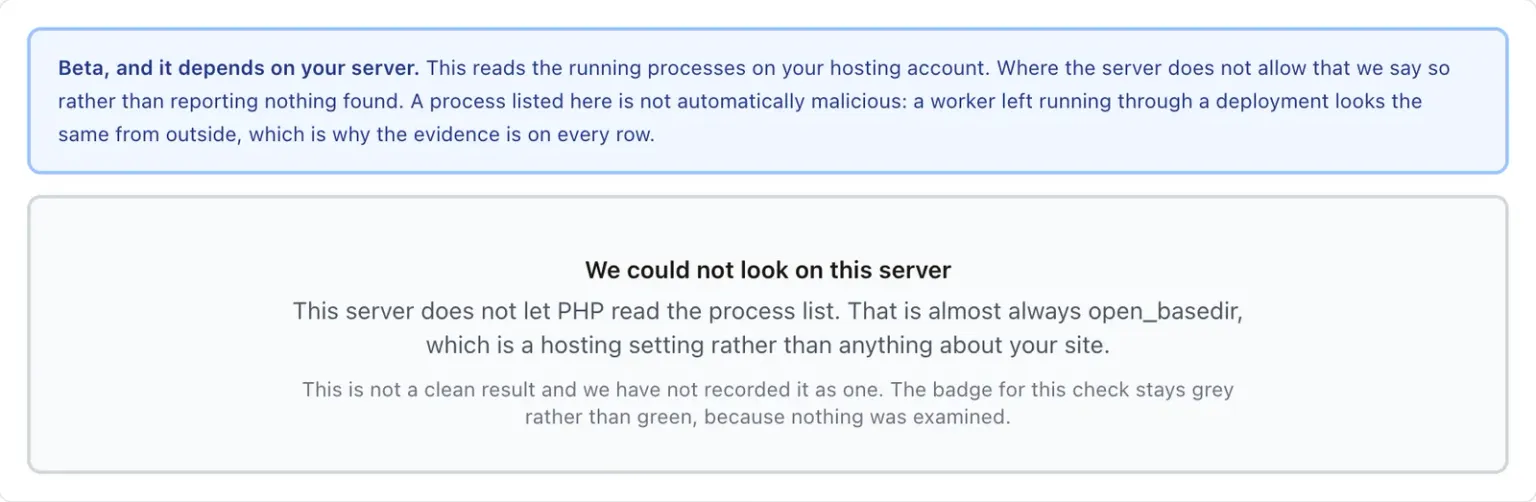
Reading the list of running processes needs a permission a lot of shared hosts simply do not grant to PHP. Where the host says no, mySites.guru cannot answer the question at all. On the sites reporting today that is roughly four in ten, which is not a rounding error, and it is why this check is marked BETA in the app. Those sites are told in plain words that we could not look, and why. A result here is only ever a statement about the processes running under your own account, on a server that let us read them, at the moment we looked.
We see what an attacker sees, and nothing more
That limit is a design decision rather than a gap we have not got round to yet. mySites.guru runs on your site as an ordinary PHP process under your own hosting account, without root and without an agent installed on the server. What we can read is therefore close to exactly what an attacker who has got into your site can read, and no more than that.
It cuts both ways. It is why the malicious process is visible to us at all. It was started by PHP through your web server, so it runs as the same user we do, and we can read its /proc entry for precisely the same reason the attacker could read ours.
It is also why a host that hides the process list from PHP hides it from us too. open_basedir does not apply to root, and a server administrator running ps sees everything. We are confined because we are unprivileged, which is the trade: the alternative is asking you to hand a third party root on your server, and no security check is worth that. Where we cannot look, we say so and point you at the two parties who do have the privilege: you over SSH, or your host.
The same boundary is why we stop reading a process the moment we can see it is not yours. On a shared server with no per-vhost user separation, every site on the box runs as one account, so anything outside your own site’s root is reported and never offered for stopping. Other customers’ processes are none of our business, and reading them would make us the thing we are looking for.
There are three things that count as proof, and they are separate because they fail differently:
- Its script has been deleted
- The process was started from a PHP file, and that file is gone. This is the classic self-deleting dropper and the strongest single signal on the list.
- Its working directory has been deleted
- The directory the process was started in no longer exists. Malware that removes the folder it unpacked itself into shows up here, and so does a queue worker that was running while you replaced a release directory.
- Its PHP binary has been deleted
- The interpreter itself has been replaced. This is reported and never offered for stopping, because a host does exactly this to every running process each time it patches PHP. On its own it almost always means the server was updated.
Two further observations get attached once a process is already proven by one of those three, never on their own: that it is detached from any parent, and that its script sits in a temp directory. Both are suggestive rather than evidence, so neither can flag a process by itself.
The check is fussy about what counts as PHP, on purpose. It judges the interpreter on the binary the kernel reports, never on the command-line string, because this family of malware names its script after an ordinary server configuration file. A substring test over the command line reads that as the web server and skips straight past it.
There is a stronger reason to distrust the command line, and the Linux manual says it out loud. A process can rewrite its own arguments after it starts, so /proc/PID/cmdline is, in the manual’s words, “the command line that the process wants you to see”. The binary behind /proc/PID/exe is a kernel fact. The argument string is whatever the process typed there.
How many sites had one
The check has been running in production since mid-September 2026. These are the figures as of 16 September, measured over the most recent snapshot for every site audited in the previous thirty days.
Measured 16 September 2026 across every connected site with a snapshot in the previous thirty days, latest snapshot per site, among those whose server allowed the read.
Almost every flagged site had exactly one such process. A handful had three or four, which is what an automated reinfection loop that has been restarted a few times looks like. We found them on both Joomla and WordPress sites; the WordPress sample is far too small to draw a comparison from, so we are not going to draw one.
That hit rate is low per site and high per account. An agency looking after three hundred sites should expect to find one, and it will be the site somebody has already cleaned twice.
On roughly four sites in ten we cannot answer the question at all, because the server will not let PHP read its own process list. Around three in ten block the read entirely, almost always because open_basedir confines PHP’s filesystem functions to the site’s own directory, and /proc is not in it. About one in ten will not tell us which account we are running as, which we treat as a no rather than guessing and reading another customer’s processes.
If you are diagnosing your own server, open_basedir is not the only thing that gets in the way. CloudLinux’s CageFS, which a great deal of cPanel hosting runs, gives each account a filtered /proc showing only its own processes, which is exactly the right behaviour and does not block this check. A host that mounts /proc with hidepid=2 is doing something stricter, and a host that disables the exec family closes the last remaining route.
Grey is not green
A check that cannot run has to look different from a check that ran and found nothing. Those sites report that we could not look and say why, rather than showing an unearned OK badge. It is the third answer most security tooling skips, and skipping it is how a scanner ends up reporting a clean bill of health for a question it never asked.
Why this check never says HACKED
It would be easy to make this one red, and it would be wrong. A deleted working directory has a completely ordinary cause: deploy a new release by swapping a directory while a queue worker is running, and that worker is now running from a directory that no longer exists. From outside the process, that is indistinguishable from malware.
So the check reports rather than accuses. It does not feed the hacked-site flag, it is marked BETA, and every row shows the raw evidence: the full command line, how long the process has been running, its parent, and which of the three signals fired. Something you set up is usually recognisable from its command line within about two seconds. Something you did not set up usually is not.
The command line is attacker-controlled text
A command line is arbitrary bytes chosen by whoever started the process, which makes printing it back to you a small security problem of its own. It can contain bidirectional formatting characters that reorder what you see on screen: a U+202E override can make evil.php draw as php.live, the same trick played on filenames for twenty years. Those characters are replaced with a visible marker rather than escaped, because escaping does not help when the characters are not markup.
Where a row is safely actionable there is a Stop it button, and the conditions for showing it are narrow. The process has to be detached, running under your account, traceable to this specific site, and proven by a deleted script or working directory rather than a deleted interpreter. Anything outside this site’s own root is reported and never offered for stopping, for the shared-account reason above.
Pressing the button re-checks all of it on your server at the moment you press, rather than trusting the page you are looking at. Process IDs get recycled, so the request sends back the start time and a hash of the command line it was shown, and the server will not act if either has changed. When it will not act, it says why: “That process now has a parent, so something is managing it”, or “We cannot tie that process to this site, so we will not stop it”.
How do I find this across every site I manage?
Two ways, and the second is the one worth knowing if you look after more than a handful of sites.
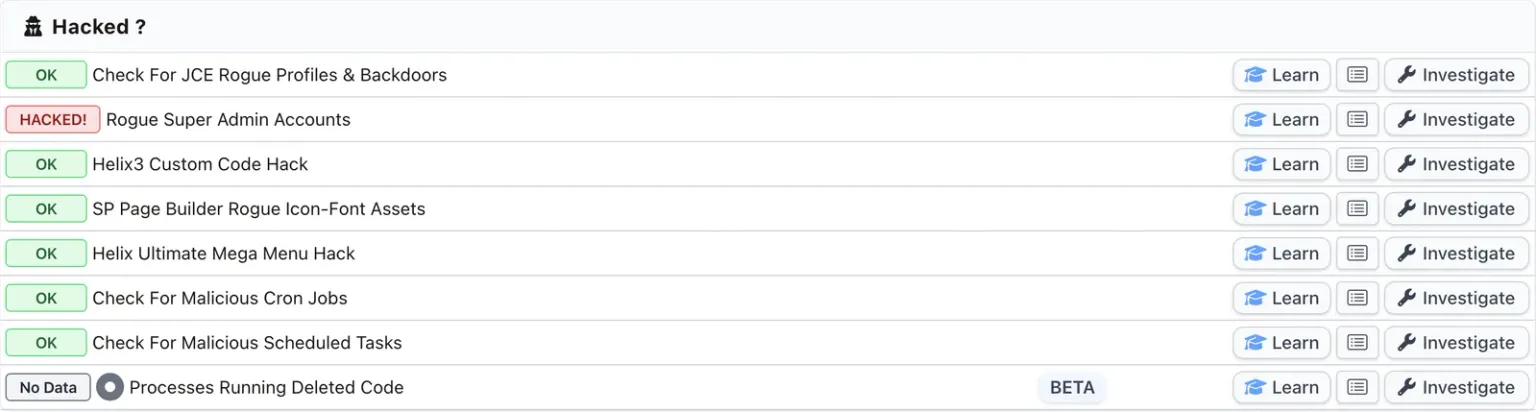
On a single site, the check sits in the Hacked panel of that site’s audit page in mySites.guru, under the name Processes Running Deleted Code, with a BETA label next to it. The badge is the summary: a green OK, a count of processes to review, or a grey No Data if the server would not let us look. Investigate on that row reads the process list live rather than replaying the stored snapshot, because a process list is out of date the moment it is written down. You get one row per candidate with its full command line, how long it has been running, its parent, and which signals fired.
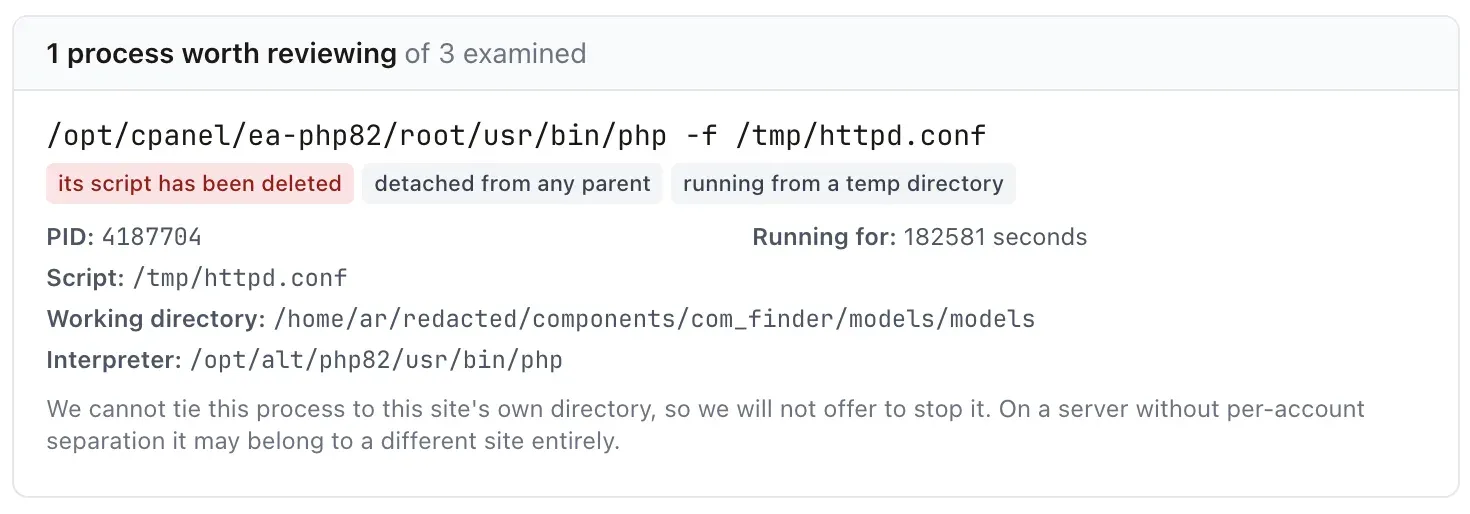
Three tags on that row, and only the red one is proof. The other two are the supporting observations from earlier, which is why they are grey.
The script is /tmp/httpd.conf. That is the naming trick, in the wild: a PHP script named after the Apache configuration file, so anything matching on the command line string reads “httpd” and moves on. It sits in /tmp, which is why the row also says running from a temp directory. And it is gone, which is the tag that matters, its script has been deleted.
It has been running for 182,581 seconds, which is a little over two days, and it is detached from any parent. No ordinary web request lives for two days. Whatever started it exited long ago and this outlived it.
The working directory took a second look to spot, and it is not in this site at all. It is a second document root in the same hosting account: the development copy of the same site, sitting next door. The folder itself is components/com_finder/models/models, a doubled folder name inside a Joomla core component, which is not a path Joomla ships.
The abandoned dev copy is the way in
Put those two facts together and the incident rearranges itself. The live site is connected to mySites.guru and gets audited. The dev copy beside it is connected to nothing, gets no audits, no update alerts and no hack checks, and has been sitting there being forgotten. That is the copy that was compromised, and the process is running out of its document root.
Sharing a cPanel account means sharing a Unix user, and a Unix user that can write to one document root can write to the other. So a development copy forgotten for a year becomes a fully privileged foothold in the live site, and none of the hardening on the live site applies to it. The attacker did not need to get past anything on production. They went around it.
This is the most common version of the story, and the one worth taking away even if you never see a resident process. A staging or development copy on the same hosting account is production, in every sense that matters to an attacker. Either connect it and patch it like the real thing, or delete it.
The final line on the row is the privilege boundary from earlier, working exactly as intended: we cannot tie the process to this site’s own directory, so no Stop button is offered. That is the right call. The process belongs to a different document root, and a tool that stops processes outside the site it was pointed at is a tool that eventually stops the wrong one. Acting on this needs somebody with a view of the whole account, which means SSH or the host.
A completely separate check, on the same site and the same snapshot, found two rogue SP Page Builder icon-font assets, which is the database residue left by the unauthenticated upload exploit we traced in June. Neither check knows the other exists. Whether the two are connected is a question for the clean-up rather than something either one can answer on its own, but a site showing both is not a site where one instrument would have been enough.
Across an account, the all-sites view answers it on one page: every Joomla site reporting a resident process, and the same view for WordPress. This is the version that matters after an extension vulnerability goes public, when the question is not “is this site affected” but “which of my sites are”. It is also reachable from the command palette by searching for resident processes or reinfection.
Either route gives you evidence to act on. Stopping the process is only the first step, and the order of the rest is where people go wrong.
If the badge is grey, the next step is SSH
On a server that blocks the process list there is nothing mySites.guru can tell you here, and the section below is how you answer the same question yourself in about ten seconds with shell access. If you have no shell access either, your host can run it for you, and the question to ask them is whether any process is running from a deleted file under your account.
Find the process that is rewriting your site
mySites.guru checks every connected site for this automatically and flags it the moment it appears. It runs twice a day on every connected Joomla, WordPress and generic PHP site.
Investigating a hack takes the whole toolkit
A resident process is one persistence route out of several, and an attacker who bothered to set one up has usually set up two. Investigating a compromised site is elimination across instruments, not a single lookup: you are asking the same question of the filesystem, the database, the schedulers, the user table and the server’s own running processes, and the answer only means something once all of them have answered.
That is why you need a toolkit rather than one favourite tool. mySites.guru runs 228 distinct checks across 15 groups, 19 of them specifically hacked-site detection, and the hack-hunting ones are spread on purpose across places you would otherwise have to visit one at a time, with a different tool and a different login for each.
The ones that matter on a reinfection, all running on every connected site, twice a day, without being asked:
- The server’s crontabs, including the root-owned locations your hosting panel does not show you at all, where the cron rebuilding your site usually lives.
- Joomla’s own scheduler table and WordPress’s WP-Cron events, both of which live in the database rather than in any crontab, where a file scanner has no way to reach them.
- Rogue and hidden administrator accounts, so a cleaned site does not just get logged back into, listed across every site at once.
- The files themselves, through two separate scanners that do different jobs.
- The server’s own running processes, which is this check, and the only one of the set that looks anywhere other than your disk and your database. The full hacked-site detection group lists the rest.
Then there is the part that tells you before you go looking. The File Watch List emails you the moment a watched file changes, so a site rewriting index.php behind your back reaches your inbox rather than waiting for somebody to notice a defacement. On a reinfection that is often the first hard evidence you get, and it arrives while the process is still running and still catchable.
None of these is clever on its own, but together they are exhaustive and repeatable: they run unattended, across every site you manage at once, and keep running after the afternoon you spent cleaning is over. Doing the same by hand means an SSH session per server, repeated daily, forever, with a different mental checklist each time.
Treat any single green badge, this one included, as one question answered rather than a site declared clean. The site is clean when the whole set agrees, and a hacked site that has only been checked one way has not really been checked.
All of it is part of the subscription rather than a paid add-on, and the pricing is per site. If you want to see what these checks say about a site you already suspect, the free audit runs the full set once without a subscription.
How do I check for this myself over SSH?
If you have shell access, you can answer this in about ten seconds. These are the two commands worth knowing, and both need reading carefully rather than trusting.
ls -l /proc/*/exe 2>/dev/null | grep deleted
lsof +L1
The first lists every running process whose executable has been unlinked, which Linux marks with a literal (deleted) suffix on the symlink. The second lists open files with a link count of zero, which is the same idea reached from the other direction and often catches more. Swap exe for cwd to find processes whose working directory has gone.
To see what a suspicious process actually is, read its command line and its age:
cat /proc/PID/cmdline | tr '\0' ' '; echo
ls -l /proc/PID/exe /proc/PID/cwd
ps -o pid,ppid,lstart,etimes,comm -p PID
The fields come from ps(1): lstart is the full start time and etimes the elapsed seconds, which is the number you want when deciding whether something has outlived every ordinary request.
Three caveats, because this is the part where people either miss the thing or panic about the wrong thing. Without root you only see your own processes, which on shared hosting is usually what you want anyway. A parent process ID of 1 means the process was detached and reparented to init, which is normal for a daemon and expected for this kind of malware. And the deleted marker on its own proves nothing: running that first command on a well-maintained server will usually return something, because any long-lived process whose binary was replaced by a package upgrade shows the same marker. On the machine I tested these commands on while writing this, the single hit was a kernel thread, not malware.
Read the command line before you act. A PHP interpreter running an unnamed script from a directory that no longer exists, detached, started three days ago, is worth stopping. Your own backup daemon is not.
When the answer is a support ticket
Sometimes you have no route of your own, and that is the normal case rather than the unlucky one. On a properly locked-down shared server PHP cannot read the process list, shell access is disabled or restricted to a jail that shows you nothing useful, and the only party who can answer the question is the host. A hardened server blocks mySites.guru for exactly the same reason it blocks you, and neither of us should have the privilege that would get past it.
So open a ticket and ask them directly. Hosts often call these orphaned or ghost processes, so use whatever wording gets you understood, but give them the precise check as well, because the phrase on its own means different things to different administrators.
Please could you check the processes running under my hosting account for
any that are running from a deleted file. On Linux these show a " (deleted)"
marker:

    ls -l /proc/*/exe 2>/dev/null | grep deleted
    ls -l /proc/*/cwd 2>/dev/null | grep deleted
    lsof +L1

I am investigating a site that keeps reinfecting itself within seconds of
the malware being removed, which is the signature of a PHP process still
running from a script that has already been deleted from disk.

Please send me the full command line, the parent PID and how long each one
has been running BEFORE stopping anything, as that command line is the only
evidence left of what the process was.
The last paragraph of that ticket is there because a host asked to deal with a suspicious process will very reasonably just kill it, and the moment they do, the command line, the working directory and the script path are gone for good. There is nothing on disk to go back to, so an eager clean-up removes the infection and the only description of it in the same second, which leaves you unable to tell what it was or how it got there.
Why restoring a backup does not fix this, and sometimes makes it worse
A restore replaces files and database rows. A running process is neither of those, so the restore does not reach it at all. The moment your files are back in place the process rewrites them, and you have spent an hour returning to exactly where you started. Changing every password has the same problem: the process is not logging in, it is already inside, and it keeps writing until it is stopped or the server restarts.
That much is only wasted effort. Four things make a restore actively worse than leaving the site alone while you think, and they apply to any hacked site rather than just this one.
- The backup probably contains the hack. A compromise is usually found weeks or months after it happened. On the WordPress site behind our last set of checks the earliest marker we could date was five months before anyone noticed, through two rewrites of the malware. Every backup taken in a window like that has the backdoor in it, so “restore last week’s” is often just a slower way of reinstalling the attacker.
- It reopens the way in. A restore rolls core and every extension back to the versions you were running before, which are the versions with the vulnerability that was exploited. Patching is usually the one part of the clean-up that was definitely working, and a restore undoes it along with the damage.
- It destroys the evidence. This is the cost that shows up later. Modified file timestamps, the files that differ from core, the rogue administrator row, the scheduled task, the correlation between what is on disk and what is in the access log: a restore overwrites all of it in one move. You end up with a site that will be hacked again and nothing left to work out how it was hacked the first time.
- A database restore re-arms the persistence that lives in the database. A malicious Joomla scheduled task, a WP-Cron event or a hidden administrator account are rows rather than files, and a restore brings the rows back with everything else. You can clean the filesystem perfectly and hand the attacker their re-entry in the same operation.
Backups still matter, but a restore is the wrong first instrument for a compromise. Stop what is running, find and close the entry point, then clean, and reach for a backup only to recover content you have actually lost, from a copy you can date to before the compromise rather than one that merely feels old enough.
The order matters: stop, unschedule, then clean
This is the part people reliably get backwards, and getting it backwards is what turns a twenty-minute clean-up into an afternoon.
- Stop the running process first. Everything else you do while it is running can be undone by it, usually faster than you can do it.
- Remove whatever restarts it. A running process is only half of the persistence. Check every crontab on the server, not just your own, the CMS’s own scheduler table and any systemd timers, or it comes back on the next run. Malicious schedules and resident processes frequently appear together.
- Then clean the files. With nothing running and nothing scheduled, a deletion finally stays deleted.
- Then close the entry point. A process running from a deleted file is a symptom. Something put it there, and until you find the vulnerable extension or the stolen credential, the same route is open and a second wave is a matter of time.
- Check the other sites on the same account. Anything that can start a background process on one site can usually reach the sites beside it.
- Reset OPcache if anything still comes back. In the stubborn cases the compiled copy is cached inside PHP-FPM, so the code outlives both the file and the process you stopped. Restarting PHP-FPM clears it, and on a host where you cannot do that, ask them to.
If you are working through this on a compromised site, the full recovery walkthroughs are here for a hacked Joomla site and a hacked WordPress site.
If a site is actively being rewritten while you work on it and you would rather hand it over, fix.mySites.guru is a fixed fee of £120 per incident, screened first so you are not charged if it cannot be fixed.
If you would rather it did not get this far again, connect the sites you manage to mySites.guru and let the checks above run twice a day on all of them. Finding the process that is rewriting a site is a good afternoon’s work once. Having something watch for it on every site you own, without you remembering to, is the part worth paying for.
Further reading
- Reinfected? Check Every Crontab, Not Just Yours covers the scheduled-task route to the same symptom, and the three scheduler layers a reinfection hunt has to cover.
- Five New Checks for WordPress Hacks a File Scan Cannot See covers the database-resident half of this family, where the persistence is a row rather than a file.
- Hacked Yesterday, Exploited Today explains why one clean-up is rarely the end of an incident.
- Processes Running Deleted Code is the full reference for the check itself, including what a clean result does and does not cover.
- The Hidden PHP Malware that Reinfects Cleaned Files is Sucuri’s 2020 teardown of a real self-deleting reinfector, with the PHP source and the
psoutput showing it still running after its file was gone. - PHP Re-Infectors: How To Stop PHP Malware That Keeps Coming Back is the 2021 follow-up, and the source for the OPcache case where the code outlives both the file and the process.
- proc_pid_exe(5) in the Linux manual is the primary reference for the
(deleted)marker this whole check reads, and for the permissions needed to read it.
Frequently Asked Questions
Why does my site get reinfected within seconds of cleaning it?
Why can a malware scanner not find this?
Will restoring a backup fix it?
How do I check for this myself?
What if my host blocks everything and I have no shell access?
Is a flagged process definitely malicious?
Can a hacked development copy affect the live site?
What is a dropper?
Is one check enough to tell me whether a site is hacked?
Does mySites.guru need root on my server?
Does this check work on every host?
What is the right order to clean this up?
 Written and edited by a human, with AI assistance. Our approach to AI