AcyMailing 11.1.0 Fixes Two Security Flaws
Acyba released AcyMailing 11.1.0 for Joomla and WordPress on 24 September 2026, and it is a security release. Two lines in the AcyMailing changelog say so, if you know where to look. Our reading of the code diff between 11.0.5 and 11.1.0 puts both fixes at the serious end: one let anyone able to email a monitored mailbox write a file of any type, PHP included, into the web root, and the other let a subscriber delete files outside the upload folder, configuration.php included.
The release came with no CVE, no blog post, no advisory and no announcement. The two fixes are one-line entries filed under Bug fixes, between a List-Unsubscribe header fix and a translation fix, and the only sign that they concern the Enterprise edition is a small coloured dot at the end of each line whose meaning appears only when you hover over it.
Update, 26 September 2026: both flaws now have CVEs
The Joomla CNA published a CVE for each fix two days after the release. CVE-2026-94132 covers the mailbox actions file write and is scored CVSS 4.0 9.5 Critical, a little above our provisional 9.2 because the CNA also rates the impact on systems beyond the vulnerable one as high. CVE-2026-94131 covers the custom field file deletion at 8.3 High, the score we gave it. Both records list every AcyMailing version up to 11.0.5 as affected and 11.1.0 as the fix, which matches our reading of the diff. The records name the Enterprise edition, and our advice for Starter installs does not change: update them too. mySites.guru’s AcyMailing rule now lists both CVE ids.
What to do now
Update AcyMailing to 11.1.0 on every Joomla and WordPress site that runs it, Starter installs included. If you cannot update today, remove file-type custom fields from public forms, switch mailbox actions and bounce handling to IMAP, and stop PHP executing in media/com_acym/upload/. Then update. If the site uses AcyMailing add-ons, check them after updating: one is already known to cause a fatal error.
TL;DR
- AcyMailing 11.1.0 fixes two security flaws that affect every earlier version with the features enabled
- Mailbox actions in POP3 mode (CVE-2026-94132): MIME parts of incoming emails were saved to
media/com_acym/upload/with no extension check, so anyone who could email the monitored mailbox could write a PHP file into the web root. CVSS 4.0 9.5 Critical - File-type custom fields (CVE-2026-94131): the stored value went unchecked, and clearing the field later deleted whatever path it named, so a subscriber could delete
configuration.php. CVSS 4.0 8.3 High - The technical detail below is our reading of the code diff, not reproduced on a test site, and neither flaw is our discovery
- The CVEs arrived two days after the release. Before that there was no advisory and no vendor post, just two lines under Bug fixes, marked Enterprise-only by a dot you have to hover over
- mySites.guru flags every connected Joomla site running AcyMailing below 11.1.0
- 11.1.0 changed method signatures in its add-on base class, and an older Easy Profile add-on stops the site with a fatal error. Check add-ons after updating
What the AcyMailing 11.1.0 changelog says
Here is the whole of the 11.1.0 Bug fixes list as it appears on the vendor’s site. The two security fixes are the fourth and fifth lines.
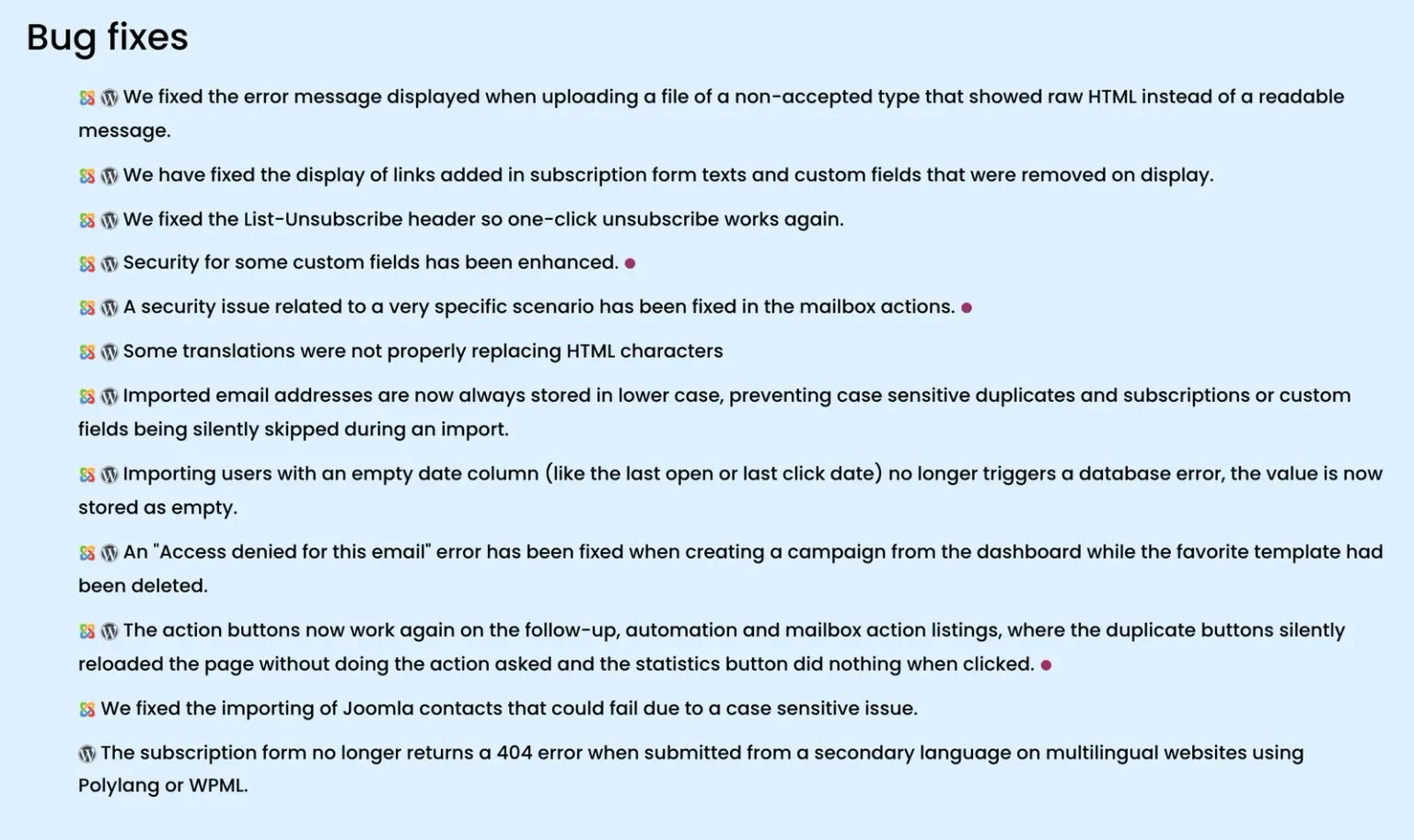
Read as a site owner would, both lines sound optional. “Security for some custom fields has been enhanced” sounds like hardening. “A very specific scenario” leaves you to guess which scenario, whether it applies to you, and what happens if it does. The page does not say which versions are affected, whether a login is needed, or that one of the fixes closes a route to running code on the server.
“A security issue related to a very specific scenario has been fixed in the mailbox actions.”
Updated when someone gets round to it.
“If your mailbox actions use POP3, anyone who can email that mailbox could write a PHP file into your web root. Update now.”
Updated today.
The line on the left is Acyba's, verbatim from the AcyMailing 11.1.0 changelog. The line on the right is ours, from our reading of the code diff. They describe the same fix.
The Enterprise dot is a hover tooltip
The dot at the end of each security line is an 8-pixel circle in dark pink. It has no text next to it and there is no legend anywhere on the changelog page. Its meaning sits in an HTML title attribute, “Only in the Enterprise version”, which a desktop browser shows after you rest the mouse on it for a second or so. On a phone or tablet there is no hover, so there is no tooltip. A screen reader will not reliably announce it either.
So to learn from the changelog that 11.1.0 fixes two Enterprise security flaws, you have to notice two security lines hidden under Bug fixes, spot a dot the size of a full stop, guess it means something, and hover over it. The same changelog text is copied into the free plugin’s wordpress.org listing, where there is no dot at all.
The dot also tells you less than it seems to. It describes which features are licensed, not where the vulnerable code lives. The public AcyMailing Starter source on GitHub, which is what the free wordpress.org plugin ships, contains the mailbox helper, the POP3 library and the file-field handling at the v11.1.0 tag. The previous release makes the point better than we can. AcyMailing 11.0.5 listed “Security has been improved on image embedding in sent emails” with the same Enterprise dot, and a week later Wordfence published CVE-2026-77807, an unauthenticated arbitrary file read rated 7.5 High, against the free WordPress plugin. The dot said Enterprise, and the CVE was filed against Starter.
Our reading is that a Starter install cannot switch either feature on, but we have not tested that, and the code is there. Update Starter anyway. It is free, and the dot was wrong about 11.0.5.
How AcyMailing’s security notes changed this year
This vendor has written better security notes, and recently. In 2023 Acyba published standalone posts for its security releases, one titled Critical security patch v8.5.0: check your websites now. In March 2026, AcyMailing 10.8.2 went out with a heading of its own, Vulnerability, naming the affected range, 9.11.0 to 10.8.1, and promising details once users had time to patch. That flaw became CVE-2026-3614.
In July we reported an unauthenticated SQL injection in AcyMailing, which became CVE-2026-56292, rated 9.2 Critical by the Joomla CNA. AcyMailing 10.11.1 fixed it with one line, “A vulnerability allowing SQL injection has been patched. Updating is strongly recommended.” We screenshotted that entry on 9 July, and it sat under a Vulnerability heading. On 24 September the same line sits under Bug fixes. The only Vulnerability heading left on the whole changelog is the one for 10.8.2.
Then came 11.0.5, with an image-embedding line that became a CVE, and now 11.1.0, with two security fixes under Bug fixes and a dot. Each release has said less than the one before. Most people with more than a few sites triage updates by reading changelogs, and for them the trend is worse than any one entry, because the heading was what got a release read at all.
We made the same complaint when Helix3 shipped a critical fix as “Security Update” and when T4 Page Builder called an open mail relay “Safer recipients”. The Joomla project’s own guidance for extension developers handling a security report asks for a dedicated advisory separate from the changelog, the affected and fixed versions, and the class of flaw named in plain words. AcyMailing 11.1.0 gives the fixed version and stops there.
What the two AcyMailing 11.1.0 fixes close
Read from the code, not reproduced
Everything in this section comes from reading the differences between the AcyMailing 11.0.5 and 11.1.0 packages. We have not reproduced either flaw on a test site, and we did not find or report them: Acyba fixed them itself. The scores below are the Joomla CNA’s, from the CVE records published on 26 September. We are not publishing request shapes, because most installs have not updated.
Mailbox actions saved email attachments of any type to the web root
CVE-2026-94132Arbitrary file write through mailbox actions (POP3 mode)
Criticalthe Joomla CNA
Anyone able to email a mailbox that AcyMailing monitors over POP3 could have a file of any type, PHP included, saved into media/com_acym/upload/, inside the web root.
CVSS:4.0/AV:N/AC:L/AT:P/PR:N/UI:N/VC:H/VI:H/VA:H/SC:H/SI:H/SA:HWhat does this mean?
CVSS 4.0 scores how severe a flaw is, from 0 (no impact) to 10 (critical). Each pair of letters in the string above is one metric; here is what this one's says.
How it is reached
- AV:N
- Network: Reachable across the internet
- AC:L
- Low: Nothing to work around, it just works
- AT:P
- Present: Needs a particular deployment or race to line up
- PR:N
- None: No account needed
- UI:N
- None: Nobody has to be tricked into anything
What it does to the site
- VC:H
- High: Everything the site holds can be read
- VI:H
- High: Data and files can be altered at will
- VA:H
- High: The site can be taken down
What it does beyond the site
- SC:H
- High: Data on other systems can be read
- SI:H
- High: Other systems can be altered
- SA:H
- High: Other systems can be taken down
Mailbox actions are an Enterprise feature that connects to a mailbox and acts on what arrives: forward a message to an address or a list, subscribe the sender, unsubscribe the sender. They share the connection settings used for bounce handling, where the connection method can be IMAP, POP3, or “POP3 without IMAP extension”. The last is for hosts where PHP’s IMAP extension is not installed, and AcyMailing then parses mail with a bundled PEAR POP3 library instead.
That fallback parser is where the flaw was. Its test for “is this MIME part an image” compared the result of preg_match() with !== false. preg_match() returns 1 or 0, and false only on an error, so the test was true for every part, and every named part went down the image branch. That branch cleaned up the name before the dot but kept the extension, and never checked it against AcyMailing’s allowed file types. A part named x.php was written to disk as x.php, in media/com_acym/upload/.
The attachment path runs when the Forward action decodes a message, and an inline path needed nothing more than a Content-ID header, so the only thing an attacker needed was the mailbox’s email address. A mailbox set up to receive email and act on it is rarely a secret: it is usually a published list, reply or contact address. The IMAP code path already checked extensions, which is why the vendor calls this “a very specific scenario”. Specific it is, and on a site that meets it, the result is someone else’s code running on your server.
Whether a PHP file in that folder executes depends on the server. Some hosts and hardening extensions block PHP in media folders, and many do not. We have written about why an .htaccess rule will not save a Joomla site on its own, and a file-write flaw is a good example: the rule only helps if it exists, applies to that folder, and the server honours it.
AcyMailing 11.1.0 changes the comparison to === 1, checks the allowed-extensions list on both the attachment and inline paths, and adds a new check that rejects PHP, HTML, Perl, Python, JSP and similar extensions whatever the allowed list says.
File-type custom fields let a subscriber delete files
CVE-2026-94131Arbitrary file deletion through file-type custom fields
Highthe Joomla CNA
A subscriber could store a path in a file-type custom field and have AcyMailing delete that file when the field was cleared, including files outside the upload folder such as configuration.php.
CVSS:4.0/AV:N/AC:L/AT:P/PR:N/UI:N/VC:N/VI:H/VA:H/SC:N/SI:N/SA:NWhat does this mean?
CVSS 4.0 scores how severe a flaw is, from 0 (no impact) to 10 (critical). Each pair of letters in the string above is one metric; here is what this one's says.
How it is reached
- AV:N
- Network: Reachable across the internet
- AC:L
- Low: Nothing to work around, it just works
- AT:P
- Present: Needs a particular deployment or race to line up
- PR:N
- None: No account needed
- UI:N
- None: Nobody has to be tricked into anything
What it does to the site
- VC:N
- None: Nothing can be read
- VI:H
- High: Data and files can be altered at will
- VA:H
- High: The site can be taken down
What it does beyond the site
- SC:N
- None: Other systems keep their data
- SI:N
- None: Other systems keep their integrity
- SA:N
- None: Other systems stay up
Custom fields let an Enterprise site collect extra data on its subscription and profile forms, and one of the field types is File. In 11.0.5 and earlier, a file field accepted any string as its value, whether or not an upload had happened, so a subscriber submitting a normal subscription or profile form could set it to a relative path that climbed out of the upload folder.
When that field was later saved empty, AcyMailing deleted the old file. It built the path from the per-user upload folder plus the stored value, and the path helper it used only tidies up slashes, so ../ segments passed straight through to a plain PHP unlink(). The upload side had a smaller problem too: the stored name came from the raw uploaded filename, not its basename(). One thing we have not confirmed is whether an anonymous visitor can send the second request, the one that clears the field, against their own subscriber record, or whether that needs the profile link AcyMailing emails to subscribers. Either way, no site login is involved.
On Joomla the obvious target is configuration.php, and what deleting it does is often overstated. Joomla checks for the file on every request. If it is missing and the /installation/ folder is still on disk, Joomla sends visitors to the installer, and whoever completes it controls the site. If /installation/ was removed after setup, as it normally is, Joomla prints “No configuration file found and no installation code available. Exiting…” and the site is down until someone restores the file. So the reliable outcome is an outage, and a takeover on any site that kept its installation folder. On WordPress the equivalent file is wp-config.php, and deleting it reopens the setup wizard on any install, the route we covered in the Avada Builder file deletion post. AcyMailing Enterprise is sold for both platforms.
AcyMailing 11.1.0 only lets a file field’s value come from a real upload, runs filenames through basename() and its own filename validation, and checks that the resolved path is inside the upload directory before both writing and deleting.
AcyMailing 11.1.0 went two days without a CVE
There was none on release day. We checked the CVE list, NVD, Patchstack, WPScan, CIRCL’s vulnerability lookup and the vendor’s own site and feed on 24 September 2026 and found nothing for either fix. The Joomla CNA published CVE-2026-94132 and CVE-2026-94131 on 26 September. The wordpress.org plugin page and the Joomla Extensions Directory both list 11.1.0, with the same changelog text and no warning.
These are not our findings: we did not report them, Acyba fixed them itself, and we wrote about them because our customers run AcyMailing and the changelog did not tell them enough to act. On release day we called the missing number paperwork that had not caught up, and two days later it caught up.
For those two days, every tool that relies on CVE feeds said nothing about either flaw. A WordPress security plugin fed from a vulnerability database had no entry to warn you about, and a scanner matching versions against the CVE list had none either. On WordPress that gap is still open as we write: the vulnerability feed we import has no entry for 11.1.0 yet, because both CVEs were filed against the Joomla extension.
AcyMailing 11.1.0 can crash sites with older add-ons
Within hours of the release, Dr. Jordan Weinstein reported on X that updating to 11.1.0 took his site down with a PHP fatal error on PHP 8.4, thrown while AcyMailing loaded its Easy Profile add-on. He also traced the cause and posted the fix.
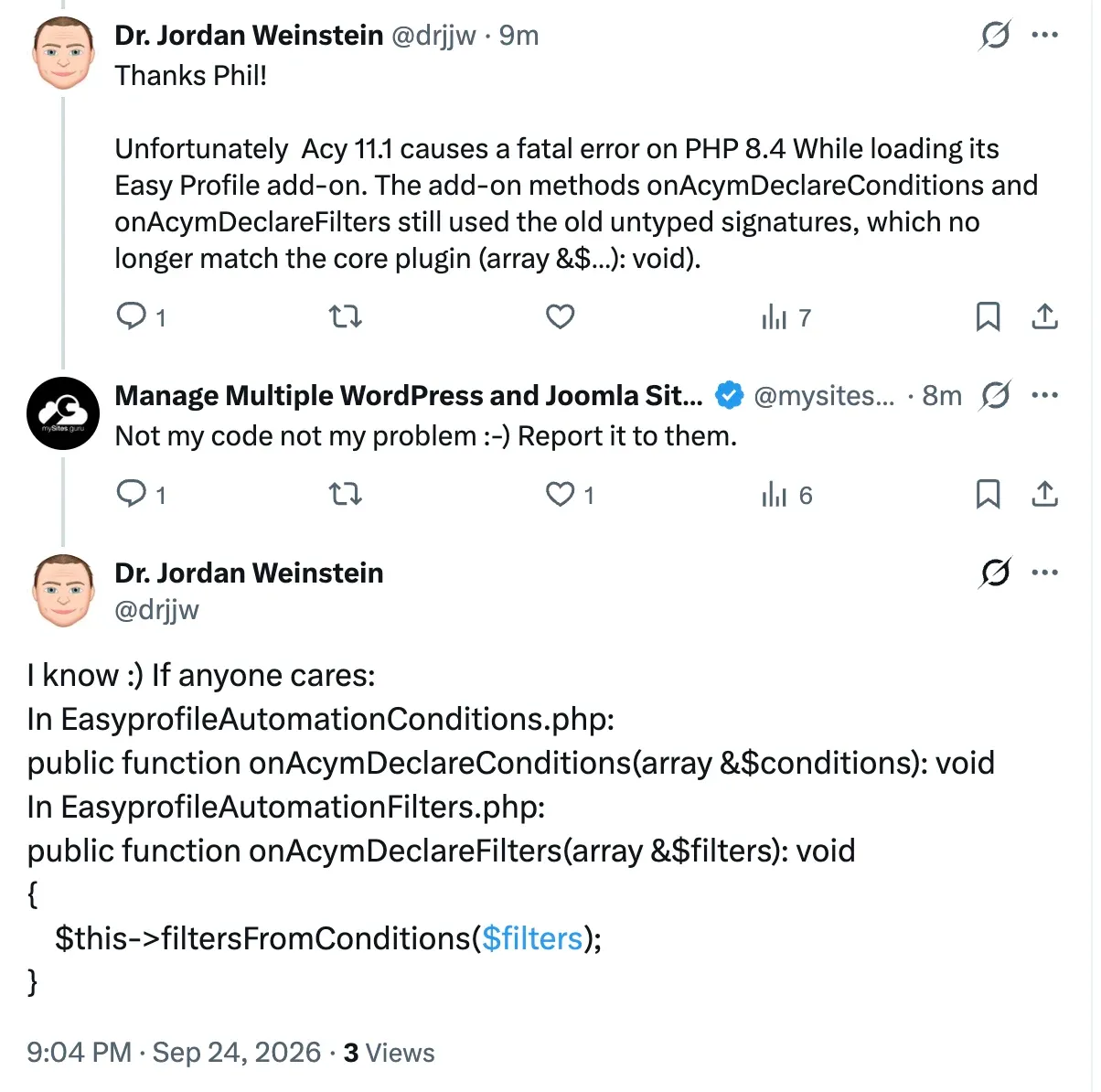
We checked his diagnosis against the public source. In 11.0.5 the AcymPlugin base class that every AcyMailing add-on extends did not declare onAcymDeclareConditions() or onAcymDeclareFilters() at all. In 11.1.0 it declares both, along with onAcymDeclareActions(), with a typed signature: (array &$conditions): void and so on. PHP requires a child class that overrides a method to stay compatible with the parent’s declaration, and a missing : void return type is not compatible. An add-on still written the old way, onAcymDeclareConditions(&$conditions) with no types, was fine in 11.0.5 because there was nothing to clash with, and is a fatal error in 11.1.0 as soon as PHP loads the file.
Jordan saw it with Easy Profile. The same break applies to any AcyMailing add-on, from Acyba or anyone else, that overrides one of those three methods without the new types, so Easy Profile is the one we know about, not necessarily the only one.
If you hit it, the fix is in the add-on, not in AcyMailing. In EasyprofileAutomationConditions.php the declaration becomes:
public function onAcymDeclareConditions(array &$conditions): voidand in EasyprofileAutomationFilters.php:
public function onAcymDeclareFilters(array &$filters): void
{
    $this->filtersFromConditions($filters);
}
A hand edit like that is overwritten the next time the add-on updates, so check for a fixed add-on release first, and treat the edit as a stopgap until there is one. If you cannot edit files, disabling the add-on brings the site back. Do not roll AcyMailing back to 11.0.5 to get round it: that reopens both security flaws to fix a compatibility problem.
Which of your sites need AcyMailing 11.1.0?
This is the question that a changelog one-liner leaves you to answer by hand, and past a handful of sites, answering it by hand is how old versions stay installed for years.
mySites.guru records the exact version of every extension on every connected Joomla and WordPress site twice a day. Our Joomla vulnerability database has an entry for AcyMailing below 11.1.0, published the day the release came out, so every connected Joomla site running an older version is flagged on its dashboard and in its audit, and the AcyMailing page of our vulnerability list shows the rule alongside the earlier ones. We flag every edition, because from outside the site a Starter install and an Enterprise install look the same.
If you are a subscriber, the AcyMailing extension search lists every install across your account grouped by version. On WordPress the automatic flag arrives when the vulnerability feed we import catches up, which for 11.1.0 has not happened yet, so use the search to find WordPress installs today. Then update them all from one dashboard instead of one admin panel at a time. If a site shows below 11.1.0 there while its own Joomla administrator says AcyMailing is up to date, its AcyMailing update site has probably been deleted.
Finding the sites is one check. Knowing whether anything got in before you updated takes several more. The vulnerable extension list tells you which sites run a flawed version. The file scanners tell you whether anything arrived before you updated: hacked files and backdoors, suspect content, and new PHP files in folders that should only hold media. Real-time alerting tells you when a file changes or an unfamiliar admin logs in. All of it is part of the subscription and runs unattended on every connected site, which beats a checklist of logins per server forever.
Find files that match known hacks
mySites.guru checks every connected site for this automatically and flags it the moment it appears. It runs as part of the full audit on every connected site.
If you ran AcyMailing Enterprise below 11.1.0
Updating closes both routes. It does not undo anything that already happened, so if you ran Enterprise with either feature enabled, spend ten minutes checking.
- Mailbox actions in “POP3 without IMAP extension” mode: list the files in
media/com_acym/upload/. Anything that is not an image or a document you recognise, and any file ending in.php,.phtml,.pharor.htm, needs a closer look. Then switch the connection method to IMAP if your host supports it, which the vendor’s own documentation recommends anyway. - File-type custom fields on a public form: check that
configuration.phpis present and unchanged, that/installation/is not on the server, and that the per-user upload folders hold only files your subscribers uploaded themselves. If you do not need file fields on public forms, remove them. - Either feature: block PHP execution in
media/com_acym/upload/at the web server level as a second layer, and run a full site audit to catch anything that is not where it should be.
If you find a file you did not put there, treat the site as compromised rather than deleting the one file and moving on. Our Joomla hacked-site guide covers the order of work, and if you would rather hand it over, fix.mySites.guru cleans up a hacked site for a single fixed fee.
What we would like from AcyMailing
Acyba fixed both flaws, and from our reading of the diff the fixes are the right ones: allow-lists rather than block-lists, a path check on both write and delete, and the broken comparison corrected rather than worked around. The engineering is fine. What is missing is a sentence telling people to act on it.
A separate Security heading on the changelog, as 10.8.2 had, would do most of the work. Naming the affected versions and the conditions, “sites using mailbox actions over POP3” and “sites with file custom fields on public forms”, would let administrators decide in seconds whether a release is urgent for them. Putting the edition in visible text, not in a tooltip, would help everyone who reads changelogs on a phone. Requesting the CVEs before release, not two days after it, would have put both fixes in front of every scanner from the first morning, at no cost to the vendor. None of that requires publishing how to exploit anything.
Until then, the safest reading of any AcyMailing changelog is to ignore the headings and the dots and update. If you look after more than a few sites, mySites.guru will tell you which ones need it, the morning the release goes out.
Timeline
AcyMailing 10.8.2 ships under a Vulnerability heading
The changelog entry names the affected range, 9.11.0 to 10.8.1, and promises details later. The flaw was reported through Wordfence and became CVE-2026-3614.
AcyMailing 10.11.1 ships under a Vulnerability heading
Our unauthenticated SQL injection, CVE-2026-56292. One line, 'Updating is strongly recommended', but under its own heading. We screenshotted it that afternoon.
AcyMailing 11.0.5 adds an Enterprise dot to a security line
'Security has been improved on image embedding in sent emails' is filed under Bug fixes with the Enterprise-only dot.
CVE-2026-77807 is published against the free WordPress plugin
Wordfence records the image-embedding fix as an unauthenticated arbitrary file read, CVSS 3.1 7.5, in the wordpress.org plugin up to 11.0.4. The line with the Enterprise dot described a flaw in the free build.
AcyMailing 11.1.0 ships with two security one-liners under Bug fixes
Both have the Enterprise dot. No CVE, no advisory, no blog post. On the same day the 10.11.1 SQL injection line is listed under Bug fixes too, not under the Vulnerability heading it had in July.
mySites.guru flags every connected Joomla site below 11.1.0
Every AcyMailing install below 11.1.0 is flagged, whatever the edition, because Starter and Enterprise look the same from outside.
The Joomla CNA publishes CVE-2026-94132 and CVE-2026-94131
The mailbox file write is scored 9.5 Critical and the file deletion 8.3 High, both for every version up to 11.0.5. mySites.guru adds both ids to its AcyMailing rule the same afternoon.
Further Reading
- AcyMailing changelog - the 11.1.0 entry, with the two security lines under Bug fixes
- AcyMailing mailbox actions documentation and bounce handling configuration - where the POP3 and IMAP connection methods are set
- AcyMailing custom fields documentation - the File field type the first fix concerns
- acyba/acymailing on GitHub - the public Starter source, tagged up to v11.1.0
- Dr. Jordan Weinstein's report of the Easy Profile add-on fatal error - the 11.1.0 compatibility break, on X
- CVE-2026-94132 and CVE-2026-94131 - the Joomla CNA records for the two 11.1.0 fixes
- CVE-2026-77807 - the 11.0.5 file read, filed against the free WordPress plugin
- Twenty rules for Joomla extension developers handling a security report - what the Joomla project asks of a security release
- CWE-22: Path Traversal and CWE-434: Unrestricted Upload of File with Dangerous Type - the two weakness classes behind the 11.1.0 fixes
Frequently Asked Questions
Is AcyMailing 11.1.0 a security release?
Is there a CVE for the AcyMailing 11.1.0 fixes?
Does the Enterprise-only dot mean the free AcyMailing Starter is safe?
Which AcyMailing sites are exposed to the mailbox actions flaw?
Can deleting configuration.php take over a Joomla site?
What can I do if I cannot update AcyMailing to 11.1.0 today?
Why does my site show a fatal error after updating to AcyMailing 11.1.0?
How do I find every site running an old AcyMailing version?
 Written and edited by a human, with AI assistance. Our approach to AI