A Backdoor Hides in Joomla's Scheduled Tasks Table
A Joomla site keeps reinfecting. You have cleaned the files twice, you have been through every crontab on the server, and because you are thorough you have also opened System, then Scheduled Tasks in the Joomla administrator. Three tasks, all of them ordinary, all of them yours.
The list can look exactly like that and still be wrong, because Joomla’s Scheduled Tasks screen does not show you every row in the table. Its filter defaults to Hide Orphaned, and an orphaned task is one whose routine no installed, enabled plugin advertises. That describes a harmless leftover from an extension you uninstalled last year. It also describes a planted task whose author removed the extension behind it afterwards. Joomla applies the same test to both and drops them out of the list without telling you.
A scheduled task is an instruction Joomla will act on, and it comes in two parts that live in different places. The routine is code, implemented by a plugin, sitting on disk. The task is a row in the database naming that routine and saying when to run it. Joomla joins the two during an ordinary page request: Task::run() looks the routine up, and if no enabled plugin advertises it the task is skipped with exit code 127 and rescheduled for next time.
An attacker who wants a site to repair itself needs both, and after that the site does the work for them. A task plugin that rewrites their files, plus a row that runs it every few minutes, and a cleaned site re-drops its own malware the next time anybody loads a page. We measured that pattern running for five months on a WordPress site, where the equivalent was 88 rows of wp_options holding the malware’s own source, a manifest of every path it owned, and a scheduled event on a 600 second interval that rewrote anything on the manifest that had gone missing. Deleted files were back in seconds.
Those two parts are also why the table is worth reading after a cleanup. Remove the plugin and the row stops firing, because Joomla checks that the routine resolves before it runs anything. What the row does not do is disappear. It stays in the table as a record that something scheduled work on this site, and at that point Joomla stops listing it.
What Joomla’s task scheduler actually is
Joomla gained a scheduler of its own in Joomla 4.1.0, released on 15 February 2022. It exists so that site maintenance, update checks, log rotation and privacy consent expiry can run without anybody having to configure a real cron job on the server.
A task is one row in a table called #__scheduler_tasks. The row names a routine, in a column Joomla’s own schema comments as the “unique identifier for job defined by plugin”:
SELECT id, title, type, state, created, created_by, next_execution
FROM jos_scheduler_tasks
ORDER BY id;
The type column holds the routine id. Everything else in the row is scheduling detail, a title, some JSON parameters and the usual Joomla bookkeeping. The routine is the only part that decides what code runs, and it is chosen by whoever wrote the extension, not by whoever created the task.
Core Joomla includes nine task plugins, all enabled on a fresh install, and between them they advertise eleven routine ids. They are worth seeing, because they set the shape of a legitimate one:
checkfiles.imagesize
delete.actionlogs
privacy.consent
rotation.logs
session.gc
update.notification
plg_task_globalcheckin_task_get
plg_task_requests_task_get
plg_task_toggle_offline
plg_task_toggle_offline_set_online
plg_task_toggle_offline_set_offline
Two naming conventions, no consistency between them, and not a digit anywhere in any of the eleven. Both of those facts come back when you have to judge an unfamiliar id.
How does Joomla decide when to run a scheduled task?
By default, when a visitor loads a page. Joomla offers three triggers and the one it picks out of the box is the loosest of them.
The Lazy Scheduler is on by default: a due task fires during an ordinary front-end request from an ordinary visitor. You configure nothing on the server, the server has no way to show it to you, and on a site with traffic the interval you set is a ceiling rather than a timetable. Web Cron is off by default and exposes a hash-protected URL an external service can hit. The CLI runner, php cli/joomla.php scheduler:run driven by a real cron job, is the option you want on any site that matters, and it is the one most sites leave switched off.
That default is why this table is worth an attacker’s time. A row plus a routine gets code running on a schedule with no shell access, no crontab entry, no unusual file permissions, and no dependency on the site being busy enough to matter, because a single page view will do.
A row in a table is not a file
A file scanner reads files, so it never sees this, and both of the file tools here work on that same half of the problem. A crontab audit reads crontabs, so it never sees this either. Neither of them reads memory, which is where a third kind of reinfection lives. Every instrument is working correctly and every one has nothing to say, which is a harder failure to spot than a broken tool.
A malicious Joomla task has to look legitimate to run at all
That routine check at the top of Task::run() sets the shape of every working attack on this table. A routine no enabled plugin advertises is skipped, so an attacker who wants their task to fire has to satisfy the same test a genuine extension does.
In practice that means installing the plugin too. A task plugin advertising a routine, plus a row that names it, and the site runs their code on a schedule like any other maintenance job. The row that results is not malformed, not orphaned and not hidden. It sits in System, then Scheduled Tasks under a title its author chose, next to the update checks and the session cleanup, and its position in that list says nothing to separate it from them.
That is the backdoor worth worrying about here, and it hides in plain sight. The title is whatever they typed, the schedule is unremarkable, and the only part that gives it away is the routine. Reading that means asking which installed extension owns it, which is the one question the list does not answer for you. On a site you already suspect, the file side of the same question is worth running alongside it.
Joomla hides an orphaned task from you by default
The other half of this is what Joomla does with a row whose routine has stopped resolving.
Joomla neither raises an error nor tidies up. Task::run() records exit code 127, defined in core as Status::NO_ROUTINE, skips the execution, fires an onTaskRoutineNotFound event and reschedules the task for next time. The row stays where it is, and it will not run again for as long as nothing advertises its routine.
The administrator list then hides it. In administrator/components/com_scheduler/forms/filter_tasks.xml the orphaned filter is declared default="-1", and -1 is the Hide Orphaned option. TasksModel turns that default into a WHERE type IN (...) clause built from the routines your enabled plugins currently advertise, so any row naming anything else is excluded from the query before the list is drawn.
The scheduler itself does the opposite. When it collects candidates to run it sets that same filter to include orphaned rows, picks them up, and rejects each one at the routine check.
So an orphaned task is inert, and that is what makes it worth reading. It is the record of a task plugin that was installed on this site and is not installed now. On a site you have just cleaned, that is the shape of the thing you removed, written down in a table that rarely gets opened. On a site that has had no incident, it is more likely to be an extension you uninstalled last year.
The filter is sensible on its own terms, and most orphaned rows are exactly that: an extension is removed, its task plugin goes with it, and the row it created stays behind with nothing left to run it. Hiding those keeps a maintenance screen readable. The side effect is that the one place an administrator would go to look is filtered by a rule the screen never mentions, and it is least helpful in the hour after a cleanup, when a row that has stopped resolving is the most interesting thing in the table.
The core bugs that let somebody else write your schedule
Joomla has published two security advisories touching com_scheduler. The 2026 one reaches further than its rating suggests.
CVE-2026-48900 is an improper access check that “allowed low privileged users to edit the task types of existing scheduler tasks”, in the words of the Joomla Security Centre advisory. Editing a task type means changing the routine an existing schedule runs. Reported by Federico Brasili on 29 April 2026 and fixed on 26 May 2026 in Joomla 5.4.6 and 6.1.1, it affects every release from 4.1.0 to 5.4.5 and from 6.0.0 to 6.1.0.
It was rated Low, and as a standalone bug that is right: you need an account first. Set it beside the mechanism in this post and it supplies the missing step. A user with a modest login could repoint an existing, unremarkable, already-scheduled task without writing a row to the database at all.
The earlier one, CVE-2025-22207, was SQL injection through improperly built ORDER BY clauses in the backend task list, reported by Calum Hutton of Snyk and fixed in 4.4.11 and 5.2.4. Different flaw, same component, and a reminder that the screen you go to for reassurance has had its own problems.
Version data measured across the Joomla sites connected to mySites.guru on 15 September 2026.
Nearly a quarter of the Joomla sites we see have nothing to check here, because Joomla 3 is long past end of life and never had a scheduler. Of the sites that do have one, roughly one in eight still runs a version where a low privileged account can repoint a task.
What makes a Joomla scheduled task malicious rather than unfamiliar
mySites.guru reads every row in the scheduler on every snapshot, which happens twice a day, and judges each task by the routine it names. The tells that mark one malicious are all about that routine:
- It names no routine at all
- No plugin can advertise an empty routine id, so the row is malformed however it got there.
- No installed, enabled plugin advertises that routine
- Nothing on the site can run it. Either the extension that created it is gone, or something that was not an extension wrote the row directly. This is the same test Joomla's own Hide Orphaned filter uses, read the other way round.
- The routine name contains a word associated with malware
- Matched as a whole token, never as a substring, so an extension advertising something like sql.execute is left alone instead of being flagged on its first four letters.
- The routine name has the shape of a generated string
- A leading or trailing underscore, a digit welded to a letter on the routine half of a dotted id, or twelve characters with no separator anywhere. This one is advisory, reported on its own, and never marks a site as hacked.
There is no rule about how often a task runs, and it was left out on purpose. One was built and measured, and an entirely ordinary backup extension turned out to schedule itself every sixty seconds. A short-interval rule would have fired on a large share of healthy sites while catching no attacks, so it was deleted before it was ever released.
A rule about created_by went the same way. The idea was that a task created by user 0 well after the site was installed deserves suspicion. On a real site running three commercial extensions, five of its eight legitimate tasks had created_by set to 0, because an installer has no logged-in user to attribute a row to. The rule fired on 62% of the tasks on an uninfected site and was removed.
Why is the routine the only thing worth matching?
Because the title is free text in the site owner’s own language, and Joomla ignores it.
A task called “Nightly backup” is called that because somebody typed it. It can say anything, in any language, and naming a planted row “System Maintenance” costs an attacker nothing. Matching on titles would break on every site that is not in English and would be trivial to dress up.
The routine is different. It is a machine-readable id that has to exist in a plugin’s TASKS_MAP constant for Joomla to run it at all, it lives in no database column of its own, and it cannot be guessed from the plugin’s name. Core’s rotatelogs plugin advertises rotation.logs, sessiongc advertises session.gc, and sitestatus advertises three ids that all begin plg_task_toggle_offline. Any mapping inferred from the element name instead of read from the site would report a legitimate third-party routine as unregistered on every site running that extension.
So the list of valid routines has to come from the site’s own plugin layer, which has a consequence. If that read fails, for any of the ordinary reasons a Joomla plugin group fails to import, then the strongest of the three tests is switched off for that read instead of being applied to an empty list. An empty list of known routines would otherwise mark every task on the site as malicious. “We could not look” and “there is nothing there” are different answers, and only one of them deserves a green tick.
How do I check a Joomla scheduler by hand?
The administrator screen will do it once you change one filter. The database will do it with no filter at all.
In the administrator, open System, then Scheduled Tasks, then change the Show Orphaned filter from its default to Show Orphaned. Skip that and you are reading a list Joomla has already filtered for you, using the test described above. Once orphaned rows are visible, look at the routine on each one, not the title, and ask which installed extension owns it. If the answer is that something planted it, the wider cleanup starts there.
Better, read the table directly and skip the filtering entirely:
SELECT id, title, type, state, created, created_by, last_exit_code, next_execution
FROM jos_scheduler_tasks
ORDER BY created DESC;
Change jos_ to whatever your own table prefix is, and if you are in the database anyway then the rest of the Joomla database is worth a look while you are there. Sorting by created descending puts anything recent at the top, which is where a planted row tends to be. A last_exit_code of 127 on a row is Joomla telling you it has been trying to run something it cannot find. A locked column with a date in it is a different problem living in the same table, and a task stuck locked after a crash will never run again until somebody clears it.
Remove the task before you clean the files
In that order, every time. Clean the files while the row is still scheduled and the next visitor to the site puts them back, which is how sites reinfect within minutes of a cleanup that looked successful. A backup restore does not settle it either, because the restore replaces the database too and brings the row back with it.
What mySites.guru does about it
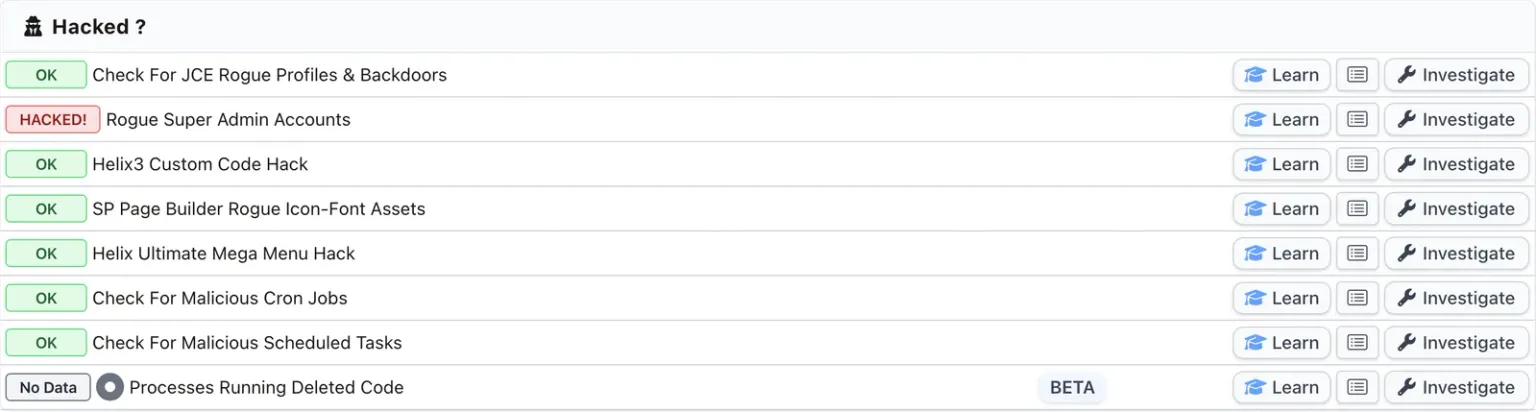
The scheduler read runs on every snapshot, twice a day, on every connected Joomla site running 4.1.0 or newer. It sits in the Hacked panel on a site’s audit page, next to the check that reads the server’s own crontabs, which is the layer below it and has never been able to reach this one. The full description of the check covers the classification in more detail.
The row below it in the screenshot, Processes Running Deleted Code, is the newest member of the same family and the one that covers reinfection driven by nothing scheduled at all. It shows a grey No Data badge there because that server would not let us read its process list.
Removal is narrow on purpose. One task at a time, and the row is re-read and matched against a token issued when the task was shown to you, so a stale page cannot delete the wrong thing. Nothing is ever added or edited, and a task’s params are never read or transmitted, because those are yours. The delete also leaves Joomla’s #__assets row alone: that table is a nested set, and deleting from it without rebuilding the tree corrupts the whole permissions structure. An orphaned asset row costs nothing.
A flagged task does not on its own mark a site as hacked, for the reason the orphaned filter exists in the first place: most rows that fail this test are extension leftovers rather than attacks. It belongs next to the other evidence, not in front of it, which is why a rogue Super User account, the administrator list across every site you manage and files that core never shipped are worth reading at the same time.
What this check still cannot do
It asks the site about itself, so a compromised site whose own plugin advertises the attacker’s routine id makes that id look perfectly registered. The vocabulary and shape rules run independently of that list for exactly this reason, but the strongest rule can be defeated by an attacker who installs a plugin alongside their task.
It cannot tell a legitimate routine being used for something else from a legitimate routine. Core’s own plg_task_requests plugin fetches a URL you specify on a schedule and writes the response to disk. A task pointing that at somewhere unhelpful is not orphaned, names a routine an enabled core plugin really does advertise, and reads as ordinary maintenance automation. CVE-2026-48900 is what makes that worth saying out loud instead of filing as theoretical.
And it says nothing about Joomla 3, which is close to a quarter of the Joomla sites we see. Those sites have no scheduler table, so there is nothing here to be clean or dirty. Their server crontabs are still read separately, and that check has always covered every crontab on the box, not just the one your control panel shows you.
On the WordPress site described earlier, four separate instruments each had a good reason to report nothing, and not one of them was broken. Sucuri documented a similar WordPress family in November 2024 that scheduled its own reinfection from encoded database rows, so this is a shape attackers already work in. Joomla’s version of that table has had far less attention, from attackers and defenders alike. The row is just as easy to write.
If a Joomla site is currently compromised and you would rather hand it over, we fix hacked sites for a fixed fee. If you would rather have all of this watched across every site you look after, start with a free audit.
Further Reading
- Joomla 4.1.0 Stable release announcement - 15 February 2022, the release that introduced the Task Scheduler and the table this post is about
- 20260516 Core - Incorrect Access Control in com_scheduler - the Joomla Security Centre advisory for CVE-2026-48900, reported by Federico Brasili
- 20250201 Core - SQL injection vulnerability in Scheduled Tasks component - the earlier com_scheduler advisory, CVE-2025-22207, reported by Calum Hutton of Snyk
- PHP Reinfector and Backdoor Malware Target WordPress Sites - Sucuri, November 2024, on the WordPress version of scheduling your reinfection from a database row
- Joomla Website Hacked: What To Do, Step by Step - Peter Martin, August 2026, one of the few Joomla cleanup guides that tells you to open the scheduler at all
Frequently Asked Questions
Is Joomla's Task Scheduler the same as my server's cron jobs?
Why can a malicious Joomla scheduled task outlast a file cleanup?
What is an orphaned task in Joomla?
Can a malicious Joomla scheduled task be hidden from the task list?
How do I see every scheduled task on a Joomla site?
Which Joomla versions have a task scheduler to worry about?
What is CVE-2026-48900?
 Written and edited by a human, with AI assistance. Our approach to AI