Five New Checks for WordPress Hacks a File Scan Cannot See
The audit page for a WordPress site in mySites.guru has a panel headed “Hacked ?”. It used to ask six questions of your files and one of your server. It now asks five more, and not one of them opens a file.
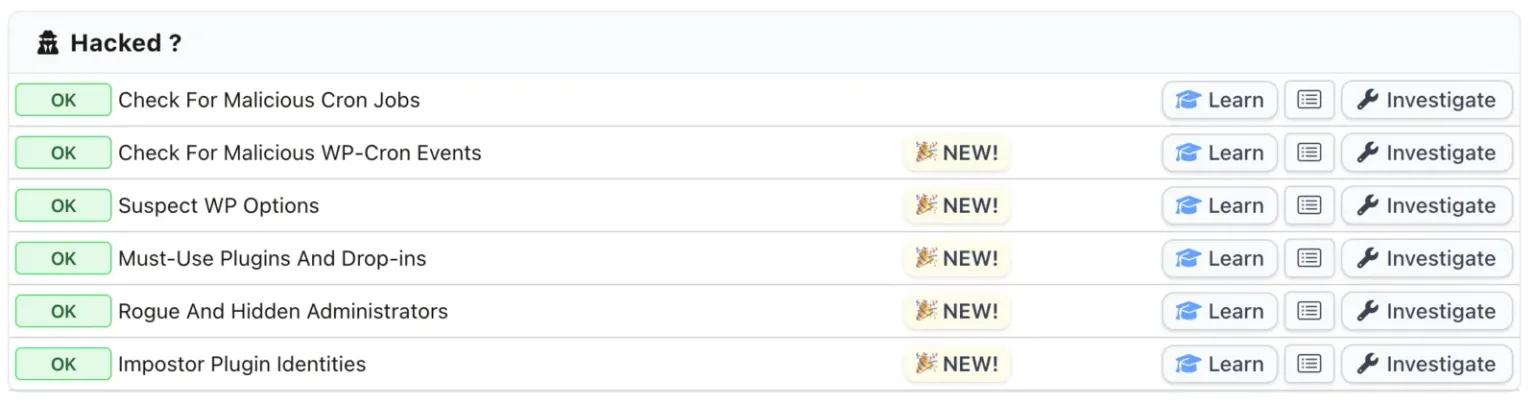
The top row, malicious cron jobs, has been there a while and reads the server’s own crontabs. The five underneath it are new. They read WordPress’s own scheduler, its settings table, the two folders it loads PHP from without telling you, and the administrator list. Joomla 4.1 and above gained a matching Scheduled Tasks check on the same day; Joomla 3 gets nothing, because it has no scheduler to read.
All five exist because of one site that ran compromised for five months while four separate instruments each had a good reason to report nothing.
The five new WordPress checks, and what each one reads
- Check For Malicious WP-Cron Events
- Reads the cron row out of wp_options with raw SQL and decodes it without letting PHP rebuild any objects inside it. An event is called malicious on four tells with no innocent explanation: it runs a file already flagged as malware, the file sits in a dot-directory under wp-content, the code behind it was created at runtime by something no ordinary plugin called, or the hook name belongs to a family we recognise. Any event can be unscheduled from the tool, not just a flagged one, because an ordinary scheduled job is the operator's to remove too, and the row is re-read afterwards so you see the verified result rather than the call's return value.
- Suspect WP Options
- Asks four questions of every row in wp_options, and the sweep never collects what is in one. Is the name nothing but 10 to 12 hexadecimal characters, anchored at both ends? Is it a name a known family uses, including behind a transient prefix? Do the first eight bytes look like compressed or encoded data, or like an opening PHP tag? The sweep collects the name, the byte length, the autoload flag and an eight-byte fingerprint, and it also reports how many bytes of that table WordPress loads on every page view. A flagged row can then be viewed a value at a time and deleted.
- Must-Use Plugins and Drop-ins
- Lists every top-level PHP file in wp-content/mu-plugins/ and every drop-in WordPress will load by name out of wp-content, including object-cache.php, advanced-cache.php, db.php, fatal-error-handler.php and sunrise.php, with whether each one is actually being loaded. It reads the directory instead of asking WordPress what is there. The count is inventory rather than an accusation, and the badge is neutral by design, because having these is normal. Only a hidden file, or one already flagged elsewhere, gets a colour, and only an increase turns the trend red.
- Rogue and Hidden Administrators
- Reads the administrator list twice, once straight from wp_users and wp_usermeta and once the way your own Users screen asks. An account is rogue when its username and email match a shape a known campaign generates. The disagreement between the two readings is itself a finding, because a database holding more administrators than WordPress admits to means something is filtering the list. Accounts can be deleted from the tool, with their content reassigned to an account that stays.
- Impostor Plugin Identities
- The one check here that never contacts your site. It re-reads the name, version, author and vendor address every plugin already declared about itself, and asks whether the declared author is a plain two-word human name whose surname is also the vendor domain, someone called "Jack Walker" publishing at walker.dev. One family generates a fake plugin per site it breaks into and invents both from the same pool. Suspect, never confirmed.
- Check For Malicious Cron Jobs
- The row above the new five, and the one that pre-dates them. It reads the account crontab, /etc/crontab, /etc/cron.d/ and the run-parts directories, and flags only tells with no innocent explanation in a website's cron: piping a download into a shell, decoding a blob and executing it, fetching from a bare IP, running something out of /tmp. It stops at the operating system, which is the gap the WP-Cron check now fills.
Read together rather than one at a time, those six describe a whole compromise. One family plants a must-use plugin, hides the loader in a dot-directory, stores its source in the options table, registers a scheduled event to rewrite anything you delete, and creates an administrator account it filters out of your Users screen. Five of the six rows have something to say about that site. The file scan has nothing at all.
Why can a file scan miss a WordPress hack completely?
Because each of these is either not a file, or it is a file with no clean counterpart to compare against.
A database row is not a file. A cron entry is not a file. A user account is not a file. Those three are outside the reach of any scanner that works by reading what is on disk, whether it matches signatures or compares hashes. A must-use plugin, a drop-in and a planted plugin are files, but they have no official version anywhere to compare them against, so a hash check has nothing to say about them either. Hash matching and pattern matching are both good instruments, and both of them work on the same half of the problem.
There is a worse case, and it is the one that prompted this work. The family we measured against kept a pristine copy of the theme’s functions.php in a database row, with a stored hash to verify it, purely so it could restore the innocent file whenever it wanted to. A file integrity check then passes, correctly. Suspect content and hacked files are two different tools on this site and both of them read files, so both were shown the clean version.
The infection that made the case for these checks
A Dutch agency raised a paid clean-up on 10 September 2026 for a site that kept coming back. They had cleaned it themselves twice. We cleaned it once, and it was reinfected by morning.
Measured during a paid clean-up of one compromised WordPress site, September 2026. One site's figures, not an average.
The persistence was 88 rows in wp_options holding complete compressed copies of the malware’s own PHP, a manifest of every path it owned, captured administrator passwords in readable form, and a WP-Cron hook on a 600 second interval that rewrote any file on the manifest that had gone missing. WP-Cron fires on ordinary page loads rather than on a timer, so on a site with traffic the interval is a ceiling and deleted files came back in seconds. The loader was a two megabyte must-use plugin. Three drop-ins were hijacked alongside it. The administrator account it created was filtered out of the Users screen by a views_users hook.
Four instruments each had a separate reason for saying nothing, and not one of them was a bug:
- The file scanner had no signature for the family, and even once patterns were added the malware restored the clean file when a scan looked.
- The cron reader ran and answered correctly. It opens crontab spools,
/etc/crontab,/etc/cron.dand the run-parts directories. There is no database query in it, and WP-Cron is a database row. - The administrator count came from
get_users(), which runs inside the attacker’s own loaded code. - Real-time file alerting would have shown 22 modifications in three minutes, but it is opt-in and this site had not opted in.
The cron check’s own Learn page had always named the two layers above it, WP-Cron and Joomla’s Scheduled Tasks, as “separate surfaces with their own tools”. They now have them, and that page links them.
Why doesn’t mySites.guru just ask WordPress?
Because on a compromised site, WordPress is answering with the attacker’s code loaded.
Reading anything out of a WordPress site means loading WordPress, which loads every active plugin and every must-use plugin first. The malware’s filters are live inside the request that asks the question. A plugin can rewrite the answer to “who are the administrators here” by returning a non-null array from users_pre_query, at which point the query never reaches the database at all.
So every WordPress read in these five checks has a raw SQL path, and a WordPress API call may enrich an answer but never decide it. The cron row is read with SQL and never get_option(), which is filtered at four points in core. Drop-ins and must-use plugins are found with scandir() and never get_dropins(). The administrator count comes from wp_users and wp_usermeta.
One API call is made precisely because it can lie
The hidden-administrator count is the difference between the raw database answer and the answer WordPress gives. The disagreement is the finding. Worth knowing: the family we measured installs views_users, which filters the links above the wp-admin Users table and does not touch the user query itself, so on that family mySites.guru’s number was correct and the customer’s own Users screen was the thing lying to them.
There is a second reason not to trust convenience, and it is sharper. The cron row is parsed by a scalar-only walker that rejects object tokens at the type-tag position, never by searching the raw bytes for O:. A hook name is arbitrary text that add_action() never validates, so an attacker can register a decoy hook literally named O:8:"stdClass":0:{}. A byte scan would then read that site as unparseable for ever, on exactly the site it exists to examine, while the real hook sits beside the decoy. That gives an attacker a switch for turning the detection off, and the naive version of this check would have shipped it.
What makes a WordPress scheduled event suspicious
Attribution comes first, and the name second. A hook whose every implementing file sits under wp-content/plugins/ or wp-content/themes/, with nothing evaluated, hidden, must-use or already flagged, says nothing about its name at all. Plugin authors name their scheduled jobs however they like, and a version number in a name is not a clue about anything.
Only when an event cannot be traced to an ordinary file, or what it is traced to is itself suspect, does the name come into it. Then the two name rules describe a shape rather than listing examples.
The separator test accepts any byte that is not a letter or a digit, so it covers hyphen, slash, dot and colon by construction instead of by a list someone has to remember to extend. The digit test skips a token that is one alpha stem with one digit run, which clears v2, mc4wp, w3tc, s2member and core’s own i18n, while still catching a generated name, because those lead with a digit or hold two digit runs. Both were measured against 2,719 hook names harvested from WordPress core and from installed plugins, and no ordinary name in that set reaches the tier that marks a site as hacked.
The tier ceiling matters too. A name alone never confirms anything. The four tells that can mark a site as hacked are all about what an event runs rather than what it is called: a file already flagged as malware, a dot-directory under wp-content, code created at runtime by something no ordinary installed plugin called, or a hook name belonging to a family we have already pulled apart.
Why a big wp_options row is not a finding
The obvious rule for a table that holds an 837,308 byte payload is a size threshold, and the measurements say no. Three real options tables were available to compare: one from the compromised site, the same site after it was cleaned, and a stock WordPress install.
| Signal | Infected site | Same site, cleaned | Stock WordPress |
|---|---|---|---|
| Option rows | 860 | 774 | 143 |
| Total option bytes | 4,807,624 | 1,393,043 | 86,015 |
| Largest single row | 837,308 | 372,553 | 30,181 |
| Rows over 64KB | 15 | 5 | 0 |
Option names matching ^[0-9a-f]{10,12}$ | 32 | 0 | 0 |
Size does not separate those three columns. The bare hexadecimal name separates them perfectly, and it is nearly free to test.
The case that settles it is rewrite_rules, which is part of WordPress itself, exists on every WordPress site there has ever been, holds the compiled permalink rules and grows past 64KB on any site with enough pages and custom post types. A tier that fires on that is measuring how big a site is. So a large row is context: listed with its byte count and a vendor label where we recognise one, with no tier, no colour and no contribution to the count on your audit row. A site with nine large rows and nothing wrong gets a green tick.
There is a corollary worth stealing. Do not calibrate a size rule on “bigger than the malware we found”. The largest legitimate row measured so far is 1,891KB and the largest malicious one is 818KB, so that threshold clears the sick site and flags the healthy one.
The anchoring in the hex pattern is doing the same kind of work. Formidable Forms writes frm_form_templates_ followed by 32 hex characters, and Elementor Pro writes elementor_pro_api_request_ followed by 15. A rule that matched a hex tail rather than the whole name would report every site running either of them as hacked.
A short repeat interval fails the same test, and it is the one that sounds most like a signal. A widely used backup plugin schedules a job every sixty seconds by design, so an “interval under 300 seconds” tier would fire on every site running it and tell you nothing.
Which of these mark a WordPress site as hacked?
Two of the five. A malicious WP-Cron event and a rogue administrator account both set the flag and both appear inside the red card. Suspect WP Options, Must-Use Plugins and Drop-ins, and Impostor Plugin Identities report only.
That is not hedging, it is what the measurements support. The cost of a false confirmation is telling a paying customer their site is infected when it is not, so a check earns the red card on measured separation rather than on how confident the rule feels. The counters that would justify promoting one out of report mode are collected per site, not per finding, so one site with two hundred suspect rows does not read as two hundred compromised sites.
Impostor Plugin Identities may never leave report mode, and the reason is a fair one. The last time that rule ran across every WordPress site we hold, it matched six plugin records. Five were this malware, all inside a single customer account. The sixth was a real independent developer publishing under his own name at his own domain, exactly as he is entitled to. Tightening the rule to exclude him would mean writing one man’s personal web address into our code, which is fitting a rule to a single example. Every one of those five sites was reading as clean at the time.
How do I clean a WordPress site using these checks?
Order decides whether the clean-up holds. While any part of the malware can still execute, it repairs whatever you just removed, which is what the agency kept running into.
- Unschedule the event first, before you touch a file. Clean the files while the event is still scheduled and it will write them back, often within minutes. The WP-Cron tool removes an event and then re-reads the row to show you the verified result.
- Read the file the event runs. mySites.guru shows the path where it can work it out, and every must-use plugin, drop-in and impostor plugin directory links straight into the web file manager at the folder rather than the file, so you see it among its siblings. That file is usually the thing that points at how the site was broken into.
- Delete the rogue administrators, then change the passwords on every administrator that remains and force everyone to sign in again. When mySites.guru deletes accounts for you, their content is reassigned, and it will not run at all if deleting them would leave the site with no one holding the keys.
- Clear the payload rows, but recognise before you remove. Start with the names, not the sizes: a row named after nothing is far more interesting than a large row named
_transient_something_sensible. A row the tool actually accused can be read one value at a time and then deleted from the same page. A large row it merely listed cannot, on purpose, because deleting the wrong settings row breaks a plugin and there is no undo. - Then delete the files, once nothing left can rebuild them, and run a full audit and work through everything it flags.
- Sweep again. On a live site a visitor can trigger a rebuild while you are still working, and so can something still running from a file you already deleted.
Rotate the authentication salts in wp-config.php afterwards to invalidate harvested session cookies, and change the database and hosting passwords. On the site above, the malware had five months to read all of them. None of that touches Application Passwords, a separate REST API credential that a salt rotation and a password change both leave working, so revoke those too.
Clean every site in the hosting account in one sitting
This family writes to every site it can reach on a server. On the compromise these checks came from, the FTP credentials we were given reached exactly one of several sites on the account, and the neighbours were never reachable. Cleaning sites one at a time, days apart, is how a compromise lasts five months. The rogue administrator search across every site you manage is the fastest way to find out how far it went.
How to check a WordPress site by hand
None of this needs a subscription. Four checks, two in SQL and two on the filesystem, get you most of the way on a single site.
-- 1. Option names, not sizes. A bare hex name is generated by a program.
SELECT option_name, LENGTH(option_value) AS bytes, autoload
FROM wp_options
WHERE option_name COLLATE utf8mb4_bin REGEXP '^[0-9a-f]{10,12}$'
ORDER BY bytes DESC;

-- 2. Administrators, read from the tables rather than through WordPress.
SELECT u.ID, u.user_login, u.user_email, u.user_registered
FROM wp_users u
JOIN wp_usermeta m ON m.user_id = u.ID
WHERE m.meta_key = 'wp_capabilities'
  AND m.meta_value LIKE '%administrator%';
Do not drop the COLLATE from the first query. The column is stored under a case-insensitive collation, so without it the pattern means [0-9a-fA-F] instead and you get matches you did not ask for. Anchoring both ends matters just as much: several perfectly ordinary plugins write a sensible prefix followed by a long hex string, so a rule that matched a hex tail would flag every site running one of them.
# 3. Drop-ins load automatically and appear in no plugin list.
ls -la wp-content/db.php wp-content/object-cache.php \
       wp-content/advanced-cache.php wp-content/fatal-error-handler.php

# 4. Anything in mu-plugins runs on every request and cannot be deactivated.
ls -la wp-content/mu-plugins/
If a drop-in exists and you run nothing that installs one, that is your answer. Same for any file in mu-plugins you did not put there, and anything in either location whose name begins with a dot is not an accident. Compare the administrator list from query two against what your own Users screen shows you: if the database holds an account the screen does not, something on the site is filtering it out.
For the scheduler, install a WP-Cron viewer and read the hook names against your plugin list. A hook nothing installed registers is a leftover at best. WordPress only fires a hook something registered, so if you grep every PHP file under plugins/, themes/ and mu-plugins/ for the literal hook name and get zero matches, no callback for it exists on the site.
What these checks still cannot do
The impostor sweep is WordPress only, and the reason is where it came from. Every rule in it was shaped against real infections on real WordPress sites, and the header it keys on is a plugin’s Plugin URI, which on Joomla holds the author URL instead. The same field means two different things across the two platforms, so a rule measured on WordPress data says nothing dependable about a Joomla site. It also cannot see a vendor address that changes on a plugin already installed, because a plugin’s details are recorded the first time it is seen. It catches something newly planted, not a takeover of something you already had.
The scheduler and options reads cover one site of a multisite network, the one whose address you registered, because iterating five thousand blogs inside a sixty second execution limit is not a thing that works.
Reading the WordPress scheduler changes it, and the tool says so. Loading WordPress makes it schedule its own update checks, so some of what gets listed was created by the visit a moment earlier. Those events are marked and never counted, which is why an empty scheduler is something we can never observe.
And a payload that registers its hook from a file planted under an ordinary plugin path buys the attribution exemption described above. That is tolerable because the file scanner, the dot-directory rule and the known-family list all still apply, and the alternative is flagging one of the most widely installed plugins in the world on every site that runs it.
No single check here is a verdict. Impostor files in core folders and the server crontab check were the last two additions in this group and the same was true of both. What changed this month is that the half of a WordPress compromise that never touches a file is now read twice a day, on every connected site, instead of being something you had to know to go and look for.
Timeline
A WordPress site is compromised
The earliest marker we can date on the site that prompted all of this. It goes unnoticed for five months, through two rewrites of the malware.
The agency asks us to clean it
Cleaned the same day. Reinfected overnight. Three audits across the reinfection report zero hacked files.
Torn down, and the gap measured
88 wp_options rows, six scheduled events, a hidden administrator and 35 files removed in one pass. Four instruments each had a separate reason for missing it.
Five WordPress checks and one Joomla check built
Scheduled events, suspect options, must-use plugins and drop-ins, rogue and hidden administrators, impostor plugin identities, plus Joomla Scheduled Tasks.
Live on every connected WordPress site
Two of the five can mark a site as hacked. The other three report only, because that is what their measurements support so far.
Further Reading
- The WP-Cron API in the WordPress developer handbook - the official statement that WP-Cron lives in the database and fires on page loads rather than on a timer, which is why a busy site reinfects in seconds
- _get_dropins() in the WordPress code reference - the authoritative list of every drop-in WordPress will load by name, since no prose documentation page for them exists
- Must-use plugins in the WordPress documentation - why a file in that folder loads before every normal plugin and cannot be disabled except by deleting it
- wp_autoload_values_to_autoload() - the four values WordPress 6.6 introduced for the autoload column, which is why counting autoloaded bytes with
autoload = 'yes'under-reports on any upgraded site - "EtherHiding": Hiding Web2 Malicious Code in Web3 Smart Contracts by Nati Tal and Oleg Zaytsev, Guardio Labs, 13 October 2023 - the paper that named the technique, and it was compromised WordPress sites from day one
- UNC5142 Leverages EtherHiding to Distribute Malware by Google Threat Intelligence, 16 October 2025 - roughly 14,000 compromised WordPress pages, and the injection points in a compromised install
- State of WordPress Security in 2026 by Patchstack with Monarx, February 2026 - 11,334 new vulnerabilities in 2025, 91% of them in plugins, and a weighted median of five hours from disclosure to first exploit
Frequently Asked Questions
Why does my WordPress site get reinfected minutes after I clean it?
Can WordPress malware really hide in the database rather than in files?
What is a WordPress drop-in, and why does malware use one?
Why can a file integrity scan report a hacked WordPress site as clean?
How do I check my own WordPress site for a database-resident backdoor?
Does mySites.guru mark a site as hacked when these checks fire?
Do these checks work on a WordPress multisite network?
 Written and edited by a human, with AI assistance. Our approach to AI