One Search Finds That User on Every Site You Manage
What the rebuilt mySites.guru universal user manager does
Every connected site now has a full user manager on its own page inside mySites.guru: a live list of that site’s accounts with search, filters and paging, and the ability to add, edit, block, unblock and delete accounts and change their group membership. You never log in to the site itself.
Then there is the portfolio-wide search. One box, one string, matched against username, name and email address on every connected Joomla and WordPress site at once. Use the site page when you know which site you are fixing, and the search when you know the person but not the sites.
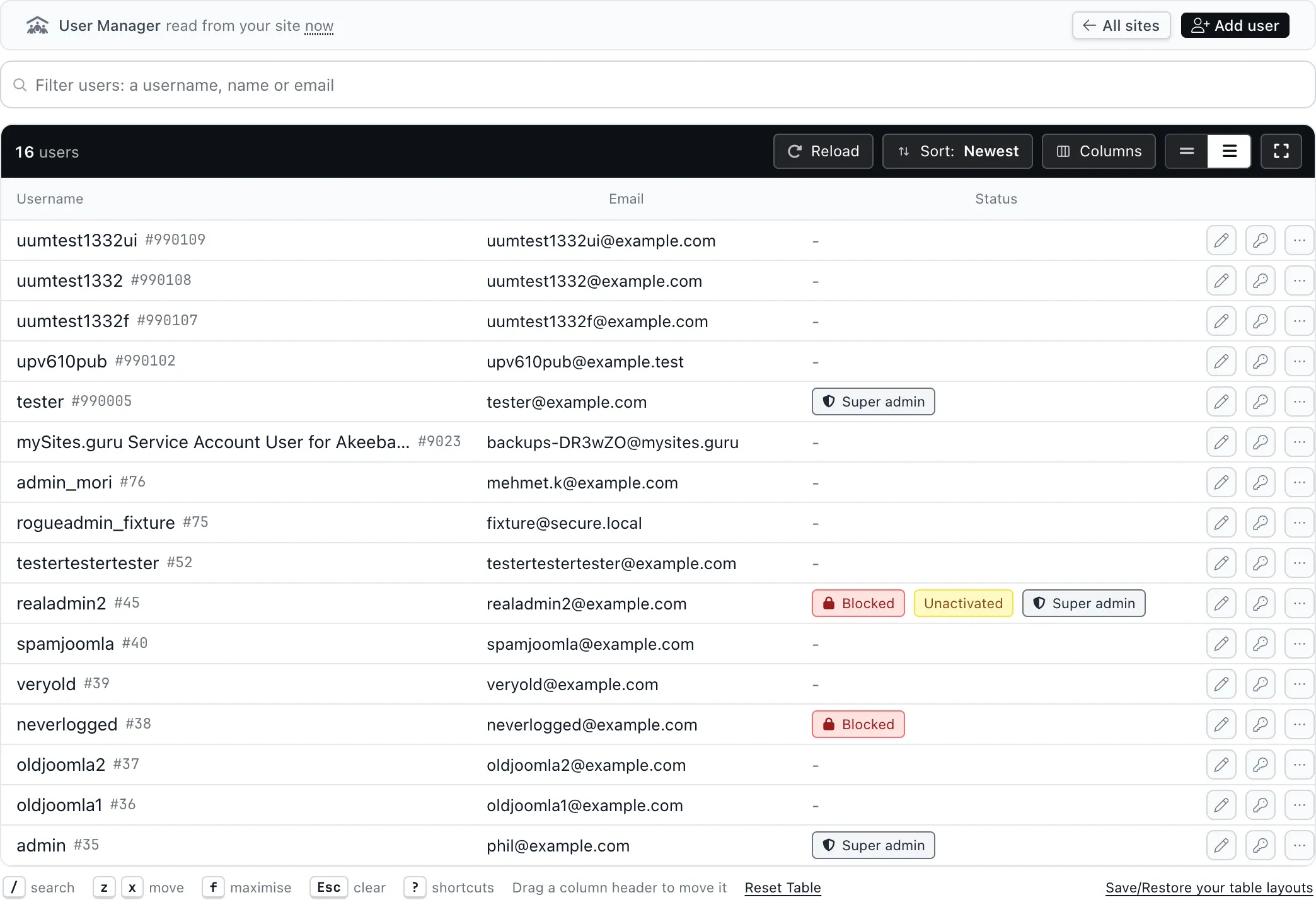
The list is read from your site at the moment you open it, every time. mySites.guru stores no copy of your users, and the page says so above the table. Sorting, the filter chips along the top, and the column picker all work on that live list. Sites with very large user tables stop counting at 5,000 and tell you they have done so, so a forum with half a million registered accounts cannot hang the page while you are trying to find one person.
Why that list is so hard to produce
A developer finished a project for you eighteen months ago. They were given an administrator account on the client’s site so they could get the work done, and it stayed there, because taking it away meant logging in to that site, finding the user list and remembering why the account was there. Multiply that by every contractor, every agency hire, every “can you just give me access for an hour” since 2019, and the answer to how many people can currently log in to your clients’ websites is that no one knows.
Cleaning up is the easy part. The awkward part is that you cannot even produce the list. Your identity provider covers email, chat and the billing dashboard, and covers precisely none of the two hundred separate WordPress and Joomla installs you look after, each with its own database, its own user table and its own set of numeric user ids that have nothing to do with each other. The same person exists on forty of those sites as forty unrelated rows. Matching those rows to one another is the actual problem, and a search that asks every site at once is the only thing that solves it.
Everything it can do
On a single site
- Add a user, setting name, username, email, password and groups in one step
- Edit an existing account’s name, username and email address
- Set a new password, written straight to the site and never stored here
- Change group membership: several groups at once on Joomla, one role on WordPress
- Block and unblock an account (Joomla only, see below)
- Delete an account, choosing who receives its content on Joomla and WordPress
- Search that site’s users by username, name or email address
- Filter by all, active, unactivated, super admins, and blocked on Joomla
- Sort by any column, and choose which columns are shown
- See last login and registration date per account, on Joomla
- Page through large sites, 50 accounts at a time and up to 200
Across every site at once
- Search every connected Joomla and WordPress site for a username, name or email address
- See every site that person holds an account on, with last login, registration date and status
- Change name, username and email address across every site you tick, in one action
- Set a new password across every site you tick
- Block and unblock across the ticked Joomla sites
- Set groups per site, or pick a group by name on every site at once (one role on WordPress)
- Offboard: move the account into a group of your choosing and block it on Joomla, remove every role on WordPress
- Delete the account on every site you tick
- Edit one account on its own if a single site needs different treatment
- Export the results to CSV
What it will not do
- Delete the last remaining Super User or Administrator on a site
- Leave an account belonging to no group at all
- Delete anything without you retyping your own mySites.guru password
- Block a WordPress account, which WordPress has no way to express
- Remove two-factor authentication from an account, or retrieve backup codes
- Store anything about your users, including any password you set
Every action on a single account
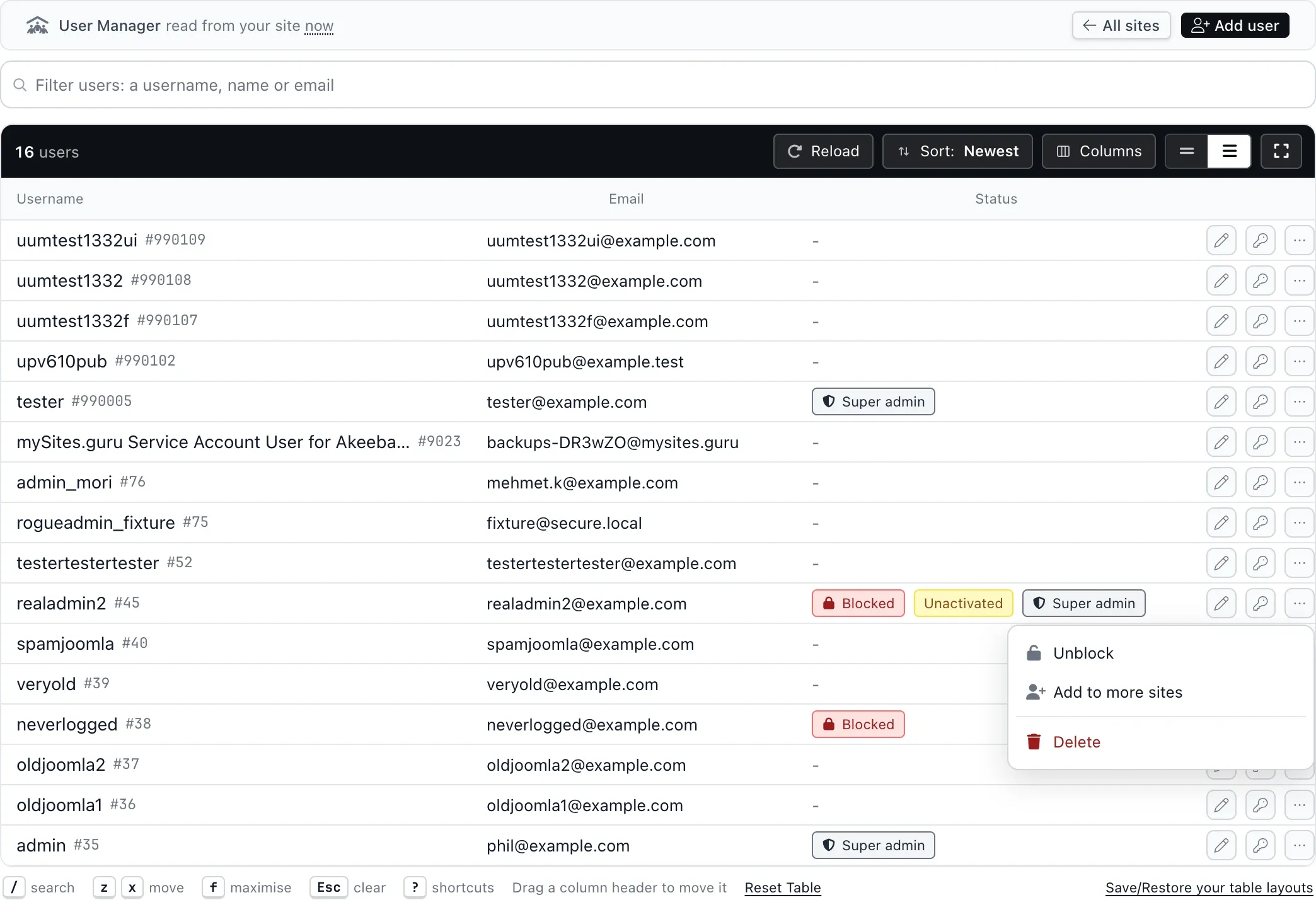
Each row has an Edit button, a Set a new password button and a More actions menu. The menu holds Block (or Unblock, on an account that is already blocked) and Delete.
Edit opens one editor that serves both creating and changing an account. The left column is the account itself: name, username, email, and on Joomla the block switch. The right column is group membership, and it is read live from the site the moment the editor opens rather than from anything cached, because a group added on the site last week has to be there when you look.
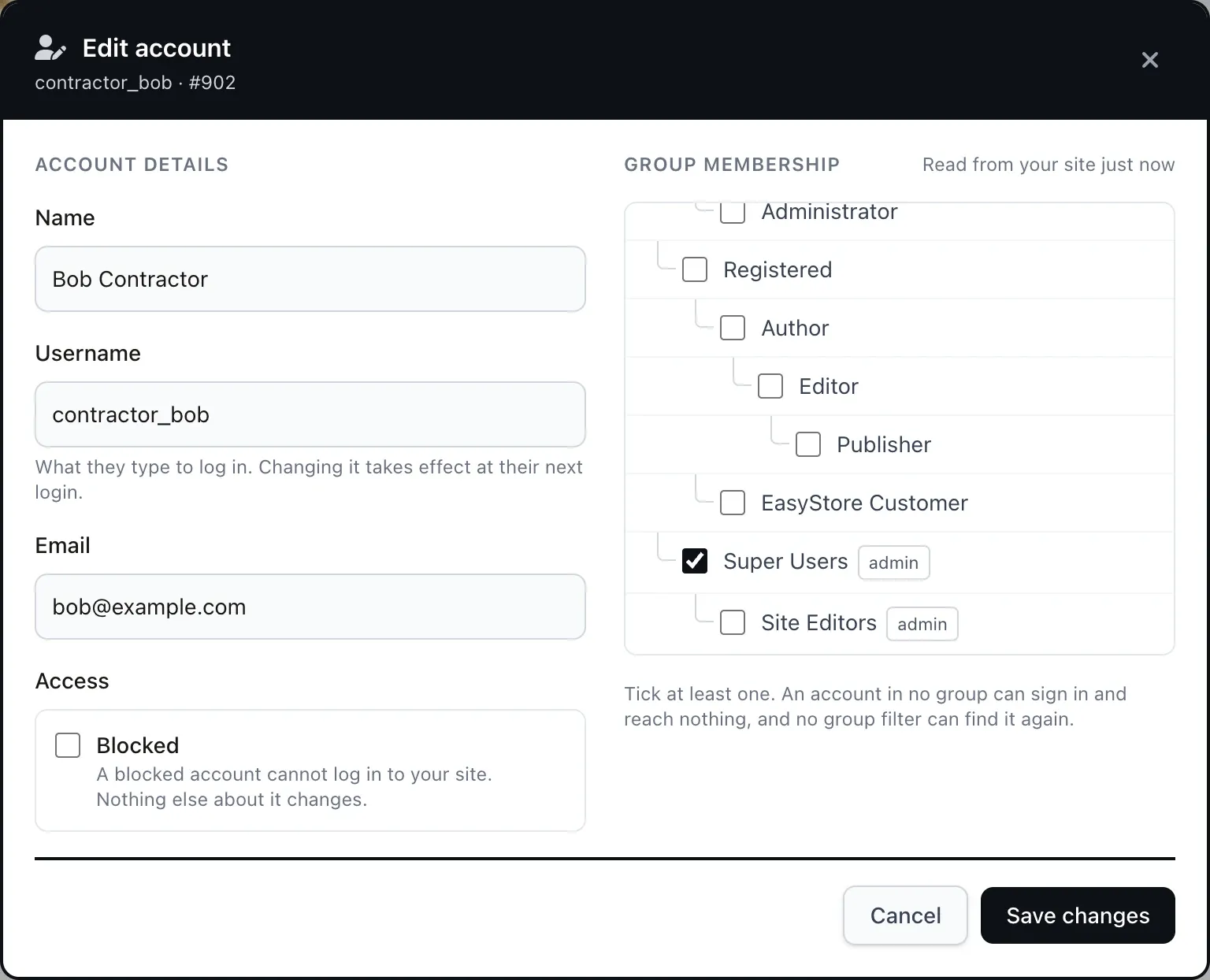
Two guard rails stop a bad afternoon becoming a catastrophic one. You cannot save an account into no group at all: an account with no group can still sign in, reaches no part of the site once it does, and disappears from every group filter you might use to find it again, which is a miserable state to leave a client’s site in. And you cannot delete the last remaining Super User or Administrator. mySites.guru counts the remaining admins before the delete and stops there, then checks again inside the transaction on the site itself and rolls back if the answer changed. Deleting an account also asks for your own mySites.guru password first, every time, no matter how recently you logged in.
These changes are written straight to your site
There is no staging step and no automatic backup taken first. A password you set is written to the site immediately and is never stored in mySites.guru, which means the tool cannot tell you later what it was. Treat it exactly as you would treat editing the user directly in the site’s own admin.
Joomla has a block switch, WordPress does not
This is the one place where the two platforms cannot be made to behave the same way, and pretending otherwise would be worse than explaining it.
Joomla has a real block column on the user table. Blocking is a first-class thing you can do to an account, and mySites.guru sets it. WordPress has no such concept. There is no supported way to mark a WordPress account as blocked, so mySites.guru does not offer a Block button on WordPress sites, and stops the action before it ever reaches the site rather than writing something ambiguous and calling it success.
What WordPress does have is accounts holding no role at all. Those can still sign in and can then do nothing, which is the closest native equivalent. mySites.guru reads that state and shows it as a “No role” badge, and the blocked filter finds those accounts, so the visibility is there even though the switch is not.
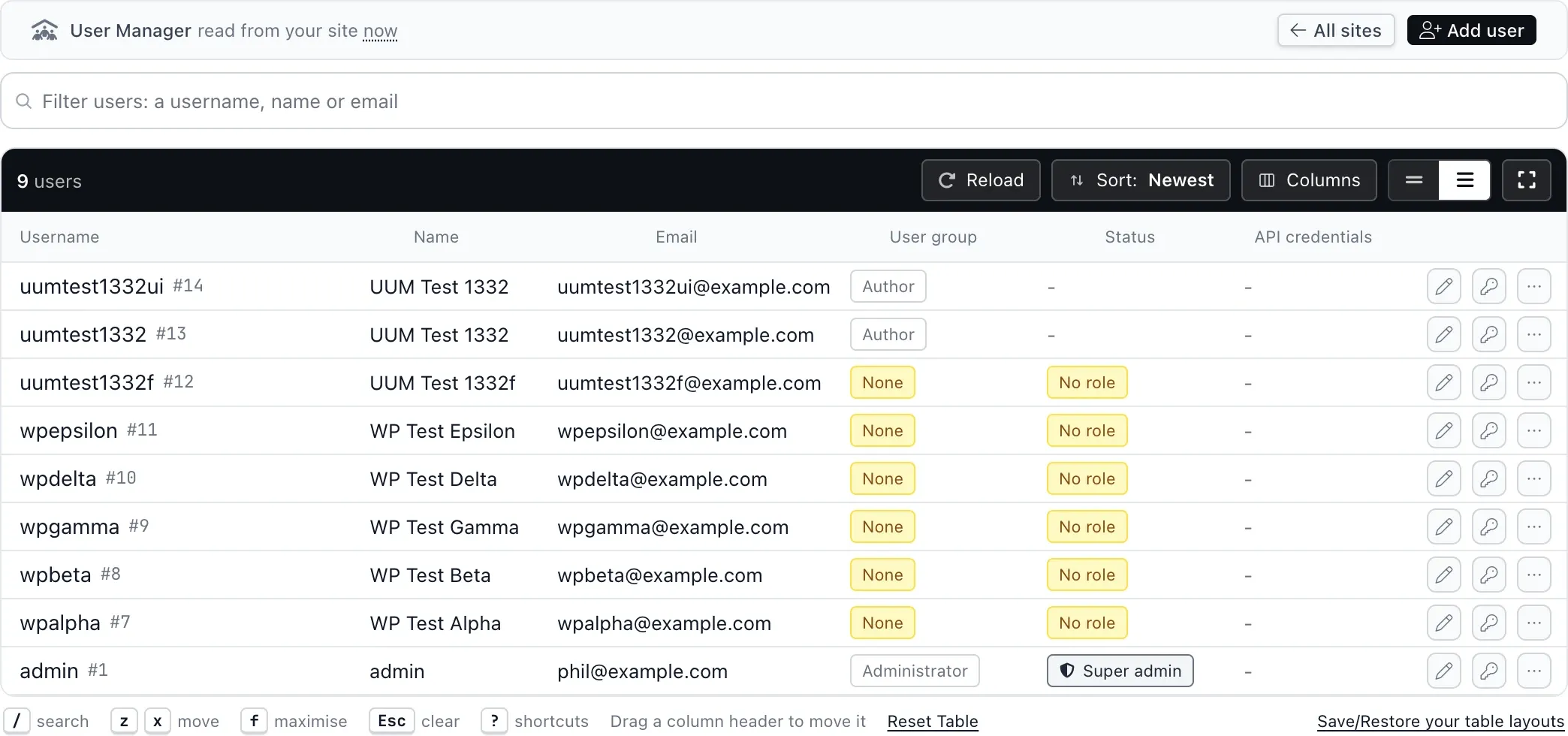
The Last login column is empty on every WordPress row for the same reason: WordPress does not record it. Joomla does, and it is the single most useful column on this screen, which the next section explains.
WordPress support for the full set of user actions shipped on 1 September 2026. Before that the WordPress connector could answer a search but not a browse or a write, so in practice this was a Joomla feature with a WordPress-shaped hole in it. That hole is closed.
What the accounts on client sites look like
We audit a large number of Joomla and WordPress sites, and the per-check results give a reasonable picture of what user accounts look like in the wild. These are the figures from the 30 days to 2 September 2026.
Measured across the Joomla and WordPress sites mySites.guru audited in the 30 days to 2 September 2026. Percentages are of sites where the check ran, and checks that apply only to certain versions are counted only against those versions.
The median Joomla site and the median WordPress site each have two accounts with full control. At the ninetieth percentile it is five. So the agency owner who believes there is one administrator on a client site is wrong more often than not, and has no practical way to find out without opening every site in turn.
The dormancy figure is the one that matters for offboarding. Two thirds of Joomla sites have at least one account that has not been used in six months, and at the ninetieth percentile a Joomla site has nineteen of them. They are ordinary accounts: the old contractor, the agency hire who left, the client’s former marketing manager, and the migration account somebody created in 2023 and never removed.
The alarming failures are rare. MD5 password hashes, which Joomla never creates itself and which usually point at a compromise, appear on 1.8% of Joomla sites. Actual rogue Super Admin accounts matching a known attacker signature appear on 0.03%. Sites are not generally on fire. The problem is duller than that: 78.3% of Joomla sites and 79.5% of WordPress sites fail at least one basic user hygiene check, and only 21.7% of Joomla sites are clean on all six. The accounts pile up because, until now, seeing across a hundred sites at once meant opening a hundred sites.
One search, every site you manage
Type a username, a name or an email address. mySites.guru asks every connected site at once and streams the answers back as they arrive.
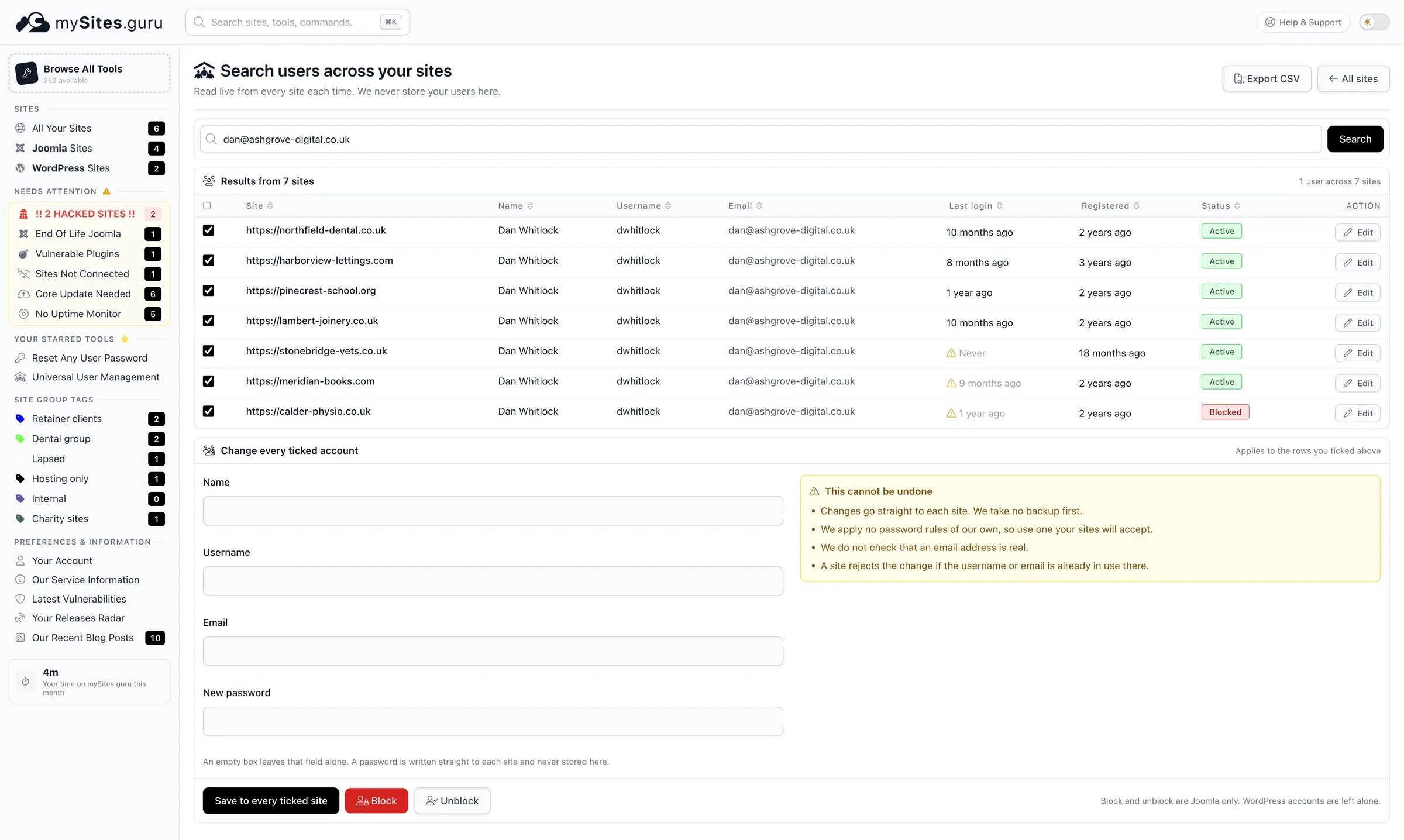
The result is the list you could not previously produce: one person, and every site they still have an account on, with the last login and registration date beside each one. Sort by last login and the dormant access shows itself immediately. There is a CSV export if you want the list somewhere else, and an Edit button per row if one site needs different treatment from the others.
The search takes one string and matches it as a partial against username, name and email together, so there is no separate “search by email domain only” mode. And Generic PHP sites connected to mySites.guru are excluded, because that connector has no user methods at all; the page names the exclusion rather than leaving them out without saying so.
Offboarding in a single pass
Tick the sites you want and a bar of actions appears over the results: Change details, Set password, Block, Unblock, Set groups, Offboard and Delete. Each one applies to every ticked site.
Change details opens a dialog with name, username and email boxes, and an empty box leaves that field alone. Change the email address and the same person’s account is updated everywhere at once, which is the mundane version of this job: somebody changes their surname, or moves from a personal address to a company one, and it needs correcting on a hundred sites. Set password opens its own dialog: type the new password, confirm with your own mySites.guru password, and it goes to every ticked site, with every session those accounts had open signed out.
Block and Unblock apply to Joomla accounts only, and WordPress rows are left untouched. Team members can use the same bar on the sites they are allowed to manage.
Set groups is the one that needed the most care, because group ids are per site and mean different things on different installs. Doing it blind across sites that disagree about what group 7 means is how you accidentally promote someone. So the dialog shows one row per ticked site, and each row reads that site’s own group list live (on WordPress, its role list). You can pick per row, or use the Pick on every site chips, which match by group name across the rows. A site with no group of that name is left without a pick and asks you to choose one there, and only the rows that resolve are sent. What you pick replaces the account’s groups: on Joomla you tick the groups the account should end up with, on WordPress it is one role. Each site’s connector then checks every id against its own groups, and rejects an empty set on Joomla.
Offboard does the leaver’s job in one action. On Joomla you pick the target group for each site, nothing is picked for you, and the same name chips work across the rows; the account is then moved into that group and blocked. On WordPress, which has no block, it removes every role. To keep the account but hand its articles and posts to someone else, use Reassign Content. To find a leaver’s accounts in the first place, including ones under a personal address, the staff roster and Find ex-staff do the search; removing an ex-employee from every site walks through it.
Take the warning on each dialog seriously. Changes go straight to each site with no backup taken first, mySites.guru applies no password rules of its own so the password has to be one your sites will accept, no check is made that an email address is real, and a site will reject the change if that username or email is already in use there.
Where to find it
It is in the left menu as Universal User Management, and on each site’s own page as the User Manager tab. If you prefer the keyboard, press Cmd+K (Ctrl+K on Windows) to open the command palette and start typing, or use the u u m hotkey.
How is this different from WordPress Multisite?
Almost everything written about managing users across WordPress sites assumes Multisite: one installation, one wp_users table, sub-sites that share an identity, and a plugin that assigns an existing network user a role on one of them. If that describes your setup, the built-in tools already do most of this.
It does not describe an agency. An agency has a few hundred entirely separate installations, often on different hosts, some Joomla and some WordPress, with no shared user table and no shared identity of any kind. There is nothing to “sync” because there is no network. The only thing connecting Dan Whitlock’s account on one client’s Joomla site to Dan Whitlock’s account on another client’s WordPress site is that both happen to use the same email address, and something has to go and ask both sites, live, to find that out.
That is why this works by search rather than by synchronisation, and why it spans two content management systems that know nothing about each other.
Who on your team can change a client’s users?
Browsing, searching and editing follow the site access you have already granted in mySites.guru, so a team member who cannot see a site cannot see or change its users. Everything is rate limited, at 300 requests an hour per person per site, which is generous for real work and unhelpful for anything automated.
Deleting an account requires the operator to retype their own mySites.guru account password, and a wrong password on that step is recorded rather than merely rejected, because a failed authentication from somebody who already holds a valid session is exactly the event you would want to see afterwards.
Every write is recorded: which of your team members changed which fields, on which site, for which account, and whether it succeeded, failed or was denied. The log stores field names, not values, because mySites.guru promises not to store your users’ details and an audit log full of old email addresses would break that promise. The record exists for our own support and incident work; there is no screen in the dashboard that shows it back to you today.
People often confuse two separate things here. Managing your own team’s access to mySites.guru is a different feature from managing the user accounts that live on your clients’ sites. Offboarding usually means doing both.
What it costs
Nothing extra. The user manager is part of the mySites.guru subscription, which is £19.99 per month for unlimited Joomla, WordPress and PHP sites, alongside the audits, backups, uptime monitoring, update management and file manager.
If you want to see what is already sitting on your own sites before committing to anything, connect a site and run an audit. The user account checks quoted above are part of the standard audit, so the answer to “who has full control of this site, and when did they last use it” arrives without you doing anything further.
Further reading
- Finding Rogue Admin Accounts Across Every Joomla Site You Manage is the detection half of this story: the audit finds planted and forgotten accounts, and the user manager is where you deal with them.
- Hacked Yesterday, Exploited Today covers why a cleanup that ignores the user table is not a cleanup at all.
- Is My WordPress Site Hacked? includes the manual version of the checks above, site by site.
- One-click login to any Joomla or WordPress admin console for the times you do need to be inside the site itself.
- Manage every site from Claude Desktop if you would rather ask for this in words than click through it.
- The summer 2026 feature roundup covers what shipped immediately before this rebuild.
Frequently Asked Questions
Can I change one person's password across every site at once?
Can I block a WordPress user the way I can block a Joomla user?
Can I change someone's user group on lots of sites at once?
Does mySites.guru keep a copy of my sites' user accounts?
What stops someone deleting the last administrator on a client site?
Which platforms does the user manager work on?
 Written and edited by a human, with AI assistance. Our approach to AI