How to Check If a Joomla Extension Needs the Joomla Compatibility Plugins, With mySites.guru Preflight
Someone hands you a Joomla extension zip, or a client asks when their site can move to Joomla 6. The same question sits under both: does this code run on Joomla as it stands, or does it only run because one of Joomla’s Backward Compatibility plugins is switched on?
After 15 years of running client sites, I know the old way to answer that: switch the plugin off on a staging copy and see what breaks. mySites.guru Preflight now has a Compat Plugins view that answers it by reading the zip. For Joomla 5, 6 and 7 it says whether the Joomla extension works, needs a compatibility plugin or breaks, and it names the file and line behind each answer. Nothing is installed and nothing in the zip is run.
What the Joomla Backward Compatibility Plugins Do
Joomla ships a “Behaviour - Backward Compatibility” plugin for Joomla 5, 6 and 7. Each one keeps older extension code running by providing names that version of Joomla has otherwise dropped: aliases for old class names, deprecated classes and removed assets. Whether the plugin is on, and which of its options are on, differs between Joomla 5, 6 and 7.
| Joomla version | Plugin | On by default? | Classes Aliases |
|---|---|---|---|
| Joomla 5 | Behaviour - Backward Compatibility (compat) | On, for new installs and upgrades | On |
| Joomla 6 | Behaviour - Backward Compatibility 6 (compat6) | Off on a new install, on after upgrading from 5.4 | Off |
| Joomla 7 (in development) | Behaviour - Backward Compatibility 7 (compat7) | Off, on new installs and after an upgrade | Off |
On Joomla 5 the plugin’s three options (Classes Aliases, ES5 Assets and Removed Assets) are all on by default. On Joomla 6 and 7, Classes Aliases is off by default while Include Deprecated Classes and Removed Assets are on, and on Joomla 6 Removed Assets cannot be switched off. Joomla’s update to 6 also asks for the Joomla 5 plugin to be switched off and Backward Compatibility 6 switched on.
The Joomla manual has a page on the compatibility plugin for 4.4 to 5.0 and another on the compatibility plugins for 5.4 to 6.0. I have written separately about why leaning on the compat plugin is technical debt.
How Do You Check a Joomla Extension Zip in Preflight?
Open Preflight, drop the zip onto the page, and choose Compat Plugins in the report menu. Preflight is the mySites.guru tool that reads a Joomla extension or WordPress plugin zip before you install it, and the launch post covers the rest of the report. It is included for active subscribers and trial users, and there is an overview on the Preflight page.
Every Joomla zip gets the view. WordPress zips do not. The count beside the menu item shows the worst answer across the three Joomla versions, for example “J7 breaks”, “J6 plugin” or “None needed”.
To show it working I built a small test plugin of our own for this post: System - Site Notice 2.3.1 (plg_system_sitenotice.zip), credited to “Example Developer”. I filled it with the sort of lines I see in older extensions:
defined('JPATH_PLATFORM') or die;
new JVersion();
Factory::getSession();
$user->get('id');
HTMLHelper::_('formbehavior.chosen', 'select');
JFilterInput::getInstance();
Factory::getMailer();
It also creates Joomla\CMS\Crypt\Key and Joomla\CMS\Crypt\Crypt objects, and has a form field class in fields/noticestyle.php that extends JFormFieldList.
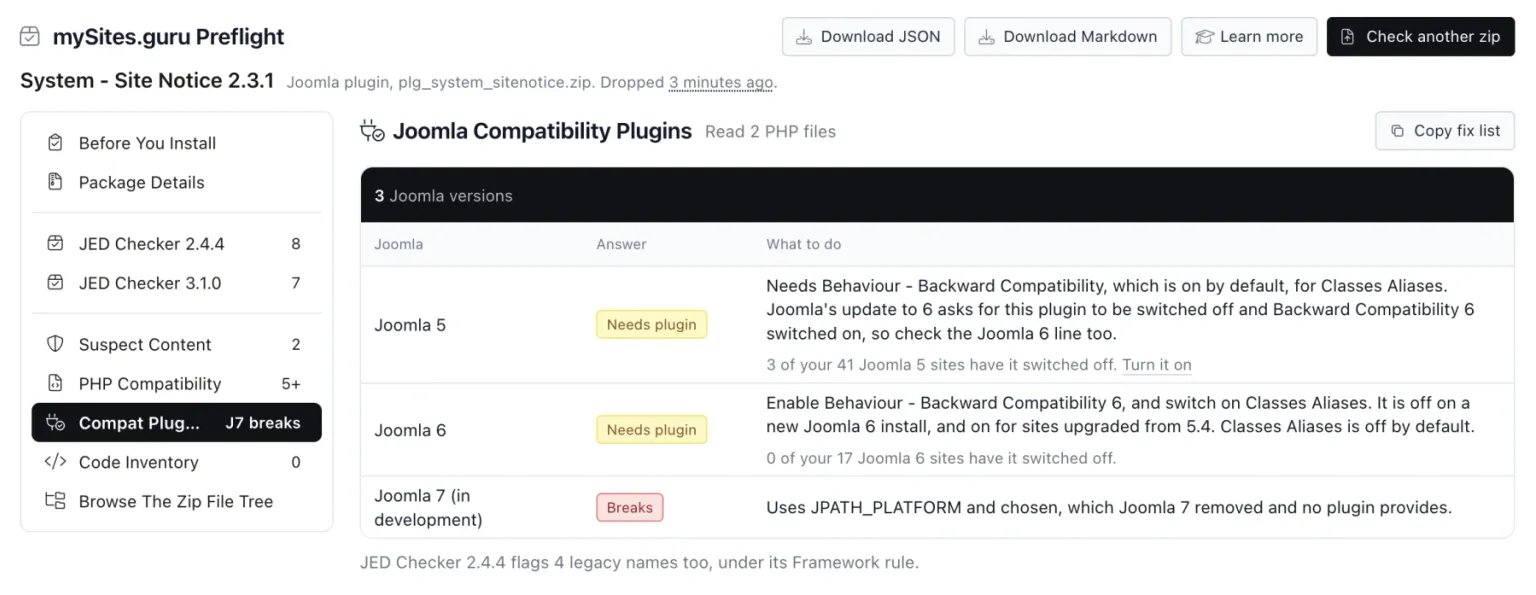
The pane is headed “Joomla Compatibility Plugins” and starts by telling you how much it read: “Read 2 PHP files” here. Preflight reads the PHP code itself, ignoring comments and strings, plus asset JSON files and form XML. Files over 1 MB are not read, and when any are skipped the header says how many and the sentences add “(from the files we could read)”.
A class is judged by the name PHP would resolve. An unqualified JFactory inside a namespace resolves to that namespace’s own JFactory, so it is not counted. Names the zip declares itself, such as its own class or a class_alias target, are dropped too.
Reading the Three Joomla Answers
Each Joomla version gets one of three answers: “Works” in green, “Needs plugin” in yellow or “Breaks” in red. Beside the answer is a plain sentence saying what to do.
- “Works with no compatibility plugin.”
- “Needs Behaviour - Backward Compatibility, which is on by default, for Classes Aliases.”
- “Enable Behaviour - Backward Compatibility 6, and switch on Classes Aliases. It is off on a new Joomla 6 install, and on for sites upgraded from 5.4. Classes Aliases is off by default.”
- “Uses JPATH_PLATFORM and chosen, which Joomla 7 removed and no plugin provides.”
When Joomla 5 needs its plugin and Joomla 6 is not fine either, the Joomla 5 sentence adds a nudge: “Joomla’s update to 6 asks for this plugin to be switched off and Backward Compatibility 6 switched on, so check the Joomla 6 line too.”
Under a “Needs plugin” row for Joomla 5 or 6, Preflight counts your own sites, in the form “N of your M Joomla 5 sites have it switched off.” When that first number is above zero there is a Turn it on link, which takes you to that check across your sites. My post on Joomla 6 technical requirements covers the same compat plugin status per site.
The Fresh Install Trap on Joomla 6
This is the part I most wanted the view to make obvious. An extension that “works on Joomla 6” on your upgraded site may only work because compat6 is on there, since it stays on for sites upgraded from 5.4. Put the same zip on a fresh Joomla 6 install, where compat6 is off, and it can stop with an error.
So two sites on the same Joomla version can disagree about the same zip. If you build new sites as well as upgrading old ones, a “Needs plugin” answer on the Joomla 6 row is the one to read twice. It is also worth knowing which sites are about to change major version at all, which is what preventing accidental Joomla version jumps is about.
Which Names Make a Joomla Extension Need the Plugin?
A Joomla extension needs a compatibility plugin when its code uses a name that only the plugin still provides on that Joomla version. Preflight looks for old J-prefixed class names such as JFactory, JVersion, JFilterInput and JFormFieldList, and for namespaced aliases such as Joomla\CMS\Crypt\Key (now Joomla\Crypt\Key) and Joomla\CMS\Input\Input (now Joomla\Input\Input). It also looks for deprecated classes that the Include Deprecated Classes option provides.
Beyond classes, it checks for the JPATH_PLATFORM constant (including the common defined('JPATH_PLATFORM') or die; guard), HTMLHelper::_('formbehavior.chosen'), form fields of type radiobasic in XML, and WebAssetManager calls such as useScript, useStyle, usePreset, useAsset and the registerAndUse variants. Asset JSON dependencies that name removed or ES5 assets count as well.
| What the code uses | Joomla 5 | Joomla 6 | Joomla 7 |
|---|---|---|---|
Aliased class names such as JVersion | Needs plugin | Needs plugin (Classes Aliases) | Needs plugin |
JPATH_PLATFORM | Works, core defines it | Needs plugin | Breaks |
Factory::getConfig(), getSession(), getMailer() | Works | Works | Needs plugin |
User::get() | Works | Works | Needs plugin |
ES5 assets such as bootstrap.es5 | Needs plugin (ES5 Assets) | Breaks | Breaks |
The chosen and wcpolyfill assets | Works | Needs plugin (Removed Assets) | Breaks |
Some classes were removed by a major version with no plugin to bring them back, and those go straight to “Breaks”. On Joomla 6 the examples include JAdapter, Joomla\CMS\Adapter\Adapter and Joomla\CMS\MVC\Model\DatabaseAwareTrait. On Joomla 7 they include Joomla\CMS\Authentication\Password\PHPassHandler, Joomla\CMS\Encrypt\AES\Mcrypt and Joomla\CMS\Categories\CategoryChangeTrait. The Joomla manual lists what is removed and backward incompatible from 6.4 to 7.0.
The three Factory methods are deprecated and due to be removed in 7.0, and the compat7 plugin keeps them.
The Names Table and the Fix List for a Joomla Extension
Below the three answers is a table of every name Preflight found. Its columns are Name, Kind (Class, Constant, Call, Probably or Asset), Instead use, Matters on, Files, First seen in and Line. “Matters on” is three pills for 5, 6 and 7: grey where the name is fine, yellow where it needs the plugin and red where it breaks.
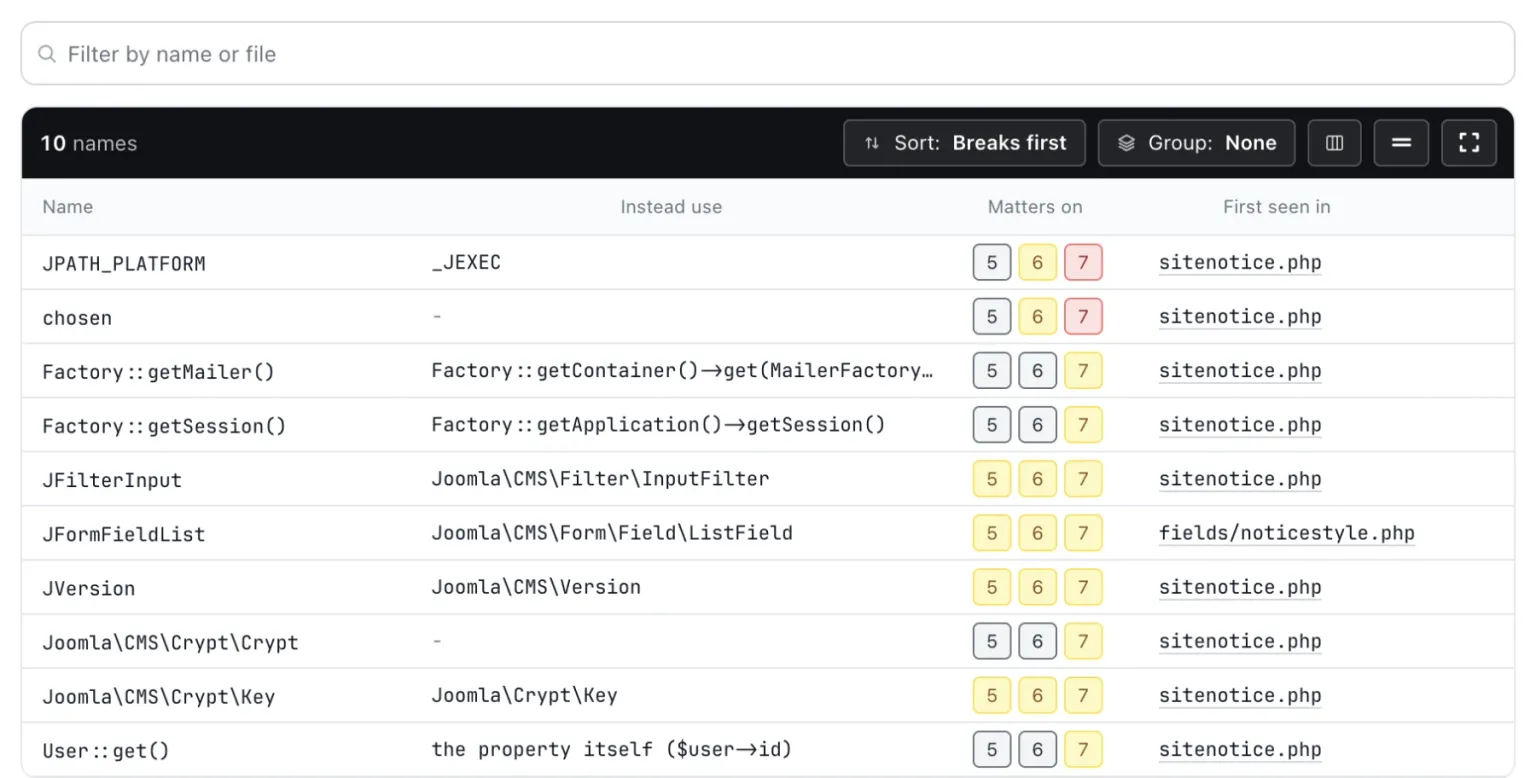
You can sort by Breaks first, Name A to Z or File A to Z, and group by Kind or by Joomla version. Click a name’s file to read the code at that line. As the table puts it, “Each name shows the first place it is used.”
The Copy fix list button copies the whole answer as Markdown: one line per Joomla version, then one line per name with its file, line and replacement. It is handy to paste into a ticket for the developer. This is the list for the test plugin:
## Joomla compatibility plugins: System - Site Notice 2.3.1

- Joomla 5: Needs Behaviour - Backward Compatibility, which is on by default, for Classes Aliases. Joomla's update to 6 asks for this plugin to be switched off and Backward Compatibility 6 switched on, so check the Joomla 6 line too.
- Joomla 6: Enable Behaviour - Backward Compatibility 6, and switch on Classes Aliases. It is off on a new Joomla 6 install, and on for sites upgraded from 5.4. Classes Aliases is off by default.
- Joomla 7 (in development): Uses JPATH_PLATFORM and chosen, which Joomla 7 removed and no plugin provides.

- `sitenotice.php` line 7: `JPATH_PLATFORM` → `_JEXEC`
- `sitenotice.php` line 31: `chosen`
- `sitenotice.php` line 23: `JVersion` → `Joomla\CMS\Version`
- `sitenotice.php` line 24: `Factory::getSession()` → `Factory::getApplication()->getSession()`
- `sitenotice.php` line 27: `User::get()` → `the property itself ($user->id)`
- `sitenotice.php` line 33: `JFilterInput` → `Joomla\CMS\Filter\InputFilter`
- `sitenotice.php` line 39: `Joomla\CMS\Crypt\Key` → `Joomla\Crypt\Key`
- `sitenotice.php` line 40: `Joomla\CMS\Crypt\Crypt`
- `sitenotice.php` line 42: `Factory::getMailer()` → `Factory::getContainer()->get(MailerFactoryInterface::class)->createMailer()`
- `fields/noticestyle.php` line 9: `JFormFieldList` → `Joomla\CMS\Form\Field\ListField`
When you check a newer build of the same package, the view compares it with the last one. You get a line such as “The build you checked on 12 Nov 2026 needed Behaviour - Backward Compatibility 6 on Joomla 6. This one does not.”, or the reverse when a build that did not need a plugin now does.
The pane also notes any overlap with the official checker. For the test plugin it reads “JED Checker 2.4.4 flags 4 legacy names too, under its Framework rule”, because the Framework rule in JED Checker flags some of the same legacy names.
The Same Answer in Before You Install and Remote Install
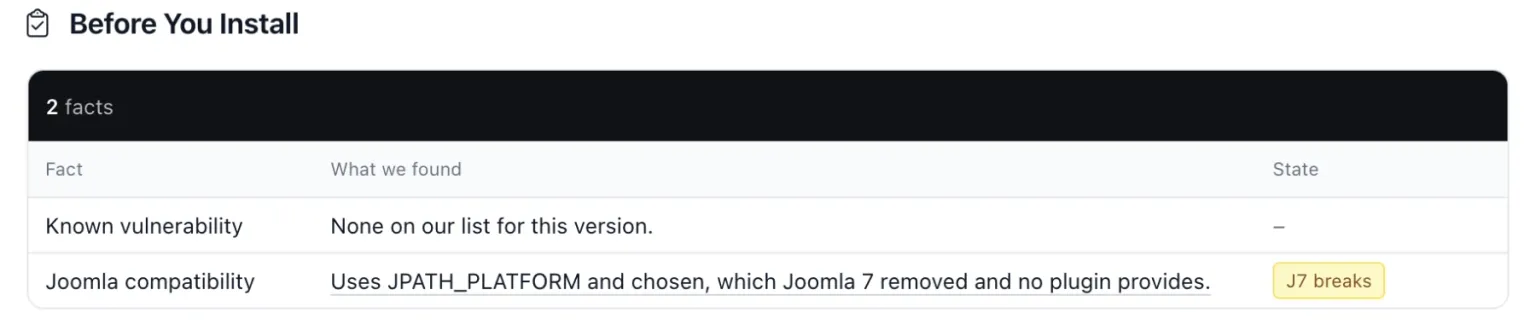
The answer shows up in two more places, so you see it even if you never open the Compat Plugins view. The Before You Install view has a “Joomla compatibility” row with the first sentence of the worst Joomla version and a short state such as “J7 breaks” or “J6 plugin”. When all three are fine it reads “Works on Joomla 5, 6 and 7 with no compatibility plugin.”
Remote Install runs Preflight at step 2. Its “mySites.guru Preflight Checks” table has a “Compatibility Plugins” row with the answer, the number of sites with the plugin off (or “None with it off”) and a View link.
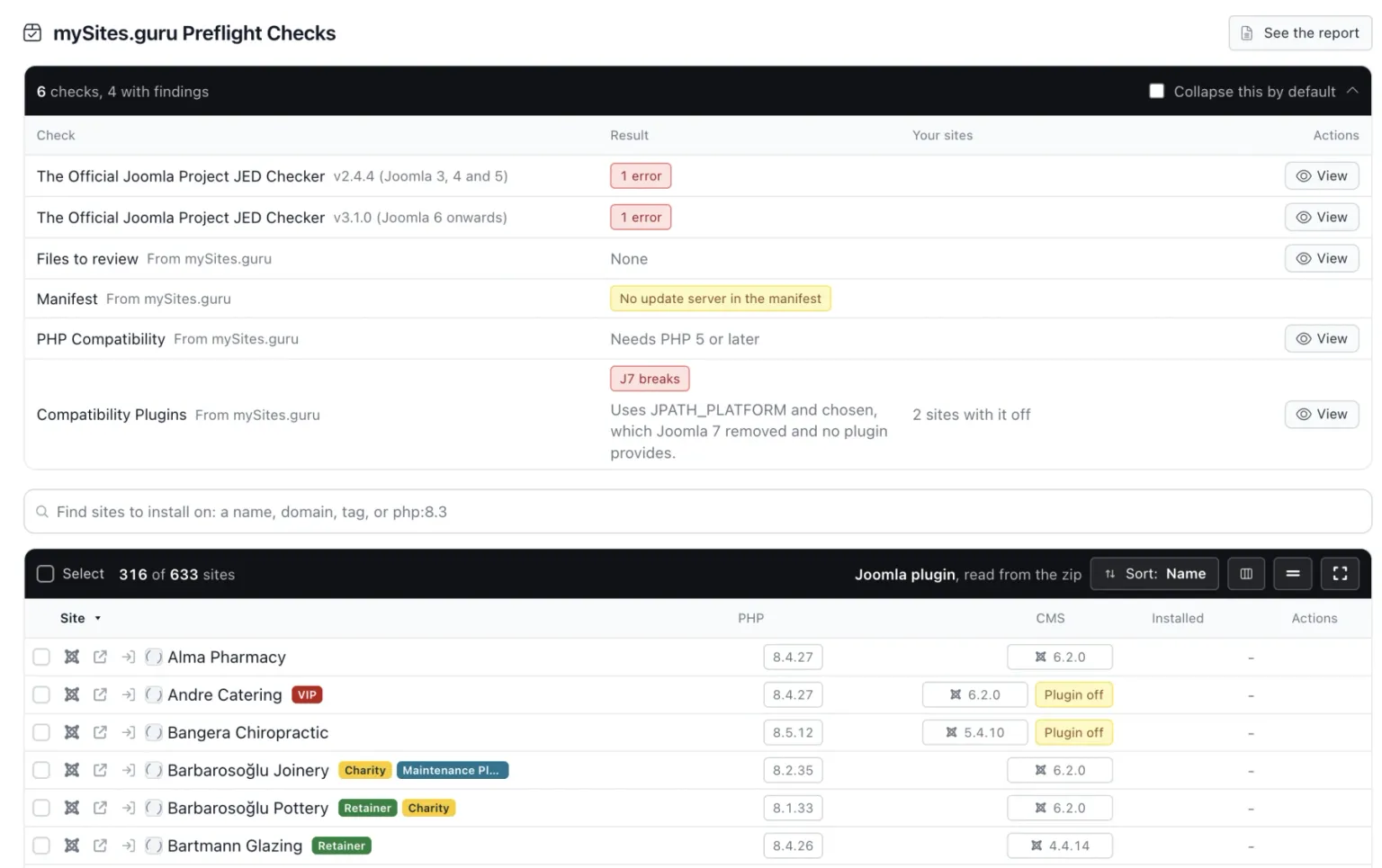
In the site list underneath, a Joomla site gets a yellow “Plugin off” pill when its Joomla version needs a plugin that the site has switched off. The tooltip spells it out: “This zip needs Behaviour - Backward Compatibility 6, and it is switched off on this site.” The pill is information only and never blocks the install.
What Preflight Cannot Tell You About Joomla Compatibility
Preflight reads code without running it, so it cannot see what that code does at run time. That is why it says an extension “uses” a name rather than that it will fail, and why every answer is evidence for you to weigh.
- A name inside a version check still counts. If the old name sits in a
version_comparebranch that only runs on older Joomla, Preflight lists it anyway. User::get()calls are a best guess from the code.- Joomla 7 is in development, and its row is judged as of 7 Nov 2026.
- A site with no snapshot data is not counted as off, so a count of 0 switched off does not prove the plugin is on everywhere.
- mySites.guru cannot see the
compat7setting on Joomla 7 sites. The Joomla 7 row says “N of your sites run Joomla 7. We cannot see their compat7 setting.”
So the old way still has a job, as the final proof. Switch the plugin off on a staging copy and click around, and if something depended on it you will see an error like the one in my post on Class “JPlugin” not found. On its own, though, that test tells you something broke on one site, after the fact, and only on the pages you clicked. Reading the zip tells you before the install, for all three Joomla versions at once, with the file and the line. So read the zip first, then confirm on staging anything that matters.
Joomla's Compat Plugin Is a Crutch, Not a FixRead the full post
If you are planning the move, what Joomla 6.2 changes for requirements and extension compatibility is the next thing to read. mySites.guru does not make extensions or the compatibility plugins, and is not affiliated with the Joomla project. Preflight reads the zip so you know what a Joomla extension needs before it goes near a client site.
Further Reading
- Compatibility Plugins, Joomla 5.4 to 6.0 - the Joomla manual page on the compatibility plugins when moving from 5.4 to 6.0
- Removed and backward incompatible changes, Joomla 6.4 to 7.0 - the Joomla manual list of what Joomla 7 removes
- Compatibility plugin, Joomla 4.4 to 5.0 - the Joomla manual page on the Joomla 5 compatibility plugin
- JED Checker on GitHub - the source of JED Checker, whose Framework rule flags some of the same legacy names
Frequently Asked Questions
How do I check if a Joomla extension needs the Backward Compatibility plugin?
Is the Backward Compatibility plugin on by default in Joomla 6?
Does a Breaks answer mean the extension will crash my site?
Can I see which of my Joomla sites have the compatibility plugin switched off?
Does Preflight check WordPress plugins for compatibility plugins?
What should I send the developer when an extension needs the plugin?
 Written and edited by a human, with AI assistance. Our approach to AI