Introducing mySites.guru Preflight: Understand What a Plugin Contains Before You Install It
Someone gives you a zip. It might be a client’s bespoke plugin from a developer you have never met, a premium extension from a vendor’s download area, or a theme a designer emailed over. Your job is to put it on client sites.
Joomla and WordPress both run that code with full access to the site the moment it is installed, and neither one shows you what is in it first. After 15 years of running client sites, my answer to “what is in this zip?” has always been the same: unzip it and read it.
mySites.guru Preflight is a new set of tools that reads a Joomla extension, WordPress plugin or WordPress theme zip and reports on it before you install it. One report holds The Official Joomla Project JED Checker or Plugin Check (PCP) from WordPress.org, both run unmodified, beside our own analysis and what mySites.guru already knows about your sites. Open it at manage.mysites.guru/en/tools/preflight, or search “Preflight” in Cmd-K or on the All Tools page. It is included for active subscribers and trial users, and there is a short overview on the Preflight page.
Transcript
You’re about to install this zip on client sites. Do you know what is in it?
Meet Preflight, in mySites.guru. Drop the zip. Nothing gets installed. It runs The Official Joomla Project JED Checker, or Plugin Check (PCP) from WordPress.org, unmodified.
Then our own checks: files to review, and the lowest PHP it runs on. A code inventory, web addresses to possible secrets, and every file.
Known vulnerabilities in that version. A newer one. How many of your sites can take it. For WordPress, whether the files match the copy on WordPress.org.
Remote Install checks every zip, and blocks sites too old for it, unless you choose Install anyway. Know what is in the zip before you install it. Preflight, in mySites.guru.
More short films on the mySites.guru features are on the films page.
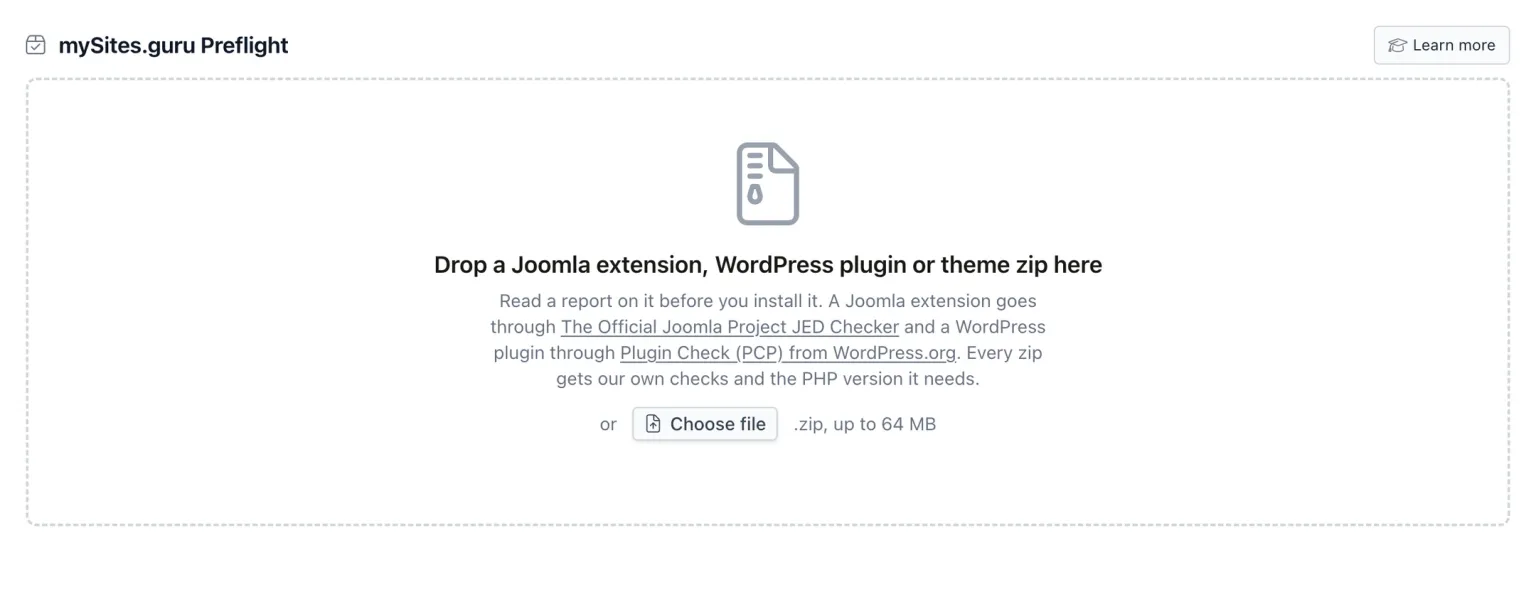
Drop a zip anywhere on the page, or use Choose file. The limit is 64 MB. Nothing is installed, and nothing in the zip is ever run.
Three Sources in One Report
A Preflight report draws on three sources and keeps them apart: the official checker for the platform, run unmodified; our own analysis of the code in the zip; and what mySites.guru already knows about your connected sites. Each has its own views in the report, so you can always tell who is saying what.
| Source | What it is | What it tells you |
|---|---|---|
| The official checker | The Official Joomla Project JED Checker or Plugin Check (PCP) from WordPress.org, run unmodified | Where the zip falls short of that project's rules and best practices |
| Our own analysis | Suspect Content, PHP Compatibility, Code Inventory and the file tree | What the code contains and the oldest PHP that can compile it |
| What we know about your sites | Vulnerability data, newer versions and your site inventory | Whether that version is known vulnerable and which of your sites can run it |
The report is one page with a menu of views down the left, in this order: Before You Install, Package Details, the official report, Suspect Content, PHP Compatibility, Compat Plugins (Joomla zips only), Code Inventory and Browse The Zip File Tree. Every menu item shows a count, so you can see where the findings are before you open anything.
Package Details is the plain identity of the thing in your hands: name, version, type, author, licence and description, with the zip’s own name, size and SHA-256. It also lists what the manifest or plugin header declares, for example Plugin URL, Author URL, Tested up to and Stable tag.
The Official Joomla Project JED Checker, Run on Your Zip
For a Joomla zip, Preflight runs The Official Joomla Project JED Checker on it in two releases, both unmodified. Release 2.4.4 is for Joomla 3, 4 and 5 extensions, and release 3.1.0 is for Joomla 6 onwards. You read each report in full, with the wording, level and line number the checker gave every finding.
If you have not met it, JED Checker is a Joomla component that checks an extension package against the rules of the Joomla Extensions Directory. Its README says it is supported by Joomla (Open Source Matters), it is free GPL software, and it has its own listing on the JED. Being a component, it is normally installed on a Joomla site first. Preflight runs it for you.
The findings are rule findings. It reports a GPL notice missing from file headers, a missing _JEXEC guard, a licence tag that is missing or wrong in the XML manifest, an update server that is missing or wrong, base64 or other encoding, error_reporting(0) and deprecated framework use. The JED publishes what each error code means.
That list also answers a question I expect to be asked a lot: does a warning mean the extension is malicious? No. A missing licence header is a directory rule, and an extension that was never written for the JED can break several of them without doing anything hostile.
Which JED Checker release for Joomla 6?
JED Checker 2.4.4 was published on 10 February 2025. JED Checker 3.1.0 was published on 25 November 2026, and its release note is plain about the split: “This release is for Joomla 6 onwards. If you are checking Joomla 3/4/5 extensions please use JEDChecker 2.4.4”.
Preflight runs both on every Joomla zip, so the menu has two entries, “JED Checker v2.4.4” and “JED Checker v3.1.0”. A zip that supports both generations of Joomla is worth reading in both. Each release gets up to 55 seconds.
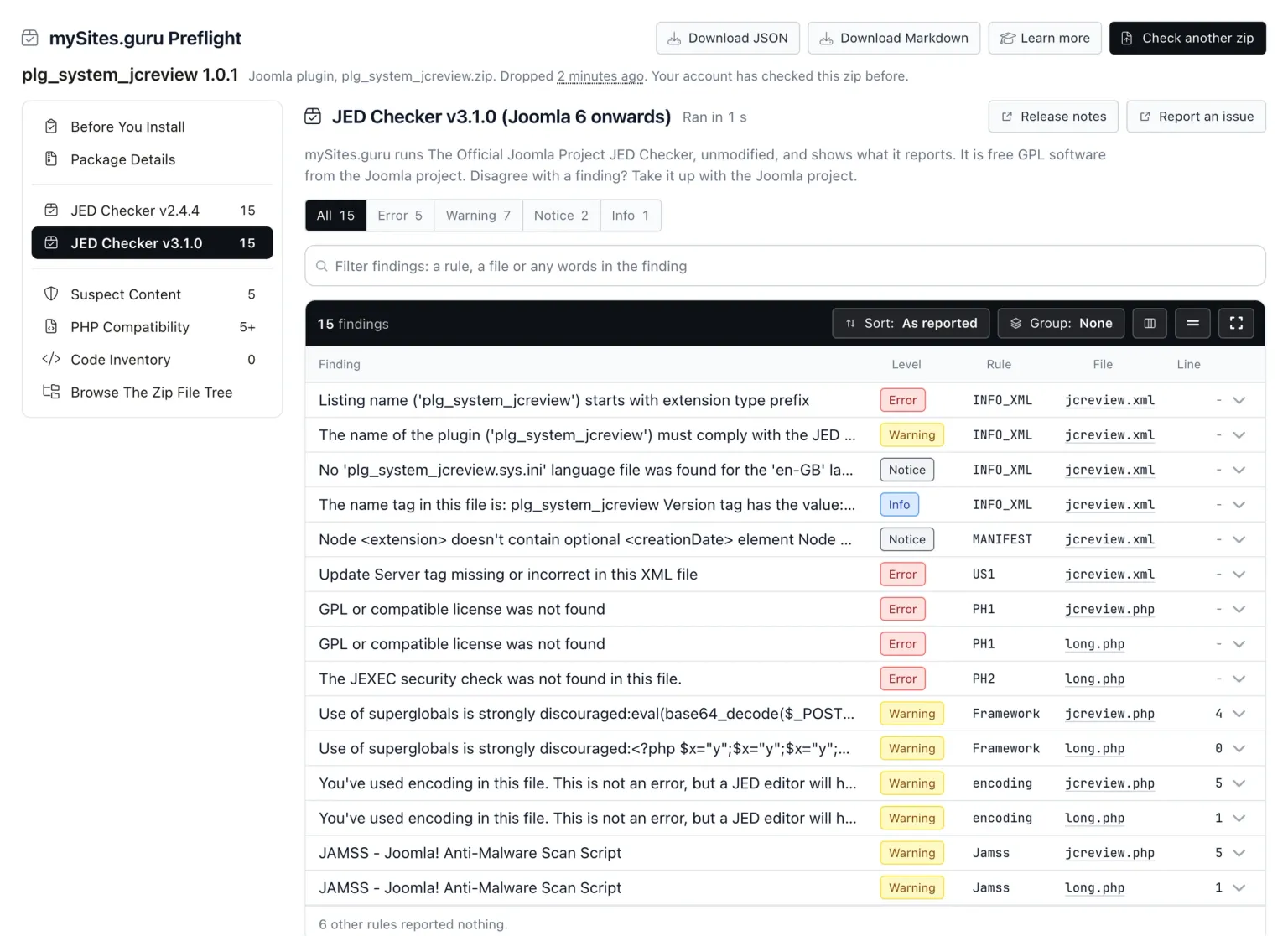
Filter the findings by level, and click a file name to read that file from the zip, opened at the line the finding names.
Plugin Check (PCP) from WordPress.org, Without a WordPress Site to Run It On
For a WordPress plugin zip, Preflight runs Plugin Check (PCP) from WordPress.org, release 2.2.0, unmodified. You do not need a WordPress site to run it on, and the plugin is never switched on. Preflight runs the 31 static checks, which read the code, and leaves out the runtime checks, which execute it.
WordPress.org describes Plugin Check as “a WordPress.org tool which provides checks to help plugins meet the directory requirements and follow various best practices”, and the plugins team has its own introduction to it. It is GPLv2 or later, developed in the open on GitHub, and release 2.2.0 was published on 6 November 2026.
Plugin Check is itself a WordPress plugin, and its own README advises against running it on a production site. So checking a zip yourself means keeping a spare WordPress site for the purpose. That is the step Preflight removes.
The static and runtime split matters here. Static checks analyse the code as text. Runtime checks execute parts of it with the plugin active, which is what you are trying to avoid with a zip you have not read yet. Preflight never runs them.
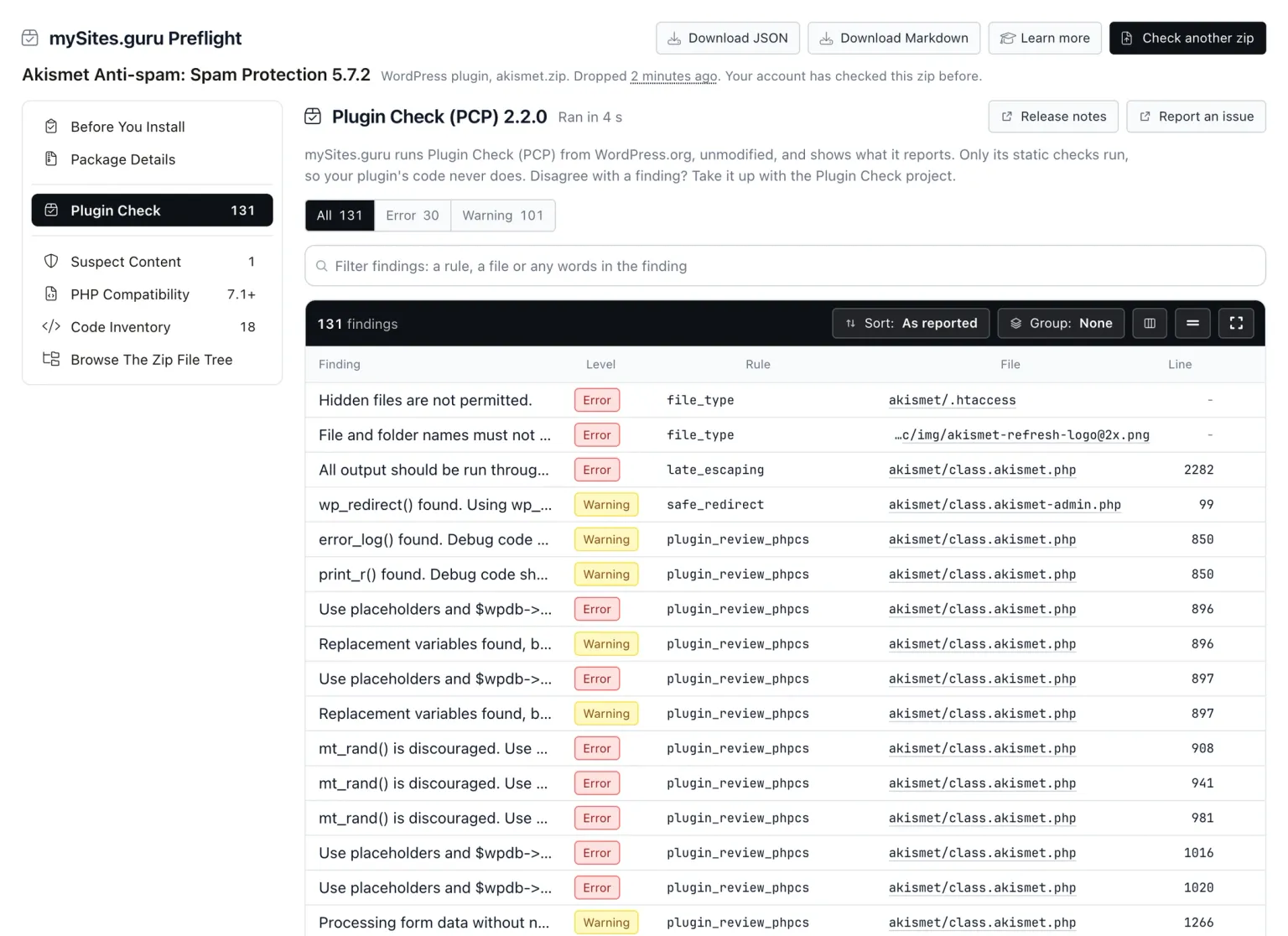
The time limit is 100 seconds. On our test machine Contact Form 7 took about 6 seconds, and a very large plugin can use the full 100. When that happens a few checks can run out of time, and the report names them, so you know what was not checked.
A WordPress theme is the exception. Plugin Check covers plugins only, so a theme zip gets no official report. It still gets every one of our own checks, described next.
Our Own Analysis of the Code
Beside the official report, Preflight reads the zip with our own tools: Suspect Content, PHP Compatibility, Code Inventory and Browse The Zip File Tree. They run on every Joomla extension, WordPress plugin and WordPress theme zip. Our findings sit in their own views and are never added to the official checker’s totals. A Joomla zip also gets Compat Plugins, which shows whether the extension needs Joomla’s Backward Compatibility plugins on Joomla 5, 6 and 7.
Suspect Content
“Our Suspect Content Matches” lists the files with PHP in them that match one of the suspect patterns mySites.guru audits use. That library is roughly 1,500 patterns, the same ones the full audit runs against what is already on a site. Open a file to see the lines that matched. Up to 200 files are listed.
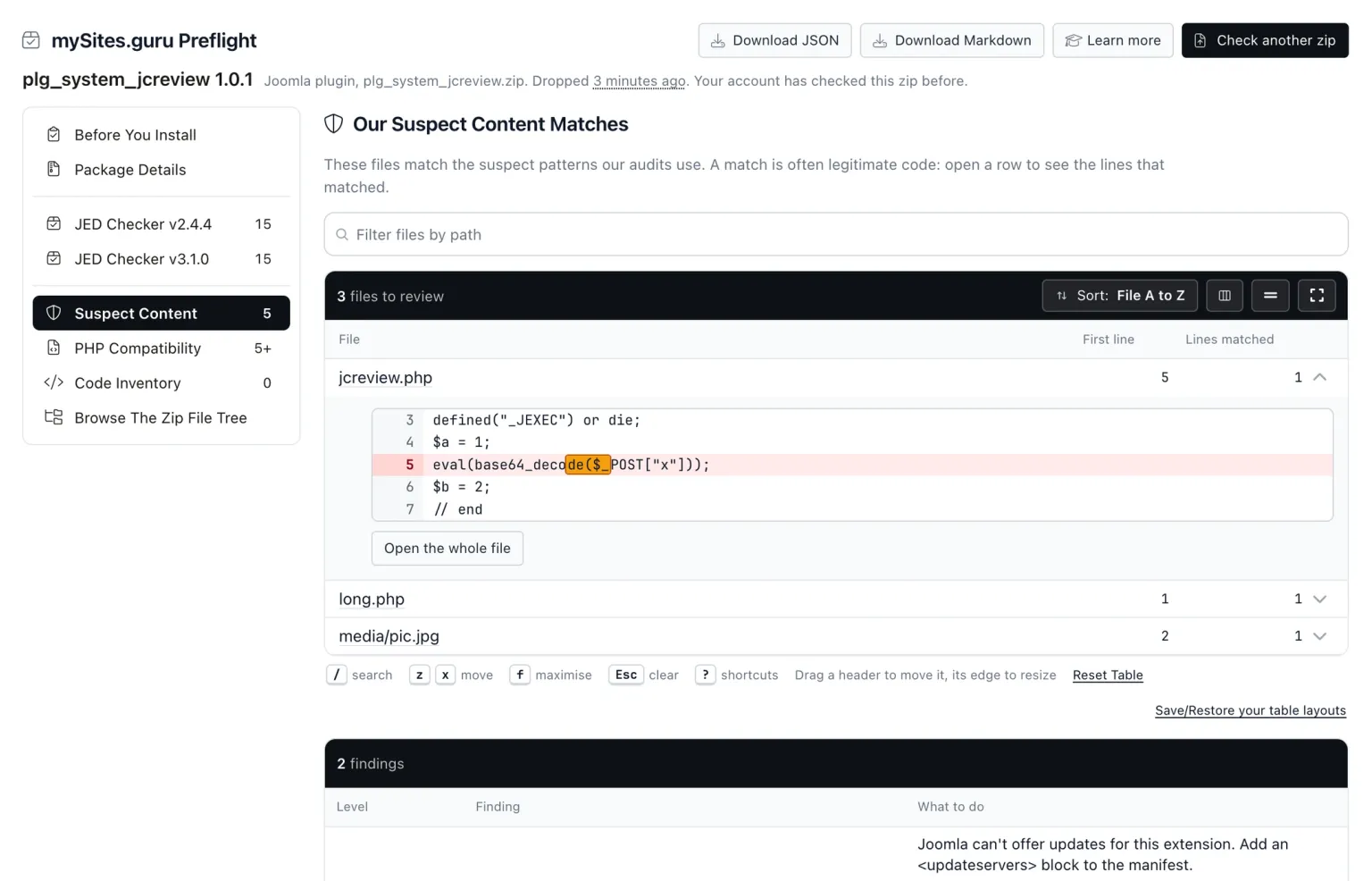
A match is often legitimate code, so we say a file “matches a suspect pattern” and nothing stronger. The view tells you which files to read first.
For a Joomla zip, this view also reports whether the manifest declares an update server and whether that server answers over https.
PHP Compatibility
We read the syntax of the zip’s PHP files, leaving out tests, stubs and polyfills, and work out the oldest PHP version that can compile them. The answer reads like “Needs PHP 7.4 or later”, with the files, lines and syntax that set it.
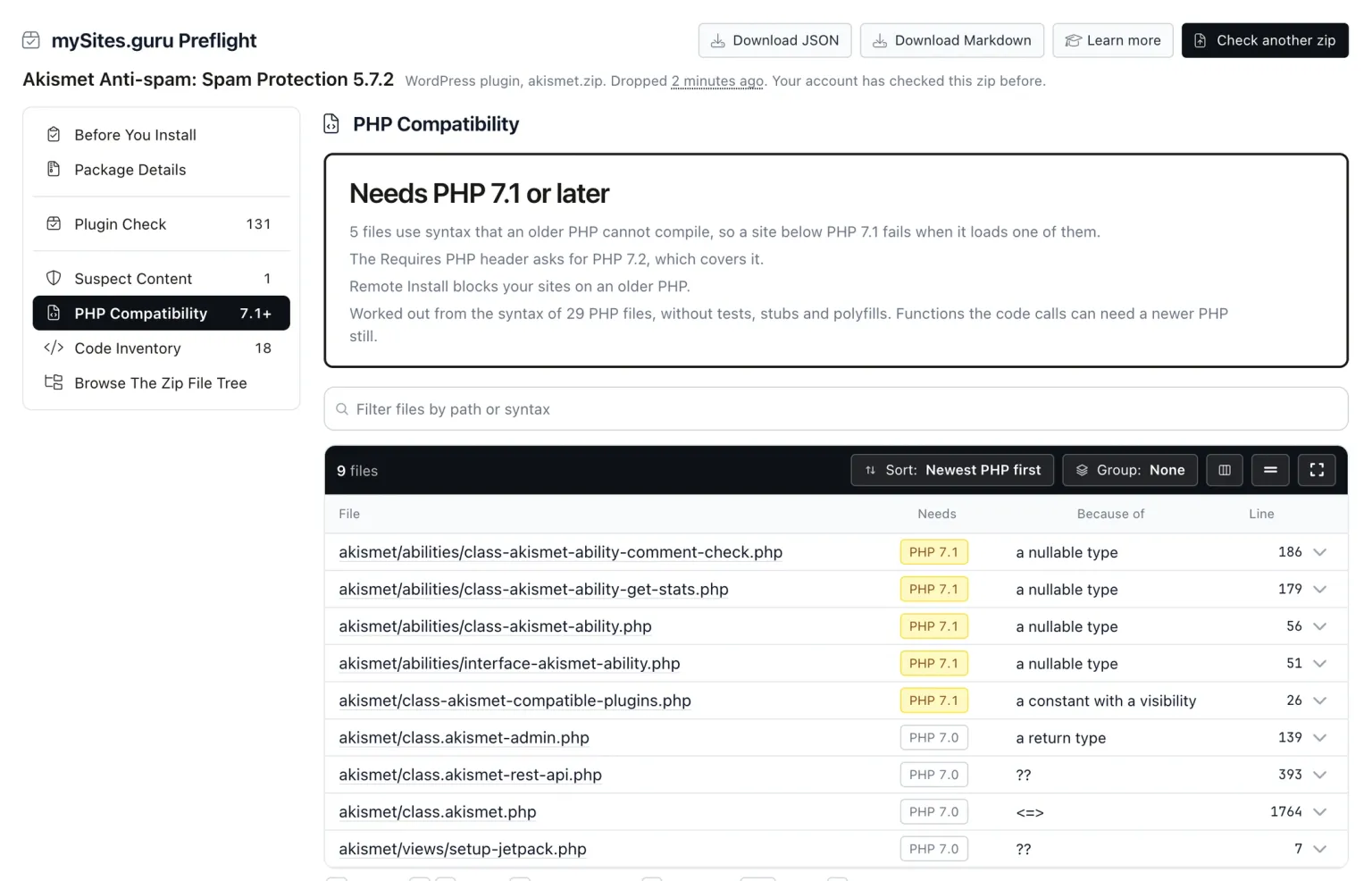
Syntax is the floor. Functions the code calls can need a newer PHP still, so treat the figure as the earliest version that could work. The view also shows the minimum PHP and the minimum Joomla or WordPress the zip itself declares, which is useful when the two disagree. If you already track PHP versions across your sites, this is the other half of that picture.
Code Inventory
Code Inventory is a list of what is in the zip besides the code you expected, grouped by kind.
- Bundled libraries are read from composer and package files, with each name and version.
- Files left in by mistake include .git folders, .env files, node_modules, .DS_Store, source maps, SQL dumps and tests.
- Possible secrets are listed with only their first four characters shown.
- Names the code uses cover the web addresses it mentions, WordPress AJAX actions, REST routes, scheduled (cron) events and database tables.
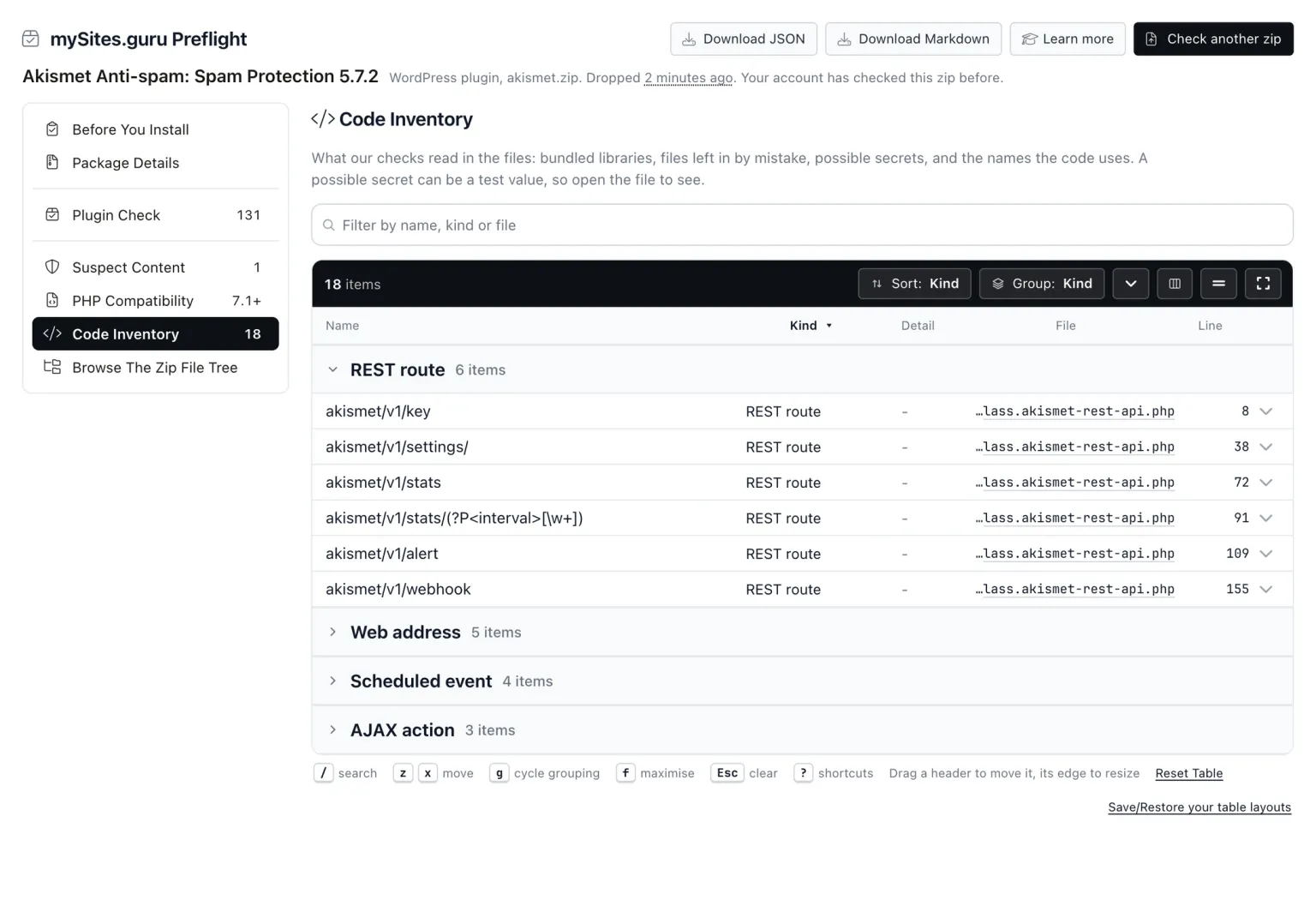
A possible secret can be a test value, so open the file to see. On an unfamiliar zip, read the web addresses first, because they are the places the code mentions by name.
Browse The Zip File Tree
Every file in the zip is shown as a tree, folders first, with file counts and sizes. Zips inside the zip open like folders. Filter by path, and click any text file to read it.
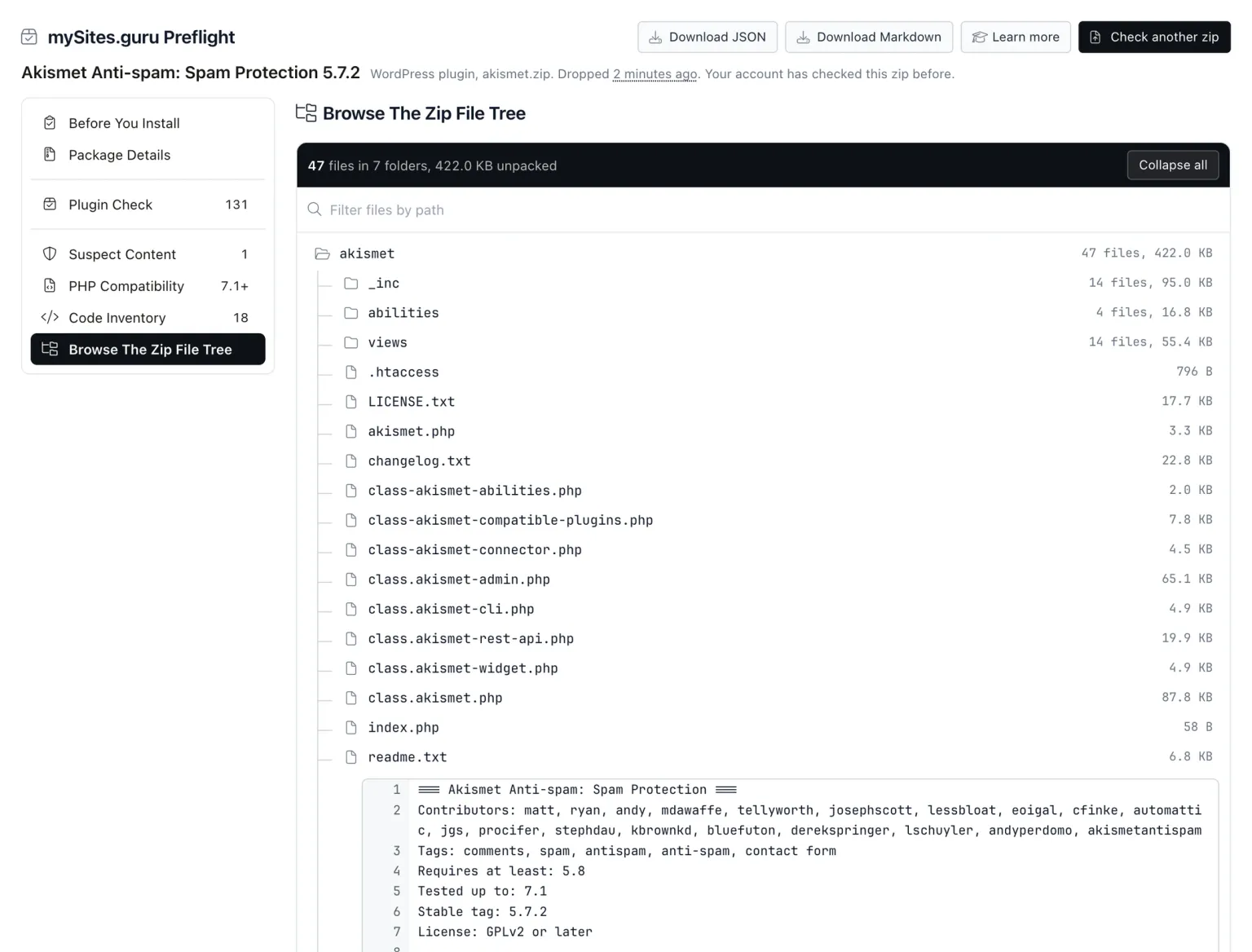
This is “unzip it and read it” without the unzipping.
What mySites.guru Already Knows About Your Sites
Before You Install is the first view in the report, and it is worked out each time you open it, from data mySites.guru already holds. It answers three questions: does this exact version have a known vulnerability, does a newer version exist, and how many of your connected sites can run it.
A standalone checker cannot do this, because it needs your site inventory. The vulnerability answer comes from the same data behind mySites.guru vulnerability alerts. The last answer counts how many of your own connected sites have the PHP and the Joomla or WordPress version the zip needs.
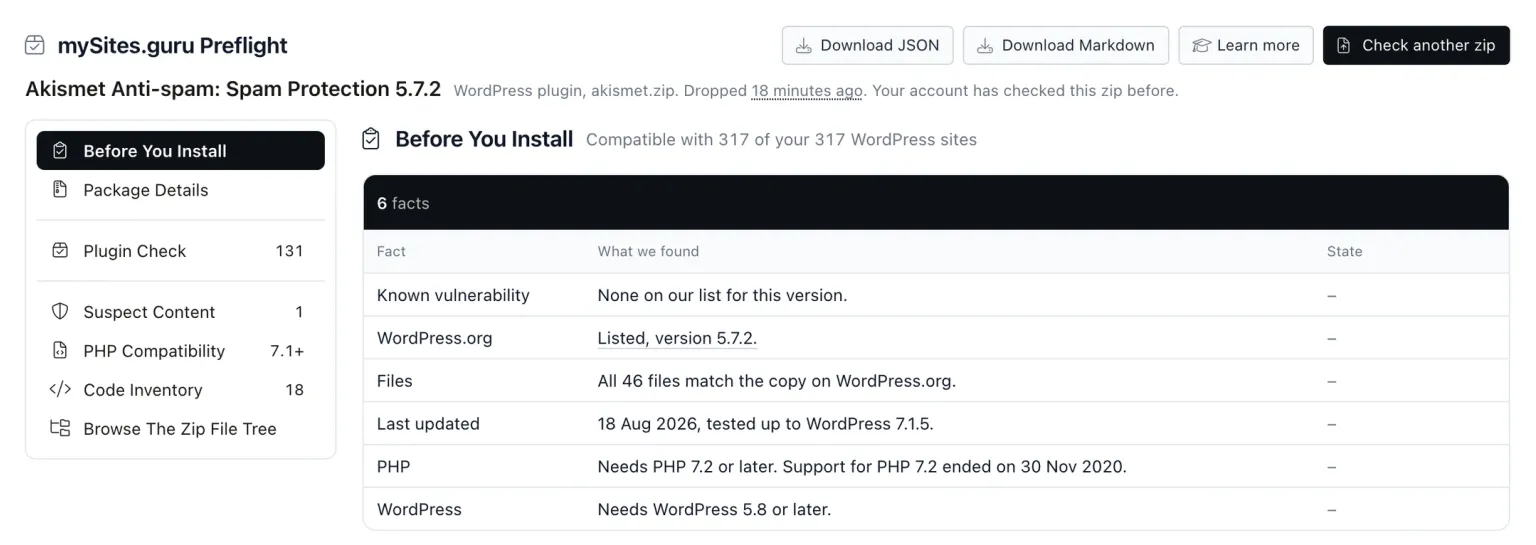
Because it is worked out on every visit, a report you open next week reflects next week’s vulnerability data and next week’s sites.
What WordPress.org says about a plugin
For a WordPress plugin, Preflight also asks WordPress.org whether the plugin is listed or closed, and when it was last updated. A closed plugin matters: WordPress.org shows a notice on closed plugins, and “Security Issue” is one of the listed reasons. A plugin not updated in two years or more is flagged for you to look at, though an old plugin can still be a good one.
Preflight then compares every file in the zip with the checksums WordPress.org publishes for that version, and lists the files that differ, are added or are missing. A match reads “matches the copy on WordPress.org”. It is the idea behind WP-CLI’s verify-checksums command, applied before the plugin is installed anywhere, and close kin to comparing core files with the originals on a live site.
For a theme, only the listing is asked. Joomla has no equivalent list to ask.
Every Remote Install Gets a Preflight Check
Remote Install is the mySites.guru tool that installs one zip on many sites, and it now runs Preflight on every Joomla or WordPress zip at step 2. A “mySites.guru Preflight Checks” table sits above the site list, so the report is in front of you before you choose where the zip goes.
The table shows the official checker’s errors and warnings, Files to review, PHP Compatibility, and the minimum PHP and Joomla or WordPress the zip declares. Each row has a View button into the full report.
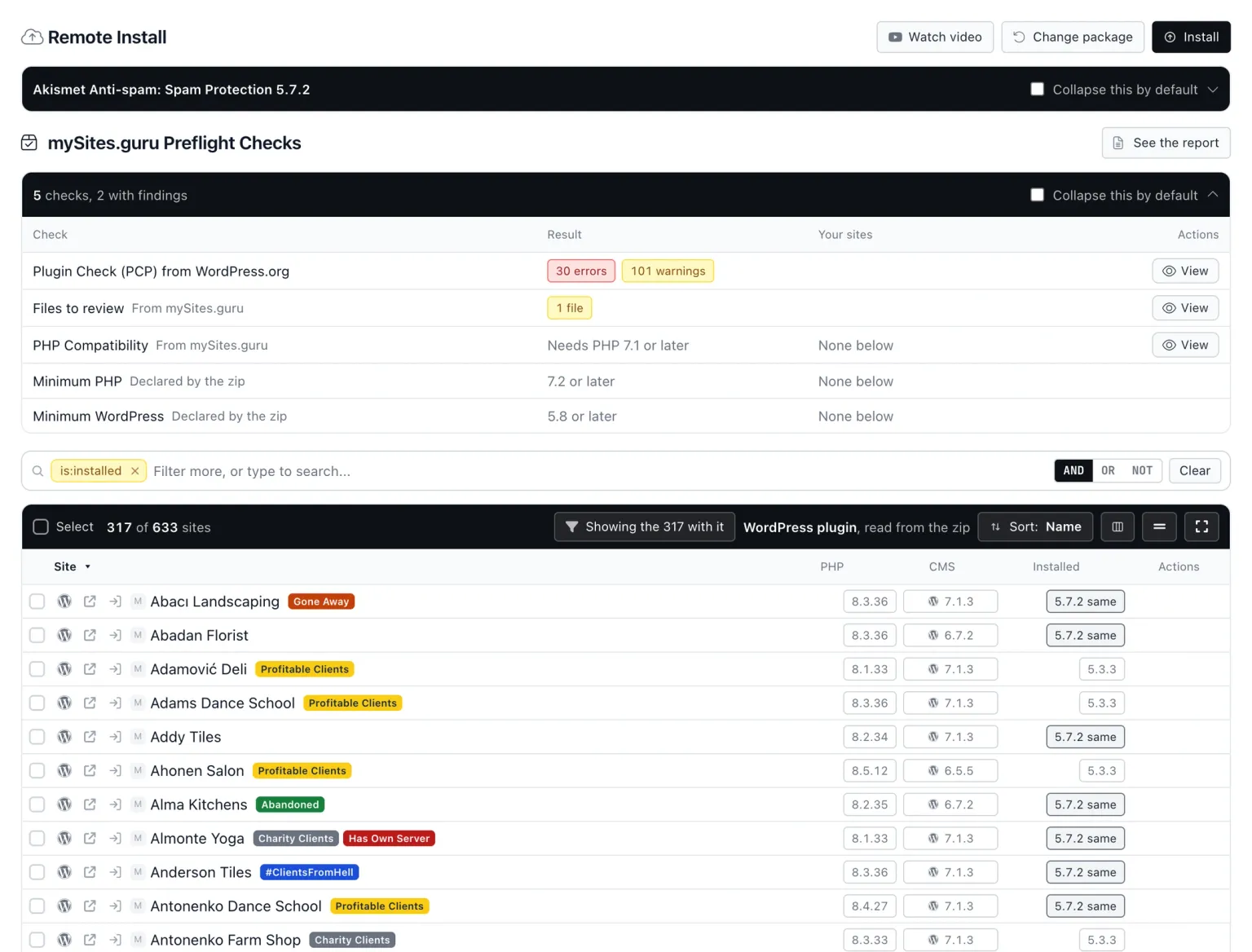
It also acts on what it finds. Sites on a PHP older than the code needs, or on a Joomla or WordPress older than the zip asks for, are blocked from the install. Install anyway unblocks them, because you may know something the check does not.
A known vulnerability or a closed WordPress.org listing is a warning at this step and blocks nothing. The check never holds up an install, and you can switch it off in your account preferences. If you would rather no one installed anything on a site without you, you can lock installs on client sites as well.
For Joomla Extension and WordPress Plugin Developers
If you build extensions or plugins, Preflight runs the official checker for your platform on your own package before you submit it anywhere. Drop your next build of the same package and the report shows which findings are new, which are still there and which you fixed.
Since 1 October 2024 a new WordPress.org plugin submission is first run through Plugin Check (PCP) from WordPress.org, and an error-level item blocks it. On the Joomla side, the Joomla Community Magazine explained in September 2024 how developers can run The Official Joomla Project JED Checker on an extension before submitting it to the JED.
Preflight runs those same releases, unmodified, and each finding keeps the wording its checker gave it. The whole report downloads as JSON or Markdown, which makes it easy to attach to a ticket or keep beside a release.
Our own views are worth a look before you ship too. Code Inventory is where you find the .env file, the source maps and the node_modules folder that were never meant to be in the release zip.
What a Preflight Report Does Not Prove
A Preflight report tells you what the checkers and our patterns found by reading the zip. It cannot tell you what the code will do at run time on a date in the future, and it does not decide for you. Read it as evidence, alongside who sent you the zip and why.
Zips from sources people trusted have been wrong before. In July 2025 the Gravity Forms team reported that manual-download packages of 2.9.11.1 and 2.9.12 from their own site had been modified to give attackers access. In June 2024, five WordPress.org committer accounts were taken over through reused passwords and malicious updates went out to five plugins. Back in November 2014, pirated Joomla, WordPress and Drupal themes and plugins came with the CryptoPHP backdoor inside them.
Preflight might not have flagged any of those, because pattern matching may or may not flag such code. We have written up a malicious release pushed through a vendor’s own update server and plugins backdoored after being sold to a new owner, and in both, code written to look ordinary can read as ordinary.
The same caution runs the other way. A long list of findings is a list of things to read, and it will often include rule findings and legitimate code that matches a pattern.
A Preflight report is not a verdict. It is evidence to read. What Preflight changes is how long the reading takes: the files to open first are listed, the line is one click away, and the questions about your own sites are already answered.
mySites.guru is not affiliated with the Joomla project, the JED or WordPress.org, and a Preflight report is not a review by the JED or by the WordPress.org plugins team. If you disagree with an official finding, take it to the project that made the checker.
Deep Security Audit for WordPress & JoomlaRead the full post
How Your Joomla or WordPress Zip Is Handled
Your zip is screened, read and stored, and never run. Each checker works in its own container with no route out to the internet. The zip is kept for 30 days and the report for 90 days after it was last read. Only someone holding the same zip can get that report.
The screening comes first. Before any checker sees a zip, Preflight rejects paths that climb out of the zip, links, password-protected files, and zips that unpack to far more than their size.
The zip is kept where Remote Install keeps its packages, at an address with a long random name that is not shown to anyone. You and your account owner can open its files from the report for a day.
The report is stored against a SHA-256 fingerprint of the zip. Drop the same zip again and the answer comes back at once, which is why a zip checked before usually needs no waiting. Your file name stays with your account.
For a WordPress zip, the question Preflight asks WordPress.org about the listing and checksums sends only the folder name and the version. Nothing about you or your sites goes with it.
Why We Built It
I started mySites.guru in 2012 as the Joomla Health Checker, and for 14 years we have audited what is already on a site, across 1,000,000+ site audits. With Preflight we point the same pattern library and the same site data at the zip, one step earlier, before it is installed anywhere.
The timing was a happy accident. The Official Joomla Project JED Checker 3.1.0 for Joomla 6 was released on 25 November 2026, the same day Preflight was finished, and Preflight runs it. Next time someone gives you a zip, drop it into Preflight before it goes near a client site.
Further Reading
- JED Checker on GitHub - the source of The Official Joomla Project JED Checker, with its releases
- JED submission error codes - what each Joomla Extensions Directory code means
- Plugin Check (PCP) on WordPress.org - the plugin page for the WordPress.org checker
- Plugin Check and 2FA now mandatory for new plugin submissions - the WordPress.org plugins team on how submissions are checked
- wp plugin verify-checksums - the WP-CLI command that verifies plugin files against WordPress.org checksums
Frequently Asked Questions
How do I check a WordPress plugin zip before installing it?
Can I run Plugin Check without a WordPress site?
Which JED Checker version should I use for a Joomla 6 extension?
Does a report with no findings mean the plugin is fine to install?
Can I check a WordPress theme zip?
What happens to the zip I upload?
 Written and edited by a human, with AI assistance. Our approach to AI