Know What Is in a Plugin Before You Install It
Drop a Joomla extension, WordPress plugin or WordPress theme zip into mySites.guru Preflight and read a report on it first. Nothing is installed and nothing in the zip is ever run.
One free audit of one site · no card · about 2 minutes to connect
More short films show the rest of mySites.guru.
Transcript
You're about to install this zip on client sites. Do you know what is in it?
Meet Preflight, in mySites.guru. Drop the zip. Nothing gets installed. It runs The Official Joomla Project JED Checker, or Plugin Check (PCP) from WordPress.org, unmodified.
Then our own checks: files to review, and the lowest PHP it runs on. A code inventory, web addresses to possible secrets, and every file.
Known vulnerabilities in that version. A newer one. How many of your sites can take it. For WordPress, whether the files match the copy on WordPress.org.
Remote Install checks every zip, and blocks sites too old for it, unless you choose Install anyway. Know what is in the zip before you install it. Preflight, in mySites.guru.
Three sources, one report
Preflight reads the zip before anything is installed, and puts three kinds of evidence in one place.
| Source | What it is | What it tells you |
|---|---|---|
| The platform's official checker | The Official Joomla Project JED Checker, or Plugin Check (PCP) from WordPress.org, run unmodified | How the zip measures against that directory's own rules |
| Our own analysis | mySites.guru reading every file in the zip | Suspect pattern matches, the PHP it needs and what is bundled inside |
| Your site data | What mySites.guru already holds about your connected sites | Known vulnerabilities, newer versions and which of your sites can run it |
The three stay apart in the report, each under its own entry in the left menu, so you can always tell who said what. Our own matches are never counted with the official findings.
Before any checker sees a zip, it is screened. Paths that climb out of the zip, links, password-protected files and zips that unpack to far more than their size are rejected. Each checker then runs in its own container with no route out to the internet.
The official checker for the platform, run unmodified
Each checker tests a package against the rules of its own directory: the Joomla Extensions Directory for one, the WordPress.org plugin directory for the other. Preflight runs the one that matches your zip, as its project released it.
A Joomla extension zip
- The Official Joomla Project JED Checker reads it twice: release 2.4.4 for Joomla 3, 4 and 5 extensions and release 3.1.0 for Joomla 6 onwards.
- A zip that supports both is worth reading in both.
- Each release has a time limit of 55 seconds.
A WordPress plugin zip
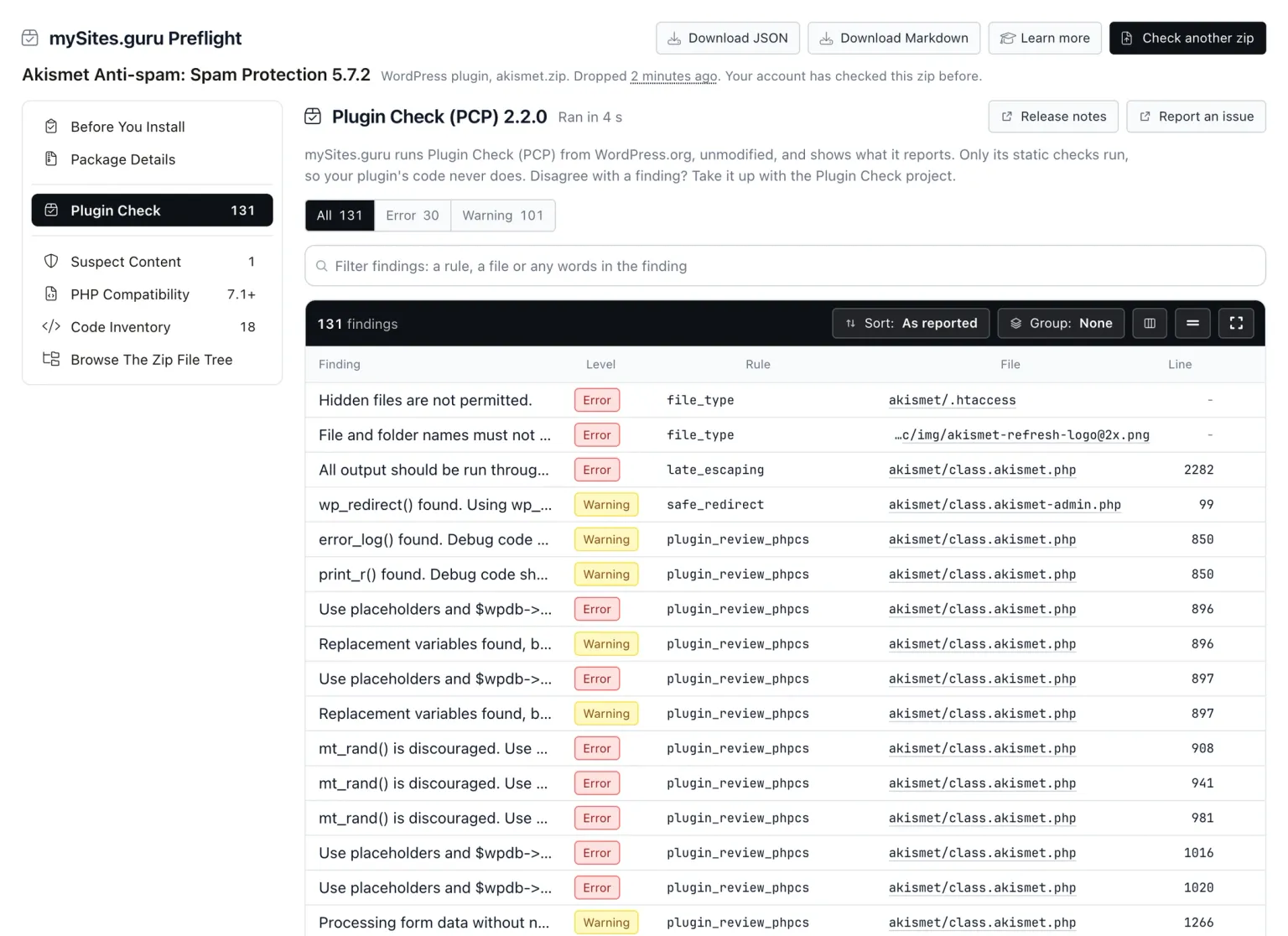
- Plugin Check (PCP) from WordPress.org reads it, in release 2.2.0, with its 31 static checks.
- Its runtime checks are left out, because they switch the plugin on and execute its code.
- The time limit is 100 seconds, and if a check runs out of time on a very large plugin the report names it.
Each finding keeps the wording, level and line number its checker gave it. Filter by level, or click a file name to read that file from the zip, opened at the line the finding names. A WordPress theme gets no official report, because Plugin Check covers plugins only, and it still gets all of our own checks.
Our own reading of the code
Beside the official report, mySites.guru reads the zip itself. Its views sit in the same left menu, each with a count of what it found.
- Suspect Content lists the files with PHP in them that match one of the roughly 1,500 suspect patterns mySites.guru audits use, with the lines that matched one click away.
- PHP Compatibility works out the oldest PHP version that can compile the code, shown as for example "Needs PHP 7.4 or later", with the files, lines and syntax that set it.
- Code Inventory groups what is inside: bundled libraries with their versions, files left in by mistake such as
.gitfolders and SQL dumps, possible secrets, and the web addresses, REST routes, scheduled events and database tables the code names. - Browse The Zip File Tree shows every file as a tree, opens a zip inside the zip like a folder, and lets you read any text file.
A match in Suspect Content is often legitimate code, which is why it opens the lines for you to read. A possible secret only ever shows its first four characters, and it can be a test value, so open the file to see.
If the package is your own, drop your next build of it and the report shows which findings are new, which are still there and which you fixed. The whole report downloads as JSON or Markdown.
What mySites.guru already knows about your sites
A checker can tell you about the zip. It cannot tell you about the sites the zip is going onto. The Before You Install view is worked out each time you open the report, from data mySites.guru holds.
- A known vulnerability in that exact version is shown, from the same data behind mySites.guru vulnerability alerts.
- A newer version is pointed out when one exists.
- Your connected sites are counted by whether they have the PHP and the Joomla or WordPress version the zip needs.
A WordPress plugin is compared with the copy on WordPress.org
Preflight asks WordPress.org whether the plugin is listed or closed and when it was last updated, then compares every file in the zip with WordPress.org's published checksums for that version. Files that differ, are added or are missing are listed. When nothing differs the report reads "matches the copy on WordPress.org".
A plugin not updated in two years or more is flagged for you to look at, and an old plugin can still be a good one. Only the folder name and version are sent to WordPress.org, nothing about you or your sites.
Joomla has no equivalent list to ask, so a Joomla zip gets the first three answers only.
The same check, wired into Remote Install
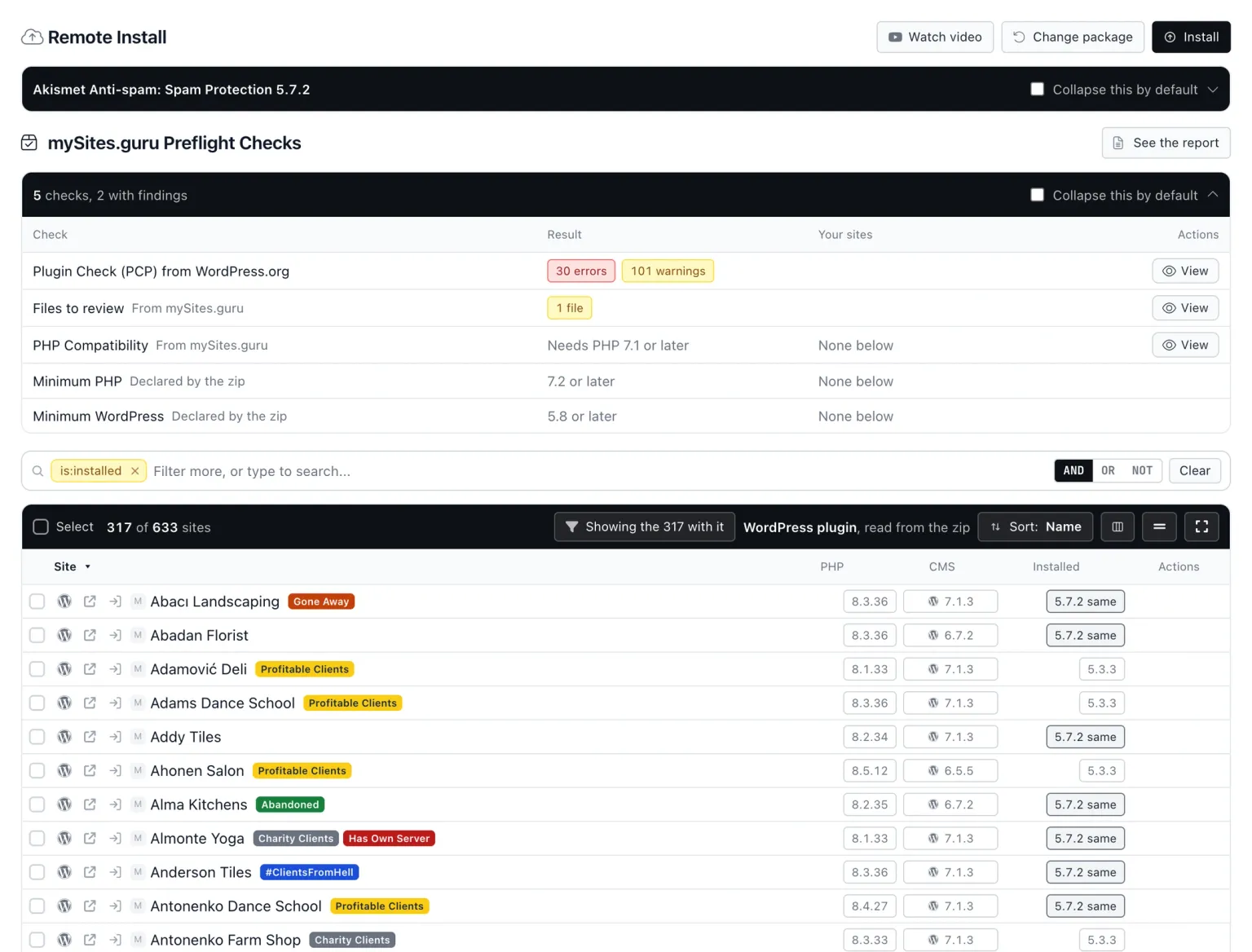
Remote Install puts one zip on many sites, so it runs Preflight on every Joomla or WordPress zip at step 2, without being asked.
A mySites.guru Preflight Checks table sits above the site list: the official checker's errors and warnings, Files to review, PHP Compatibility, and the minimum PHP and Joomla or WordPress the zip declares, each with a View button into the full report.
Blocks a site from the install
- A site on a PHP older than the code needs is blocked.
- A site on a Joomla or WordPress older than the zip asks for is blocked.
- "Install anyway" unblocks those sites.
Warns and blocks nothing
- A known vulnerability in that version is a warning.
- A closed WordPress.org listing is a warning.
- The check never holds up an install, and it can be switched off in account preferences.
What a Preflight report does not prove
A report is evidence to read, and the verdict is yours. Preflight reads code without running it, so it cannot see what that code will do at run time, and a zip from a source you trust can still be wrong. Pattern matching may or may not flag code that was written to look ordinary. Preflight makes the reading fast and leaves the reading to you.
mySites.guru is not affiliated with the Joomla project, the JED or WordPress.org. A Preflight report is not a review by the JED or by the WordPress.org plugins team. If you disagree with an official finding, take it to the project that made the checker.
Your zip is kept for 30 days where Remote Install keeps its packages, at an address with a long random name that is not shown to anyone. The report is kept for 90 days after it was last read, against a SHA-256 fingerprint of the zip, so dropping the same zip again answers at once, and only someone with the same zip gets that report. Your file name stays with your account.
Included for subscribers and trial users
Preflight is available to active subscribers and trial users, on every paid plan from the £5/month single-site plan to £19.99/month for unlimited sites.
The same plan covers the rest of mySites.guru: vulnerability alerts, bulk updates and scheduled backups. See pricing for the details.
What our users say


Hover to read their thoughts, or view all reviews
Common questions
Is anything in the zip installed or run?
How do I open Preflight?
Can I check a WordPress theme zip?
Does a report with no findings mean the zip is fine to install?
What does Preflight cost?
More ways mySites.guru protects your sites
Joomla Vulnerability Scanner
Know which sites run a vulnerable extension
WordPress Vulnerability Scanner
Alerts for every WordPress plugin and theme
Bulk Update Joomla
Patch core and extensions across every site
Bulk Update WordPress
Update plugins, themes and core across every site
Uptime Monitoring
Checks every 5 minutes, alerts when a site goes down
Website Backups
Scheduled Akeeba backups for every site
Start with one site
Run your free audit first. Preflight is there for subscribers and trial users the next time someone hands you a zip.
Get Your Free Site AuditOne free audit of one site · no card · about 2 minutes to connect