How mySites.guru Helps Agencies Firefight PHP2Shell at Scale

That dog is every agency owner on the morning of 21 October 2026, coffee in hand, scrolling a sites list. (The meme is KC Green’s, and it has never been more accurate.) PHP had just published 8.5.12, 8.4.27, 8.3.36 and 8.2.35, fixing CVE-2026-109618 and CVE-2026-109619: two unauthenticated remote code execution flaws, both rated CVSS v4.0 9.2, which the press and security vendors have since named PHP2Shell. PHP’s own position is that updating is the only safe choice.
What the two flaws are and which server setups are most exposed is in our post on PHP’s critical security release, so I will not repeat it here. This post is about the other problem, the one that only shows up when you look after other people’s sites in bulk.
On almost all Joomla and WordPress hosting, the host installs and updates PHP. You cannot patch it yourself, and your control panel only offers the versions the host has installed. For one site that is one support ticket. For an agency it is dozens of tickets to different companies, each about a different set of sites, each with a different idea of what “soon” means. Across the accounts that manage 20 or more live sites with us, the median number of different servers those sites run on is 11. The fire is spread across eleven buildings, and most of them have a different landlord.
Accounts managing 20 or more live sites run them on a median of 11 different servers, each one a separate host conversation.
So the question for an agency is operational rather than technical: which of my sites, on which servers, at which hosts, are still exposed, who do I chase, how do I know when they are done, and what do I do about the hosts that patched but kept the old version number? Everything below is how mySites.guru answers each of those in turn.
TL;DR
- Every site’s PHP pill goes red when the version it reports is at or below 8.2.34, 8.3.35, 8.4.26 or 8.5.11, or on 8.1 and older. A dashboard banner, a Needs Attention row and the
php-securitysearch token give you the affected list in one click. - Every site reports the server hostname it runs on, so
hostname:<server>turns a pile of red sites into one ticket per host. - Each affected site’s Important card has a ready-written request for the host under “Copy request for your host”, and clears itself at the first snapshot after PHP is updated.
- The explainer page groups your affected sites by PHP branch, shows a progress bar, and checks php.net hourly for “Is the fix out yet?”.
- Hosts on CloudLinux and Ubuntu back-port the fix without changing the version number. A back-port declaration records the host’s word, with who and when, and turns the pill back to its normal colour with a shield. It is a claim, not proof: only PHP’s official releases are definitively fixed.
- PHP 8.1 and older stay red whatever the host says, because they are end of life. The fix there is a move to 8.3 or newer.
Every Affected Site on One Screen
mySites.guru records the PHP version each site reports while serving a request, at every snapshot. php -v on the command line and the build serving your pages are often two different installs, and the one you care about this week is the one answering web requests.
For this release the PHP version pill turns red at or below 8.2.34, 8.3.35, 8.4.26 or 8.5.11, and for every version on 8.1 and older. Anything after the first dash in the version string (-nmm1, -bookworm.0) is ignored, so a packager’s suffix does not hide a vulnerable number or invent a fixed one. The pill is the same one that normally shows amber or green depending on how far a site is behind php.net, and it appears on the sites list, the site header, the site picker, the core upgrade tool and client reports.
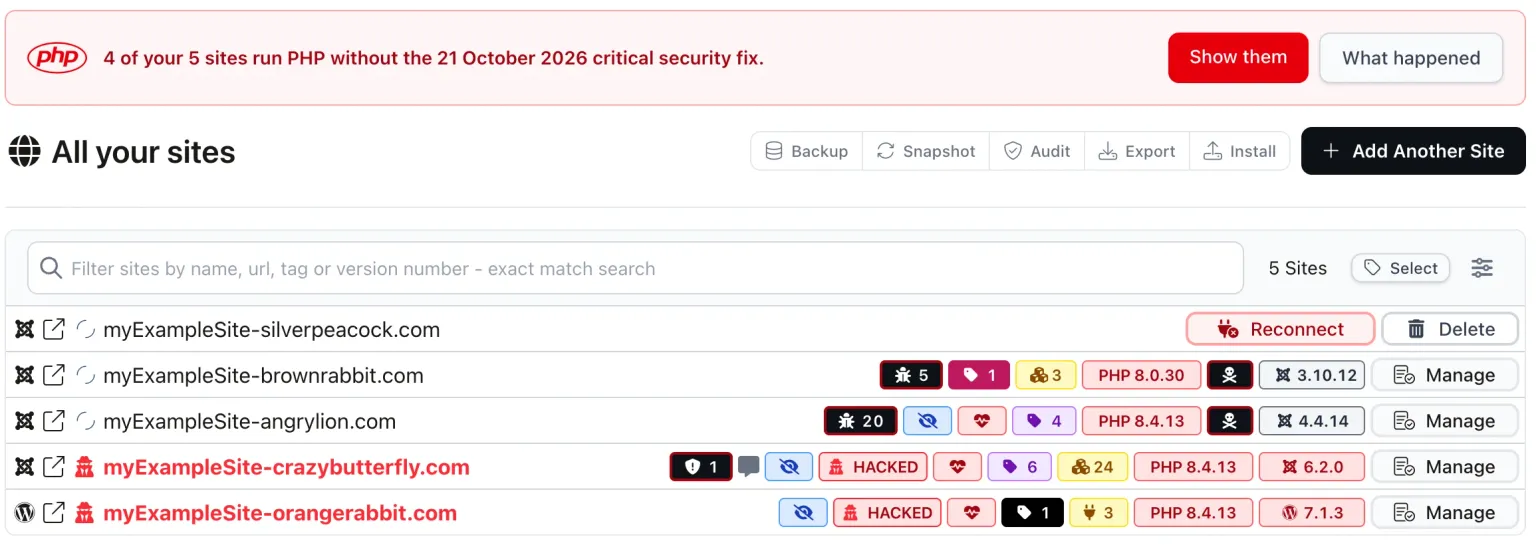
Above the list sits a banner, shown only while you have at least one affected site and only until 21 December 2026: “4 of your 5 sites run PHP without the 21 October 2026 critical security fix.” Its “Show them” button filters the list down to those sites, and “What happened” opens the explainer page covered below.
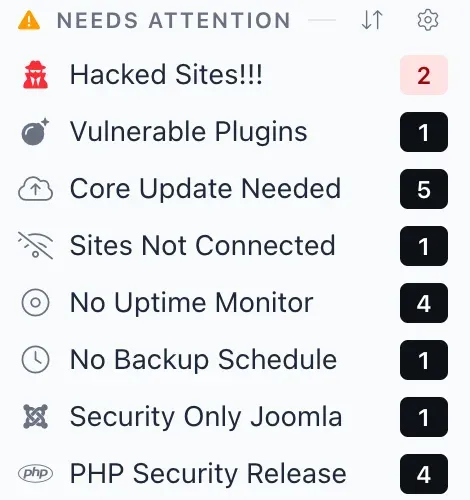
The left menu’s Needs Attention group gets a “PHP Security Release” row with a count, which you can hide like any other row once you are on top of it. And if you prefer the search box, the token php-security finds every affected site, while php-backported finds the ones covered by a back-port declaration.

The snapshot row “PHP Version Should Be Latest Supported Series” goes red for the same versions, so the result reaches anyone reading the snapshot rather than the sites list.
Sorting the Fire by Host and Server
A list of forty red sites is a list. The same forty sites grouped by the server they sit on is a to-do list, usually a much shorter one, because a host that updates PHP on a server fixes every site on it at once.
Each site reports the hostname of the server it runs on, and mySites.guru uses that in three places. The site header has a hostname badge that links to every site on that server. The “Your Web Servers” page lists all of your servers so you can see the spread at a glance. And on the sites list, the search token hostname:<server> filters to one server, which combined with the red pills tells you in a second whether a host has done that box yet.
This is the step that turns a fire across eleven servers into eleven conversations, each with one list of sites attached. If you tag your sites by client or server already, the tags do the same job for hosts whose servers do not report a helpful hostname, and for the client-facing side, where “which of your sites are affected” is the question you will be asked.
The Spreadsheet Does Not Know What Your Host Did Overnight
Plenty of agencies keep a spreadsheet of client sites: domain, host, CMS, and a PHP version someone typed in at launch or after the last migration. It feels like an inventory until the day you need it, because the one thing that changes most on a hosted site is the thing you do not change yourself. The host upgrades PHP on its own schedule, moves accounts to a new server, switches a site to a newer branch when the old one goes end of life, and back-ports a fix overnight, usually without a word to you. None of that touches a cell in your sheet.
So on release day the PHP column is only as current as the last time someone edited it, and it cannot tell you which sites the host already patched that morning. You end up checking every site by hand to find out whether the sheet is lying.
mySites.guru reads the PHP version and the server hostname from each site at every snapshot, so the list you filter on release day is what the sites reported, not what somebody remembered to write down. And it keeps moving while you work: the host patches a server, the next snapshot reports the fixed build, and those sites drop off the list on their own. When the host does the work for you, the dashboard notices.
Most of This Is in Your Host’s Hands
An agency cannot patch PHP it does not run
Almost every agency hosts client sites on servers someone else operates: shared hosting, reseller accounts, a managed VPS, the client’s own provider. The PHP build on those servers is the host’s to choose, compile and update. Your control panel offers the versions the host has installed, and nothing else, so the speed of the fix is the speed of each host.
It is rare, though not unheard of, for an agency to run its own servers with someone in house who can compile a specific PHP build and roll it out the same afternoon. We are in that position for mySites.guru itself, because I build the PHP images our own platform runs on. Most agencies are not, and should not need to be. For everyone else there is a lot of reliance on web hosts doing the right thing, and doing it quickly.
Some hosts were quick. The first sites we monitor reported a fixed version about fifty minutes before PHP’s advisories went public, because hosts and packagers who were told in advance had their builds ready. Others have not fared so well. Across the servers running sites on PHP 8.2 to 8.5 that we have snapshotted since the advisories went out:
Part of that 36.8% is CloudLinux and Ubuntu servers that are patched under an old version number, which is the case back-port declarations exist for, covered below. The rest are hosts that have not got there yet, and those are the conversations to start today.
A Ticket for Your Host, Already Written
Each affected site gets a card on its Important tab, and the tab opens by default while the card applies. The card is titled with the specific problem, “PHP 8.4.13 has two critical security flaws”, says which fixed release to ask for, and has three buttons: “What happened” for the explainer page, “Copy request for your host”, and “Check again”.
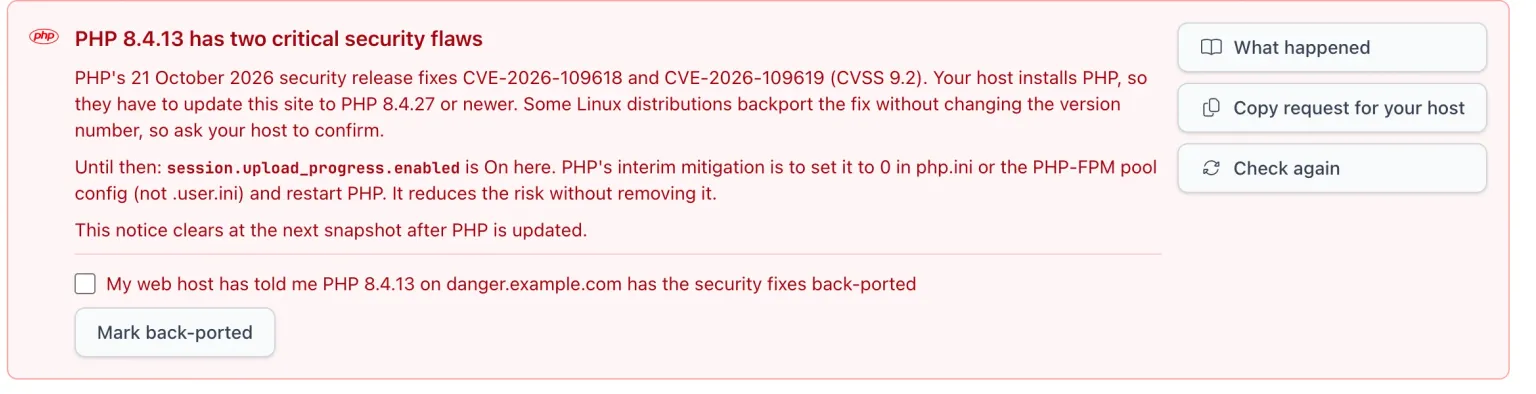
“Copy request for your host” puts a finished ticket on your clipboard, with the site, the server and the version already filled in. This is the one from a test site:
Hello, the website https://myExampleSite-smallsnake.com runs PHP 8.4.13 on panasoni.example.com.

PHP published a critical security release on 21 October 2026 (CVE-2026-109618 and CVE-2026-109619). Please update PHP 8.4 on this server to 8.4.27 or newer, or confirm that your distribution package includes the backported fix, and let me know when it is done. If the fix is back-ported into the current build without a version change, please say so in your reply.

Thank you.
The last sentence is there on purpose, and it is the reason the back-port section further down works. Hosts that back-port rarely volunteer it unless asked, and you want their answer in writing.
“Check again” takes a fresh snapshot, so when the host replies “done” you can confirm it straight away rather than waiting for the next scheduled run. The card cannot be dismissed. It clears itself at the first snapshot after PHP is updated, which means a card you can still see is a site that is still exposed, with no way to tidy it out of sight and forget it. For a site on end-of-life PHP the card says there is no official fix and asks the host to make PHP 8.3 or newer available instead.
How Do You Know When a Host Has Finished?
The explainer page at manage.mysites.guru/en/help/php-security-release (you need to be signed in) lists only your affected sites, grouped by PHP branch with the newest branch first, each group headed by what to ask for: “PHP 8.4: ask your host for 8.4.27 or newer.” Paused sites are left out, and a site drops off the list at its first snapshot after its host updates PHP, so the page gets shorter as the week goes on.
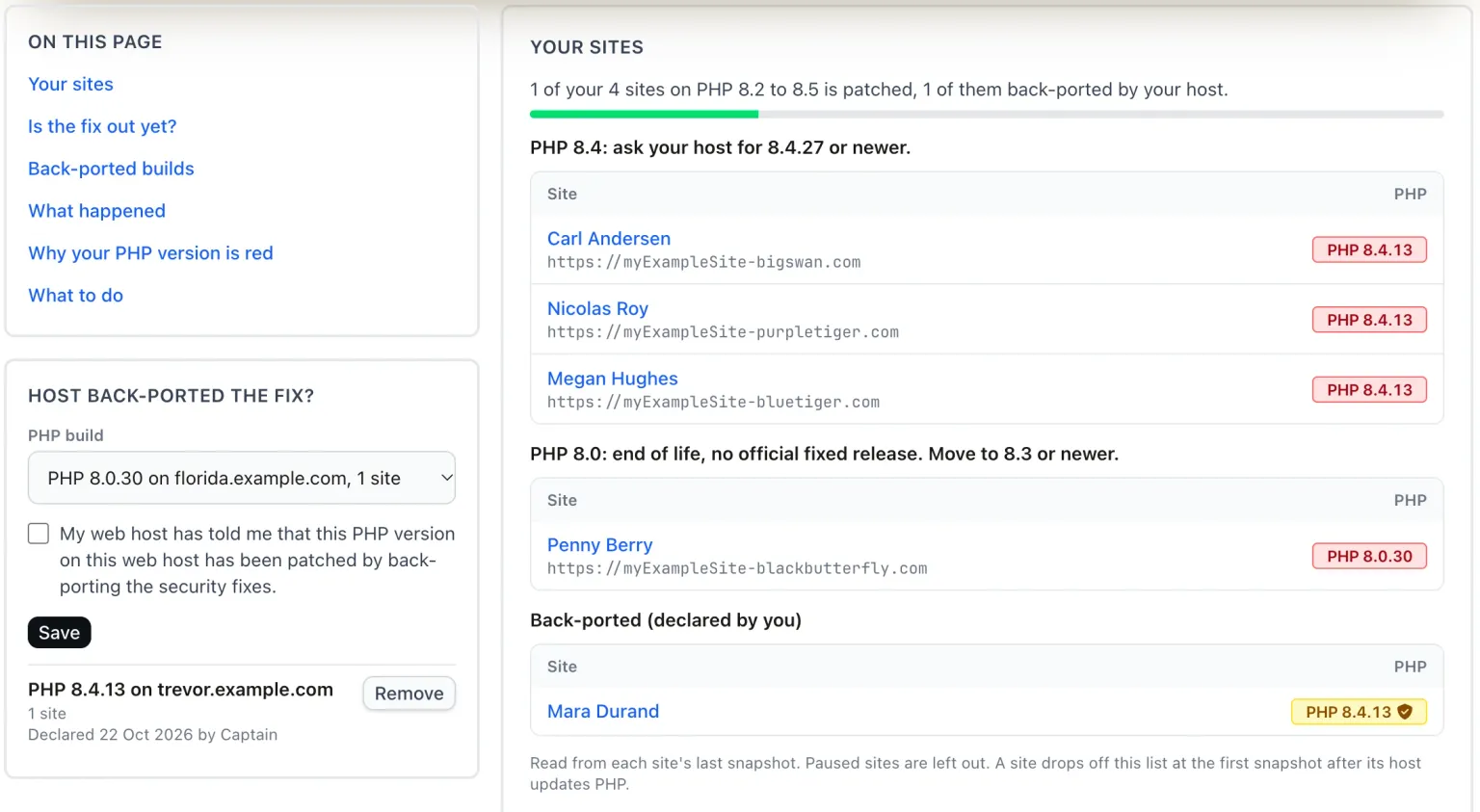
At the top is a progress line and bar, “1 of your 4 sites on PHP 8.2 to 8.5 is patched, 1 of them back-ported by your host.”, which is the number you will be asked for in the Monday stand-up. Below the sites is an “Is the fix out yet?” table, one row per branch, fed from our php.net feed and checked every hour, so a host telling you “the release is not out yet for 8.3” can be checked against the source without leaving the page. The page also explains why a version is red and what to do about it, and it is in Cmd+K and Browse All Tools, so you can reach it from anywhere.
For the wider picture, this is the same view across every site we monitor, the morning after the release.
45.0% of affected sites were fixed the morning after the release.
- Patched 44.5%, official release installed
- Back‑ported 0.5%, declared on the host's word
- Unpatched 34.2%, fix out, host has not applied it
- End of life 20.8%, 8.1 and older, no official fix
Hosts are not moving at one speed. On the supported branches, 67.3% of sites on PHP 8.5 are fixed against 53.2% on PHP 8.3, the branch most sites sit on, with 8.4 at 56.7% and 8.2 at 56.2%. WordPress sites are slightly ahead of Joomla sites, 48.6% fixed against 43.9%, largely because more Joomla sites are on end-of-life PHP. And the end-of-life branches are fixed on about 0.9% of their sites, every one of them a host back-port a customer has declared, because there is no release for those branches to install.
The 34.2% in amber is the work in front of you: sites whose host has a fixed release available and has not applied it yet. Some of that amber is not real, which brings us to the part of this release that has caused the most confusion.
What If the Host Patched but the Version Number Did Not Move?
A version check works when the fix arrives as a new version number. On CloudLinux and Ubuntu packages it does not. CloudLinux says so directly for the ea-php packages that cPanel servers running CloudLinux use: “Our packages carry the fix as a backport, so their version numbers stay below PHP’s: ea-php84, for example, is 8.4.26, not 8.4.27.” Its advice is to look for the CVE IDs in the package changelog instead:
rpm -q ea-php84-php-cli --changelog | grep -E 'CVE-2026-(109618|109619)'CloudLinux has fixed ea-php52 through ea-php85 on CloudLinux 7, 8, 9 and 10, and alt-php 5.2 to 8.5 on CloudLinux 7, 8 and 9. Ubuntu does the same: 24.04’s php8.3 is fixed in 8.3.6-0ubuntu0.24.04.13 and 22.04’s php8.1 in 8.1.2-1ubuntu2.28 (USN-8948-1 and USN-8948-2), so a fully patched Ubuntu 24.04 site still reports 8.3.6 and shows red. Debian went the other way and ships the new upstream numbers, bookworm’s php8.2 as 8.2.35-1~deb12u1 (DLA-4848-1) and trixie’s php8.4 as 8.4.27-1~deb13u1 (DSA-6574-1), so on Debian the version check simply works.
We could not fix this with a cleverer rule, because the version string a back-ported build reports is identical to the vulnerable one. Nothing in the site’s report tells the two apart. The only party who knows is the host.
A back-port declaration is your host's word, not proof
There is no way to see what a host’s custom build contains, or whether the patches were applied correctly. Only PHP’s official releases, 8.5.12, 8.4.27, 8.3.36 and 8.2.35, are the definitive fixed versions, tested by the whole PHP community. A declaration records that your host told you otherwise, with who recorded it and when.
So on 22 October we added back-port declarations. On the explainer page there is a “Host back-ported the fix?” card. You pick a PHP build from a list of your own affected builds (the PHP version on a given web host, with site counts, most sites first), tick “My web host has told me that this PHP version on this web host has been patched by back-porting the security fixes.”, and Save. Or, on a single site, tick the box under the Important card and press “Mark back-ported”. The card then lists your declarations with how many sites each covers and “Declared 22 Oct 2026 by” whoever did it, with a Remove button; the success message has an Undo. Every change is written to the activity log.
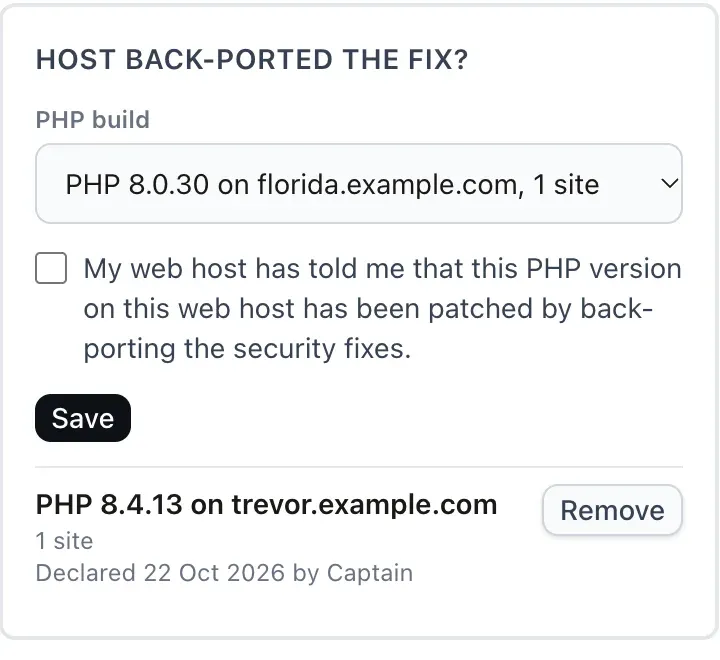
A declaration matches on the exact PHP version string the site reports plus the server hostname, within your account only, and your team members share it. The account scope is a safety decision rather than a limitation: short server hostnames like “www” or “web-01” repeat across unrelated customers, and one agency’s word about its host must never flip a different agency’s sites to green. If the host later changes the build, say to 8.4.27 proper, the declaration stops matching on its own and the card shows “No site reports this any more”, so a stale declaration cannot outlive the build it described.

What changes once a declaration is in place: the PHP pill gets a shield icon and goes back to its normal colour, green if the build is current or amber if it is behind php.net’s latest, with the tooltip “Your host says the 21 Oct 2026 fix is back-ported into this build. Declared 22 Oct 2026 by Captain.” The site leaves the affected list, the Important card, the banner and the Needs Attention counts, the reports, the snapshot rows and the upgrade warning, and the API reports backported. On the explainer page it moves to a “Back-ported (declared by you)” group, and the progress bar shows back-ported sites as a lighter segment, so you can always see how much of your “patched” is a vendor’s release and how much is a host’s promise. An admin looking at a customer’s account cannot make declarations for them.
My opinion on this, for what it is worth. A declaration is not evidence, and we do not pretend it is. You cannot inspect a host’s custom build from the outside: you do not know which patches went into it, whether they were applied cleanly, or whether anything else changed along the way. The official releases are the only versions the PHP project built, tested and published as fixed, and everyone who runs that version runs and scrutinises exactly the same code. A back-ported build has been tested by one vendor, at best. So treat the official version as the goal, and push your host to offer it even when they say the old build is patched.
Where a host insists it has back-ported the fix, get that in writing (the ticket text already asks), record it, and keep the declaration for what it is: a note of the host’s claim. The shield says “your host says”, the tooltip names the person on your team who recorded it, and the activity log has the rest. We added it because the alternative, a red pill that never goes away on a site the host swears is patched, trains everyone on your team to stop looking at red, which is the worst outcome a security dashboard can produce. It does not make the build as trustworthy as an official release, and nothing in mySites.guru claims it does.
Two known limits. A custom report template of your own keeps the old red unless it passes the site through, and a teammate’s Needs Attention count refreshes at their next sites-list load rather than instantly.
End-of-Life PHP Has No Number to Wait For
PHP 8.1 and older are end of life and got no official fixed release. php-src has source-only back-port branches for 7.4, 8.0 and 8.1, with no builds, which is nothing a shared host’s control panel can offer. The supported versions page shows what is still maintained; everything below 8.2 is not. On 20 October, 22.7% of the sites we monitor were on PHP 8.1 or older, and for those there is no release to wait for.
mySites.guru treats them accordingly. The pill is red on every 8.1-or-older version and its tooltip adds “No official fix for the 21 Oct 2026 PHP flaws.” The Important card says there is no official fix and asks the host to make PHP 8.3 or newer available. And a back-port declaration, even a true one from a vendor that did back-port into 8.0 or 8.1, does not turn the pill green: the critical-release warning goes, but the version stays red because it is still end of life. On the explainer page these sites sit under their own heading, “PHP 8.0: end of life, no official fixed release. Move to 8.3 or newer.”
A host’s back-port on an end-of-life branch closes this hole and leaves the next one open, because nothing upstream fixes that branch any more. Our post on end-of-life version support covers how mySites.guru flags end-of-life versions, and the sites on this list are the first clients to talk to about moving.
The Session Upload Progress Check
The snapshot check “PHP Session Upload Progress Setting” reports session.upload_progress.enabled for each site. It is read-only and reports what PHP says the value is. It does not make an unpatched site safe: the fix is the fixed PHP release from your host. If you are not sure which of our checks run on a snapshot and which need the full audit, snapshot vs audit has the breakdown.
Your Clients Have Never Heard of PHP2Shell
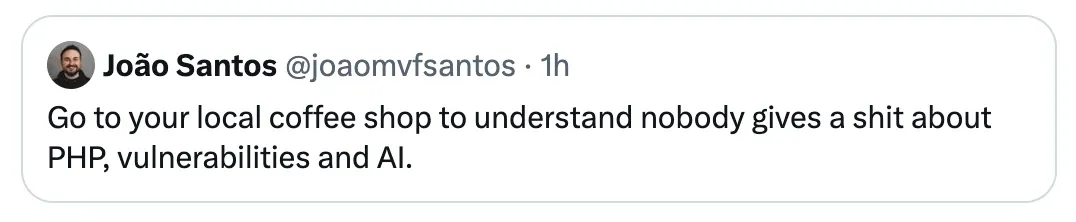
João Santos put it well the morning after the release: go to your local coffee shop and see how much anyone there cares about PHP, vulnerabilities and AI. He is right. We live and work in a PHP bubble. This week our feeds are wall-to-wall CVE numbers, CVSS scores and arguments about back-ports, and outside that bubble it is an ordinary Thursday.
Flo the Florist wants her orders to keep coming in. Bob the Builder wants the quote form on his site to keep sending him leads. Neither of them knows which PHP version their site runs, and neither should have to, because that is what they pay an agency for.
Most of them will never ask. A few will catch a headline about a “critical PHP flaw” on the news, or get a scary email forwarded by a nephew, and the next message in your inbox will be “are we affected?”. The agencies that come out of this week looking good are the ones that can answer in one line, the same day, instead of needing an afternoon to find out. Everything earlier in this post is about being able to send that line.
It also changes how you say it. Flo does not want CVE numbers, CloudLinux package names or the word “back-port”. She wants “we checked your site, your host has applied PHP’s security fix, there is nothing for you to do.” Keep the jargon on your side of the bubble, and keep the evidence somewhere you can find it if she, or her insurer, ever asks.
Reporting It to Clients (and Your Own Tools)
Clients will ask, and some will ask before you have finished the list. Client reports, both the in-app version and the emailed one, print a note under the PHP version for an affected site, so a report sent this week says the right thing without you editing it.
If you run your own dashboards or ticketing, the API and MCP site summary have a php_security_release field with four values: unpatched, eol, backported or null, and the first two count as an attention reason. That is enough to drive a Slack alert, a client status page or a weekly export from one API or MCP call for every site in your account. And when you just need the page in front of you, Cmd+K and type php: the explainer page is in there alongside the rest of the tools.
The fire is still burning on a fair share of hosting as I write this. What has changed since 21 October is that an agency no longer needs to log in to eleven control panels to find out where. Open the sites list, filter by host, send the tickets, record the back-ports, and watch the progress bar move. The dog can finish its coffee.
Further Reading
- Security advisory: Critical remote code execution vulnerabilities, update now - PHP's advisory for the 21 October 2026 release.
- PHP2Shell: PHP vulnerabilities patched - Help Net Security's report, with the name the industry settled on.
- CloudLinux on CVE-2026-109618 and CVE-2026-109619 - why ea-php and alt-php version numbers stay below PHP's, and how to check the changelog instead.
- PHP2Shell vulnerability fixes available - Ubuntu's fixed packages, which keep the old upstream version number.
- Debian security tracker: CVE-2026-109618 - Debian's fixed packages, which do ship the new upstream numbers.
- PHP: Supported Versions - which PHP branches still receive fixes.
- KC Green - the artist behind the This is fine dog, from Gunshow (2013).
To see every one of your client sites, its PHP version and whether it is patched, grouped by server, run a free audit. No credit card needed.
Frequently Asked Questions
How do I find every client site still running vulnerable PHP?
How do I group affected sites by web host or server?
My host says PHP is patched but the version number has not changed. What do I do?
Why does a back-ported end-of-life PHP version stay red?
Does mySites.guru report the session.upload_progress.enabled setting?
How does a site drop off the affected list once the host has patched?
Can I get the PHP security status into my own tooling or client reports?
 Written and edited by a human, with AI assistance. Our approach to AI