The PHP Project Advises Turning Off Session Upload Progress Until the Next Release
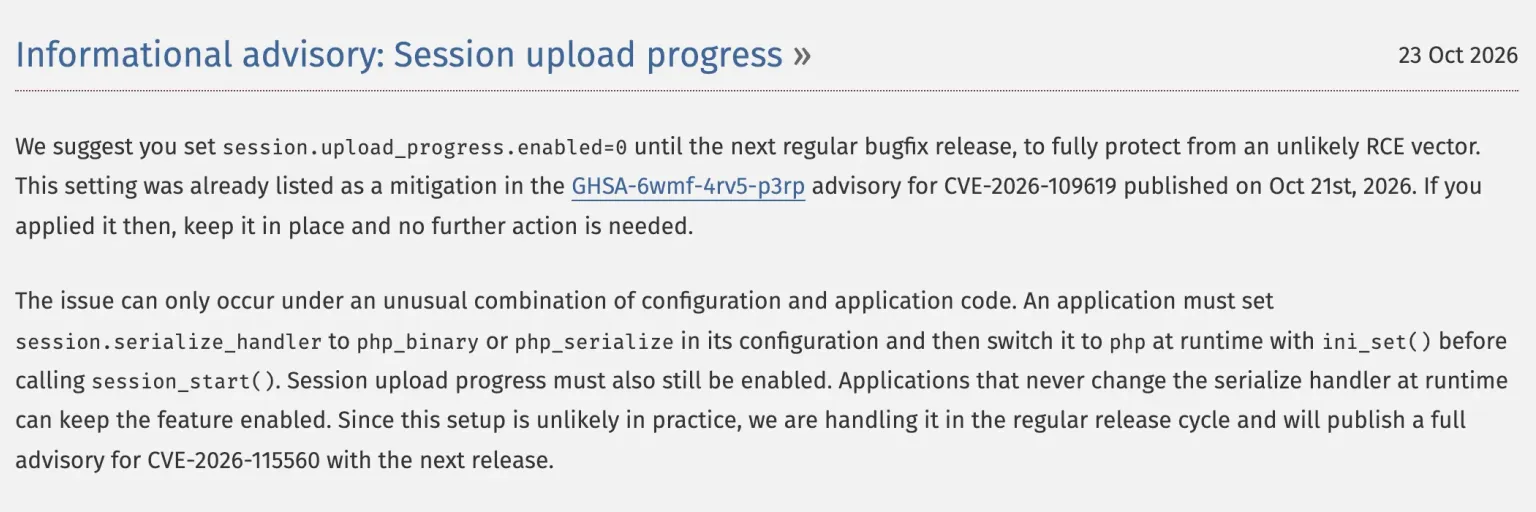
On 23 October 2026 the PHP project advised site owners to set session.upload_progress.enabled=0 until the next regular bugfix release, to fully protect against what it calls an “unlikely RCE vector”, tracked as CVE-2026-115560. The notice sits on the php.net homepage as an informational advisory, and it is separate from this week’s two critical PHP2Shell flaws, which were fixed on 21 October and need a PHP update, not a config change.
If you already set session.upload_progress.enabled=0 after the 21 October advisory, you are done: php.net says to keep it in place and that no further action is needed. If you did not, it is a one-line change to a PHP config file, and the rest of this post covers who actually needs it, where the line goes, and how to find the sites that still have the feature on.
What to do
Set session.upload_progress.enabled=0 in your PHP configuration. It is a config change, not a code change, and it cannot be done with ini_set(). If you applied it on 21 October for CVE-2026-109619, keep it and do nothing else. This does not replace updating PHP for the two critical flaws: only a patched PHP (8.5.12, 8.4.27, 8.3.36 or 8.2.35) fixes those.
Do You Need to Do Anything Right Now?
If you applied the session.upload_progress.enabled=0 mitigation on 21 October, no. If you did not, set it to 0 now and leave it there until the next PHP release. Most sites are not exploitable through CVE-2026-115560, because it needs an unusual configuration that stock Joomla and WordPress do not use, but PHP still recommends turning the feature off as a precaution.
The reason PHP can be this relaxed is in the advisory itself. The flaw “can only occur under an unusual combination of configuration and application code”, and because that setup is “unlikely in practice”, PHP is handling it in the regular release cycle rather than as an out-of-band security release. The full advisory for CVE-2026-115560 is due with the next release. Until then the CVE is assigned but not published, so there is no CVSS score, no description and no affected-version list to quote, and anyone quoting one is guessing.
This week has been loud enough for PHP site owners without a third alarm, and the honest description of this advisory is cheap belt-and-braces: a setting almost nobody uses, switched off until the fix is out.
How mySites.guru Shows Which Sites Have It On
At the start of this week, when disabling session upload progress was only a footnote mitigation in the GHSA-6wmf-4rv5-p3rp advisory for CVE-2026-109619, mySites.guru added a read-only check called PHP Session Upload Progress Setting. It records the value of session.upload_progress.enabled on every connected site at each snapshot, and snapshots run twice a day. It does not change the setting and cannot, because the directive is not writable at runtime. It just reports what each site has.
Two days later that boring inventory is the whole job. The 23 October advisory does not ask you to understand a vulnerability, it asks you to find every site where a particular ini value is still 1 and change it. After 15 years of looking after other people’s sites, that is the step where time goes: not the fix, which is one line, but the hunt across a dozen hosts, three control panels and a handful of sites nobody remembers the login for. If you already hold the list, the advisory is an afternoon. If you do not, you are logging in to each one to run phpinfo(). We wrote about the same problem at agency scale earlier this week, when the question was which PHP version each host was running.
mySites.guru now flags sites that still have session upload progress on, so the list is one screen rather than a spreadsheet you build by hand. Two caveats. First, a site showing the feature on is normal rather than a sign of compromise or a careless host, because it is the PHP default and almost nothing turns it off. Second, switching it off does not help an unpatched PHP against the PHP2Shell RCEs. The PHP version check and this check sit side by side for a reason, and the PHP version is the one that matters more.
See which sites still have session upload progress on
mySites.guru checks every connected site for this automatically and flags it the moment it appears. It runs on every snapshot, twice a day.
The check is part of the mySites.guru subscription alongside the PHP version, vulnerability and malware checks that have been doing the heavy lifting this week. If you want to see what it reports for one of your sites before paying anything, a free audit runs the same checks and shows you the result.
What Is PHP Session Upload Progress?
PHP session upload progress is a feature that records the progress of an in-flight file upload into the user’s $_SESSION, so a page can show an upload progress bar by polling with a separate AJAX request. It is controlled by session.upload_progress.enabled, which has been on by default since PHP 5.4, and it is documented in the PHP manual.
While an upload is in progress, PHP writes an entry into the session with the bytes received so far, the total expected, and the filename, and updates it as the upload continues. The application never has to opt in to any of this: if the setting is on and a form includes the right hidden field, the data appears in the session.
Very few applications use it. The GHSA advisory calls it a “hardly-used and hardly-tested feature”, which is a frank description from the people who maintain it, and it is why the GHSA says it may be prudent to keep it off even after patching. Because it is the PHP default, in the mySites.guru database almost every connected site reports it on, which says nothing about those sites except that nobody has ever had a reason to touch the setting.
Why Most Sites Are Not Exposed
The advisory is specific about what has to be true for CVE-2026-115560 to be reachable. An application must set session.serialize_handler to php_binary or php_serialize in its configuration, then switch it to php at runtime with ini_set() before calling session_start(). Session upload progress must also still be enabled. All three have to hold at once.
Switching the serialize handler at runtime is rare. Stock Joomla and stock WordPress do not do it, and PHP’s own words are that “applications that never change the serialize handler at runtime can keep the feature enabled”. So for the large majority of sites the CVE is not reachable regardless of the upload progress setting, and that is why PHP chose the regular release cycle over an emergency release.
PHP still suggests setting the feature off, for the same reason the GHSA did two days earlier: it is a hardly-used feature, turning it off costs nothing, and it removes the exposure rather than relying on an audit of every extension and plugin’s session handling. That is a reasonable trade. You are very probably not vulnerable, and the fix is still worth the two minutes.
How Do You Set session.upload_progress.enabled to 0?
session.upload_progress.enabled is a PHP_INI_PERDIR directive, so it is set in php.ini, a PHP-FPM pool configuration, a .user.ini file in the site’s web root, or .htaccess under mod_php. It cannot be changed at runtime with ini_set(), which means no plugin, extension or line in configuration.php or wp-config.php can do it for you. The directive is:
session.upload_progress.enabled=0On most managed hosting the host controls php.ini, so the practical route is .user.ini if your host honours it, or a support ticket asking the host to set it. Some control panels expose PHP ini overrides in their own interface, which writes the same directive for you. If you run your own server, put it in the pool configuration or php.ini and reload PHP-FPM.
Then confirm it took effect. A .user.ini or .htaccess change is read on a following request, so make a fresh one and check session.upload_progress.enabled in phpinfo() or with ini_get(). If the site is connected to mySites.guru, the next snapshot records the new value and the site leaves the list of sites still showing it on.
How This Fits This Week’s PHP Security Releases
On 21 October 2026 PHP released 8.5.12, 8.4.27, 8.3.36 and 8.2.35, fixing two critical flaws: CVE-2026-109618, remote code execution via out-of-memory corruption, and CVE-2026-109619, remote code execution via stale global state. Both are rated CVSS 4.0 9.2 and both are unauthenticated remote code execution. The pair has been named PHP2Shell, a name coined by Wiz. PHP 8.1 and older are end of life and get no official fixed release. The same morning joomla.org was offline, which made it a long day for anyone looking after Joomla sites.
CVE-2026-115560 is a separate, lower-stakes vector in the same session upload progress feature. It was not fixed in the 21 October releases, and it will be fixed properly in the next monthly bugfix release, expected mid-to-late November 2026, when PHP will also publish the full advisory. Disabling the feature is the bridge until then.
The ordering of priorities has not changed. Update PHP to a fixed release first, because that is what closes the two critical holes. Then set session.upload_progress.enabled=0, or confirm it is already set, and leave it there. If you did both on 21 October, this advisory is already behind you.
Further Reading
- The PHP Foundation's advisory post - the 23 October 2026 notice advising session.upload_progress.enabled=0 until the next PHP release.
- GHSA-6wmf-4rv5-p3rp: CVE-2026-109619 - the 21 October advisory that first listed disabling session upload progress as a mitigation.
- PHP manual: Session Upload Progress - what the feature does and the ini directives that control it.
- PHP 21 October 2026 security releases - the announcement of PHP 8.5.12, 8.4.27, 8.3.36 and 8.2.35.
Not sure which of your sites still have session upload progress on, or which are still on an unpatched PHP? A free audit of a site reports both.
Frequently Asked Questions
I already set session.upload_progress.enabled=0 after the 21 October PHP advisory. Do I need to do anything?
Is CVE-2026-115560 dangerous? Is my site at risk?
What is session.upload_progress.enabled?
How do I set session.upload_progress.enabled to 0?
Does turning off session upload progress fix the PHP2Shell vulnerabilities?
When will PHP publish the full advisory for CVE-2026-115560?
Does mySites.guru show which of my sites still have session upload progress on?
 Written and edited by a human, with AI assistance. Our approach to AI