Joomla.org Is Offline After the PHP Security Release: What It Means for Your Site
At 20:00 UTC on 21 October 2026 the Joomla project posted on Bluesky that “due to today’s PHP security releases, Joomla websites are temporarily offline to keep our sites and your data safe. Downloads, automated updates and Install from Web are unavailable for now.”
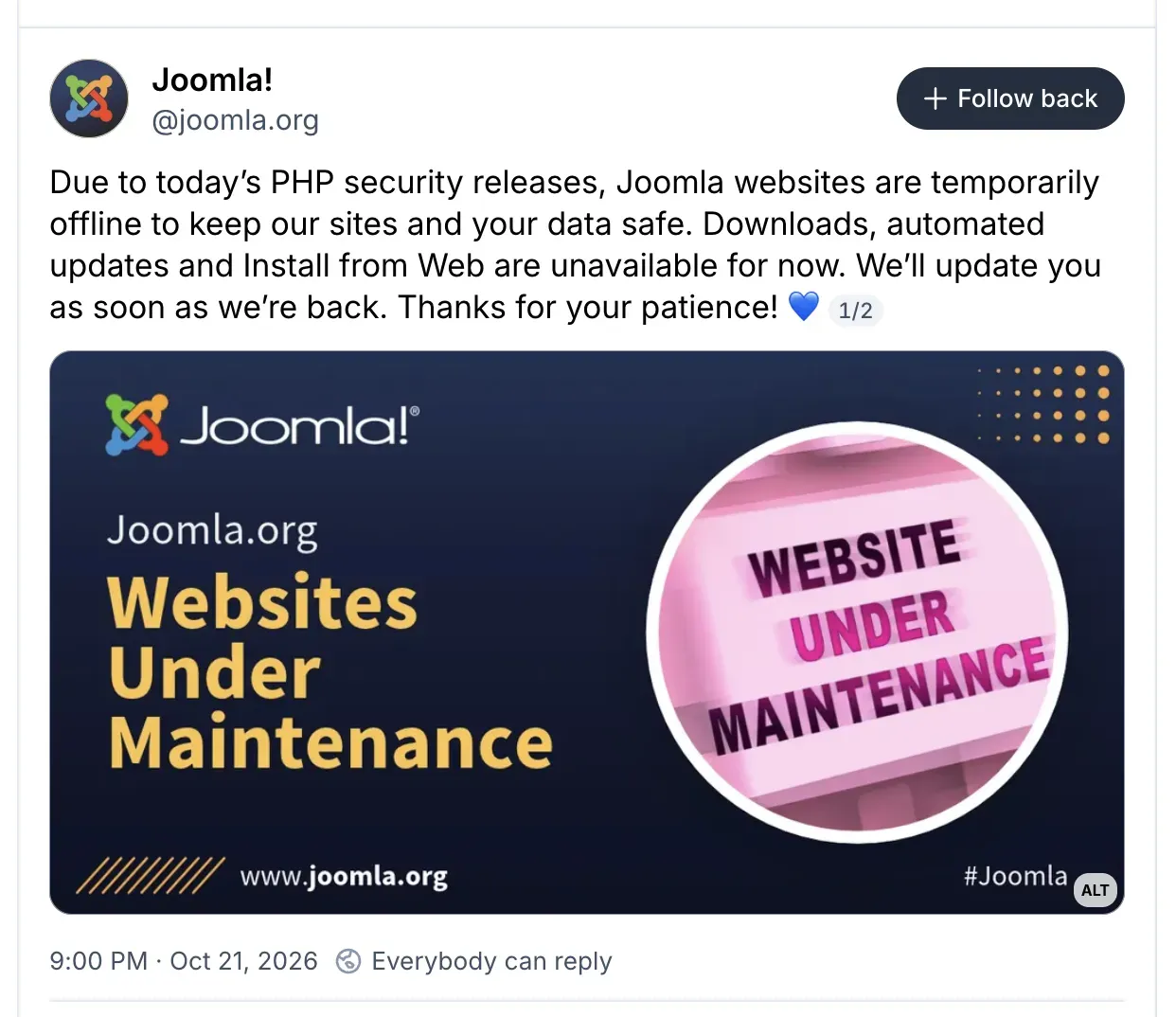
The status page shows the main joomla.org sites had already been down since the afternoon, hours before the announcement. Three minutes later came the part aimed at you: “Running a Joomla site? Contact your hosting provider now and ask if your server runs a patched PHP version. This is a server-level vulnerability, so updating Joomla alone will not fix it.”
Your Joomla sites are not offline; joomla.org is. Your sites run on your own hosting, and the outage does not change how they serve pages. The urgent job is the PHP version under each of them, at your host, which is what Joomla itself is telling people.
What to do now
Find out which PHP version each of your Joomla sites reports and whether it is 8.5.12, 8.4.27, 8.3.36 or 8.2.35. If it is below those, or on 8.1 or older, contact the host now and ask when the patched release goes on. Do not spend the evening on Joomla core updates: the latest releases predate the outage and do not contain the PHP fix, because the flaw is not in Joomla. Our PHP security release post has the detail on the two vulnerabilities.
What Is Down and What Still Works
We checked each joomla.org service at about 20:35 UTC. Most of the project’s public sites return Cloudflare errors (521, 502 or 503). A few pieces still answer, and they are the ones that matter for keeping sites updated.
| Service | Status at 20:35 UTC | What it means for your site |
|---|---|---|
| joomla.org (main site) | Down | Nothing. Your site does not call it. |
| downloads.joomla.org | Down | The first download mirror for core packages is unavailable. Joomla 4, 5 and 6 can use two others; Joomla 3 cannot. |
| extensions.joomla.org (the JED) | Down | You cannot browse or install new extensions from the directory. |
| Install from Web feed | Down | The Install from Web tab shows “Can’t connect to the Joomla! server”. |
| autoupdate.joomla.org | Down (503) | Joomla’s free Automated Core Updates service cannot call into sites. |
| developer.joomla.org, magazine, volunteers, community, API docs | Down | Nothing for a running site. |
| forum.joomla.org | Down (confirmed later in the evening) | The community forum is unavailable, so you cannot search past answers there for now. |
| docs.joomla.org | Behind a Cloudflare challenge | We could not tell either way. |
| manual.joomla.org, status.joom.la | Up | The manual and the status page answer normally. |
| update.joomla.org update lists | Up, from Cloudflare’s cache | Joomla’s update check still sees the current releases. |
| TUF signed metadata (targets.json, timestamp.json) | Up, from Cloudflare’s cache | Joomla 5.1+ can still decide which core update to offer, until the cached copy expires. |
| update.joomla.org/releases/ and GitHub releases | Up | Core update packages are still downloadable. |
The cached responses from update.joomla.org show cf-cache-status: STALE, which is Cloudflare serving the last good copy because the origin is unreachable. That is why Joomla sites still see a correct update list, and why the expiry further down this post is worth a look.
Why Did Joomla Take Its Own Sites Offline?
Because PHP published a critical security release on the afternoon of 21 October, and the Joomla project’s servers run PHP like everyone else’s. At about 13:35 UTC PHP released 8.5.12, 8.4.27, 8.3.36 and 8.2.35, fixing CVE-2026-109618 and CVE-2026-109619, both rated CVSS v4.0 9.2 and both confirmed as allowing unauthenticated remote code execution. PHP’s own words: “There are no complete mitigations, updating is the only safe choice.” PHP 8.1 and older get no official release. The researchers, Wiz, say they demonstrated unauthenticated RCE against default container images of WordPress, Drupal and Joomla; exploitation in the wild has been claimed but not confirmed. The full breakdown is in our post on the PHP release.
Joomla is not the only organisation that went dark rather than wait. Global News reported that the Government of Canada took some sites offline as a precaution and that Dutch and Finnish agencies did the same, and CERT-EU’s advisory told organisations to “consider isolating internet-facing applications from public networks until a fix can be applied”.
Our view is that Joomla made the right call. A project that ships the update packages for a large share of the web should not keep those servers online on an unpatched PHP. The update pipeline is exactly what an attacker would want to own, and a few hours without a download page is a cheap price for keeping it clean.
Can You Still Update Joomla Core During the Outage?
Probably, and in most cases you will not need to. The latest core releases are 6.2.0 and 5.4.10, both already in the signed update metadata and both published before the outage, so a site on one of them has no core update to miss. Joomla core does not contain the PHP flaw, which is Joomla’s own point about updating Joomla alone.
For a Joomla 4, 5 or 6 site that does still need one, Joomla’s update check reads update.joomla.org, which is still answering from Cloudflare’s cache, so the admin still sees the current release offered. The signed metadata lists three download mirrors for each core package: downloads.joomla.org, GitHub, and update.joomla.org/releases/. Joomla’s own updater (the download step in com_joomlaupdate) tries the first URL and moves on to the next mirror if it fails. downloads.joomla.org is down, but the GitHub releases and update.joomla.org/releases/ both answered when we checked, so a core update started now should fall back to a mirror that is up. We downloaded the 5.4.10 update package from both working mirrors at 20:43 UTC, and each file’s SHA-256 matched the hash in Joomla’s signed metadata. We have not run a full update end to end during the outage, so “should”, not “will”.
Joomla 3 is the exception. Joomla 2.5 and 3.x sites read the legacy core feed at update.joomla.org/core/extension.xml, and that feed names downloads.joomla.org as the only download location, with no mirrors listed. A Joomla 3 core update started from the admin, or from mySites.guru, has nowhere else to fetch the package from until downloads.joomla.org is back. The Joomla 4 and 5 update feeds list the GitHub and update.joomla.org mirrors alongside it, and so does the signed metadata Joomla 5.1 and newer use. If you still look after Joomla 3 sites, our Joomla 3 security hub covers the options for them.
To take the live update check out of the picture entirely on Joomla 4 and newer, download the package from GitHub releases and install it by hand in System > Update > Joomla using the “Upload & Update” tab. Our post on the Joomla file checksum failed error covers verifying a package and doing this safely.
“Automated updates are down” is being read three different ways. Joomla’s Automated Core Updates is a free service the Joomla project runs: autoupdate.joomla.org calls back into opted-in sites and applies core updates for them. That server is returning 503, so that service is down. It is not the same thing as an administrator clicking update in the Joomla admin, which uses the site’s own updater and the mirrors above, and it is not the same thing as a core update run from mySites.guru, which uses that same site-side updater. Our post on how to disable Joomla’s automated upgrades shows where the project’s service is switched on and off.
The Joomla TUF Update Expiry to Watch For on 23 October
TUF, The Update Framework, is an open standard for securing software updates, and Joomla 5.1 and newer use it to decide which core update to offer. The Joomla project signs a small set of metadata files describing each release and its hash: root.json, targets.json, snapshot.json and timestamp.json. Before a site accepts an update it checks those signatures, and it checks that none of the files has expired. The expiry is there to stop a freeze attack, where someone who controls a mirror or sits in the network path keeps serving an old, still validly signed list so a site never hears about a security release. A site that sees expired metadata says no to the update rather than trusting it.
That expiry could bite later in the week if joomla.org stays down. The cached copy of timestamp.json that update.joomla.org is serving expires at 01:18 UTC on 23 October 2026.
The signing itself is still running: the copy in Joomla’s GitHub updates repository is already signed through 24 October, so the update.joomla.org copy is just a cached snapshot that happens to be the one sites can reach. If joomla.org is still offline when that snapshot expires and the cache has not been refreshed, a Joomla 5.1+ site checking for core updates would show “Update not possible because the offered update has expired”. That is a TUF safety check rejecting stale metadata, not a fault on the site, and we have an explainer on what that message means. Treat it as a possibility to watch for rather than a prediction; if joomla.org is back before then, nobody will see it.
What About Joomla Extensions and Install from Web?
Install from Web and the Joomla Extensions Directory are both down, so you cannot browse or install new extensions from inside Joomla for now. Open the Install from Web tab under System > Install > Extensions and Joomla says “Can’t connect to the Joomla! server. Please try again later.” That message is about joomla.org, not your site, and it can wait until the project is back.
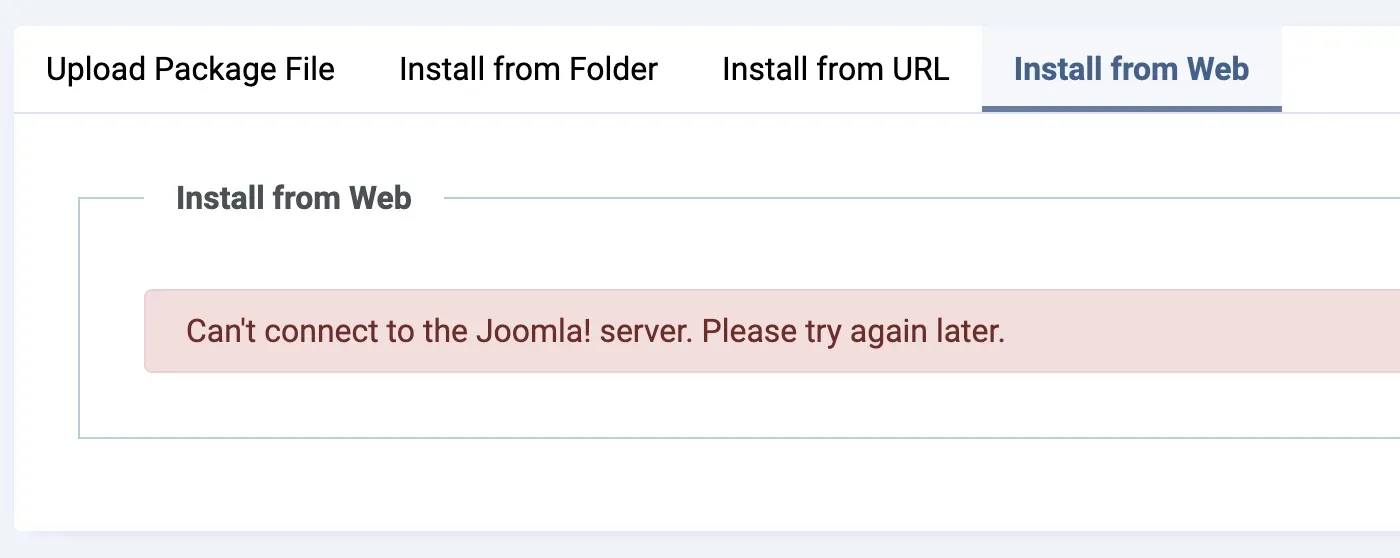
The other tabs on the same screen, Upload Package File, Install from Folder and Install from URL, do not use joomla.org, so installing an extension from a zip you already have works as normal.
Updates for extensions you already have come from each vendor’s own update server, not from joomla.org. That would normally keep them out of this outage, but some extension developers have taken their own sites offline for the same PHP release, and their update servers went with them. For those extensions Joomla cannot check whether a newer version exists, so an empty update list is not proof that a site is current. Run the update check again once the vendor is back. Extensions from vendors whose sites are still up update as normal, and the two things that depend on joomla.org itself are the core update entry and the language pack feeds hosted there.
What mySites.guru Keeps Doing, and What It Cannot
mySites.guru has no way around the outage for Joomla core. A core update run from mySites.guru uses the site’s own Joomla updater, the same code as clicking update in the Joomla admin. During the outage it behaves the same way: it reads Joomla’s currently cached update metadata and downloads the package with the same mirror fallback described above, which on Joomla 3 means no fallback at all. mySites.guru has no separate mirror of Joomla core packages. If Joomla’s updater cannot complete an update on a site, we cannot complete it either.
Extension update checks have the same limit. mySites.guru asks each site to check its own update servers, so where a vendor has taken its site offline, the update for that extension cannot be seen until the vendor is back. For every vendor still online, bulk-updating Joomla extensions across your sites works as normal.
The rest keeps running, because none of it depends on joomla.org or a vendor’s server:
- The core file integrity check, which flags modified core files, uses mySites.guru’s own copy of Joomla core file hashes.
- Vulnerable-extension flagging uses mySites.guru’s own vulnerability database, so a site running a known vulnerable extension version is still flagged even while that vendor’s update server is offline.
- The PHP version check, the one that matters this week, reads what each site reports.
If you manage multiple Joomla sites, all of this is on one dashboard, so you are not logging into each admin in turn to find out where you stand.
How Do You Check PHP on Every Joomla Site?
Look at the PHP version each site reports while serving a request, and compare it with the patched release for its branch. mySites.guru records that version for every connected site and, for this release, marks it red at or below 8.2.34, 8.3.35, 8.4.26 or 8.5.11. Sites on 8.1 and older are flagged end of life, because no official release exists for them. Being on a supported branch is only half the answer; the patch level inside it is the other half, and our post on PHP branches versus patch levels explains why the higher PHP number can be the more out-of-date one.
One caveat applies to any version-number check, ours included. A distribution package that backports the fix without changing the version number still looks unpatched, so for a site on distribution packages, confirm with the host rather than trusting the number either way, then record the back-port so the site stops showing red.
PHP Version Should Be Latest Supported Series
mySites.guru checks every connected site for this automatically and flags it the moment it appears. It runs as part of the full audit on every connected site.
What to Do While Joomla.org Is Down
Joomla will come back when its servers run a patched PHP, and nothing you do on your own sites in the meantime depends on joomla.org, apart from browsing for new extensions, which can wait. What cannot wait is an unpatched PHP under a public site, with the researchers reporting a working exploit against a default Joomla image. The Joomla project has done its part by taking the risk off its own servers. Yours is to get the list of every PHP version across your sites, chase the hosts that have not moved, and plan the version move for anything on 8.1 or older. If that list does not exist yet, a free audit builds it in a few minutes.
Further Reading
- Joomla's outage notice on Bluesky - the project's announcement that its websites are offline because of the PHP security releases.
- Joomla's advice to site owners - contact your host and ask about a patched PHP; updating Joomla alone will not fix it.
- Joomla status page - the live status of each joomla.org property.
- Joomla CMS releases on GitHub - core update packages that stayed downloadable during the outage.
- PHP's security advisory for the 21 October releases - the fixed versions and PHP's own risk assessment.
- Wiz: PHP2Shell - the researchers' write-up, including the demonstrated RCE against default Joomla, WordPress and Drupal container images.
- CERT-EU advisory 2026-018 - the advice to consider isolating internet-facing applications until the fix is applied.
- Government sites go dark over vulnerability in code - Global News on the Canadian, Dutch and Finnish agencies that took sites offline as a precaution.
To see which PHP version every one of your Joomla sites is reporting, and which are still below the patched release, run a free audit. No credit card needed.
Frequently Asked Questions
Is my Joomla site offline because joomla.org is offline?
Can I still update Joomla core while joomla.org is down?
Does updating Joomla fix the PHP vulnerability?
Which PHP versions have the fix?
Why would Joomla say the offered update has expired?
Do third-party Joomla extension updates still work?
 Written and edited by a human, with AI assistance. Our approach to AI