How to Add a Changelog to Your Joomla Extension
Every Joomla administrator has seen the Changelog column on the Extensions: Update screen, and most of them have learned not to bother with it. The button has been part of Joomla since 4.0, when Roland Dalmulder’s pull request 24026 was merged in March 2019, yet on a typical site the column reads N/A for most Joomla extensions, and when a button does appear it sometimes opens a modal with a title and nothing underneath. The admin is left to update blind or go hunting on the vendor’s website.
This post is for the developers who can change that. A Joomla extension changelog is three small pieces of XML, and we show each one, then the three ways we have watched it break on Joomla 6.2.0, with screenshots of the right and wrong results side by side. The same file now does a second job: releases.mysites.guru reads it and shows your release notes to anyone watching for Joomla extension releases, so writing it once reaches your users in two places.
What Joomla Does With Your Changelog
Joomla reads a <changelogurl> element from two different files and stores each one in a different table. The one in your installation manifest goes into the #__extensions table and drives the Changelog button on System, Manage, Extensions, which describes the version already installed. The one inside each <update> entry of your update-server XML goes into the #__updates table and drives the Changelog button on System, Update, Extensions, for the version on offer. The second screen is the one an administrator looks at before clicking Update, so it is the one that matters most.
| Where it goes | Stored in | Shows on |
|---|---|---|
| Installation manifest XML | #__extensions.changelogurl | System, Manage, Extensions (installed version) |
| Each update entry in the update-server XML | #__updates.changelogurl | System, Update, Extensions (offered version) |
The update screen also shows your update entry’s <infourl> as an external link under the extension name, next to the update-site URL. Here is a Joomla 6.2.0 site with four test plugins each going from 1.0.0 to 1.1.0:
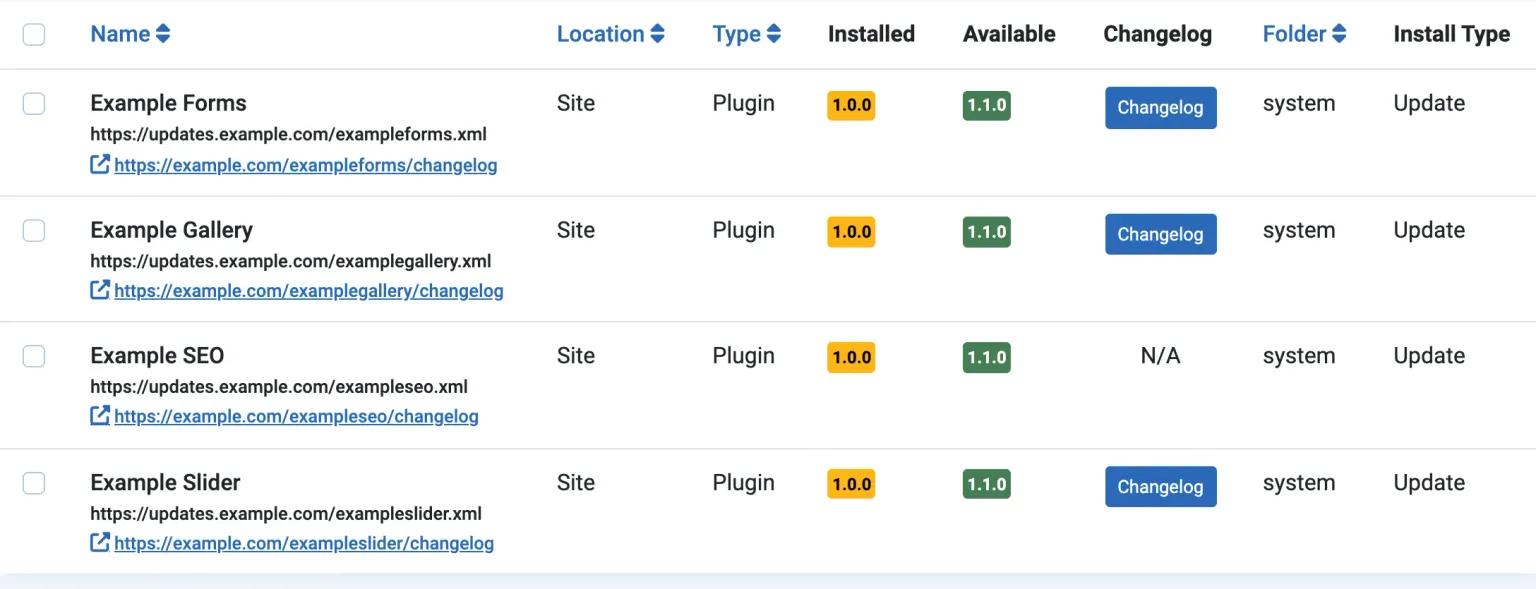
Example SEO is the one to notice. Its manifest has a <changelogurl>, its update XML does not, and the result is N/A. Joomla does not fall back to the manifest here, because the update screen reads the pending update record and nothing else. If you only ever added the element to your manifest, this is why your users have never seen the button.
The Three Pieces of XML
The manifest and the update-server entry each hold a URL. The changelog file holds the words.
In the installation manifest, <changelogurl> sits at the top level, alongside the <updateservers> block that tells Joomla where to look for updates:
<extension type="plugin" group="system" method="upgrade">
  <name>plg_system_examplegallery</name>
  <version>1.1.0</version>
  ...
  <changelogurl>https://example.com/updates/examplegallery-changelog.xml</changelogurl>
  <updateservers>
    <server type="extension" name="Example Gallery">https://example.com/updates/examplegallery.xml</server>
  </updateservers>
</extension>
In the update-server XML, the same element goes inside each <update> entry, beside <infourl>. The two do different jobs: <infourl> is a page for humans and takes an optional title attribute, <changelogurl> is a file for Joomla to parse. The update server page of the Joomla Manual lists every element an entry can hold.
<updates>
  <update>
    <name>Example Gallery</name>
    <element>examplegallery</element>
    <type>plugin</type>
    <folder>system</folder>
    <client>site</client>
    <version>1.1.0</version>
    <infourl title="Example Gallery 1.1.0">https://example.com/examplegallery/changelog</infourl>
    <changelogurl>https://example.com/updates/examplegallery-changelog.xml</changelogurl>
    <downloads>
      <downloadurl type="full" format="zip">https://example.com/downloads/examplegallery-1.1.0.zip</downloadurl>
    </downloads>
    <targetplatform name="joomla" version="(5|6)\..*"/>
  </update>
</updates>
The changelog file, documented on the Joomla Manual’s changelog page, has a <changelogs> root with one <changelog> per version. Each holds <element>, <type> and <version>, then any of seven groups: <security>, <fix>, <language>, <addition>, <change>, <remove> and <note>, each holding <item> lines. Joomla labels them Security Fixes, Bug Fixes, Language, New Features, Changes, Removed Features and Notes. This is the file behind the Example Gallery button in the screenshot above:
<?xml version="1.0" encoding="utf-8"?>
<changelogs>
  <changelog>
    <element>examplegallery</element>
    <type>plugin</type>
    <version>1.1.0</version>
    <security>
      <item><![CDATA[Fixed a stored XSS in image captions (reported by an outside researcher)]]></item>
    </security>
    <fix>
      <item><![CDATA[Lightbox no longer closes when you swipe on a touchscreen]]></item>
      <item><![CDATA[Captions & alt text are kept when an image is replaced]]></item>
    </fix>
    <addition>
      <item><![CDATA[WebP and AVIF thumbnails]]></item>
    </addition>
    <change>
      <item><![CDATA[Requires PHP 8.1 or later]]></item>
    </change>
  </changelog>
  <changelog>
    <element>examplegallery</element>
    <type>plugin</type>
    <version>1.0.0</version>
    <note>
      <item><![CDATA[First release]]></item>
    </note>
  </changelog>
</changelogs>
And this is what Joomla 6.2.0 makes of it when the admin clicks the button:
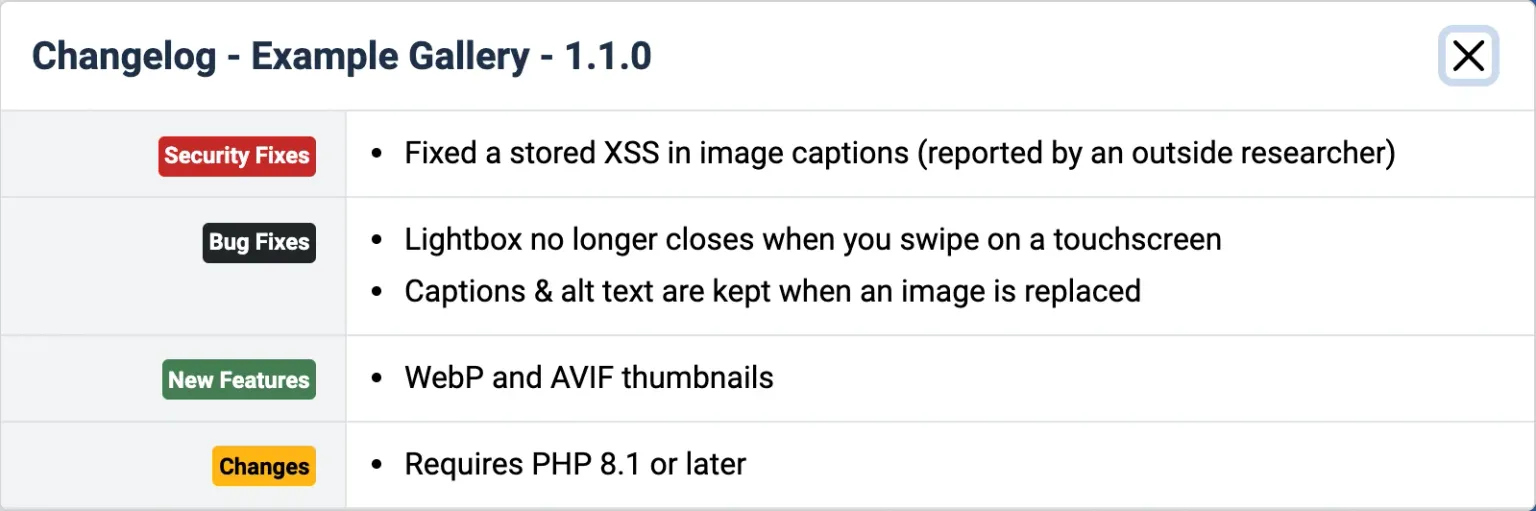
Every group gets a coloured badge, the ampersand in “Captions & alt text” comes through intact, and the PHP requirement is where an admin will see it before updating. If you want a real-world file to compare against, Joomla’s own Weblinks extension publishes its changelog in exactly this shape, with entries for 5.0.0, 5.1.0 and 5.2.0.
Three Ways a Joomla Changelog Breaks
We built the four test plugins in the first screenshot to fail in the ways we see most often. Each one looks fine in a text editor and wrong in the Joomla administrator.
Missing from the update server XML
This is the Example SEO row from the first screenshot. The manifest had the element, the update XML did not, and the Extensions: Update screen showed N/A. The fix is one line inside the <update> entry for each version you publish. Bear in mind that Joomla only shows the changelog entry for the version on offer, not the versions a site skipped in between (issue 37774), so a site two releases behind sees only the newest entry.
A version that does not match exactly
Joomla picks the entry to show by running version_compare() on the <version> element with the equality operator, and nothing else. The <element> and <type> children are parsed but never checked, and if two entries match the same version the last one wins. The catch is that PHP’s version_compare('1.1', '1.1.0') is not equal, so a changelog file that says <version>1.1</version> for a 1.1.0 release matches nothing. The button still appears, because Joomla only checks that the URL is not empty, and the modal opens with its title and no content.

The Joomla Manual says the button will not be shown when no version matches. On Joomla 6.2 it is shown, and empty, which is worse for the admin than N/A because it looks like your release has nothing in it. Copy the version string from the manifest into the changelog entry character for character.
Plain-text items that fall apart
The third failure needs a screenshot to believe. Example Forms has a changelog with three bug fixes written as plain text:
<fix>
<item>Größe des Upload-Felds korrigiert</item>
<item>Spam & honeypot checks run before validation</item>
<item>Fixed the <select> field losing its value</item>
</fix>Joomla 6.2.0 shows them as ten bullets:
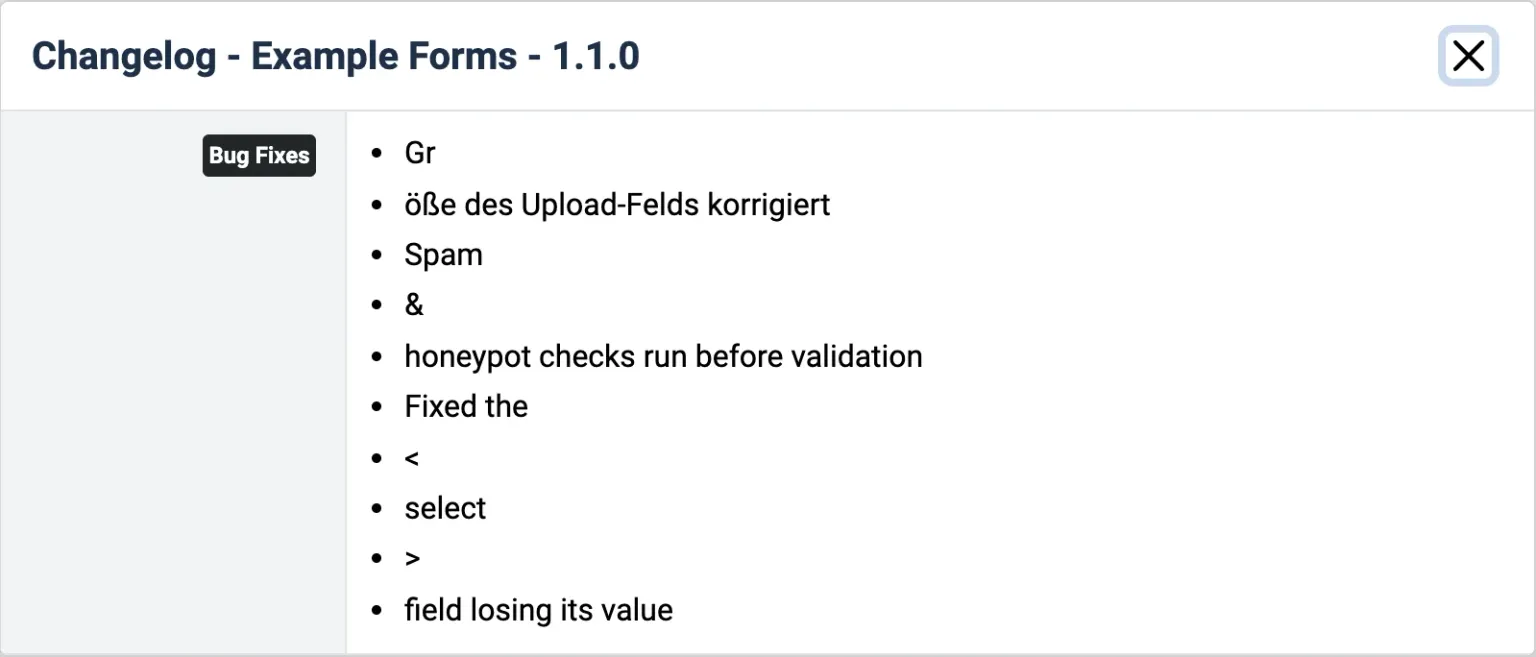
Joomla’s parser adds a new list item for every chunk of character data the XML parser hands it, instead of joining the chunks. An entity (&, <, é) or a non-ASCII character (ö, ß, é) in a plain <item> therefore starts a new bullet. A German changelog breaks on almost every line with an umlaut or an ß, and an English one breaks on its first ampersand. It is reported upstream as joomla-cms issue 48392, opened in September 2026, a fix is open but not merged at the time of writing, and an older report about diacritics from 2020 (issue 29262) is still open too.
You do not have to wait for the fix. Wrapping each item’s text in <![CDATA[ ... ]]> hands the parser one chunk, so the item stays one bullet, accents and ampersands included. That is why every item in the Example Gallery file above is wrapped, and why its ampersand rendered correctly. One caution: Joomla prints the item content without escaping it, so HTML inside a CDATA section is rendered as HTML in the admin modal. Keep the items plain text.
Wrap every item in CDATA
Write each changelog line as <item><![CDATA[Your text here]]></item>, plain text only, with no HTML inside. That form keeps ampersands, umlauts and accents intact on current Joomla releases, and keeps working once the upstream fix is released.
A Release Checklist for Joomla Changelogs
Each release touches the manifest, the changelog file and the update XML, in that order, and the test at the end catches all three failures above.
Bump the version in the manifest. This is the string every other step has to match exactly.
Add the changelog entry. A new
<changelog>block with the identical version string, each<item>wrapped in CDATA, security fixes first.1.1 does not equal 1.1.0. Copy the string, do not retype it.
Upload the changelog XML. It must answer HTTP 200 to Joomla's own server-side HTTP client; anything else is logged as a warning and the modal opens empty.
Joomla fetches the file itself with a Joomla/x.y user agent, so browser CORS settings are irrelevant.
Add the changelogurl to the update entry. Inside the
<update>element for the new version, on the same domain as the update feed, with nothing but the URL between the tags.Whitespace or a line break around the URL breaks it. Joomla does not trim it (issue 47219, with a fix in pull request 47396 still open).
Point infourl at a public page for this release. A human-readable page on your site for that version, not a generic homepage and not a login-walled download page.
Test it the way an admin sees it. Install the previous version on a Joomla 5 or 6 test site, click Check for Updates under System, Update, Extensions, and open the Changelog button.
Sites on current Joomla 5 and 6 behave as described here. Until early 2025 the update screen read the installed extension's URL instead of the update record's (fixed in pull request 44652 for Joomla 5.2), and a package upgrade did not refresh the stored URL (fixed in December 2024 by pull request 44564).
If your release includes a security fix, the <security> group in the changelog is only half the signal. Joomla 5.4.9 and 6.1.4 also read an integer security level in the update XML and badge the update by severity, and that element sits in the same <update> entry as <changelogurl>. Set both.
Publish the Same Changelog as a Public Page
The <infourl> in your update entry is the link Joomla shows under the extension name on Extensions: Update, and it is the “Open the vendor’s page” link on releases.mysites.guru. Joomla administrators and Release Radar visitors both click it, and search engines index whatever it opens, so it should open a real page. Most do not today. Across the 259 Joomla vendors on Release Radar, the <infourl> is usually a product or sales page, a homepage or a general download area, and 58 vendors send none at all, so the administrator who clicks it learns nothing about the update in front of them.
Make it a public changelog page on your own site for that release: the version number, the date, the same seven groups you put in the XML with security fixes first, and any upgrade notes an admin needs before clicking Update, such as a new PHP floor. That page is where an admin goes when the modal has whetted their appetite and they want detail, and it is what a site owner who does not have the extension installed yet can read. A login-walled download area or your homepage does not do that job. We have written before about what happens when a security fix is released with a vague changelog and about how a Joomla extension developer should handle a security release, and a plain public page per release is the simplest answer to both.
What releases.mysites.guru Does With It
releases.mysites.guru, which we call Release Radar, is a free public log of new Joomla and WordPress extension releases, built from the update feeds that sites connected to mySites.guru already poll. A release is listed once two separate customers’ sites have seen it, no account is needed, and it has an RSS feed and a JSON API. Since early November 2026 the Joomla 4+ connector also reads the changelog URL from the pending update rows Joomla stores in #__updates, so the URL we see is the one from your update-server XML, the same one that drives Joomla’s own Changelog button.
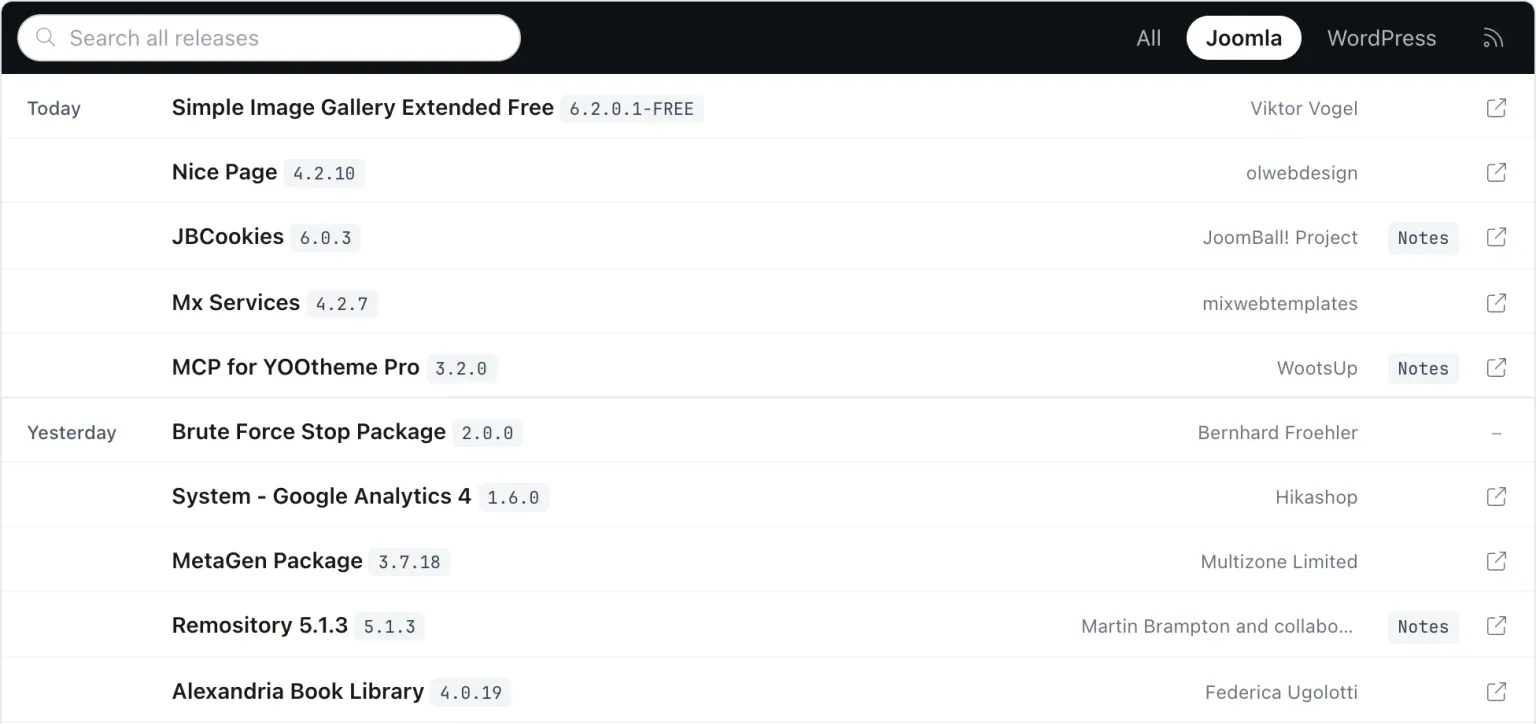
A row gets a Notes chip when a usable changelog URL is stored. Clicking it opens a popup with the vendor’s entry for that exact version, credited to the vendor by name, with an “Open the vendor’s page” link to the <infourl>. The text is fetched on request and never written into the site’s indexable HTML, feed or sitemap, so the words stay yours. Here is the JBCookies 6.0.3 popup, and it is a nice detail that one of JoomBall! Project’s own notes for that release reads “Added changelog support to the extension update modal”:
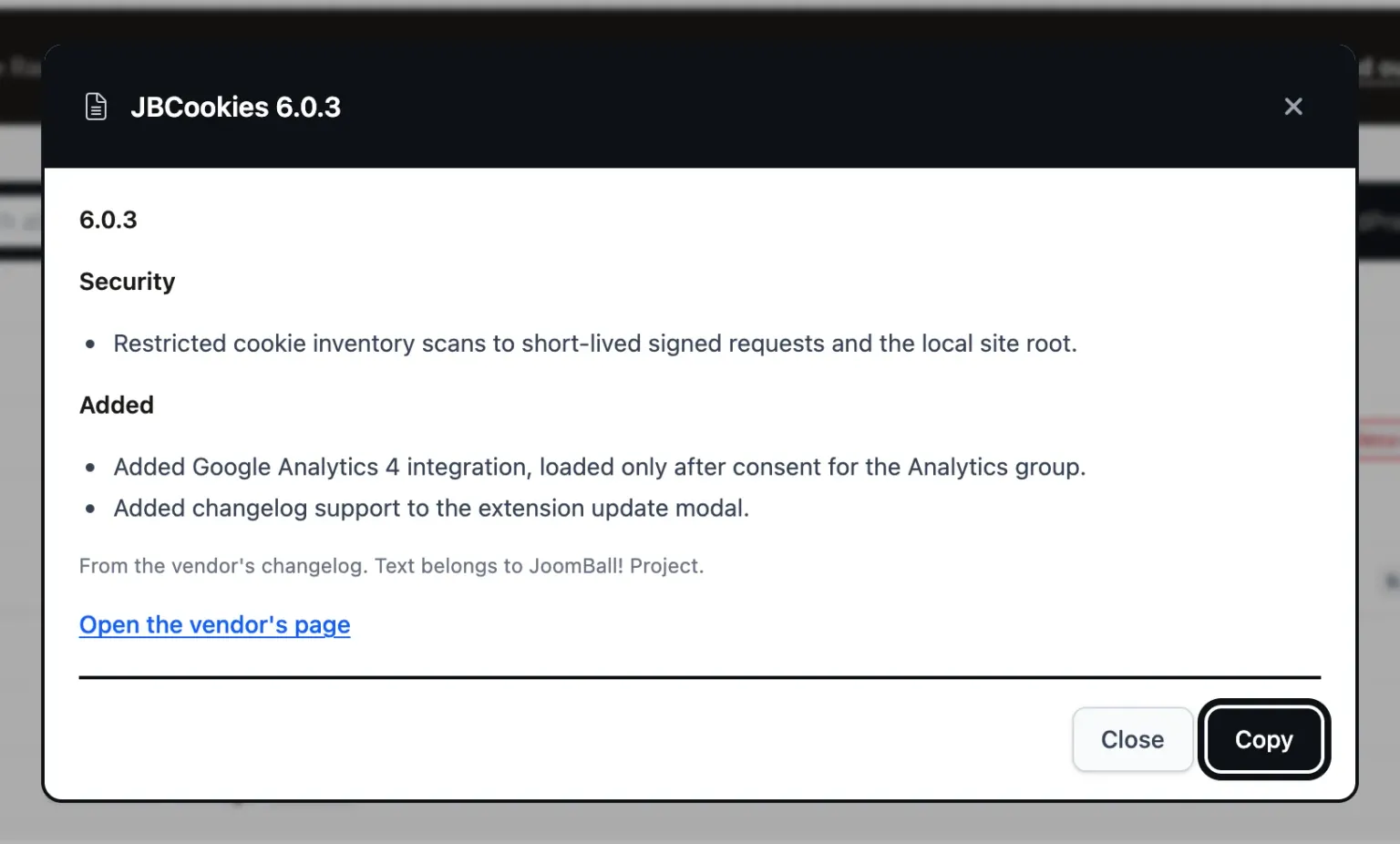
A few rules decide whether your file is used, and they are easy to satisfy. The changelog URL has to be http or https, at most 1,024 characters, and on the same registrable domain as the update-server feed; cdn.example.com and www.example.com count as the same domain. Anything else is ignored, so that no one can point a public popup at text the vendor did not write. The fetch uses ports 80 and 443 only, follows up to three redirects, reads at most 1 MB, caches the result for six hours and retries a failure after ten minutes. The file is parsed as XML without fetching external entities.
The parser reads the whole <item> text, so the Joomla splitting bug does not affect it, and it strips any HTML down to plain text. It pulls security-looking items (CVE ids, XSS, SQL injection, CSRF and the like) into a Security group at the top, and items such as “requires PHP 8.1” into a “Check before updating” group. When one file holds several extensions it matches <element> against the extension’s element; with a single element in the file it uses every entry. Version matching is exact like Joomla’s, so 1.1 does not equal 1.1.0 here either, though it reads the first version-shaped token and “v1.1.0” still reads as 1.1.0. If there is no entry for the version on offer, the popup says the vendor has not written this release up yet and shows the newest entry instead. None of that changes the advice: write the file for Joomla, with exact versions and CDATA items, because the Joomla administrator is where your users read it.
How Many Joomla Extensions Publish One?
releases.mysites.guru lists 1,568 Joomla extension releases from 259 vendors, and few of those vendors send a changelog URL. Of the 734 Joomla releases seen offered on live sites between 4 and 6 November 2026, in the first week of collecting changelog URLs, 93 came with one Release Radar could use, about one in eight. Several of the largest commercial Joomla extension vendors publish update XML with <infourl> only and no <changelogurl> at all. The <infourl> itself is the larger problem. Of the 259 vendors, 58 send none, and 115 mostly send a product or sales page, their homepage or a general download area, with nothing about the release on offer. Only 86, about a third, mostly point it at a URL that names the release, with the version number or the words changelog or release notes in it, and many of those are download pages rather than release notes. That link is the one a Joomla administrator clicks on Extensions: Update, and the one Release Radar shows beside every row, so for most releases the admin who follows it reaches a page that says nothing about the update in front of them.
The files that do exist are mostly in good shape. Of the 95 changelogs fetched, 89 had an entry for the exact version on offer, 5 stopped at an earlier version and 1 returned nothing usable. And 24 of those 89 entries, about one in four, had a Security section, which is exactly the information an administrator deciding whether to update tonight or next week needs most.
Adding <changelogurl> to each update entry and keeping a changelog XML in step with it is a few lines per release, and pointing <infourl> at a page for that version instead of the product page is a change to one URL. JED does not require either: the JED Checker treats changelogurl as optional and does not warn when it is missing, even though JED has required an update server since January 2017. If every Joomla extension developer made both changes this year, the Changelog column would stop being the one administrators ignore, and the link beside it would be worth clicking.
Where mySites.guru Fits
Subscribers see the same changelog a step further on. On the mySites.guru Updates page, each pending extension update on a connected site has a release notes popup listing the entries between the version installed and the version offered, up to 15 versions, with security fixes first. Joomla’s own screen shows only the entry for the version on offer, so an agency with a site three releases behind sees the two releases it skipped as well. The same changelog also reaches the OAuth API, the MCP tools that list releases and fetch a release’s changelog, and the “Release notes:” line in Release Radar alert emails.
For developers, the ask is the one this post started with: <changelogurl> in the manifest and in every update entry, exact version strings, CDATA items, and an <infourl> that opens a public page for that release. For agencies running more than a handful of Joomla sites, reading the vendor’s notes beside the pending update, for every site, is part of the subscription. See what it costs or how to manage multiple Joomla sites from one dashboard.
The changelog is also where a security release gets its second signal. Joomla 5.4.9, 6.1.4 and 6.2 read a <security> level from 0 to 4 in the same <update> entry as <changelogurl> and badge the update by severity in the update manager, so a security release should set that level and put the fix in the changelog’s <security> group. The post below covers the XML and the edge cases.
Further Reading
- Joomla Manual: Change Log - the official reference for the changelog XML format and its seven groups
- Joomla Manual: Update Servers - every element an update entry can hold, including changelogurl and infourl
- joomla-cms issue 48392 - the report that an item splits into several list entries when its text is not pure ASCII
- joomla-cms pull request 24026 - Roland Dalmulder's pull request that brought changelog support into Joomla 4.0
- releases.mysites.guru - the free public log of Joomla and WordPress extension releases that shows your changelog as release notes
Frequently Asked Questions
Where does the changelogurl element go in a Joomla extension?
Why does the Joomla Extensions: Update screen show N/A in the Changelog column?
Why does the Joomla Changelog modal open with nothing in it?
Why are my Joomla changelog items split into several bullet points?
Does the Joomla Extensions Directory require a changelogurl?
What does releases.mysites.guru do with a Joomla extension changelog?
 Written and edited by a human, with AI assistance. Our approach to AI