Put mySites.guru Security Alerts in Your Google Top Stories

When a Joomla extension or PHP itself releases a critical security fix, the useful window is measured in hours. We usually publish the write-up the same day. Whether you see it that day depends on where you happen to look. Google now lets you tell it which sites you want in your Top Stories, through a feature it calls Preferred Sources, and mySites.guru is one of the sites you can pick. Choose us, and Google says our content “is more likely to appear in Top Stories” for you, with a “preferred” badge, when you search for the thing we have just written about.
The button is below, and the rest of this post explains what it does, what it does not do, and why a site management tool wants a place in your news.
Add mySites.guru in One Click
Google's preferred sources
Google lets you choose sources you want to see more of when you are signed in. Add mySites.guru and our posts appear more often for you in Top Stories, AI Mode and AI Overviews. The button opens a Google window and you stay on this page. You can remove us at any time in Google's source preferences.
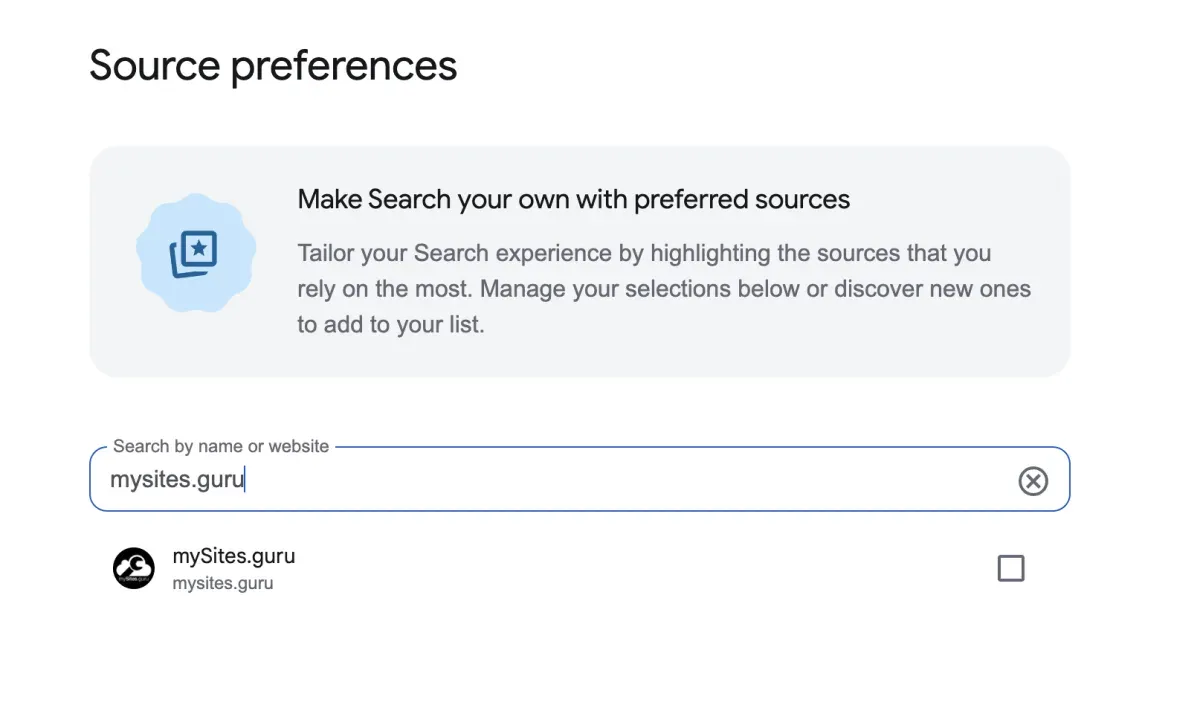
The button opens a small Google window over this page and you stay here. If you run an ad blocker and see nothing above this paragraph, Google’s script has been blocked, so use the direct link instead: add mySites.guru as a Preferred Source. That link opens Google’s Source preferences page with mysites.guru already in the search box. Tick the box and you are done. If you change your mind, untick it in the same place.
What does a preferred source change?
A preferred source changes what you see, and only you. Once you select mySites.guru, Google says our content is more likely to appear in your Top Stories, with a “preferred” badge, and since 27 May 2026 the same badge can appear on our content in AI Overviews and AI Mode. Other people’s results stay as they were, and so do our rankings.
Google’s own wording from that announcement: “Just like in Top Stories, your Preferred Sources will be clearly labeled to stand out.” Google also says “people are twice as likely to click through to a Preferred Source.” That figure describes people who had already chosen the source, so it measures a reader’s habit rather than a lift in where a site ranks.
What it will not do
Google says nothing about ordinary web results here. Selecting mySites.guru does not move us, your sites or anyone else up or down the blue links. It does not filter other sites out of your results either: you still see every other source, we just become more likely to appear among them with a badge. Top Stories only shows up on newsy, fresh queries, so an ordinary search looks the same as before.
The feature itself is still young. Google launched it in the US and India on 12 Aug 2025, took it worldwide in English in Dec 2025, opened it to all supported languages on 30 Apr 2026, extended it into AI Overviews and AI Mode on 27 May 2026, and on 20 Aug 2026 gave publishers an embeddable button, which is the one on this page. By then, in Google’s words, “people have already selected more than 600,000 unique sources.”
Only domain-level and subdomain-level sites are eligible, so you pick mysites.guru as a whole rather than its /blog section, and you get the posts wherever they live on the site. And there is no cap on your side: “You can select as many sources as you like, and you always have the option to manage your selections,” as Google put it in December 2025. Adding us costs you no other source.
Why a Site Management Tool Wants to Be in Your Top Stories
mySites.guru is a site management tool, but the blog has become something close to a security news desk for people who run Joomla and WordPress sites. In the last three months we published 99 posts, and 81 of them were about security: vulnerabilities in Joomla extensions and WordPress plugins, disclosures we made ourselves, and the security releases that fix them. Month by month that was 32 posts in July, 25 in August, 40 in September and 31 in October up to the 24th.
This week alone is a fair sample. On 20 October we published PHP’s Critical Security Release and Your Joomla or WordPress Site. On 21 October, Joomla.org went offline after that PHP security release, and the same day YOOtheme Pro 5.0.53 fixed an unauthenticated remote code execution flaw. Behind those sits Nineteen and Counting, the Joomla extension vulnerabilities we found and disclosed in a single month.
All of those are dated news. A disclosure read on the day it is published is worth far more than the same disclosure read the following week, because the week in between is when the sites that have not patched get found. Google’s eligibility test is simply “Any website that publishes fresh content is eligible,” with the warning that “Sources that aren’t updated regularly may not be available.” At 99 posts in a quarter, we clear that bar comfortably, and it is the reason we are asking.
Adding It From Google Search Instead
If you would rather not use the button, Google’s help page describes the route from a normal search, and it is the same on desktop and phone, in a browser or in the Google app. Search for a recent news event. When the “Top stories” block appears, click or tap the star icon to the right of its header. Search for mysites.guru in the panel, tick its checkbox and press “Reload results”. If you are signed in to a Google Account when you save, the choice follows you to every browser you sign into.
The AI Mode and AI Overviews side has its own path in the same help page: tap your profile picture, then Search personalization, then Source preferences. The two are one list, so a choice made in either place applies to the other.
Removing us is the reverse. Open the same star panel, untick mySites.guru and reload the results.
Other Ways to Hear From Us First
Preferred Sources is the lowest-effort option, but it only reaches you when you happen to be searching. For the posts to come to you instead, subscribe to the newsletter, add the blog RSS feed to your reader, or follow us on any of our channels. If what you want is the release itself rather than our write-up, Release Radar is our free Joomla and WordPress release tracker.
And if this has you thinking about the other side of the same coin, how your own sites appear in AI answers, our robots.txt post on AI crawlers explains why blocking AI training and blocking AI answers are two separate choices.
For the sites themselves, the mySites.guru features page lists what we check on every connected site, and you can register here. But the ask of this post is smaller than that. Tick the box, and the next time a Joomla extension or PHP has a critical hole, you will hear about it from us on the day.
Further Reading
- Preferred Sources for publishers - Google's own page on what the feature does and which sites are eligible.
- Choose your preferred sources - Google's help page with the add and remove steps for Top Stories, AI Mode and AI Overviews.
- Preferred Sources comes to AI Overviews and AI Mode - Google's 27 May 2026 announcement, including the figure that people are twice as likely to click through to a source they chose.
- Personalise your news in Search and Discover - the 20 Aug 2026 post introducing the embeddable publisher button, and the 600,000 sources figure.
Frequently Asked Questions
Does adding mySites.guru as a Preferred Source help my own site's Google rankings?
Is it free?
Do I need a Google Account?
Can I remove mySites.guru again later?
Does it work on my phone?
 Written and edited by a human, with AI assistance. Our approach to AI