How to Check Joomla Template Overrides Across 100+ Sites, With Ease

Every Joomla update and every extension update can change a core layout file that one of your templates overrides. Joomla notices. It records the override, shows an “Overrides to check” notice on the admin dashboard, and waits for someone to open Template Manager and look. On one site that works: you see the notice the next time you log in. On 100+ sites, no one logs in to every admin after an update day, so the list grows on every site and each stale override keeps running the old code. Bug fixes never arrive, new features never appear, and a security fix in a Joomla extension’s layout never reaches the copy.
mySites.guru now reads that list from every connected Joomla 4, 5 and 6 site twice a day and puts the results on one page for all your sites. From there you open the site that needs attention, compare each override with the current core file side by side, fix it or mark it checked, and move on. No Joomla admin login needed.
What Joomla Already Tracks For You
A template override is a copy of a core or extension layout file kept in the template’s html folder, for example html/com_content/article/default.php, so you can change the output without editing the original. When an update changes the original, your copy keeps running the old code, which is why Joomla 4 added Improved Override Management, a project that came out of Google Summer of Code 2018.
The work is done by the Installer - Override plugin (plg_installer_override). Before an extension update, a Joomla update or an extension install, it takes an md5 hash of every overridden core file. Afterwards it hashes them again. Any override whose core file changed is recorded in the #__template_overrides table with the date and the action that caused it:
- Joomla Update means a Joomla core update changed the file your override copies.
- Extension Update is recorded when an extension update changed one of its own layout files that you override.
- Extension Install covers a fresh install of an extension that put a different file behind an existing override.
An unreviewed row has state 0. Joomla lists those rows in Template Manager on the template’s “Updated Files” tab, and the Quick Icon plugin shows the “Overrides to check” notice on the admin dashboard, as long as the Installer - Override plugin is enabled. Reviewing one in Joomla means opening the override, comparing it with the core file (Joomla’s editor has a diff toggle), editing it if needed, then marking it checked, which sets state 1. Only enabled templates count, the same rule Joomla’s own dashboard notice uses.
Know three limits before you trust the count. If the plugin is switched off, Joomla records nothing, and switching it back on only records updates from then on. Joomla skips the comparison when the number of override files changes during the update. And the comparison cannot tell changes an update made from changes you made yourself, which is why Brian Teeman’s best practice is to delete override files you never modified, so future updates only flag the ones you really changed.
How often does a core file change? Astrid Günther’s example is Cassiopeia’s com_content/tmpl/article/default.php, which changed between Joomla 4.1.4 and 4.1.5, a point release. A JoomShaper forum thread is titled “50 override changes in Helix after updating to Joomla 5”. That is one site. Multiply by your client list.
Every Joomla Site’s Overrides On One Page
The All Sites page for the Template Overrides To Check snapshot check lists every connected Joomla site with its result and an Investigate and a Manage Site button beside each one. Yellow pills say “7 to check” or “12 to check”; green says “All checked”. You see which sites need attention without opening any of them. The page is behind the “Compare all sites” button on the check, or straight from this URL once you are signed in.
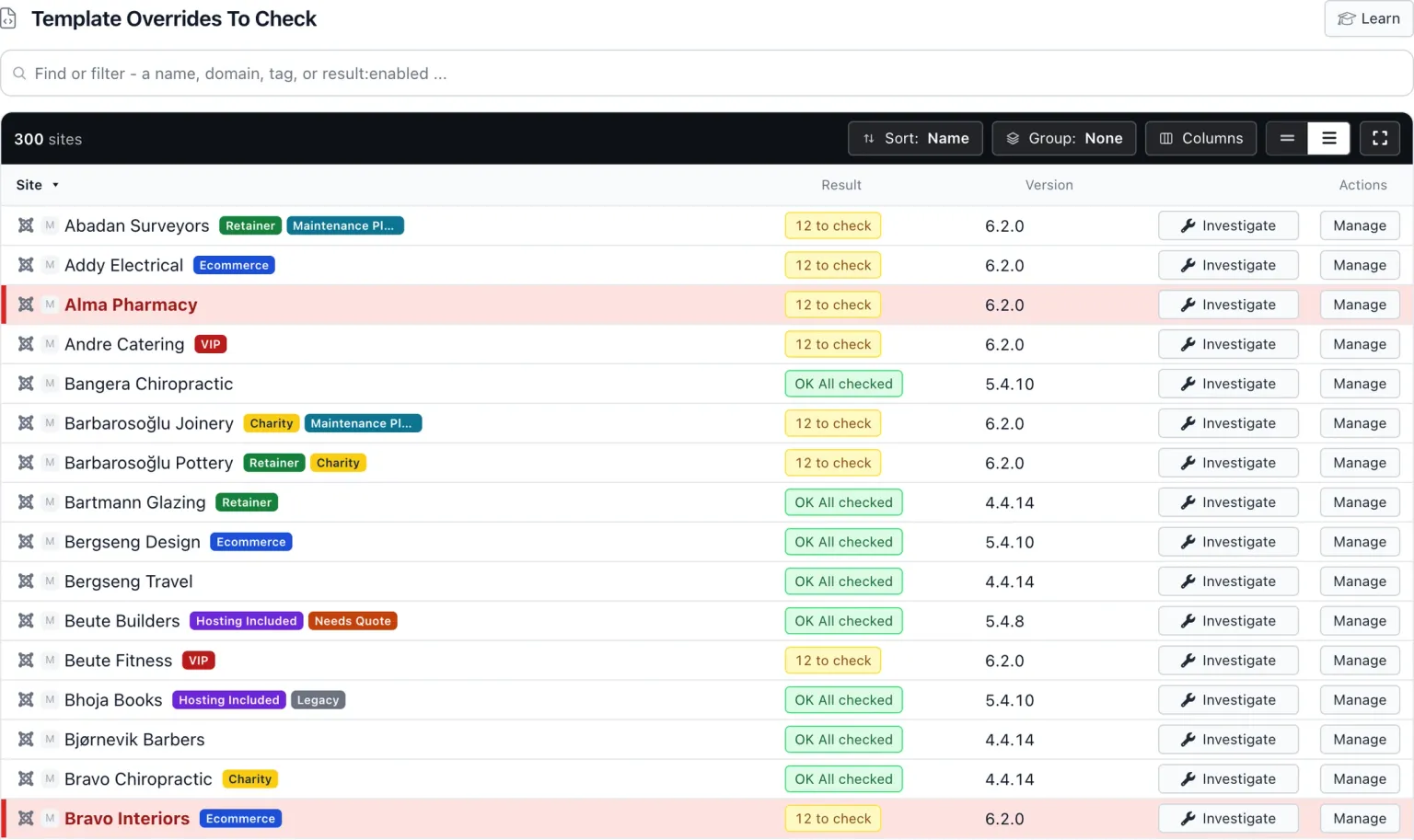
Both new checks have an All Sites page. The one for Template Override Tracking tells you which sites have the plugin switched off.
The Two New Snapshot Checks
A snapshot check is a single fact mySites.guru reads from a connected site twice a day, and on demand whenever you ask. Two have been added for Joomla 4, 5 and 6 (Joomla 3 has no #__template_overrides table, so it gets neither).

Template Overrides To Check is the count of unchecked overrides on enabled templates. It shows one of four labels:
- N to check
- N overrides on enabled templates have an unreviewed change behind them.
- All checked
- Every recorded override has been marked checked.
- Tracking is off
- The Installer - Override plugin is disabled, so the count means nothing.
- No Data
- The site has not reported yet: an older connector, or a table that could not be read. Never shown as zero.
Template Override Tracking shows whether Joomla’s Installer - Override plugin is On or Off, and its Investigate page has a switch that turns it on or off from mySites.guru.
No emails or alerts are sent for new unchecked overrides. An override to check is a review task rather than an incident, so the check turns yellow, the All Sites page shows it, and you deal with it on your own schedule.
Reviewing An Override Without Logging In To Joomla
Investigate on a site opens its Template Overrides To Check page: one row per unchecked override, with the template (and a Site or Admin pill), the override path, what changed it (Joomla Update, Extension Update or Extension Install), the date, and three actions: Edit, Mark checked, and Open in Joomla admin.
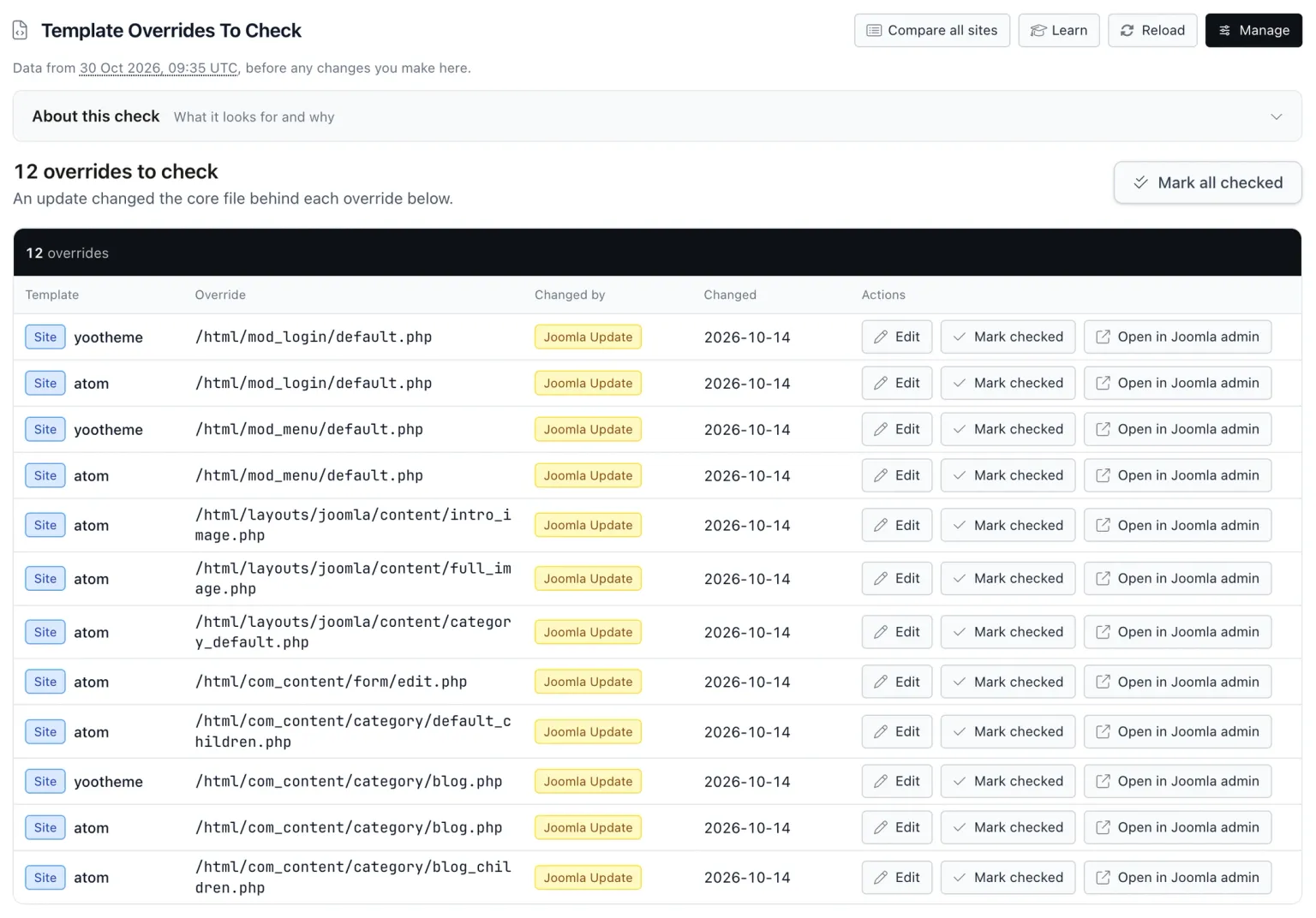
Mark checked fades the row out and the count updates live. “Mark all checked” clears the whole list after a confirmation, for the site where you have looked at the overrides and know they are fine. Up to 500 rows are listed, with the real total shown above them.
“Checked” is Joomla’s own flag. Marking an override checked in mySites.guru sets the same state 1 in #__template_overrides that Template Manager sets, so the dashboard notice on the site clears too. Every edit and every mark is written to the site’s Joomla action log, so a colleague looking in Joomla later can see what happened and when.
The Editor and the Differences Tab
Edit opens an editor with three tabs. Your Override File is the override source in an editable code editor with line numbers and syntax highlighting. Joomla Core File is read only: the current core file the override copies, so you can see exactly what the update put there. Differences shows the two side by side, Joomla core on the left and your override on the right, with changed lines tinted.
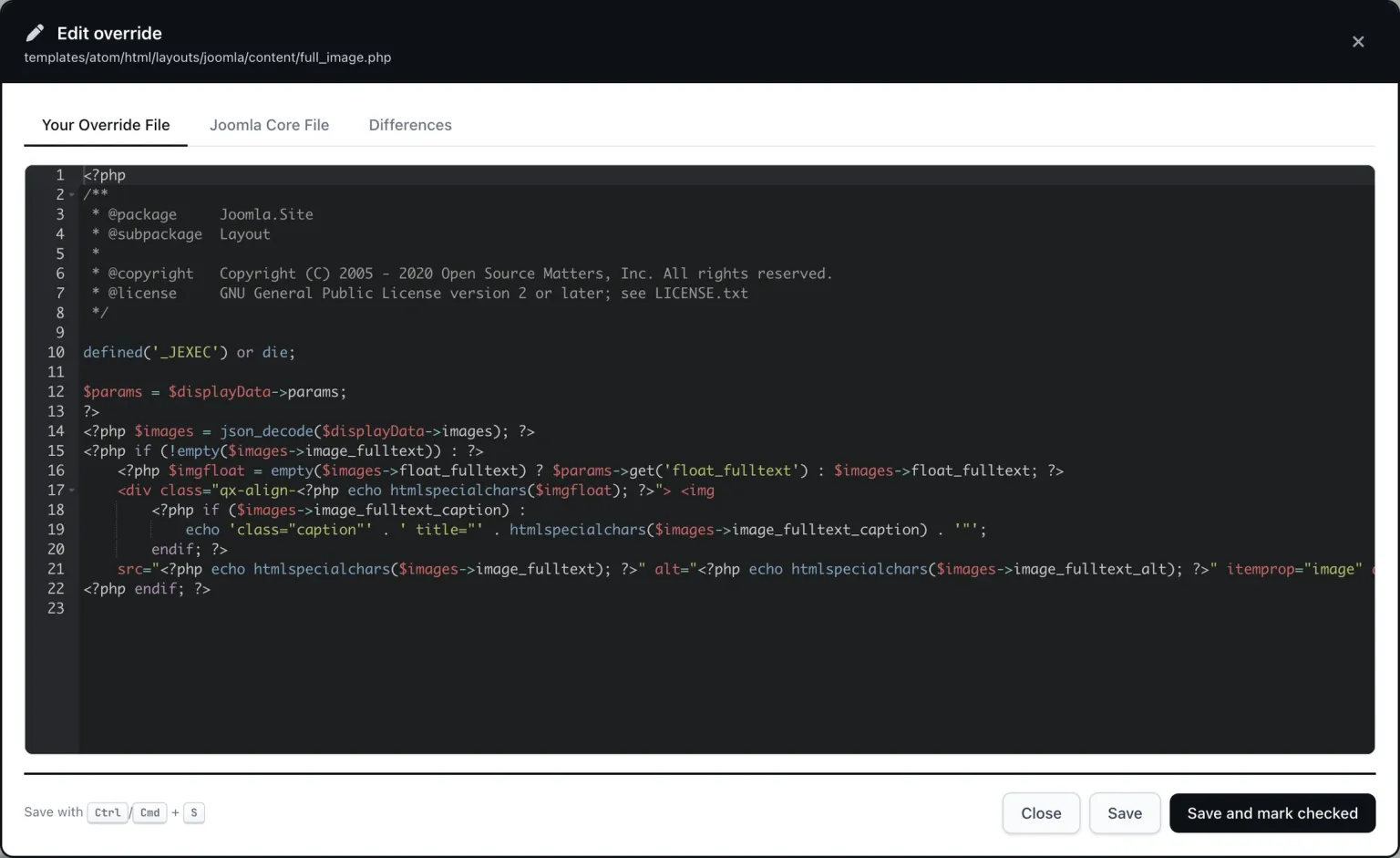
The diff is built from what is in the editor right now, so an edit you have not saved yet shows up in Differences straight away. Each change has two small buttons between the columns. The arrow copies the Joomla core lines for that change into your override: take the new core code. The bin deletes your override’s lines for that change: drop what you added. Work down the diff deciding which, and the override is current.
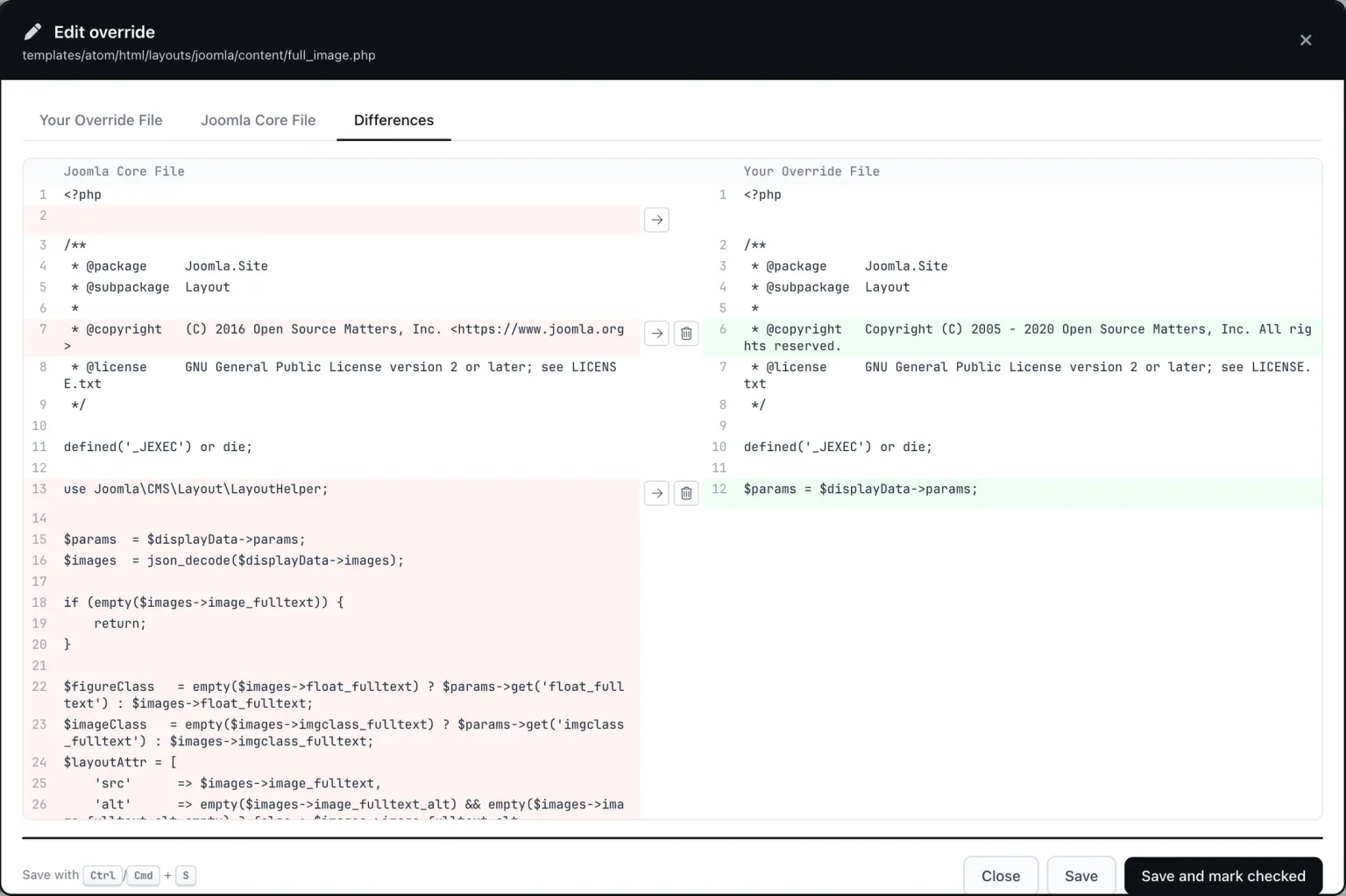
The current core layout in that screenshot has a use Joomla\CMS\Layout\LayoutHelper; line, an early if (empty($images->image_fulltext)) { return; }, and $figureClass, $imageClass and $layoutAttr variables that the override lacks. Each of those is one arrow click.
Save writes the file to the site. “Save and mark checked” does both in one go, and Ctrl/Cmd + S saves. Closing with unsaved changes asks first. If the file changed on the site since you opened it, nothing is saved and you are told, with the option to reload, so two people editing the same template never overwrite each other. Files up to 1 MB can be edited here.
Turning Joomla’s Override Tracking Back On
A count of zero can mean two things: every override has been reviewed, or the plugin that records them is off and nothing has been recorded since. mySites.guru keeps the two apart by showing “Tracking is off” in place of a count.
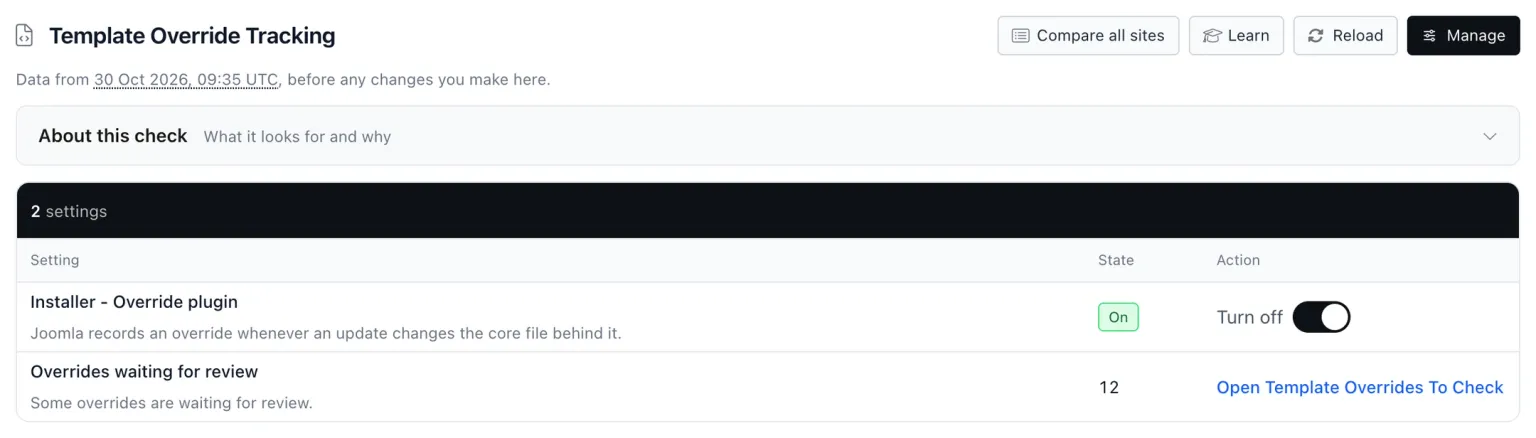
The Template Override Tracking Investigate page shows the plugin’s state and has a switch to turn it on or off, without logging in to the site.
A site with tracking off has no history
A site with the Installer - Override plugin disabled has no record of which overrides the last update changed, and switching it on today does not recover that. Switch it on now rather than after the next update day, then open the overrides you care about once and compare them in the Differences tab.
Updates Run From mySites.guru Now Get Recorded
Joomla’s comparison needs its “before” list and its “after” list from the same update. A Joomla core update run from mySites.guru runs as separate requests, so Joomla lost the “before” list and recorded nothing. An extension installed from a URL through mySites.guru had the same gap. Both are now recorded, the same as if you had run them from Joomla’s admin. Extension updates through mySites.guru already recorded correctly.
Core updates run from mySites.guru before this change recorded nothing, so any override they changed is not in the list. From the next update on, the list is complete.
A Practical Routine For 100+ Joomla Sites
Here is how I run it across client sites, in order.
- After a bulk update day, open the All Sites page for Template Overrides To Check. Ignore the green rows.
- Work the yellow rows, biggest count first. Investigate, open the Differences tab on each override, arrow in what core changed, bin what you never meant to keep, then Save and mark checked.
- Delete overrides no one customised. This is Teeman’s point: an override you never changed is pure maintenance debt. Delete the file in Joomla’s Template Manager or with the mySites.guru file manager, and the next update stops flagging it.
- Switch tracking on where it is off. Open the All Sites page for Template Override Tracking, Investigate, flip the switch.
- Between update days, let the Manage Site “Important” tab do the reminding. It shows a card when a site has overrides to check (and tracking is on), with a button to the review page. In the sites list, search
has-overrides-to-checkto filter to just those sites. - After a core upgrade, the upgrade status page shows a “Review template overrides” button once the upgrade finishes OK on a site whose last snapshot had overrides to check.
If you script against mySites.guru, the API and MCP site summary now has the fields template_overrides_unchecked and template_override_tracking_enabled, plus an attention reason template_overrides_unchecked.
Separately, Joomla 5.4.8 and 6.1.3 broke override creation in Template Manager, a different problem from reviewing them.
Requested by Jaz, Released the Same Day
On 14 October 2026 at 16:16 UTC, Jaz posted a request on the mySites.guru Feature Requests board: “Snapshot check to show if there are Joomla template overrides that need checking”. The aim was to stop logging in to every site’s admin to find out. It was marked shipped at 19:08 UTC the same day, under three hours later. Thanks Jaz.
The Template Override Tracking check came out of building it. I had never known the Installer - Override plugin existed, and a site with it switched off records nothing at all, so its state became a check of its own.
A lot of mySites.guru gets built this way. Detecting locked Joomla scheduled tasks was a customer request, and so were several of the summer 2026 features. If there is a fact about your sites you keep logging in to check, post it on the board.
Try It On Your Own Joomla Sites
mySites.guru connects your Joomla and WordPress sites to one dashboard, and has been trusted since 2012, with 90,000+ sites protected. Both override checks run on every connected Joomla 4, 5 and 6 site from its next snapshot.
Sign up, connect a Joomla site, run a snapshot, and open the All Sites page. If it comes back yellow, open the Differences tab on the first override and see what the last update changed behind your back. Plans are on the pricing page, and the Joomla multi-site page covers the rest of what mySites.guru runs across your sites.
Further Reading
- Improved Override Management (Joomla Documentation) - what the Installer - Override plugin records and where Joomla shows it
- Joomla Improved Override Management, Astrid Günther (Joomla Community Magazine) - why overrides need reviewing, with a Cassiopeia example from a point release
- Managing Template Overrides in Joomla, Brian Teeman (Joomla Community Magazine) - the case for deleting overrides you never modified
- Templates: Customise (Joomla 5 help screen) - the Template Manager screen, including the Updated Files tab
Frequently Asked Questions
What does the Joomla 'Overrides to check' notice mean?
Why does a Joomla site show no overrides to check after an update?
Does marking an override checked in mySites.guru change anything in Joomla?
Does Template Overrides To Check work on Joomla 3?
Will mySites.guru email me when a site has overrides to check?
 Written and edited by a human, with AI assistance. Our approach to AI