mySites.guru Is Now a Cloudflare Verified Service
If your WordPress or Joomla site sits behind Cloudflare, you may have watched mySites.guru fail to reach it: an audit that stopped at a challenge page, a backup that never started, a connection check that came back blocked. You installed our connector and asked us to make those requests, but to a firewall judging traffic by behaviour alone they looked like any other automated client. Since 24 October 2026 every connector request has been cryptographically signed, and on 31 October 2026 Cloudflare confirmed how mySites.guru identifies itself and listed us as a verified agent in its Bots and Agents Directory, with our listing in Cloudflare Radar open for anyone to read.
This post covers what Cloudflare means by a verified bot or agent, what our listing shows, the signature standard behind it and how a verifier checks it, what you can now do in your Cloudflare settings, and how anyone can confirm that a request came from us, with or without Cloudflare in the way. The reference for all of it is our /bot/ page, which lists every request mySites.guru makes, both User-Agents, the addresses, the signing key and how to stop the traffic. This post explains it; that page is the reference.
What is a Cloudflare verified bot?
Cloudflare’s definition is short: “A Verified bot is a bot or agent that Cloudflare has confirmed is transparent about who it is and what it does: it represents itself honestly and does not abuse the access that honesty earns. Examples include search engine crawlers, monitoring services, and user-driven agents.” A service has to clear two bars to get there, and has to keep clearing them to stay, because one that breaches the requirements “will be removed from the global allowlist”.
The first bar is honest self-identification. In Cloudflare’s words the service “declares who it is deterministically, through a cryptographic Web Bot Auth signature, a published IP list with a stable user-agent, or reverse DNS”. mySites.guru does all three. Our addresses have been published for years, our User-Agent is stable, our worker’s reverse DNS resolves back to us, and since 24 October every connector request also has a Web Bot Auth signature that Cloudflare can check against a key we publish.
The second bar is non-abusive behaviour: the service “obeys robots.txt and crawl directives, maintains reasonable request rates, and has not been observed evading website owner preferences or attacking sites”. Our fit to that bar needs a word of explanation, because the wording is written with crawlers in mind and mySites.guru is not one. We do not discover sites or follow links. Every request we make goes to a connector that the site’s owner installed, for an audit, backup or update that owner asked for, and only one audit runs at a time per server. We read robots.txt with each snapshot so we can tell the owner what it says, but as our /bot/ page explains we do not apply its rules to our own requests, because there is nothing to crawl. The owner’s preference is expressed more directly than any robots.txt directive could: installing the connector is consent, and removing it stops everything. That is the kind of traffic verification exists to let through.
Cloudflare lists mySites.guru as an agent rather than a bot, the third of its three examples, a user-driven agent, and classifies the service under Monitoring & Operations and Security Testing. Both fit. mySites.guru monitors and tests sites for security, and it does so for site owners who tell it what to do. The rest of this post explains what follows from that.
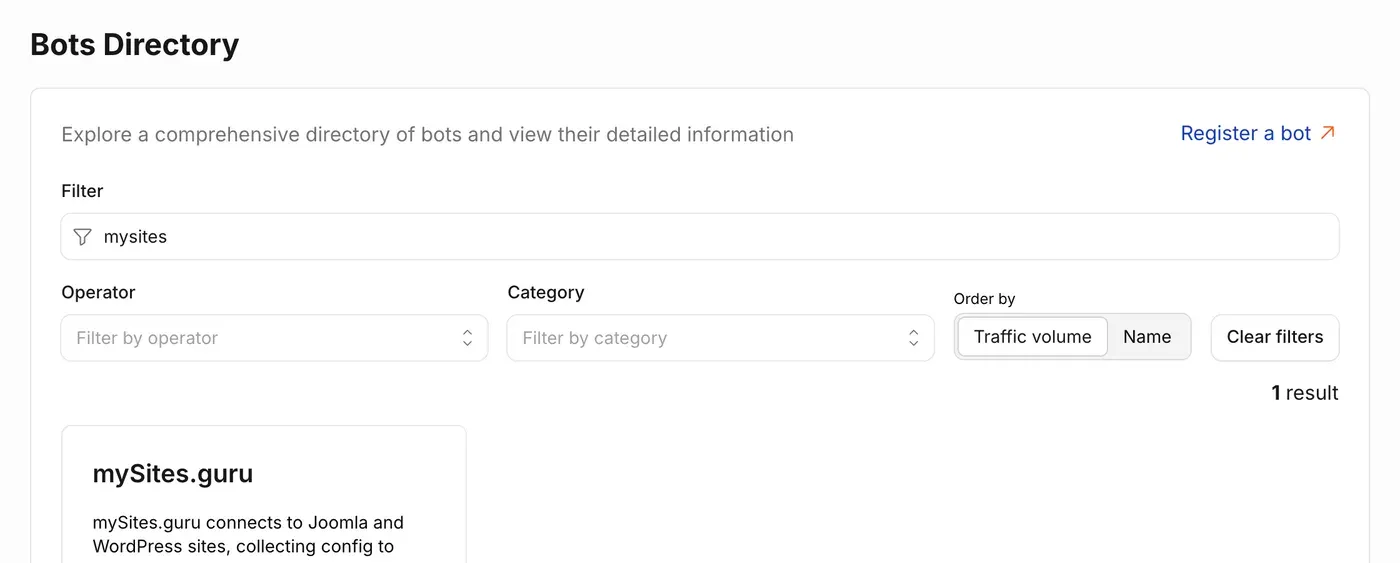
The Bots Directory is the public face of Cloudflare’s BotBase, the Bots and Agents Directory that its network checks traffic against. Every service in it is listed there, so the directory is a record of what Cloudflare has confirmed, and a listing is a public statement that the service behind it has been checked.
What is Cloudflare?
Cloudflare is a reverse proxy. A visitor’s request to a site behind it goes to Cloudflare’s network first, and Cloudflare decides whether to pass it to the origin server, challenge it or block it. The same is true of a request from mySites.guru, which is why a decision made inside Cloudflare’s network can stop an audit before the connector on your site ever sees it. What makes that decision matter is the scale of the network making it.
On W3Techs’ survey of 24 October 2026, Cloudflare sits in front of 27.9% of all websites, which is 86.0% of every site that uses a reverse proxy at all. Cloudflare’s own figure is that it proxies about 20% of the web, at an average of 115 million HTTP requests per second, from 335 cities in over 125 countries, on a network that passed 500 Tbps of external capacity in April 2026.
The website share is from W3Techs; the request rate and footprint are from Cloudflare’s own overview and its quarterly filing for the period to 30 June 2026, and the capacity from its 500 Tbps announcement. With that share of the web behind it, Cloudflare’s view of mySites.guru is effectively a verdict on whether we can reach a large part of the sites our customers connect. A challenge page at the edge is invisible to the site owner, who sees the site load normally in a browser, and visible only as a failed audit in our dashboard.
What the Radar listing shows
A Bots Directory listing has the same shape for every service: a Verified badge where it has been earned, an About card with a description, category, operator, access type, documentation link and, for a service that signs its requests, a Signature Agent URL pointing at the directory where its public key lives. Below that sits a User agent card with the HTTP request traffic Cloudflare has seen and the robots.txt tokens it knows for the service.
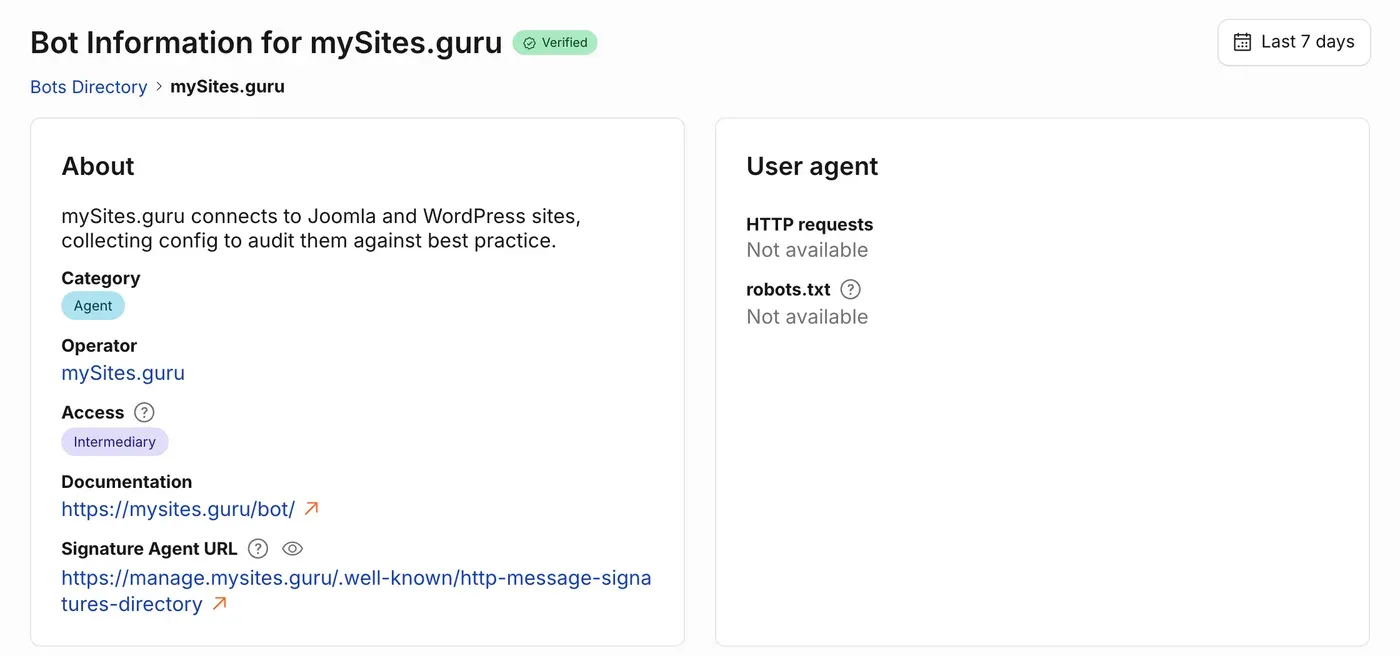
Ours reads as follows. The badge is Verified. The description is “mySites.guru connects to Joomla and WordPress sites, collecting config to audit them against best practice.” The type, which Radar shows under the Category field, is Agent: Cloudflare lists mySites.guru as an agent rather than a bot, classified under Monitoring & Operations and Security Testing. The operator is mySites.guru. The documentation link goes to our /bot/ page, and the Signature Agent URL is https://manage.mysites.guru/.well-known/http-message-signatures-directory, the same address you will find in the signature section of that page.
Access is Intermediary. Cloudflare’s own explanation of the two access types is that bots with “direct” access are controlled directly by their operator, while bots with “intermediary” access can be controlled by end users. Intermediary is the accurate description of mySites.guru, and it is why the listing calls us an agent. We do not decide which sites to visit; our customers do. A site owner connects a site, then starts or schedules the audits, backups, updates and snapshots from their dashboard, and mySites.guru makes the requests on their behalf. Cloudflare’s classification says the same thing as our own description of the service: an agent acting for the people who own the sites it talks to.
The User agent card shows Not available for both HTTP requests and robots.txt. The listing was approved on 31 October 2026, and Cloudflare’s traffic charts are built from what its network has observed since a service was added, so there is nothing to plot yet. Our User-Agent is not something you need the listing for in any case: it is mySites/6.0 (+https://mysites.guru/bot/) for connector calls and uptime checks alike, and it is published on /bot/.
The Signature Agent URL is the field that does the most work, because it points at the key Cloudflare uses to check every signed request. The listing rests on arithmetic as well as on a reviewer’s judgement.
How Web Bot Auth proves a request came from mySites.guru
Web Bot Auth is an IETF working group draft, HTTP Message Signatures for automated traffic, dated 1 September 2026 and written by T. Meunier of Cloudflare and S. Major of Google. It is built on RFC 9421, the HTTP Message Signatures standard. The working group’s charter says it “will standardize methods for cryptographically authenticating automated clients and providing additional information about their operators to Web sites.” We chose the newest draft rather than an earlier shape of the protocol, so what we send today is what the standard is converging on.
The idea is older than the draft. A signature is a piece of arithmetic that only the holder of a private key can produce and anyone holding the matching public key can check. If mySites.guru publishes its public key at a known address and signs each request with the private key it keeps to itself, then a firewall can fetch the public key once and check every request for itself, without a list of User-Agents to maintain and without trusting a header that any client could type.
On the wire, each signed request from mySites.guru has three extra headers. These are real ones, from a request our production worker sent on 24 October (long expired):
Signature-Agent: sig1="https://manage.mysites.guru"
Signature-Input: sig1=("@authority" "signature-agent";key="sig1");created=1792854734;keyid="PetbnHRFHSGbLUOwohXvoGOqNry-ox7cKdq34htUz-A";alg="ed25519";expires=1792854794;nonce="6CdYlQrySPbX2ZXCRJ4O_HV2Qh05QwcBD3QIbEVU7OuC_Lpxd-coKoX8o4zRAhZGaAetQyA0MaZMH8l2QK6GMw";tag="web-bot-auth"
Signature: sig1=:Et4glFiPW17YFdXFy5aZjAazOIqchSxuFlKFQo24H6SAOGRsQSsw7SZpcFco/Jrz+zzbnodmRfBXR0o2VLuODQ==:
Signature-Agent names where our public key can be fetched. Signature-Input says what was signed and with which key, and Signature is the Ed25519 signature itself. Three design choices make a copied header worthless to an attacker. The signature covers @authority, the host the request is going to, so a header captured on one site fails verification on every other site. It expires 60 seconds after it is made. And each one includes a random 64-byte nonce, so no two are alike.
What a verifier does with those headers
Cloudflare does this for every signed request it sees, and so can anyone else who wants to. The steps are the ones RFC 9421 lays out.
- Read
Signature-Inputto find out what was signed. Ours covers two things: the@authoritycomponent, which is the host in the request, and theSignature-Agentheader. The parameters after the list say when the signature was created, when it expires, which key signed it, the algorithm, the nonce, and the tagweb-bot-auth, which marks it as this kind of signature rather than some other use of RFC 9421. - Check the time. If the current time is past
expires, or beforecreatedby more than a little clock drift, stop: the signature is stale. Ours are valid for 60 seconds. - Fetch the key.
Signature-Agentsays the key directory is athttps://manage.mysites.guru, and the draft says to append/.well-known/http-message-signatures-directoryto find it. The directory is a JSON Web Key Set, and the verifier picks the key whose thumbprint matches thekeyidinSignature-Input, which for us isPetbnHRFHSGbLUOwohXvoGOqNry-ox7cKdq34htUz-A. A verifier can cache the key, so this fetch happens once in a while rather than once per request. - Check the directory itself. The directory response is signed as well, with a Content-Digest of its body, so the verifier can confirm that the key list it fetched was published by the holder of the key inside it before it trusts any request signed with that key.
- Rebuild the signature base. The verifier takes the covered components from the request as it actually received them, the real host it was sent to and the real
Signature-Agentheader, and lays them out in the form RFC 9421 specifies, with the signature parameters appended. This is why@authoritymatters: a verifier on a different host rebuilds a different base, and the arithmetic fails. - Verify. Run the Ed25519 verification with the public key, the rebuilt base and the bytes inside
Signature. It either passes or it does not; there is no partial score. If it passes, the request was made by the holder of the private key matching the key published at manage.mysites.guru, and by no one else.
The public key is live at manage.mysites.guru/.well-known/http-message-signatures-directory if you want to try this against a request in your own logs, and the verification section of /bot/ has the shorter DNS check for anyone who does not want to. The cost of all this on our side is about 20 microseconds of CPU per request, measured on our production worker servers, which is to say nothing you will notice in an audit’s run time.
One thing Web Bot Auth does not replace is the security already between us and your site. Every connector call is also encrypted and authorised with that site’s own keys, and validated by mySites.guru before it runs, as our post on connecting client sites explains. The two do different jobs. Web Bot Auth proves where a request came from; the per-site signature authorises what it does. A firewall cares about the first, your site cares about the second, and neither one stands in for the other.
What changes for WordPress and Joomla sites behind Cloudflare?
For a site on a Pro, Business or Enterprise plan, mySites.guru now falls into a group of traffic that Cloudflare already treats differently. Super Bot Fight Mode sorts automated traffic into Definitely automated, Likely automated and Verified bots, and each group can be set to Allow. On the Pro plan, Cloudflare says “Allow or block verified bots” is handled by the Super Bot Fight Mode settings themselves, with no custom rules needed. Cloudflare also notes that “Historically, Verified bots have been excluded in default bot configurations across all plans,” so verified status is a group Cloudflare has long set apart from the rest.
If you write your own WAF custom rules, Cloudflare exposes the field cf.client.bot, which is true for a verified bot. Cloudflare’s own guidance is to make your first rule this expression, with the action Skip and “All remaining custom rules” selected, so that search engine crawlers, monitoring services and every other verified service bypass the rules written for everyone else:
(cf.client.bot)That single rule replaces the one we have asked customers to add by hand, which matches our User-Agent and IP address and is documented in the Cloudflare section of our /bot/ page. The hand-written rule still works and is still useful as a fallback, and there is no harm in keeping both. The point of the change is that you no longer have to know we exist to let us through.
The free plan's Bot Fight Mode is a different thing
Bot Fight Mode on Cloudflare’s free plan cannot be skipped or adjusted with WAF custom rules or Page Rules, and Cloudflare does not say verified services are exempt from it. If it challenges a request you want to allow, Cloudflare’s own advice is to turn Bot Fight Mode off or upgrade to Super Bot Fight Mode, where verified bots are a group you control.
There is a wider shift here that our robots.txt post touched on in its section on what replaces lists of crawler names: a signature instead of a list of names. A firewall that checks a signature does not need to be told about mySites.guru in advance, or keep a list of User-Agents up to date, or trust that a string in a header is honest. It fetches the key, checks the arithmetic, and knows.
Part of a longer push to be open about our traffic
The listing is the latest step in a sequence, each one making it easier for someone reading a server log to know who we are and what we want. Our addresses have been published for a long time, in plain text, at manage.mysites.guru/ips. Connector traffic still comes from 178.62.5.35, whose reverse DNS is main-workers.mysites.guru, and every request includes the header X-Questions: Please email phil@phil-taylor.com, so a human is one email away from anyone who wonders what a request was for.
On 24 October we changed both of our User-Agents to mySites/6.0 (+https://mysites.guru/bot/), pointing at mysites.guru/bot/, a public page that describes every request the service makes, how to verify it and how to stop it. Hosts have their own guide at manage.mysites.guru/info-for-webhosts. The signatures went live the same day, and a week later the listing followed from them.
There are two limits. First, signing covers every connector request, which means audits, backups, updates, snapshots and connection checks. Uptime checks are not signed yet; they are still identified by their published IP, 165.227.239.229, whose reverse DNS is monitor-engine.mysites.guru, and by the same mySites/6.0 User-Agent. Second, a signature only helps where something checks it. Cloudflare does. Akamai, AWS WAF for CloudFront, Vercel and DataDome also verify Web Bot Auth signatures, though we are not registered with any of them. SiteGround’s Anti-Bot AI does not check signatures today, so signing does not by itself stop SiteGround challenging us, and the route there remains the support ticket in that post.
How can you check a request really came from us?
Pick whichever of two checks suits your tools. The first is reverse DNS, forward-confirmed: look up the source IP, get main-workers.mysites.guru, then look that name up and confirm it resolves back to the same address. The verification section of our /bot/ page walks through it with the dig commands. The second is the signature itself: fetch our public key from the directory above and verify the Signature header against the request, following the six steps earlier in this post or the signature section of /bot/. If your site is behind Cloudflare, that second check is done for you on every request, and the result is what makes the listing possible.
Either check gives you the same answer with no trust required. A request that says it is from mySites.guru can be tested against a key we publish and a name we control, and a request that fails those tests is not from us, whatever its headers claim. That is what Cloudflare’s verified listing certifies, and it is what we want every firewall between us and your WordPress or Joomla site to be able to confirm for itself.
Further Reading
- mySites.guru service traffic - our own reference page: every request we make, both User-Agents, the addresses, the signing key, how to verify a request and how to stop it
- Cloudflare: Verified bots - Cloudflare's definition, the two bars a service must clear, and what happens to one that breaches them
- Cloudflare Radar: Bots Directory - the public directory our listing sits in
- IETF: HTTP Message Signatures for automated traffic (draft-ietf-webbotauth-httpsig-protocol) - the working group draft our signatures follow
- RFC 9421: HTTP Message Signatures - the standard the draft is built on
- W3Techs: usage statistics of reverse proxy services - the survey behind the Cloudflare market share figures
- Cloudflare: Super Bot Fight Mode - the Pro, Business and Enterprise setting where verified bots are a group of their own
Frequently Asked Questions
Does this help if my site uses Cloudflare's free plan?
Are uptime checks signed too?
Do I still need the Cloudflare WAF skip rule?
Why is mySites.guru listed as an agent with Intermediary access?
Does this stop SiteGround blocking mySites.guru?
How can I check a request really came from mySites.guru?
 Written and edited by a human, with AI assistance. Our approach to AI