Joomla 6.1.2 and 5.4.7 Ignore Every Article Option
You set an Alternative Layout on a Joomla article. The front end ignores it and renders the default. The custom fields that layout was supposed to show have apparently vanished. So you clear the Joomla cache, purge Cloudflare, rebuild the menus, reinstall the template, and check the article again. Nothing has changed.
The article is fine. Your template is fine. Joomla 5.4.7 and 6.1.2 both have a core regression that throws away every Option you set on an individual article and renders the menu item or global value instead.
Both versions shipped on 7 July 2026, and both are still the newest stable release on their branch. The people who updated promptly are exactly the ones who got hit, and as of 10 August 2026 there is no released Joomla version you can update to that fixes it.
What Actually Breaks in Joomla 6.1.2 and 5.4.7
Every per-article Option is ignored on the front end. Not one feature, all of them. The Options tab on an article stops influencing the page entirely, and Joomla falls back to whatever the menu item or the com_content global configuration says.
That includes the Alternative Layout, author display, the info block, publish dates, hit counts, tags, and article navigation. Anything you can set per article and expect to win.
This is why the symptom looks different on every site. On one it is a missing byline. On another it is a page rendering with the wrong layout, which makes the custom fields assigned to that layout look like they have been deleted. The underlying fault is identical in both cases.
Note
This is a functional bug, not a security issue. It does not expose data or allow unauthorised access. It is tagged as a bug on the Joomla issue tracker, and it never went through Joomla's security channel.
Why Write About This When the Fix Already Exists?
Several people have asked exactly that in the comments, so to answer it directly: yes, we know. We have been tracking this since the day it was reported in July, which is why the check described further down reads the file on disk instead of trusting the version number, and why applying the official hotfix from mySites.guru is one click. None of that was built this weekend.
What changed this weekend was demand. Site owners fall into two groups: the ones who update the week a release ships, and the ones who update someday. Someday turned out to be 8 and 9 August, a month after 5.4.7 and 6.1.2 came out, and our mailbox filled up with the same question from people who had just updated and watched their article layouts stop working. A fix existing and a fix being applied are different things, and the gap between them is exactly where the support tickets are.
The second reason is that the Joomla project communicates post-release problems poorly. The full write-up lives on a known-issues page in the manual, several levels deep on a site most administrators never visit. Credit where it is due, the release announcement now opens with a yellow warning card headed “Known issue with 5.4.7 and 6.1.2”, with both the hotfix link and the manual link. Previous releases gave known issues a plain sentence link partway down the page, so the card is an improvement.
Almost no one updates Joomla by reading joomla.org, though. They click Update in their own administrator. On that screen the entire pointer to the announcement is one link labelled “Additional Information”, rendered from the infourl field in Joomla’s update XML, sitting beside the button everyone came to press. Once the update finishes, the completion screen tells you “Your site has been updated. Your Joomla version is now 5.4.7.” and stops there. No post-installation message ever mentions the known issue.
The timing makes it worse. The regression was reported on 8 July, one day after both versions shipped, so anyone who updated in that first day read an announcement page that did not yet have the warning. Joomla has no mechanism to reach a site once it has already updated, and the known-issues page just sits there waiting to be found. The people most exposed are the ones who updated fastest and then had no reason to look again.
If you patched in July, this post is not aimed at you. Send it to whoever updated last weekend.
How Do I Find Every Affected Joomla Site?
You need a patch-level version list, and that is harder than it sounds. Joomla’s own public statistics only report the minor branch, so they will tell you what share of sites run 5.4 or 6.1 but not how many are on the specific releases that have the bug.
If your sites are connected to mySites.guru, the Sites list already holds the exact version of every install. Type the version straight into the filter box at the top of the list, which reads “Filter sites by name, url, tag or version number - exact match search”, and the list narrows to the matching sites. Do it once for 5.4.7 and once for 6.1.2, and export each list if you want it as a CSV to work through.
That turns an afternoon of logging into every site into about thirty seconds. It is the same job managing multiple Joomla sites exists to make boring.
Here is what that query returns across the Joomla sites connected to mySites.guru today:
| Joomla version | Share of connected Joomla sites |
|---|---|
| 5.4.7 | ~18% |
| 6.1.2 | ~13% |
| 5.4.8 or 6.1.3 | none, no such release exists |
So about 31% of every connected Joomla install is on a version that has this bug. Narrow it to sites already on a current branch, meaning 5.4.x or 6.1.x, and the affected share is nearly 88%. Keeping Joomla current is still the right call, and it is what put almost nine in ten of those sites on a broken release.
Filtering on the version number has one limitation. Applying the hotfix does not change the version a site reports, so a patched 5.4.7 site still shows as 5.4.7 and keeps appearing in that filter. Separating the patched from the broken means looking at the file itself, which is what the dedicated check described below does.
Why Won’t Clearing Your Joomla Cache Fix It?
Because nothing is cached wrongly. The wrong values are resolved in PHP on every single request, while Joomla is building the article, long before any cache or CDN sees the finished HTML.
That single fact explains why this bug costs people an afternoon. Every instinct a competent Joomla administrator has is the wrong one here:
- Clearing the Joomla cache changes nothing, because the page is rebuilt with the same wrong values.
- Purging Cloudflare or switching on development mode changes nothing, for the same reason.
- Rebuilding the menu or the database changes nothing, because no data is corrupt.
- Reinstalling the template changes nothing, because the template was never consulted for the layout it was told to skip.
The fastest way to confirm it is to turn on debug and look at which layout actually loads. If the com_content global default renders instead of the one set on the article, this is your bug.
The Code Change That Broke Joomla’s Article Options
The cause is PR #47752, “[5.4] Fix Author Display Issue Using Article Setting”, merged on 27 May 2026 and shipped in both 5.4.7 and 6.1.2. It rewrote how components/com_content/src/Model/ArticleModel.php merges an article’s own parameters over the menu and global ones.
The original logic merged the article’s stored attribs wholesale, so anything set on the article won every time:
$data->params = clone $this->getState('params');
$data->params->merge($registry);
The replacement only reaches into the article’s parameters where the menu item already holds the literal string use_article for that key:
$menuParamsArray = $this->getState('params')->toArray();

foreach ($menuParamsArray as $key => $value) {
    if ($value === 'use_article') {
        $articleArray[$key] = $registry->get($key);
    }
}
A Single Article menu item has no article_layout key at all, so the loop never fires for it and the article’s value is never merged in. What is still there is the com_content global configuration merged with the menu item parameters, and the view then reads that stale value:
if (isset($active->query['layout'])) {
    $this->setLayout($active->query['layout']);
} elseif ($layout = $item->params->get('article_layout')) {
    $this->setLayout($layout);
}
Execution reaches the second branch and sets the layout, using a value the article never got a chance to override. Nothing errors, nothing is logged, and the page renders happily with the wrong settings. Silent wrong output is always more expensive to diagnose than a crash.
Which of My Joomla Articles Are Actually Affected?
Only articles whose Options differ from what the menu item or global config already says. If an article’s layout matches the com_content default, it renders correctly by accident. So a site can look 95% fine and still have three pages badly broken.
To list the published articles that set their own layout, swap #__ for your real table prefix:
SELECT id, title,
       JSON_UNQUOTE(
           JSON_EXTRACT(attribs, '$.article_layout')
       ) AS article_layout
FROM   #__content
WHERE  state = 1
  AND  JSON_VALID(attribs)
HAVING article_layout IS NOT NULL
   AND article_layout <> ''
ORDER BY title;
Layout is only the most visible casualty though. To catch every article that has any non-inherited Option, match on the shape of the stored JSON instead. Joomla writes unset options as empty strings, so anything with a value has been set on purpose:
SELECT id, title, attribs
FROM   #__content
WHERE  state = 1
  AND  attribs REGEXP '"[a-zA-Z0-9_]+":"[^"]+"'
ORDER BY title;
Work down that list and check each one on the front end. It is usually much shorter than people expect.
How Do I Apply the Official Joomla Hotfix?
Joomla publishes a hotfix package that reverts the offending change on 5.4.7 and 6.1.2. It is a one-time file patcher: it checks your version, replaces ArticleModel.php, tells you what it changed, then deletes itself, so no extension is left installed afterwards.
The package is Joomla_5_4_7_and_6_1_2_ArticleModel_Hotfix1.zip, published at update.joomla.org/hotfix/. Check it against these before you install it:
SHA256
e1247bb5a01b2448307407f9f843b33edae52d324f7f95b21252e74e7c47328f

MD5
a1e708491efa376d5369a7db3bce5800
Install it through System, Install, Extensions like any other package. Verify the checksum first, and take a backup, because this replaces a core file:
shasum -a 256 Joomla_5_4_7_and_6_1_2_ArticleModel_Hotfix1.zipWarning
The patcher runs on exactly 5.4.7 and 6.1.2 and aborts safely on any other version. That version lock is intended, so do not try to force it onto a different release. If you would rather not use the installer, the zip preserves the directory structure and you can copy the correct version's ArticleModel.php over components/com_content/src/Model/ yourself, then fix ownership and permissions and clear the cache.
There is nothing to undo later. When 5.4.8 or 6.1.3 arrives it overwrites the patched file with the proper fix.
Apply the Hotfix From mySites.guru Instead
mySites.guru now checks for this regression on every snapshot of a Joomla site, and applies Joomla’s official hotfix for you. On the Manage Site page, open the Quick Snapshot tab and look under Joomla Configuration for Article Options Ignored (Joomla 5.4.7 & 6.1.2).
The check ignores the reported version number, because patching the file does not change it. Instead it reads components/com_content/src/Model/ArticleModel.php on your site and looks for a local variable named menuParamsArray. That variable exists in 5.4.7 and 6.1.2 and in no other release: not in 5.4.6 or 6.1.1 before them, not in the permanent fix scheduled for 5.4.8 and 6.1.3, and not in either file inside Joomla’s own hotfix package. Its presence is therefore an exact answer, in both directions, to whether the site is running the broken code at this moment, which is more than a version number can tell you.
Click Investigate and you get the file, its MD5, and the published articles that are actually losing settings, with the specific Options each one sets:
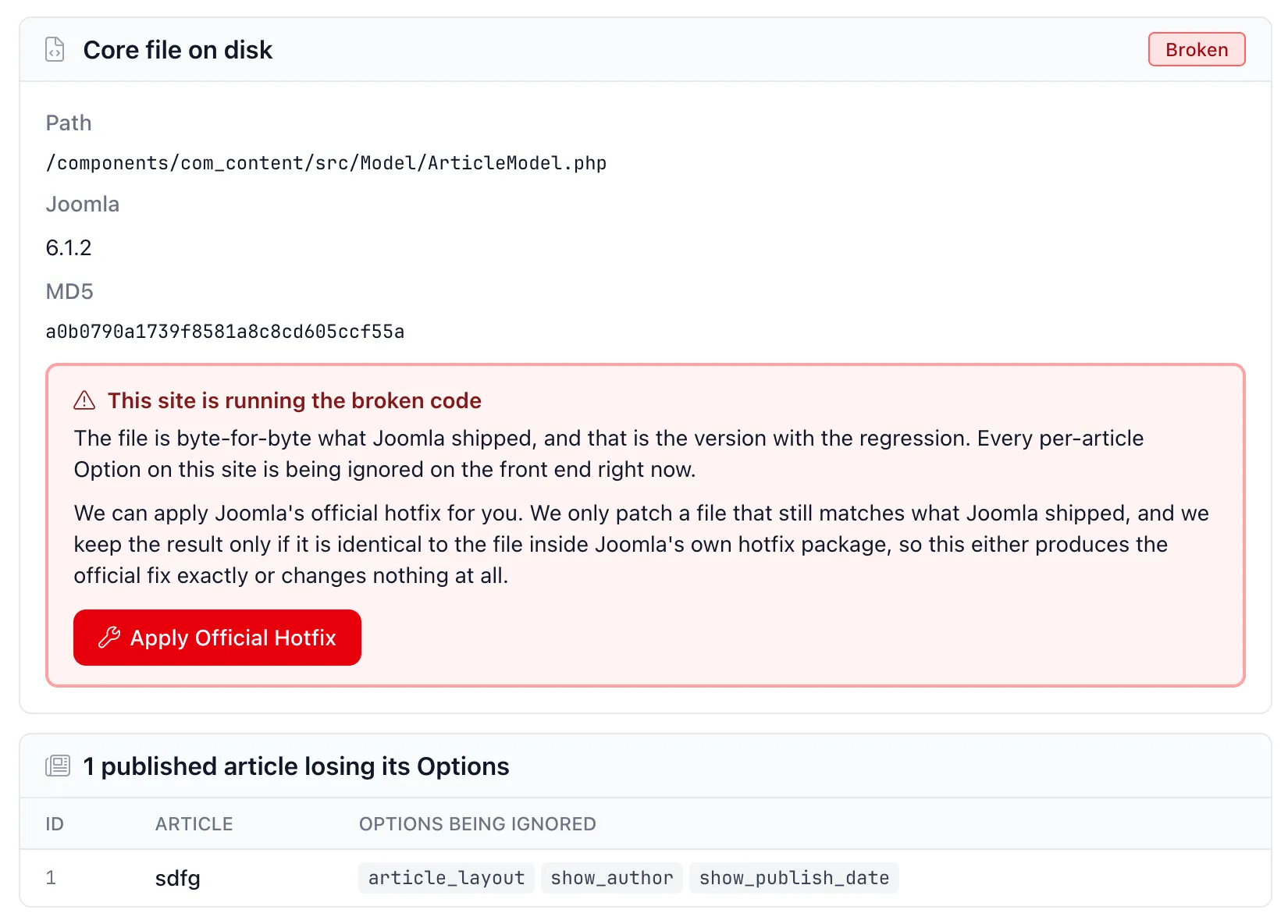
The count matters more than the badge. As covered above, an article whose Options match the menu item or global default renders correctly by accident, so only published articles that actually set a per-article Option are counted. A 5.4.7 site that leaves everything on “Use Global” loses nothing, and we say so rather than raising an alarm about it. The badge reads “No Data” until the site has taken a snapshot with a connector new enough to run the check, because “no data” and “zero” are different answers.
Clicking Apply Official Hotfix writes nothing straight away. It asks first, and the dialog spells out the rule the patcher enforces:
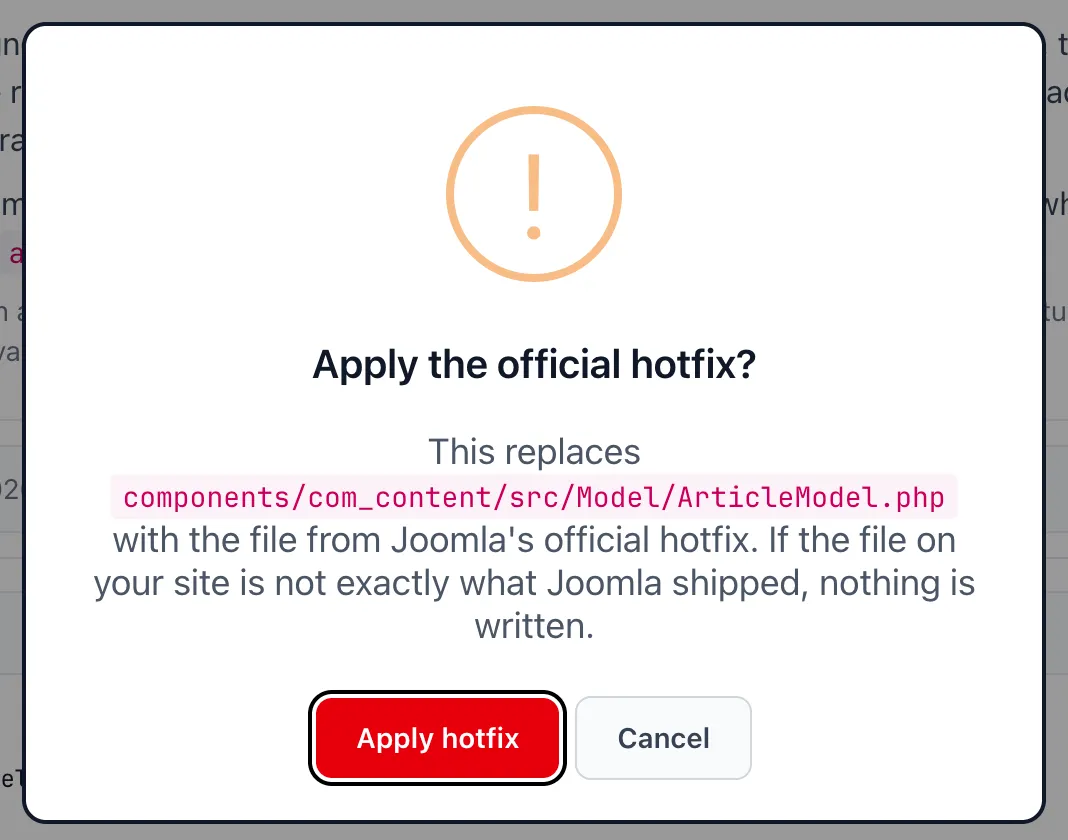
There are two gates on that write. The file has to still be byte-for-byte what Joomla shipped, and the patched result is only kept if it is identical to the file inside Joomla’s official hotfix package. So it either produces the official fix exactly or changes nothing at all. If somebody has already edited ArticleModel.php on that site, the patch is rejected and you are told, rather than having work no one can see overwritten.
There is no backup step. The first gate means the file being replaced is always a specific, published Joomla release, so the rollback is downloading that same official file again.
When the write does happen, the file is read back off disk and its checksum verified a second time, so the panel only flips once the bytes on your own server have been checked:
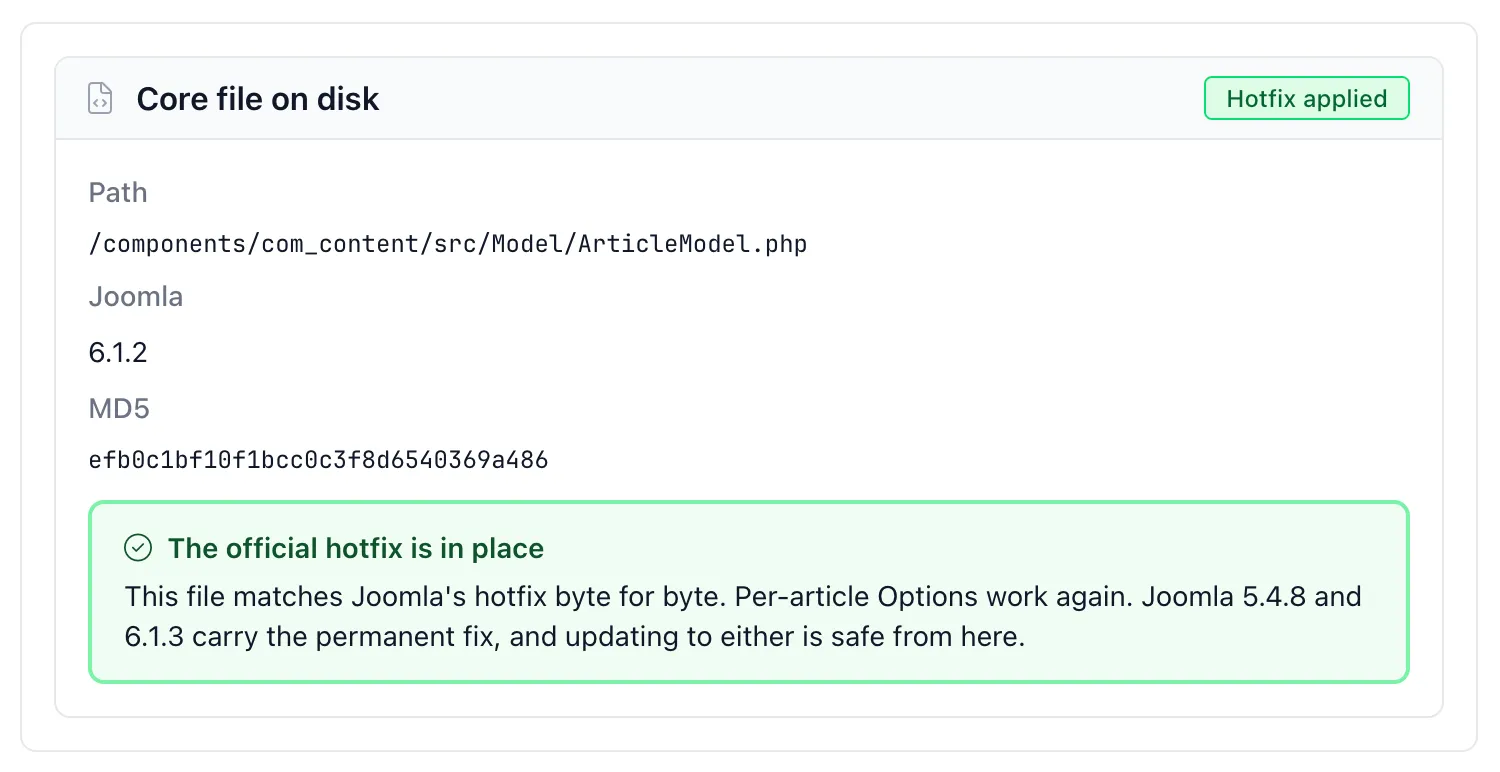
“It’s Just a Single File”
Which is the other thing being said in the comments, and it is completely right. One file, one hotfix, a couple of minutes.
So try the version of that question an agency actually has to answer: which of the 300 client sites you updated before anyone knew about this issue have that one core file modified, and which do not? By hand, that is 300 administrator logins, or SSH and a checksum on 300 servers.
The all-sites view for this check answers it on one page, in one place. It lists only your connected Joomla sites reporting 5.4.7 or 6.1.2, so the page is your affected set rather than a list you have to filter down, and every row has the same badge as the snapshot panel: a red count of the published articles currently losing their Options, or a green OK. Investigate on any row applies Joomla’s official hotfix to that site. Job done.
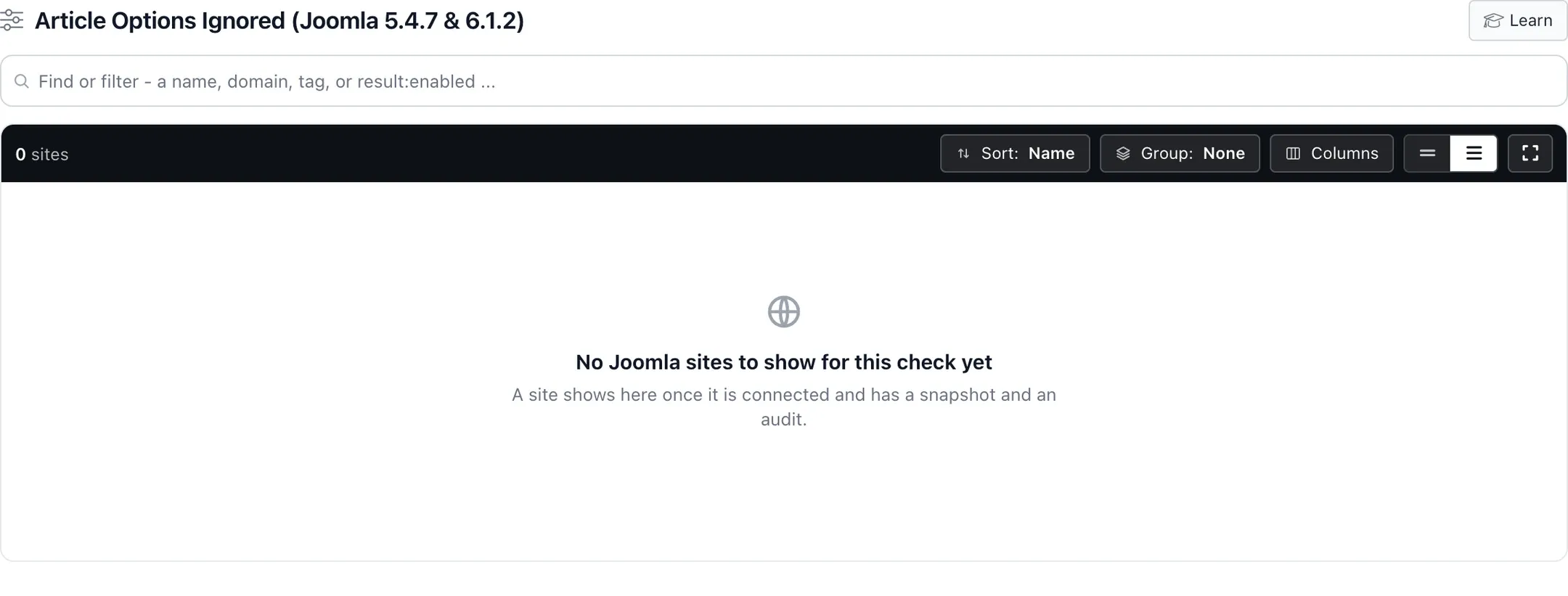
The screenshot is from a demo account with no sites on either release, so the list is empty. On an account with affected sites, each one is a row.
Every site gets the same two gates, so one whose ArticleModel.php somebody has already edited is rejected rather than overwritten. A successful patch runs a fresh snapshot for that site straight away, so its badge reflects the file you just wrote instead of waiting for the next scheduled run.
Patched sites stay on the list, because patching does not change the version a site reports: the list works as a progress bar, turning green a row at a time until you are through the portfolio.
One caveat. A green OK here means per-article Options are working, which covers both a patched site and a site where no published article sets any Options to lose. When you want the file-level answer, the per-site panel above reports Broken or Hotfix applied from the bytes on disk.
The Joomla Menu Item Workaround, and Where It Falls Short
If you cannot patch core on a particular site, set the layout on the menu item rather than the article. Looking back at the view code above, $active->query['layout'] is checked first and wins, so it never reaches the broken merge.
For a custom layout to appear in the menu item’s dropdown it needs an .xml manifest next to the .php file, because Joomla only offers layouts it can find a manifest for:
<?xml version="1.0" encoding="UTF-8"?>
<metadata>
	<layout title="Team Page">
		<message><![CDATA[Team page layout.]]></message>
	</layout>
</metadata>
Joomla scans templates/<template>/html/<component>/<view>/*.xml and builds the request variable as template:layout, so the menu link ends up as ...&id=342&layout=yourtemplate:team-page.
We built and verified this on a client site before the hotfix existed, then reverted it once the hotfix shipped. It works, but be clear about what it does not do. It only rescues the layout, not the other article Options, and it only helps the pages you remember to fix. It is a stopgap for a handful of important pages, not a fix for a site.
Three Joomla Fixes That Will Make Things Worse
Some of the obvious workarounds cause more damage than the bug.
Do not change the com_content global Alternative Layout
It looks like it fixes the broken page, and it changes every other article that relies on the default at the same time.
Do not add article_layout or use_article to a Single Article menu item’s parameters by hand
That field only exists on category menu item types, so the administrator form drops it the next time anyone saves that menu item, and the page breaks again weeks later.
Do not roll back to 5.4.6 or 6.1.1 to escape it
Those releases are missing the ten security fixes that shipped in 5.4.6 and 6.1.1 and later. Trading a cosmetic rendering bug for known security holes is a bad deal in every direction. Patch the file instead.
Where This Leaves Joomla Site Owners
The fix itself was quick. Issue #48058 was raised on 8 July, one day after the release, and PR #48060 was merged on 10 July. It restores the original wholesale merge and it is sitting in the 5.4-dev, 6.1-dev and 6.2-dev branches right now.
It just has not been released. 5.4.8 and 6.1.3 are both open milestones with a target date of 18 August 2026, which means that for over a month the newest stable Joomla on both supported branches has shipped this bug, with no upgrade path away from it.
The fix has now shipped
Joomla 5.4.8 and 6.1.3 shipped on 19 August 2026, and both have the merge commit for PR #48060, so the article options bug is fixed in each. The update to be on now is 5.4.9 or 6.1.4, which keeps that fix. Both are also security releases, closing ten advisories including an MFA authentication bypass, so there is no argument for staying put. There is one catch, and it is the same lesson this post is about: 5.4.8 and 6.1.3 break the Template Manager, so creating a template override throws a “Snooping out of bounds” error. That bug is fixed in 5.4.9 and 6.1.4, released on 29 September 2026 with 16 more security fixes, so go straight to those: Joomla 5.4.9 and 6.1.4 security release.
Which is a reminder worth taking seriously if you look after sites for other people: “keep everything on the latest version” is good policy and it is not a complete one. You still need to know what version each site is actually on, and you need to hear about a bad release before your client does. This is the same discipline that stops accidental version jumps and catches update channel failures before they become support tickets. It is not unique to Joomla either, as anyone who lived through the WordPress 6.9.2 release that crashed sites will recognise.
The bug is annoying. Not knowing which of your sites has it is the actual problem.
Further Reading
- Joomla 6.1.2 and 5.4.7 release announcement - has the known-issue warning card and the hotfix link
- Joomla 6.1.2 Known Issues - the official known-issues page, including the hotfix checksums
- Joomla 5.4.7 Known Issues - the same guidance for the 5.4 branch
- Issue #48058 - the regression report against 5.4.7
- PR #48060 - the fix, merged and awaiting release
- PR #47752 - the change that caused it
Frequently Asked Questions
Which Joomla versions ignore per-article Options?
Is this a security vulnerability?
Can I just update to a newer Joomla version to fix it?
Will clearing the Joomla cache or purging my CDN fix it?
Does the official hotfix need to be uninstalled later?
Can mySites.guru apply the hotfix for me?
Why do only some of my articles look wrong?
 Written and edited by a human, with AI assistance. Our approach to AI