What Does File Checksum Failed Mean in a Joomla Update, and How Do You Fix It?
You start a core update in Joomla Update and, instead of the update running, a red banner appears above the Pre-Update Check:
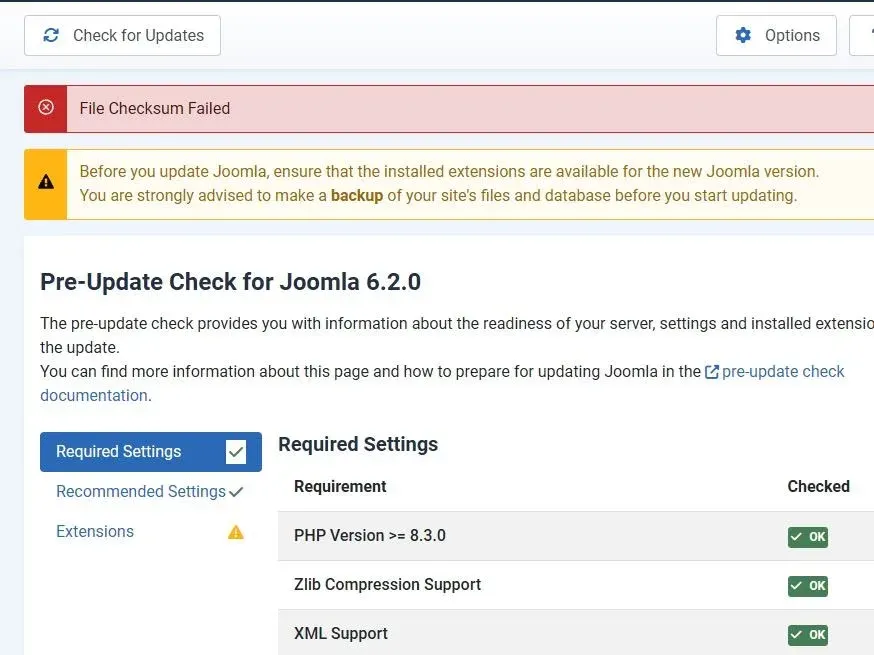
“File Checksum Failed” means the update zip Joomla downloaded did not match the SHA-512 hash Joomla’s release team signed, so Joomla stopped before installing anything. The banner says nothing about why the two differed.
Reasons Why You Might See File Checksum Failed in Joomla Upgrade
- Joomla’s update servers, mirrors or CDN are serving a file that does not match the signed hash, usually in the hours after a new Joomla release.
- The file is fine but the published hash is wrong, because of a mistake when it was entered or signed. This has happened on release days before and is usually corrected within minutes of being spotted.
- The download failed or was cut short, or a proxy or firewall on your host interfered with it.
- Your disk or hosting quota is full, so the zip could not be written.
- The Path to Temp Folder in Global Configuration points at a folder that does not exist on this server, often one copied from a development machine.
- The temp folder exists but PHP cannot write to it.
- A truncated zip from an earlier attempt is still in the temp folder and Joomla keeps reusing it.
The short version
Joomla downloaded the update zip, hashed it, and the hash did not match the one Joomla’s release team signed. Joomla installed none of it, so your site is unchanged. If the release is only hours old, wait an hour and try again. If it is not, check the Path to Temp Folder in Global Configuration, check your disk space, and delete any leftover Joomla_*_Update_Package.zip from your tmp folder before retrying, because Joomla reuses a truncated zip instead of downloading it again.
What Joomla Checks Before It Installs an Update
Before extracting a core update package, Joomla calculates its SHA-512 hash and compares it with the hash in Joomla’s signed update metadata. If the two differ, Joomla stops there and shows the banner. The language string behind the banner is COM_JOOMLAUPDATE_VIEW_UPDATE_CHECKSUM_WRONG, defined in com_joomlaupdate.ini.
A checksum, or hash, is a fixed-length fingerprint of a file. Change one byte of a 30 MB update zip and its SHA-512 changes completely. So if the hash of the file on your server matches the published one, you have the file the release team built, and if it does not, you have something else: a different build, a truncated download, an HTML error page saved under a .zip name, or an empty file.
Stopping is the right call. An update package is unpacked over the core files of your site, and a half-written or substituted package is the last thing you want extracted there.
Where the Signed Hash Comes From: TUF in Two Minutes
Since Joomla 5.1, core updates use The Update Framework, usually shortened to TUF. Before 5.1, Joomla read the expected hash from a plain XML file on the update server, so anyone who could change that file, or sit between your site and the server, could change the hash along with the package. TUF closes that gap by signing the metadata. David Jardin’s Joomla Magazine article on the 5.1 rollout explains why the project adopted it.
TUF splits the job into four signed roles, described in the TUF specification:
| Role | Lists |
|---|---|
root | The keys allowed to sign every other role, and how many signatures each needs |
targets | Each release Joomla offers, with its file length, hashes and download URLs |
snapshot | The current version of the targets file |
timestamp | A fresh signature each day, with a short expiry |
Joomla publishes the root role as root.json. The targets file is signed by Joomla release team members, and it is where the SHA-512 for each release package lives. The snapshot role stops an attacker mixing an old targets file with new metadata, and the daily timestamp lets a site tell when it is being fed stale metadata. If the timestamp lapses you get a different error, which we cover in the offered update has expired.
Joomla Update Not Possible Because the Offered Update Has ExpiredRead the full post
Joomla’s own copy is at update.joomla.org/cms/targets.json, with its history in the joomla/updates repository. Each release entry lists the package’s length in bytes, its SHA-512 hash and its download URLs. For Joomla core those are downloads.joomla.org, the GitHub release asset and update.joomla.org/releases.
TUF and the checksum do two different jobs. TUF proves the hash came from Joomla’s release team and has not been tampered with. The checksum proves the zip on your server matches that hash. A TUF problem (expired, unsigned or tampered metadata) produces a JLIB_INSTALLER_TUF_* error before any download starts, and “File Checksum Failed” only appears once the metadata has passed and the package itself has not.
The TUF client library Joomla bundles, php-tuf, has its own download method that stops at the signed length and checks the hash, as section 5.7 of the specification describes. Joomla does not use it. It uses TUF to fetch and verify the metadata, then downloads the package with its own HTTP code and compares hashes in a function that predates TUF. That older code is why one message covers so many causes.
The Most Common Reason for File Checksum Failed in Joomla
Most of the time the error appears because a new Joomla version has only just come out and the Joomla project is still firefighting the release. In that first hour or so, packages are still reaching the mirrors, the signed update metadata is still being deployed, and CDN caches around the world are still being purged. Until all of that settles, some sites that check for the update get a file, or a cached response, that does not match the signed hash, and each of them shows the same red banner.
Nothing on your site needs fixing when this is the cause. The release team usually has it sorted within an hour or two, so if the version you are updating to came out today, wait and check for updates again later. If you cannot wait, download the package yourself, check its hash, and use Upload and Update, as described further down.
And yes, sometimes the Joomla project screws up the signing.
How mySites.guru Spots the Local Causes Before an Update
When the cause is on Joomla’s servers, all your sites fail together and the fix is patience. When it is local, it is one site, and often one that has been broken for months without anyone noticing, because the temp folder is only touched when Joomla tries to install something.
The most common local cause we see is a Path to Temp Folder copied from somewhere else. A site is built on a laptop or a staging server, the database and configuration.php move to production, and $tmp_path still points at /Users/someone/Sites/client/tmp or /home/staging/public_html/tmp. The site looks fine. Then an update or an extension install tries to write a file to a folder that does not exist on this server, and fails.
mySites.guru checks the configured tmp and log paths on each connected Joomla site twice a day, and flags any that do not match the site’s own default folders. Across the Joomla sites connected to mySites.guru, 11.6% are currently flagged by that check. One click in mySites.guru resets both paths to the site’s own tmp and administrator/logs folders.
Log And Tmp Folders Should Use Default Locations
mySites.guru checks every connected site for this automatically and flags it the moment it appears. These run twice a day on every connected site.
It can also fix this across every connected site with one click.
A separate check confirms that the tmp and logs folders are writable by PHP, and a scheduled backup before any core update covers you if an update does get partway through. If you look after more than a handful of sites, the portfolio view also answers the first question this error raises: is it one site, or all of them? If all your sites on the same Joomla version fail at once, it is Joomla’s side.
Why Joomla Shows the Same Error for Five Different Problems
The confusion comes from UpdateModel::download(). Simplified, it does this:
// Find the path to the temp directory and the local package.
$tempdir = /* Path to Temp Folder from Global Configuration */;
$target  = $tempdir . '/' . $basename;

// Do we have a cached file?
$exists = is_file($target);

if (!$exists) {
    // Try each download URL until one returns HTTP 200 and the write does not throw
    while (!($download = $this->downloadPackage($packageURL, $target)) && isset($sources[$mirror])) {
        // ...next mirror
    }
}
// (a 0-byte cached file is re-downloaded; a non-empty one is reused as it is)

$response['check'] = $this->isChecksumValid($target, $updateInfo['object']);
Three things in that code explain almost all the reports.
First, the hash check runs whatever happened before it. If all the mirrors failed, or the file was never written, Joomla still hashes $target. PHP’s hash_file() returns false for a missing file, false does not equal the signed hash, and you get “File Checksum Failed” rather than “Download of update package failed”. The controller tests the checksum result first, so the download-failed message is only reached in one narrow case: when the initial request for the package URL throws.
Second, downloadPackage() does not check whether the file was written. It calls File::write(), which returns false when PHP’s file_put_contents() fails, and ignores the return value. On a small RAM disk filled on purpose, PHP reports No space left on device, file_put_contents() returns false, and Joomla’s code continues as if the download had succeeded.
Third, Joomla keeps the file it downloaded. A failed check clears the session state but leaves the zip in the temp folder, and the next attempt reuses any non-empty file with the same name rather than downloading it again. Fix the disk space, retry, and the same truncated zip gives you the same error.
So the same banner can mean any of these.
Release-day mismatch
The version came out in the last few hours and all sites fail at once. The mirrors, the CDN cache and the signed metadata are briefly out of step during a release, or a hash was entered wrongly. Wait. It clears on its own, usually within an hour or two.
Failed or partial download
A mirror returned an error, a proxy or firewall interfered, or the connection was cut. The update log in administrator/logs/joomla_update.php stops before the checksum line. A host that blocks outbound requests to GitHub or update.joomla.org can fail all three mirrors. Use Upload and Update with a package you have verified, and look at what sits between PHP and the internet.
Disk or quota full
PHP could not write the update zip, the failed write was not caught, and the hash check ran on an empty or incomplete file. Check the hosting control panel for the account quota, not only the server disk. Free a few hundred megabytes, delete the leftover update zip from the temp folder, and retry.
Wrong Path to Temp Folder
The tmp path in configuration.php points at a folder that does not exist on this server, often one copied from a development machine. The zip is not saved anywhere. Set Path to Temp Folder, on the Server tab of Global Configuration, to the tmp folder inside this site’s root, or use the one-click fix in mySites.guru.
Temp folder not writable
The path is right but PHP cannot write there, usually after files were copied with the wrong owner or permissions. Correct the owner or permissions so PHP can write to the folder.
Joomla core developers have known about the first problem for years. When a wrong download URL caused this error on a 4.1.1 release candidate in 2022, one of them wrote on the issue that “the real message should have been that the download failed not that the checksums did not match and that should be patched”. Current Joomla still works this way.
Why Does This Keep Happening Around Joomla Releases?
Because a Joomla release is a set of manual and semi-manual steps done in a hurry, and the checksum is designed to catch any one of them going wrong. On release day the team builds the packages, uploads them to several places, signs the targets entry with their own keys, merges it, waits for CI to deploy, and relies on a CDN purge so the edge servers pick up the new files. Sites around the world start checking minutes later. If one mirror is a few minutes behind, one edge still has an old response cached, or one hash is pasted wrongly, the sites that check in that window get a mismatch. The release history near the end of this post shows how often that has happened.
TUF could not have prevented this. It guarantees that the hash your site checks against was signed by Joomla’s release team. It cannot guarantee that the hash describes the file each mirror and CDN edge is serving at that minute.
The same pattern hits the TUF metadata itself. When the daily timestamp file is not deployed in time, sites get a different error, which we traced in the offered update has expired. Joomla’s update CDN has a documented history of caching a file at the wrong moment.
How Do I Fix File Checksum Failed in Joomla?
Work out which cause you have before changing anything. If the version you are updating to came out in the last few hours, start with step one. If it has been out for days and other people’s sites updated fine, skip to step two.
- Wait an hour and check again. Go to System, Update, click Check for Updates, and retry. A release-day mismatch affects everyone and clears without any change to your site.
- Check the Path to Temp Folder. In System, Global Configuration, open the Server tab. Path to Temp Folder must be the absolute path of a folder that exists on this server and that PHP can write to, normally the
tmpfolder inside your site’s root. Joomla’s own field help warns against using the system-wide/tmp. If it shows a path from another machine, fix it here or with the one-click fix in mySites.guru. - Check disk space and quota. A Joomla 6 update package is around 30 MB, and it is then unpacked over the site. Shared hosting quotas fill up without warning, often with old backups. Free a few hundred megabytes before retrying.
- Delete leftover update zips from the temp folder. Look for a file named like
Joomla_x.y.z-Stable-Update_Package.zipin your tmp folder and delete it. Joomla reuses a non-empty file with that name instead of downloading it again, so a truncated zip from an earlier attempt makes each retry fail even after you have fixed the cause. - Read the update log. Joomla logs each attempt, including the URL it downloaded from, to
administrator/logs/joomla_update.php. If the logged URL is not one of Joomla’s three mirrors, or the log stops before the checksum line, that tells you where it broke. - Use Upload and Update with a package you have verified. Download the Update Package from joomla.org, check its hash (next section), and install it from the Upload and Update tab of Joomla Update. The live download is skipped entirely.
If the error persists after all of that, and only on one host, look at what sits between PHP and the internet. A host that blocks outbound requests, a transparent proxy or a security product that rewrites downloads can all give Joomla something other than the zip.
Is It Safe to Skip the Checksum Check?
Do not go looking for a way to turn it off. The check is the only thing between a corrupted or substituted package and the core files of your site, and a release-day glitch does not make it less useful the next time.
What you can do is run the check yourself, on a package you download by hand, and then use Upload and Update. Compare the SHA-512 of your download with the one in Joomla’s signed targets.json:
# macOS / Linux
shasum -a 512 Joomla_x.y.z-Stable-Update_Package.zip

# Windows (PowerShell)
Get-FileHash Joomla_x.y.z-Stable-Update_Package.zip -Algorithm SHA512
Find the entry for your version in targets.json and compare the full sha512 value. If yours does not match, download it again rather than installing it. Upload and Update only skips the live download, so a package that fails this check should stay off your site through either route.
How This Shows Up in Real Life
On a single site, the error looks the same whatever caused it. Across many sites, the pattern tells you which kind you have: a release-day problem hits every site checking for that version at once and clears on its own, while a local cause sits on one site until someone fixes it.
The Joomla 6.2.0 and 5.4.10 Release
When Joomla 6.2 and Joomla 5.4.10 were released on 13 October 2026, the Joomla forum had a thread titled “Update to J6.2.0 failing - missing checksum?” within a quarter of an hour, and a second, “I see v 6.2 is out. However, the 2 sites I’ve tried have failed”, shortly after. The screenshot at the top of this post is from that day. About 75 minutes after the first report a forum regular posted “Seems to be fixed now”, and the sites updated without anyone changing anything on them.
The joomla/updates repository records each change to Joomla’s signed update metadata, with a deploy status from the CI system that pushes it to update.joomla.org. Lined up against the two forum threads, release day looked like this (all times UTC):
5.4.10 signed
Release team members sign the 5.4.10 targets entry into the staging area of joomla/updates.
6.2.0 signed
Three release team members sign the 6.2.0 entry. The 5.4.10 and 6.2.0 Update Package zips are uploaded to GitHub at 15:45 and 15:49.
GitHub releases published
The 6.2.0 and 5.4.10 releases go public on github.com/joomla/joomla-cms.
Signed metadata goes live
targets.json version 118, listing 6.2.0 and 5.4.10, is deployed to update.joomla.org. Sites start being offered the update.
First forum report
"Update to J6.2.0 failing - missing checksum?" A second user reports the same on 5.4.10 at 16:41, and another confirms Upload and Update works.
Clean-up release deployed
targets.json version 119 removes 38 old and pre-release entries, and the deploy purges the CDN cache. The 6.2.0 and 5.4.10 entries are unchanged.
"Seems to be fixed now"
Updates start working again on the forum. The original poster confirms at 18:57.
Joomla has not said what went wrong, and no issue was opened on GitHub, so we cannot tell you the cause, only rule one out. The 6.2.0 and 5.4.10 entries in the signed metadata have not changed from the first signing commit to today: same length, same SHA-512, same three URLs. No one signed a wrong hash and then corrected it.
We also downloaded the 6.2.0 package from all three mirrors on 14 October and hashed each copy. All three match the signed SHA-512. (The downloads.joomla.org URL redirects to update.joomla.org/releases, so two of the three are the same Cloudflare-cached file.) Whatever sites received between 16:03 and 17:32 was not what those mirrors serve now. The CDN cache purge at 17:13 is the only change in the record before the fix, which is suggestive, but timing is all it is.
Earlier Joomla Release Days
The 6.2.0 release was not the first. The public record shows the same error on release days going back years:
| Date | Release | What went wrong | How long |
|---|---|---|---|
| 11 June 2019 | 3.9.7 | A release team member said on the issue: “I added the wrong hashes to the update server” | Minutes |
| 21 March 2022 | 4.1.1 RC1 | A wrong download URL in the update XML, so the download failed and the checksum error was shown (#37339) | Same day |
| 25 October 2022 | 4.2.4 | The published hashes did not match the zip, described on #39069 as “a security feature kicking in because of a mistake in the Joomla Update files” | About 6 minutes after it was spotted |
| 15 and 21 February 2024 | 5.0.3 RC1, 5.0.3 | Reported on #42816 and #42851; fixed on the server side | Same day |
| 28 May 2024 | 4.4.5 | Reported on #43559; cause not stated | About 15 minutes |
| 13 October 2026 | 6.2.0, 5.4.10 | Cause not stated; signed hashes were correct throughout | About 75 minutes |
TUF did not prevent any of these, and could not have. Where a cause was given before Joomla 5.1, it was a wrong hash or a wrong URL in the unsigned XML file. On 13 October 2026 the signed hashes were correct throughout, which points at delivery: what the mirrors and CDN served in that window.
What Joomla Could Do Better Here
Most of the confusion around this error is avoidable, and the information needed to avoid it is already on the server. The signed targets entry includes the file’s length, which Joomla currently ignores. A zip that is 0 bytes, or 12 MB of an expected 32 MB, is a failed download rather than a tampered package, and Joomla could say so. A missing file is a temp folder problem, and Joomla could say that too, naming the path it tried. A non-empty file that fails the check could be deleted, so the next attempt downloads a fresh copy rather than reusing the bad one.
None of that weakens the security check, because the hash comparison would still decide whether anything is installed. It would turn one message covering five causes into five messages that each tell you what to fix. Until then, “File Checksum Failed” means “Joomla could not verify the file”, and finding out why is up to you.
Further Reading
- The offered update has expired - the other TUF-era Joomla update error, caused by expired signing metadata rather than a bad package.
- Joomla update error 999 - an update failure caused by an abandoned extension update site.
- The Update Framework specification - the roles, signing and target verification Joomla’s core updates are built on.
- Tamper-proof core updates for Joomla - the Joomla Magazine announcement of TUF arriving in Joomla 5.1.
- joomla/updates on GitHub - the history of Joomla’s signed update metadata, with deploy status.
- Joomla Help: Joomla Update - the official documentation for the update screen, including Upload and Update.
Find the broken tmp paths before an update does
mySites.guru checks the temp and log folders, update status, backups and security of all the Joomla and WordPress sites you run, from one dashboard, and fixes a wrong tmp path in one click.
Frequently Asked Questions
What does File Checksum Failed mean in Joomla?
Is my Joomla site hacked if I see File Checksum Failed?
Why does File Checksum Failed appear on Joomla release day?
Can a wrong tmp path cause File Checksum Failed in Joomla?
Can a full disk or hosting quota cause File Checksum Failed?
Is it safe to bypass the Joomla checksum check?
Which Joomla versions verify core updates against TUF signed hashes?
 Written and edited by a human, with AI assistance. Our approach to AI